Azure-pipelines-agent: Agent does not detect the Xamarin.Android capability
Agent capabilities
Capability name Capability value
Agent.OS Windows_NT
Agent.OSVersion 10.0.14393
Agent.Version 2.119.1
ALLUSERSPROFILE C:\ProgramData
AndroidSDK C:\Program Files (x86)\Android\android-sdk
AndroidSDK_19 C:\Program Files (x86)\Android\android-sdk\platforms\android-19
AndroidSDK_21 C:\Program Files (x86)\Android\android-sdk\platforms\android-21
AndroidSDK_22 C:\Program Files (x86)\Android\android-sdk\platforms\android-22
AndroidSDK_23 C:\Program Files (x86)\Android\android-sdk\platforms\android-23
AndroidSDK_25 C:\Program Files (x86)\Android\android-sdk\platforms\android-25
APPDATA C:\Windows\ServiceProfiles\NetworkService\AppData\Roaming
AzureGuestAgent
AzurePS 2.1.0
Cmd C:\Windows\system32\cmd.exe
CommonProgramFiles C:\Program Files\Common Files
CommonProgramFiles(x86) C:\Program Files (x86)\Common Files
CommonProgramW6432 C:\Program Files\Common Files
COMPUTERNAME VS2017
ComSpec C:\Windows\system32\cmd.exe
DotNetFramework C:\Windows\Microsoft.NET\Framework64\v4.0.30319
DotNetFramework_2.0 C:\Windows\Microsoft.NET\Framework\v2.0.50727
DotNetFramework_2.0_x64 C:\Windows\Microsoft.NET\Framework64\v2.0.50727
DotNetFramework_3.0 C:\Windows\Microsoft.NET\Framework\v3.0
DotNetFramework_3.0_x64 C:\Windows\Microsoft.NET\Framework64\v3.0
DotNetFramework_3.5 C:\Windows\Microsoft.NET\Framework\v3.5
DotNetFramework_3.5_x64 C:\Windows\Microsoft.NET\Framework64\v3.5
DotNetFramework_4.6.2 C:\Windows\Microsoft.NET\Framework\v4.0.30319
DotNetFramework_4.6.2_x64 C:\Windows\Microsoft.NET\Framework64\v4.0.30319
FSHARPINSTALLDIR C:\Program Files (x86)\Microsoft SDKs\F#\4.1\Framework\v4.0\
GTK_BASEPATH C:\Program Files (x86)\GtkSharp\2.12\
jdk C:\Program Files\Java\jdk1.8.0_112
jdk_8 C:\Program Files (x86)\Java\jdk1.8.0_112
jdk_8_x64 C:\Program Files\Java\jdk1.8.0_112
LOCALAPPDATA C:\Windows\ServiceProfiles\NetworkService\AppData\Local
MSBuild C:\Program Files (x86)\Microsoft Visual Studio\2017\Enterprise\MSBuild\15.0\Bin\
MSBuild_15.0 C:\Program Files (x86)\Microsoft Visual Studio\2017\Enterprise\MSBuild\15.0\Bin\
MSBuild_15.0_x64 C:\Program Files (x86)\Microsoft Visual Studio\2017\Enterprise\MSBuild\15.0\Bin\amd64\
MSBuild_2.0 C:\Windows\Microsoft.NET\Framework\v2.0.50727\
MSBuild_2.0_x64 C:\Windows\Microsoft.NET\Framework64\v2.0.50727\
MSBuild_3.5 C:\Windows\Microsoft.NET\Framework\v3.5\
MSBuild_3.5_x64 C:\Windows\Microsoft.NET\Framework64\v3.5\
MSBuild_4.0 C:\Windows\Microsoft.NET\Framework\v4.0.30319\
MSBuild_4.0_x64 C:\Windows\Microsoft.NET\Framework64\v4.0.30319\
MSBuild_x64 C:\Program Files (x86)\Microsoft Visual Studio\2017\Enterprise\MSBuild\15.0\Bin\amd64\
node.js C:\Program Files\nodejs\node.exe
npm C:\Program Files\nodejs\npm.cmd
NUMBER_OF_PROCESSORS 1
OS Windows_NT
Path C:\Windows\system32;C:\Windows;C:\Windows\System32\Wbem;C:\Windows\System32\WindowsPowerShell\v1.0\;C:\Program Files\Microsoft SQL Server\130\Tools\Binn\;C:\Program Files (x86)\Xoreax\IncrediBuild;C:\Program Files\Git\cmd;C:\Program Files (x86)\GtkSharp\2.12\bin;C:\Program Files\dotnet\;C:\Program Files\nodejs\;C:\Windows\ServiceProfiles\NetworkService\AppData\Local\Microsoft\WindowsApps;C:\agent\bin
PATHEXT .COM;.EXE;.BAT;.CMD;.VBS;.VBE;.JS;.JSE;.WSF;.WSH;.MSC
PowerShell 5.1.14393.1066
PROCESSOR_ARCHITECTURE AMD64
PROCESSOR_IDENTIFIER Intel64 Family 6 Model 45 Stepping 7, GenuineIntel
PROCESSOR_LEVEL 6
PROCESSOR_REVISION 2d07
ProgramData C:\ProgramData
ProgramFiles C:\Program Files
ProgramFiles(x86) C:\Program Files (x86)
ProgramW6432 C:\Program Files
PSModulePath %ProgramFiles%\WindowsPowerShell\Modules;C:\Windows\system32\WindowsPowerShell\v1.0\Modules;C:\Program Files\WindowsPowerShell\Modules\;C:\Program Files (x86)\Microsoft SDKs\Azure\PowerShell\ResourceManager\AzureResourceManager\;C:\Program Files (x86)\Microsoft SDKs\Azure\PowerShell\ServiceManagement\;C:\Program Files (x86)\Microsoft SDKs\Azure\PowerShell\Storage\
PUBLIC C:\Users\Public
SystemDrive C:
SystemRoot C:\Windows
TEMP C:\Windows\SERVIC~2\NETWOR~1\AppData\Local\Temp
TMP C:\Windows\SERVIC~2\NETWOR~1\AppData\Local\Temp
USERDOMAIN WORKGROUP
USERNAME VS2017$
USERPROFILE C:\Windows\ServiceProfiles\NetworkService
VisualStudio C:\Program Files (x86)\Microsoft Visual Studio\2017\Enterprise\
VisualStudio_15.0 C:\Program Files (x86)\Microsoft Visual Studio\2017\Enterprise\
VisualStudio_IDE C:\Program Files (x86)\Microsoft Visual Studio\2017\Enterprise\Common7\IDE\
VisualStudio_IDE_15.0 C:\Program Files (x86)\Microsoft Visual Studio\2017\Enterprise\Common7\IDE\
VS140COMNTOOLS C:\Program Files (x86)\Microsoft Visual Studio\Shared\14.0\Common7\Tools\
VSTest C:\Program Files (x86)\Microsoft Visual Studio\2017\Enterprise\Common7\IDE\CommonExtensions\Microsoft\TestWindow
VSTest_15.0 C:\Program Files (x86)\Microsoft Visual Studio\2017\Enterprise\Common7\IDE\CommonExtensions\Microsoft\TestWindow
windir C:\Windows
WindowsKit C:\Program Files (x86)\Windows Kits\8.1\
WindowsKit_8.1 C:\Program Files (x86)\Windows Kits\8.1\
WindowsSdk C:\Program Files (x86)\Microsoft SDKs\Windows\v7.1A
WindowsSdk_7.1 C:\Program Files (x86)\Microsoft SDKs\Windows\v7.1A
VSTS type and version
VisualStudio.com : https://totaltim.visualstudio.com
What's not working?
Agent does not detect Xamarin.Android capability, event though Visual Studio 2017 with Xamarin Android tools and Android SDK are installed on the machine.
Connecting to the machine and building the Xamarin Android app works.
Tried setting the capability manually in user capabilities, but vsts still does not want to launch the build on this agent.
Agent and Worker's diag log
Thanks for your help.
 gdavocap
All 60 comments
@madhurig
 ericsciple
on 28 Jun 2017
ericsciple
on 28 Jun 2017
@gdavocap: To unblock yourself, can you try adding these capabilities to the "User Capabilities" section:
Xamarin.Android
AndroidSDK
MSBuild
That should allow your build to run on the agent.
Thanks,
Madhuri
 madhurig
on 29 Jun 2017
madhurig
on 29 Jun 2017
@madhurig : We are having the same issue with a freshly installed VSTS-agent.
I did add the user capabilities you mentioned in the above post.
Is there any way to run a tool to see which capabilities we are missing to run certain builds (in this exampl Xamarin Android ?)
 bartdkmediahuis
on 4 Jul 2017
bartdkmediahuis
on 4 Jul 2017
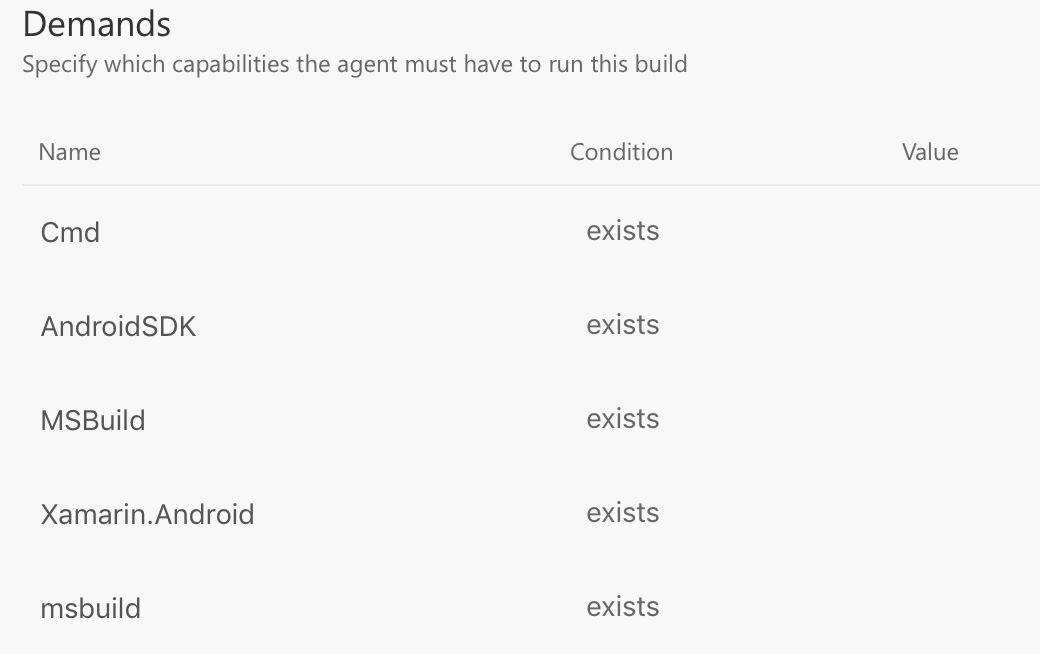
The build definition editor in the web shows all the demands from the tasks used in the definition. You can check that and add any missing capabilities to the "user capabilities". I see multiple cases of "msbuild" which might be causing an issue with your builds not running even after adding the capabilities manually.
madhurig
on 5 Jul 2017
Good point. The thing is that this view is readonly.
I can remove manually created Demands, but in this case msbuild and MSBuild were not added manually, so they can not be removed either.
Is there any option to check why a certain agent is not capable to run a given build definition ?
Note : This build definition does run on another (older) agent.
bartdkmediahuis
on 5 Jul 2017
@madhurig What values should we add for these capabilities
 waldo-jeffers
on 8 Aug 2017
waldo-jeffers
on 8 Aug 2017
@sisterray : the values are not used by the tasks, so you can add any value as a placeholder.
Thanks,
Madhuri
madhurig
on 14 Aug 2017
 TingluoHuang
on 23 Aug 2017
TingluoHuang
on 23 Aug 2017
the next agent release will carry the fix.
TingluoHuang
on 23 Aug 2017
@gdavocap @sisterray @bartdkmediahuis please give a try to 2.122.0 agent which contains the fix.
TingluoHuang
on 6 Sep 2017
@TingluoHuang - This issue is still not resolved and I am using 2.123.0
 kpanwar
on 12 Oct 2017
kpanwar
on 12 Oct 2017
@kpanwar Can you please post your agent's capabilities? What version of Xamarin/Visual Studio do you have installed?
 yacaovsnc
on 12 Oct 2017
yacaovsnc
on 12 Oct 2017
@yacaovsnc @TingluoHuang
I have VS 2015 Update 3 and VS2017 (15.4.0)
Xamarin - 4.7.10.22
Xamarin.AndroidSDK - 8.0.0.33
Capability name | Capability value
-- | --
Agent.ComputerName | MSIDBUILD02
Agent.Name | MSIDBUILD02-Agent1
Agent.OS | Windows_NT
Agent.OSVersion | 10.0.14393
Agent.Version | 2.123.0
ALLUSERSPROFILE | C:\ProgramData
APPDATA | C:\Windows\ServiceProfiles\NetworkService\AppData\Roaming
AzureGuestAgent |
Cmd | C:\Windows\system32\cmd.exe
CommonProgramFiles | C:\Program Files\Common Files
CommonProgramFiles(x86) | C:\Program Files (x86)\Common Files
CommonProgramW6432 | C:\Program Files\Common Files
COMPUTERNAME | MSIDBUILD02
ComSpec | C:\Windows\system32\cmd.exe
DotNetFramework | C:\Windows\Microsoft.NET\Framework64\v4.0.30319
DotNetFramework_4.6.2 | C:\Windows\Microsoft.NET\Framework\v4.0.30319
DotNetFramework_4.6.2_x64 | C:\Windows\Microsoft.NET\Framework64\v4.0.30319
FSHARPINSTALLDIR | C:\Program Files (x86)\Microsoft SDKs\F#\4.1\Framework\v4.0\
InteractiveSession | False
JAVA_HOME | C:\Program Files\Java\jdk1.8.0_131\bin
jdk | C:\Program Files\Java\jdk1.8.0_131
jdk_8 | C:\Program Files (x86)\Java\jdk1.8.0_131
jdk_8_x64 | C:\Program Files\Java\jdk1.8.0_131
LOCALAPPDATA | C:\Windows\ServiceProfiles\NetworkService\AppData\Local
MSBuild | C:\Program Files (x86)\Microsoft Visual Studio\2017\Enterprise\MSBuild\15.0\Bin\
MSBuild_12.0 | C:\Program Files (x86)\MSBuild\12.0\bin\
MSBuild_12.0_x64 | C:\Program Files (x86)\MSBuild\12.0\bin\amd64\
MSBuild_14.0 | C:\Program Files (x86)\MSBuild\14.0\bin\
MSBuild_14.0_x64 | C:\Program Files (x86)\MSBuild\14.0\bin\amd64\
MSBuild_15.0 | C:\Program Files (x86)\Microsoft Visual Studio\2017\Enterprise\MSBuild\15.0\Bin\
MSBuild_15.0_x64 | C:\Program Files (x86)\Microsoft Visual Studio\2017\Enterprise\MSBuild\15.0\Bin\amd64\
MSBuild_4.0 | C:\Windows\Microsoft.NET\Framework\v4.0.30319\
MSBuild_4.0_x64 | C:\Windows\Microsoft.NET\Framework64\v4.0.30319\
MSBuild_x64 | C:\Program Files (x86)\Microsoft Visual Studio\2017\Enterprise\MSBuild\15.0\Bin\amd64\
NUMBER_OF_PROCESSORS | 4
OS | Windows_NT
Path | C:\Windows\system32;C:\Windows;C:\Windows\System32\Wbem;C:\Windows\System32\WindowsPowerShell\v1.0\;C:\Program Files\Microsoft SQL Server\130\Tools\Binn\;C:\Program Files\dotnet\;%USERPROFILE%.dnx\bin;C:\Program Files\Microsoft DNX\Dnvm\;C:\Program Files\Microsoft SQL Server\120\Tools\Binn\;C:\Windows\ServiceProfiles\NetworkService\AppData\Local\Microsoft\WindowsApps;f:\agent1\bin
PATHEXT | .COM;.EXE;.BAT;.CMD;.VBS;.VBE;.JS;.JSE;.WSF;.WSH;.MSC
PowerShell | 5.1.14393.1770
PROCESSOR_ARCHITECTURE | AMD64
PROCESSOR_IDENTIFIER | Intel64 Family 6 Model 79 Stepping 1, GenuineIntel
PROCESSOR_LEVEL | 6
PROCESSOR_REVISION | 4f01
ProgramData | C:\ProgramData
ProgramFiles | C:\Program Files
ProgramFiles(x86) | C:\Program Files (x86)
ProgramW6432 | C:\Program Files
PSModulePath | %ProgramFiles%\WindowsPowerShell\Modules;C:\Windows\system32\WindowsPowerShell\v1.0\Modules
PUBLIC | C:\Users\Public
SqlPackage | C:\Program Files (x86)\Microsoft Visual Studio\2017\Enterprise\Common7\IDE\Extensions\Microsoft\SQLDB\DAC\130\SqlPackage.exe
SystemDrive | C:
SystemRoot | C:\Windows
TEMP | C:\Windows\SERVIC~2\NETWOR~1\AppData\Local\Temp
TMP | C:\Windows\SERVIC~2\NETWOR~1\AppData\Local\Temp
UATDATA | C:\Windows\CCM\UATData\D9F8C395-CAB8-491d-B8AC-179A1FE1BE77
USERDOMAIN | REDMOND
USERNAME | MSIDBUILD02$
USERPROFILE | C:\Windows\ServiceProfiles\NetworkService
VisualStudio | C:\Program Files (x86)\Microsoft Visual Studio\2017\Enterprise\
VisualStudio_14.0 | C:\Program Files (x86)\Microsoft Visual Studio 14.0\
VisualStudio_15.0 | C:\Program Files (x86)\Microsoft Visual Studio\2017\Enterprise\
VisualStudio_IDE | C:\Program Files (x86)\Microsoft Visual Studio\2017\Enterprise\Common7\IDE\
VisualStudio_IDE_14.0 | C:\Program Files (x86)\Microsoft Visual Studio 14.0\Common7\IDE\
VisualStudio_IDE_15.0 | C:\Program Files (x86)\Microsoft Visual Studio\2017\Enterprise\Common7\IDE\
VS110COMNTOOLS | C:\Program Files (x86)\Microsoft Visual Studio 11.0\Common7\Tools\
VS120COMNTOOLS | C:\Program Files (x86)\Microsoft Visual Studio 12.0\Common7\Tools\
VS140COMNTOOLS | C:\Program Files (x86)\Microsoft Visual Studio 14.0\Common7\Tools\
VSTest | C:\Program Files (x86)\Microsoft Visual Studio\2017\Enterprise\Common7\IDE\CommonExtensions\Microsoft\TestWindow
VSTest_14.0 | C:\Program Files (x86)\Microsoft Visual Studio 14.0\Common7\IDE\CommonExtensions\Microsoft\TestWindow
VSTest_15.0 | C:\Program Files (x86)\Microsoft Visual Studio\2017\Enterprise\Common7\IDE\CommonExtensions\Microsoft\TestWindow
windir | C:\Windows
WindowsKit | C:\Program Files (x86)\Windows Kits\8.0\
WindowsKit_8.0 | C:\Program Files (x86)\Windows Kits\8.0\
WindowsKit_8.1 | C:\Program Files (x86)\Windows Kits\8.1\
WindowsSdk | C:\Program Files (x86)\Microsoft SDKs\Windows\v8.1A
WindowsSdk_8.1 | C:\Program Files (x86)\Microsoft SDKs\Windows\v8.1A
WindowsSdk_8.1_NetFx40Tools | C:\Program Files (x86)\Microsoft SDKs\Windows\v8.1A\bin\NETFX 4.5.1 Tools
WindowsSdk_8.1_NetFx40Tools_x64 | C:\Program Files (x86)\Microsoft SDKs\Windows\v8.1A\bin\NETFX 4.5.1 Tools\x64
kpanwar
on 12 Oct 2017
@kpanwar can you share your agent diag log?
TingluoHuang
on 12 Oct 2017
How do I collect that?
Sent from Outlook
From: Ting notifications@github.com
Sent: Thursday, October 12, 2017 1:30:45 PM
To: Microsoft/vsts-agent
Cc: Kanishk Panwar; Mention
Subject: Re: [Microsoft/vsts-agent] Agent does not detect the Xamarin.Android capability (#1043)
@kpanwarhttps://na01.safelinks.protection.outlook.com/?url=https%3A%2F%2Fgithub.com%2Fkpanwar&data=02%7C01%7CKanishk.Panwar%40microsoft.com%7C363563bec35e4fa15dae08d511b01dc9%7C72f988bf86f141af91ab2d7cd011db47%7C1%7C0%7C636434370463642144&sdata=2cKuJB7icqVIWMz6vly6NU9d4vA2Bn0Nv852l2hyMxU%3D&reserved=0 can you share your agent diag log?
—
You are receiving this because you were mentioned.
Reply to this email directly, view it on GitHubhttps://na01.safelinks.protection.outlook.com/?url=https%3A%2F%2Fgithub.com%2FMicrosoft%2Fvsts-agent%2Fissues%2F1043%23issuecomment-336256991&data=02%7C01%7CKanishk.Panwar%40microsoft.com%7C363563bec35e4fa15dae08d511b01dc9%7C72f988bf86f141af91ab2d7cd011db47%7C1%7C0%7C636434370463642144&sdata=8%2Fo65OZtxfM8gl5uWIjFok98jyLl353vIFwnSE60yhc%3D&reserved=0, or mute the threadhttps://na01.safelinks.protection.outlook.com/?url=https%3A%2F%2Fgithub.com%2Fnotifications%2Funsubscribe-auth%2FAFcv-2bksexfKH_GAJhASWI6_3_rEGOKks5srnb0gaJpZM4OHn3_&data=02%7C01%7CKanishk.Panwar%40microsoft.com%7C363563bec35e4fa15dae08d511b01dc9%7C72f988bf86f141af91ab2d7cd011db47%7C1%7C0%7C636434370463642144&sdata=EfU2nI5ms3XWz65iMDYPwwZK%2FVG50nB7q3uQUfZBlVA%3D&reserved=0.
kpanwar
on 12 Oct 2017
@kpanwar there is a _diag folder under your agent root directory.
TingluoHuang
on 12 Oct 2017
@TingluoHuang - file contains a lot of information that should not go out. I will mail it internally
kpanwar
on 12 Oct 2017
@kpanwar sure, tihuang @ microsoft . com
TingluoHuang
on 12 Oct 2017
Still not fixed. We do not even have the ability to remove the demand.
 bergmeister
on 25 Oct 2017
bergmeister
on 25 Oct 2017
1254
the fix has been merged. please try the latest release agent https://github.com/Microsoft/vsts-agent/releases/tag/v2.124.0
TingluoHuang
on 25 Oct 2017
Thanks for the quick response. Just to let you know: The download link in VSTS (in the 'Agent Pools' menu) still points to 2.123 (this is what I had downloaded before my previous comment).
bergmeister
on 25 Oct 2017
@bergmeister we are in the process of releasing the newer version to VSTS. It normally takes about a week for safe deployment reason. you can pick it from the github release if it's really urgent to you.
TingluoHuang
on 25 Oct 2017
@TingluoHuang : I just installed the 2.124 agent and it is the same problem that I cannot queue it because it has not got the AndroidSDK capability and definitely have it installed (SDK version 25). I am also on the latest version of VS.
bergmeister
on 25 Oct 2017
@bergmeister i think you are hitting a different issue.
Xamarin.Android and AndroidSDK are 2 different capabilities.
@madhurig @yacaovsnc
please check this issue.
TingluoHuang
on 25 Oct 2017
@bergmeister you can also check the code see what might goes wrong. :)
https://github.com/Microsoft/vsts-agent/blob/master/src/Misc/layoutbin/powershell/Add-AndroidSdkCapabilities.ps1
TingluoHuang
on 25 Oct 2017
@TingluoHuang Yes, you are right. The new agent version fixed the Xamarin.Android capability but the fact that I do not have the AndroidSDK capability is a different issue. I noticed that the SDK got installed at C:\Program Files (x86)\Android\android-sdk (using the Android SDK manager in VS 15.4.1). It used to be in C:\Users\**username**\AppData\Local\Android\android-sdk a few months ago if I remember correctly. I suspect that this change is the cause of the issue. Your referenced script does not work because it cannot get the ANDROID_HOME variable on my machine. Frankly saying I can solve my problem quicker by setting an environment variable myself to set the capability. I have a bog-standard Windows Server 2016 Azure VM (created few weeks ago using the Visual Studio image) ) with the latest updates in terms of OS/VS and Android SDK 25.
bergmeister
on 25 Oct 2017
@bergmeister Do you see this reg value? Computer\HKEY_LOCAL_MACHINE\SOFTWARE\WOW6432Node\Android SDK Tools\Path
The script @TingluoHuang referenced says:
- Look for the environment variable first, if it exists, use it;
- If it doesn't, look under registry hives, and it looks at three places
- Then it lists all the sub versions of SDK under the path.
I don't have ANDROID_HOME set, and I see the capability properly identified because my registry settings were there. I am wondering if on your box the registry is not set properly for whatever reason.
yacaovsnc
on 25 Oct 2017
@bergmeister
We do not even have the ability to remove the demand.
You have the ability to declare user capabilities on the agent. You may unblock yourself by adding this AndroidSDK as a user capability.
yacaovsnc
on 25 Oct 2017
@yacaovsnc No, the registry entry Computer\HKEY_LOCAL_MACHINE\SOFTWARE\WOW6432Node\Android SDK Tools does not exist at all. It does not see the user/system variables (I manually executed those powershell lines)
bergmeister
on 25 Oct 2017
Hello. I have a very similar issue. When trying to manually add the path of Xamarin.Android to the environment variables I get a host of other issues identifying targets, MAndroid, etc.
My question is how can I get the newer version of the build agent? I tried reinstalling/manually updating and it seems I am still stuck on 2.112.0
 Vladis466
on 15 Nov 2017
Vladis466
on 15 Nov 2017
@Vladis466 You can grab the latest installer from here
bergmeister
on 15 Nov 2017
Thank you, that added the Xamarin.Android to the capabilities.
Unfortunately now I am still receiving the following, the build seems to require a specific Agent version. However it was attempting to build with Agent version 2112 so I am not sure why I am getting this message.
No agent found in pool Default which satisfies the specified demands:
AndroidSDK
MSBuild
Xamarin.Android
AndroidSDK
MSBuild
Xamarin.Android
Agent.Version -gtVersion 1.98.1
Vladis466
on 15 Nov 2017
@Vladis466 Agent.Version -gtVersion 1.98.1 means agent version greater than 1.98.1, you must missing something else, AndroidSDK/MSBuild
TingluoHuang
on 15 Nov 2017
I see. You are correct. This leads to the same core issue however. It seems manually setting the path versus updating the agent did not have an effect on where the build agent is searching for targets.
error MSB4019: The imported project "C:\Program Files (x86)\MSBuild\Xamarin\AndroidXamarin.Android.CSharp.targets" was not found.
If I update the path in the csproj file I get an error searching for Mandroid.
A few of us have posted over this issue at the following link. Any insight would be appreciated.
https://forums.xamarin.com/discussion/99584/xamarin-android-could-not-find-mandroid?
Vladis466
on 15 Nov 2017
Hi All,
I'm using agent version 2.124.0 and I have the same issue with the capability AndroidSDK
 lsprado
on 12 Dec 2017
lsprado
on 12 Dec 2017
@lsprado can you provide more detail about it? can you share your agent diag log?
TingluoHuang
on 12 Dec 2017
It sounds like Xamarin.Andriod capability is not fixed. I would like to manually add this capability. Can you tell me what path I should be using? Would it it be /Library/Frameworks/Xamarin.Andriod.framework
Do I need to keep drilling down past this level to a specific version?
 scottstout
on 21 Dec 2017
scottstout
on 21 Dec 2017
@scottstout: What you have should be fine. You don't need a drill down to the version.
madhurig
on 21 Dec 2017
I am hitting similar issue since I updated Xamarin tools on my build-agent (Mac OSX)

As you can see VSTS still complaining :(
 prashantvc
on 21 Dec 2017
prashantvc
on 21 Dec 2017
@prashantvc: Can you please open a new bug for Xamarin capabilities on macOS? This issue is tracking capability not being detected on Windows. To unblock yourself you can add "Xamarin.Android" capability on your agent manually, the value can be set to anything say /Library/Frameworks/Xamarin.Android.framework.
madhurig
on 21 Dec 2017
@Vladis466: The issue you are seeing is not related to capabilities published by the agent. The build agent invokes msbuild and relies on msbuild to find the right dependencies based on the targets defined by the Xamarin team. Please verify what version of msbuild you are targeting and if you continue to have issues, please open a bug here: https://github.com/Microsoft/vsts-tasks/issues
Thanks,
Madhuri
madhurig
on 21 Dec 2017
Fix for new versions of Xamarin.Android (i.e. VS for Mac) on macOS: https://github.com/Microsoft/vsts-agent/pull/1342
madhurig
on 21 Dec 2017
@madhurig : There is a minor typo in your post. Mind fixing the "Andriod" to "Android" ? Just in case someone does a copy paste. Thanks.
Any idea on a release date for the above fix ? #1342 ?
bartdkmediahuis
on 27 Dec 2017
Hi there,
I am having the same problem. Actually, I have 3 of the 4 capabilities that mention here:
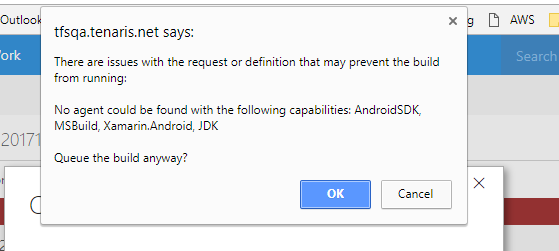
But then, when the build failed I got some more:
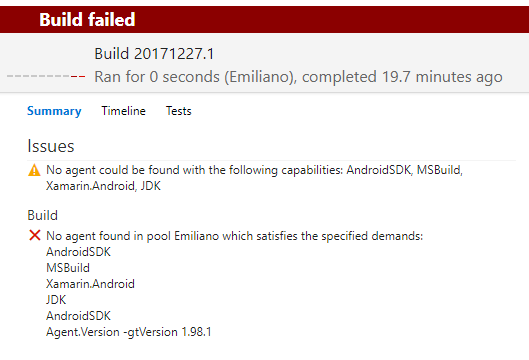
My agent.version is 2.112.0 (downloaded from my TFS), however, I don't get it why is demanding Agent.Version -gtVersion 1.98.1.
Any idea? Thanks!!
 eorengo
on 27 Dec 2017
eorengo
on 27 Dec 2017
@eorengo your agent is missing one of the required capabilities. Since you are using a private agent, you can define "user capabilities" and workaround this issue.
From the "Gear icon" -> Agent Queues -> Select your queue and on the right most panel, select "Capabilities". Add a user capability there and you should pass this validation. You can also check which capability you are missing from that setting page.
yacaovsnc
on 27 Dec 2017
@bartdkmediahuis: Thanks, I fixed the typo. The fix will start deploying in mid January due to the holidays.
@scottstout: Please check if you have the same type "Andriod" in your capability.
Thanks,
Madhuri
madhurig
on 28 Dec 2017
Adding the user capabilites AndroidSDK,, Xamarin.Android, JDK did solve the problem. Version v2.124.0 of the build agent didn't solve this problem.
 marcelbeeker
on 18 Jan 2018
marcelbeeker
on 18 Jan 2018
We have a part of the fix on the VSTS service that will deploy in the next couple of weeks.
madhurig
on 18 Jan 2018
there is same problem with TFS 2018.1 RTM. Adding user capabilities is working as workaround.
 jiberan
on 1 Mar 2018
jiberan
on 1 Mar 2018
Note that you can use the latest agent released on github with any 2017 or 2018+ on prem server. So once the fix is in here ok to pickup
 bryanmacfarlane
on 1 Mar 2018
bryanmacfarlane
on 1 Mar 2018
The fix has been deployed, I will close the issue, please reopen if still hitting the problem.
TingluoHuang
on 9 Apr 2018
Just ran into this with a fresh install of VS 2019 with Xamarin and more. I'm getting this error:
No agent found in pool Default which satisfies the specified demands:
msbuild
visualstudio
Xamarin.Android
JDK
Agent.Version -gtVersion 2.122.1
Here are my capabilities:
Capability name | Capability value
-- | --
Agent.ComputerName | FARMERPICKLES
Agent.HomeDirectory | C:\A\default
Agent.Name | FarmerPickles
Agent.OS | Windows_NT
Agent.OSArchitecture | X64
Agent.OSVersion | 10.0.17763
Agent.Version | 2.150.3
ALLUSERSPROFILE | C:\ProgramData
APPDATA | C:\Users\Build\AppData\Roaming
Cmd | C:\Windows\system32\cmd.exe
CommonProgramFiles | C:\Program Files\Common Files
CommonProgramFiles(x86) | C:\Program Files (x86)\Common Files
CommonProgramW6432 | C:\Program Files\Common Files
COMPUTERNAME | FARMERPICKLES
ComSpec | C:\Windows\system32\cmd.exe
DotNetFramework | C:\Windows\Microsoft.NET\Framework64\v4.0.30319
DotNetFramework_2.0 | C:\Windows\Microsoft.NET\Framework\v2.0.50727
DotNetFramework_2.0_x64 | C:\Windows\Microsoft.NET\Framework64\v2.0.50727
DotNetFramework_3.0 | C:\Windows\Microsoft.NET\Framework\v3.0
DotNetFramework_3.0_x64 | C:\Windows\Microsoft.NET\Framework64\v3.0
DotNetFramework_3.5 | C:\Windows\Microsoft.NET\Framework\v3.5
DotNetFramework_3.5_x64 | C:\Windows\Microsoft.NET\Framework64\v3.5
DotNetFramework_4.7.0 | C:\Windows\Microsoft.NET\Framework\v4.0.30319
DotNetFramework_4.7.0_x64 | C:\Windows\Microsoft.NET\Framework64\v4.0.30319
DriverData | C:\Windows\System32\Drivers\DriverData
HOMEDRIVE | C:
HOMEPATH | \Users\Build
InteractiveSession | True
LOCALAPPDATA | C:\Users\Build\AppData\Local
LOGONSERVER | \DC01
MSBuild | C:\Program Files (x86)\Microsoft Visual Studio\2019\Enterprise\MSBuild\Current\Bin\
MSBuild_14.0 | C:\Program Files (x86)\MSBuild\14.0\bin\
MSBuild_14.0_x64 | C:\Program Files (x86)\MSBuild\14.0\bin\amd64\
MSBuild_16.0 | C:\Program Files (x86)\Microsoft Visual Studio\2019\Enterprise\MSBuild\Current\Bin\
MSBuild_16.0_x64 | C:\Program Files (x86)\Microsoft Visual Studio\2019\Enterprise\MSBuild\Current\Bin\amd64\
MSBuild_2.0 | C:\Windows\Microsoft.NET\Framework\v2.0.50727\
MSBuild_2.0_x64 | C:\Windows\Microsoft.NET\Framework64\v2.0.50727\
MSBuild_3.5 | C:\Windows\Microsoft.NET\Framework\v3.5\
MSBuild_3.5_x64 | C:\Windows\Microsoft.NET\Framework64\v3.5\
MSBuild_4.0 | C:\Windows\Microsoft.NET\Framework\v4.0.30319\
MSBuild_4.0_x64 | C:\Windows\Microsoft.NET\Framework64\v4.0.30319\
MSBuild_x64 | C:\Program Files (x86)\Microsoft Visual Studio\2019\Enterprise\MSBuild\Current\Bin\amd64\
NUMBER_OF_PROCESSORS | 4
OneDrive | C:\Users\Build\OneDrive
OS | Windows_NT
Path | "C:\Program Files (x86)\Common Files\eshware\";C:\Program Files (x86)\Common Files\eshware\;C:\Program Files (x86)\Common Files\eshware\;C:\Program Files (x86)\ebms\;C:\Windows\system32;C:\Windows;C:\Windows\System32\Wbem;C:\Windows\System32\WindowsPowerShell\v1.0\;C:\Windows\System32\OpenSSH\;C:\Program Files\dotnet\;C:\Program Files\Microsoft SQL Server\130\Tools\Binn\;C:\Program Files\Microsoft SQL Server\Client SDK\ODBC\170\Tools\Binn\;C:\Program Files (x86)\Microsoft SQL Server\140\Tools\Binn\;C:\Program Files\Microsoft SQL Server\140\Tools\Binn\;C:\Program Files (x86)\Microsoft SQL Server\140\DTS\Binn\;C:\Program Files\Microsoft SQL Server\140\DTS\Binn\;C:\Program Files\Microsoft SQL Server\Client SDK\ODBC\130\Tools\Binn\;C:\Program Files (x86)\Microsoft SQL Server\Client SDK\ODBC\130\Tools\Binn\;C:\Program Files (x86)\Microsoft SQL Server\140\Tools\Binn\ManagementStudio\;C:\Program Files\IronPython 2.7\;C:\Users\Build\AppData\Local\Microsoft\WindowsApps;C:\Users\Build.dotnet\tools
PATHEXT | .COM;.EXE;.BAT;.CMD;.VBS;.VBE;.JS;.JSE;.WSF;.WSH;.MSC
PowerShell | 5.1.17763.503
PROCESSOR_ARCHITECTURE | AMD64
PROCESSOR_IDENTIFIER | Intel64 Family 6 Model 158 Stepping 10, GenuineIntel
PROCESSOR_LEVEL | 6
PROCESSOR_REVISION | 9e0a
ProgramData | C:\ProgramData
ProgramFiles | C:\Program Files
ProgramFiles(x86) | C:\Program Files (x86)
ProgramW6432 | C:\Program Files
PROMPT | $P$G
PSModulePath | C:\Program Files\WindowsPowerShell\Modules;C:\Windows\system32\WindowsPowerShell\v1.0\Modules;C:\Program Files (x86)\Microsoft SQL Server\140\Tools\PowerShell\Modules\
PUBLIC | C:\Users\Public
SHFBROOT | C:\Program Files (x86)\EWSoftware\Sandcastle Help File Builder\
SqlPackage | C:\Program Files (x86)\Microsoft SQL Server\140\DAC\bin\SqlPackage.exe
SystemDrive | C:
SystemRoot | C:\Windows
TEMP | C:\Users\Build\AppData\Local\Temp
TMP | C:\Users\Build\AppData\Local\Temp
USERDNSDOMAIN | ECC.LOCAL
USERDOMAIN | ECC
USERDOMAIN_ROAMINGPROFILE | ECC
USERNAME | build
USERPROFILE | C:\Users\Build
VERBOSE_ARG | 'SilentlyContinue'
VisualStudio | C:\Program Files (x86)\Microsoft Visual Studio\2019\Enterprise\
VisualStudio_16.0 | C:\Program Files (x86)\Microsoft Visual Studio\2019\Enterprise\
VisualStudio_IDE | C:\Program Files (x86)\Microsoft Visual Studio\2019\Enterprise\Common7\IDE\
VisualStudio_IDE_16.0 | C:\Program Files (x86)\Microsoft Visual Studio\2019\Enterprise\Common7\IDE\
VSTest | C:\Program Files (x86)\Microsoft Visual Studio\2019\Enterprise\Common7\IDE\CommonExtensions\Microsoft\TestWindow
VSTest_16.0 | C:\Program Files (x86)\Microsoft Visual Studio\2019\Enterprise\Common7\IDE\CommonExtensions\Microsoft\TestWindow
windir | C:\Windows
WindowsSdk | C:\Program Files (x86)\Microsoft SDKs\Windows\v8.1A
WindowsSdk_8.1 | C:\Program Files (x86)\Microsoft SDKs\Windows\v8.1A
WindowsSdk_8.1_NetFx40Tools | C:\Program Files (x86)\Microsoft SDKs\Windows\v8.1A\bin\NETFX 4.5.1 Tools
WindowsSdk_8.1_NetFx40Tools_x64 | C:\Program Files (x86)\Microsoft SDKs\Windows\v8.1A\bin\NETFX 4.5.1 Tools\x64
WIX | C:\Program Files (x86)\WiX Toolset v3.11\
 jamers99
on 31 May 2019
jamers99
on 31 May 2019
It sounds like Xamarin.Andriod capability is not fixed. I would like to manually add this capability. Can you tell me what path I should be using? Would it it be /Library/Frameworks/Xamarin.Andriod.framework
Do I need to keep drilling down past this level to a specific version?
Can i get the full path for this? i understood that i need to add Xamarin.Android to user capabilities but can't find the full path
 kkarakk
on 3 Jun 2019
kkarakk
on 3 Jun 2019
Just adding the capability should with a valid the path /Library/Frameworks/Xamarin.Andriod.framework should get you unblocked. Have you tried it?
madhurig
on 3 Jun 2019
I got it working with an absolute path so no worries
kkarakk
on 3 Jun 2019
I also had this issue when upgrading our build server from VS2017 to VS2019
 DanDude0
on 13 Jun 2019
DanDude0
on 13 Jun 2019
I have same issue for VS2019, adding Xamarin.Android capability to /Library/Frameworks/Xamarin.Andriod.framework did not fix the problem.
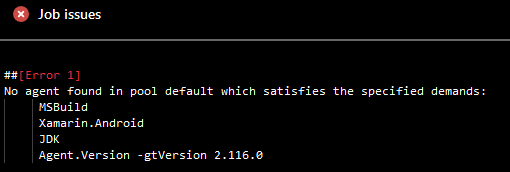
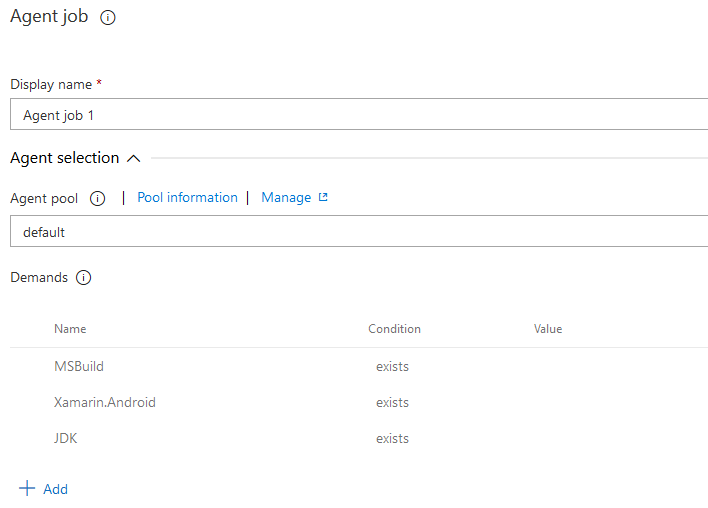
 Edgaras91
on 6 Jan 2020
Edgaras91
on 6 Jan 2020
What was the fix here? Running 2.165.0 / 2.165.1 on Windows on the same machine I use VS2019 and build fine, the agent won't even attempt to queue a build on it.
 jadenrogers
on 7 Mar 2020
jadenrogers
on 7 Mar 2020
I had to install a build agent on my local machine to let it work. The build agent is my local dev machine with Android SDK and Java installed.
After I did that, my private build agent was picked up the build.
Van: Jaden notifications@github.com
Verzonden: Saturday, March 7, 2020 9:01:11 PM
Aan: microsoft/azure-pipelines-agent azure-pipelines-agent@noreply.github.com
CC: marcelbeeker marcelbeeker72@hotmail.com; Comment comment@noreply.github.com
Onderwerp: Re: [microsoft/azure-pipelines-agent] Agent does not detect the Xamarin.Android capability (#1043)
What was the fix here? Running 2.165.1 on Windows on the same machine I use VS2019 and build fine, the agent won't even attempt to queue a build on it.
—
You are receiving this because you commented.
Reply to this email directly, view it on GitHubhttps://eur05.safelinks.protection.outlook.com/?url=https%3A%2F%2Fgithub.com%2Fmicrosoft%2Fazure-pipelines-agent%2Fissues%2F1043%3Femail_source%3Dnotifications%26email_token%3DAENYSNQQ2J6AOSXV7JQ3IULRGKRYPA5CNFSM4DQ6PX72YY3PNVWWK3TUL52HS4DFVREXG43VMVBW63LNMVXHJKTDN5WW2ZLOORPWSZGOEOEEEAY%23issuecomment-596132355&data=02%7C01%7C%7C8ad6bfba7a3a497a9ace08d7c2d24945%7C84df9e7fe9f640afb435aaaaaaaaaaaa%7C1%7C0%7C637192080729129430&sdata=jVXaYLLawZc9ggHJZrqMIMUDs%2B0Dm%2BKK1pi6Ebl4k7A%3D&reserved=0, or unsubscribehttps://eur05.safelinks.protection.outlook.com/?url=https%3A%2F%2Fgithub.com%2Fnotifications%2Funsubscribe-auth%2FAENYSNRDHBVCNMYOJNAYS33RGKRYPANCNFSM4DQ6PX7Q&data=02%7C01%7C%7C8ad6bfba7a3a497a9ace08d7c2d24945%7C84df9e7fe9f640afb435aaaaaaaaaaaa%7C1%7C0%7C637192080729129430&sdata=fLjLa%2FcMf4tBh09GKte6o%2FH7GsS1zIlMSgv7u%2FMhR8E%3D&reserved=0.
marcelbeeker
on 7 Mar 2020
Thanks, for my case it was missing the JDK capability. For other people just go to your build job in the web UI and it will tell you what "Demands / Capabilities" are needed and then you can correct accordingly.
jadenrogers
on 8 Mar 2020
Related issues
 gregpakes
·
43Comments
gregpakes
·
43Comments
 letmaik
·
35Comments
bergmeister
·
52Comments
letmaik
·
35Comments
bergmeister
·
52Comments
 JamesNK
·
84Comments
JamesNK
·
84Comments
 robinhultman
·
35Comments
robinhultman
·
35Comments
Most helpful comment
Hi All,
I'm using agent version 2.124.0 and I have the same issue with the capability AndroidSDK