Azure-pipelines-agent: [error]Invalid file path '/datadrive/vsts/work/5/s'.
Have you tried trouble shooting?
yes
Agent Version and Platform
2.138.6, CentOS 7
VSTS Type and Version
VisualStudio.com
What's not working?
A bash task failst to starte with ##[error]Invalid file path '/datadrive/vsts/work/5/s'. When I ssh into the agent the path is there.
2018-08-20T12:35:18.6270415Z ##[debug]Evaluating condition for step: 'Publish UPacks'
2018-08-20T12:35:18.6297038Z ##[debug]Evaluating: succeeded()
2018-08-20T12:35:18.6322664Z ##[debug]Evaluating succeeded:
2018-08-20T12:35:18.6353933Z ##[debug]=> True
2018-08-20T12:35:18.6378753Z ##[debug]Result: True
2018-08-20T12:35:18.6397703Z ##[section]Starting: Publish UPacks
2018-08-20T12:35:18.6496620Z ==============================================================================
2018-08-20T12:35:18.6509209Z Task         : Bash
2018-08-20T12:35:18.6522128Z Description  : Run a Bash script on macOS, Linux, or Windows
2018-08-20T12:35:18.6534626Z Version      : 3.136.0
2018-08-20T12:35:18.6546977Z Author       : Microsoft Corporation
2018-08-20T12:35:18.6559872Z Help         : [More Information](https://go.microsoft.com/fwlink/?LinkID=613738)
2018-08-20T12:35:18.6572627Z ==============================================================================
2018-08-20T12:35:18.8945589Z ##[debug]agent.workFolder=/datadrive/vsts/work
2018-08-20T12:35:18.8965707Z ##[debug]loading inputs and endpoints
2018-08-20T12:35:18.8985073Z ##[debug]loading INPUT_TARGETTYPE
2018-08-20T12:35:18.9004588Z ##[debug]loading INPUT_FILEPATH
2018-08-20T12:35:18.9023777Z ##[debug]loading INPUT_SCRIPT
2018-08-20T12:35:18.9043214Z ##[debug]loading INPUT_WORKINGDIRECTORY
2018-08-20T12:35:18.9062706Z ##[debug]loading INPUT_FAILONSTDERR
2018-08-20T12:35:18.9082065Z ##[debug]loading ENDPOINT_AUTH_SYSTEMVSSCONNECTION
2018-08-20T12:35:18.9101201Z ##[debug]loading ENDPOINT_AUTH_SCHEME_SYSTEMVSSCONNECTION
2018-08-20T12:35:18.9120321Z ##[debug]loading ENDPOINT_AUTH_PARAMETER_SYSTEMVSSCONNECTION_ACCESSTOKEN
2018-08-20T12:35:18.9139984Z ##[debug]loading SECRET_VSTS_CLI_UPACKS_PAT
2018-08-20T12:35:18.9159060Z ##[debug]loading SECRET_SYSTEM_ACCESSTOKEN
2018-08-20T12:35:18.9178339Z ##[debug]loaded 10
2018-08-20T12:35:18.9197890Z ##[debug]check path : /datadrive/vsts/work/_tasks/Bash_6c731c3c-3c68-459a-a5c9-bde6e6595b5b/3.136.0/task.json
2018-08-20T12:35:18.9218530Z ##[debug]set resource file to: /datadrive/vsts/work/_tasks/Bash_6c731c3c-3c68-459a-a5c9-bde6e6595b5b/3.136.0/task.json
2018-08-20T12:35:18.9238617Z ##[debug]system.culture=en-US
2018-08-20T12:35:18.9258408Z ##[debug]failOnStderr=false
2018-08-20T12:35:18.9277854Z ##[debug]workingDirectory=/datadrive/vsts/work/5/s
2018-08-20T12:35:18.9297651Z ##[debug]check path : /datadrive/vsts/work/5/s
2018-08-20T12:35:18.9316860Z ##[debug]targetType=filePath
2018-08-20T12:35:18.9335970Z ##[debug]filePath=/datadrive/vsts/work/5/s
2018-08-20T12:35:18.9355534Z ##[debug]task result: Failed
2018-08-20T12:35:18.9425619Z ##[error]Invalid file path '/datadrive/vsts/work/5/s'.
2018-08-20T12:35:18.9454731Z ##[debug]Processed: ##vso[task.issue type=error;]Invalid file path '/datadrive/vsts/work/5/s'.
2018-08-20T12:35:18.9493147Z ##[debug]Processed: ##vso[task.complete result=Failed;]Invalid file path '/datadrive/vsts/work/5/s'.
2018-08-20T12:35:18.9519859Z ##[section]Finishing: Publish UPacks

Agent and Worker's Diagnostic Logs
 plang85
All 10 comments
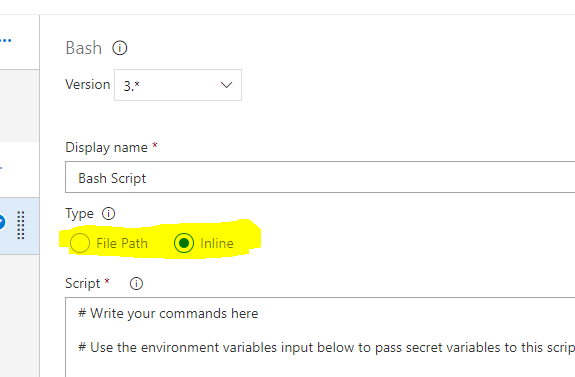
@plang85 how was your definition created, make sure the bash task is select inline script instead of file path
 TingluoHuang
on 21 Aug 2018
TingluoHuang
on 21 Aug 2018
@plang85 the error complains about the task expect to get a path to a file, but what returned is a folder path.
TingluoHuang
on 21 Aug 2018
:thumbsup: was a yaml definition, but inline was the problem
plang85
on 21 Aug 2018
@plang85 do you mind share the price of your yaml file that causing the problem? are you hardcode "filePath" in your yaml file?
TingluoHuang
on 21 Aug 2018
sure thing
  - task: Bash@3
    displayName: Publish UPacks
    inputs:
      targetType: 'inline'
      script: |
        docker rm -f $(docker_container)
        docker run --rm --name $(docker_container) --mount type=bind,source=$(Build.Repository.LocalPath),target=/var/code $(docker_image) /bin/bash -c \
        'which python; cd /var/code; pip install -r requirements.txt; \
        echo Executing upacks publish script for $(deployedfolder)/info.yaml
        python ./scripts/upacks.py  --login-token="$(vsts_cli_upacks_pat)" --vsts-url="$(vsts_url)" --feed="$(vsts_upacks_feed)" --name-pattern="$(vsts_upacks_name_pattern)" --version-pattern="$(vsts_upacks_version_pattern)" --package-match-exclude="$(upacks_pattern_match_exclude)" --debug $(deployedfolder)/info.yaml ; \
        '
@plang85 weird... you did put inline in your yaml file, then why the system use filePath
TingluoHuang
on 21 Aug 2018
the inline was after your comment
plang85
on 21 Aug 2018
@plang85 so before it looks like this?
 - task: Bash@3
    displayName: Publish UPacks
    inputs:
      script: |
        docker rm -f $(docker_container)
        docker run --rm --name $(docker_container) --mount type=bind,source=$(Build.Repository.LocalPath),target=/var/code $(docker_image) /bin/bash -c \
        'which python; cd /var/code; pip install -r requirements.txt; \
        echo Executing upacks publish script for $(deployedfolder)/info.yaml
        python ./scripts/upacks.py  --login-token="$(vsts_cli_upacks_pat)" --vsts-url="$(vsts_url)" --feed="$(vsts_upacks_feed)" --name-pattern="$(vsts_upacks_name_pattern)" --version-pattern="$(vsts_upacks_version_pattern)" --package-match-exclude="$(upacks_pattern_match_exclude)" --debug $(deployedfolder)/info.yaml ; \
        '
@TingluoHuang yep, that's correct
plang85
on 21 Aug 2018
@plang85 cool, thanks.
TingluoHuang
on 21 Aug 2018
Related issues
 KelvinJin
·
54Comments
KelvinJin
·
54Comments
 jessehouwing
·
57Comments
jessehouwing
·
57Comments
 A141133
·
80Comments
A141133
·
80Comments
 peder
·
32Comments
peder
·
32Comments
 gregpakes
·
43Comments
gregpakes
·
43Comments
Most helpful comment
@plang85 how was your definition created, make sure the bash task is select inline script instead of file path
