Azure-pipelines-agent: Skip build if there's [skip ci] in the commit message.
Hey, just wonder if there's a way I can skip a build if [skip ci] or something exists in the commit message. I know we have branch filters and path filters, but commit message filter would be nice to have if I just commit something really tiny.
 KelvinJin
All 54 comments
i think as long as the commit message contains NO_CI then it will skip
 ericsciple
on 15 Mar 2017
ericsciple
on 15 Mar 2017
***NO_CI***
ericsciple
on 15 Mar 2017
Aha, good to know. It worked. Thanks!
KelvinJin
on 15 Mar 2017
Basically most of the others CI use [ci skip] or [skip ci] (e.g. Travis, CircleCI, Concourse)
Some dependencies use [ci skip] as a pattern to skip automatically versioning from their CI, why not make VSTS also accept it?
 marceloavf
on 27 Oct 2017
marceloavf
on 27 Oct 2017
Come Vote here for additional spellings.
 masters3d
on 21 Feb 2018
masters3d
on 21 Feb 2018
@ericsciple ***NO_CI*** does not work for Azure Pipelines
 chrislampley
on 26 Oct 2018
chrislampley
on 26 Oct 2018
@chrislampley can you please point me at your account and build, I am curious why it didn't work for you?
You can message me privately if you don't want to share your account information:
[email protected]
 davekenn
on 26 Oct 2018
davekenn
on 26 Oct 2018
@ericsciple PM sent.
chrislampley
on 26 Oct 2018
Although I am not Eric, he is just a few feet away from me, we will take a look and get back to you, thanks!
davekenn
on 27 Oct 2018
@chrislampley sorry I didn't see any message or I missed it
ericsciple
on 29 Oct 2018
***NO_CI*** is also not working for me on Azure Pipelines. Getting endless recursive builds. Is there a solution?
 rauljmz
on 11 Dec 2018
rauljmz
on 11 Dec 2018
@rauljmz can you provide more detail info?
what's your Azure DevOps account?
what's your definition looks like, the trigger section?
how did you provide the ***NO_CI*** string?
 TingluoHuang
on 11 Dec 2018
TingluoHuang
on 11 Dec 2018
@TingluoHuang the DevOps account is CluedIn-io. The trigger section is picked up from the YML file and is simply
trigger:
- develop
- master
The original intention is for the pipeline to make an extra commit to the master branch during build. This should not trigger a new build, but despite the ***NO_CI*** flag being in the commit message, it does (causing constant builds).
I have also tried simply pushing a commit manually with the flag too, that also triggers a build.
I have tried putting ***NO_CI*** in the beginning, in the end, with square brackets... running out of options!
rauljmz
on 11 Dec 2018
@rauljmz if you manually (not during your build) commit a change with ***NO_CI*** in commit message and push it to master, will it trigger a CI build?
TingluoHuang
on 11 Dec 2018
@TingluoHuang Yes it does - I tried that too.
rauljmz
on 11 Dec 2018
@rauljmz i can repro myself, can you share some screenshot of how do you made the commit message?
this is my message looks like:

TingluoHuang
on 11 Dec 2018
@TingluoHuang Of course.
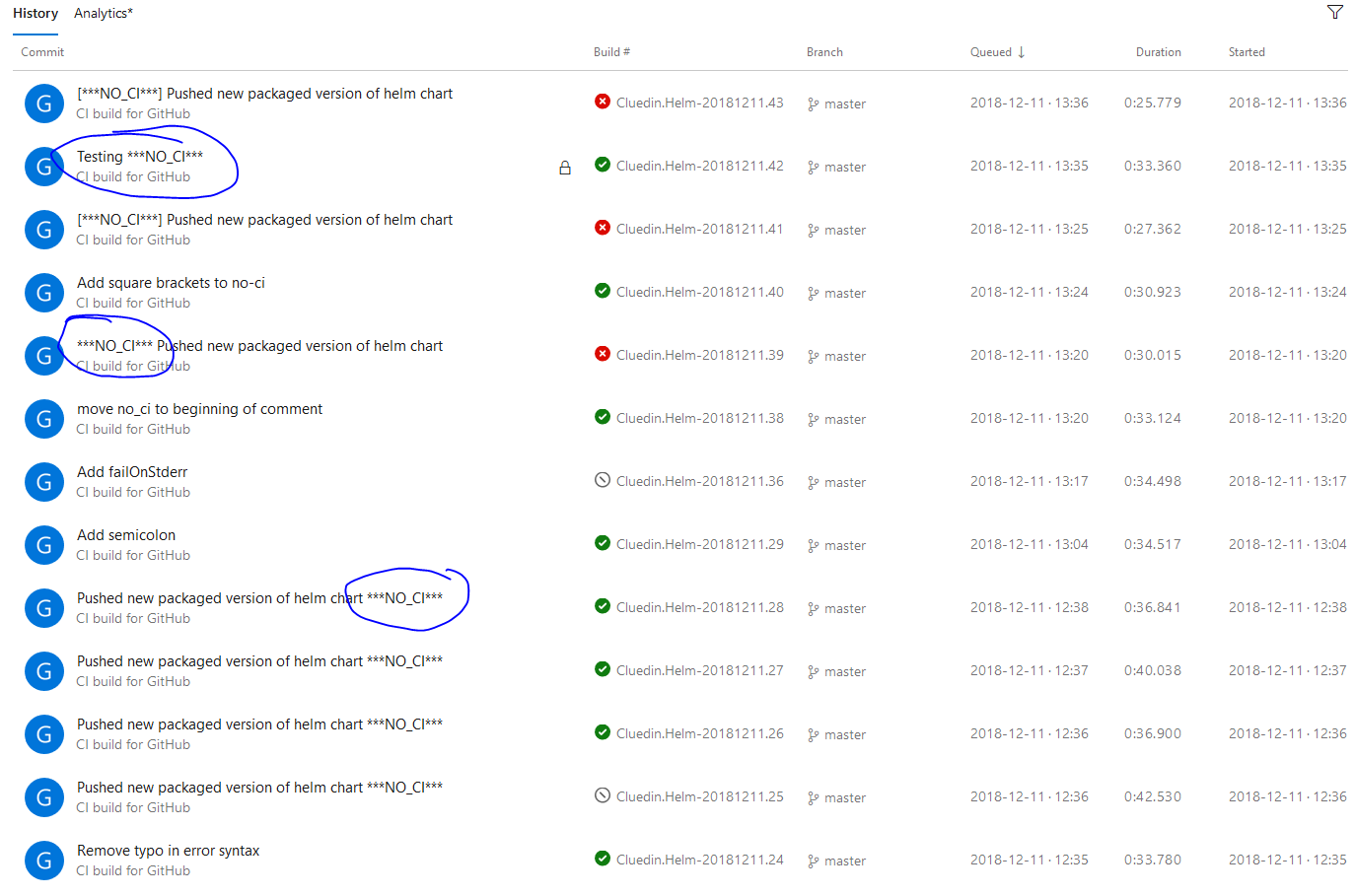
The last two, Rev.42 is manual commit and push, Rev.43 is the one generated by the automated commit in the pipeline. Both have ***NO_CI*** yet triggered a pipeline.
The yaml file does this:
  - task: Bash@3
    displayName: 'Commit changes to repo'
    condition: and(succeeded(), eq(variables['Build.SourceBranch'], 'refs/heads/master'))
    inputs:
      targetType: 'inline'
      script: "git checkout master; git add docs; git commit -m '[***NO_CI***] Pushed new packaged version of helm chart';git push;"
@madhurig
TingluoHuang
on 11 Dec 2018
@rauljmz - it appears you are using the Azure Pipelines GitHub app. This is currently a limitation when using the GitHub app and it is something we plan to address.
If you are making commits via the script under a particular folder of in a specific file, you can use PATH filters as a workaround to avoid triggering builds for changes in the specific file or under that folder. E.g. add something like this in your yml file
trigger:
  branches:
    include:
    - master
  paths:
    exclude:
    - docs/*
https://docs.microsoft.com/en-us/azure/devops/pipelines/build/triggers?view=vsts&tabs=yaml
If that workaround is not something you can apply, you can switch to using PAT or OAuth for authenticating with GitHub. One of the downsides of that is that you won't get checks but will see a status update from the Azure pipelines results.
Thanks,
Madhuri
 madhurig
on 14 Dec 2018
madhurig
on 14 Dec 2018
@madhuri Thanks for looking into this. Actually I implemented your
suggested workaround excluding the /docs path two days ago and it works
well. I think it would be good to add this limitation of the GitHub app
service connection to the documentation.
Incidentally, whenever I add new projects to the organization it only
allows me to use OAuth or PAT, but the checks are still available. I will
try to capture it in another issue.
On Fri, 14 Dec 2018 at 20:10, Madhuri Gummalla notifications@github.com
wrote:
@rauljmz https://github.com/rauljmz - it appears you are using the
Azure Pipelines GitHub app. This is currently a limitation when using the
GitHub app and it is something we plan to address.If you are making commits via the script under a particular folder of in a
specific file, you can use PATH filters as a workaround to avoid triggering
builds for changes in the specific file or under that folder. E.g. add
something like this in your yml filetrigger: branches: include: - master paths: exclude: - docs/*
https://docs.microsoft.com/en-us/azure/devops/pipelines/build/triggers?view=vsts&tabs=yaml
If that workaround is not something you can apply, you can switch to using
PAT or OAuth for authenticating with GitHub. One of the downsides of that
is that you won't get checks but will see a status update from the Azure
pipelines results.Thanks,
Madhuri—
You are receiving this because you were mentioned.
Reply to this email directly, view it on GitHub
https://github.com/Microsoft/azure-pipelines-agent/issues/858#issuecomment-447440792,
or mute the thread
https://github.com/notifications/unsubscribe-auth/ABHHsBVIXCIyatOxpl3XQovk2MqmQ1uwks5u5AXOgaJpZM4MddVj
.
rauljmz
on 15 Dec 2018
@rauljmz - thanks for the update. We are working on improvements in the app flow and pipeline creation so the app would be the default way to create pipelines whenever possible.
Thanks,
Madhuri
madhurig
on 17 Dec 2018
Another option if you're using YAML builds: create a condition for that step to only run if [skip ci] isn't in the commit message. Unfortunately, you can't do this at the job level because it hasn't pulled sources yet so Build.SourceVersionMessage is null. You'll need to copy it to each step in your pipeline.
steps:
  - bash: echo "Run tests"
    condition: not(contains(variables['Build.SourceVersionMessage'], '[skip ci]'))
 nickromano
on 24 Jan 2019
nickromano
on 24 Jan 2019
Vote for Add support [ci skip] and [azure skip] to Azure Pipelines on the Developer Community
 mloskot
on 25 Jan 2019
mloskot
on 25 Jan 2019
This is available now. You can tell Azure Pipelines to skip running a pipeline that a commit would normally trigger. Just include [skip ci] in the commit message or description of the HEAD commit and Azure Pipelines will skip running CI. You can also use any of the variations below. This is supported for commits to Azure Repos Git, Bitbucket Cloud, GitHub, and GitHub Enterprise Server.
[skip ci]or[ci skip]skip-checks: trueorskip-checks:true[skip azurepipelines]or[azurepipelines skip][skip azpipelines]or[azpipelines skip][skip azp]or[azp skip]***NO_CI***
 davidstaheli
on 22 Mar 2019
davidstaheli
on 22 Mar 2019
As of today, ***NO_CI*** still doesn't work as I expect for Pull Requests in Azure build (self-hosted agents). The build was still triggered despite the inclusion of the magic string in the commit title. Here's a screenshot created from a build today.

How do I apply this change? This is part of the azure-pipelines-agent repo, but surely this isn't a fix requiring me to update my self-hosted agents, is it? I would expect it to be at the agent pool level.
 DirtRanchers
on 18 Apr 2019
DirtRanchers
on 18 Apr 2019
@Richard-II Pull request build should still running even you have ***NO_CI*** in your commit message, only the CI build should stop running when that commit merged into master.
TingluoHuang
on 18 Apr 2019
I'm talking about exactly that...the build still runs (on master) when the
commit is merged to master. This is what I don't want when I specify the
special string. A pull request is just another commit and should honor the
skip instruction just like any other commit.
On Thu, Apr 18, 2019, 12:50 PM Ting notifications@github.com wrote:
@Richard-II https://github.com/Richard-II Pull request build should
still running even you have NO_CI in your commit message, only the
CI build should stop running when that commit merged into master.—
You are receiving this because you were mentioned.
Reply to this email directly, view it on GitHub
https://github.com/Microsoft/azure-pipelines-agent/issues/858#issuecomment-484589443,
or mute the thread
https://github.com/notifications/unsubscribe-auth/AJCIFD7VMWAAGMYKE4AVF43PRCRFZANCNFSM4DDV2VRQ
.
DirtRanchers
on 18 Apr 2019
@Richard-II you need to report the problem on https://developercommunity.visualstudio.com/spaces/21/index.html since the filtering is happened on server side.
TingluoHuang
on 18 Apr 2019
Re: https://github.com/Microsoft/azure-pipelines-agent/issues/858#issuecomment-475768046
@davidstaheli , can you please clarify because I have a commit message with [skip ci] appended at the end and Azure ran anyway. Thanks!
xref spacetelescope/synphot_refactor#194
 pllim
on 11 Jun 2019
pllim
on 11 Jun 2019
@pllim - PR builds are always run, [skip ci] only skips CI builds.
madhurig
on 11 Jun 2019
@pllim - PR builds are always run,
[skip ci]only skips CI builds.
Thanks for the quick reply, @madhurig . That is not how Travis CI works though (from which I am transitioning). So how do I ask Azure not to run for a particular commit pushed to an unmerged PR?
pllim
on 11 Jun 2019
In addition, I noticed that when [skip ci] is in any of the commit messages of a pull request, when that PR is merged, Azure skips from running in master. I guess the current Azure behavior is the opposite of what is desired...
pllim
on 11 Jun 2019
None of these options working for me:
[skip ci] or [ci skip]
skip-checks: true or skip-checks:true
[skip azurepipelines] or [azurepipelines skip]
[skip azpipelines] or [azpipelines skip]
[skip azp] or [azp skip]
NO_CI
Can someone advise?
Thanks!
 BoazWarshawsky
on 10 Sep 2019
BoazWarshawsky
on 10 Sep 2019
None of these options working for me:
I'm having the same problem using [skip ci]. Anything broken @davidstaheli?
Thanks!
 jeliasson
on 23 Sep 2019
jeliasson
on 23 Sep 2019
The documentation does not make it clear that the [skip ci] command only skips on merge to master. Is there any way to skip a PR build? (other than adding that condition to all our jobs.)
 petong
on 10 Oct 2019
petong
on 10 Oct 2019
@madhurig said (Jun 11, 2019):
@pllim - PR builds are always run,
[skip ci]only skips CI builds.
Yes....we know that's how it works--but many of us are on this thread because the way it works today for PRs is not what we expect or want. We are voicing our request for a fix, or at least a workaround. You imply that "it's working as designed,"--we are stating that the behavior is undesirable, regardless of whether it was by design or by oversight.
What this causes for me is that I have to forego a PR, and instead temporarily disable all policies on my master branch, commit my changes directly to master, and then re-enable all policies. It's a pain, and it's dangerous. I want the PR because I want a code review!
(btw, I confirmed again today that the problem still exists)

DirtRanchers
on 20 Nov 2019
If the feature of allowing pipeline skipping is added it is dangerous to me. My policies have to be upheld and I can not allow anyone to ignore them in my team.
So if this new feature ever gets added please ensure it's behind a setting (that I'd argue should be off by default as a policy is no longer a policy if there's a default way to never adhere to it).
 bddckr
on 20 Nov 2019
bddckr
on 20 Nov 2019
@bddckr If someone in your team adds [ci skip], you can catch it during review and request to fix the commit and re(force)-push.
People have valid reasons to skip CI-s for PRs. There is no need for babysitting.
It would be good if Azure Pipelines aligns with the the CI-s that have been hear for longer, Travis CI and AppVeyor, and set de-facto behavioural standards.
mloskot
on 20 Nov 2019
I'm using tools to remove the human error out of the equation. I can adjust my pipeline to break the build if running in a PR with a CI skip commit, as well as you can just make yours return early and do nothing if such a commit is the sole reason the pipeline is running.
At the end of the day we're in the same boat. Your use case is as valid as mine. I'm just asking to keep functionality as is while new features might get added. Breaking behavior with a feature addition (or change) is a concern that I just wanted to state here and can't be in anyone's interest :)
bddckr
on 20 Nov 2019
@bddckr, technically you can't break your build with a functioning CI skip, because the build won't be triggered in the first place. :-) (but I understand your point)
I'd be fine with them adding a setting called "recognize CI skip on PR commits", and even fine if it were off by default. Hopefully, it won't be at the pipeline level, because we have literally dozens of pipelines triggered by a single PR.
DirtRanchers
on 20 Nov 2019
At the policy level makes the most sense to me, it's not about the pipeline really I'd say. Together with cross-repo policies one can create nowadays that actually allows the setup to be relatively quick, even among multiple repos.
Btw I tried to find this restriction to only allow skipping CI builds, instead of PR builds on the docs page here but it doesn't state skipping at all in the PR section. It might be worth opening a ticket with the docs there to ensure this is documented. Until hopefully added as an option - at which point that added feature should be explained.
bddckr
on 20 Nov 2019
Is there a way to get the git commit message so I can use it as condition?
This one is not working:
not(contains(variables['Build.SourceVersionMessage'], '[skip ci]'))
Build.SourceVersionMessage returns some commit id.
BoazWarshawsky
on 23 Nov 2019
Build.SourceVersionMessage returns some commit id.
Are you sure? My condition work just fine.
See predefined variables where you can read on Build.SourceVersionMessage.
https://docs.microsoft.com/en-us/azure/devops/pipelines/build/variables?view=azure-devops&tabs=yaml
jeliasson
on 24 Nov 2019
@jeliasson I am 99% sure, what I tried to running this line:
echo $(Build.SourceVersionMessage)
and what I got is:
Merge d66b422899c095fffeeb6a1448a0af113e0eab7f into d58ad52ba31cc0d11be346d23f491e8b0793fefa
Instead of my commit message.
What am I doing wrong here?
BoazWarshawsky
on 24 Nov 2019
Merge d66b422899c095fffeeb6a1448a0af113e0eab7f into d58ad52ba31cc0d11be346d23f491e8b0793fefa
Instead of my commit message
That sounds very wierd, and almost like a squash commit with a automated custom message. Could you please check your commit history and verify that is in fact not your commit message?
If it isn’t, I’ll have another check on my pipeline on my computer.
jeliasson
on 24 Nov 2019
It is very strange that this feature skips CI build if any commit in the history has one of the indicator strings. This means, for example, that backporting a commit with [ci skip] onto a release branch skips CI for that branch even if the following 10 commits are un-skipped. Travis only skips if the most recent commit contains the skip indicator.
 ihnorton
on 26 Nov 2019
ihnorton
on 26 Nov 2019
How did anyone here get this to work?
I push a change to my npm package, this package itself builds, updates the version of package.json and then pushes the tag and version update with a [skip ci] comment. But still...pipelines gets stuck in an infinite loop. We do not use PRs or anything else.
My yaml file trigger looks like this:
trigger:
- master

 andrejohansson
on 21 Jan 2020
andrejohansson
on 21 Jan 2020
Is this feature documented somewhere other than the comments? I can't seem to find it.
 laike9m
on 31 Oct 2020
laike9m
on 31 Oct 2020
Unless I'm misunderstanding something, this feature does not work for me.
Here's my CI run:
https://dev.azure.com/laike9m/laike9m/_build/results?buildId=328&view=results
It was triggered by two commits, which all had [skip ci] in the commit message.
https://github.com/laike9m/Cyberbrain/pull/66/commits
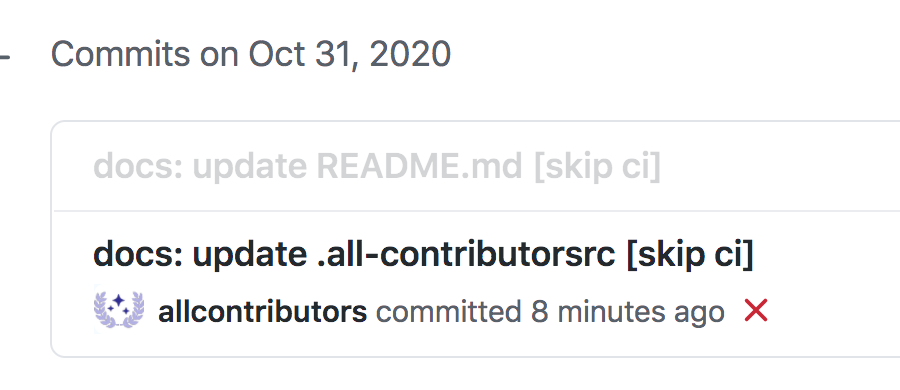
Can someone help me take a look?
laike9m
on 31 Oct 2020
This does not work.
 Vic152
on 20 Nov 2020
Vic152
on 20 Nov 2020
This does not work. Or at least in a way that would be useful to me. I want to be able to stop _any_ build pipelines, not just certain ones.
My scenario is that I commit to a branch when a pipeline runs - this pipeline is triggered by a branch policy when a PR is made to validate the build. But when pushing the commit the pipeline triggers itself and then fails because the previous run committed changes to what the pipeline itself requires. These flags are of no use to me and do not fulfil my requirement.
The issue shouldn't be closed because adding [skip ci] doesn't always skip ci.
 whenmoon
on 2 Feb 2021
whenmoon
on 2 Feb 2021
FYI I think this requires the [skip ci] to be on its own commit line in the commit message. It did not work for me when it was on the same line as the release version like this:
"Release version 0.1.5 [skip ci]"
But when I tried it with commit like this it worked fine and CI was skipped:
"Release version 0.1.5
[skip ci]"
 SlasherZet
on 24 Feb 2021
SlasherZet
on 24 Feb 2021
I tried what @SlasherZet has suggested, but the CI build still ran. My commit message was:
chore (release): publish v4.7.2
[skip ci]
 xram
on 22 Mar 2021
xram
on 22 Mar 2021
FWIW [skip ci] works on GitHub Actions.
pllim
on 22 Mar 2021
Related issues
 letmaik
·
35Comments
letmaik
·
35Comments
 A141133
·
80Comments
A141133
·
80Comments
 michaelschufi
·
32Comments
michaelschufi
·
32Comments
 erwinkramer
·
50Comments
erwinkramer
·
50Comments
 peder
·
32Comments
peder
·
32Comments
Most helpful comment
This is available now. You can tell Azure Pipelines to skip running a pipeline that a commit would normally trigger. Just include
[skip ci]in the commit message or description of the HEAD commit and Azure Pipelines will skip running CI. You can also use any of the variations below. This is supported for commits to Azure Repos Git, Bitbucket Cloud, GitHub, and GitHub Enterprise Server.[skip ci]or[ci skip]skip-checks: trueorskip-checks:true[skip azurepipelines]or[azurepipelines skip][skip azpipelines]or[azpipelines skip][skip azp]or[azp skip]***NO_CI***