Azure-pipelines-agent: Using YAML build definition, have the ability to set build number format
Agent Version and Platform
Hosted VS2017 Windows. But I suspect that this request is for every agent type.
VSTS Type and Version
VisualStudio.com
Issue
While creating the build definition manually, I have an option to set build number format using Option tab:
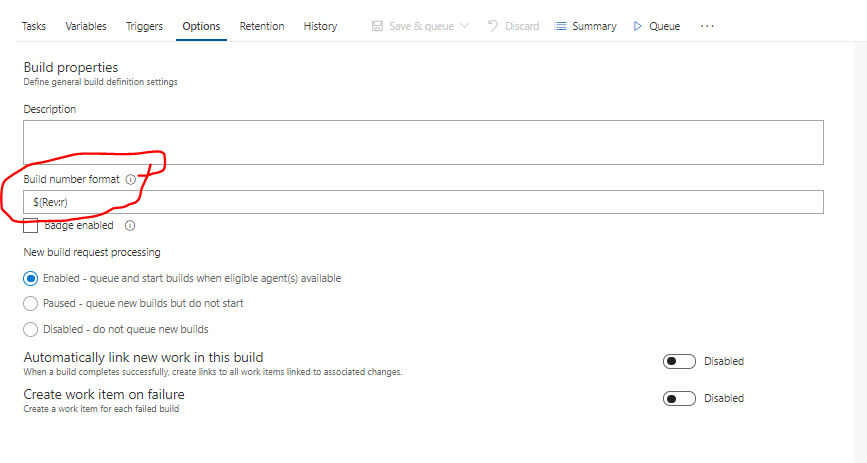
Currently, in YAML build definition, I'm not able to set that. Also after the build definition is created, I'm unable to manually set that option (Options tab is gone if I'm using YAML ).
My question is: is it possible to achieve this right now?
 tomaszgawlik
All 6 comments
My understanding is that setting the following at the top of your yaml file achieves that:
name: $(Build.DefinitionName)-$(date:yyyyMMdd)$(rev:.r)
See https://github.com/Microsoft/vsts-agent/blob/master/docs/preview/yamlgettingstarted-name.md
This then populates Build.BuildNumber
 simonvane
on 5 Jul 2018
simonvane
on 5 Jul 2018
@simonvane yes that did the trick. thank you for your quick response!
tomaszgawlik
on 5 Jul 2018
@simonvane the link no longer works:(
 cpoDesign
on 24 Sep 2018
cpoDesign
on 24 Sep 2018
the docs moved. This doc contains links to the new and old docs: https://github.com/Microsoft/azure-pipelines-agent/blob/master/docs/preview/yamlgettingstarted.md
Here was the old doc: https://github.com/Microsoft/azure-pipelines-agent/blob/3d39fca3cac2bf54c16600e0a3b9e7972d4c5ef3/docs/preview/yamlgettingstarted-name.md
 ericsciple
on 24 Sep 2018
ericsciple
on 24 Sep 2018
 Fisher-Joe
on 20 Aug 2019
Fisher-Joe
on 20 Aug 2019
@simonvane Thanks man! It really helped me!
 cristianbanarescu
on 5 Sep 2019
cristianbanarescu
on 5 Sep 2019
Related issues
 gdavocap
·
60Comments
gdavocap
·
60Comments
 bbusacker
·
49Comments
bbusacker
·
49Comments
 gregpakes
·
43Comments
gregpakes
·
43Comments
 michaelschufi
·
32Comments
michaelschufi
·
32Comments
 ChristophLindemann
·
41Comments
ChristophLindemann
·
41Comments
Most helpful comment
My understanding is that setting the following at the top of your yaml file achieves that:
See https://github.com/Microsoft/vsts-agent/blob/master/docs/preview/yamlgettingstarted-name.md
This then populates Build.BuildNumber