Azure-kinect-sensor-sdk: Color camera doesn't work
Describe the bug
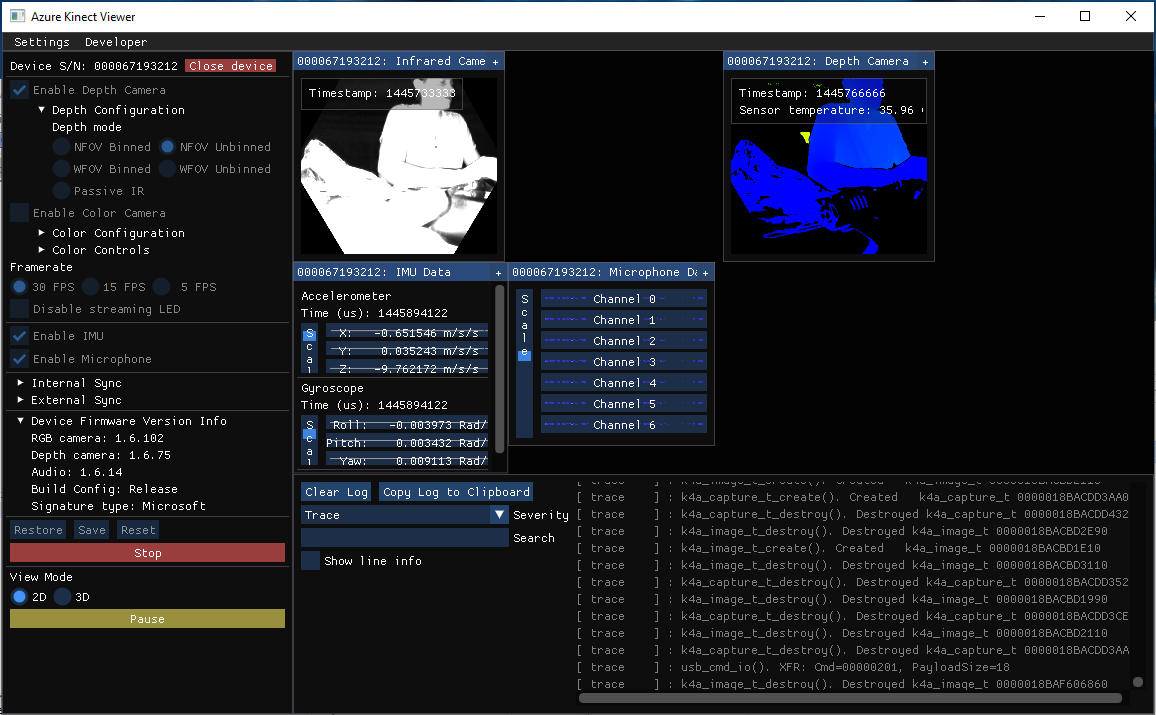
I just unpacked the Azure Kinect camera, plugged the USB-C cable into a direct port on my laptop and connected the power cable to a power outlet. I downloaded the latest SDK (1.3.0) from the SDK page and opened the Azure Kinect Viewer. After opening the camera and clicking Start (with default settings), I get the error "Failed to start device!" (see screenshot below). If I untick the "Enable Color Camera" box, the camera starts just fine and shows depth and IR camera output. If I only enable color camera and try to start, I get the same error.
I have tried restarting the computer, unplugging and re-plugging the usb cables, switching usb ports and tried with the power cable both in power outlet and in the computer. Nothing works.
To Reproduce
Connect a camera to computer and power. Open Azure Kinect Viewer (tried both from SDK 1.2 and 1.3). Open the device with color camera enabled. Click Start.
Expected behavior
All the camera outputs should work.
Logs
[ trace ] : k4a_device_start_cameras(). k4a_device_start_cameras starting
[ info ] : k4a_device_start_cameras(). Starting camera's with the following config.
[ info ] : k4a_device_start_cameras(). color_format:3
[ info ] : k4a_device_start_cameras(). color_resolution:1
[ info ] : k4a_device_start_cameras(). depth_mode:2
[ info ] : k4a_device_start_cameras(). camera_fps:2
[ info ] : k4a_device_start_cameras(). synchronized_images_only:1
[ info ] : k4a_device_start_cameras(). depth_delay_off_color_usec:0
[ info ] : k4a_device_start_cameras(). wired_sync_mode:0
[ info ] : k4a_device_start_cameras(). subordinate_delay_off_master_usec:0
[ info ] : k4a_device_start_cameras(). disable_streaming_indicator:0
[ trace ] : usb_cmd_io(). XFR: Cmd=80000001, CmdLength=13, PayloadSize=0, CmdData=00000000 00000000...
[ trace ] : usb_cmd_io(). XFR: Cmd=000000e1, CmdLength=4, PayloadSize=0, CmdData=00000004 0000018b...
[ trace ] : usb_cmd_io(). XFR: Cmd=00000103, CmdLength=4, PayloadSize=0, CmdData=0000001e 0000018b...
[ trace ] : usb_cmd_io(). XFR: Cmd=00000009, PayloadSize=0
[ trace ] : usb_cmd_io(). XFR: Cmd=000000f1, PayloadSize=0
[ error ] : Start(). Failed to enumerate media type at start: 0x800706bf
[ error ] : color->m_spCameraReader->Start(width, height, fps, config->color_format, &color_capture_available, color) returned failure in color_start()
[ error ] : color_start(device->color, config) returned failure in k4a_device_start_cameras()
[ info ] : k4a_device_start_cameras(). k4a_device_start_cameras started
[ info ] : k4a_device_stop_cameras(). k4a_device_stop_cameras stopping
[ trace ] : k4a_image_t_create(). Created k4a_image_t 0000018BACBCFF10
[ trace ] : k4a_image_t_create(). Created k4a_image_t 0000018BACBCF990
[ trace ] : k4a_image_t_create(). Created k4a_image_t 0000018BACBD0E90
[ trace ] : k4a_image_t_create(). Created k4a_image_t 0000018BACBCFA10
[ trace ] : k4a_image_t_create(). Created k4a_image_t 0000018BACBD0510
[ trace ] : k4a_image_t_create(). Created k4a_image_t 0000018BACBD1190
[ trace ] : k4a_image_t_create(). Created k4a_image_t 0000018BACBD0910
[ trace ] : k4a_image_t_create(). Created k4a_image_t 0000018BACBD1210
[ trace ] : k4a_image_t_destroy(). Destroyed k4a_image_t 0000018BACBCFF10
[ trace ] : k4a_image_t_destroy(). Destroyed k4a_image_t 0000018BACBCF990
[ trace ] : k4a_image_t_destroy(). Destroyed k4a_image_t 0000018BACBD0E90
[ trace ] : k4a_image_t_destroy(). Destroyed k4a_image_t 0000018BACBCFA10
[ trace ] : k4a_image_t_destroy(). Destroyed k4a_image_t 0000018BACBD0510
[ trace ] : k4a_image_t_destroy(). Destroyed k4a_image_t 0000018BACBD1190
[ trace ] : k4a_image_t_destroy(). Destroyed k4a_image_t 0000018BACBD0910
[ trace ] : k4a_image_t_destroy(). Destroyed k4a_image_t 0000018BACBD1210
[ trace ] : usb_cmd_io(). XFR: Cmd=000000f2, PayloadSize=0
[ trace ] : usb_cmd_io(). XFR: Cmd=0000000a, PayloadSize=0
[ warning ] : queue_disable(). Waiting for blocking call to complete
[ warning ] : queue_error(). Error detected, shutting down queue and notifying consumers
[ warning ] : queue_error(). Error detected, shutting down queue and notifying consumers
[ warning ] : queue_error(). Error detected, shutting down queue and notifying consumers
[ warning ] : capturesync_add_capture(). Capture Error Detected, Depth
[ info ] : k4a_device_stop_cameras(). k4a_device_stop_cameras stopped
[ trace ] : k4a_image_t_create(). Created k4a_image_t 0000018BACD7C390
[ trace ] : k4a_image_t_create(). Created k4a_image_t 0000018BACD7C410
[ trace ] : k4a_image_t_create(). Created k4a_image_t 0000018BACD7C490
[ trace ] : k4a_image_t_create(). Created k4a_image_t 0000018BACD7BF90
[ trace ] : k4a_image_t_create(). Created k4a_image_t 0000018BACD7C590
[ trace ] : k4a_image_t_create(). Created k4a_image_t 0000018BACD7C510
Screenshots
Doesn't work with color camera

Works when color camera is not enabled
Desktop (please complete the following information):
- OS with Version: Windows 1903
- SDK Version: 1.3.0
- Firmware version: 1.6.102075014
Additional context
 lordjesus
All 8 comments
see #381
 wes-b
on 24 Oct 2019
wes-b
on 24 Oct 2019
After checking with Event Viewer as suggested in #381 I found that the FrameServer was getting errors from a module called Realtek/RsProvider.dll located in C:\Program Files\Realtek\RsProviders\RsProvider.dll. After a lot of investigating and trying solutions online, I chose to simply delete the folder (made a backup of it first). After deleting the RsProviders folder, the Azure Kinect camera works.
The error was also visible in the Camera app, where it would freeze the picture every 2 seconds. After deleting the RsProviders folder, the Camera app doesn't freeze anymore.
lordjesus
on 25 Oct 2019
Thanks for the update!
wes-b
on 25 Oct 2019
@lordjesus @wes-b How did you checked for error in the frame server using the event viewer? I can't find help any information about this anywhere.
 DivyanshK86
on 18 Dec 2019
DivyanshK86
on 18 Dec 2019
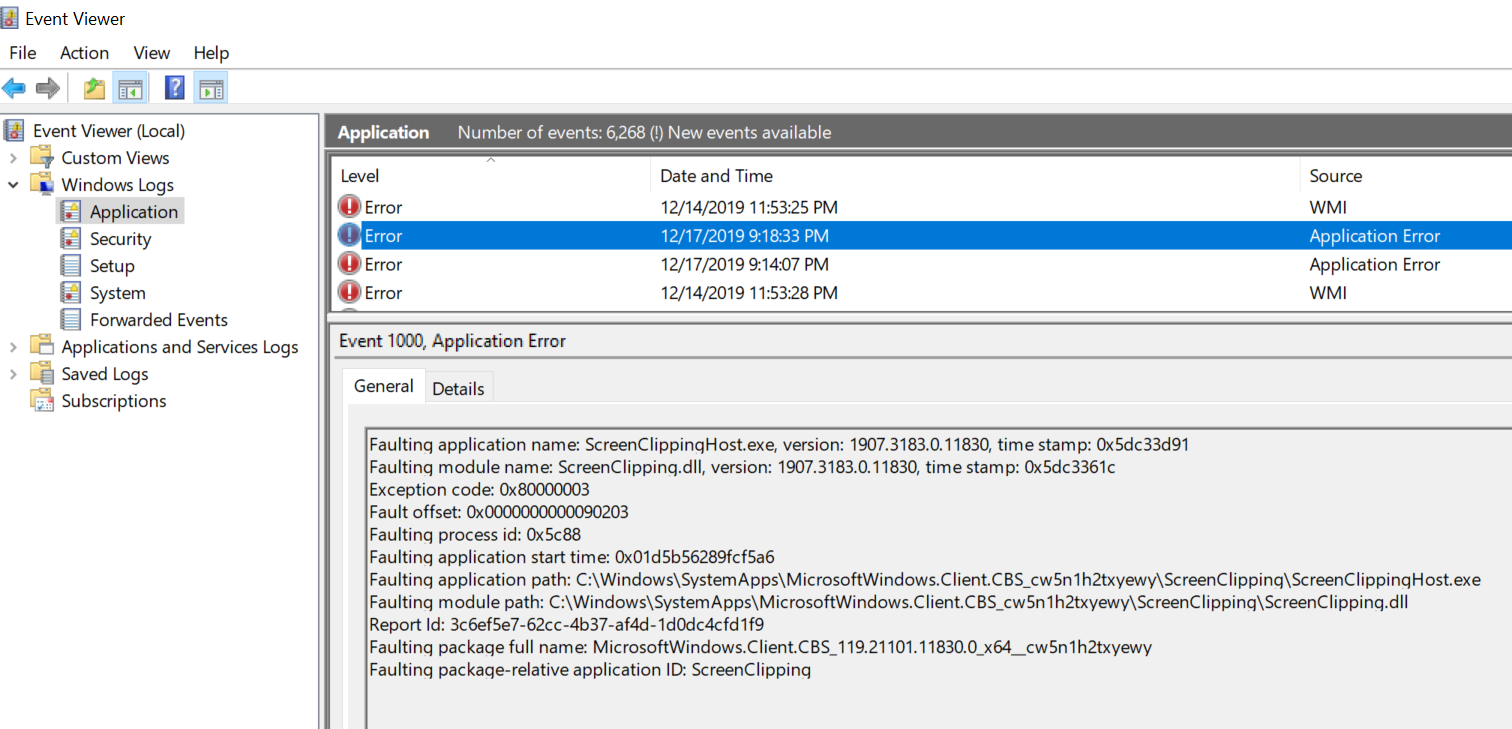
On Windows you:
- Launch the tools with _Windows_ key and type _Event Viewer_. Below is a screen shot.
- Select _Application_ under _Windows Logs_.
- Sort the list so that newer messages are at the top of the list
- Look for _Error_ message that talk about the target binary crashing, or look for Error messages that talk about _Frame Server_ (FS) crashing. The error message will typically tell you the binary (DLL or exe) that crashed.
wes-b
on 18 Dec 2019
Thanks @wes-b for the help but I couldn't see any error messages in my event log about this issue so I uninstalled every possible driver that I could remove in my pc and it still didn't work. In the end I completely reinstalled windows again and then it somehow worked for me. Thanks for the answer though it would help others.
DivyanshK86
on 19 Dec 2019
@wes-b I just realized the problem seems to appear again when I updated my windows to "creator's update". Before the creator's update, my color camera was working fine in the windows camera app but I was getting a fatal error while starting up "Azure kinect viewer" that says "the procedure entry point getdpiforsystem could not be located in the dynamic link library" which fixed after the creator's update but then my color camera stopped working. In short, I am still not able make the color camera and azure kinect viewer work together at this point.
DivyanshK86
on 20 Dec 2019
... but then my color camera stopped working. In short, I am still not able make the color camera and azure kinect viewer work together at this point.
At this point lets open a new issue. Please capture repro steps and log. The first _error_ message in your log is probably covered in issue here already, so you might check that too
wes-b
on 20 Dec 2019
Related issues
 natelowry
·
3Comments
natelowry
·
3Comments
 Jalroka
·
3Comments
Jalroka
·
3Comments
 yeongwoonIm
·
3Comments
yeongwoonIm
·
3Comments
 devLupin
·
4Comments
devLupin
·
4Comments
 virtusense-trisha
·
4Comments
virtusense-trisha
·
4Comments