Azure-kinect-sensor-sdk: Kinect Device Crash and Unresponsive
Using two new Kinect DK devices. Getting the same result with both. Connected them to my PC into two separate USB ports. I am able to reproduce this issue every single time. When I run Azure Kinect Viewer, both cameras are available. After I open either device and simply attempt to start it, I get IMU errors.
After the error messages, Kinect Viewer isn't able to detect either of the devices, even after I stop them. They completely disappear. I check the device manager and the devices are gone. I have to do a hard reboot to get the PC to see the devices again.
Below is the Log report:
[ warning ] : capturesync_add_capture(). Dropping depth capture as TS is too large TS:1233733333
[ warning ] : capturesync_add_capture(). Dropping depth capture as TS is too large TS:1233766666
[ warning ] : capturesync_add_capture(). Dropping depth capture as TS is too large TS:1233800000
[ warning ] : capturesync_add_capture(). Dropping depth capture as TS is too large TS:1233833333
[ warning ] : capturesync_add_capture(). Dropping depth capture as TS is too large TS:1233866666
[ warning ] : capturesync_add_capture(). Dropping depth capture as TS is too large TS:1233900000
[ warning ] : capturesync_add_capture(). Dropping depth capture as TS is too large TS:1233933333
[ warning ] : depth_engine_thread(). Dropping depth image due to bad timestamp at startup
[ warning ] : imu_capture_ready(). IMU startup dropped last 368 samples, the timestamp is too large
[ error ] : replace_sample(). capturesync_drop, releasing capture early due to full queue TS: 16088 type:Depth
[ error ] : replace_sample(). capturesync_drop, releasing capture early due to full queue TS: 49422 type:Depth
[ error ] : replace_sample(). capturesync_drop, releasing capture early due to full queue TS: 82755 type:Depth
[ error ] : replace_sample(). capturesync_drop, releasing capture early due to full queue TS: 116088 type:Depth
[ error ] : replace_sample(). capturesync_drop, releasing capture early due to full queue TS: 149422 type:Depth
[ error ] : replace_sample(). capturesync_drop, releasing capture early due to full queue TS: 182755 type:Depth
[ error ] : replace_sample(). capturesync_drop, releasing capture early due to full queue TS: 216088 type:Depth
[ error ] : replace_sample(). capturesync_drop, releasing capture early due to full queue TS: 249422 type:Depth
[ error ] : replace_sample(). capturesync_drop, releasing capture early due to full queue TS: 282755 type:Depth
[ error ] : replace_sample(). capturesync_drop, releasing capture early due to full queue TS: 316088 type:Depth
[ error ] : replace_sample(). capturesync_drop, releasing capture early due to full queue TS: 349422 type:Depth
[ error ] : replace_sample(). capturesync_drop, releasing capture early due to full queue TS: 382755 type:Depth
[ error ] : replace_sample(). capturesync_drop, releasing capture early due to full queue TS: 416088 type:Depth
[ error ] : replace_sample(). capturesync_drop, releasing capture early due to full queue TS: 449422 type:Depth
[ error ] : replace_sample(). capturesync_drop, releasing capture early due to full queue TS: 482755 type:Depth
[ error ] : replace_sample(). capturesync_drop, releasing capture early due to full queue TS: 516088 type:Depth
[ error ] : replace_sample(). capturesync_drop, releasing capture early due to full queue TS: 549422 type:Depth
[ error ] : replace_sample(). capturesync_drop, releasing capture early due to full queue TS: 582755 type:Depth
[ error ] : replace_sample(). capturesync_drop, releasing capture early due to full queue TS: 616088 type:Depth
[ warning ] : queue_disable(). Waiting for blocking call to complete
[ warning ] : queue_error(). Error detected, shutting down queue and notifying consumers
[ warning ] : queue_error(). Error detected, shutting down queue and notifying consumers
[ warning ] : queue_error(). Error detected, shutting down queue and notifying consumers
[ warning ] : capturesync_add_capture(). Capture Error Detected, Depth
[ warning ] : usb_cmd_libusb_cb(). USB timeout on streaming endpoint for imu
[ warning ] : usb_cmd_libusb_cb(). USB timeout on streaming endpoint for imu
[ warning ] : usb_cmd_libusb_cb(). USB timeout on streaming endpoint for imu
[ warning ] : usb_cmd_libusb_cb(). USB timeout on streaming endpoint for imu
[ warning ] : usb_cmd_libusb_cb(). USB timeout on streaming endpoint for imu
[ warning ] : usb_cmd_libusb_cb(). USB timeout on streaming endpoint for imu
[ error ] : usb_cmd_io(). Error calling libusb_bulk_transfer for initial tx, result:LIBUSB_ERROR_NO_DEVICE
[ error ] : usb_cmd_io(usbcmd_handle, cmd, p_cmd_data, cmd_data_size, NULL, 0, p_data, data_size, NULL, &cmd_status) returned failure in usb_cmd_write()
[ error ] : usb_cmd_write(colormcu->usb_cmd, DEV_CMD_IMU_STREAM_STOP, NULL, 0, NULL, 0) returned failure in colormcu_imu_stop_streaming()
 thedevguy
All 33 comments
Hi @thedevguy, what OS are we talking about. The log indicates you are not getting color images from the camera. Please make sure you are not using an extra cables, make sure you are powered sufficiently with the device power supply provided in box. Then please review the USB host controller compatibility info below, and finally look for third party software and drivers that may be impacting your ability to use the color camera in the camera app (assuming we are talking about Windows here).
https://docs.microsoft.com/en-us/azure/kinect-dk/troubleshooting#usb3-host-controller-compatibility
 wes-b
on 5 Jul 2019
wes-b
on 5 Jul 2019
OS: Windows 10
Not using any extra cables. Using what came in the box. Both devices are plugged into the wall charger using the wall charger that came in the box.
thedevguy
on 6 Jul 2019
I've purchased a new USB card from Amazon for my PC (https://www.amazon.com/gp/product/B00HJZEA2S) that has 4 discreet Renesas controllers. Once I get the card I'll report on the issue.
thedevguy
on 6 Jul 2019
I received and installed the usb controller that meets published specifications. The card specifications are here: https://www.startech.com/Cards-Adapters/USB-3.0/Cards/PCI-Express-USB-3-Card-4-Dedicated-Channels-4-Port~PEXUSB3S44V
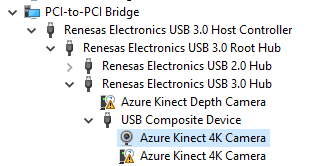
The kinect is detected however using the Kinect Viewer neither camera are available to open. When I try to refresh devices I get this error:
[ error ] : find_libusb_device(). Unable to open LIBUSB at index 0
[ error ] : usb_cmd_create(USB_DEVICE_DEPTH_PROCESSOR, device_index, NULL, &depthmcu->usb_cmd) returned failure in depthmcu_create()
[ error ] : depthmcu_create(index, &device->depthmcu) returned failure in k4a_device_open()
[ error ] : find_libusb_device(). Unable to open LIBUSB at index 1
[ error ] : usb_cmd_create(USB_DEVICE_DEPTH_PROCESSOR, device_index, NULL, &depthmcu->usb_cmd) returned failure in depthmcu_create()
[ error ] : depthmcu_create(index, &device->depthmcu) returned failure in k4a_device_open()
thedevguy
on 9 Jul 2019
I have done the following trouble shooting steps:
- installed new drivers for the usb card
- unsinstalled the kinect dk sdk software and reinstalled it
- sacrificed a small goat
thedevguy
on 9 Jul 2019
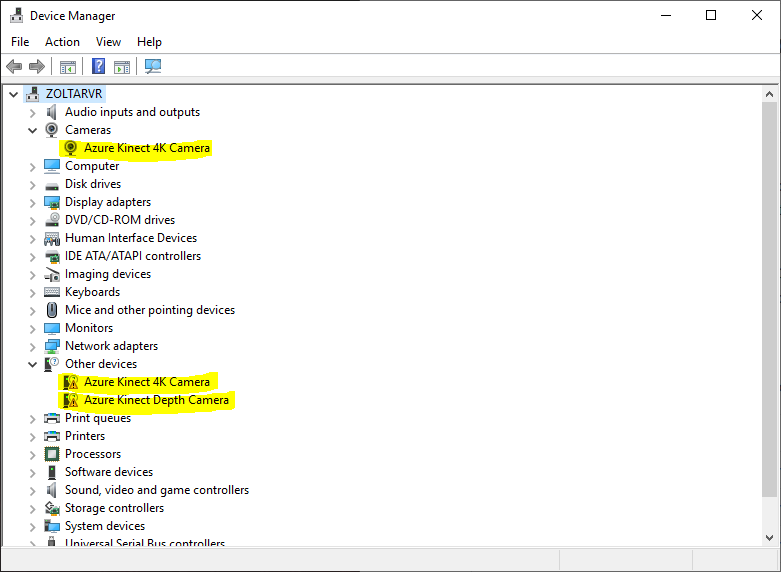
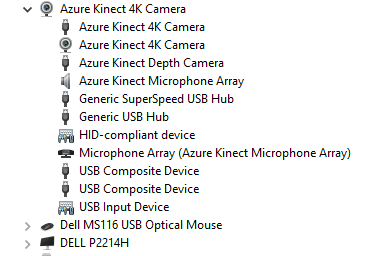
Here is a screen capture of how the device manager looks and how the viewer doesnt show the device listed.

thedevguy
on 9 Jul 2019
The yellow triangles next to "Azure Kinect Depth Camera" and "Azure Kinect 4k Camera" indicate the two cameras are not enumerated successfully. You should be able to double click on the errored out devices to determine what the error is. Also please try multiple USB ports on the card, don't assume they are all exactly the same.
wes-b
on 9 Jul 2019
Wes here are what the devices show when I double click on the error-ed out devices. I have tried every port I have on the USB controller with no change to the error.


thedevguy
on 14 Jul 2019
Can the Kinect DK work with Windows PCs that have AMD CPUs?
thedevguy
on 14 Jul 2019
These devices should have WinUsb installed on them. I can't see the full history via the images. Not sure if you have some 3rd party software messsing with the WinUsb driver or not. You might try updating the driver and specifically telling Windows to use WinUsb.inf.
wes-b
on 15 Jul 2019
And yes, AMD CPU's work fine.
wes-b
on 15 Jul 2019
I had a similar problem,

[ warning ] : capturesync_add_capture(). Dropping depth capture as TS is too large TS: 42100000
[ warning ] : capturesync_add_capture(). Dropping depth capture as TS is too large TS: 42133333
[ warning ] : capturesync_add_capture(). Dropping depth capture as TS is too large TS: 42166666
[ warning ] : capturesync_add_capture(). Dropping depth capture as TS is too large TS: 42200000
[ warning ] : capturesync_add_capture(). Dropping depth capture as TS is too large TS: 42233322
[ warning ] : capturesync_add_capture(). Dropping depth capture as TS is too large TS: 42266666
[ warning ] : capturesync_add_capture(). Dropping depth capture as TS is too large TS: 42300000
[ warning ] : capturesync_add_capture(). Dropping depth capture as TS is too large TS: 42333333
[ warning ] : CFrameContext(). No metadata attached to the sample
[ warning ] : CFrameContext(). No metadata attached to the sample
[ warning ] : CFrameContext(). No metadata attached to the sample
[ warning ] : CFrameContext(). No metadata attached to the sample
[ warning ] : CFrameContext(). No metadata attached to the sample
[ warning ] : CFrameContext(). No metadata attached to the sample
[ warning ] : CFrameContext(). No metadata attached to the sample
[ warning ] : CFrameContext(). No metadata attached to the sample
[ warning ] : imu_capture_ready(). IMU startup dropped last 408 samples, the timestamp is too large
[ warning ] : CFrameContext(). No metadata attached to the sample
[ warning ] : CFrameContext(). No metadata attached to the sample
[ warning ] : CFrameContext(). No metadata attached to the sample
[ warning ] : CFrameContext(). No metadata attached to the sample
[ warning ] : CFrameContext(). No metadata attached to the sample
[ warning ] : CFrameContext(). No metadata attached to the sample
[ warning ] : CFrameContext(). No metadata attached to the sample
[ warning ] : CFrameContext(). No metadata attached to the sample
[ warning ] : CFrameContext(). No metadata attached to the sample
[ warning ] : CFrameContext(). No metadata attached to the sample
[ warning ] : CFrameContext(). No metadata attached to the sample
[ warning ] : CFrameContext(). No metadata attached to the sample
[ warning ] : CFrameContext(). No metadata attached to the sample
[ warning ] : CFrameContext(). No metadata attached to the sample
[ warning ] : CFrameContext(). No metadata attached to the sample
[ warning ] : CFrameContext(). No metadata attached to the sample
[ warning ] : CFrameContext(). No metadata attached to the sample
[ error ] : replace_sample(). capturesync_drop, releasing capture early due to full queue TS: 17733 type:Depth
[ warning ] : CFrameContext(). No metadata attached to the sample
[ error ] : replace_sample(). capturesync_drop, releasing capture early due to full queue TS: 51066 type:Depth
[ warning ] : CFrameContext(). No metadata attached to the sample
[ error ] : replace_sample(). capturesync_drop, releasing capture early due to full queue TS: 84400 type:Depth
[ warning ] : CFrameContext(). No metadata attached to the sample
[ error ] : replace_sample(). capturesync_drop, releasing capture early due to full queue TS: 117733 type:Depth
[ warning ] : CFrameContext(). No metadata attached to the sample
[ error ] : replace_sample(). capturesync_drop, releasing capture early due to full queue TS: 151066 type:Depth
[ warning ] : CFrameContext(). No metadata attached to the sample
[ error ] : replace_sample(). capturesync_drop, releasing capture early due to full queue TS: 184400 type:Depth
[ warning ] : CFrameContext(). No metadata attached to the sample
[ error ] : replace_sample(). capturesync_drop, releasing capture early due to full queue TS: 217733 type:Depth
[ warning ] : CFrameContext(). No metadata attached to the sample
[ error ] : replace_sample(). capturesync_drop, releasing capture early due to full queue TS: 251066 type:Depth
[ warning ] : CFrameContext(). No metadata attached to the sample
[ error ] : replace_sample(). capturesync_drop, releasing capture early due to full queue TS: 284400 type:Depth
[ warning ] : CFrameContext(). No metadata attached to the sample
[ error ] : replace_sample(). capturesync_drop, releasing capture early due to full queue TS: 317733 type:Depth
[ warning ] : CFrameContext(). No metadata attached to the sample
[ error ] : replace_sample(). capturesync_drop, releasing capture early due to full queue TS: 351066 type:Depth
[ warning ] : CFrameContext(). No metadata attached to the sample
[ error ] : replace_sample(). capturesync_drop, releasing capture early due to full queue TS: 384400 type:Depth
[ warning ] : CFrameContext(). No metadata attached to the sample
[ error ] : replace_sample(). capturesync_drop, releasing capture early due to full queue TS: 417733 type:Depth
[ warning ] : CFrameContext(). No metadata attached to the sample
[ error ] : replace_sample(). capturesync_drop, releasing capture early due to full queue TS: 451066 type:Depth
[ warning ] : CFrameContext(). No metadata attached to the sample
[ error ] : replace_sample(). capturesync_drop, releasing capture early due to full queue TS: 484400 type:Depth
[ warning ] : CFrameContext(). No metadata attached to the sample
[ error ] : replace_sample(). capturesync_drop, releasing capture early due to full queue TS: 517733 type:Depth
[ warning ] : CFrameContext(). No metadata attached to the sample
[ error ] : replace_sample(). capturesync_drop, releasing capture early due to full queue TS: 551066 type:Depth
[ warning ] : CFrameContext(). No metadata attached to the sample
[ error ] : replace_sample(). capturesync_drop, releasing capture early due to full queue TS: 584400 type:Depth
[ warning ] : CFrameContext(). No metadata attached to the sample
[ warning ] : CFrameContext(). No metadata attached to the sample
[ warning ] : queue_disable(). Waiting for blocking call to complete
[ warning ] : queue_error(). Error detected, shutting down queue and notifying consumers
[ warning ] : queue_error(). Error detected, shutting down queue and notifying consumers
[ warning ] : queue_error(). Error detected, shutting down queue and notifying consumers
[ warning ] : capturesync_add_capture(). Capture Error Detected, Depth
[ error ] : replace_sample(). capturesync_drop, releasing capture early due to full queue TS: 17733 type:Depth
[ error ] : replace_sample(). capturesync_drop, releasing capture early due to full queue TS: 51066 type:Depth
[ error ] : replace_sample(). capturesync_drop, releasing capture early due to full queue TS: 84400 type:Depth
[ error ] : replace_sample(). capturesync_drop, releasing capture early due to full queue TS: 117733 type:Depth
 lllbrucccce
on 19 Jul 2019
lllbrucccce
on 19 Jul 2019
Try this:
1) Open device manager - Windows Button + r -> devmgmt.msc
2) Unplug all Kinects
3) Set View-> Devices by Type
4) Set View -> Show Hidden Devices
5) Under "Cameras" right click on all instances of "Azure Kinect 4k Camera" and select "Uninstall Device"
6) Under "USB Serial Bus devices" right click and select "Uninstall Device" for all "Azure Kinect 4k Camera" and "Azure Kinect Depth Camera" instances present.
7) Plug the Kinect in and try again.
wes-b
on 19 Jul 2019
Try this:
- Open device manager - Windows Button + r -> devmgmt.msc
- Unplug all Kinects
- Set View-> Devices by Type
- Set View -> Show Hidden Devices
- Under "Cameras" right click on all instances of "Azure Kinect 4k Camera" and select "Uninstall Device"
- Under "USB Serial Bus devices" right click and select "Uninstall Device" for all "Azure Kinect 4k Camera" and "Azure Kinect Depth Camera" instances present.
- Plug the Kinect in and try again.
I tried. It didn't work.
lllbrucccce
on 19 Jul 2019
@lllbrucccce I didn't notice this before, but [ warning ] : CFrameContext(). No metadata attached to the sample is unique to your log and makes your issue different. Please lets start a new issue for this. Does the camera work fine with the camera app? I am wondering if you have some other camera software installed that may be filtering the camera images.
wes-b
on 22 Jul 2019
I am closing this issue as it seems like the original issue has been resolved. We can reopen it if new information is available.
wes-b
on 22 Jul 2019
This issue has not been resolved. Please keep open.
On Mon, Jul 22, 2019 at 11:18 AM wes-b notifications@github.com wrote:
Closed #459
https://github.com/microsoft/Azure-Kinect-Sensor-SDK/issues/459.—
You are receiving this because you were mentioned.
Reply to this email directly, view it on GitHub
https://github.com/microsoft/Azure-Kinect-Sensor-SDK/issues/459?email_source=notifications&email_token=AAGXPN4CAM5B4BPIAAE7YHLQAX2XPA5CNFSM4H5NYM2KYY3PNVWWK3TUL52HS4DFWZEXG43VMVCXMZLOORHG65DJMZUWGYLUNFXW5KTDN5WW2ZLOORPWSZGOSUGT5VI#event-2500673237,
or mute the thread
https://github.com/notifications/unsubscribe-auth/AAGXPN7WIUP3BXARZEM32FTQAX2XPANCNFSM4H5NYM2A
.>
Ali Daniali
Follow me on Twitter: http://twitter.com/thedevguy
LinkedIn: http://www.linkedin.com/in/alidaniali
thedevguy
on 22 Jul 2019
Sure, what is your current status after trying:
Try this:
Open device manager - Windows Button + r -> devmgmt.msc
Unplug all Kinects
Set View-> Devices by Type
Set View -> Show Hidden Devices
Under "Cameras" right click on all instances of "Azure Kinect 4k Camera" and select "Uninstall Device"
Under "USB Serial Bus devices" right click and select "Uninstall Device" for all "Azure Kinect 4k Camera" and "Azure Kinect Depth Camera" instances present.
Plug the Kinect in and try again.
Closing the issue due to no new information.
 tesych
on 30 Jul 2019
tesych
on 30 Jul 2019
Please reopen. I havent had access to the PC with the issue until now.
thedevguy
on 1 Aug 2019
I followed the steps provided and did not have any different results.
thedevguy
on 1 Aug 2019
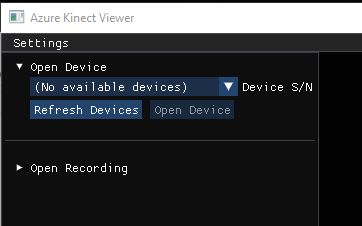
When starting the viewer I dont see the device and see the following error:
[ error ] : find_libusb_device(). Unable to open LIBUSB at index 0
[ error ] : usb_cmd_create(USB_DEVICE_DEPTH_PROCESSOR, device_index, NULL, &depthmcu->usb_cmd) returned failure in depthmcu_create()
[ error ] : depthmcu_create(index, &device->depthmcu) returned failure in k4a_device_open()
thedevguy
on 1 Aug 2019
@tesych would you please reopen this issue. Thank you.
thedevguy
on 1 Aug 2019
Using the Non-Renesas USB Controller the device is detected in the viewer however it crashes and I get these errors:
[ warning ] : depth_engine_thread(). Depth image processing is too slow at 56ms (this may be transient).
[ warning ] : capturesync_add_capture(). Dropping depth capture as TS is too large TS: 82400000
[ warning ] : capturesync_add_capture(). Dropping depth capture as TS is too large TS: 82433333
[ warning ] : capturesync_add_capture(). Dropping depth capture as TS is too large TS: 82466666
[ warning ] : capturesync_add_capture(). Dropping depth capture as TS is too large TS: 82500000
[ warning ] : capturesync_add_capture(). Dropping depth capture as TS is too large TS: 82533333
[ warning ] : capturesync_add_capture(). Dropping depth capture as TS is too large TS: 82566666
[ warning ] : capturesync_add_capture(). Dropping depth capture as TS is too large TS: 82600000
[ warning ] : capturesync_add_capture(). Dropping depth capture as TS is too large TS: 82633333
[ warning ] : capturesync_add_capture(). Dropping depth capture as TS is too large TS: 82666666
[ warning ] : capturesync_add_capture(). Dropping depth capture as TS is too large TS: 82700000
[ warning ] : capturesync_add_capture(). Dropping depth capture as TS is too large TS: 82733333
[ warning ] : capturesync_add_capture(). Dropping depth capture as TS is too large TS: 82766666
[ warning ] : imu_capture_ready(). IMU startup dropped last 448 samples, the timestamp is too large
[ error ] : replace_sample(). capturesync_drop, releasing capture early due to full queue TS: 16088 type:Depth
[ error ] : replace_sample(). capturesync_drop, releasing capture early due to full queue TS: 49422 type:Depth
[ error ] : replace_sample(). capturesync_drop, releasing capture early due to full queue TS: 82755 type:Depth
[ error ] : replace_sample(). capturesync_drop, releasing capture early due to full queue TS: 116088 type:Depth
[ error ] : replace_sample(). capturesync_drop, releasing capture early due to full queue TS: 149422 type:Depth
[ error ] : replace_sample(). capturesync_drop, releasing capture early due to full queue TS: 182755 type:Depth
[ error ] : replace_sample(). capturesync_drop, releasing capture early due to full queue TS: 216088 type:Depth
[ error ] : replace_sample(). capturesync_drop, releasing capture early due to full queue TS: 249422 type:Depth
[ error ] : replace_sample(). capturesync_drop, releasing capture early due to full queue TS: 282755 type:Depth
[ error ] : replace_sample(). capturesync_drop, releasing capture early due to full queue TS: 316088 type:Depth
[ error ] : replace_sample(). capturesync_drop, releasing capture early due to full queue TS: 349422 type:Depth
[ error ] : replace_sample(). capturesync_drop, releasing capture early due to full queue TS: 382755 type:Depth
[ error ] : replace_sample(). capturesync_drop, releasing capture early due to full queue TS: 416088 type:Depth
[ error ] : replace_sample(). capturesync_drop, releasing capture early due to full queue TS: 449422 type:Depth
[ error ] : replace_sample(). capturesync_drop, releasing capture early due to full queue TS: 482755 type:Depth
[ error ] : replace_sample(). capturesync_drop, releasing capture early due to full queue TS: 516088 type:Depth
[ error ] : replace_sample(). capturesync_drop, releasing capture early due to full queue TS: 549422 type:Depth
[ warning ] : queue_disable(). Waiting for blocking call to complete
[ warning ] : queue_error(). Error detected, shutting down queue and notifying consumers
[ warning ] : queue_error(). Error detected, shutting down queue and notifying consumers
[ warning ] : queue_error(). Error detected, shutting down queue and notifying consumers
[ warning ] : capturesync_add_capture(). Capture Error Detected, Depth
thedevguy
on 1 Aug 2019
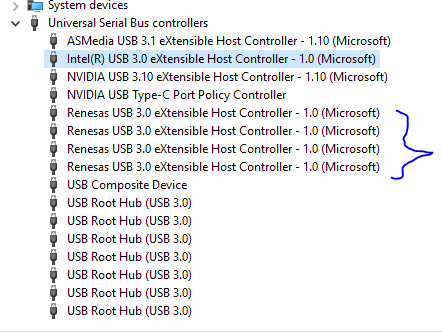
@thedevguy I was using Startech USB 3.0 card (PEXUSB3S44V) with Renesas drivers and had the same issue and here's what fixed it for me:
Unplug all kinects. Go into device manager, look for the Renesas USB root hubs, uninstall the devices and delete the drivers when prompted. Install the Renesas drivers as administrator. Re-plugin the kinect and verify that the 4k camera as well as the depth have no yellow flags.
The kinect streams were then viewable in the tool. I tried the above steps without deleting the drivers and it didn't work. My guess is that the automatically installed renesas hub drivers were sticking around and not being replaced by the drivers startech provided. The hub name also changed to eXtensible afterwards.
This is a screenshot of my Renesas hubs, note that the hub says eXtensible now:
and the kinect in device manager when viewed by container:
Sorry if you've already tried this
 ultrafro-ptc
on 5 Aug 2019
ultrafro-ptc
on 5 Aug 2019
@ultrafro-ptc thanks for the image. The (Microsoft) at the end of Renesas USB 3.0 eXtensible Host Controller -1.0 (Microsoft) also tells you that you are running the Microsoft driver rather than the Renesas driver.
wes-b
on 5 Aug 2019
I’ll check it out thank you.
-Ali
On Mon, Aug 5, 2019 at 12:15 PM wes-b notifications@github.com wrote:
@ultrafro-ptc https://github.com/ultrafro-ptc thanks for the image. The
(Microsoft) at the end of Renesas USB 3.0 eXtensible Host Controller -1.0
(Microsoft) also tells you that you are running the Microsoft driver
rather than the Renesas driver.—
You are receiving this because you were mentioned.
Reply to this email directly, view it on GitHub
https://github.com/microsoft/Azure-Kinect-Sensor-SDK/issues/459?email_source=notifications&email_token=AAGXPN5MX3VVETJA6SYF6ALQDB335A5CNFSM4H5NYM2KYY3PNVWWK3TUL52HS4DFVREXG43VMVBW63LNMVXHJKTDN5WW2ZLOORPWSZGOD3SZMNY#issuecomment-518362679,
or mute the thread
https://github.com/notifications/unsubscribe-auth/AAGXPN7527QXGOXIA5AMUYDQDB335ANCNFSM4H5NYM2A
.>
Ali Daniali
Follow me on Twitter: http://twitter.com/thedevguy
LinkedIn: http://www.linkedin.com/in/alidaniali
thedevguy
on 5 Aug 2019
I had a similar experience at the beginning. But that I came to know that my laptop's installed webcam was being called upon somehow when I try to run the cameras. I then uninstalled the laptop's camera. Then upon lowering the protection standards in my Kaspersky AntiVirus, I was able to run the cameras smoothly. Weird but worked for me.
 rajk97
on 15 Oct 2019
rajk97
on 15 Oct 2019
@thedevguy I was using Startech USB 3.0 card (PEXUSB3S44V) with Renesas drivers and had the same issue and here's what fixed it for me:
Unplug all kinects. Go into device manager, look for the Renesas USB root hubs, uninstall the devices and delete the drivers when prompted. Install the Renesas drivers as administrator. Re-plugin the kinect and verify that the 4k camera as well as the depth have no yellow flags.
The kinect streams were then viewable in the tool. I tried the above steps without deleting the drivers and it didn't work. My guess is that the automatically installed renesas hub drivers were sticking around and not being replaced by the drivers startech provided. The hub name also changed to eXtensible afterwards.
This is a screenshot of my Renesas hubs, note that the hub says eXtensible now:
and the kinect in device manager when viewed by container:
Sorry if you've already tried this
I have tried this solution. the StarTech driver performed even worse than microsoft drivers. I had to uninstall them to at least to be able to see the camera in Azure viewer. Btw, i'm using a StarTech PCI card with 4 slots.
 Krisonrik
on 11 Nov 2019
Krisonrik
on 11 Nov 2019
quick test with JU-P40811-S1 usb 3 card.
https://www.siig.com/4-port-superspeed-usb-3-0-pcie-card-quad-core-lp.html
Chipset: Renesas uPD720202
Tested on two different computers with one kinect azure unit.
When connected to JU-P40811-S1 card, seem to work fine on :
asrock X299 OC Formula
Device not turn on \ recognized when they connected to JU-P40811-S1 on .
Z370-A PRO
I will post more results soon.
there is hardware section we can share our test results ?
should we open one ?
 barakooda
on 21 Nov 2019
barakooda
on 21 Nov 2019
@barakooda are you talking about Windows or Linux?
USB Card JU-P40811-S1 works fine. Awesome! Thank you.
works fine :
https://www.asrock.com/MB/Intel/X299%20OC%20Formula/index.asp
What do you mean by this? mainboard and USB card works great? USB3 ports on the main board work great?
kinect devices not turn on \ recognized when they connected.
Z370-A PRO
What do you mean by this? USB ports don't work for you? Do you know what USB Host controllers are used here?
wes-b
on 21 Nov 2019
Sorry for not being clear, I updated my text.
thanks.
barakooda
on 22 Nov 2019
there is hardware section we can share our test results ?
should we open one ?
@barakooda, thanks for the idea, https://github.com/microsoft/Azure-Kinect-Sensor-SDK/issues/936 has been opened.
wes-b
on 22 Nov 2019
Related issues
 virtusense-trisha
·
4Comments
virtusense-trisha
·
4Comments
 UnaNancyOwen
·
3Comments
UnaNancyOwen
·
3Comments
 benjaminrhansen
·
4Comments
benjaminrhansen
·
4Comments
 d-walsh
·
3Comments
UnaNancyOwen
·
3Comments
d-walsh
·
3Comments
UnaNancyOwen
·
3Comments
Most helpful comment
I have done the following trouble shooting steps: