Azuracast: influxdb dependency timeout upon timeout
Hi,
it's a recurring issue for me when I do an update it times out on the first try (see snippet below) but after executing the update command again it will work well. Should I be worried about it?
Thanks,
Peter
2019/03/10 16:34:29 Problem with dial: dial tcp 192.168.16.4:8086: connect: connection refused. Sleeping 1s
2019/03/10 16:34:30 Timeout after 20s waiting on dependencies to become available: [tcp://mariadb:3306 tcp://influxdb:8086]
 gammaw
All 24 comments
@gammaw The initial setup takes a few seconds on most machines, which is why the Dockerize command uses the fairly permissive 20 second timeout. It definitely shouldn't be taking longer than 20 seconds, though, unless you're on extremely limited hardware or something is going wrong with the Influx container. You may want to check the influxdb logs (docker-compose logs -f influxdb) to see if they're throwing any sort of error or just being really slow.
 SlvrEagle23
on 10 Mar 2019
SlvrEagle23
on 10 Mar 2019
@SlvrEagle23 I see no errors, which is good. I suspect the HW. We've got a VPS with 2GB memory. What is a recommended setup?
gammaw
on 11 Mar 2019
@gammaw That amount of memory is plenty. I think the problem you're running into is CPU allocation. Who are you hosting with, and what is the "vCPU" allocation for the VPS?
SlvrEagle23
on 11 Mar 2019
@SlvrEagle23 it's assigned one vCPU. I see that it should be enough for one station (https://www.azuracast.com/install_do.html). We have one station. Like I said, above problem occurs when I run a new update but it works well on the second try. I also realize that saving media changes takes a lot of time (almost a minute) even if I only change a string or add a tiny cover image.
What do you think? Can I/should I improve the performance of the server or is it inherent behavior of Azura?
gammaw
on 12 Mar 2019
@gammaw Depending on how your hoster handles it's VMs it's pretty likely that your VM draws too much CPU time for the small type of instance you have chosen and that the hoster automatically throttles your CPU time.
To explain that a little bit: When hosting VMs most hosters normally over provision their available hardware so that for example on a 4 core / 8 threads machine they will put 16 VMs with 1 core each and the CPU power / time that is available will be split between these VMs. To prevent single VMs from hogging CPU power constantly there is a "budget" when it comes to CPU time that will be used up by using the CPU available to your VM. When you've used that up you CPU power / time will be scaled down to allow other VMs to do stuff.
Audio transcoding is quite the CPU intensive task so I suspect that you are hitting the budget limit for your VM. You should be able to check if your VM is waiting for time on the shared CPU via the top command and looking at the steal st value in the %Cpu(s) column. That value should not exceed 10-20% for longer periods.
 Vaalyn
on 12 Mar 2019
Vaalyn
on 12 Mar 2019
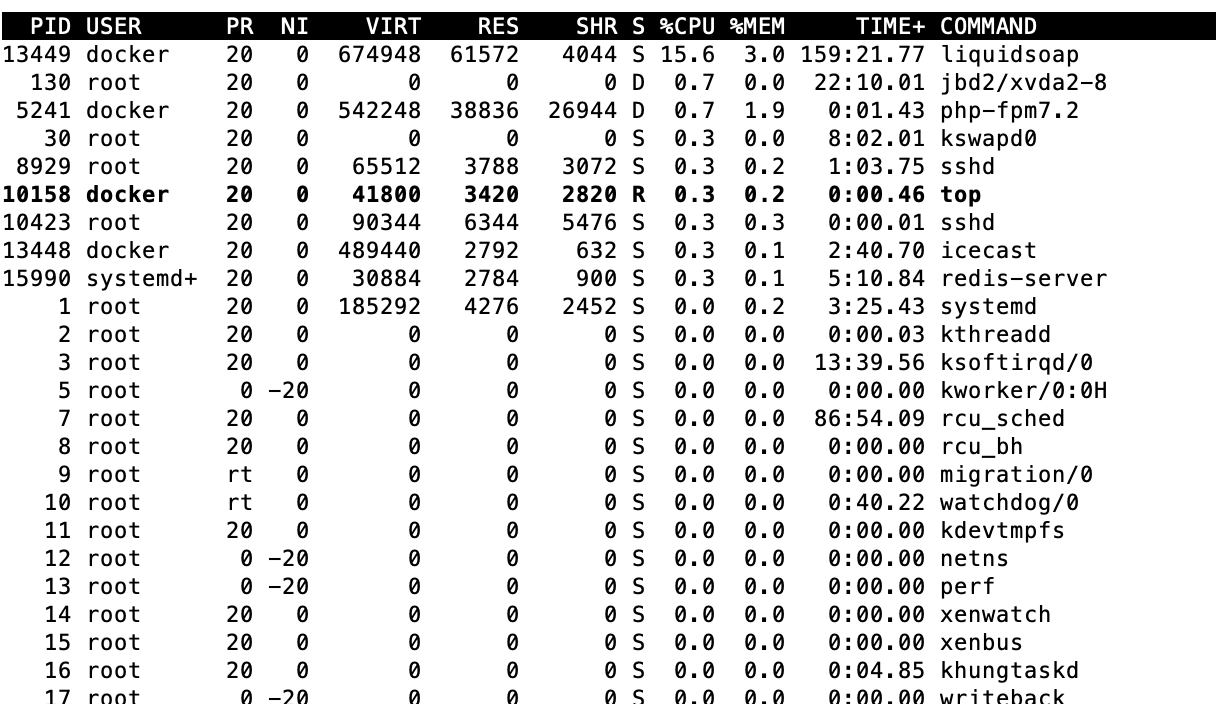
@Vaalyn thanks. I see no st and the CPU utilisation doesn't seem to go above 20%. I took a picture while a change in a song is being saved. I had plenty of time as it always takes 20-25s. I can image though that the load is much higher during an update. Does it make sense?
gammaw
on 12 Mar 2019
@gammaw Here is a screenshot on where to look for the st value.
Vaalyn
on 12 Mar 2019
@Vaalyn thanks. I see practically no stealing and also the CPU load doesn't exceed 20%. I guess updates and similar operations are bursts. Still I don't understand why saving media changes takes so long. Do you have it too or is it only my setup?
gammaw
on 14 Mar 2019
@gammaw I tested editing a media file and also added a pretty big image as cover art to it. The operation finished pretty much instantly for me. My VM is on a dedicated VMWare ESXi and has 2GB RAM and 2 cores of a Xeon D-1520 assigned, so not much more than you have on your VM and I have 4 stations running on that instance.
Do you have some kind of monitoring where you can see resource usage statistics over time?
I'm not sure where the issue is exactly originating from but I'm pretty sure that there is something unusual going on with your machine since there is no CPU steal, no over the top CPU usage and RAM should also be fine.
Vaalyn
on 14 Mar 2019
@gammaw @Vaalyn AzuraCast saves any changes made to station media via the ID3 metadata back to the corresponding file. Depending on the file type, this can be a somewhat IO/CPU intensive process that takes some time.
It's an excellent candidate for taking advantage of our new message queue / worker system (that would have it processing in the background), but that's a subject better suited for another issue, as it has nothing to do with InfluxDB.
SlvrEagle23
on 14 Mar 2019
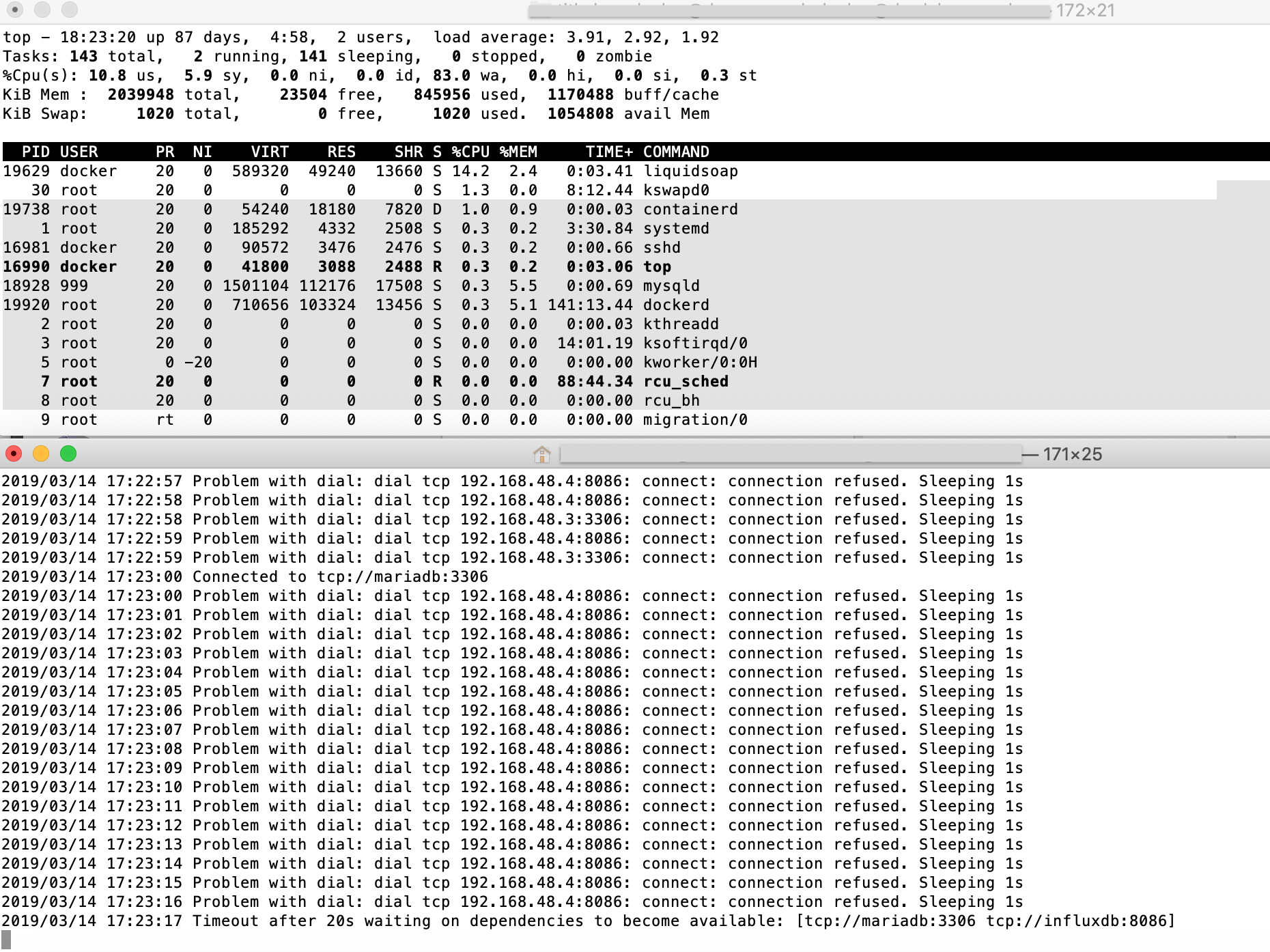
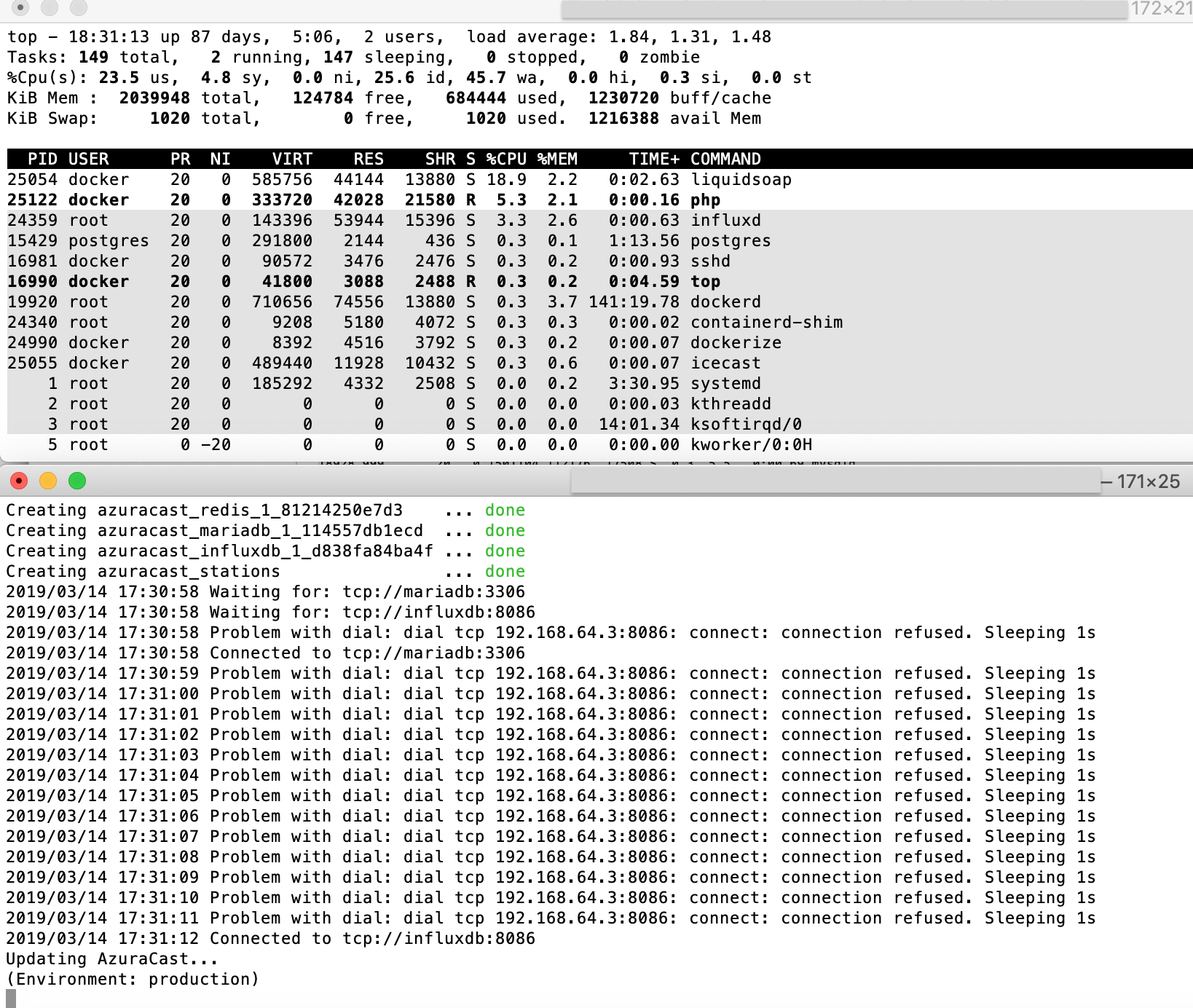
@SlvrEagle23 @Vaalyn thanks for the update. I just did an update on our test server and I took a snapshot during the first attempt (always failed) and during the second attempt (always successful). I started the second attempt immediately after the first one. As you can see the CPU utilisation isn't too high and I see no reason why the timeout occurs. Any idea? Is it possible that it's an IO (disk) issue and I have too slow throughput?
FAIL
SUCCESS
gammaw
on 14 Mar 2019
@gammaw Your system seems to indeed be starved of IOPs. You can see that by looking at the wa in top. On the screenshot you posted you have a 83 wa. This means that your system is using 83% of the time to wait for IOPs.
This could either be that the IOPs assigned to your VM are really low or that someone else on the same VM host is causing this. You can try to check if it is your machine using too much IOPs with iotop (see this tutorial). If that seems to be all fine then you should get in contact with your hoster to clarify how much IOPs they've assigned your VM and if they could look into what's causing the IOPS resource starvation.
Vaalyn
on 14 Mar 2019
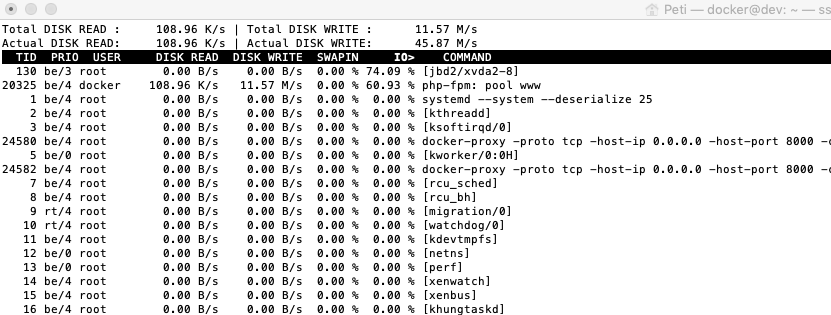
@Vaalyn @SlvrEagle23 thanks. I installed and started iotop, edited a song's data, saved it and checked what was happening. Here is a snapshot. The jbd2 command appears frequently, also when I don't save changes and there is no listener. I checked with my host provider, they said that my VPS doesn't have an SSD but it's a solid RAID disk system and no user ever reported an IO bottleneck. They confirmed that the jbd2 command is responsible for writing things to disk. They also said that they see significant IO traffic which may overload the virtual environment. What do you think this traffic comes from? Can it be due to some constant logging? In iotop I see the commands mysqld and influxd popping up every once in a while.
FYI: I also see that small media files need much less time to be updated. In my tests I only change the strings (e.g., title) in already updated files. Should it not be independent of the file size?
gammaw
on 15 Mar 2019
So jbd2 is not just a "command" it's basically the block device driver responsible for interfacing with the ext4 filesystem your machine is most likely using. So we can't directly blame this driver for the high IO here but need to dig a little deeper to find out what the root cause is.
Your hoster said that you are located on a raid device. From what I know of most hosting providers I'd bet that they use a software RAID instead of a better performing hardware RAID to save costs. This may be part of the problem or at least it could be adding a bit to it. When something is writing to disk the jbd2 driver will execute Journal Flushing Operations to commit the changes to the disk device. This is done to increase the resilience of your filesystem to better survive crashes and stuff without corrupting the filesystem. Having this enabled will indeed increase your IO but when using it in combination with a RAID this could even increase the performance hit that this has on disk operations when the RAID has no fast write cache. On systems with a battery backed or flash storage backed write cache you can relatively savely disable the journaling but on systems without this it would increase the risk of data loss or corruption significantly.
I'm not really convinced that the PHP-fpm process that is seen in the screenshot is entirely responsible for the high IO from this driver but I would suspect that maybe one of the disks of the RAID is slowly failing and thus causing an increased latency for disk operations on the raid which would explain the high IO. You may want to check this with your hoster (depending on the hoster it may be that they don't want to check this because they think they know better but it's worth a shot).
Writing a single file to disk should not cause this much IO even with journaling enabled on a software RAID that the system slows down so significantly so I'm relatively sure that this issues is caused by the disk setup of the machine here.
Vaalyn
on 15 Mar 2019
@Vaalyn @SlvrEagle23 thanks! I'll check with our hoster and let you know. In the meanwhile, can I increase the influxdb timeout during the update?
gammaw
on 16 Mar 2019
If I'm not mistaken the timeout is defined here and can't be overriden from the user.
Vaalyn
on 16 Mar 2019
@gammaw I was indeed mistaken. The timeout is not defined there and can be overriden with a docker-compose.override.yml. This will set the wait timeout to 60s, depending on your machine you may need to increase that value further:
version: '2.2'

services:
    web:
        entrypoint:
            - dockerize
            - -wait
            - tcp://mariadb:3306
            - -wait
            - tcp://influxdb:8086
            - -timeout
            - 60s
        command: ["/sbin/my_init"]
@SlvrEagle23 @Vaalyn we moved our server to another host provider (2GB, 1vCPU config with SSD disk) and things got much better. So yes, your suspicion seems confirmed that that error was due to a badly performing disk. This other is issue (https://github.com/AzuraCast/AzuraCast/issues/1268) seems also be related as so far we don't see these glitches on the new server. One thing remained: I can still observe relatively slow reaction from Azuracast when saving metadata of big files. Is it normal? The workflow is this: upload big file (say 500MB), open it, change (for example) title, save it.
gammaw
on 12 Apr 2019
@gammaw I'm assuming your server is using an HDD not an SSD. Such a big file will take some time to be completely written to disk by PHP and also to be processed by the library we use for the ID3 tags. How long would you say does it take to open and save the 500MB file?
Vaalyn
on 12 Apr 2019
@gammaw I'm assuming your server is using an HDD not an SSD. Such a big file will take some time to be completely written to disk by PHP and also to be processed by the library we use for the ID3 tags. How long would you say does it take to open and save the 500MB file?
Re ID3 tag reading, a headsup for this Media-File PHP lib https://packagist.org/packages/wapmorgan/media-file ... the author claims huge speed difference compared to getID lib when analyzing MP3 file (141.54x).
I didn't test it myself yet but I intend to this days to try to catalog my huge music col.
And another lib from the same author, specialized just for ID3 https://packagist.org/packages/wapmorgan/mp3info
 btoplak
on 12 Apr 2019
btoplak
on 12 Apr 2019
@btoplak Thank you for the links. These are indeed useful libraries, but they're limited in their utility versus getid3. For one, when we scan the metadata, we're looking for both ID3 metadata and track metadata (duration, etc), which would make the second library more appropriate, but then it appears to only work with MP3 files. Our current getid3 library supports about any file type we can throw at it. We also write back any changes made inside our web UI to the files, which is often where there's a more significant performance deficit, and this library doesn't handle that at all.
SlvrEagle23
on 12 Apr 2019
@gammaw I'm assuming your server is using an HDD not an SSD. Such a big file will take some time to be completely written to disk by PHP and also to be processed by the library we use for the ID3 tags. How long would you say does it take to open and save the 500MB file?
@Vaalyn it's an SSD, at least according to the hoster's specs :) Saving takes about 2-3 seconds for a 500MB song so it's not extreme. In general I'm very happy with the performance on the new server. I understand that saving involves some ID3 editing on the file which may vary in time according to the file size, right?
gammaw
on 13 Apr 2019
@gammaw That's indeed correct and 2-3s seem pretty reasonable to me for the file size.
Vaalyn
on 13 Apr 2019
Closing the issue as it seems to be resolved by changing faulty hardware.
Vaalyn
on 23 May 2019
Related issues
SlvrEagle23
·
3Comments
 adamderann
·
3Comments
adamderann
·
3Comments
 Rafaelrds2017
·
3Comments
Rafaelrds2017
·
3Comments
 Yusadolat
·
3Comments
Yusadolat
·
3Comments
 dpcee30
·
3Comments
dpcee30
·
3Comments
Most helpful comment
@gammaw I was indeed mistaken. The timeout is not defined there and can be overriden with a
docker-compose.override.yml. This will set the wait timeout to 60s, depending on your machine you may need to increase that value further: