Aspnetboilerplate: Documentation on Social integrations
For the later versions of ABP, devs are being advised to use Microsofts way for using social integrations.
But this method ties in with DotNet Identity which ABP doesn't use. So it's very difficult to use the tutorial to get ABP working with these integrations.
Please write up a more detailed example of how to do this using at least one of the providers (Google etc).
An idea for the structure:
1) User clicks here, JS authenticate and get the AuthCode, pass AuthCode to server
2) Use AuthCode to get profile details, then create a new user, and (save the token?)
Because we need to keep track of the expiriry date, I am not sure if we should be using AbpUserTokens or creating our own table.
 worthy7
All 30 comments
Just a little collection of resources I found:
Google integration from MS The issue here is it is designed to work with a new web project, and just magically works, but this magic is removed from ABP, so it's useless
This code can't work in ABP
services.AddIdentity<ApplicationUser, IdentityRole>()
        .AddEntityFrameworkStores<ApplicationDbContext>()
        .AddDefaultTokenProviders();
And neither will the buttons just "appear" magically because the front end is totally different to the template.
Helpfulish answer from @acjh (I think)
This is good and is the closest thing we get to a tutorial, but it is difficult to follow and needs to be more complete. What is confusing is the concept of Social and External. They are clearly different, but in the Core 2.0 examples it seems External is still being used. What's going on...
This screenshot is also very misleading because it looks like social logins "just work" but there is no code in the downloaded template which show these Facebook and Google buttons.
worthy7
on 10 May 2018
@Worthy7 have you tried this https://github.com/aspnetboilerplate/aspnetboilerplate/issues/3243#issuecomment-377868426 ?
We definitely need to remove social login buttons from the screenshots.
 ismcagdas
on 10 May 2018
ismcagdas
on 10 May 2018
@ismcagdas No I didn't spot that issue, thanks. I'll try to work something out - at the moment I'm actually looking to abandon Abp's authentication, It has been done over and over and over by everyone so I was thinking to just use Firebase.auth for the auth, and then pass tokens into Abp somehow instead - it seems like a more stable approach (since firebase will get updated by google over time).
Yea, remove the social buttons - false advertising! hehe
But in general, I do feel there is a kind of "half-done" feel to the social login and Abp. Need some better clearer guides please - it's obviously going to be a common thing for anyone looking to use ABP.
worthy7
on 11 May 2018
Yea, remove the social buttons - false advertising! hehe
😄 Yes it is a bit like that. We actually faced some problems about social logins when we were updating some Identity packages.
I agree with you, we must at least create a document for social logins.
ismcagdas
on 11 May 2018
Hi everyone,
I have studied the flow of the WebApplication template and I think this is how it works:
1) You set up the magic microsoft config in Startup.cs
services.AddAuthentication().AddGoogle(googleOptions =>
            {
                googleOptions.ClientId = _appConfiguration["Authentication:Google:ClientId"];
                googleOptions.ClientSecret = _appConfiguration["Authentication:Google:ClientSecret"];
            });
2) After authorizing on the front end, you need to send the auth-code received to this url: .../signin-google?code=1234567 which is a special endpoint set up by the config above.
3) This will do some magic within the app with that code, which will store something called the ExternalLoginInfo;
4) Now, after this call to signin-google is done, you can call another endpoint (which you need to make yourself/(or is there something in ABP already?)).
5) Inside this call, you can access the ExternalLoginInfo by doing:
ExternalLoginInfo info = await _signInManager.GetExternalLoginInfoAsync();
Which will give you some claims and auth tokens.
6) Now at this point, you can register the user with these details or try to sign them in.
The way the template does it is like this:
It tries to login using these credentials first:
var result = await _signInManager.ExternalLoginSignInAsync(info.LoginProvider, info.ProviderKey, isPersistent: false, bypassTwoFactor: true);
if the result failed, it registers the user something like this:
var email = info.Principal.FindFirstValue(ClaimTypes.Email);
var user = new ApplicationUser { UserName = model.Email, Email = model.Email };
var createresult = await _userManager.CreateAsync(user);
var addloginresult = await _userManager.AddLoginAsync(user, info);
await _signInManager.SignInAsync(user, isPersistent: false);
I think the above is self explanatory.
The question is, since all of this is the MS dot net way how do we do this the abp way?
( I see the TokenAuthController and 'ExternalAuthManager' but I'm not sure if they can be used. so before I waste my time I'd like to ask here, cheers)
worthy7
on 16 May 2018
I have studied ABP and can produce a similar corresponding flow, and uncovered some SECRET SAUCE too.
First let me point out the general flow:
1) Set up
2) Auth on the front end, pass back the AuthorizationCode
3) Get data from external providers about the user
4) Try to login, or register then login.
Now in Abp is looks like this (I think!)
1) Set up adding the Google provider to ExternalAuthProviders in externalAuthConfiguration,
(This requires building a Google Api wrapper like so, but it's broken)
2) Auth on the front end and then pass back an ExternalAuthenticateModel. This includes passing the ClientKey (which we registered in step 1, and will be available via TokenAuth.GetExternalAuthenticationProviders() - I read somewhere it might not be good to pass the ClientKey?)
3) Now this is the part that is broken in Abp, getting the data from google. I will try to write a wrapper around a google api or something - instead of doing this.
4) Trying to login and register ect can be done just as shown in TokenAuth.ExternalAuthenticate.
Problems are:
1) I'm not sure it's safe to pass the client key from the server to the client and back, I thought they should be using different keys.
2) I want to be able to register multiple google accounts with one ABP user, not sure if this is possible.
3) Getting the data from the google api.
worthy7
on 16 May 2018
OK boys and girls, this took absolutely forever to work out, but i finally have it working, this is the code to create a GoogleAuthProviderApi in .net:
using Google.Apis.Auth;
using Google.Apis.Auth.OAuth2;
using Google.Apis.Auth.OAuth2.Flows;
using Google.Apis.Auth.OAuth2.Responses;
using System.Threading;
using System.Threading.Tasks;

namespace MaProject.Authentication.External.Google
{
    public class GoogleAuthProviderApi : ExternalAuthProviderApiBase
    {
        public const string Name = "Google";

        /// <summary>
        /// The flow is as follows
        /// 1) We have the access code. We send it off to get a TokenResponse, which contains access and id tokens.
        /// 2) we use the id token and send it for validation, which will also give us back the user details.
        /// (as long as we have the profile scope)
        /// </summary>
        /// <param name="accessCode"></param>
        /// <returns></returns>
        public override async Task<ExternalAuthUserInfo> GetUserInfoAsync(string accessCode)
        {
            var flow = (new GoogleAuthorizationCodeFlow(new GoogleAuthorizationCodeFlow.Initializer
            {
                ClientSecrets = new ClientSecrets() { ClientId = this.ProviderInfo.ClientId, ClientSecret = this.ProviderInfo.ClientSecret },
                Scopes = new[] { "profile" },
            }));


            TokenResponse credential = await flow.ExchangeCodeForTokenAsync("user-id", accessCode, "postmessage", CancellationToken.None);
            var idtokenpayload = await GoogleJsonWebSignature.ValidateAsync(credential.IdToken);

            return new ExternalAuthUserInfo()
            {
                EmailAddress = idtokenpayload.Email,
                Name = idtokenpayload.GivenName,
                Provider = this.ProviderInfo.Name,
                ProviderKey = this.ProviderInfo.ClientId,
                Surname = idtokenpayload.FamilyName
            };

        }

    }
}
@ismcagdas Do you know how AbpUserToken is supposed to be used?
worthy7
on 29 May 2018
I also want to add this huge guide as a reference - it is regarding social logins using Angular - which is where I am stuck.
worthy7
on 29 May 2018
@Worthy7 I don't know much about AbpUserToken, it is actually used by ASP.NET Core Identity I think.
You can read this article to get more information about it https://www.stevejgordon.co.uk/asp-net-core-identity-token-providers.
ismcagdas
on 29 May 2018
Oh really... So they are not supposed to be used to store external login tokens? (Google etc)
Hmm. Guess I have to make a custom ExternalToken
Still having lots of trouble with Social Login, I have gone back and fourth 3 times between MS's login, and rolling my own through ABP.
worthy7
on 29 May 2018
No, you should use AbpUserLogins for that.
ismcagdas
on 29 May 2018
I see... Is ProviderKey supposed to be the Google-User-Id?
And, my system is going to want to use the RefreshToken from the login (to do offline stuff), where would be an appropriate place to put this? Is there any infrastructure in Abp already for this?
Extend AbpUserLogins?
worthy7
on 29 May 2018
@Worthy7 ProviderKey should contain the name of the provider like "Facebook", "Twitter" etc..
I'm not sure about RefreshToken. How are you planning to use RefreshToken ?
ismcagdas
on 29 May 2018
To call to the users calendar once in a while
worthy7
on 29 May 2018
Another reference, this one is talking about using the return from MS's social login, put it in a blankish page, then send it back through window events/callsback to get it back to the default angular.
Could probably build an Abp.SocialLogins wrapper lol
@ismcagdas You said that you faced some problems with the social logins - what exactly?
worthy7
on 30 May 2018
FYI:
"providerKey:
// The unique identifier for this user provided by the login provider.
"
https://docs.microsoft.com/en-us/dotnet/api/microsoft.aspnetcore.identity.externallogininfo?view=aspnetcore-2.0
worthy7
on 30 May 2018
@Worthy7 Thanks for writing all this up -- I have been prototype/porting an existing (non-ABP) app with Facebook login (the MS way) and racking my brain trying to figure out how it translates versus some of the older ABP samples that have social logins (implying they work). I'll have more time to tinker with this soon, but look forward to anyone else tackling it as well.
 MattLavalleeMA
on 28 Jun 2018
MattLavalleeMA
on 28 Jun 2018
@MattLavalleeMA No worries, it was a massive pain - but no pain no gain.
I have a feeling that the way I have it working right now is not how I wrote in this issue, but the way I'm using it now hasn't changed for a while - it works well. So for everyones' sake :sake: I'll write it up better.
Setup:
Web.Host -> Startup/AuthConfigurer.cs
Add this to the Configure function:
            services.AddAuthentication().AddGoogle(googleOptions =>
            {
                googleOptions.ClientId = configuration["Authentication:Google:ClientId"];
                googleOptions.ClientSecret = configuration["Authentication:Google:ClientSecret"];
                googleOptions.AccessType = "offline"; // makes it get a refresh token
                googleOptions.SaveTokens = true; // makes it add tokens to the UserInfo object on signin
                googleOptions.Scope.Add(GoogleApis.GoogleConsts.Scopes);
            });
Angular-Client:
In an Angular template, do something like:
<button (click)="login('Google')">Login</button>
Which calls this function on our component:
login(provider : string) {
        this._loginService.externalAuthenticateWithRedirect(provider, 100, 100).then(() => {
            this.router.navigate(['/dashboard']);
        });
    }
Which calls: externalAuthenticateWithRedirect
externalAuthenticateWithRedirect(provider: string, width: Number, height: Number) {
        // this version will open a window with the

        var redirectUri = location.protocol + '//' + location.host + '/assets/staticpages/AuthComplete.html';

        var externalProviderUrl = environment.backend + "api/TokenAuth/AspExternalLogin?provider=" + provider + "&returnUrl=" + redirectUri;

        return new Promise((resolve, reject) => {
            //window["calendrAuthCompletedCB"] = function (fragment: ExternalAuthenticateResultModel) {
            //    this.login(fragment.accessToken, fragment.encryptedAccessToken, fragment.expireInSeconds, this.rememberMe);
            //    resolve();
            //};
            var scope = this;
            window.addEventListener('message', (event : MessageEvent) =>

            // IMPORTANT: Check the origin of the data!
            //if (~event.origin.indexOf('http://yoursite.com')) {
            //    // The data has been sent from your site

            //    // The data sent with postMessage is stored in event.data
            //    console.log(event.data);
            //} else {
            //    // The data hasn't been sent from your site!
            //    // Be careful! Do not use it.
            //    return;
            //}
            {
                var fragment: ExternalAuthenticateResultModel = <ExternalAuthenticateResultModel>event.data;
                scope.login(fragment.accessToken, fragment.encryptedAccessToken, fragment.expireInSeconds, this.rememberMe).then((result) => {
                    if (result) resolve()
                    else reject();
                })
            }, false);

            var oauthWindow = window.open(externalProviderUrl, "Authenticate Account", "location=0,status=0,width=600,height=750");

        });
    }
This code sets the final location to be a strange AuthComplete.html (shown below).
Then sets the externalProvider URL to be my backend, complete with the return url.
It then sets up a new promise, saves the outer scope, creates a window listener, which will get the hash fragments back from AuthComplete.html and log the user in later.
Then it just opens a new window at the externalProvider URL.
The externalProvider URL opens api/TokenAuth/AspExternalLogin
The TokenAuth Controller AspExternalLogin function:
        [HttpGet]
        [AllowAnonymous]
        [ValidateAntiForgeryToken]
        public IActionResult AspExternalLogin(string provider, string returnUrl = null)
        {
            // Request a redirect to the external login provider.

            var redirectUrl = Url.Action(nameof(ExternalAuthenticateSpaAsync), "TokenAuth", new { returnUrl });
            var properties = _signInManager.ConfigureExternalAuthenticationProperties(provider, redirectUrl);
            properties.IsPersistent = true;
            return Challenge(properties, provider);
        }
This sets the first redirect url (used internally, before the AuthComplete one) to "ExternalAuthenticateSpaAsync", with the parameter of the AuthComplete.html link. Don't be confused, this is a redirect url, with another redirect url set as a parameter of where to go afterwards.
It then uses ASP's normal SignInManager to generate the Challenge (which will use our google config), which it returns to the user asking them to sign in (if all your api keys/domain origin's are set up correctly).
The user then signs in and the result is sent to "ExternalAuthenticateSpaAsync" (with the AuthComplete.html redirect parameter included).
This smart little wrapper, will do the usual authenticate inside ExternalAuthenticate, but will take the result and stick it onto the end of the AuthComplete.html return Url we specified earlier.
        [HttpGet]
        public async Task<IActionResult> ExternalAuthenticateSpaAsync(string returnUrl)
        {
            ExternalAuthenticateResultModel res = await ExternalAuthenticate(null);

            string redirectUri = returnUrl + "#" + res.GetQueryString();

            return Redirect(redirectUri);
        }
ExternalAuthenticate is quite big.
/// <summary>
        /// both asp and abp will redirect here.
        /// </summary>
        /// <param name="model"></param>
        /// <returns></returns>
        [HttpPost]
        public async Task<ExternalAuthenticateResultModel> ExternalAuthenticate([FromBody] ExternalAuthenticateModel model)
        {
            AbpLoginResult<Tenant, User> loginResult;
            ExternalAuthUserInfo externalUser;
            List<AuthenticationToken> tokens = new List<AuthenticationToken>();

            // if model is null, we will use asp net sign-in
            if (model == null)
            {
                var aspmodel = (await _signInManager.GetExternalLoginInfoAsync());
                model = new ExternalAuthenticateModel()
                {
                    ProviderKey = aspmodel.ProviderKey,
                    AuthProvider = aspmodel.LoginProvider
                };
                externalUser = new ExternalAuthUserInfo()
                {
                    EmailAddress = aspmodel.Principal.FindFirstValue(ClaimTypes.Email),
                    Name = aspmodel.Principal.FindFirstValue(ClaimTypes.Name),
                    Surname = aspmodel.Principal.FindFirstValue(ClaimTypes.Surname),
                    Provider = aspmodel.LoginProvider,
                    ProviderKey = aspmodel.ProviderKey
                };
                tokens = aspmodel.AuthenticationTokens.ToList();
                loginResult = await _logInManager.LoginAsync(new UserLoginInfo(aspmodel.LoginProvider, aspmodel.ProviderKey, aspmodel.ProviderDisplayName), GetTenancyNameOrNull());
            }
            else
            {
                // the access code will also be here.
                externalUser = await GetExternalUserInfo(model);
                tokens = externalUser.AuthenticationTokens.ToList();
                loginResult = await _logInManager.LoginAsync(new UserLoginInfo(model.AuthProvider, model.ProviderKey, model.AuthProvider), GetTenancyNameOrNull());
            }

            switch (loginResult.Result)
            {
                case AbpLoginResultType.Success:
                    {
                        var accessToken = CreateAccessToken(CreateJwtClaims(loginResult.Identity));

                        using (AbpSession.Use(null, loginResult.User.Id))
                        {
                            await GetAccountProvider(model.AuthProvider).SetOrUpdateUserTokensAsync(new SetUserTokenInput()
                            {
                                LoginProvider = externalUser.Provider,
                                UserId = loginResult.User.Id,
                                Tokens = tokens,
                                ProviderUserId = externalUser.ProviderKey
                            });
                        }

                        return new ExternalAuthenticateResultModel
                        {
                            AccessToken = accessToken,
                            EncryptedAccessToken = GetEncrpyedAccessToken(accessToken),
                            ExpireInSeconds = (int)_configuration.Expiration.TotalSeconds
                        };
                    }
                case AbpLoginResultType.UnknownExternalLogin:
                    {
                        var newUser = await RegisterExternalUserAsync(externalUser);

                        if (!newUser.IsActive)
                        {
                            return new ExternalAuthenticateResultModel
                            {
                                WaitingForActivation = true
                            };
                        }

                        // Try to login again with newly registered user!
                        loginResult = await _logInManager.LoginAsync(new UserLoginInfo(model.AuthProvider, model.ProviderKey, model.AuthProvider), GetTenancyNameOrNull());
                        if (loginResult.Result != AbpLoginResultType.Success)
                        {
                            throw _abpLoginResultTypeHelper.CreateExceptionForFailedLoginAttempt(
                                loginResult.Result,
                                model.ProviderKey,
                                GetTenancyNameOrNull()
                            );
                        }

                        await GetAccountProvider(model.AuthProvider).SetOrUpdateUserTokensAsync(new SetUserTokenInput()
                        {
                            LoginProvider = externalUser.Provider,
                            UserId = newUser.Id,
                            Tokens = tokens,
                            ProviderUserId = externalUser.ProviderKey
                        });

                        return new ExternalAuthenticateResultModel
                        {
                            AccessToken = CreateAccessToken(CreateJwtClaims(loginResult.Identity)),
                            ExpireInSeconds = (int)_configuration.Expiration.TotalSeconds
                        };
                    }
                default:
                    {
                        throw _abpLoginResultTypeHelper.CreateExceptionForFailedLoginAttempt(
                            loginResult.Result,
                            model.ProviderKey,
                            GetTenancyNameOrNull()
                        );
                    }
            }
        }
Since model == null. it will get the usual externalLoginInfo from MS's Identity.
Then it uses this info to create a new model, compatible with ABP.
Also I create an external User model by pulling in the claims set by ASP.
Since we specified SaveTokens, they exist on the aspmodel and we keep them for later.
Then it tries to just login this user and get the result.
If login fails, they don't have an account - so we make one with RegisterExternalUserAsync (which is modified). Then try to login again which should succeed.
private async Task<User> RegisterExternalUserAsync(ExternalAuthUserInfo externalUser)
        {
            // check if user exists based on their email
            User user = _userManager.Users.FirstOrDefault(s => s.IsActive == true && s.EmailAddress == externalUser.EmailAddress);

            if (user == null)
            {
                user = await _userRegistrationManager.RegisterAsync(
                    externalUser.Name,
                    externalUser.Surname,
                    externalUser.EmailAddress,
                    externalUser.EmailAddress,
                    Authorization.Users.User.CreateRandomPassword(),
                    true
                );
            }
            // ensure we add the login for the user, so they can be matched in the future.
            user.Logins = new List<UserLogin>
            {
                new UserLogin
                {
                    LoginProvider = externalUser.Provider,
                    ProviderKey = externalUser.ProviderKey,
                    TenantId = user.TenantId
                }
            };

            await CurrentUnitOfWork.SaveChangesAsync();

            return user;
        }
Then we use a little helper GetAccountProvider which is needed because each provider has their own way that they want tokens stored. ABP has their own which is implemented using DI.
protected virtual IExternalAccountProvider GetAccountProvider(string ProviderName)
        {
            switch (ProviderName)
            {
                case "Google":
                    return _googleAccountProvider;

                case "Microsoft":
                    return _microsoftAccountProvider;
                default:
                    throw new Exception("Unknown Provider");
            }
        }
My GoogleAccountProvider is currently injected into this controller, there might be a "more correct way".
The important parts of my GoogleAccountProvider:
public class GoogleAccountProvider : DomainService, IExternalAccountProvider
    {

        private GoogleAuthorizationCodeFlow flow;

        public GoogleAccountProvider(GoogleTokenDataStore tokenDatastore, IOptions<GoogleApiConfig> googleConfig)
        {

            flow = (new GoogleAuthorizationCodeFlow(new GoogleAuthorizationCodeFlow.Initializer
            {
                ClientSecrets = new ClientSecrets() { ClientId = googleConfig.Value.ClientId, ClientSecret = googleConfig.Value.ClientSecret },
                Scopes = new[] { "https://www.googleapis.com/auth/calendar", "https://www.googleapis.com/auth/calendar.readonly"},
                DataStore = tokenDatastore

            }));
        }

        public async Task RemoveLoginAsync(long id, string loginProvider, string providerKey)
        {
            TokenResponse credential = await flow.LoadTokenAsync(id.ToString(), CancellationToken.None);
            await flow.RevokeTokenAsync(providerKey, credential.AccessToken, CancellationToken.None);

        }

        public async Task SetOrUpdateUserTokensAsync(SetUserTokenInput input)
        {
            if (input.Tokens.Exists(n => n.Name == "refresh_token"))
            {
                try
                {
                    await flow.RefreshTokenAsync(input.ProviderUserId, input.Tokens.First(s => s.Name == "refresh_token").Value, CancellationToken.None);
                } catch (Exception e)
                {
                    throw e;
                }
            }
        }
    }
Anyway, that saves the users refresh_token if the login had one.
After all this is done, ExternalAuthenticate returns a model back, to the ExternalAuthenticateSpaAsync function, which just contains the access token for this login (abp access token, nothing to do with google).
This finally redirects the user to AuthComplete.html#somestuff , a very special page (which I believe must be hosted on the client side not the backend)
<!DOCTYPE html>
<html xmlns="http://www.w3.org/1999/xhtml">
<head>
    <title></title>

</head>
<body>
    <script type="text/javascript">


        window.common = (function () {
            var common = {};

            common.getFragment = function getFragment() {
                if (window.location.hash.indexOf("#") === 0) {
                    return parseQueryString(window.location.hash.substr(1));
                } else {
                    return {};
                }
            };

            function parseQueryString(queryString) {
                var data = {},
                    pairs, pair, separatorIndex, escapedKey, escapedValue, key, value;

                if (queryString === null) {
                    return data;
                }

                pairs = queryString.split("&");

                for (var i = 0; i < pairs.length; i++) {
                    pair = pairs[i];
                    separatorIndex = pair.indexOf("=");

                    if (separatorIndex === -1) {
                        escapedKey = pair;
                        escapedValue = null;
                    } else {
                        escapedKey = pair.substr(0, separatorIndex);
                        escapedValue = pair.substr(separatorIndex + 1);
                    }

                    key = decodeURIComponent(escapedKey);
                    value = decodeURIComponent(escapedValue);

                    data[key] = value;
                }
                console.log("auth data");
                console.dir(data);
                return data;
            }

            return common;
        })();

        var fragment = common.getFragment();

        window.location.hash = fragment.state || '';

        window.opener.postMessage(fragment,
            "*"
        );


        window.close();

    </script>
</body>
</html>
All it does, it grab the fragments and pass them back to angular in the previous window. (Can you even remember the beginning of this post? :-)) There might be something dangerous about using * in the postMessage part, google it.
So this window will close, then in angular, it will run the event we set, which runs this login function:
private login(accessToken: string, encryptedAccessToken: string, expireInSeconds: number, rememberMe?: boolean) {

        var tokenExpireDate = rememberMe ? (new Date(new Date().getTime() + 1000 * expireInSeconds)) : undefined;

        this._tokenService.setToken(
            accessToken,
            tokenExpireDate
        );

        this._utilsService.setCookieValue(
            AppConsts.authorization.encrptedAuthTokenName,
            encryptedAccessToken,
            tokenExpireDate,
            abp.appPath
        );

        return this._authSession.init().then();
    }
Which will log the user in and reset the authSession.
Viola :violin:. Login without having to refresh the page.
worthy7
on 28 Jun 2018
@Worthy7 Holy shnikies… nice write-up. I'm assuming in your model that Google Auth is always enabled? My first stumbling point was gathering which providers are enabled for a given tenant. The rest of your flow makes sense, though now I'm going to have to reconcile why my other app's code is so much leaner (probably 1/3 of this implementation, which doesn't seem in any way bloated). I'll post back when I get a chance to figure it out. 👍
MattLavalleeMA
on 28 Jun 2018
@MattLavalleeMA Mine is huge because
1) I need the refresh token
2) I wanted Angular to automatically signin without refreshing
If you do have a simpler way that would be nice to know :)
I did it this way so I can very easily add "Microsoft" etc using the interface. IExternalAccountProvider.
To answer your question about providers, this looks to me like Tenant Settings. So read the settings, and only show buttons for whatever is enabled. Then also make sure you check any incoming request on the Provider string and check the appropriate auth setting is enabled for that tenant. Does that make sense?
I don't use Multitenancy in this system, but I know how to do it because I have another project which does.
worthy7
on 29 Jun 2018
@Worthy7 The good news is that I got mine working, piecing together your code along with my original app's. One part that (in hindsight, was obvious) trimmed the code was that I'd used AutoMapper for external claims -> [Abp]User, so that ends up just being a profile and not inline with the rest of the logic. I wasn't (and so far am not) dealing with the refresh token, which obviously caused your big foray into manually managing the providers.
When I do get some time and can clean up what changes there were, I'll have to PR the "MS Way" changes, as they weren't as overhaul-y as I'd originally feared.
And, to answer my own question, the changed call for getting the context's available providers is:
List<AuthenticationScheme> loginProviders = (await SignInManager.GetExternalAuthenticationSchemesAsync()).ToList();
MattLavalleeMA
on 30 Jun 2018
Would be good to have users and logins separated. That way could have optional local accounts, so 3rd party login only, and not have to deal with any of the security risks of storing passwords.
Doing this https://github.com/aspnetboilerplate/aspnetboilerplate/blob/405e0dd7aca7f019afce37f89860ca7676f9de98/src/Abp.ZeroCore/Authorization/AbpLoginManager.cs#L311 doesn't seem great. Would it not be better to have some sort of method of flagging the account as not allowing local login. E.g. null password.
 Mardoxx
on 25 Jul 2018
Mardoxx
on 25 Jul 2018
Hi @Mardoxx
We are using MS Identity library, so we should check if its possible to make it check our custom flag.
We may work on that if you create a separated issue.
Thanks.
 hikalkan
on 29 Jul 2018
hikalkan
on 29 Jul 2018
Hi, i noticed that this issue is closed but i was thinking about looking for a simpler way to approach the idea of social logins, in my case i wanted to use facebook, so this is what i did:
CLIENT SIDE
First of all i wanted to handle the facebook login with an external library:
https://www.npmjs.com/package/ngx-facebook
(Yes im a lazy guy...)
I followed the instructions of the package readme, and modified the login.service.ts file in my angular project as follows:
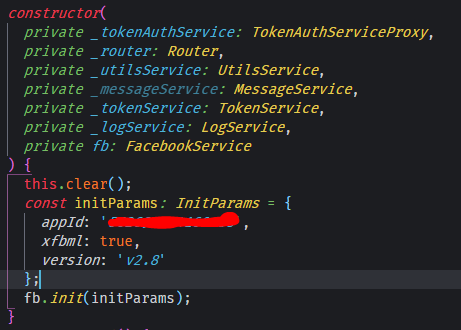
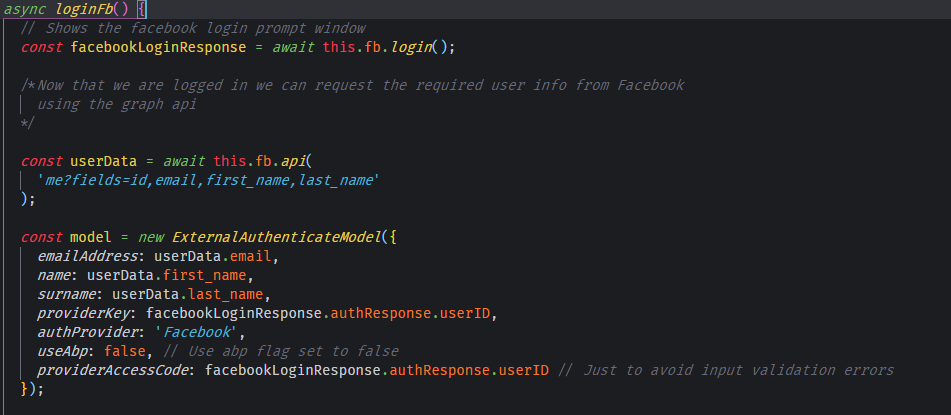
Then i created an async function called loginFb, which will be responsible for the entire login process
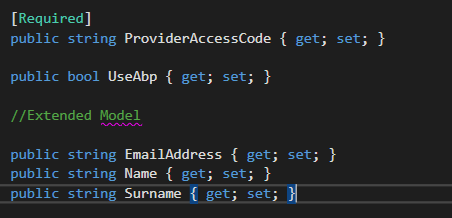
As you can see i extended the ExternalAuthenticateModel in my visual studio project adding some new properties
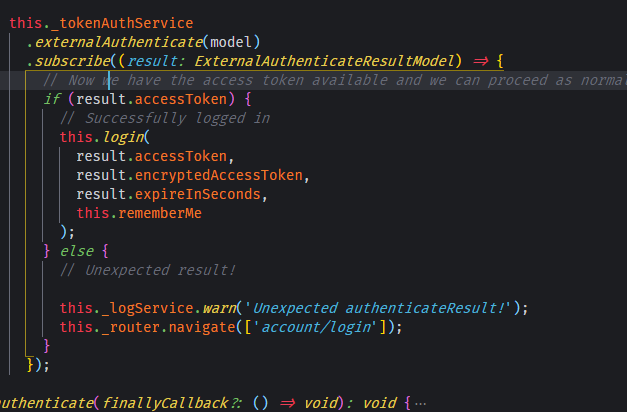
So, in the next step i call the ExternalAuthenticate method from the _tokenAuthService and when the result is successful i just proceed as normal.
And finally on my LoginComponent i just added a button calling the method
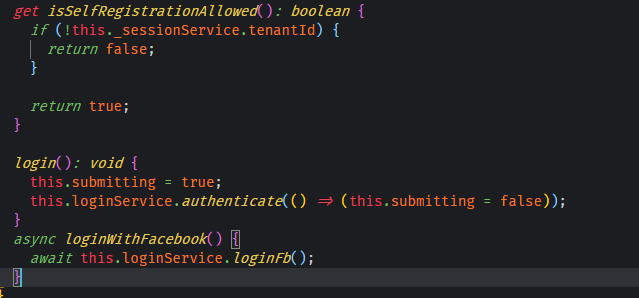
SERVER SIDE
In the server side i followed the instructions of the Facebook external login setup
Next i modified the ExternalAuthenticate method in the TokenAuthController.cs file in the Web.Core project as follows
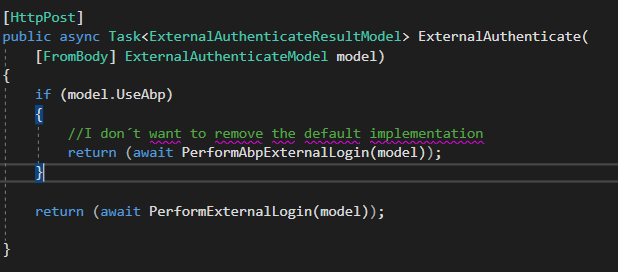
So as you can see i use the UseAbp flag to switch functions, the important one in this case is PerformExternalLogin, which do exactly the same as the default implementations with just one or two differences.
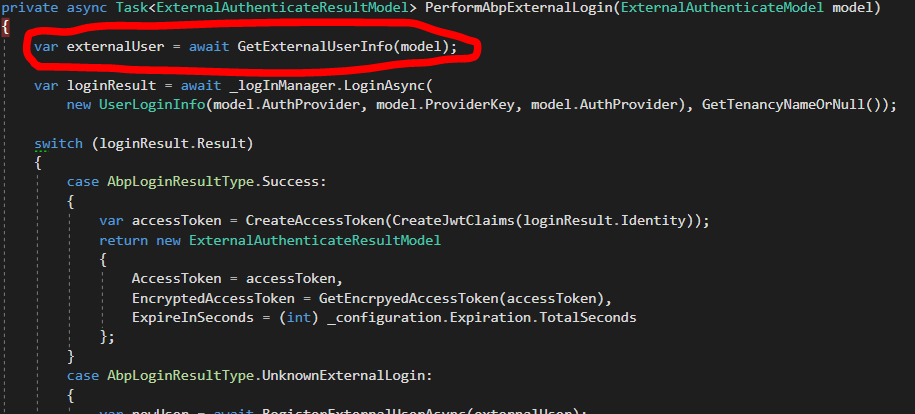
The GetExternalUserInfo function was removed
And in the AbpLoginResultType.UnknownExternalLogin case i added this
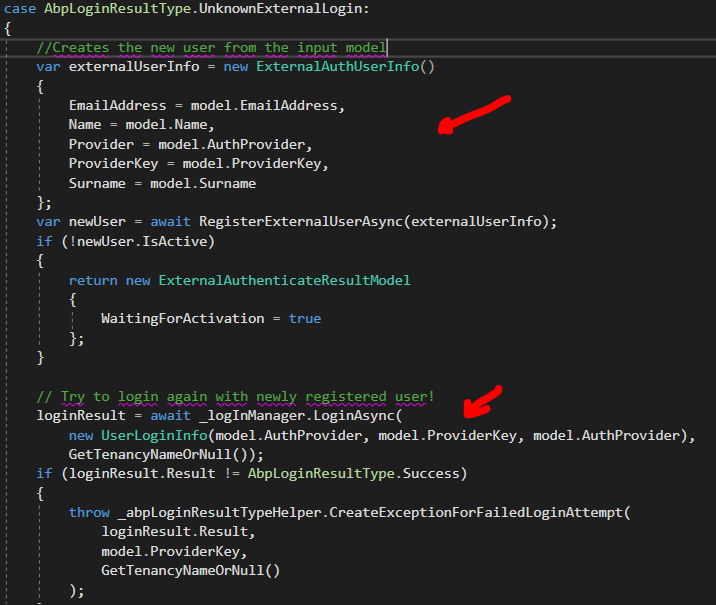
As i mentioned before i extended the ExternalAuthenticateModel with the required properties for this to work.
And that´s it, it works for me, for Facebook at least :P ...
I dont know if this is a good practice but i hope this helps someone,
in any case here is a gist if you wanna see how i did it
https://gist.github.com/periface/ad4ebc968ad65ec7c6b7d40050c0012b
PD: SORRY FOR MY BAD ENGLISH :/
 periface
on 17 Oct 2018
periface
on 17 Oct 2018
Hey @periface, thanks for chiming in.
There is a bad practice in there unfortunately. The issue is that you are trusting the name and email address that the user gives you, instead of pulling it from Facebook. So I could give you my facebook authentication code, but then I could send you a different email address (not registered to Facebook) and your system would accept that, and also my name.
This isn't a big issue if you are also doing email confirmation, but social logins usually try to skip that step.
This is actually a step I was stuck on for quite some time, this is why we have to write annoying backend API calls for each provider.
worthy7
on 18 Oct 2018
Well, actually the user´s name, surname and email address are obtained from the graph api provided by facebook.
Here:
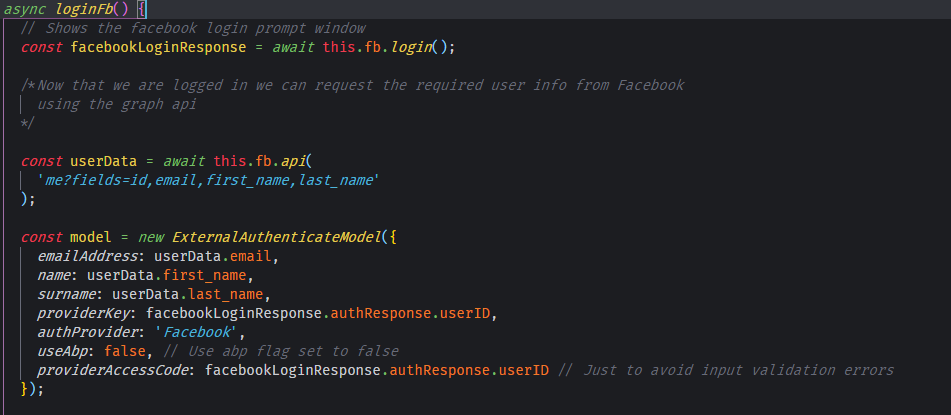
It is not provided by the user, i dont know if you are talking about that, but anyways ill check it out, thx for the feedback :)
periface
on 18 Oct 2018
Yea I know but that is front end code - which means the user could just
fake a request to your server - that's why I'm talking about, sorry it
wasn't clear.
So I could use PostMan for example, to make a fake request to your server
and you aren't checking it is legit my email/username.
On Thu, 18 Oct 2018 at 09:58, Alan Torres notifications@github.com wrote:
Well, actually the user name, surname and email address are obtained from
the graph api provided by facebook.Here:
[image: image]
https://user-images.githubusercontent.com/8449812/47125018-b457d980-d246-11e8-988f-8c09a025da96.pngIt is provided by the user, i dont know if you are talking about that, but
anyways ill check it out, thx for the feedback :)—
You are receiving this because you were mentioned.
Reply to this email directly, view it on GitHub
https://github.com/aspnetboilerplate/aspnetboilerplate/issues/3342#issuecomment-430838961,
or mute the thread
https://github.com/notifications/unsubscribe-auth/AEirH6p1AUIXfGw_O-A97xmSmFY75BPRks5ul9IfgaJpZM4T365-
.
worthy7
on 18 Oct 2018
You are right, i´ll check that out, there has to be an easier way to achieve the social login stuff :smile:, thanks again.
periface
on 18 Oct 2018
Further to my comments in the accepted answer on this SO post it would be beyond wonderful to get some documentation on how to properly implement social authentication with ABP.
 mos-ie
on 20 Nov 2018
mos-ie
on 20 Nov 2018
Related issues
 evannielsen
·
30Comments
evannielsen
·
30Comments
 alandillon
·
28Comments
alandillon
·
28Comments
 ahmedhassieb
·
26Comments
ahmedhassieb
·
26Comments
 sylfree9999
·
37Comments
hikalkan
·
42Comments
sylfree9999
·
37Comments
hikalkan
·
42Comments
Most helpful comment
Further to my comments in the accepted answer on this SO post it would be beyond wonderful to get some documentation on how to properly implement social authentication with ABP.