Aspnetboilerplate: MVC SPA Template is broken
Hi,
I have downloaded the newest template from homepage, mvc+spa+entity framework.
But after nuget restoration, there are still some references issues unfixed.
For example:
The type 'Type' is defined in an assembly that is not referenced. You must add a reference to assembly 'netstandard, Version=2.0.0.0, Culture=neutral, PublicKeyToken=cc7b13ffcd2ddd51'. Test.Core C:\Users\[user]\Desktop\Test\3.0.0\src\Test.Core\TestCoreModule.cs
Can you please fix those minor issues?
Abp package version: 3.0.0
Base framework: .Net 4.6.1
 sylfree9999
All 37 comments
Visual Studio version?
 acjh
on 11 Sep 2017
acjh
on 11 Sep 2017
Hi @sylfree9999 , It does not work with VS 2015, can you try with VS 2017 (with latest update if possible ) ?
If you face a runtime error, you can delete bin folder and run your project again.
 ismcagdas
on 11 Sep 2017
ismcagdas
on 11 Sep 2017
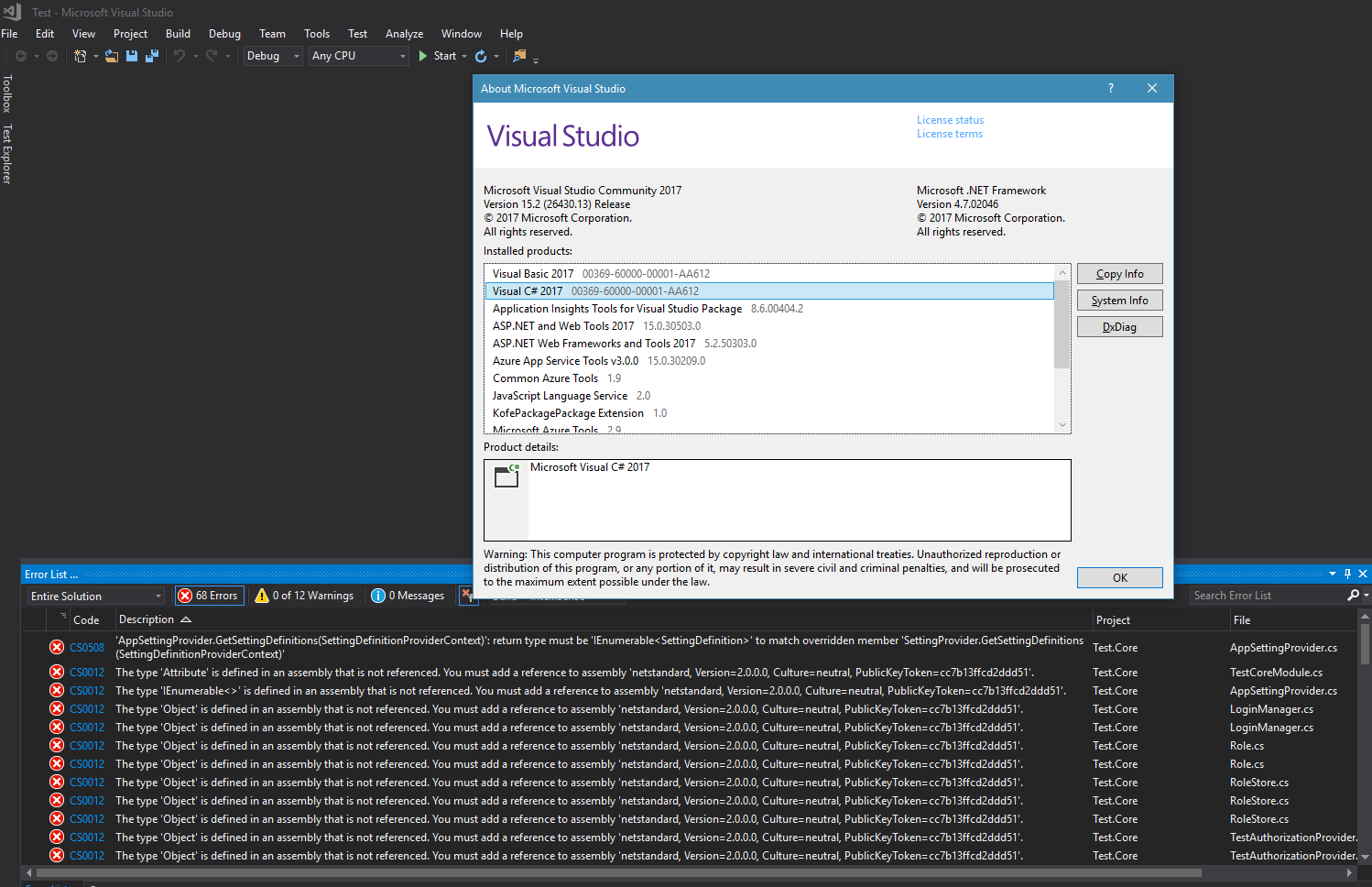
@acjh @ismcagdas I have tried both vs2015 and vs2017, still with no success. Below is the screenshot from vs2017. Am I missing something?
sylfree9999
on 12 Sep 2017

VS2017 15.3.3

 cuibty
on 12 Sep 2017
cuibty
on 12 Sep 2017
@cuibty Are you in @sylfree9999's team? VS2017 15.3.3 should work - are you getting the same error?
@sylfree9999 For VS2015, install NETStandard.Library.NETFramework package.
acjh
on 12 Sep 2017
@acjh
we are not a team
not the same error
nuget restore , references warning
cuibty
on 12 Sep 2017
@cuibty Create a new issue since you have a different error. Post the warnings from Error List there.
acjh
on 12 Sep 2017
@sylfree9999 For VS2017, install version 15.3.3 - you are using version 15.2 in your screenshot.
acjh
on 12 Sep 2017
@acjh @ismcagdas By installing the latest visual studio version(15.3.3) and deleting the bin folder after the first run, it can work now. But I'm seeing the same error as @cuibty showed above in the project. Anyway, thanks very much for your support.
sylfree9999
on 12 Sep 2017
I have the same thing. Did you fix it?
 don59
on 12 Sep 2017
don59
on 12 Sep 2017
@don59 Same thing as in the reference error or the warnings?
acjh
on 12 Sep 2017
@acjh I have upgraded the VS2017 to 15.3.3, and It works. Thanks.
don59
on 12 Sep 2017
VS2015.3 template doesn't work:
error CS0012: The type 'Object' is defined in an assembly that is not referenced. You must add a reference to assembly 'netstandard, Version=2.0.0.0, Culture=neutra
 aciechomski
on 12 Sep 2017
aciechomski
on 12 Sep 2017
@aciechomski For VS2015, install NETStandard.Library.NETFramework package.
acjh
on 12 Sep 2017
i have VS 2017 15.3.3 installed and the project is not running with the same reference error as above, i tried to delete the bin and obj of web project and rebuild and i still get the same errors..
What should i do to fix them ?
 Korigoth
on 14 Sep 2017
Korigoth
on 14 Sep 2017
@Korigoth Can you post a screenshot like this?
acjh
on 14 Sep 2017
i just updated VS 2017 to 15.3.4 to see if it's better and i still have the same issues

Korigoth
on 14 Sep 2017
Can you post the error message?
acjh
on 14 Sep 2017
Here is the references with problems
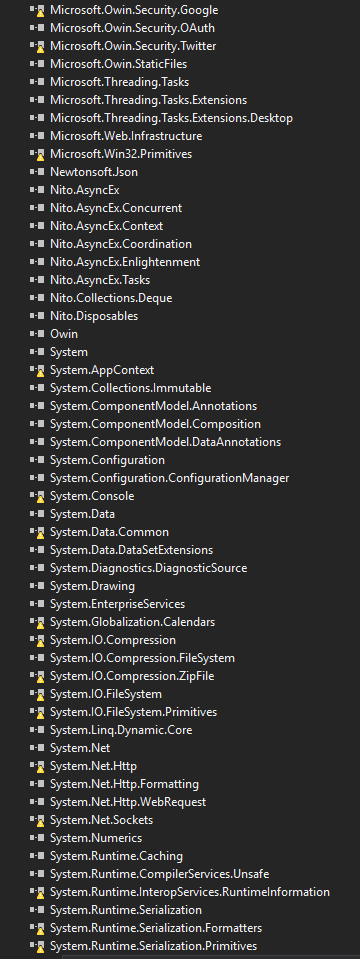
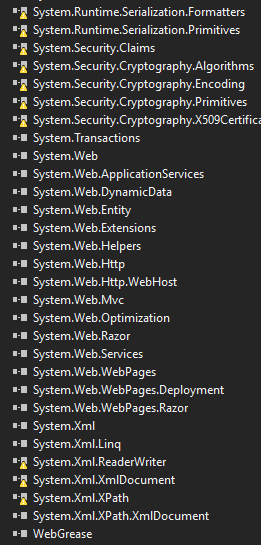
The project is running now! but i have a shit tons of references with problems
Korigoth
on 14 Sep 2017
Those are warnings, not errors.
Anyway I found a solution:
Run VS as administrator, then opening the project resolves the warnings.
Subsequently, you can open the project without running as administrator.
cc: @sylfree9999, @cuibty
acjh
on 14 Sep 2017
How do you resolve the warnings? i did open VS as Admin then my project. Rebuild and they are still there with warnings.
Korigoth
on 14 Sep 2017
Is there a way to resolve the warnings ?
Korigoth
on 15 Sep 2017
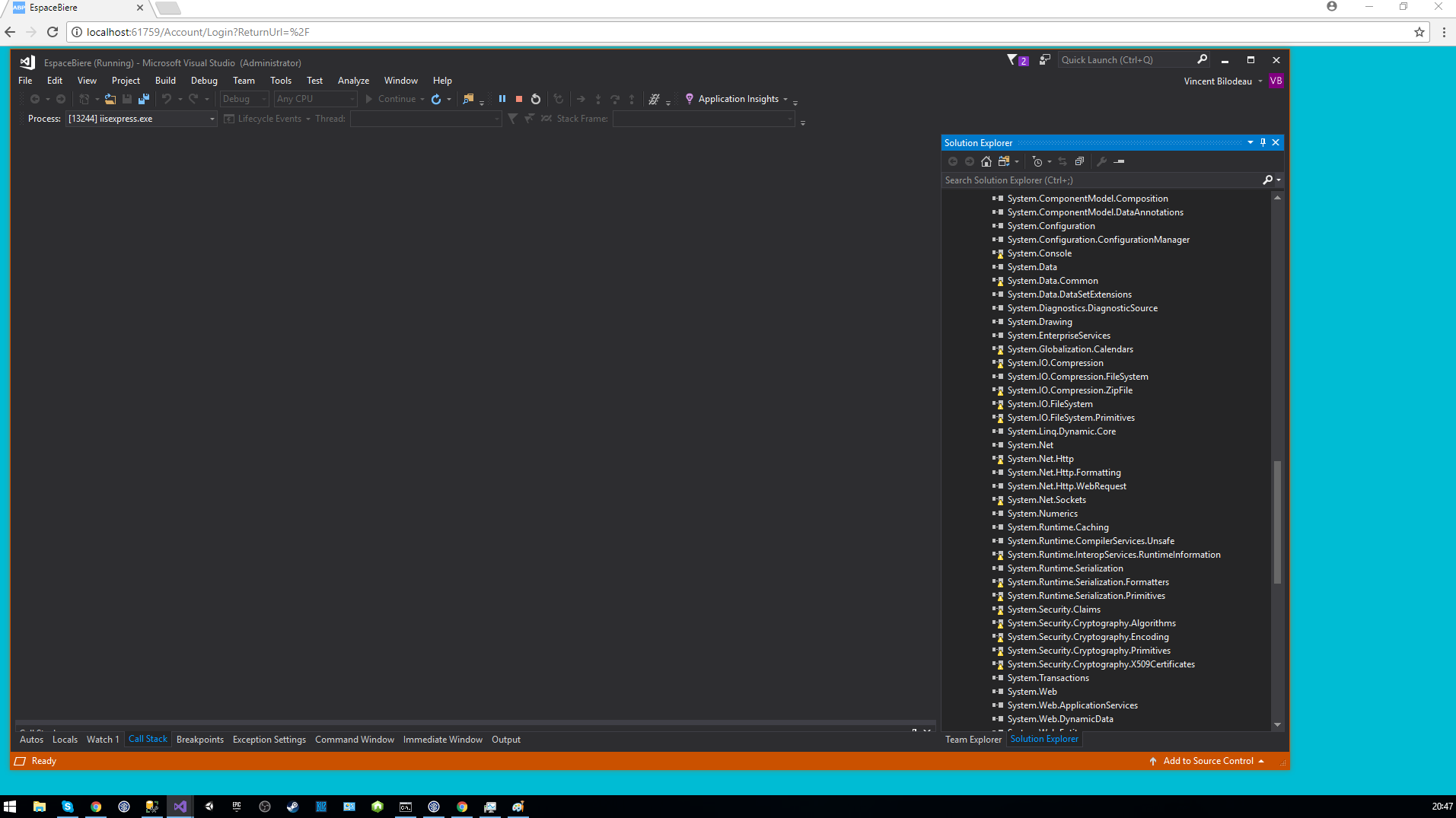
Can you post a screenshot of your project open in VS while running (not just logged in) as administrator?
acjh
on 15 Sep 2017
how can i show that i run as Admin ? Do they write it somewhere (Windows 10)
in Task Manager it doesn't show i run it as Admin
Except that screen that proof i know how to start it as admin
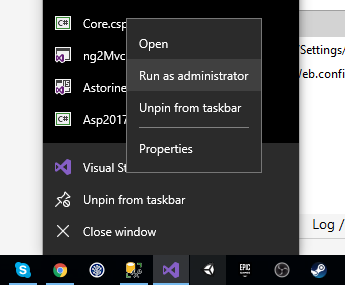
Korigoth
on 15 Sep 2017
Here is the screen of me running the app and still having all the reference warnings
Korigoth
on 15 Sep 2017
+1
cuibty
on 15 Sep 2017
Hi @Korigoth those warnings are not related to ABP, it is related to VS and it's tooling.
Are you able to build your solution ?
ismcagdas
on 15 Sep 2017
@ismcagdas
Yea, i'm able to build the solution, but why is there so much new References unused in the new template?
and it seem's that the web config doesn't have any dependentAssembly tag about them! I think it's the main problems about those references.
I think it should be fixed in the template by either removing them or fixing the dependencies?
Korigoth
on 15 Sep 2017
@Korigoth have you tried it with VS 2017 v15.3.4 ?
ismcagdas
on 17 Sep 2017
@ismcagdas Yes, it is my current version.
Korigoth
on 18 Sep 2017
hi all, i get the same error , a lot of references with a warning, and i cant run my proyect, i can compile but get reference errors of my libraries.
Proyect : Asp.Net mvc fw 4.6.1 v3.0.0 ABP
Vs version : v15.3.4
tried to update my proyect ( from 1.5.1 to 3.0.0 ) and create a new proyect ( download from the abp page , a mvc startup template ) and get the same error in two cases.
hope everyone can help us.
thanks in advice!
 linachu
on 18 Sep 2017
linachu
on 18 Sep 2017
@ismcagdas We started a DotNetCore2 + Angular4 template from VS2017 yesterday at job. I've discovered that all the reference with warning in ABP (MVC 5 template) were from Microsoft.NETCore.App.
I dont know if it can help you guys to fix thoses warnings in the template?
The real problem is we all need to remove thoses references by hand each time we create a template or we are getting a big list of reference warning in the project.
Korigoth
on 20 Sep 2017
@Korigoth you can run the app removing the bad references??
the iss throw an error " netfx.conflicts.(something)" can resolve and blabla...
i've tried remove all the bad references from all the projects but nothing at the moment.
thanks
linachu
on 20 Sep 2017
hi guys !! i have good news !!
at least searching for a solution, i have found this, and it works!
this is the link to the solution https://github.com/dotnet/corefx/issues/23229#issuecomment-322968208
in my case, this do the trick
<Target Name="UpdateOriginalItemSpecs" AfterTargets="ResolveAssemblyReferences">
    <ItemGroup>
        <ReferencePath>
            <OriginalItemSpec>%(ReferencePath.FileName)</OriginalItemSpec>
        </ReferencePath>
    </ItemGroup>
</Target>
now the empty solution ( the downloaded template v3.0.0 asp.net mvc ) is working, now its time to update my solution from 1.5.1 to 3.0.0. i hope works like this.
@Korigoth try it !
regards
linachu
on 21 Sep 2017
@linachu we dont use IIS yet, but may be we are going to use it, we dont know yet if we are going on Azure or on promise server...
i will definitly check this csproj modification if we are going on promise
Korigoth
on 21 Sep 2017
@linachu thks save me a lot of time!
 andmattia
on 9 Oct 2017
andmattia
on 9 Oct 2017
Fixed by https://github.com/dotnet/sdk/issues/1499 in .NET Core 2.1 SDK
acjh
on 3 Jun 2018
Related issues
 okezieokpara
·
59Comments
okezieokpara
·
59Comments
 hikalkan
·
42Comments
hikalkan
·
48Comments
hikalkan
·
42Comments
hikalkan
·
48Comments
 beriniwlew
·
31Comments
beriniwlew
·
31Comments
 SmallShrimp
·
56Comments
SmallShrimp
·
56Comments
Most helpful comment
hi guys !! i have good news !!
at least searching for a solution, i have found this, and it works!
this is the link to the solution https://github.com/dotnet/corefx/issues/23229#issuecomment-322968208
in my case, this do the trick
now the empty solution ( the downloaded template v3.0.0 asp.net mvc ) is working, now its time to update my solution from 1.5.1 to 3.0.0. i hope works like this.
@Korigoth try it !
regards