Aspnetboilerplate: Abp.UI.UserFriendlyException: 'Role name Admin is already taken.'
I seem to have an issue when creating a new Tenant.
It is like it isn't using tenant ID to create a role.
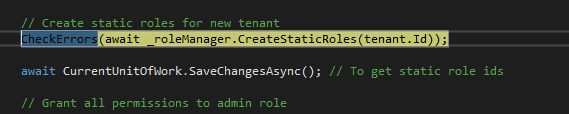
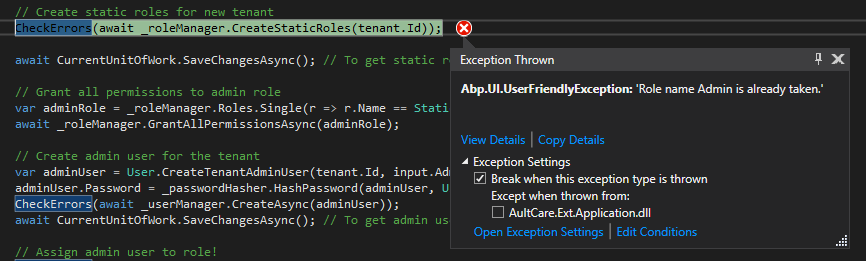
 alandillon
All 28 comments
Hi @kyurthich,
To better understand the problem, Could you explain what did you do step by step before occuring this error?
 alirizaadiyahsi
on 25 Oct 2017
alirizaadiyahsi
on 25 Oct 2017
You should switch to the related tenant to be able to work with tenant manager.
C#
using(CurrentUnitOfWork.SetTenantId(tenant.Id))
{
   ...move your code here!
}
 hikalkan
on 25 Oct 2017
hikalkan
on 25 Oct 2017
Yeah I will see if I can get that information today.
On Wed, Oct 25, 2017 at 1:30 AM, alirizaadiyahsi notifications@github.com
wrote:
Hi @kyurthich https://github.com/kyurthich,
To better understand the problem, Could you explain what did you do step
by step before occuring this error?—
You are receiving this because you were mentioned.
Reply to this email directly, view it on GitHub
https://github.com/aspnetboilerplate/aspnetboilerplate/issues/2634#issuecomment-339218916,
or mute the thread
https://github.com/notifications/unsubscribe-auth/ADLUGQgvYJatM2pyHG3bqcQnW_G06LkYks5svsd8gaJpZM4QEx32
.
--
--Alan
alandillon
on 26 Oct 2017
I get this error trying to set up a new tenant in the angular project.
@kyurthich, did you ever figure it out?
 beriniwlew
on 28 Nov 2017
beriniwlew
on 28 Nov 2017
@beriniwlew have you done any change that may effect it. Can we reproduce the problem with a new startup template? If so, we will test it. Thanks.
hikalkan
on 29 Nov 2017
There is not an exception while creating a new tenant in new startup template.
 yekalkan
on 29 Nov 2017
yekalkan
on 29 Nov 2017
I've been working hard on the project, but only recently got to the angular portion.
What type of things should I be watching out for, then?
How can I debug this?
I've got 2 admin roles, and 2 admin users in the database. Is this normal?
I have edited the Tenant.cs to include additional properties, but they are not required.
I'm also using SQL Server 2008 R2, if that helps.
beriniwlew
on 29 Nov 2017
I would also like to point out that I'm getting a "User name 'admin' is already taken." error when attempting to edit the email address of the default tenant user (admin).
beriniwlew
on 29 Nov 2017
@beriniwlew the two records for user and role are belong to host and tenant. So, you have one admin role and one admin user for host (TenantId=null) and same for default tenant (TenantId=1). So, this is the expected behaviour.
I would also like to point out that I'm getting a "User name 'admin' is already taken." error when attempting to edit the email address of the default tenant user (admin).
This might be a bug, we will check it.
Are you still getting error for tenant creation ? If so, can you share your tenant creation code ?
 ismcagdas
on 29 Nov 2017
ismcagdas
on 29 Nov 2017
I'm still getting the error for tenant creation, even after rebuilding the database.
I have not changed anything in the tenant creation code, all I did was add a few parameters, which aren't being used yet. I will remove them and try again, just to be sure.
beriniwlew
on 29 Nov 2017
I removed the new properties in tenant, but it had no effect.
beriniwlew
on 29 Nov 2017
@beriniwlew just to be sure, are you trying this on ASP.NET Core & Angular 2 project ?
ismcagdas
on 29 Nov 2017
Yes, using Full .NET Framework.
beriniwlew
on 29 Nov 2017
I could not reproduce this on ASP.NET Core & Angular 2 project, using Full .NET Framework.
 acjh
on 26 Mar 2018
acjh
on 26 Mar 2018
@kyurthich do you resolve this issue? I have got the same issue with the latest ASP.NET Core & Angular 2 template.
 zclmoon
on 24 May 2018
zclmoon
on 24 May 2018
It will create static roles when create a new tenant in Abp.
[UnitOfWork]
        public virtual async Task<IdentityResult> CreateStaticRoles(int tenantId)
        {
            var staticRoleDefinitions = RoleManagementConfig.StaticRoles.Where(sr => sr.Side == MultiTenancySides.Tenant);

            using (_unitOfWorkManager.Current.SetTenantId(tenantId))
            {
                foreach (var staticRoleDefinition in staticRoleDefinitions)
                {
                    var role = new TRole
                    {
                        TenantId = tenantId,
                        Name = staticRoleDefinition.RoleName,
                        DisplayName = staticRoleDefinition.RoleName,
                        IsStatic = true
                    };

                    var identityResult = await CreateAsync(role);
                    if (!identityResult.Succeeded)
                    {
                        return identityResult;
                    }
                }
            }

            return IdentityResult.Success;
        }
But the issue is that why check the duplication of role name and display name since the default tenant already create a role which name is the tenant admin. This means that it always cannot pass the duplicate check when create a new tenant? It is wired u guys cannot reproduce. is there any point that I have missed? please kindly help @hikalkan
public virtual async Task<IdentityResult> CheckDuplicateRoleNameAsync(int? expectedRoleId, string name, string displayName)
        {
            var role = await FindByNameAsync(name);
            if (role != null && role.Id != expectedRoleId)
            {
                throw new UserFriendlyException(string.Format(L("RoleNameIsAlreadyTaken"), name));
            }

            role = await FindByDisplayNameAsync(displayName);
            if (role != null && role.Id != expectedRoleId)
            {
                throw new UserFriendlyException(string.Format(L("RoleDisplayNameIsAlreadyTaken"), displayName));
            }

            return IdentityResult.Success;
        }
I have been experiencing the same issue with Role and User validation when using multi tenant feature. Here is how I temporarely fixed it. It would be great to integrate this directly in the project.
First, there is an issue in TenantAppService.cs when granting permissions to admin role in Create method:
// Grant all permissions to admin role
var adminRole = _roleManager.Roles.Single(r => r.Name == StaticRoleNames.Tenants.Admin && r.TenantId == tenant.Id);
In AbpRoleManager, CheckDuplicateRoleNameAsync did not consider multitenancy:
        public override async Task<IdentityResult> CheckDuplicateRoleNameAsync(int? expectedRoleId, string name, string displayName)
        {
            var tenantId = GetCurrentTenantId();

            var role = await FindByNameAsync(name);
            if (role != null && role.Id != expectedRoleId && role.TenantId == tenantId)
            {
                throw new UserFriendlyException(string.Format(L("RoleNameIsAlreadyTaken"), name));
            }

            role = await FindByDisplayNameAsync(displayName);
            if (role != null && role.Id != expectedRoleId && role.TenantId == tenantId)
            {
                throw new UserFriendlyException(string.Format(L("RoleDisplayNameIsAlreadyTaken"), displayName));
            }

            return IdentityResult.Success;
        }
The same this is happening in AbpUserManager
public override async Task<IdentityResult> CheckDuplicateUsernameOrEmailAddressAsync(long? expectedUserId, string userName, string emailAddress)
        {
            var tenantId = GetCurrentTenantId();

            var user = (await FindByNameAsync(userName));
            if (user != null && user.Id != expectedUserId && user.TenantId == tenantId)
            {
                throw new UserFriendlyException(string.Format(L("Identity.DuplicateUserName"), userName));
            }

            user = (await FindByEmailAsync(emailAddress));
            if (user != null && user.Id != expectedUserId && user.TenantId == tenantId)
            {
                throw new UserFriendlyException(string.Format(L("Identity.DuplicateEmail"), emailAddress));
            }

            return IdentityResult.Success;
        }
Having fixed that, the same error occurs, coming this time from Identity Framework.
In order to fix that, I overrided the default RoleValidator (I guess there is a better way to override it for a final solution) :
In RoleManager constructor:
RoleValidators.Clear(); // clear the existing default validator
RoleValidators.Add(new MultitenantRoleValidator());
The new MultitenantRoleValidator class:
using System;
using System.Collections.Generic;
using System.Threading.Tasks;
using Microsoft.AspNetCore.Identity;
using Microsoft.EntityFrameworkCore;

namespace Portal.Authorization.Roles
{
    public class MultitenantRoleValidator : RoleValidator<Role>
    {
        /// <summary>
        /// Creates a new instance of <see cref="RoleValidator{Role}"/>/
        /// </summary>
        /// <param name="errors">The <see cref="IdentityErrorDescriber"/> used to provider error messages.</param>
        public MultitenantRoleValidator(IdentityErrorDescriber errors = null)
        {
            Describer = errors ?? new IdentityErrorDescriber();
        }

        private IdentityErrorDescriber Describer { get; set; }

        /// <summary>
        /// Validates a role as an asynchronous operation.
        /// </summary>
        /// <param name="manager">The <see cref="RoleManager{Role}"/> managing the role store.</param>
        /// <param name="role">The role to validate.</param>
        /// <returns>A <see cref="Task{IdentityResult}"/> that represents the <see cref="IdentityResult"/> of the asynchronous validation.</returns>
        public override async Task<IdentityResult> ValidateAsync(RoleManager<Role> manager, Role role)
        {
            if (manager == null)
            {
                throw new ArgumentNullException(nameof(manager));
            }
            if (role == null)
            {
                throw new ArgumentNullException(nameof(role));
            }
            var errors = new List<IdentityError>();
            await ValidateRoleName(manager, role, errors);
            if (errors.Count > 0)
            {
                return IdentityResult.Failed(errors.ToArray());
            }
            return IdentityResult.Success;
        }


        private async Task ValidateRoleName(
            RoleManager<Role> manager,
            Role role,
            ICollection<IdentityError> errors)
        {
            var roleName = await manager.GetRoleNameAsync(role);
            if (string.IsNullOrWhiteSpace(roleName))
            {
                errors.Add(Describer.InvalidRoleName(roleName));
            }
            else
            {
                var owner = await manager.Roles.FirstOrDefaultAsync(r => r.TenantId == role.TenantId && r.NormalizedName == roleName); // HERE

                if (owner != null &&
                    !string.Equals(await manager.GetRoleIdAsync(owner), await manager.GetRoleIdAsync(role)))
                {
                    errors.Add(Describer.DuplicateRoleName(roleName));
                }
            }
        }

    }
}
Then the same for User validation:
In UserManager constructor:
UserValidators.Clear();
UserValidators.Add(new MultiTenantUserValidator());
And the MultiTenantUserValidator class:
using Microsoft.AspNetCore.Identity;
using Microsoft.EntityFrameworkCore;
using System;
using System.Collections.Generic;
using System.ComponentModel.DataAnnotations;
using System.Linq;
using System.Text;
using System.Threading.Tasks;

namespace Portal.Authorization.Users
{
    class MultiTenantUserValidator : UserValidator<User>
    {
        /// <summary>
        /// Validates the specified <paramref name="user"/> as an asynchronous operation.
        /// </summary>
        /// <param name="manager">The <see cref="UserManager{User}"/> that can be used to retrieve user properties.</param>
        /// <param name="user">The user to validate.</param>
        /// <returns>The <see cref="Task"/> that represents the asynchronous operation, containing the <see cref="IdentityResult"/> of the validation operation.</returns>

        public override async Task<IdentityResult> ValidateAsync(UserManager<User> manager, User user)
        {
            if (manager == null)
            {
                throw new ArgumentNullException(nameof(manager));
            }
            if (user == null)
            {
                throw new ArgumentNullException(nameof(user));
            }
            var errors = new List<IdentityError>();
            await ValidateUserName(manager, user, errors);
            if (manager.Options.User.RequireUniqueEmail)
            {
                await ValidateEmail(manager, user, errors);
            }
            return errors.Count > 0 ? IdentityResult.Failed(errors.ToArray()) : IdentityResult.Success;

        }

        private async Task ValidateUserName(UserManager<User> manager, User user, ICollection<IdentityError> errors)
        {
            var userName = await manager.GetUserNameAsync(user);
            if (string.IsNullOrWhiteSpace(userName))
            {
                errors.Add(Describer.InvalidUserName(userName));
            }
            else if (!string.IsNullOrEmpty(manager.Options.User.AllowedUserNameCharacters) &&
                userName.Any(c => !manager.Options.User.AllowedUserNameCharacters.Contains(c)))
            {
                errors.Add(Describer.InvalidUserName(userName));
            }
            else
            {
                var owner = await manager.Users.FirstOrDefaultAsync(u => u.TenantId == user.TenantId && u.NormalizedUserName == userName); // HERE
                if (owner != null &&
                    !string.Equals(await manager.GetUserIdAsync(owner), await manager.GetUserIdAsync(user)))
                {
                    errors.Add(Describer.DuplicateUserName(userName));
                }
            }
        }

        // make sure email is not empty, valid, and unique
        private async Task ValidateEmail(UserManager<User> manager, User user, List<IdentityError> errors)
        {
            var email = await manager.GetEmailAsync(user);
            if (string.IsNullOrWhiteSpace(email))
            {
                errors.Add(Describer.InvalidEmail(email));
                return;
            }
            if (!new EmailAddressAttribute().IsValid(email))
            {
                errors.Add(Describer.InvalidEmail(email));
                return;
            }
            var owner = await manager.Users.FirstOrDefaultAsync(u => u.TenantId == user.TenantId && u.EmailAddress == email); // HERE
            if (owner != null &&
                !string.Equals(await manager.GetUserIdAsync(owner), await manager.GetUserIdAsync(user)))
            {
                errors.Add(Describer.DuplicateEmail(email));
            }
        }
    }
}
Here are the full working sources, unit tests included:
MultiTenatUserAndRoleValidationFix.zip
A question I would have is about possible redundancy in checking that twice in Identity and Abp. Wouldn't fine just overriding default validators since they seem to do the same job and removing
Abp CheckDuplicateUsernameOrEmailAddressAsync ... ?
Hope that helps :-)
 zetic-be
on 8 Jun 2018
zetic-be
on 8 Jun 2018
AbpUserManager & AbpRoleManager is designed to work in the current tenant. So, most of times, they don't need to consider multi-tenancy.
Also, no need to add TenantId == ... filter to queries thanks to automatic data filtering system.
hikalkan
on 12 Jun 2018
The thing is that creating tenants is done by the host user and so, data filtering is not enabled when using the managers, throwing the exception mentioned in the first post.
As mentioned in the documentation on automatic data filtering:
If the current user is not logged in to the system or the current user is a host user (Host user is an upper-level user that can manage tenants and tenant data), ASP.NET Boilerplate automatically disables the IMustHaveTenant filter. Thus, all data of all tenants can be retrieved to the application. Notice that this is not about security, you should always authorize sensitive data!
zetic-be
on 13 Jun 2018
@zetic-be it says IMustHaveTenant not IMayHaveTenant.
So, can you reproduce this problem using one of ABP templates ?
ismcagdas
on 13 Jun 2018
I use the ..net core template.
To reproduce the issue, just adding the TenantAppService_Tests.cs from the zip I attached in my first post to the Tests project included in the template should do it.
zetic-be
on 13 Jun 2018
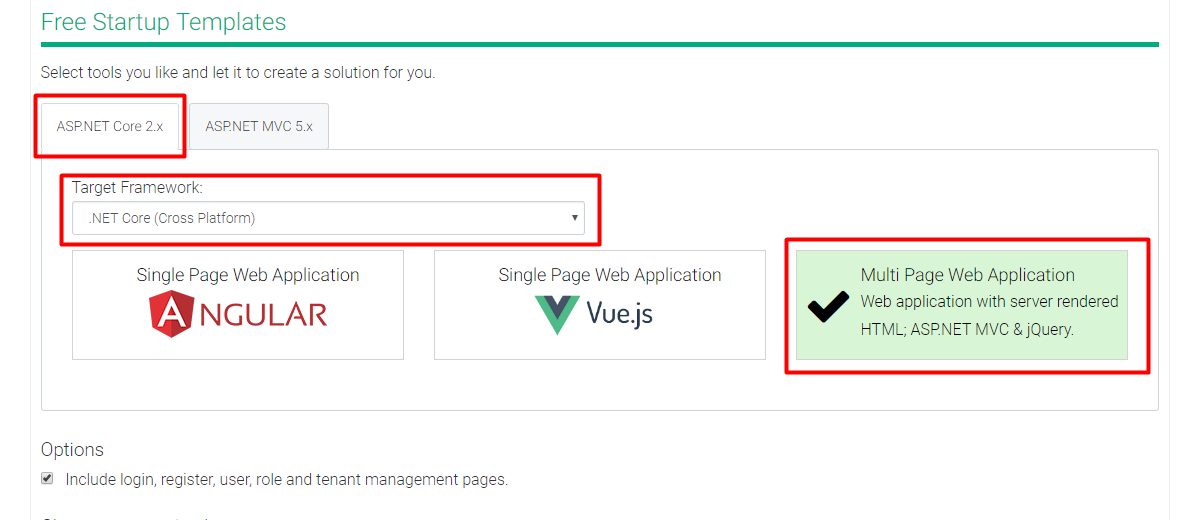
@zetic-be I just downloaded a new template (see screenshot below), added the TenantAppService_Tests to my project and CreateTenant_Test test is passed.
ismcagdas
on 14 Jun 2018
@ismcagdas OK thank you, I probably omitted something for reproducible steps. I will restart a project from scratch and add pieces until problems shows up again ... and share it in zipped file.
zetic-be
on 14 Jun 2018
Hello,
I have more details on how to reproduce the issue.
It does work fine when taking the original template as it is.
The issue is happening in the following situation:
Add two properties to Tenant.cs
using Abp.MultiTenancy;
using System.ComponentModel.DataAnnotations;
using Test.Authorization.Users;

namespace Test.MultiTenancy
{
    public class Tenant : AbpTenant<User>
    {
        public Tenant()
        {
        }

        public Tenant(string tenancyName, string name)
            : base(tenancyName, name)
        {
        }

        [Required]
        public int SomeProperty1 { get; set; }

        [Required]
        public int SomeProperty2 { get; set; }
    }
}
Until there test still pass, the issue comes when adding Index to TenantConfiguration in DbContext.cs
using Microsoft.EntityFrameworkCore;
using Abp.Zero.EntityFrameworkCore;
using Test.Authorization.Roles;
using Test.Authorization.Users;
using Test.MultiTenancy;
using Microsoft.EntityFrameworkCore.Metadata.Builders;

namespace Test.EntityFrameworkCore
{
    public class TestDbContext : AbpZeroDbContext<Tenant, Role, User, TestDbContext>
    {
        /* Define a DbSet for each entity of the application */

        public TestDbContext(DbContextOptions<TestDbContext> options)
            : base(options)
        {
        }

        protected override void OnModelCreating(ModelBuilder modelBuilder)
        {
            modelBuilder.ApplyConfiguration(new TenantConfiguration());
        }
    }

    class TenantConfiguration : IEntityTypeConfiguration<Tenant>
    {
        public void Configure(EntityTypeBuilder<Tenant> builder)
        {
            builder.HasIndex(t => new { t.SomeProperty1, t.SomeProperty2 }).IsUnique();
        }
    }
}
Here is a zip file with reproducible test:
TestTenantIssue.zip
So these modifications seem to break something. How would you suggest to fix it?
zetic-be
on 15 Jun 2018
@zetic-be is it this test ?
```c#
[MultiTenantFact]
public async Task CreateTenant_Test()
{
// Arrange
LoginAsHostAdmin();
// Act
await _tenantAppService.Create(
    new CreateTenantDto
    {
        Name = "NewTenant",
        TenancyName = "NewTenant",
        AdminEmailAddress = "[email protected]"
    });
}
```
If so, you are not providing required values (SomeProperty1 and SomeProperty2).
ismcagdas
on 16 Jun 2018
@ismcagdas yes, you are right. I should have kept those Properties in the project. I kind of reduced it to the minimum required to get that error.
So here is an updated version with the properties.
TenantAppService_Tests.cs
[MultiTenantFact]
        public async Task CreateTenant_Test()
        {
            // Arrange
            LoginAsHostAdmin();

            // Act
            await _tenantAppService.Create(
                new CreateTenantDto
                {
                    Name = "NewTenant",
                    TenancyName = "NewTenant",
                    AdminEmailAddress = "[email protected]",
                    SomeProperty1 = 999,
                    SomeProperty2 = 999
                });
        }
Modified CreateTenantDto.cs :
using System.ComponentModel.DataAnnotations;
using Abp.Authorization.Users;
using Abp.AutoMapper;
using Abp.MultiTenancy;

namespace Test.MultiTenancy.Dto
{
    [AutoMapTo(typeof(Tenant))]
    public class CreateTenantDto
    {
        [Required]
        [StringLength(AbpTenantBase.MaxTenancyNameLength)]
        [RegularExpression(AbpTenantBase.TenancyNameRegex)]
        public string TenancyName { get; set; }

        [Required]
        [StringLength(AbpTenantBase.MaxNameLength)]
        public string Name { get; set; }

        [Required]
        [StringLength(AbpUserBase.MaxEmailAddressLength)]
        public string AdminEmailAddress { get; set; }

        [StringLength(AbpTenantBase.MaxConnectionStringLength)]
        public string ConnectionString { get; set; }

        public bool IsActive {get; set;}

        [Required]
        public int SomeProperty1 { get; set; }

        [Required]
        public int SomeProperty2 { get; set; }
    }
}
I also checked in tenantAppService, added properties are properly mapped from CreateTenantDto to Tenant when doing :
            // Create tenant
            var tenant = ObjectMapper.Map<Tenant>(input);
Error still occurs.
zetic-be
on 17 Jun 2018
@zetic-be found the problem on your project. You are not calling base.OnModelCreating(modelBuilder);.
The OnModelCreating of your DbContext must be like below. Could you try that ?
```c#
protected override void OnModelCreating(ModelBuilder modelBuilder)
{
base.OnModelCreating(modelBuilder);
modelBuilder.ApplyConfiguration(new TenantConfiguration());
}
```
ismcagdas
on 22 Jun 2018
Thank you a lot for investigating this @ismcagdas, indeed this solves the problem. I kind of disabled everything by forgetting this line.
This issue can probably be closed now.
zetic-be
on 22 Jun 2018
Related issues
 maxkol
·
26Comments
maxkol
·
26Comments
 abolfazlmohammadiseif
·
29Comments
abolfazlmohammadiseif
·
29Comments
 worthy7
·
30Comments
worthy7
·
30Comments
 sylfree9999
·
37Comments
sylfree9999
·
37Comments
 brunobertechini
·
78Comments
brunobertechini
·
78Comments