Just wondering is there any installation package available for centos? current installation guide says it's available for debian/ubuntu, fedora, arch/manjaro only.
if not, is there a chance of centos package in near future?
 johnshumon
All 88 comments
We don't have any CentOS packages at the moment but you can try if one of the Fedora packages work for you.
 KlaasT
on 7 Feb 2018
KlaasT
on 7 Feb 2018
curl -s https://packagecloud.io/install/repositories/asbru-cm/asbru-cm/script.rpm.sh | sudo bash
Detected operating system as centos/7.
Checking for curl...
Detected curl...
Downloading repository file: https://packagecloud.io/install/repositories/asbru-cm/asbru-cm/config_file.repo?os=centos&dist=7&source=script
done.
Installing pygpgme to verify GPG signatures...
Loaded plugins: fastestmirror, langpacks
asbru-cm_asbru-cm-source/signature                                                                                                                                                                                     |  836 B  00:00:00
asbru-cm_asbru-cm-source/signature                                                                                                                                                                                     |  951 B  00:00:00 !!!
Loading mirror speeds from cached hostfile
 * base: mirror.nsc.liu.se
 * epel: epel.mirror.far.fi
 * extras: mirror.nsc.liu.se
 * updates: mirror.nsc.liu.se
Package pygpgme-0.3-9.el7.x86_64 already installed and latest version
Nothing to do
Installing yum-utils...
Loaded plugins: fastestmirror, langpacks
Loading mirror speeds from cached hostfile
 * base: mirror.nsc.liu.se
 * epel: epel.mirror.far.fi
 * extras: mirror.nsc.liu.se
 * updates: mirror.nsc.liu.se
Package yum-utils-1.1.31-42.el7.noarch already installed and latest version
Nothing to do
Generating yum cache for asbru-cm_asbru-cm...

The repository is setup! You can now install packages.
and then:
sudo yum install asbru-cm
Loaded plugins: fastestmirror, langpacks
Loading mirror speeds from cached hostfile
 * base: mirror.nsc.liu.se
 * epel: epel.mirror.far.fi
 * extras: mirror.nsc.liu.se
 * updates: mirror.nsc.liu.se
No package asbru-cm available.
Error: Nothing to do
Any idea?
johnshumon
on 7 Feb 2018
We are trying to build CentOS packages but that doesn't seem to be very easy. However in the mean time you can try to download RPMs directly at https://packagecloud.io/asbru-cm/asbru-cm and test them if they work. That would help us in the future if the dependencies might already work for CentOS.
KlaasT
on 9 Feb 2018
See issue #30
We would really need help on dependencies from CentOS packagers. If you can find time to contact them and ask how to get the perl-Gnome2-Vte package into CentOS, I'd believe Ásbrú will then be easy to deliver on that distribution.
 gfrenoy
on 15 Feb 2018
gfrenoy
on 15 Feb 2018
@KlaasT That didn't work.
sudo rpm -ivh asbru-cm-5.0.0-1.fc26.noarch.rpm
[sudo] password for ashumon:
error: Failed dependencies:
    perl(Crypt::Blowfish) is needed by asbru-cm-5.0.0-1.fc26.noarch
    perl(Crypt::Rijndael) is needed by asbru-cm-5.0.0-1.fc26.noarch
    perl(Expect) is needed by asbru-cm-5.0.0-1.fc26.noarch
    perl(Gnome2::GConf) is needed by asbru-cm-5.0.0-1.fc26.noarch
    perl(Gtk2::AppIndicator) is needed by asbru-cm-5.0.0-1.fc26.noarch
    perl(Gtk2::Ex::Simple::List) is needed by asbru-cm-5.0.0-1.fc26.noarch
    perl(Gtk2::Ex::Simple::TiedCommon) is needed by asbru-cm-5.0.0-1.fc26.noarch
    perl(Gtk2::GladeXML) is needed by asbru-cm-5.0.0-1.fc26.noarch
    perl(Gtk2::SourceView2) is needed by asbru-cm-5.0.0-1.fc26.noarch
    perl(Gtk2::Unique) is needed by asbru-cm-5.0.0-1.fc26.noarch
    perl(HTTP::Proxy) is needed by asbru-cm-5.0.0-1.fc26.noarch
    perl(IO::Stty) is needed by asbru-cm-5.0.0-1.fc26.noarch
    perl(IO::Tty) is needed by asbru-cm-5.0.0-1.fc26.noarch
    perl(Net::ARP) is needed by asbru-cm-5.0.0-1.fc26.noarch
    perl(XML::Parser) is needed by asbru-cm-5.0.0-1.fc26.noarch
    perl-Gnome2-Vte is needed by asbru-cm-5.0.0-1.fc26.noarch
@gfrenoy perl-Gnome2-Vte package can be installed using cpan. I have managed to run PAC Manager 4.5.5.7 which is also based on perl-Gnome2-Vte. Have a look at this: script. All the necessary dependencies of perl are installed using cpan. This might give an idea how dependencies of asbru for centos can be sorted.
johnshumon
on 21 Feb 2018
So, as said in issue #30, this is an issue that needs to be addressed by RHEL7/CentOS packagers...
Anyway, let's try to help with our limited CentOS knownledge :-/
_Disclaimer: I did not try any of these options, use it at your own risk !_
For the Perl & Gtk2 dependencies, don't you have to be bound to a "repository" that would give you those ? Something like the EPEL repository ?
And in any case, if you managed the dependencies by yourself, you can override the dependency check with the rpm option "--nodeps". Or, better, get a copy of the git repository and start asbru-cm.
And if you could find someone that has experience in making packages for CentOS, please contact him/her to help us :)
gfrenoy
on 22 Feb 2018
A solution to this would be Flatpak support, see #83
 Croydon
on 9 May 2018
Croydon
on 9 May 2018
@Croydon I don't really believe that Flatpak would help us here very much. We have many unsolved dependencies on CentOS which makes things problematic.
KlaasT
on 9 May 2018
@KlaasT When using Flatpak you can choose between a set of common runtimes which bundle a lot of dependencies (http://docs.flatpak.org/en/latest/available-runtimes.html) and beyond that you bundle other dependencies in your individual Flatpak. If it runs somewhere it should run anywhere.
Croydon
on 9 May 2018
Hi @gfrenoy
I was able to get asbru-cm running on RHEL 7.5.
I'm a PAC user and I'll test asbru-cm during the next days.
From a very brief test, everything seems mostly fine.
Just one annoying glitch found so far:
When iconized, in order to show the asbru-cm main window, a double click on the systray icon is not enough; one click (left or right both are showing the context menu) plus another click in the "Show Window" option are required.
Some of the necessary dependent packages are available from EPEL.
The dependent packages that are unavailable from EPEL needs to be built from source.
Most of the times the Fedora sources compiles fine on RHEL/CentOS.
I've just built the missing packages in my system from the Fedora 27 sources ( https://apps.fedoraproject.org/packages/). Just one of them (perl-HTTP-Proxy) needed a very simple patch.
I'm not a packager nor a developer and I do not have much time to dedicate to this, but if someone is interested, I can explain how-to build the missing packages.
Best regards.
 popxunga
on 9 Jul 2018
popxunga
on 9 Jul 2018
Hi, any news on here with CentOS 8? I was able to get it to work with CentOS 7, but no look with CentOS 8.
 x-wolverine-x
on 2 Oct 2019
x-wolverine-x
on 2 Oct 2019
I will have a look at that. We are currently building Asbru on the bases of GTK3. Maybe that will bring us a step forward to CentOS 8.
KlaasT
on 2 Oct 2019
For CentOS 7 x86_64 users, you can try with the repo from Nux Dextop. http://li.nux.ro/download/nux/dextop/el7/x86_64/
x-wolverine-x
on 2 Oct 2019
The first CentOS 7/8 builds are done for our gtk3 branch. However we will probably need to fix quite some dependencies of the rpm package before it can be installed and run.
You will find it here. https://packagecloud.io/asbru-cm/gtk3/packages/el/8/asbru-cm-5.2.90~1570527220-1.el8.noarch.rpm
KlaasT
on 8 Oct 2019
Thx, I will wait for a ready to install version then.
x-wolverine-x
on 8 Oct 2019
Hi ...
I've just built the missing el7 packages from source and the latest asbru-cm-6.0.0~1570889814-1.el7.src.rpm as well using the following source packages:
perl-ExtUtils-Manifest-1.72-439.el7.src.rpm
perl-Gtk3-SimpleList-0.18-4.el7.src.rpm
perl-ExtUtils-MakeMaker-6.98-1.el7.src.rpm
perl-CPAN-Meta-2.150010-439.el7.src.rpm
perl-JSON-PP-4.04-2.el7.src.rpm
perl-CPAN-Meta-YAML-0.018-440.el7.src.rpm
All them can be found here except the perl-ExtUtils-MakeMaker-6.98-1.el7.src.rpm that I've found here.
Briefly tested asbru 6 and found no issues so far.
Let me know If I can help somehow.
Regards
popxunga
on 13 Oct 2019
Thanks for your work. I think the goal should be that the end user wouldn't have to build any packages. Maybe we can resolve these dependencies from the OS repositories.
KlaasT
on 13 Oct 2019
Of course that's the goal but considering that the el7 platform is now at
least 3 years old, the reality is that the dependent packages required for
pac 4.5.x, asbru-cm 5.x or asbru-cm 6.x are still nowhere.
The EPEL 7 should/could be the repo where to make them available.
Another possible (?) alternative would be store them in the same repo from
where asbru-cm is available now, but I don't know if this is against any
rules.
A domingo, 13/10/2019, 16:06, Klaas Tammling notifications@github.com
escreveu:
Thanks for your work. I think the goal should be that the end user
wouldn't have to build any packages. Maybe we can resolve these
dependencies from the OS repositories.—
You are receiving this because you commented.
Reply to this email directly, view it on GitHub
https://github.com/asbru-cm/asbru-cm/issues/60?email_source=notifications&email_token=AI7NJGFQKMG5FLTNYZAKGA3QOM2OZA5CNFSM4EPSYKU2YY3PNVWWK3TUL52HS4DFVREXG43VMVBW63LNMVXHJKTDN5WW2ZLOORPWSZGOEBCYEJY#issuecomment-541426215,
or unsubscribe
https://github.com/notifications/unsubscribe-auth/AI7NJGEOTFZO5DPY7CCASX3QOM2OZANCNFSM4EPSYKUQ
.
popxunga
on 13 Oct 2019
I don't know how complicated it is to get new RPMs into the EPEL repositories. I agree that the best place for the additional packages would be EPEL.
We could upload them to our own repositories however that mean even more maintenance.
With adding EPEL to my local CentOS installation I was able to narrow missing dependencies down to Crypt::Blowfish, Gtk3::SimpleList and HTTP::Proxy. For the last I don't even think we will need that one. I cannot find any references to that in the code.
KlaasT
on 15 Oct 2019
@KlaasT you know when there will be correct centos (el) 8 rpm? All available are "not an rpm package (or package manifest)"
THX
x-wolverine-x
on 15 Oct 2019
I think the chance to get it to the EPEL Repo is close to zero. But maybe to rpmfusion.
x-wolverine-x
on 15 Oct 2019
I don't know anything about creating packages, but I supouse you can execute bash commands during any installation process. So if you can add this lines to your install scripts, you will be able to install any dependency on any OS that has some missing package library
- For centos add dependency to : perl-App-cpanminus
- execute : cpanm -iqn Crypt::Blowfish
- execute : cpanm -iqn Gtk3::SimpleList
- execute : cpanm -iqn HTTP::Proxy
With this approach you can install any missing package directly from cpan into any OS, centos 7,6
Hope it helps
 hanspr
on 1 Nov 2019
hanspr
on 1 Nov 2019
That's true, for but for CentOS 6 and 7 I see no Problem to get it work, there are many ways to make it. But for CentOS 8 it's impossible for now for me 👎 If you have any helpful tips I would be very thankful.
x-wolverine-x
on 1 Nov 2019
After a fresh install from CentOS 8 with enabled EPEL Repo.
Try to install from the gtk3 repo
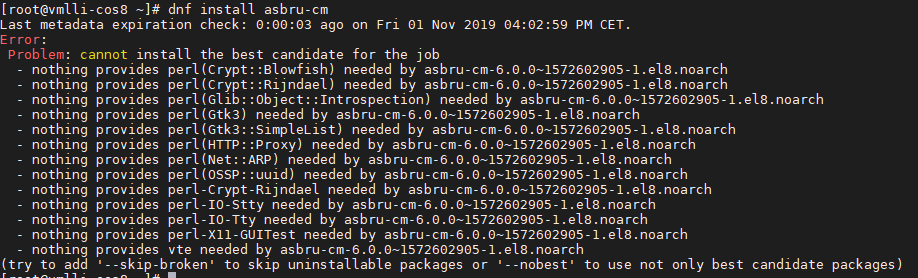
Then I installed the first needed missed dependency Crypt::Blowfish
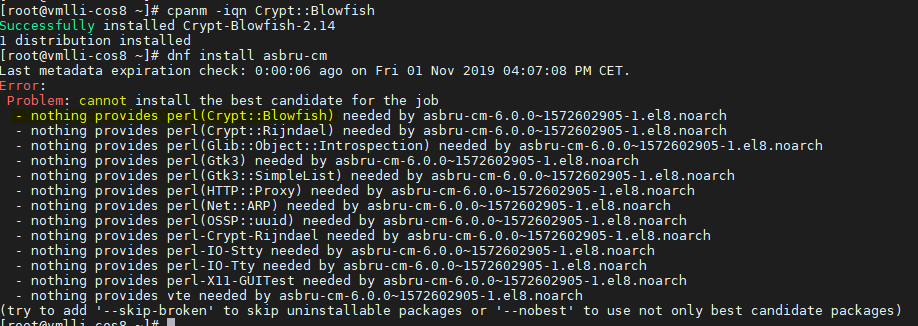
The Crypt-Blowfish is still missing...
x-wolverine-x
on 1 Nov 2019
And there is no perl-Gtk3 package for CentOS 8 / EPEL 8 for now. And vte is vte291
x-wolverine-x
on 1 Nov 2019
I think the problems with missing packages should work with the same principle as long as this package is available from the start : perl-App-cpanminus
If it does, then you are set to install all the missing ones. By executing the commands
cpanm -iqn Crypt::Blowfish
cpanm -iqn Crypt::Rijindael
cpanm -iqn Glib::Object::Introspection
cpanm -iqn Gtk3::SimpleList
...
...
Now the vte, lets see if it runs with that version, I think there should be no problems to run, if the vte shipped with Centos is old, then the user will have to find a way with Centos to request for them to upgrade to a newer one. Or live with the limitation provided by the published by Centos.
hanspr
on 1 Nov 2019
And well, I may be stating the obvious, but the Centos package should not have any required dependencies to any of the missing ones so it does not refuses to install.
(Sorry for the reediting, sometimes I get confused with the use of a foreign language)
hanspr
on 1 Nov 2019
@hanspr first, thank you for your time and help. :-)
How to install the perl-Gtk3 in CentOS 8? Because I need this to install Gtk3::SimpleList for example.
x-wolverine-x
on 1 Nov 2019
If it can not be installed with
cpanm -iqn Gtk3
then we are out of luck, game over.
Let me install a VM with centos 8 to test a manual install of asbru and I tell you if it is or not possible
hanspr
on 1 Nov 2019
I'm downloading Centos 8,
meanwhile I will try to explain my self just in case.
There is the distro package manager for each linux distribution. yum, rpm, apt, etc.
And there is cpanm. That you could say is the package manager for perl libraries (similar to pip in python if you are familiar with this).
You can install perl libraries using the distro package manager. But if a particular package does not exists in that distro, you still can install "perl libraries only", using cpanm. The repository for perl libraries is OS agnostic, so it should normally work for any Distro.
But, what could happen is if the perl Library has "C" bindings to a particular C library, that C library has to be installed first.
So if Centos 8 has "no gtk3 C libraries", again cpanm -iqn Gtk3, will not work because it will not find the C libraries to bind to.
So the logic would be, to create a package that requires the C libraries that are need it. And then install all the perl libraries that do not have a distro package already available, using cpanm
I hope, I explained my self better, the download is almost done, let me see what Centos 8 has or does not have available.
hanspr
on 1 Nov 2019
Got your point. I hope that you can find a way to make it.
To activate the EPEL 8 Repo just use:
dnf install -y epel-release
x-wolverine-x
on 1 Nov 2019
Right now I'm going for the third install attempt, it crashes on the VM at the end and it does not install on VirutalBox.
hanspr
on 1 Nov 2019
You use the 8 or Stream ISO?
x-wolverine-x
on 1 Nov 2019
CentOS-8-x86_64-1905-dvd1.iso
It always crashes at the end when asks to accept a license,
hanspr
on 1 Nov 2019
I will try to install it in VirtualBox (Version 6.0.12 r133076) now
x-wolverine-x
on 1 Nov 2019
I always arrive to this final screen
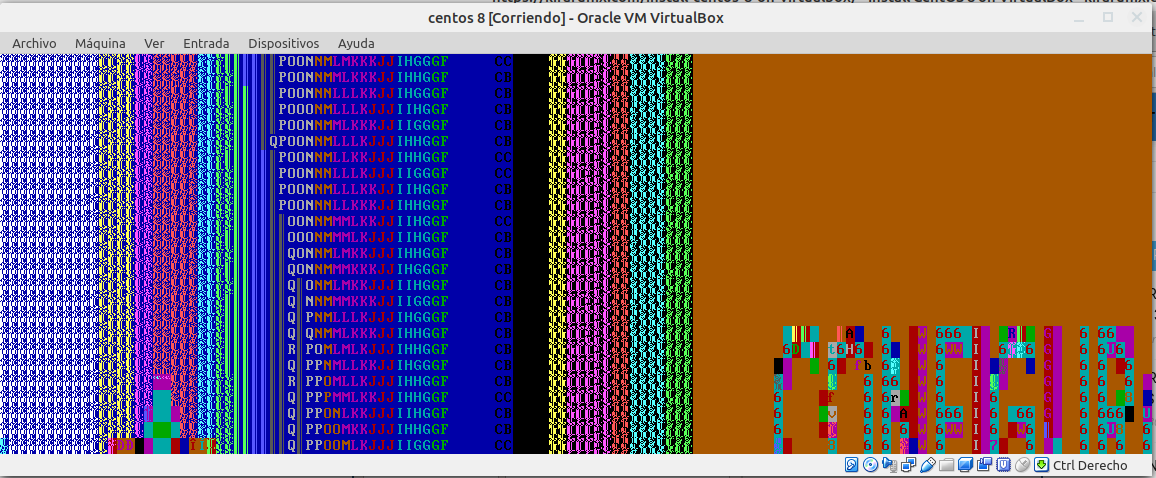
I will install a minimum and then install everything else with the package manager
hanspr
on 1 Nov 2019
I install Server with GUI for testing.
x-wolverine-x
on 1 Nov 2019
Is working fine...

x-wolverine-x
on 1 Nov 2019
Since I upgraded to mint 19, I've been having all sort of weird problems. I will have to solve this one to be able to move on. Could you share, your virutal machine settings just in case I'm choosing the wrong ones.
hanspr
on 1 Nov 2019
Done, it failed because I was selecting spanish at the begining, it works if you install in english, so I guess the Centos team thinks that we all live in New York
hanspr
on 1 Nov 2019
I always install in English, and just change the keyboard and time zone.
x-wolverine-x
on 1 Nov 2019
@x-wolverine-x
I'm really sorry, I hit a wall. The problem is with library OSSP::uuid
We should change that dependency, is a non standard library from CPAN, I think that we will have more problems as years pass if we keep this dependency in the code.
I will see how difficult is to move away from this library and use a more standard one.
hanspr
on 1 Nov 2019
I hope at the weekend I will find time to rewrite some of our build environment. So we can build Red Hat/CentOS independendly from a Fedora or opensuse
KlaasT
on 2 Nov 2019
Hi,
I managed to substitute OSSP for Data::uuid, but that did not help.
When attempting to build gtk3, there are missing "devel" c library packages. So you can not use cpanm because this procedure what it does is to compile the c bindings based on those files. For example I could not find package : gboject-introspection-devel, thou gboject-introspection (binary) exists and is installed by default. But without the devel files, you can not install perl-gtk3.
And that is the main reason why you see so many missing packages available. The process is moving slow.
For what I've been reading, is to early to jump into Centos 8.
We could try to keep fighting our way in, but every time we would have to build an installer that would rely on downloading and compiling every C and perl Library needed.
I would wait a couple of months and monitor how is the availability of packages going and when the missing number is not to high, then we could use a mixed approach as I was suggesting.
hanspr
on 2 Nov 2019
That was the same that I see... every missing dependency kick me into many other missing.
x-wolverine-x
on 2 Nov 2019
Maybe someone will care for this https://bugzilla.redhat.com/show_bug.cgi?id=1759801
Maybe we have to wait for EPEL 8.1 or EPEL 8.2
x-wolverine-x
on 2 Nov 2019
Hi @gfrenoy
As per your request on #269:
I start doing this while I was a user of pac 3 or 4 and with EL6.
The life was easier with EL6 because lots of the required packages were available from EPEL 6.
At that time I had to compile from source just a few packages.
Once EL7 came out things got a lot more complicated.
1 - First you need to install the basic development tools on your CentOS 7 (gcc, etc,).
2 - Install and enable the EPEL 7 repository.
3 - Then to build one of the missing packages:
a) Grab its src.rpm from koji
b) Logged in as your user, install with:
      rpm -i <package_name>.src.rpm (a structure of folders is created under ~/rpmbuild).
c) Navigate to ~/rpmbuild/SPECS
d) Ensure you have everything needed to build the package by executing:
       sudo yum-builddep <package_name>.src.rpm
e) If something required is missing on d) then build it first.
f) Once you get everything required to build one package, build it with:
       rpmbuild -ba <package_name>.src.rpm
       The resulting rpm's will be written under ~/rpmbuild/RPMS .
       And the src.rpm's under ~/rpmbuild/SRPMS
4 - Then build a local repository as follows:
a) Create the folder let's say ~/localrepo/packages
b) Copy the built rpm's into ~/localrepo/packages
c) Change to ~/localrepo and execute: "createrepo ." (this will create a folder repodata).
d) Finally let your system know that local repo exists by creating this file:

[~]$ cat /etc/yum.repos.d/local_repo.repo
[local_repo]
name = My Local Repository
failovermethod = priority
enabled=1
baseurl=file:///your_home_dir/localrepo
gpgcheck = 0
5) sudo yum clean all ; sudo yum update
Note: Each time you add a new package or replace an already existing package into ~/localrepo/packages (step 4b), remove the repodata folder and repeat the create "createrepo ." command as stated in step 4c) and then run step 5 again.
If you prefer avoiding all this mess, I can share the packages I've built so far.
If that is the case, let me know which ones you need to asbru-cm 5.x or 6.x.
Regards
popxunga
on 10 Nov 2019
Yes if you already have the packages built, that'd be great if you can share them so that we can host them on packagecloud.io ...
gfrenoy
on 11 Nov 2019
I just admit I didn't manage to do any work on CentOS and the build system last week. (We had some big trouble at work). There will be some updates to this issue soon.
Any packages you can share and maybe the .spec files will be great.
KlaasT
on 11 Nov 2019
INFORMATION:
All missing/required packages for Asbru-CM were built from source rpm's extracted from koji.
No changes were made to the source code of any package, but some of the spec files had to suffer some adjustments due to build requirements on CentOS 7.7.
I was able to successfully install and briefly test Asbru-cm 5.2.1 and 6.0 in a CentOS 7.7 virtual machine.
ATTENTION:
I'll not accept any responsibility for any possible damage caused by the installation of these packages. So, try it at YOUR OWN RISK !
NOTE
EPEL 7 repository installation and activation is required.
Use the following command to install and activate the EPEL 7 repo:
sudo yum install https://dl.fedoraproject.org/pub/epel/epel-release-latest-7.noarch.rpm
SUGGESTION:
I recommend a long enough closed test period before releasing this to packagecloud repo.
@gfrenoy
Please let me know where to transfer the files.
Regards
popxunga
on 13 Nov 2019
@popxunga are you able to do this for the CentOS / EPEL 8 also?
x-wolverine-x
on 13 Nov 2019
Hi...
I guess that some of the required packages doesn't exist on EPEL 8 yet. But
I'll have a look.
Regards.
popxunga
on 13 Nov 2019
@x-wolverine-x @gfrenoy @KlaasT
Hi guys ...
Think I may have good news for CentOS 8 as well:
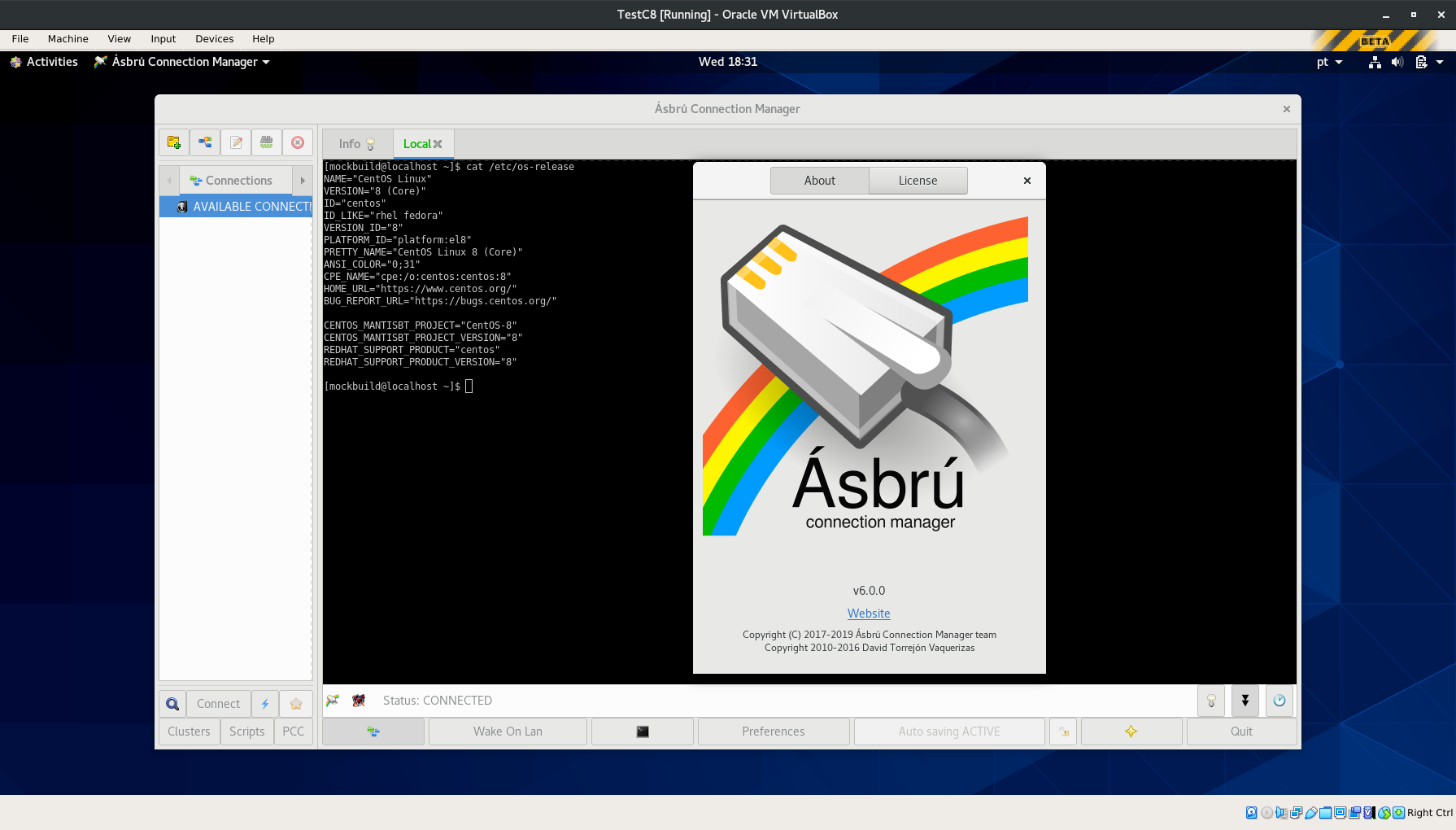
Regards.
popxunga
on 13 Nov 2019
@popxunga you made my day. How you mage this for CentOS 8? I'm still try to find the right src rpm to build my own rpm for testing. xD
x-wolverine-x
on 13 Nov 2019
@popxunga is it possible to get the CentOS 8 rpm's ? Or any hint what src rpm's to use?
x-wolverine-x
on 14 Nov 2019
Hi @x-wolverine-x ...
I've asked already where to upload the files but as you can see I got no answer so far.
popxunga
on 14 Nov 2019
How big are the packages? For now you could send them to [email protected] and I would have a look at them and upload them to our repository.
KlaasT
on 14 Nov 2019
Files were sent by email.
popxunga
on 14 Nov 2019
@popxunga maybe you can send me them to x.wolverine.[email protected] too?
@KlaasT if it don't work to put them to your repo for some reason, I can setup a repo for them if needed.
x-wolverine-x
on 14 Nov 2019
Hi @x-wolverine-x ... Sent !
popxunga
on 14 Nov 2019
I received the tar.gz just now. Give me a few minutes and I will upload them. For some reason I didn't get any invitation from Github.
KlaasT
on 14 Nov 2019
Note that those packages installation should/need to be tested before
release them to public.
Better upload them to a test repository case you have it.
I was setting up a repository myself on GitHub, but I'm not sure that this
kind of usage (repositories for binary packages distribution) is allowed
there. Maybe because the repo was created as private or because meanwhile I
cancelled the invitation once you gave me your email contact, you didn't
got the invitation.
Best regards.
popxunga
on 14 Nov 2019
Okay. I uploaded the EL 7 packages into a test repository.
curl -s https://packagecloud.io/install/repositories/asbru-cm/el-test/script.rpm.sh | sudo bash
KlaasT
on 14 Nov 2019
@popxunga for CentOS8 there are some missing

x-wolverine-x
on 14 Nov 2019
Will the EL 7 work for EL 8? Then I would copy them over.
KlaasT
on 14 Nov 2019
@KlaasT is it possible to use vte291 instant of vte?
x-wolverine-x
on 14 Nov 2019
Will the EL 7 work for EL 8? Then I would copy them over.
I will try
x-wolverine-x
on 14 Nov 2019
No @KlaasT
I sent you 2 emails.
One for el7 and the other for el8.
You should put the el7 files in a el7 repo
And the el8 files in a el8 repo.
Please do not mix el7 with el8 stuff.
popxunga
on 14 Nov 2019
Okay I found the missing emails. I will try to get them out of the spam quarantine.
KlaasT
on 14 Nov 2019
@ x-wolverine-x
I'm sure I built them. Double check in the el8.tar.gz if the files are there.
You have the noarch and x86_64 folders.
popxunga
on 14 Nov 2019
Sorry my fault of course... xD I don't checked the noarch... sorry.

x-wolverine-x
on 14 Nov 2019
EL8 has been uploaded.
KlaasT
on 14 Nov 2019
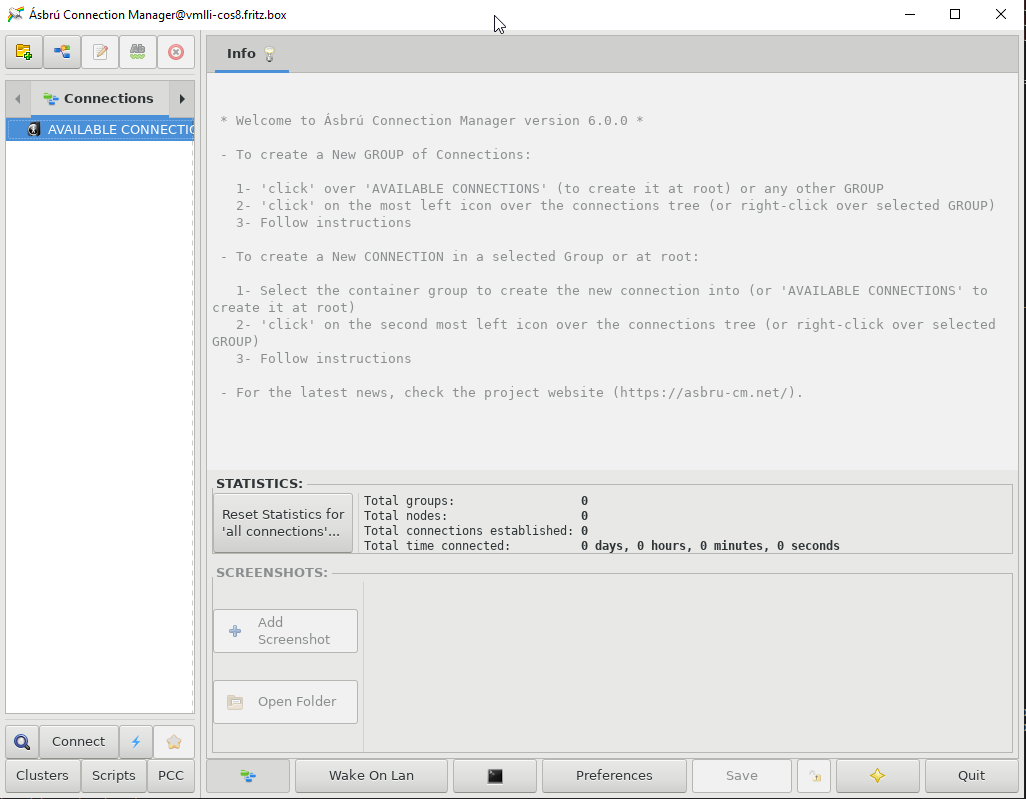
A big thank you @popxunga
x-wolverine-x
on 14 Nov 2019
Repos are fine and not mixed up, it just was all up to my blindness.
BIG thank you guys for make this happen, you really make me very happy.
x-wolverine-x
on 14 Nov 2019
Note:
The EL7 package files I've sent you support both Asbru CM 5.2.x and Asbru CM 6.x.
The EL8 package files supports Asbru CM 6.x only.
popxunga
on 14 Nov 2019
I'm just waiting for some more feedback from CentOS or Red Hat users. If everything works alright so far I'm considering to push the packages to the main repository to make it easier for users to install the software and resolve dependencies.
KlaasT
on 18 Nov 2019
@KlaasT Test it on many CentOS 8 installations, and all working with the test-repo.
x-wolverine-x
on 21 Nov 2019
By doing the follow, I was able to run Ásbrú on my CentOS 7 live VM:
sudo yum install https://dl.fedoraproject.org/pub/epel/epel-release-latest-7.noarch.rpm
curl -s https://packagecloud.io/install/repositories/asbru-cm/el-test/script.rpm.sh | sudo bash
curl -s https://packagecloud.io/install/repositories/asbru-cm/gtk3/script.rpm.sh | sudo bash
sudo yum install asbru-cm
It is working fine :-) I just noticed an error message when starting a terminal:
*** This build of Glib was compiled with glib 2.56.1, but is currently running with 2.50.3, which is too old. We'll continue, but expect problems!
I'd guess it's the vte built that was not done with the same Glib version as the target environment. Is there anything we can do anything about this ?
gfrenoy
on 23 Nov 2019
The packages were built on a CentOS 7 virtual machine which I had to drop due to space constraints.
All packages were built in the same CentoOS 7 virtual machine (vte included).
Did you fully updated your Centos 7 VM before doing the test ?
My RHEL 7.7 host has glib2 2.56.1. I would expect that your CentOS VM has the same version and not 2.50.3.
popxunga
on 23 Nov 2019
Did you fully updated your Centos 7 VM before doing the test ?
Good point ! No, I did not... And as it's only a "live" VM (no hard disk), this operation will typically fails so let's assume it's OK. Thanks for the quick feedback.
gfrenoy
on 23 Nov 2019
Hi @gfrenoy & @KlaasT
Is there any interest to get Asbru 5.2.x supported on el8 as well ?
popxunga
on 26 Nov 2019
Currently we are trying to bring all effort into Asbru 6.x and rather prefer not to get busy in porting 5.2.x to new distributions.
KlaasT
on 26 Nov 2019
Hi, I've just installed Asbru on Centos 7 an got this error:
Typelib file for namespace 'Wnck', version '3.0' not found at /usr/lib64/perl5/vendor_perl/Glib/Object/Introspection.pm line 108.
BEGIN failed--compilation aborted at /usr/share/asbru-cm/lib/PACUtils.pm line 54.
Compilation failed in require at /usr/share/asbru-cm/lib/PACMain.pm line 53.
BEGIN failed--compilation aborted at /usr/share/asbru-cm/lib/PACMain.pm line 53.
Compilation failed in require at /bin/asbru-cm line 92.
BEGIN failed--compilation aborted at /bin/asbru-cm line 92.
I guess it is related to #202 , but I can't find gir1.2-wnck-3.0 for Centos 7.
 aTanCS
on 20 Dec 2019
aTanCS
on 20 Dec 2019
I guess it is related to #202 , but I can't find gir1.2-wnck-3.0 for Centos 7.
This fixed all missing dependencies:
yum install libwnck3 vte291
@aTanCS Thanks for your feedback.
gfrenoy
on 20 Dec 2019
@aTanCS Just wanted to ask back if this issue has been fixed yet. Did you try an installation using our snapshots repository? The dependency should be resolved there. Thanks.
KlaasT
on 30 Dec 2019
Closed #60
KlaasT
on 7 Jan 2020
Related issues
popxunga
·
7Comments
 beliys
·
8Comments
beliys
·
8Comments
 vibo69
·
13Comments
popxunga
·
12Comments
vibo69
·
13Comments
popxunga
·
12Comments
 mirlipili
·
12Comments
mirlipili
·
12Comments
Most helpful comment
@x-wolverine-x @gfrenoy @KlaasT
Hi guys ...
Think I may have good news for CentOS 8 as well:
Regards.