Asbru-cm: Loki EL7 - Paste copied Password from node context menu.
Describe the bug Environment (please complete the following information):
After copying some node password from its context menu, any attempt to login from another terminal to that node using the copied password is failing (Ref. #295 ).
This started to happen with package 6.3.0 1593801131-1.el7.
All is good with the previous one, 6.3.0 1593336135-1.el7.
Looking at changes between then I'm not sure what may have caused this.
I've copied the node password and pasted into a text file and compared it with the password stored in Keepassxc and they match.
So it looks like that something wrong may be happening during the paste action.
This is the password: Ax>FS3=
 popxunga
All 12 comments
6.3.0 1593336135-1.el7 --> up to https://github.com/asbru-cm/asbru-cm/commit/726cabe1bac963456a44e7d6d243a65bdfa98479
So the usual suspect would be this commit : https://github.com/asbru-cm/asbru-cm/commit/cf9c5ab03a43b520c09e3f94834d55b7291b8a4f
Can you try to revert it and see if this helps ?
The other possible problem would be a special character in the password ... Do you have the problem for all passwords or only that particular one ?
 gfrenoy
on 6 Jul 2020
gfrenoy
on 6 Jul 2020
I really think https://github.com/asbru-cm/asbru-cm/commit/cf9c5ab03a43b520c09e3f94834d55b7291b8a4f is the guilty one. We are now mixing both types of clipboards (PRIMARY and CLIPBOARD, see definitions here).
I made things more consistent and we are only using the PRIMARY one. Which is OK I since since it is meant for selections and texts (and works with cyrillic characters, #652).
Let me know how it looks with the next build...
gfrenoy
on 6 Jul 2020
Sorry ... too busy these days.
Just checked the loki repo and I do not see the yesterday EL7 package.
popxunga
on 7 Jul 2020
Mmm, indeed, the EL7 job failed ; and for some reason, I cannot restart it right now.
gfrenoy
on 7 Jul 2020
Ok got that right back and I restarted the job that succeeded ; you should have a new build 6.3.0~1594135261-1.el7 on packagecloud now.
gfrenoy
on 7 Jul 2020
Indeed ! Got it installed and tested it and it is working correctly now !!!
Thanks :-)
popxunga
on 7 Jul 2020
Hi @gfrenoy ...
Meanwhile I noticed that I'm not able to select some text in the terminal and then copy it using the context menu.
So as soon as I select some text with the mouse it is automatically copied.
And now my clipboard manager is full with all the "trash" copied within Asbru terminals.
To be honest I prefer the old behavior where the copy operations don't use the primary clipboard.
Is that possible to add a setting where we can select the clipboard used by Asbru ?
Thanks.
popxunga
on 7 Jul 2020
Can you see if you have the option "Mouse selection copies content to global clipboard" checked ?
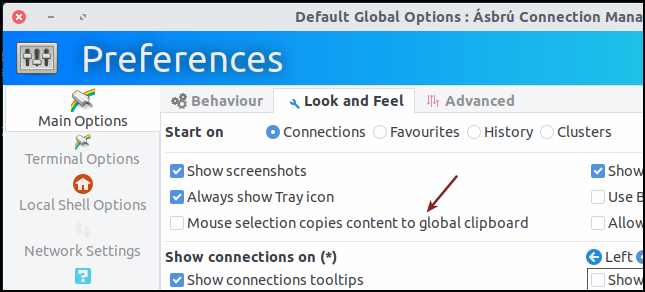
If it is checked, try to uncheck it...
Now that we are only using the primary clipboard ; I guess we can just remove that option ? Or should I revert my change so that the selection also copy the value to the CLIPBOARD clipboard (aka global) ?
gfrenoy
on 8 Jul 2020
Yes ... the "Mouse selection copies content to global clipboard" was checked.
Is it checked by default ? I honestly don't remember to ever activated that option ...
Do not revert anything for now. Let me first revert to the previous loki version (asbru-cm-6.3.0~1593336135) to verify.
popxunga
on 8 Jul 2020
Just downgraded to asbru-cm-6.3.0-1593336135 and with the "Mouse selection copies content to global clipboard" setting checked, the text selection with mouse works as if the setting was unchecked.
So it looks like that something introduced after asbru-cm-6.3.0-1593336135 made that setting work correctly.
When looking at the clipboard both asbru versions seems to be doing the same (my fault and sorry for the confusion).
This said I think there's no need to revert anything.
Thanks.
popxunga
on 9 Jul 2020
I was a bit too "extreme" when searching and replacing 'CLIPBOARD' by 'PRIMARY' ; after my latest change (https://github.com/asbru-cm/asbru-cm/commit/78d2e82ac7e2536f9f5fe1ce99f876b23066efa9), the option "Mouse selection copies content to global clipboard" was copying the content of the primary clipboard to ... the primary clipboard !
That was for sure wrong (totally useless).
The latest commit makes things more useful and consistent.
Thanks again for your so valuable reports and feedback.
gfrenoy
on 9 Jul 2020
Tested it and it seems to work fine :-)
Thanks.
popxunga
on 9 Jul 2020
Related issues
popxunga
·
16Comments
 dakorpar
·
9Comments
popxunga
·
14Comments
dakorpar
·
9Comments
popxunga
·
14Comments
 paliasp
·
11Comments
paliasp
·
11Comments
 Silex
·
8Comments
Silex
·
8Comments