Asbru-cm: Easier remote file download/file manager
Is your feature request related to a problem? Please describe.
I'm and I believe a lot of people are often in need to download remote files.
With bunch of different connections different ports and ips it's kinda frustrating to type scp command, having some better solution there would be really nice
Describe the solution you'd like
Having remote file explorer on right would be probably best solution, like MobaXterm on windows has:
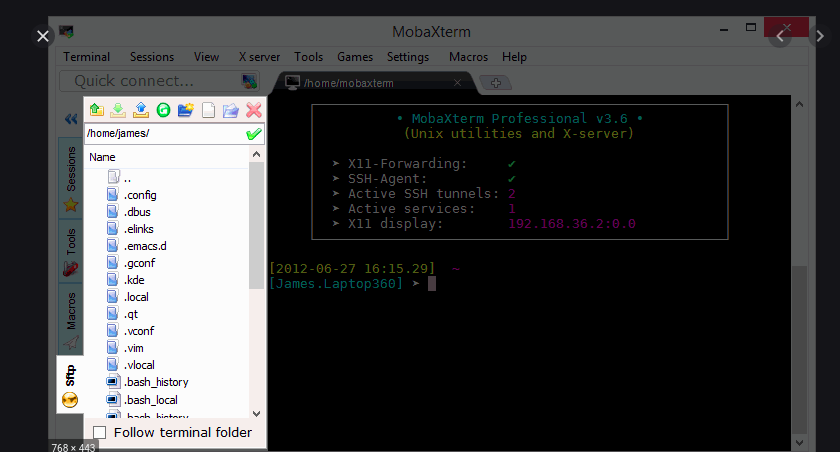
With then drag/drop options or right click context menu to download etc...
Describe alternatives you've considered
Having some perl script (I can't write perl :( ) which could show dropdown of all files in directory and asks where to download file would be maybe a much easier solution which would be a great add on
 dakorpar
All 9 comments
Interesting idea :) Don't believe it's an easy one though !
A few questions to analyse this a bit further:
- would that "file manager" be for SSH connections or SFTP connections ?
- when you mean "drag/drop options" : you mean with client operating system ? So being able to drag'n'dop a file from the "file manager" to your system ?
- right-click / download would download where ?
- not sure to understand your alternative ... do you mean a "right-click" on the terminal and then some options in the context menu that would list the files ?
 gfrenoy
on 8 Jun 2020
gfrenoy
on 8 Jun 2020
- doesn't matter basically if you have ssh you should be able to do download through sftp, right?
- drag/drop is just an idea, probably not worth in first version, just right clicking file and download where file save dialog opens would be a great start
it would open up save dialog
alternative would be maybe a perl script which would create just a scp line with host/user/password with defaults to home directory and user can then change whatever he wants by itself, rather then going every time to password manager and getting host ip, username, password, port...
I believe it's not that easy to implement, sadly I dont do perl so can't really help directly, but this sounds like an interesting feature in every day work...
dakorpar
on 8 Jun 2020
Hi,
I transfer files daily to/from my ssh connections, the solution I use (and that I don't see mentioned here, maybe you all forgot it exists) is:
open the ssh connection, right click on the terminal, and do "Open new SFTP window".
This way I can use cd, lcd, ls, lls, get, and put. Once you get to know sftp it's really easy to use.
 syco
on 24 Jul 2020
syco
on 24 Jul 2020
@gfrenoy you can check what I think is a good implementation of such mechanism here: https://github.com/subhra74/snowflake
I am aware that the approach there is quite different but I think it's a good starting point for the logic.
It is quite powerful because it also offers the possibility to edit remote files with internal editor or open remote files with local editor and apply modifications on remote on save, automatically.
 stderr-to-devnull
on 5 Aug 2020
stderr-to-devnull
on 5 Aug 2020
Looks good but we really need a more detailed analysis of this request. This story is a bit too large to really understand what needs to be done. We need to split this into smaller well defined tasks.
it also offers the possibility to edit remote files with internal editor or open remote files with local editor and apply modifications on remote on save
Ever considered sshfs ? It's a standard package on most distros.
gfrenoy
on 9 Aug 2020
@gfrenoy
Looks good but we really need a more detailed analysis of this request. This story is a bit too large to really understand what needs to be done. We need to split this into smaller well defined tasks.
Ok, I will try to break it down.
- Create a two-pane file manager GUI, accessible with a button or right-click context menu, which at first offers basic features like listing files and dirs and their properties from remote host and allows move, copy, delete to the local dir pane.
- Expand functionality for on-the-spot file editing, using either the local system's editor associated with that specific remote file type. I've done this and it worked great in the implementation of https://github.com/subhra74/snowflake
- Other features, like large text file viewing and searching.
All of these are implemented and explained (with screenshots) on this project: https://github.com/subhra74/snowflake#a1
I believe that these features are very powerful and extremely useful for sysadmins/devops engineers. Not everything can always be done with configuration management or pushing to repos, especially when testing work-in-progress code in test (temporary) files that require quick adjustments / copy-pasting of code, formatting etc using an actual local IDE driven by a GUI.
Ever considered sshfs ? It's a standard package on most distros.
I actually implemented SSHFS mounts for a set of core servers in a complex project but that was for permanent established connections. This is not practical when dealing with tens or hundreds of servers for which I _may_ need to access the file system remotely, _sometimes_. So the situations I described are more on-demand, only when needed. Such implementation via button or context menu would be highly effective.
stderr-to-devnull
on 13 Aug 2020
So if Snowflake works for your needs, shouldn't we use it instead of developing again the same feature in Ásbrú ?
What about an option that would create the SSHFS mount and start snowflake with the two expected panes ?
gfrenoy
on 12 Sep 2020
So if Snowflake works for your needs, shouldn't we use it instead of developing again the same feature in Ásbrú ?
Snowflake falls very shot on some very basic aspects. I also feel that Ásbrú is possibly the most mature and complete solution of its kind for Linux. No one wants to use multiple tools for one task. Related to this, as a side note (definitely not a complaint), I believe that this kind of fragmentation is the main reason there is such a low adoption of Linux.
As such, this feature would make Ásbrú more complete, bringing more usability and would solidify it as the reference tool of its kind on Linux (at least for me it is).
stderr-to-devnull
on 15 Sep 2020
Another option (if I may), could be to replace "Open new sftp window" with one or more customizable commands that can be executed using the connection settings as variables.
So every user could have it open snowflake configured to the current connection, or filezilla, or in my case dolphin.
In kde if you execute "dolphin sftp://snfoisfmo" you get a fully functional window, you can browse through remote folders, open and edit files, all without the need of sshfs. I'm fairly sure nemo and nautilus can do the same.
syco
on 15 Sep 2020
Related issues
 wcasanova
·
17Comments
wcasanova
·
17Comments
 popxunga
·
16Comments
popxunga
·
5Comments
popxunga
·
16Comments
popxunga
·
5Comments
 paliasp
·
11Comments
paliasp
·
11Comments
 beliys
·
8Comments
beliys
·
8Comments
Most helpful comment
@gfrenoy
Ok, I will try to break it down.
All of these are implemented and explained (with screenshots) on this project: https://github.com/subhra74/snowflake#a1
I believe that these features are very powerful and extremely useful for sysadmins/devops engineers. Not everything can always be done with configuration management or pushing to repos, especially when testing work-in-progress code in test (temporary) files that require quick adjustments / copy-pasting of code, formatting etc using an actual local IDE driven by a GUI.
I actually implemented SSHFS mounts for a set of core servers in a complex project but that was for permanent established connections. This is not practical when dealing with tens or hundreds of servers for which I _may_ need to access the file system remotely, _sometimes_. So the situations I described are more on-demand, only when needed. Such implementation via button or context menu would be highly effective.