
 knowledgenude
All 6 comments
Looks correct for me:
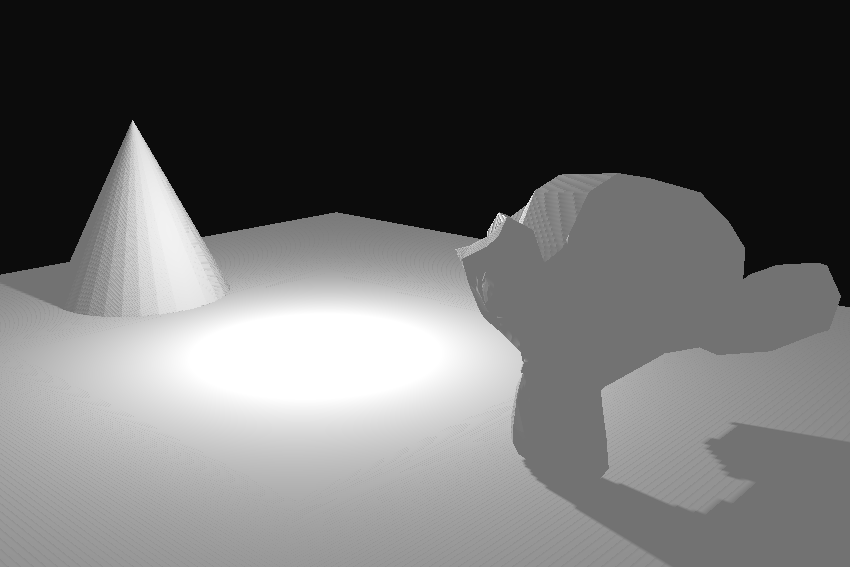
Actually, Draw Order: Auto also defaults to Distance.
On what system/graphics card do you run this?
 MoritzBrueckner
on 15 Oct 2020
MoritzBrueckner
on 15 Oct 2020
I had tested with RX 550 and RX 560 in the same setup, both have the same issue. Maybe the problem is not happening in DirectX but only for OpenGL. I don't think it is caused by the GPU because previously i don't had this issue. I also suspect about the drivers, i don't remember to get it working with the current drivers.
Using Draw Order: Shader works fine, do you know if there is some performance difference between this two options?
knowledgenude
on 15 Oct 2020
Hmm, I still cannot reproduce this (tested with DirectX and OpenGL), maybe it's something with AMD graphics cards?
Using
Draw Order: Shaderworks fine, do you know if there is some performance difference between this two options?
I'm pretty new to computer graphics so don't trust me, but my guess is that when choosing Shader for the drawing order, all objects with the same shader are drawn in a row to reduce the amount of context switches (shader pipelines need to be changed which takes a lot of time because the CPU has to wait for the GPU I think). So I think that using shader order should be faster when you have many objects with the same material in a scene (it's always better to test it! Don't trust me^^!). On the other hand, sorting by shader is problematic when using transparent materials, in this case sorting by distance is much better (see http://www.opengl-tutorial.org/intermediate-tutorials/tutorial-10-transparency/).
MoritzBrueckner
on 15 Oct 2020
I don't know exactly what is the problem for now. I don't remember it happening in other OS with the same hardware, but anyway i will have to update the OS version in a few days when it have a stable version, hence the drivers may change and i will see if the problem still. I will keep this open before i change the OS, this way other people can confirm or not the issue.
The information you send looks trustworthy, probably it will be also useful in the future and for other users, thank you very much as always :+1:
knowledgenude
on 15 Oct 2020
I'm also fine:

OS: Windows 10 64-bit
Graphics card: NVIDIA GeForce 930M
 e1e5en-gd
on 17 Oct 2020
e1e5en-gd
on 17 Oct 2020
It was probably related to drivers. After updating to Fedora 33 today, it is working fine. :+1:
knowledgenude
on 28 Oct 2020
Related issues
 HeadClot
·
3Comments
HeadClot
·
3Comments
 guzzard
·
4Comments
guzzard
·
4Comments
 GrahamWilkins
·
3Comments
GrahamWilkins
·
3Comments
 Amir-Arsalan
·
4Comments
e1e5en-gd
·
3Comments
Amir-Arsalan
·
4Comments
e1e5en-gd
·
3Comments
Most helpful comment
It was probably related to drivers. After updating to Fedora 33 today, it is working fine. :+1: