Armory: How to compile an Armory game after installing the Armory addon?
I downloaded Blender 2.79b in a freshly-installed Ubuntu 16.04 and followed the instructions given here to install the Armory addon in Blender. When I click on _Play_
I get the following errors:

My guess is that Armory is looking for some dependencies to be able to compile the game but I don't know what those dependencies are (sorry I'm pretty new to Armory). Can someone (especially @luboslenco) tell me what I need to do to be able to compile my games? Note that in the future, I am going to compile my games in the background (I won't be able to use a GUI on our servers). So it would be great if you can take that into consideration when responding.
 Amir-Arsalan
All 4 comments
If you install it via addon, you need to clone the full armory sdk and set the path via user preferences.
 sh-dave
on 16 Sep 2018
sh-dave
on 16 Sep 2018
@sh-dave Thank you so much! What do you mean by setting the path via user preferences? Setting what path?
Amir-Arsalan
on 17 Sep 2018
The addon needs the sdk for all the included binaries (like nodejs, that's the error you get if you look in the last line). I'm not sure if/how you can set that path via some python api though, maybe @luboslenco knows more about that.
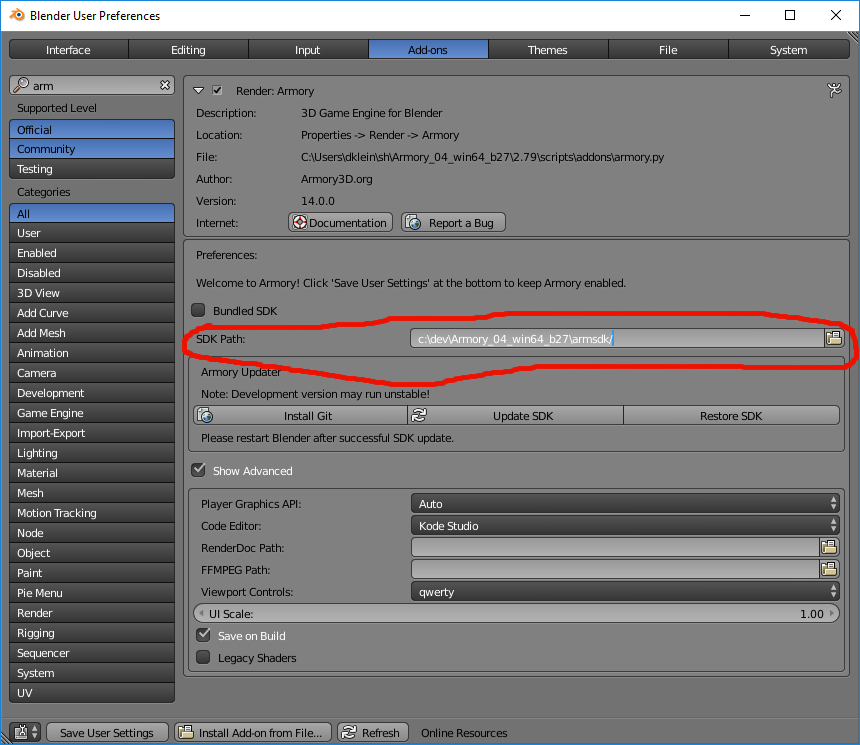
sh-dave
on 17 Sep 2018
There are two ways to obtain the SDK:
Afterwards the armory.py add-on is installed and pointed to the armsdk directory in the user preferences, like Dave shows above. In your screenshot it looks like the sdk path is not pointed to that?
To set the path via python instead: https://github.com/armory3d/armory/issues/879
 luboslenco
on 17 Sep 2018
luboslenco
on 17 Sep 2018
Related issues
 Nos-
·
4Comments
Nos-
·
4Comments
 e1e5en-gd
·
3Comments
luboslenco
·
3Comments
e1e5en-gd
·
3Comments
luboslenco
·
3Comments
 BrahRah
·
3Comments
BrahRah
·
3Comments
 HeadClot
·
4Comments
HeadClot
·
4Comments
Most helpful comment
The addon needs the sdk for all the included binaries (like nodejs, that's the error you get if you look in the last line). I'm not sure if/how you can set that path via some python api though, maybe @luboslenco knows more about that.