Armory: Error in building complex scene
Building a complex scene in html 5 return this error only if i plug in a normal map texture in armoryPBR
Uncaught TypeError: Cannot read property 'shader' of undefined
at kha_graphics4_PipelineState.compileShader (kha.js:40073)
at kha_graphics4_PipelineState.compile (kha.js:40034)
at iron_data_ShaderContext.finishCompile (kha.js:10706)
at iron_data_ShaderContext.compile (kha.js:10697)
at new iron_data_ShaderContext (kha.js:10561)
at new iron_data_ShaderData (kha.js:10502)
at kha.js:10522
at Function.iron_data_Data.returnSceneRaw (kha.js:9264)
at kha.js:9248
at kha_Assets.loadBlobFromPath.fileName (kha.js:9420)
System
Blender: 2.90
Armory: 2020.09
OS: Windows 10 64bit
Graphics card: GT1050 TI
 RomStef
All 6 comments
May I ask what the name of the material is? Does it contain some special characters or spaces, anything unusual?
Also, is there a shader file in build_[ProjectName]/debug/html5-resources/ with the material name (something like MyMaterial_mesh-webgl2.frag.essl)?
Do you see any other warnings during compilation?
 MoritzBrueckner
on 11 Oct 2020
MoritzBrueckner
on 11 Oct 2020
I think the problem is related to nGon geometry.
we are working on a project aimed at the 3D reconstruction of some monuments of interest in the city of Palermo. we want to create an environment for virtual tourism. For reasons of time and to speed up the production process, our modeler is reproducing the buildings directly on modified images taken from google maps and this leads to the creation of not exactly perfect geometries.
We tried to use the triangulate modifier to optimize the geometry, this works but does not respect the original UV maps of the model. At the moment we have decided not to apply normal maps.
Any advice is welcome :D
this is an preview
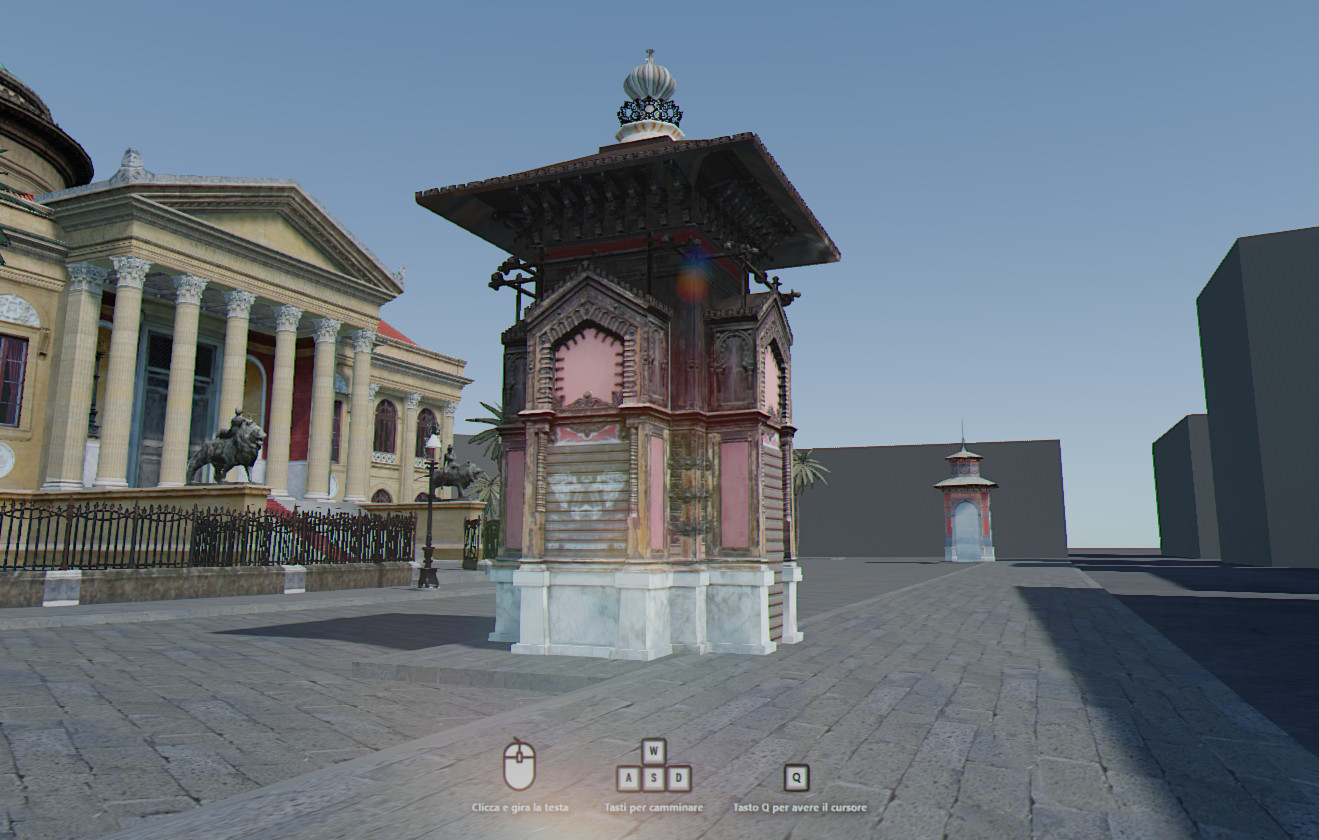
RomStef
on 14 Oct 2020
Hm, unfortunately I can't reproduce such an error with using ngons. What about the questions I've asked further above? The error message actually doesn't look that much like an issue with ngons but rather with materials/shaders.
Also, does the Blender console (that displays the server output when running on html5) show some http error codes that look like some resource wasn't loaded/found?
Maybe you can copy the scene and remove object by object until you find the problematic object/material?
Looks awesome btw 👍
MoritzBrueckner
on 14 Oct 2020
For Armory to work correctly, you need Blender 2.83 (https://github.com/armory3d/armory/wiki/setup). Try on the specified version
 e1e5en-gd
on 15 Oct 2020
e1e5en-gd
on 15 Oct 2020
I'm sorry , i will try to upload an example for reproduce the error as soon as possible .
Meanwhile a new error occurs. Any advice on how to solve?
________ [Armory] Compiling ________
Exporting Scene
Traceback (most recent call last):
File "D:\Grafica 3d Alessandro\Progetti\Palermo3d\City\monte_di_pieta\ArmorySDK//armory/blender\arm\props_ui.py", line 541, in execute
make.play()
File "D:\Grafica 3d Alessandro\Progetti\Palermo3d\City\monte_di_pieta\ArmorySDK//armory/blender\arm\make.py", line 482, in play
build(target=runtime_to_target(), is_play=True)
File "D:\Grafica 3d Alessandro\Progetti\Palermo3d\City\monte_di_pieta\ArmorySDK//armory/blender\arm\make.py", line 370, in build
export_data(fp, sdk_path)
File "D:\Grafica 3d Alessandro\Progetti\Palermo3d\City\monte_di_pieta\ArmorySDK//armory/blender\arm\make.py", line 123, in export_data
ArmoryExporter.export_scene(bpy.context, asset_path, scene=scene, depsgraph=depsgraph)
File "D:\Grafica 3d Alessandro\Progetti\Palermo3d\City\monte_di_pieta\ArmorySDK//armory/blender\arm\exporter.py", line 153, in export_scene
cls(context, filepath, scene, depsgraph).execute()
File "D:\Grafica 3d Alessandro\Progetti\Palermo3d\City\monte_di_pieta\ArmorySDK//armory/blender\arm\exporter.py", line 2136, in execute
self.export_objects(self.scene)
File "D:\Grafica 3d Alessandro\Progetti\Palermo3d\City\monte_di_pieta\ArmorySDK//armory/blender\arm\exporter.py", line 2000, in export_objects
self.export_mesh(mesh_ref)
File "D:\Grafica 3d Alessandro\Progetti\Palermo3d\City\monte_di_pieta\ArmorySDK//armory/blender\arm\exporter.py", line 1437, in export_mesh
self.export_mesh_data(export_mesh, bobject, out_mesh, has_armature=armature is not None)
File "D:\Grafica 3d Alessandro\Progetti\Palermo3d\City\monte_di_pieta\ArmorySDK//armory/blender\arm\exporter.py", line 1156, in export_mesh_data
exportMesh.calc_tangents(uvmap=lay0.name)
RuntimeError: Error: Tangent space can only be computed for tris/quads, aborting
RomStef
on 16 Oct 2020
This is caused by objects using both ngons and normal maps (see this: https://github.com/armory3d/armory/issues/1411#issuecomment-536114520).
MoritzBrueckner
on 16 Oct 2020
Related issues
 Sanva
·
3Comments
Sanva
·
3Comments
 HeadClot
·
4Comments
HeadClot
·
4Comments
 DevMagicLord
·
3Comments
DevMagicLord
·
3Comments
 mushroomeo
·
4Comments
mushroomeo
·
4Comments
 guzzard
·
4Comments
guzzard
·
4Comments
Most helpful comment
This is caused by objects using both ngons and normal maps (see this: https://github.com/armory3d/armory/issues/1411#issuecomment-536114520).