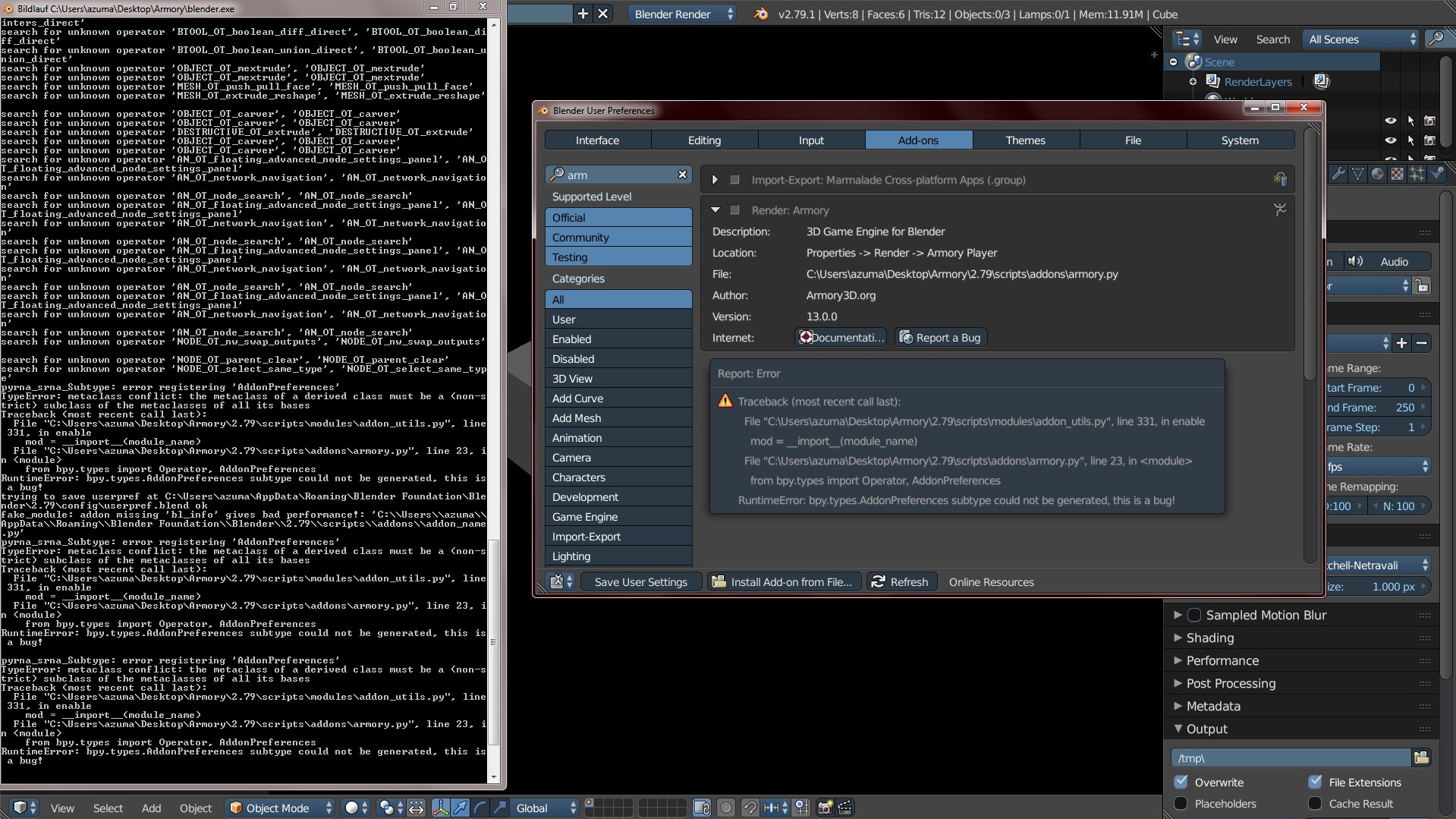
Armory: Bug On enable Armory Again / still
(optional - drag & drop zipped .blend file here)
i just downloaded and extracted armory and tryed to enable it in addons and got same bug , so cant use it still like 0.1 version...
 mushroomeo
All 4 comments
I’m with lubos on this and saying there’s prolly a conflict with addons somewhere. So far, it seems your the only one running into this issue. Do you have multiple 2.79 versions? Two things I’d would try and not sure if they would solve it or not.
1: Make a “config” folder within your Armory “2.79” folder.
2: Disable every addon and try enabling just Armory.
Edit:
After some browsing and testing a put a little something together to disable all addons. There might be a better way ,but this seems to work. Run this from text editor, then try enabling Armory.
import bpy

prefs = bpy.context.user_preferences

for enabled_addons in prefs.addons.keys():
    bpy.ops.wm.addon_disable(module=enabled_addons)
 AFWSI
on 5 Apr 2018
AFWSI
on 5 Apr 2018
thanks very much that script solved the problem !!! : )
found out other solution and here is what i did:
found out if deleting addons in C:\Usersazuma\AppData\Roaming\Blender Foundation\Blender\2.79\scriptsaddons then armory started working
so i went to C:\Users\"yourusernamename"\AppData\Roaming\Blender Foundation\Blender\2.79\scriptsaddons and started delete addons that i have installed. after each 1 deleted addon i restarted Armory unil i saw the button "Play in Viewport" in 3D view
the addon that did conflict was : Code Autocomplete
version 2.0.0
later i reinstalled it and armory worked still.
mushroomeo
on 6 Apr 2018
Glad you figured out what addon was causing the conflict. Maybe Lubos can look at that addon and figure out why it was doing this. It’s weird that another addon would do this.
AFWSI
on 6 Apr 2018
Happy the solution was found, bookmarking this as a reference when it pops up again..
 luboslenco
on 1 Jun 2018
luboslenco
on 1 Jun 2018
Related issues
luboslenco
·
3Comments
 Amir-Arsalan
·
4Comments
Amir-Arsalan
·
4Comments
 e1e5en-gd
·
3Comments
e1e5en-gd
·
3Comments
 Nos-
·
4Comments
Nos-
·
4Comments
 GrahamWilkins
·
3Comments
GrahamWilkins
·
3Comments
Most helpful comment
thanks very much that script solved the problem !!! : )
found out other solution and here is what i did:
found out if deleting addons in C:\Usersazuma\AppData\Roaming\Blender Foundation\Blender\2.79\scriptsaddons then armory started working
so i went to C:\Users\"yourusernamename"\AppData\Roaming\Blender Foundation\Blender\2.79\scriptsaddons and started delete addons that i have installed. after each 1 deleted addon i restarted Armory unil i saw the button "Play in Viewport" in 3D view
the addon that did conflict was : Code Autocomplete
version 2.0.0
later i reinstalled it and armory worked still.