Armory: World Background wrong when using HDRI and second Scene is present
Description
The World Background of a starting Scene uses a standart grey world if more than one scenes are present and the starting Scene uses an HDRI, the effect on the environment of the correct HDRI is still present.
To Reproduce
Create a scene and give it a HDRI World background, create a second scene with a flat color world, play.
Expected behavior
The correct world background to appear.
System
Blender: 2.82
Armory: 2020.6
OS: Win 10
Graphics card: GTX 1060
Test File
worldbug.zip
 Simonrazer
All 5 comments
I did not understant what you mean. Do you want the same background for both scenes? If yes, you have to set the same World in the scene properties for both scenes, or you can create a new World in the same place for different backgrounds.
 knowledgenude
on 18 Jun 2020
knowledgenude
on 18 Jun 2020
I want the correct world background to appear for the first scene (the HDRI), at the moment it shows a standart Blender grey world background (if the second scene with its own world exists in the .blend as well).
Simonrazer
on 18 Jun 2020
Found the issue, now I have to find a way to fix it :)
There is a big underlying problem in the way environment textures and other world attributes are handled by the exporter. There is a "list" (actually a string) of definitions in the "Arm" world called world_defs. The problem is that this list does not take multiple worlds into account, so the export of the second scene and world deletes an already set flag called _EnvTex that is required by the first world.
So even if there was a fast fix for your issue, I think it is better to try fixing the whole system behind it. Hopefully I'll have some more time in the next days.
Edit: Actually this might be easier than I thought...
Edit 2: Nope^^ Now the export works but the shader defines are broken
 MoritzBrueckner
on 18 Jun 2020
MoritzBrueckner
on 18 Jun 2020
Hi @luboslenco, I need your opinion:
It looks like this problem is only solvable by a quite big refactor of the world exporter including the world shader. Before I proceed I want to make sure that you're ok with my proposal on how to solve this.
Currently, there is one single shader used for all worlds (world_pass) with certain parts turned on/off via defines. The problem is that different worlds need different defines. My proposal is to rewrite the world exporter so that it exports a unique shader per world. Needless context switches are no issue here as obviously only one world is rendered at the same time.
The idea is to use a system similar to how the material shaders are generated. This would also enable us to finally work on https://github.com/armory3d/armory/issues/664. Also, we would need to move some attributes from the "Arm" world and from the render passes over to individual worlds (which makes more sense anyways). To keep the current render pass functionality, my proposal is to only keep the "enable/disable clouds/fog/water" attributes in the render passes as a global, renderpass-wide setting and move all settings for those things over to the individual worlds. So for example: if the render path switch for clouds is off, no world renders clouds but when it's turned on, the world's settings are used.
Should water be a per-world or per-scene setting?
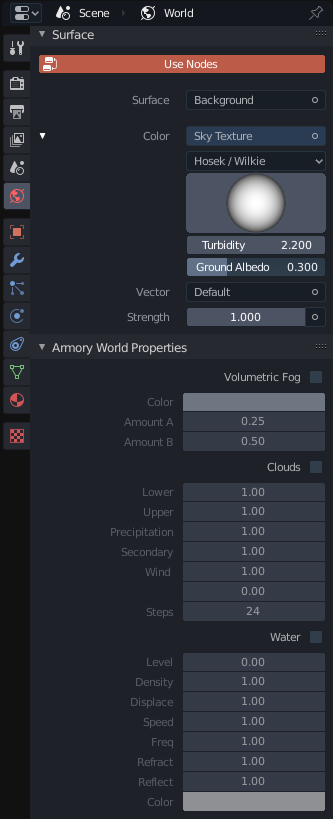
The UI could look like that:
World panel:
Render Path panel (only Clouds and Water switches left, the same goes for Volumetric Fog in the compositor sub-panel)

Two big downsides of this refactor would be that we loose some compatibility with older projects and many example files probably need to be updated after this.
If you're ok with that, I would open a WIP/draft pull request to keep the discussion off this issue, as it is a bit off-topic despite being the solution. If the work is done, I will then remove the draft status.
Thanks :)
MoritzBrueckner
on 19 Jun 2020
That sounds most excellent, support for multiple worlds would be awesome! Please feel welcome to open a draft pr. Happy to update examples as needed.
 luboslenco
on 22 Jun 2020
luboslenco
on 22 Jun 2020
Related issues
 GrahamWilkins
·
3Comments
GrahamWilkins
·
3Comments
 Sanva
·
3Comments
knowledgenude
·
3Comments
Sanva
·
3Comments
knowledgenude
·
3Comments
 AttSee
·
4Comments
AttSee
·
4Comments
 mushroomeo
·
4Comments
mushroomeo
·
4Comments
Most helpful comment
Hi @luboslenco, I need your opinion:
It looks like this problem is only solvable by a quite big refactor of the world exporter including the world shader. Before I proceed I want to make sure that you're ok with my proposal on how to solve this.
Currently, there is one single shader used for all worlds (
world_pass) with certain parts turned on/off via defines. The problem is that different worlds need different defines. My proposal is to rewrite the world exporter so that it exports a unique shader per world. Needless context switches are no issue here as obviously only one world is rendered at the same time.The idea is to use a system similar to how the material shaders are generated. This would also enable us to finally work on https://github.com/armory3d/armory/issues/664. Also, we would need to move some attributes from the
"Arm"world and from the render passes over to individual worlds (which makes more sense anyways). To keep the current render pass functionality, my proposal is to only keep the "enable/disable clouds/fog/water" attributes in the render passes as a global, renderpass-wide setting and move all settings for those things over to the individual worlds. So for example: if the render path switch for clouds is off, no world renders clouds but when it's turned on, the world's settings are used.Should water be a per-world or per-scene setting?
The UI could look like that:
World panel:

Render Path panel (only

CloudsandWaterswitches left, the same goes forVolumetric Fogin the compositor sub-panel)Two big downsides of this refactor would be that we loose some compatibility with older projects and many example files probably need to be updated after this.
If you're ok with that, I would open a WIP/draft pull request to keep the discussion off this issue, as it is a bit off-topic despite being the solution. If the work is done, I will then remove the draft status.
Thanks :)