Armory: Modifiers are not applied when loading scenes.
Description
When I load a scene through 'set' or 'spawn', the modifiers on its objects are not applied. I tested through nodes as well as scripts, and the same result happened.
Interestingly, it works sometimes, however I need to runs separately each scene, and then run the main scene.
*This modifiers problem always occurs in the exported game.
To Reproduce
- Create a blend file.
- Create a new scene.
- Create a cube with the bevel modifier in the new scene.
- Return to the main scene.
- Create an empty object and attach a node tree like this:
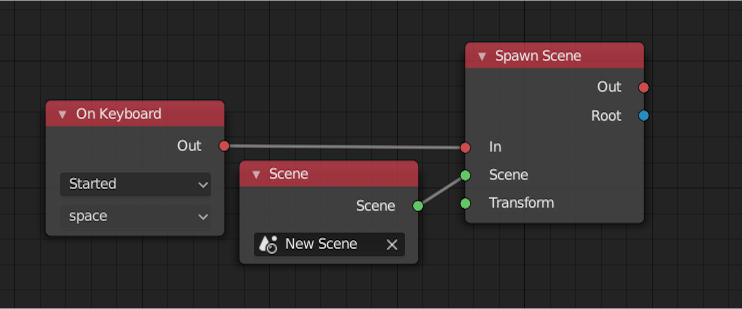
- Run F5 and press space.
Expected behavior
Modifiers should be applied to the loaded scene even when the scene is in another blend file (via link).
System
Blender: 2.8
Armory: 2019-11
OS: Windows 7 and Linux (Manjaro)
Graphics card: geforce gtx 750 ti
Test File
test.zip
 blenderaiser
All 30 comments
I could reproduce it on my end thanks to your file :+1:
I was digging a bit on the Scene class to see if I could spot where the issue may be, but AFAIK Armory "applies" modifiers when exporting meshes (by obtaining an evaluated copy from the dependency graph) here: https://github.com/armory3d/armory/blob/3e57614e1254cd25f207be9c6d4bf8e5f211b0bc/blender/arm/exporter.py#L1269
So meshes should be at their "exported state" when loading scenes, regardless of being on the main scene or not.
My bet is that the dependency graph is not giving a correct copy of the object with "applied" modifiers for different scenes given the current trend: https://github.com/armory3d/armory/issues/1378#issuecomment-531398321
 N8n5h
on 7 Nov 2019
N8n5h
on 7 Nov 2019
Thanks for your attention @N8n5h!
I made a humble example of a possible solution :P
Open the main.blend and just run the script and look at the terminal to see the count of vertices with the modifiers applied.
Do you think this example will be helpful?
*If I'm not mistaken, the Unity3D also open each scene in exportation. But as there are few objects in the example, this is not even perceptible.
Blender - Eval All Scenes.zip
blenderaiser
on 8 Nov 2019
So it seems I was right on my guess. Your solution could fit as a workaround for now :+1: but ideally the bigger issue with the dependency graph should be adressed at some moment; maybe it could be reported to Blender directly if it's still there in the latest versions, the only complicated thing is to isolate this issue (to reproduce it without Armory basically) and prove that Blender is the issue and not Armory.
If you don't have a problem I will try to apply your solution to the exporter and send a PR so it works for the moment, is that ok?
Edit: I pushed a solution based on your one in a branch: https://github.com/N8n5h/armory/blob/patch-1/blender/arm/make.py, I tested it with your original file and it seems to work, please test it and if it's ok I will send a PR.
N8n5h
on 8 Nov 2019
I tested the branch with my example and it worked! =]
I also tested on another example that worked, but I had to change some modifier parameters and save the file ... weird. It may be some mistake on my part too.
I will use this solution in my projects and analyze the consistency of it.
blenderaiser
on 8 Nov 2019
I also tested on another example that worked, but I had to change some modifier parameters and save the file ... weird. It may be some mistake on my part too.
It seems like maybe the fix wasn't enough to workaround the dependency graph issue...
N8n5h
on 8 Nov 2019
The solution is working well for scenes in the same file and linked objects, but linked scenes are not.
Example to run with the branch:
test_solution.zip
blenderaiser
on 8 Nov 2019
I tested your files and I'm not sure why the solution doesn't work... I think it's something it's ought to be reported to the Blender devs, no point in working around it.
N8n5h
on 9 Nov 2019
I understand, but the test code mentioned below works correctly in all scenarios (I did more tests). Wouldn't the problem be at Armory?
Thanks for your attention @N8n5h!
I made a humble example of a possible solution :P
Open the main.blend and just run the script and look at the terminal to see the count of vertices with the modifiers applied.
Do you think this example will be helpful?*If I'm not mistaken, the Unity3D also open each scene in exportation. But as there are few objects in the example, this is not even perceptible.
Blender - Eval All Scenes.zip
blenderaiser
on 9 Nov 2019
but the test code mentioned below works correctly in all scenarios
Well the only thing I did was change the scene before doing any mesh exporting to apply something similar to your solution, but I could have missed something, you are free to check where the process might fail in the exporter: https://github.com/N8n5h/armory/blob/5e83189c1f5268edddf9a14dbe09ee23aa2771a2/blender/arm/make.py#L59.
Also mesh exporting is right around here in case you wanna check that too https://github.com/armory3d/armory/blob/3e57614e1254cd25f207be9c6d4bf8e5f211b0bc/blender/arm/exporter.py#L1269
probably some tests to find out what is going on might help find the cause.
Wouldn't the problem be at Armory?
Not sure, but unfortunately I don't have a lot of time in hand right now to do tests to spot where the issue lie, but I'm inclined to believe the problem is right around the dependency graph since I manually tested it before some time ago and found that it caused problems in another issue, but I could be wrong this time.
N8n5h
on 10 Nov 2019
It seems that additional setting is necessary when data of another file is linked and used.(https://github.com/armory3d/armory/wiki/multiuser)
 Sandy10000
on 10 Nov 2019
Sandy10000
on 10 Nov 2019
I tried to test what Sandy10000 posted, but I'm having issues with the text and the solidify modifier, so I'm unsure if text is an ideal subject for testing this, I feel like with an simpler object I could get more consistent results.
@blenderaiser Can you recreate the test files in Blender - Eval All Scenes.zip but with a mesh object instead? I tried to do it myself but failed because I'm not sure how you linked the objects in the same scene so that they appear to be with a "lock" in the UI.
N8n5h
on 10 Nov 2019
The links are made like this: File -> Link -> Blend File -> Scene -> Scene
... or for objects: File -> Link -> Blend File -> Object -> Cube
That's why they get blocked.
I could use proxies, but they don't work well for objects with children.
So for more than one person to edit the same project and have something similar to prefabs I intend to use a lot of links.
I put some logs in make.py and exporter.py and I found a problem. Armory is evaluating linked scene objects when the main scene is defined in bpy.context.window.scene. In the print you can see it. I marked in red the objects that were evaluated in the wrong scene, they should be evaluated in 'Linked Scene'.

Logs with '------- My Code' show 100% correctly. This code I put in the export_objects function in exporter.py:
...
self.output['mesh_datas'] = []

for object in scene.objects:
       if object.type == "MESH":
           evobj = object.evaluated_get(self.depsgraph)
           mesh = evobj.to_mesh()
           print("----- My Code: " + evobj.name + " | original vertices: " + str(len(object.data.vertices)) +", evaluated vertices: "+str(len(mesh.vertices)))
           evobj.to_mesh_clear()
The log with '* Armory Code' in put in export_mesh function in exporter.py:
...
exportMesh = bobject_eval.to_mesh()
print("***** Armory Code: " + bobject.name + " | original vertices: " + str(len(bobject.data.vertices)) + ", evaluated vertices: " + str(len(exportMesh.vertices)))
In the export_data function in make.py:
...
curr_scene = bpy.context.window.scene # ref to current scene
for scene in bpy.data.scenes:
    if scene.arm_export:
        print("\n------------- SCENE: " + scene.name)
But I still don't know why these errors occur.
Hope this helps in something.
blenderaiser
on 10 Nov 2019
@N8n5h, running F5, using the codes from the previous post, I believe you will see the same behavior in the terminal.
Blender - Eval All Scenes 2.zip
blenderaiser
on 10 Nov 2019
Yeah, it seems like my quick fix didn't do much. I was reading the code and it's a bit more complicated than I thought; it would require me to sit and do a lot more of reading to understand how the exporter works to better apply the fix.
N8n5h
on 10 Nov 2019
Update:
I discovered the issue with my quick fix, it seems that bpy.context.scene is not being updated when changing the scene with bpy.context.window.scene = scene and instead it stays always in the same scene for some reason.
Ok, digging again in the exporter source I found this https://github.com/armory3d/armory/blob/3e57614e1254cd25f207be9c6d4bf8e5f211b0bc/blender/arm/exporter.py#L1944
After commenting those lines the linked objects are exported in their correct context I presume, same with the dependency graph.
I tested it with the files Blender - Eval All Scenes 2.zip but still it doesn't work :disappointed:
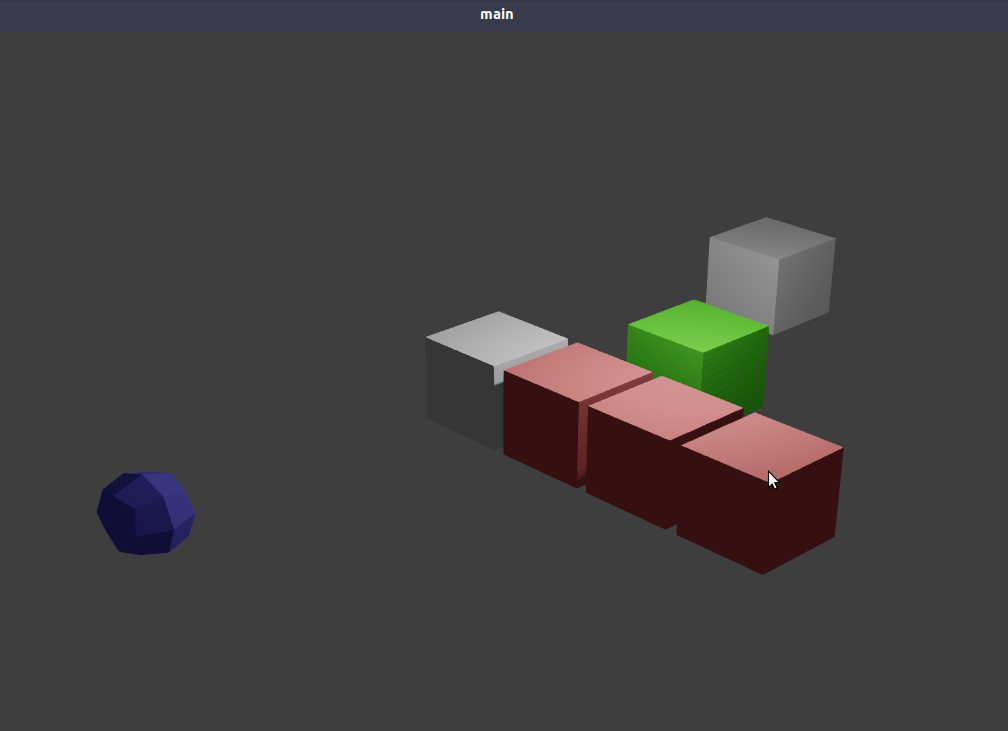
N8n5h
on 11 Nov 2019
I discovered the issue with my quick fix, it seems that bpy.context.scene is not being updated when changing the scene with bpy.context.window.scene = scene and instead it stays always in the same scene for some reason.
I reached the same conclusion! =]
I am creating an exporter for Panda3d, for study only, and managed to solve this problem apparently. But I still don't know how to implement this in Armory.
The secret was to use the bpy.types.WindowManager.event_timer_add function on the export operator of all scenes. In a timer step you load the scene and next you evaluate the objects....
You can also run evaluated_depsgraph_get in the timer step until the scene in depsgraph.scene_eval is the desired scene, and only then evaluate the objects.
I have no time now, but I plan to make an example soon and post here.
blenderaiser
on 13 Nov 2019
Update: I found where the issue might be. It seems that when calling an operator, in this case arm.play (ArmoryPlayButton), from a panel, in this case Player panel (ARM_PT_ArmoryPlayerPanel), it has some effect in bpy.context.scene that prevents it to update correctly.
If you call the operator directly, for example from the search window (space in Blender > search for "Play" > click "arm: Play"), bpy.context.scene will work just fine after the scene change.
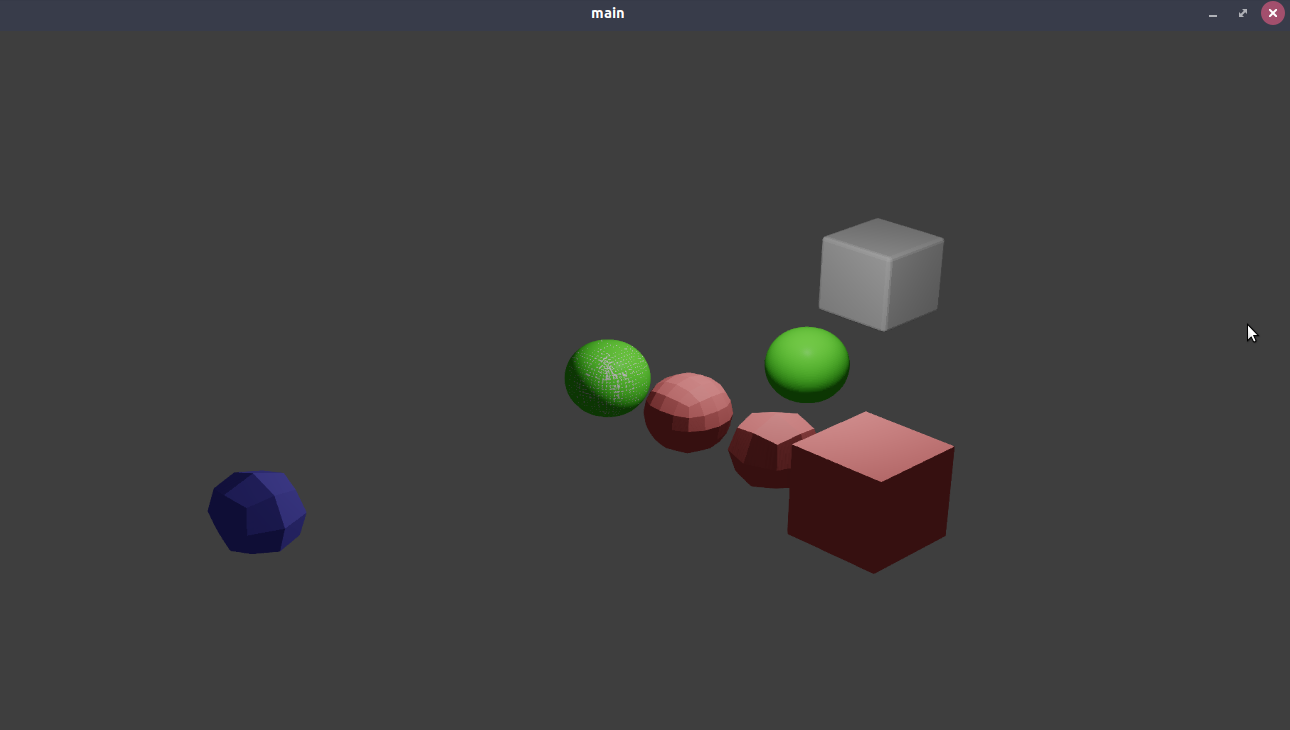
I isolated the issue in a small blend file and reported it to the blender devs here: https://developer.blender.org/T71542
If I have some time I will try to dig Blender's source to see if I can spot the issue there...
N8n5h
on 15 Nov 2019
Update: It seems that the problem is not the panel but the properties editor: "Issue is that Properties space has its own 'current scene' storage, which is returned from its context, and that gets updated on UI update, not on depsgraph update (as is the case for 'normal' context from other spaces)." according to an administrator in the Blender developers page from my issue report. So basically it will not update immediately unless there is an UI update.
So for that among some solutions are, maybe the easiest: moving the panel elsewhere like in 3d view, or writing a modal: I tested with a timer modal and it works, but the thing is that a lot of the exporter has to be refactored to avoid race condition.
I implemented the simplest solution and moved the Play and Build project to the 3d View:

I suck at git so I had to create another branch, https://github.com/N8n5h/armory/tree/fix-export
please test the changes to see if that fits as a solution to the original problem.
N8n5h
on 24 Nov 2019
Sorry, I had no time last week.
Nice! Worked well! Particularly I prefer Play and Build in 3d view kkk
... but I noticed that instances of collections are not being exported. Later I update the post with an example.
blenderaiser
on 25 Nov 2019
Ok nice to hear it works. Regarding that other issue, does that occur without the applied fix too?
N8n5h
on 25 Nov 2019
No, it is happening only in applied fix.
blenderaiser
on 25 Nov 2019
Ok, I will try to look at it, but seems a bit out of scope of the original issue. The original one was resolved with the fix, right?
N8n5h
on 25 Nov 2019
Yes, about modifiers, I think it was solved, thanks! About the instances of collections, it appears that their objects are not included in the export. Simply the objects of the collection instance do not appear in the game. Before the fix, objects would appear, so I believe that switching to 3d view can make Armory not see objects from collection instances.
blenderaiser
on 25 Nov 2019
Ok, please provide an example when you can so I can get testing with it! :+1:
N8n5h
on 25 Nov 2019
Here is the example.
main.blend.zip
The logic below may be able to access objects for export. Hope that helps in something.
if evaluated_object.instance_type == "COLLECTION":
    for evaluated_object_in_collection in evaluated_object.instance_collection.all_objects:


...
I would like to use collections as prefabs, because their instances allow editing of transform, as well as preserving the hierarchy of objects (where proxies fall short) and not requiring a link. Is there another way to do this?
blenderaiser
on 26 Nov 2019
Is there another way to do this?
I haven't played too much with those aspects of the engine, so I don't know if there is another way. But, what I know is that an asset manager is planned for Blender for not so far future versions, and if I recall correctly it would have some behavior like prefabs similar to Unity, but not sure, I would have to look it up again.
As for the issue, the error seems to be here: https://github.com/N8n5h/armory/blob/e7fb260aeae5f40c5a47cfaa8c9d7b9f98517c1f/blender/arm/exporter.py#L1944
I didn't see it the first time, but it looks like that code is a catch-all for whatever is "foreign" to the scene database I think, including linked objects. I have to include it again but make sure linked objects are not picked in the mix...
N8n5h
on 26 Nov 2019
Update, I pushed a fix to the fix-export branch https://github.com/N8n5h/armory/commit/674f9bc250a0c013153d618db3013b61191bf60f, now it loops over the collections of each scene instead of all the collections in the blend file, so now it should work fine, I tested a bit to see if everything mentioned in here worked and it seems like everything works. If you find something that is not working please do tell.
N8n5h
on 26 Nov 2019
I made another fix with a different approach https://github.com/N8n5h/armory/tree/fix-export-2:
this time I removed the looping over different scenes to update the current scene and instead I create a temporal collection that will have all the objects and collections from differents scenes linked to it, creating some "zoo" like collection to expose all objects/collections to the dependency graph before exporting the current scene.
This let me keep the Play and Build panels over the properties editor. Not sure if this introduces any issues but with the tests from this issue seems to work.
Update:
I pushed fixes in both fix-export and fix-export-2 branches after testing with the bowling example from the examples_repo and it seems to work with no problems.
Now fix-export works a bit different, instead of setting the current scene and going with it, the scene is changed, but only briefly to have the depsgraph updated and promptly saved into a variable that the exporter then receives, after that the scene is changed back to the original to avoid issues and keep it as close as the original.
For the fix-export-2 I had to divide the export process in two. First try to have a collection "zoo" of only meshes and collections with meshes by checking if they are either MESH or EMPTY (so regular empties may get in the bunch, I need to check for issues later), and then the exporting it with the context scene. after that the process goes normally.
Update2: I commited a new branch fix-export-3 as a newer alternative, let the zoo be visible to the dependency graph only and then export normally. That way I avoid possible conflicts of having the "zoo" exported with the main scene when it shouldn't.
I'm trying to have them as polished as possible to get them into master with little to no problems...
N8n5h
on 1 Dec 2019
Great! Good solution! I tested fix-export-3 quickly in several ways and it worked! I will continue using this fix ... thanks!
blenderaiser
on 2 Dec 2019
maybe the issue can be closed now, since it's solved? :smiley:
N8n5h
on 6 Dec 2019
Related issues
 mushroomeo
·
4Comments
mushroomeo
·
4Comments
 luboslenco
·
3Comments
luboslenco
·
3Comments
 BrahRah
·
3Comments
BrahRah
·
3Comments
 e1e5en-gd
·
3Comments
e1e5en-gd
·
3Comments
 knowledgenude
·
3Comments
knowledgenude
·
3Comments
Most helpful comment
It seems that additional setting is necessary when data of another file is linked and used.(https://github.com/armory3d/armory/wiki/multiuser)