Ardupilot: Copter: object avoidance should support cheaper lidar
The SF40C is about $1k USD which is expensive for many users. We should add support for cheaper sensors like these:
 rmackay9
All 70 comments
@rmackay9 , I got RPLidar 1 and I don't think it is suitable for flying vehicle, but version 2 seems ok (http://www.robotshop.com/en/rplidar-a2-360-laser-scanner.html)
 khancyr
on 24 Jan 2017
khancyr
on 24 Jan 2017
Prototype of a Multi-Laser -STM VL53LOX - Time Of Flight
Range: 2 Meter , Powered by Arduino or Tennsy
The POC : Proximity Obstacle Collision avoidance system

More info here: https://gitter.im/ArduPilot/ardupilot/VisionProjects/archives/2017/02/26
 patrickpoirier51
on 24 Jan 2017
patrickpoirier51
on 24 Jan 2017
those i2c VL53L0X lidar sensors look ideal, if they could be supported then they would be great for short range avoidance and a fraction of the weight of something like a sr-04 sonar.
https://www.pololu.com/product/2490
they would make great altimeters too if your just wanting it for landing for plane and copter.
 geofrancis
on 31 Jan 2017
geofrancis
on 7 Feb 2017
geofrancis
on 31 Jan 2017
geofrancis
on 7 Feb 2017
Here is my first mavlink test with the POC

The arduino base system , sequentially sends these messages:
command_heartbeat();
command_distance_1();
command_distance_2();
command_distance_3();
command_distance_4();
command_distance_5();
command_distance_6();
Each distance message is
//MAVLINK DISTANCE MESSAGE
int sysid = 1;
int compid = 158;
uint32_t time_boot_ms = 0; /< Time since system boot/
uint16_t min_distance = 1; /< Minimum distance the sensor can measure in centimeters/
uint16_t max_distance = 160; /< Maximum distance the sensor can measure in centimeters/
uint16_t current_distance = dist1; /< Current distance reading/
uint8_t type = 0;
uint8_t id = 1;
uint8_t orientation = 4;
uint8_t covariance = 0;
and for each message we associate distance , id and orientation of the associated sensor.
The actual setup is
dist 1 - id 1 - orient 4 == looking at 6 oclock
dist 2 - id 2 - orient 6 == looking at 9 oclock
dist 3 - id 3 - orient 7 == looking at 11 oclock
dist 4 - id 4 - orient 0 == looking at 12 oclock
dist 5 - id 5 - orient 1 == looking at 1 oclock
dist 6 - id 6 - orient 2 == looking at 3 oclock
The message refresh rate is a slow 4,5 Hz and it seems that its not reading correctly all the time
after few experiments, reduced the 4 sensors = front - back - left- right and refresh is at 8 HZ and the reading is consistent
patrickpoirier51
on 4 Mar 2017
@patrickpoirier51, looks good! If the distances are appearing on the proximity viewer then it's working and it should do object avoidance.
rmackay9
on 7 Mar 2017
Doing test with Object Avoidance transmitting Mavlink Message on a Pixracer running 3.5.2 (master)

Changed the Mavlink message structure like this:
id 1 - orient 4 == looking at 6 oclock
id 2 - orient 24 == looking upward
id 3 - orient 6 == looking at 9 oclock
id 4 - orient 0 == looking at 12 oclock
id 5 - orient 1 == looking at 3 oclock
Parameters are as follow:
PRX_TYPE = 2 (MAVLINK)
AVOID_TYPE = 2 (USE PROXIMITY SENSOR)
AVOID_ENABLE = 1
AVOID_DIST_MAX= 1 METER
Connected to SERIAL 2 = 112 (Kbauds) , using 1 (MAVLINK)
With all sensor enabled I cannot takeoff in AltHold = Motors are spinning but not full speed
If I disable id 2 - orient 24 == looking upward , I can takeoff and get avoidance on 360 degs.
If I disable all sensors but id 2 - orient 24 == looking upward = I got BAD LIDAR HEALTH
patrickpoirier51
on 20 Mar 2017
The POC has a little brother: http://www.kaidengtoys.com/goodshow/k90-k90-remote-control-edition-6-axis-gyro-quadcop.html
Look at 2:42 https://youtu.be/o0QdqPtIn5A?t=163
patrickpoirier51
on 3 Apr 2017
Update: with new code release https://github.com/ArduPilot/ardupilot/issues/6080 the AltHold is working OK. Thanks to Randy for this. Will perform more test and report on discuss.ardupilot.org.
Next step will be implementing VL53L1 ... when available
http://www.st.com/content/ccc/resource/technical/document/data_brief/group1/05/c4/52/c9/2f/fb/41/98/DM00364684/files/DM00364684.pdf/jcr:content/translations/en.DM00364684.pdf
patrickpoirier51
on 25 Apr 2017
Great!
The multi-zone range finders will be great to start playing with. I've actually got a LeddarVu which has 8 zones which is a start. It's a bit pricey but hopefully prices will come down.
rmackay9
on 25 Apr 2017
@patrickpoirier51 when will you be releasing your code for the vl53l1?
geofrancis
on 9 May 2017
@geofrancis
My code is a mess... but here are links to codes I used
MAVLINK on ARDUINO
http://forum.arduino.cc/index.php?topic=382592.0
VL53L0X – maximum sensors on I2C arduino bus
https://forum.pololu.com/t/vl53l0x-maximum-sensors-on-i2c-arduino-bus/10845/7
patrickpoirier51
on 10 May 2017
Hello, I started the integration of the latest RPLIDAR-A2 with 16m range in the AP_PROXIMITY library. The serial communication is working and I already get measurements from the LIDAR in the proximity window, but further testing is needed . Please have a look at the PR #6552:
 SteveJos
on 10 Jul 2017
SteveJos
on 10 Jul 2017
Does anyone have more detail on the VL53L1?
I can't find any info on this except the "data brief" document on ST's website.
Any ideas about availability?
Incidentally, could this be one of the sensors that going to be in the upcoming iPhone 8?
 dionator
on 31 Jul 2017
dionator
on 31 Jul 2017
Here is the answer from MOUSER when I requested for a quote on the VL53L1
"No bid, not available for mass market"
patrickpoirier51
on 31 Jul 2017
Well... the POC has been commercialised: http://www.teraranger.com/products/teraranger-multiflex/
patrickpoirier51
on 4 Oct 2017
Short remark: I used dronekit on a RPI access point to address and readout 3 VL53L0x sensors. I wrote a brief python program to send the mavlink distance messages and readout the sensors. The readout python code is based on the excellent work of johnbryanmoore on github (johnbryanmoore/VL53L0X_rasp_python). A sample of my code looks like:
def range_sensor(self,dist,orient):

    self.msg = self.vehicle.message_factory.distance_sensor_encode(
        0,      # time system boot, not used
        1,      # min disance cm
        160,    # max dist cm
        dist,   # current dist, int cm
        0,      # type sensor
        1,      # on board id, not used
        orient, # orientation: 0...7
        0,      # covariance, not used
        )

    self.vehicle.send_mavlink(self.msg)

def measure(self):
    distance1 = self.tof1.get_distance()/10
    self.range_sensor(distance1, 0)
    distance2 = self.tof2.get_distance()/10
    self.range_sensor(distance2, 1)
    distance3 = self.tof3.get_distance()/10
    self.range_sensor(distance3, 7)

    time.sleep(self.timing/1000000.00)
RNG = RNGFIND()
while True:
"""
measurement loop
"""
RNG.measure()
time.sleep(0.1)
 avncalst
on 9 Oct 2017
avncalst
on 9 Oct 2017
Cool, so you are using the TCA9548A I2C Multiplexer ?
patrickpoirier51
on 9 Oct 2017
No I am not using the I2C multiplexer. At boot the 3 sensors get a different address, see johnbryanmoore/VL53L0X_rasp_python/python/VL53L0X_multi_example.py
avncalst
on 10 Oct 2017
Yeah, like I did with the Arduino https://github.com/patrickpoirier51/POC/blob/master/VL53_MULTI_PROMINI.ino
patrickpoirier51
on 10 Oct 2017
I'm trying to send DISTANCE_SENSOR message to FC (pixhawk 2.4.8 clone) through RPi3 using python dronekit following template from @avncalst but it seems pixhawk does not accept it reporting "Bad LiDAR Health". I'm using a Lidar Lite v1 connected via PWM to RPi collecting measurements and forwarding (20Hz frequency) to FC
def send_distance_message(dist, orient):
    msg = vehicle.message_factory.distance_sensor_encode(
             0,      # time system boot - not used
             25,      # min disance cm (defined 25cm as referement)
             40000,    # max dist cm (40mt for LidarLite)
             dist,   # current dist, int cm - MUST BE INT
             4,      # type= 0: laser; 4: unknown/analog
             0,      # on board id, not used
             orient, # must be set to MAV_SENSOR_ROTATION_PITCH_180 (12) for mavlink rangefinder, represents forward-facing
             0,      # covariance, not used
    )
vehicle.send_mavlink (msg)
vehicle.commands.upload()
I've checked RPi calculates correctly the distance (at least in the range 20cm - 3mt) but no message is passed by to FC.
FC settings:
PRX_TYPE: 2
AVOID_ENABLE: 2
AVOID_DIST_MAX: 5
AVOID_MARGIN: 2
Radar does not activate.
Thanks for support
PS: how can I install mavlink inspector on windows (7 and/or 10)?
 poliant
on 27 Oct 2017
poliant
on 27 Oct 2017
Did you set the RNGFND tab?
avncalst
on 27 Oct 2017
Yes I did. But RNGFND is disable.
And in mavlink inspector DISTANCE_SENSOR does not appear.
What I really do not understand is why there is the message "bad lidar health"...
poliant
on 27 Oct 2017
I've enable RNGFND as well, but problem still persist
poliant
on 28 Oct 2017
Here a simple test file. Works for me.
FC settings: Copter version 3.5.3, RNGFND:10 (mavlink), PRX_TYPE:2 (mavlink)
import time
from dronekit import connect, VehicleMode
vehicle = connect('udpin:127.0.0.1:15550', wait_ready=False)
vehicle.initialize(8,30)
vehicle.wait_ready('autopilot_version')
print "\nGet all vehicle attribute values:"
print " Autopilot Firmware version: %s" % vehicle.version
print " Major version number: %s" % vehicle.version.major
print " Minor version number: %s" % vehicle.version.minor
print " Patch version number: %s" % vehicle.version.patch
print " Release type: %s" % vehicle.version.release_type()
print " Release version: %s" % vehicle.version.release_version()
print " Stable release?: %s" % vehicle.version.is_stable()
print " test mav_distance message"
def range_sensor(dist,orient):
    msg = vehicle.message_factory.distance_sensor_encode(
        0,      # time system boot, not used
        1,      # min disance cm
        160,    # max dist cm
        dist,   # current dist, int
        0,      # type sensor
        1,      # on board id, not used
        orient, # orientation: 0...7
        0,      # covariance, not used
        )

    vehicle.send_mavlink(msg)
def measure():
    distance1=150
    range_sensor(distance1, 0)

    distance2=150
    range_sensor(distance2, 1)

    distance3=150
    range_sensor(distance3, 7)
while True:
measure()
time.sleep(0.1)
not different from what I have... let's try
thanks
poliant
on 29 Oct 2017
problem in my code was the orientation: I was passing a non consistent value (so the warning message "bad lidar health").... how to make a mountain out of a molehill
thanks for support
PS: it seems there is no need to set RNGFND to 10, it is enough PRX_TYPE to 2, but I've not tested on-air (quad still not assembled)
poliant
on 29 Oct 2017
Hi, everyone, pls allow me to add a low cost LiDAR TFmini from Benewake. It's mini size with big smart, easy to integrate and use. Ranging 12m, 6g. Public price is US$39.9 only.
You are welcome to check below eBay link for the Benewake TFmini LiDAR to know more:
Thanks
 SiyaLiu
on 1 Dec 2017
SiyaLiu
on 1 Dec 2017
Sure @SiyaLiu go ahead do a github pull request and we will review it.
 amilcarlucas
on 1 Dec 2017
amilcarlucas
on 1 Dec 2017
I think @patrickpoirier51 did some test with it?
khancyr
on 1 Dec 2017
yes, @patrickpoirier51 , is it ok that you share your test with TFmini LiDAR here too ?
SiyaLiu
on 1 Dec 2017
Yes, once we can get the TFMINI fully working, I will update here as well.
patrickpoirier51
on 1 Dec 2017
Well, there is a new cheap sensor with a range of 6-12 meters on the bench.
Its a POC using Benewake TFMINI
Still a lot do do but the range makes it a great contender for an avoidance system on budget
BOM on the picture is approx 150$

patrickpoirier51
on 29 Dec 2017
I want to try to integrate my RangeFinder. Hardware should work right away. I do not know the programm structure of ardupilot - it can take a long time.
https://github.com/ipmgroup/RangeFinder_9xVL53L0X_hardware
 karu2003
on 16 Jan 2018
karu2003
on 16 Jan 2018
@karu2003 already done : https://github.com/ArduPilot/ardupilot/blob/master/libraries/AP_RangeFinder/AP_RangeFinder_VL53L0X.h
khancyr
on 16 Jan 2018
I see that VL53L0X has been added to ardupilot but when i tried it connected to i2c I dont get anything, is there something im missing?
geofrancis
on 16 Jan 2018
@khancyr only one was added. PCA9554 no support. I want 5 - 9 directions.
karu2003
on 16 Jan 2018
Please ask question on FORUM, this is a developper's thread, this is used to add/enhance system and code
patrickpoirier51
on 16 Jan 2018
@karu2003 interesting design, you can use an Arduino or a Teensy to collect I2C devices and transform into Serial Mavlink avoidance message , like I did with the POC
patrickpoirier51
on 16 Jan 2018
Hi Patrick, I am very interested in your findings using the TF Minis as I will be attempting something similar. Which Board are you using to connect the multiple Lidars Arduino Mega? I see for individual sensors you are using Arduino Nano and I2C connection on Pixhawk.
 jason099912
on 24 Jan 2018
jason099912
on 24 Jan 2018
@jason099912 I am still workin on this prototype and I wil write a blog pretty soon.
Yes it is converting the TFMINI Serial into I2C using Attiny85 and each sensor has his own I2C address. The Arduino ProMini do collect the I2C and transmit over Serial using Mavlink Protocol , just like the POC.
I tried collecting TFMINI directly from serial interface using a Tennsy3.5 but I could not get stable operation because of too many buffer overruns. The code can certainly be optimised but without real handshake it will allways be symptomatic. and Pricewise its less expensive to use multiple Attiny (1.50$) + ProMini (2,50$) than a single Teensy3.5 (30$).
patrickpoirier51
on 24 Jan 2018
Hi Patrick, Thank you for the details it looks very interesting and could potentially be a very cost effective solution. Keep up the good work.
jason099912
on 24 Jan 2018
I have been on the ardupilot.org and people have asked the same question and got no response.
There is no information on the ardupilot website either other than a link to the manufacturer.
all I can find is the its rangefinder type 16, when I tried this it didnt work, I have lidar lites and a few different ultrasonics that I have used without issue. all I wanted was to know if there was anything specifically different about the VL53L0X or should it just work when plugged into the i2c and the type is set like any other rangefinder.
I plan on building a POC but i would like to get one working first for testing.
geofrancis
on 24 Jan 2018
@geofrancis there is no particular requirement to make the VL53L0X work. Once configured using the wizard (optionnal hardware-rangefinder) you reboot the FC and should be able to read sonar distance
patrickpoirier51
on 24 Jan 2018
thank you, then I probably have a faulty one.
geofrancis
on 24 Jan 2018
I mounted a Lidar-Lite v3 on a servo and adapted my python dronekit code. In this way I am able to measure distances in a 180 degree yaw range. First tests show promising results.


avncalst
on 25 Jan 2018
Thats Cool :-)
What is the maximum scan speed you can achieve ?
Can you easily correlate the controlled-vs-real position ?
I builded one with TFMINI + Arduino + Cheap Servo, I could get 2 cylcles per second but trying to go faster with an open-loop servo system was inducing errors == giving wrong vectors
patrickpoirier51
on 25 Jan 2018
The scan speed is an issue. I am still testing and optimizing the code. Instead of scanning I direct the servo to the 5 predefined angles. I tested this morning the new code on my drone in loiter mode (still at low cycle times (1cycle/sec)). Works OK. I will continue to evaluate and try to speed up the cycle time, but it will be always inferior to 5 fixed lidars. However it is a cheaper solution.
avncalst
on 27 Jan 2018
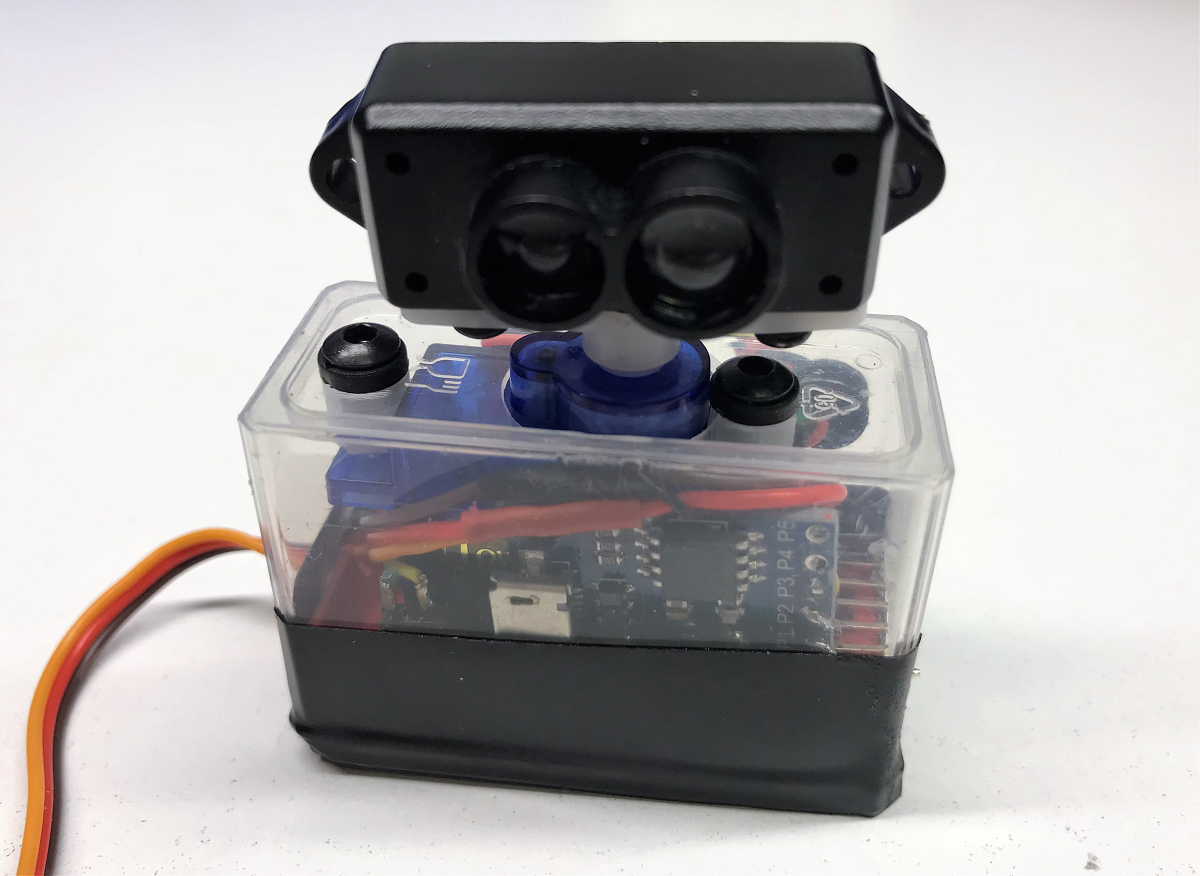
This is the prototype I talked you about == Its a micro servo and controlers inserted in a TicTac Box
You can see the Digistump (Attiny85) clone that is used to control the servo. The Arduino Pro Mini sends 3 bits vector codes (3 digital pins) corresponding to the pwm code for azimuth.
My next step is to add 3 opto sensors -or any type of encoder- to close the scanning loop so I dont have to ''tune'' the timing ;-)
patrickpoirier51
on 27 Jan 2018
Nice work
avncalst
on 27 Jan 2018
Just published the blog on avoidance:
https://discuss.ardupilot.org/t/avoidance-experiments-with-the-poc-and-benewake-tfmini/25277
patrickpoirier51
on 27 Jan 2018
Hello, i use lidar TFMINI and arduino with my pixhawk for obstacle avoidance , i use mavlink "mavlink_msg_distance_sensor_pack" function ,with telmetry 2 port , with serial parameters 'mavlink2' and baud rate '57600' ,in mision planner i see the sensor distance work and the drone fly no problem and react to the sensor , but the problem is when i use Mavproxy i have this message "(Time has wrapped ,0, xxxx)" continuously ! It's embarrassing beacause i need use the NSH terminal and it seems a mavlink bug and can affect the Autopilot ,i change the Serial 2 protocol paramaters " mavlink1" the same issue !, who has an idea ?
 Tarek-H
on 2 Feb 2018
Tarek-H
on 2 Feb 2018
RP Lidar have been added to Copter-3.6 along with the TF02, TFmini so I think we can close this now..
rmackay9
on 1 Jun 2018
LOL !! Does it mean there will never be other options ?!?! ;-)
patrickpoirier51
on 1 Jun 2018
Hi, wondering if anyone is going ahead with adding support for the Scans Sweep Lidar? Or as @patrickpoirier51 seems to be doing...read data from the Lidar then send it on to Mission Planner? Might be a bit beyond my knowledge/skills at the moment. Cheers
 bj-neilson
on 26 Jun 2018
bj-neilson
on 26 Jun 2018
Hello patrickpoirier51
I am very interested in your project
"Prototype of a Multi-Laser -STM VL53LOX - Time Of Flight"
I have purchased Arduino Uno, 7 VL53LOX sensors, TCA9548A Multiplexer.
I would like it if it could be, see the connection scheme you use and the information on how to communicate with the controller.
I have seen the video on Youtuve and I find it impressive.
I am a little fish in programming of ardupilot and arduino but with desire everything is achieved. I come from DJI with F450 and F550 and it has nothing to do with it.
I would appreciate it if you are so kind to provide me with information to be able to mount a POC with VL53LOX.
It happens to me like to geofrancis, that putting the type 16 and the address 41 I do not see any data in APM Planner or Mission Planner.
Sorry for my English.
Cheers.
 tincdron
on 9 Jul 2018
tincdron
on 9 Jul 2018
@tincdron
I am not using the i2c multiplexer but the Arduino GPIO.
Take a look at my code, https://github.com/patrickpoirier51/POC/blob/master/MAVLINK-POC-4_up.ino#L50
you can do the same with the UNO,( actually you have more pins available than with ProMini) you just need to map the correct IO to the xshunt of each VL53L0x
patrickpoirier51
on 9 Jul 2018
Hello patrickpoirier51,
Thanks for answering, I appreciate it.
I understand the replacement of pins 2 to 8, the 7 does not connect and these are connected to XSHUT.
How to connect SDA, SCL and what pins.
Cheers.
tincdron
on 10 Jul 2018
Hello patrickpoirier51,
I saw you in the Erle Robotics forum, I'm using an ErleBrain 3 as a controller with APM Copter V3.4 rc2.
Where can I get the libraries for Arduino "mavlink.h" and "mavlink_msg_distance_sensor.h".
Cheers.
tincdron
on 10 Jul 2018
@tincdron you have to generate the header file using the scripting.
Take a look at this blog: https://discuss.ardupilot.org/t/mavlink-step-by-step/9629
patrickpoirier51
on 10 Jul 2018
Hello patrickpoirier51,
Where SDA, SCL connect
Are they connected in parallel?
I'm going to do first tests with VL53_MULTI_PROMINI.ino, I understand that the data comes out through the Arduino screen.
Cheers.
tincdron
on 11 Jul 2018
Hello patrickpoirier51,
I think I have solved the SDA, SCL connections.
Hello patrickpoirier51,I'm going to do tests.
I only have to find the libs.
Cheers.
tincdron
on 11 Jul 2018
Hello patrickpoirier51,
In the MINIZEE video I see that you use VL53L laser and Ardupilot 3.4.
I am using APM copter V3.4 rc2 from Erle Robotics and I am not able to measure anything, if I see the address 29 in i2C.
You have an idea that is happening, Erle Robotics has no idea.
You changed something in Ardupilot 3.4 or what configuration you had, in Mision Planner there is not the RangeFinder VL53L type 16.
Cheers.
tincdron
on 12 Jul 2018
3.4 is really old stuff, the VL53L0x == type 16 has been introduced in Copter 3.5.0-rc8
patrickpoirier51
on 12 Jul 2018
Hello patrickpoirier51,
Thanks for answering, I'll see if Erle Robotics has the Copter 3.5.0-rc8.
I have installed the Copter 3.5.0 but the sensor does not work.
The Copter 3.6 is not available from Erle Robotics.
Greetings.
tincdron
on 13 Jul 2018
Have you checked if you can see the device with i2cdetect?
patrickpoirier51
on 13 Jul 2018
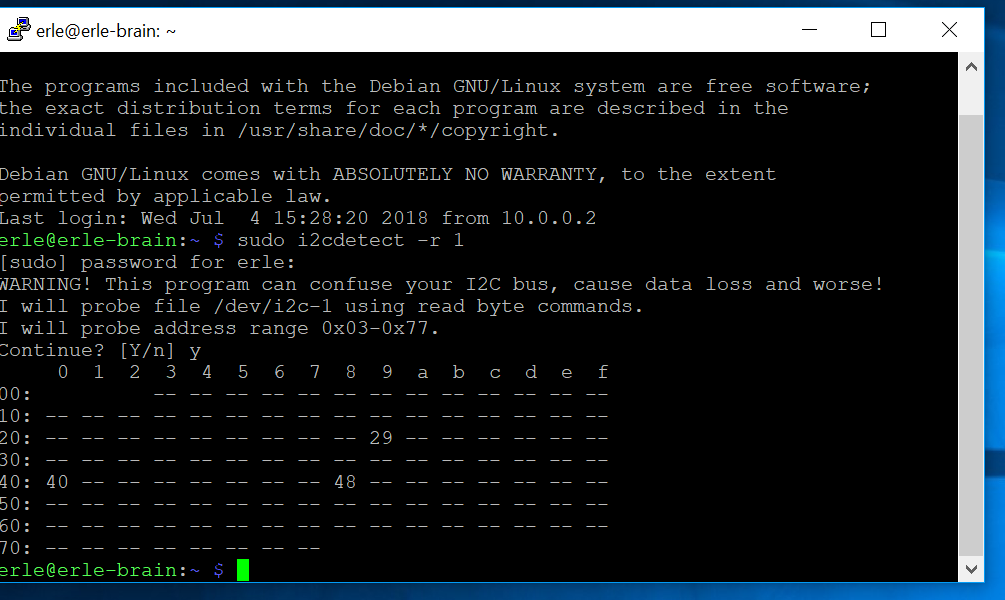
If it is identified according to the image.
Hex 20 = 41
Cheers
tincdron
on 13 Jul 2018
Well , I think it’s related to a race condition on the bus... there was an issue on the forum, I suggest you check with Erle
patrickpoirier51
on 13 Jul 2018
I have tried to use this to AC3.2.1 (APM 2.8 - retired), it said it was missing or not declared var, etc error. I'm using Raspberry Pi with cheap VLX sensor, HRC-04/05 (This for indoor mode only). How can i custom firmware for my APM 2.8 ? what section i have to change? Or should i buy Pixhack 2.4.8 ? Thanks
 SHikumo
on 4 Aug 2018
SHikumo
on 4 Aug 2018
Hi @rmackay9 @patrickpoirier51,
Is there any way to execute above things on px4 firmware for collision avoidance.
 imakashr
on 24 Nov 2020
imakashr
on 24 Nov 2020
Related issues
rmackay9
·
4Comments
patrickpoirier51
·
8Comments
 machenxiang
·
8Comments
rmackay9
·
4Comments
machenxiang
·
8Comments
rmackay9
·
4Comments
 Saijin-Naib
·
4Comments
Saijin-Naib
·
4Comments
Most helpful comment
Well, there is a new cheap sensor with a range of 6-12 meters on the bench.

Its a POC using Benewake TFMINI
Still a lot do do but the range makes it a great contender for an avoidance system on budget
BOM on the picture is approx 150$