Arduino-esp32: WiFi AP issues after upgrading to the latest version 1.0.1
Hardware:
Board: ESP32 Dev Module
Core Installation version: 1.0.1
IDE name: Arduino IDE & Platform.io
Flash Frequency: 40Mhz
PSRAM enabled: no
Upload Speed: 115200
Computer OS: Windows 10
Description:
While in AP mode, it's not possible for several mobile devices to obtain an IP address from the DHCP Server. The issue started to appear after upgrading to the latest version of the framework, version 1.0.1.
It's worth mentioning that this issue was not presented with the previous version of the framework.
These are the devices that cannot connect to the AP:
- Samsung Galaxy Note 5 - Android 7.0
- Samsung Galaxy S5 - Android 4.4
- NVIDIA Shield Tablet - Android 7.0
- iPhone 6S - iOS 12.1.2
The following devices successfully connect to the AP:
- Samsung Galaxy Note 8 - Android 8.0.0
- Samsung Galaxy Tab A - Android 7.1.1
- Personal Computer - Windows 10
Sketch:
The sketch I've used for this test is the one included on the examples folder
/*
  WiFiAccessPoint.ino creates a WiFi access point and provides a web server on it.

  Steps:
  1. Connect to the access point "yourAp"
  2. Point your web browser to http://192.168.4.1/H to turn the LED on or http://192.168.4.1/L to turn it off
     OR
     Run raw TCP "GET /H" and "GET /L" on PuTTY terminal with 192.168.4.1 as IP address and 80 as port

  Created for arduino-esp32 on 04 July, 2018
  by Elochukwu Ifediora (fedy0)
*/

#include <WiFi.h>
#include <WiFiClient.h>
#include <WiFiAP.h>

#define LED_BUILTIN 2   // Set the GPIO pin where you connected your test LED or comment this line out if your dev board has a built-in LED

// Set these to your desired credentials.
const char *ssid = "ESP32";
const char *password = "password";

WiFiServer server(80);


void setup() {
  pinMode(LED_BUILTIN, OUTPUT);

  Serial.begin(115200);
  Serial.println();
  Serial.println("Configuring access point...");

  // You can remove the password parameter if you want the AP to be open.
  WiFi.softAP(ssid, password);
  IPAddress myIP = WiFi.softAPIP();
  Serial.print("AP IP address: ");
  Serial.println(myIP);
  server.begin();

  Serial.println("Server started");
}

void loop() {
  WiFiClient client = server.available();   // listen for incoming clients

  if (client) {                             // if you get a client,
    Serial.println("New Client.");           // print a message out the serial port
    String currentLine = "";                // make a String to hold incoming data from the client
    while (client.connected()) {            // loop while the client's connected
      if (client.available()) {             // if there's bytes to read from the client,
        char c = client.read();             // read a byte, then
        Serial.write(c);                    // print it out the serial monitor
        if (c == '\n') {                    // if the byte is a newline character

          // if the current line is blank, you got two newline characters in a row.
          // that's the end of the client HTTP request, so send a response:
          if (currentLine.length() == 0) {
            // HTTP headers always start with a response code (e.g. HTTP/1.1 200 OK)
            // and a content-type so the client knows what's coming, then a blank line:
            client.println("HTTP/1.1 200 OK");
            client.println("Content-type:text/html");
            client.println();

            // the content of the HTTP response follows the header:
            client.print("Click <a href=\"/H\">here</a> to turn ON the LED.<br>");
            client.print("Click <a href=\"/L\">here</a> to turn OFF the LED.<br>");

            // The HTTP response ends with another blank line:
            client.println();
            // break out of the while loop:
            break;
          } else {    // if you got a newline, then clear currentLine:
            currentLine = "";
          }
        } else if (c != '\r') {  // if you got anything else but a carriage return character,
          currentLine += c;      // add it to the end of the currentLine
        }

        // Check to see if the client request was "GET /H" or "GET /L":
        if (currentLine.endsWith("GET /H")) {
          digitalWrite(LED_BUILTIN, HIGH);               // GET /H turns the LED on
        }
        if (currentLine.endsWith("GET /L")) {
          digitalWrite(LED_BUILTIN, LOW);                // GET /L turns the LED off
        }
      }
    }
    // close the connection:
    client.stop();
    Serial.println("Client Disconnected.");
  }
}
I would appreciate it if someone could provide a hint on this issue. Any help will be really helpful.
Thanks in advanced
 evert-arias
All 16 comments
I have the same Issue! , any help to solve the problem would be highly appreciated!
 luisgcu
on 26 Jan 2019
luisgcu
on 26 Jan 2019
Just for further clarification and testing
Have you tried disconnecting all devices then connect 1 device only (for example: only the iphone)?
Does it make a difference if you dont use a password for the AP?
Try using a static config in both ap and sta mode:
WiFi.mode(WIFI_AP_STA);
IPAddress ip(1,2,3,4);
IPAddress gateway(1,2,3,4); // same as ip, some phones disconnect if there is no internet
IPAddress subnet(255,255,255,0);
WiFi.softAPConfig(ip, gateway, subnet);
WiFi.softAP("ESP32");
delay(1000);
IPAddress myIP = WiFi.softAPIP();
Serial.print("AP IP address: ");
Serial.println(myIP);
 1TekPro
on 26 Jan 2019
1TekPro
on 26 Jan 2019
@1TekPro thanks for your comments, but our test had been done one device at the time, and the problem appear with some mobile devices.
As @evert-arias mentioned in the initial post the first list of devices won't connected to the AP , the second list show devices that successfully get connected, .. we tested one by one.. we never tried to connect more than one mobile devices to the ESP32 AP.
These are the devices that cannot connect to the AP the mobile device show a message that read "failed to obtain Ip address:
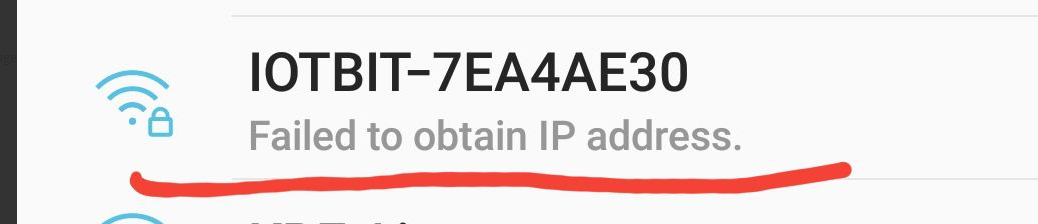
Samsung Galaxy Note 5 - Android 7.0 (failed to obtain ip address from ESP32)
Samsung Galaxy S5 - Android 4.4 (failed to obtain ip address from ESP32)
NVIDIA Shield Tablet - Android 7.0 (failed to obtain ip address from ESP32)
iPhone 6S - iOS 12.1.2 (failed to obtain ip address from ESP32)
As we mention previously , we downgraded ESP32 Core Installation version to 1.0.0, and that problem go away.
luisgcu
on 26 Jan 2019
And these 2?
"Does it make a difference if you dont use a password for the AP?"
"Try using a static config in both ap and sta mode:"
I can not fix it, but we can at least narrow down which part of the core is causing the issue.
1TekPro
on 27 Jan 2019
hi @1TekPro we have to try these 2 , we let you know as soon as possible .
luisgcu
on 27 Jan 2019
Hi @1TekPro
I've tried without a password and also static config, resulting in the same behaviour.
evert-arias
on 27 Jan 2019
Try esptool.py erase_flash and load the firmware again.
Also try turn on logging in Arduino IDE (board-> esp32 dev module, tools -> Core debug level -> Verbose). We are looking for "AP_STAIPASSIGNED"
1TekPro
on 27 Jan 2019
hi @1TekPro we been dealing with that issue for week, we did all sort of test including erase the flash.
Now we are doing more test.
I just did the test to remove the password , and it works ok!! tested on my Note 5 iPhone 6s.
then I noticed that you had added a delay of 1000ms after WiFi.softAP("ESP32"); so I did the same
added 500ms delay with the password option and it works! , so it seems the delay fix the issue.
I have to try once again to convince myself, since this weird problem had us scratching our heads for a week.
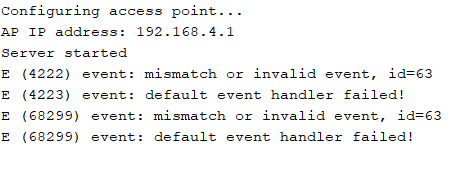
one strange serial message that we had seen after upgrading to ESP32 V1.1 is like the below.
it read "E (4502) event : mismatch or invalid event, id=63"
we don't know what that means or is related to the problem described here.
luisgcu
on 27 Jan 2019
Nice! Some progress. I added a delay because I noticed the esp32 takes a bit longer with the new core to enable and even switch ap broadcast modes. I didn't even think about the possible correlation to your issue.
The error you see doesn't really effect anything so far. I believe it has to do with wifimesh
1TekPro
on 27 Jan 2019
@luisgcu, the event log entry is tracked via a diff issue and should have a fix coming soon.
 atanisoft
on 27 Jan 2019
atanisoft
on 27 Jan 2019
well the delay doesn't fix the issue at all, the only fix is to remove the password, @evert-arias found a thread were they discusses exact the same problem that we had.
https://github.com/espressif/esp-idf/issues/2915
luisgcu
on 27 Jan 2019
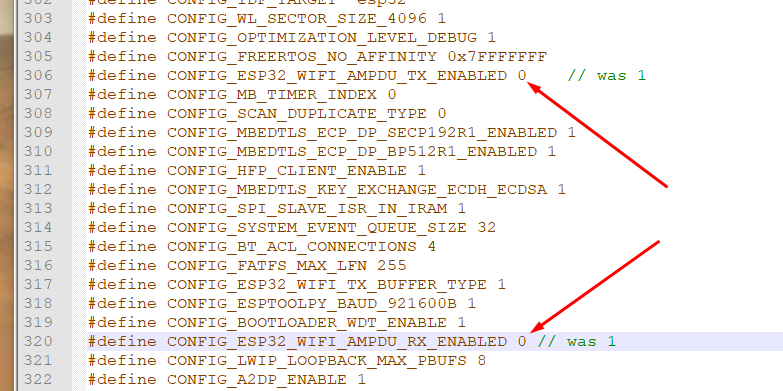
Out of curiosity, did disabling AMPDU RX/TX fix the issue allowing a password to be set?
1TekPro
on 27 Jan 2019
@1TekPro the answer to your question seems to be Yess..
well we tried that just now and fix the problem.
luisgcu
on 27 Jan 2019
This is the file where you may disable AMPDU RX/TX as @luisgcu mention on the previous comment: arduinoespressif32\tools\sdk\include\config\sdkconfig.h
We have tried this, and it did worked! :+1:
evert-arias
on 27 Jan 2019
If you are satisfied with the solution/answer, please close the issue. :)
1TekPro
on 27 Jan 2019
Hi. I had the same problem – could not connect to ESP32 in WIFI_AP mode from certain workstations. I could connect from my Android phone but not from my computer for example.
Setting CONFIG_ESP32_WIFI_AMPDU_TX_ENABLED and CONFIG_ESP32_WIFI_AMPDU_RX_ENABLED to 0 seemed to fix the problem but the same problem still occurs when EASP32 is working in WIFI_AP_STA mode when it is not connected as a station. For example if ESP32 is connected to my router and it also works as access point I can connect to it both ways, through router (STA) and directly (AP) from all different workstations. However, when my router is down and so ESP32 cannot connect to it as a station (STA) then I again cannot connect to ESP32 directly (AP) from my computer although Android phone seems to connect without a problem.
 BojanJurca
on 5 May 2019
BojanJurca
on 5 May 2019
Related issues
 jhowkis
·
3Comments
jhowkis
·
3Comments
 NickChungVietNam
·
3Comments
NickChungVietNam
·
3Comments
 mistergreen
·
4Comments
mistergreen
·
4Comments
 docloulou
·
3Comments
docloulou
·
3Comments
 lonerzzz
·
3Comments
lonerzzz
·
3Comments