Arduino-esp32: DOIT ESP32 DEVKIT V1 Board
How to match pin names? doitESP32devkitV1.
Pics:
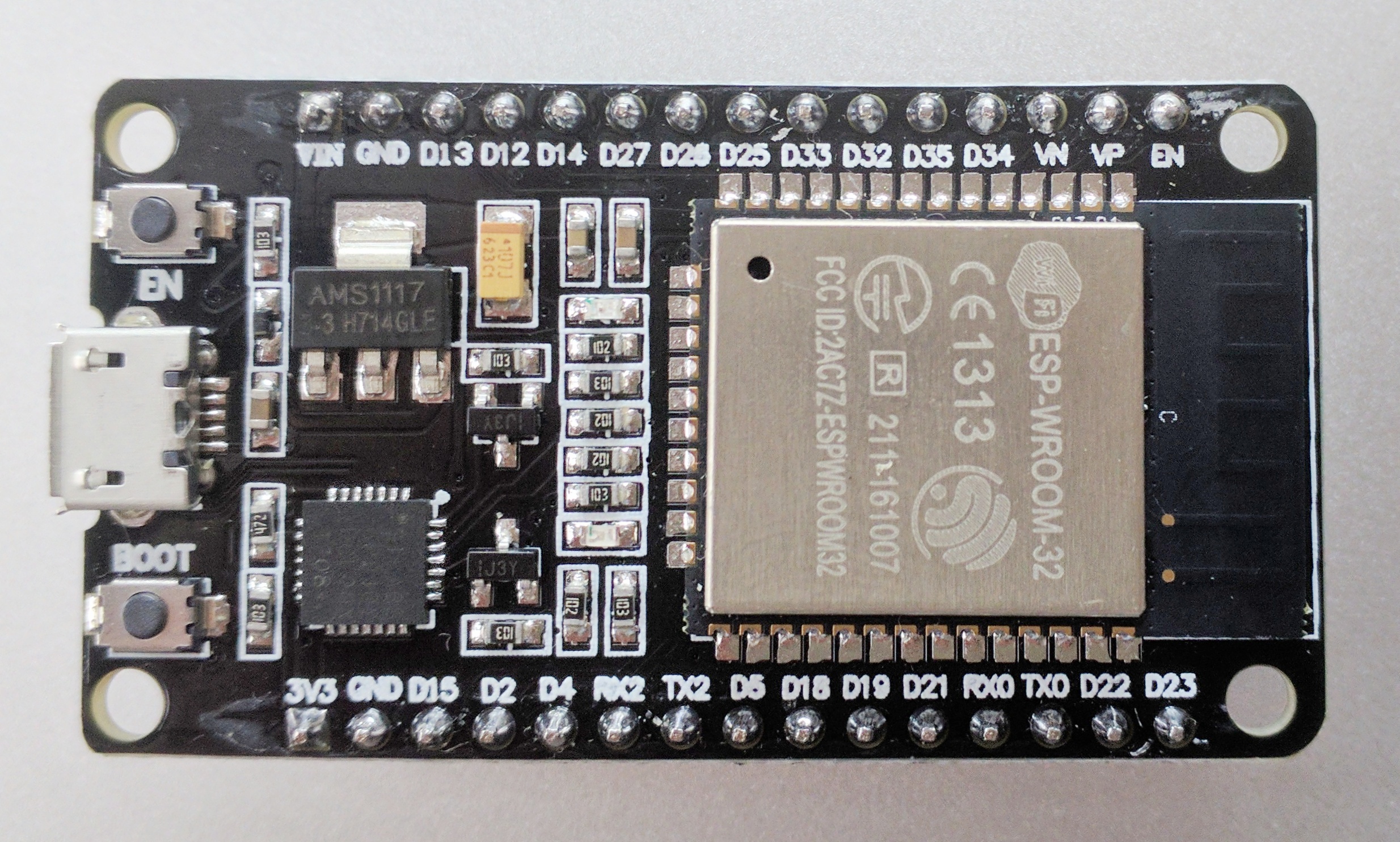
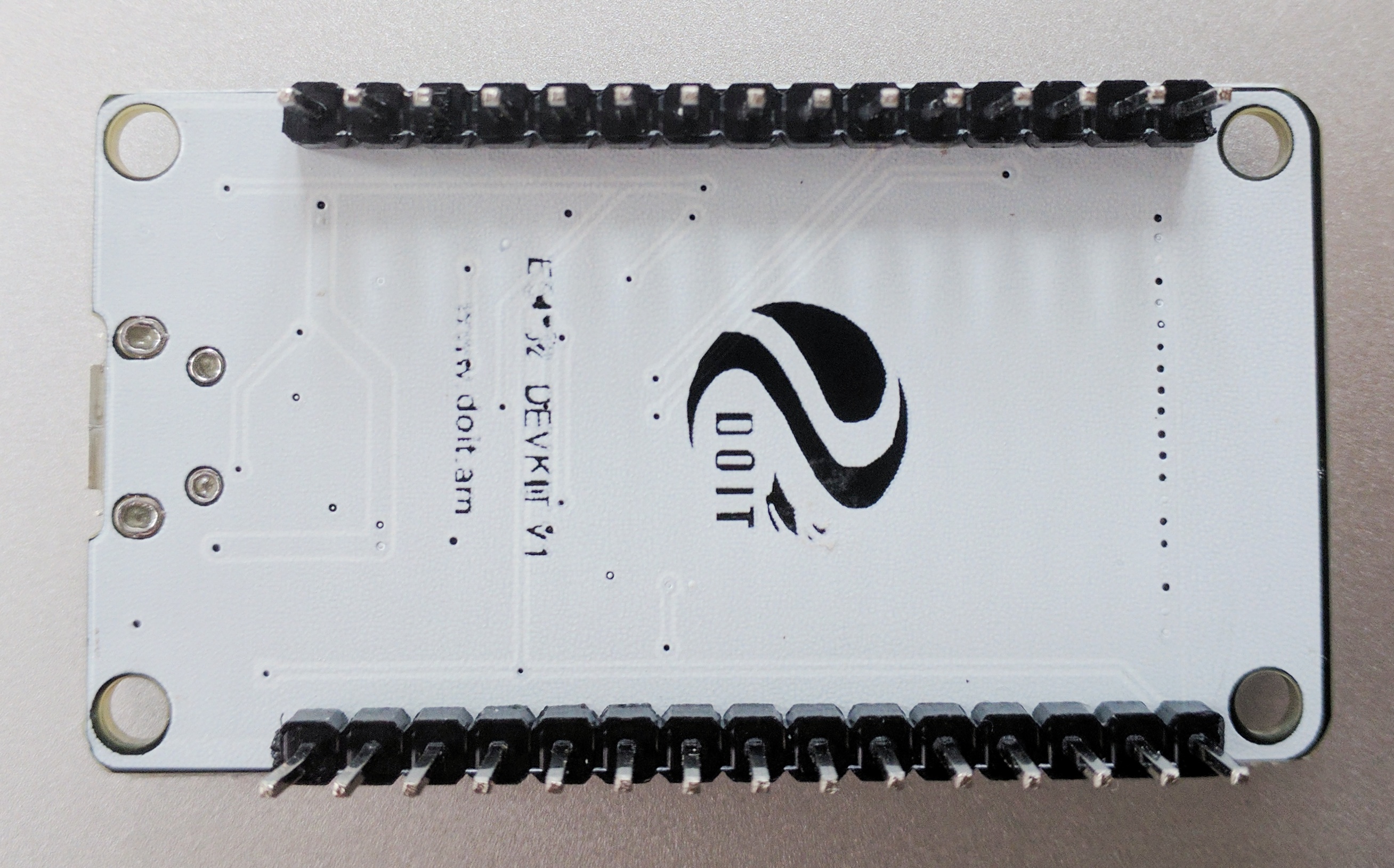
 dbachko
All 84 comments
You can use it as "ESP32 Dev Module", D13 is GPIO13, D14 is GPIO14 and so on...
Anyway, here is a DOIT author github page: https://github.com/Nicholas3388/LuaNode, have the old board schematic and you can ask for the new one
 copercini
on 29 Jul 2017
copercini
on 29 Jul 2017
Here you go :) It also took me a while to find the schematics. Just not the following, the GPIO pins follow the numbers 1-27 (lower right pin out schematics), but the analog pins labeled as A6-A9 are 34, 35, 32, 33, 25, 28. The board labels on board are pretty accurate except you need to know that those analog pins are not labeled unless you look at the schematic.
Some other quirks I noticed:
Also when you power the board with a 5v USB you get 5v power out of the VIN pin, I used this to power a 5v servo with no problems, even during extended stall draw was ok. Also don't accidentally cross ground on the VIN side with ground on the 3.3v side, you will blow your board when powered via USB.
 liqngliz
on 10 Aug 2017
liqngliz
on 10 Aug 2017
@dbachko Did the information provided answer your question?
 lonerzzz
on 13 Aug 2017
lonerzzz
on 13 Aug 2017
You can talk about the UART Serials, I know have three Ports, but I no can't found the tx1 rx1
 ICELUCKBR
on 10 Sep 2017
ICELUCKBR
on 10 Sep 2017
@PITDEVBR by default the pins of serial1 are rx1Pin = 9; tx1Pin = 10; and serial2 rx2Pin = 16; tx2Pin = 17;
But you can set it on any pin if you want: Serial1.begin(9600, SERIAL_8N1, gpioX_rx, gpioY_tx);
copercini
on 10 Sep 2017
@copercini but in module ESP32 the DOIT dont have the pins 9 and 10. With is command "Serial1.begin(9600, SERIAL_8N1, gpioX_rx, gpioY_tx);" I can change for anywhere pin in module?
ICELUCKBR
on 10 Sep 2017
yes. just make sure that TX is below GPIO34. RX can be above
 me-no-dev
on 10 Sep 2017
me-no-dev
on 10 Sep 2017
Someone have the code using the firmware the changing the serials 1 for test, a create but no have successful...
ICELUCKBR
on 27 Sep 2017
@PITDEVBR like this:
HardwareSerial Serial1(1);  // UART1/Serial1

void setup() {
  Serial.begin(115200);
  Serial1.begin(9600,SERIAL_8N1,9,10); //You can change 9 and 10 to another pins
}
Have fun =)
copercini
on 6 Oct 2017
Hi @liqngliz
The schematic pdf which you shared is verified , i want to use it in one of design.
Thanks.
 sarwadenj
on 31 Oct 2017
sarwadenj
on 31 Oct 2017
"Also don't accidentally cross ground on the VIN side with ground on the 3.3v side, you will blow your board when powered via USB." Could someone explain this to me? Are you saying not to use the GND pin next to Vin with the 3v side? I've been doing just that on a lolin32 ;(
 chinswain
on 11 Dec 2017
chinswain
on 11 Dec 2017
@chinswain I'm looking at the schematic and I'm also not sure what @liqngliz is referring to. The schematic doesn't really make a distinction between the grounds so it's not clear to me where the separation is meant to be, or why shorting the grounds would cause an issue. The only thing I can see is that there's just a diode with no current-limiting resistor between the VCCUSB and the VIN pin, which means if you were to short VIN to ground then you'd blow the diode, probably.
I suppose if you tried to impose non-common 5V on both sides of the diode, then the ground on the VIN side would sit one diode bias voltage below the ground on the other, but I'm not sure why that would cause an issue if you connected them, since it would just stop the diode from conducting.
I'd love to know what I'm missing here.
 DavidAntliff
on 21 Dec 2017
DavidAntliff
on 21 Dec 2017
The USB is protected by SS14, a low drop schottky 1 amp diode. The other input does not have this protection so a battery should not be connected. I see only 1 ground path.
 bobmc-rmm
on 25 Dec 2017
bobmc-rmm
on 25 Dec 2017
@bobmc-rmm so there should be no issue with connecting the "3.3V output" GND on the left side of the board with the "5V input" GND on the right side of the board?
DavidAntliff
on 26 Dec 2017
@DavidAntliff ..There is only one GND in the schematic. Then consider the 3v regulator which has GND common to it's input and output. It can only function in a common GND circuit. There can be parallel inputs to the regulator but every source must have the same GND. Moreover, each souce needs to have a protection diode to prevent reverse flow from competing sources.
bobmc-rmm
on 26 Dec 2017
@bobmc-rmm that makes sense, thanks. So the original statement about blowing the board if ground on each side is connected is false? The issue is around managing competing supplies.
DavidAntliff
on 26 Dec 2017
@liqngliz .. Arduino for ESP32 has variants/doitESP32devkitV1 has 'pins_arduino.h' with symbold A0..A19 not matching the one and only doit board I have seen. Is there a correct header file somewhere. I have been using Huzzah32 which costs more than most of these ESP32 but it is better quality and works according to documentation. I have ordered a different ESP32 with more pins.
bobmc-rmm
on 27 Dec 2017
There is another doit ESP32 with more pins .. 2 X 18 and it is also V1. There is no schematic for it.
http://www.smartarduino.com/view.php?id=95103
I am looking for a header file or pinmap with the GPIO assignment for the symbols printed on each board.
bobmc-rmm
on 27 Dec 2017
@bobmc-rmm I confirm, this the same as https://www.banggood.com/ESP32-Development-Board-WiFiBluetooth-Ultra-Low-Power-Consumption-Dual-Cores-ESP-32-ESP-32S-Board-p-1109512.html?cur_warehouse=CN .. very hard to find the appropriate schematic.
 onyx007
on 27 Feb 2018
onyx007
on 27 Feb 2018
@onyx007 @bobmc-rmm Curious if either of you have ever found a pinout or other schematic for the DOIT 36-pin board. I ordered a board for my first Arduino project and that's what showed up. Most everything I find online has a GND pin beside the 3V3 pin on the same side of the board, but this one only has one GND and it is on the opposite side of the board from 3V3. Can I just connect that GND to the ground rail on my breadboard then use a jumper to connect that rail to the ground rail that is on the same side with the 3V3 pin? It's my very first attempt so I have a lot to learn :)
 davenippon
on 3 Mar 2018
davenippon
on 3 Mar 2018
There is only one ground circuit on these ESP boards so you use whichever
pins are marked as GND
On Sat, Mar 3, 2018 at 2:06 PM, davenippon notifications@github.com wrote:
@onyx007 https://github.com/onyx007 @bobmc-rmm
https://github.com/bobmc-rmm Curious if either of you have ever found a
pinout or other schematic for the DOIT 36-pin board. I ordered a board for
my first Arduino project and that's what showed up. Most everything I find
online has a GND pin beside the 3V3 pin on the same side of the board, but
this one only has one GND and it is on the opposite side of the board from
3V3. Can I just connect that GND to the ground rail on my breadboard then
use a jumper to connect that rail to the ground rail that is on the same
side with the 3V3 pin? It's my very first attempt so I have a lot to learn
:)—
You are receiving this because you were mentioned.
Reply to this email directly, view it on GitHub
https://github.com/espressif/arduino-esp32/issues/544#issuecomment-370171763,
or mute the thread
https://github.com/notifications/unsubscribe-auth/AZsW0GeNRCAQfdo523Z7JcnGi0YS_s8mks5taumrgaJpZM4OncIj
.
bobmc-rmm
on 3 Mar 2018
@bobmc-rmm Thanks! Project complete and working like a champ! (Simple e-paper thermometer I saw on another site I wanted to build to get my feet wet.)
davenippon
on 4 Mar 2018
that is good news
On Sat, Mar 3, 2018 at 10:36 PM, davenippon notifications@github.com
wrote:
@bobmc-rmm https://github.com/bobmc-rmm Thanks! Project complete and
working like a champ! (Simple e-paper thermometer I saw on another site I
wanted to build to get my feet wet.)—
You are receiving this because you were mentioned.
Reply to this email directly, view it on GitHub
https://github.com/espressif/arduino-esp32/issues/544#issuecomment-370199345,
or mute the thread
https://github.com/notifications/unsubscribe-auth/AZsW0OdVi_FZO5n9fY_7uLLE_iQLmEdgks5ta2EzgaJpZM4OncIj
.
bobmc-rmm
on 4 Mar 2018
@davenippon Congrats! I am stuck with connecting the e-paper display (2.9 inch waveshare). Running the new version of the Doit V1 board (with 18 pins on each side).
Any idea how to wire the display?
Display wires:
BUSY
RST
DC
CS
CLK
DIN
GND
3.3V
Thanks in advance.
 toh1000
on 13 Mar 2018
toh1000
on 13 Mar 2018
Hello @toh1000 , Try these and see how it goes:
(e-paper pin -> E32 board pin):
BUSY -> D4
RST -> D21
DC -> D22
CS -> D5
CLK -> D16
DIN -> D23
GND -> GND
3.3V -> 3V3
(screenshot from a doc I made to keep it straight)

davenippon
on 14 Mar 2018
Any news on the 2x18pin version of the devboard from DOIT? Schematic or pin documentation?
 johansundstrom
on 19 Mar 2018
johansundstrom
on 19 Mar 2018
Hi,
I'm looking for a eagle library for that development board, does anyone see that?
 plugowski
on 5 Apr 2018
plugowski
on 5 Apr 2018
Good question johansundstrom. I originally purchased some v1's, then some v3's then some more v1's. Every single purchase is different. How can DOIT get away with same number and ver, but 6 more pins. There is only 1 ground pin now as we well. I read somewhere when using pull up/down to 5v side can let out to much smoke. Have a guess where the ground pin is? Yep, right beside the 5v input. I guess that there is going to have to be a sacrificial ESP... I actually lucked onto a site that looked like DOIT. I requested info, but guess that it ended up in a junk filter trap. Sorry about the poor quality pic, but I guess anyone looking will get the picture and be forewarned.

 ColinMarsh
on 15 Apr 2018
ColinMarsh
on 15 Apr 2018
A weird board alright, still looking for a valid breakout diagram .. here is a photo from the front for the fun of it. https://www.flickr.com/photos/138684657@N03/39913883734 . Off topic: I was counting the pins with my pen while the board was live off my Mac , sliding the pen from pin to pin and then from GRND to VIN I blew one board. The good thing is, it is not expensive.
onyx007
on 15 Apr 2018
For what it's worth, here is the web site that I have previously tried to get info. http://www.geekcreit.com/customer_service.html The home page will not load, well, not for me anyway. Not sure if that means anything or not.
BTW. If you are paying more than about AUD9.5/board, you could probably do better. Try Banggood. They modded their price for me last time
ColinMarsh
on 15 Apr 2018
Thank you for the link Colin, I will use it and ask. I ordered from Banggood.
onyx007
on 15 Apr 2018
Hi @onyx007, you are welcome
ColinMarsh
on 15 Apr 2018
If it can be on any help, here is what I found in the Q&A about this product on banggood, it is not completed but getting close.
https://docs.google.com/spreadsheets/d/1VH7ejolhriWXEWxKkzGnvYzx4yaj4Sg_0Dw3ma5qNSk/edit#gid=0
onyx007
on 15 Apr 2018
Thanks @onyx007. I wonder why DOIT don't define GPIO's contiguously. Does anyone know or heard any discussion on the matter?
ColinMarsh
on 16 Apr 2018
"Also don't accidentally cross ground on the VIN side with ground on the 3.3v side, you will blow your board when powered via USB." Yes. Don´t make this. My ESP32 Died.
 Isaquedeveloper
on 20 Apr 2018
Isaquedeveloper
on 20 Apr 2018
Let us all help onyx007 to fulfill the complete Google document
johansundstrom
on 23 Apr 2018
I found a site that seems to have some good info here:
http://esp-idf.readthedocs.io/en/latest/get-started/get-started-devkitc.html
For example, it explains that:
"Some of broken out pins are used internally be the ESP32 module to
communicate with SPI memory. They are grouped on one side of the board
besides the USB connector and labeled D0, D1, D2, D3, CMD and CLK. In
general these pins should be left unconnected or access to the SPI flash
memory / SPI RAM may be disturbed."
and
" GPIO16 and 17 are used internally by the ESP32-WROVER module. They are
broken out and avialable for use only for boards that have the ESP-WROOM-32
module installed."
I'll qualify the above with saying I am very, very new to all this, but
this info looked helpful in mapping out the pins on the ESP32 dev board.
Right now I have one hooked up on a breadboard with a waterproof DS18B20
sensor on my desk to check the temp of the water in my electric kettle and
display it on a 2x2 E-Paper display before making coffee :) I might switch
to a more basic board for that and try to do something cooler with the
ESP32 since it has Wi-Fi, Blue tooth etc.
On Mon, Apr 23, 2018 at 2:02 AM, Johan sundstrom notifications@github.com
wrote:
Let us all help onyx007 to fulfill the complete Google document
—
You are receiving this because you were mentioned.
Reply to this email directly, view it on GitHub
https://github.com/espressif/arduino-esp32/issues/544#issuecomment-383505405,
or mute the thread
https://github.com/notifications/unsubscribe-auth/AjT3oFzwdlfmfLoo_AVa7hCjENFvtcWwks5trZjDgaJpZM4OncIj
.
davenippon
on 23 Apr 2018
I agree with davenippon here.
It seems that this particular board is an ESP-DEVKITV1 (or ESP-DEVKITJ), which has some pins left out(or should I say left in), given that they are not of a particular use rather than maybe monitoring.
The full official schematic for the board is here : https://dl.espressif.com/dl/schematics/ESP32-DevKitJ-v1_sch.pdf .
Now, imagine some pins of it never seeing the surface. I believe this particular image can help you through : https://raw.githubusercontent.com/playelek/pinout-doit-32devkitv1/master/pinoutDOIT32devkitv1.png
 filchristou
on 26 Apr 2018
filchristou
on 26 Apr 2018
Thank you for the help , it is close ( png file ) but always a few pins which I am not sure about.
onyx007
on 27 Apr 2018
I recently sent an email to DOIT.am. I hope to get a response which I will post here. Keep fingers crossed
johansundstrom
on 27 Apr 2018
To OP: this is the pinout: https://github.com/playelek/pinout-doit-32devkitv1
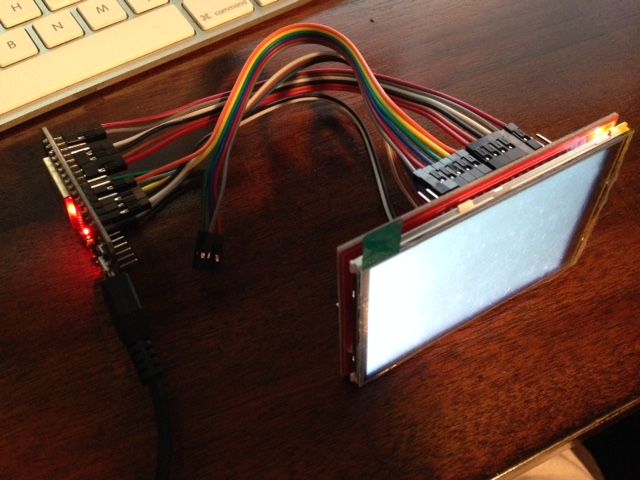
I am trying to connect a parallel TFT to this board. using the TFT_eSPI library. Oh joy.
First, I learned to stay away from the two TX&RX as they prevent USB upload, maybe linked to the EPROM. Then I wires everything that needed to be within the 0-31 range and good luck on a board with only 24 usable pins.
So far I get a faint pulse, nothing else. Someone told me that this TFT needs 5V signal because it's made for Uno. Would that explain that?
 laurentopia
on 28 Apr 2018
laurentopia
on 28 Apr 2018
Has anyone experience powering the DOIT ESP32 with a 3.7V Lithium battery? I've tried putting the 3.7V on Vcc - failed. Putting it on the USB port fails too. I even used a low-voltage drop regulator (0.4V at 400mA) and put it on 3V3 - failed. Last and final test was putting the regulated 3.3V on to Pin 2 (Vout) of the onboard voltage regulator - failed.
In all cases the board doesn't boot and the current draw cycles between 50 and 100mA with about a 1 second frequency. Thus, it looks as if the unit starts up, voltage drops, causing the device to reset, current drops and the whole cycle start all over again.
Any idea / suggestions?
 volkerpetersen
on 4 May 2018
volkerpetersen
on 4 May 2018
@laurentopia I have not used the display you are working with, but have you tried this library?
https://github.com/Bodmer/TFT_HX8357
Or maybe this page might help?
http://educ8s.tv/arduino-3-5-color-tft-display-ili9481-arduino-uno-mega-tutorial/
Good luck and let us know how it goes!
davenippon
on 4 May 2018
@davenippon No I didn't try that one, it's for mega though...
laurentopia
on 4 May 2018
@johansundstrom Did you get a response? I have sent 2 emails through their "Support" link and one to a DOIT development engineer's address that I lucked upon. Unfortunately, I am still waiting. Nice product, absolute shit support
ColinMarsh
on 4 May 2018
I sent an email to support as well weeks ago and still waiting ...
onyx007
on 4 May 2018
@ColinMarsh No answer at all :-( I signed up for their BBS at http://bbs.smartarduino.com/ and is still pending member since april 24. I keep asking myself - WHY this non responsive behaviour?
johansundstrom
on 4 May 2018
Why do not you transfer this conversation to another site? It's not the best place.
Thanks.
 lrmoreno007
on 4 May 2018
lrmoreno007
on 4 May 2018
@volkerpetersen my doit v1 board has a ams1117 voltage regulator onboard, and based on a few other pages I found online:
Voltage regulator on board for input voltage (5-12V on Vin pin)
According to the spec sheet https://static.chipdip.ru/lib/552/DOC001552809.pdf , it looks like that wants 4.8V<= VIN <=10.3V
 spiffomatic64
on 6 Jun 2018
spiffomatic64
on 6 Jun 2018
What is the default rx1 tx1 pin in this board
 vishnu-chalil
on 21 Jul 2018
vishnu-chalil
on 21 Jul 2018
There are three UART controllers available on the ESP32 chip.
Usually they are referred as UART0 UART1 UART2. UART0 is used by default for console output.
You asked for default pins on UART1. The answer is that you don't really need them since you always should set them with uart_set_pin().
If you insist please check a detailed answer by kolban :
https://esp32.com/viewtopic.php?t=1033
filchristou
on 21 Jul 2018
@filchristou how do i use" uart_set_pin()" to set for UART 1 in an ESP-VROOM-32 board
vishnu-chalil
on 21 Jul 2018
You can find documentation here : http://esp-idf.readthedocs.io/en/latest/api-reference/peripherals/uart.html .
An example would be :
#define TXD_PIN (GPIO_NUM_32)
#define RXD_PIN (GPIO_NUM_33)

    //----initialize UART-----//
    uart_config_t uart_config = {};
    uart_config.baud_rate = 115200;
    uart_config.data_bits = UART_DATA_8_BITS;
    uart_config.parity = UART_PARITY_DISABLE;
    uart_config.stop_bits = UART_STOP_BITS_1;
    uart_config.flow_ctrl = UART_HW_FLOWCTRL_DISABLE;
    uart_param_config(UART_NUM_1, &uart_config);

    uart_set_pin(UART_NUM_1, TXD_PIN, RXD_PIN, UART_PIN_NO_CHANGE, UART_PIN_NO_CHANGE);
    uart_driver_install(UART_NUM_1, RX_BUF_SIZE * 10, 0, 0, NULL, 0);
You can find more examples on peripherals here https://github.com/espressif/esp-idf/tree/master/examples/peripherals
filchristou
on 23 Jul 2018
Thank you @filchristou
vishnu-chalil
on 2 Aug 2018
@laurentopia Your LCD is parallel, it is not SPI (Serial Peripheral Interface). So I think you are using the wrong library. I uploaded a project recently using a shield like this at https://github.com/cspwcspw/ESP32_CamToLCD If you ignore the camera code and just use the LCD part of that there is a simple test suite that should at least show some colours and rectangles. I don't use any Adafruit libraries,
 cspwcspw
on 12 Sep 2018
cspwcspw
on 12 Sep 2018
@Isaquedeveloper I also did this (i.e. short VIN to GND accidentally), but the board isn't completely dead. You can power it directly from VIN and GND using a power supply (from 5V to 12V). For a long term fix, you would need to replace the SS14 Schottky diode (between the AMS1117 regulator and the micro USB).
 mcx
on 26 Sep 2018
mcx
on 26 Sep 2018
Hello everybody!
Does anyone here have the DoIt DevKit Esp32 (30pins) fritzing part? I haven't found it at all.
Thanks in advance.
 csaraivarocha
on 16 Oct 2018
csaraivarocha
on 16 Oct 2018
I found a diagram for this board on Random Nerd tutorials, though mine has the short names silk-screened on anyway. The 5V and its ground are connected to the modem board, a PIR and a couple of LEDS; the 3.3V and its ground are connected to the RTC and previously also a SSD1306 0.96" OLED display. The modem needs a good couple of amps when connecting or sending SMS, so there's a backup battery which seems to give enough for that.
I'm using hardwareSerial.h library and UART2 on PIO16 and 17. Working like a charm, connected to a SIM800C development board. My SIM880C board has regulator, battery pins and Vmpu input to set the inout/output voltage levels. RTC via I2C on PIO21 and 22, which are the default in the wire.h library.
Only problem I gave myself was using the wrong Serial monitor baud rate and thinking the modem wasn't working.
Maybe this will help someone.

 nicechocolate
on 16 Feb 2019
nicechocolate
on 16 Feb 2019
Hi All,
Whether the library
 ShathyaKodees
on 25 Apr 2019
ShathyaKodees
on 25 Apr 2019
why wouldn't it? What is special about that board? Library support is architecture based and not board based. Any ESP32/8266 can use that library
me-no-dev
on 25 Apr 2019
Here you go :) It also took me a while to find the schematics. Just not the following, the GPIO pins follow the numbers 1-27 (lower right pin out schematics), but the analog pins labeled as A6-A9 are 34, 35, 32, 33, 25, 28. The board labels on board are pretty accurate except you need to know that those analog pins are not labeled unless you look at the schematic.
Some other quirks I noticed:
Also when you power the board with a 5v USB you get 5v power out of the VIN pin, I used this to power a 5v servo with no problems, even during extended stall draw was ok. Also don't accidentally cross ground on the VIN side with ground on the 3.3v side, you will blow your board when powered via USB.
I can strongly agree. I already blew three boards by connecting ground on the Vin side with ground on the 3.3v side till I noticed that this was the reason. I still don't understand that there is a different ground. I feel there should be more details about this.
 NilsBe
on 23 Sep 2019
NilsBe
on 23 Sep 2019
I already blew three boards by connecting ground on the Vin side with ground on the 3.3v side
This makes no sense to me - see earlier comments. There's only one ground on the board according to the schematics. Are you sure you're not using a Vin that isn't 5V (e.g. 3.3V), then connecting USB and blowing the D1 diode?
DavidAntliff
on 23 Sep 2019
If it is a problem caused by connecting the grounds, then maybe it's something unexpected about the low voltage loss regulator.
Mine all works fine but I have had no need to connect the grounds together. On mine, the +5V and its ground from the processor board is only connected to the modem board, not that it supplies enough juice to get a phone connection established (up to 2A!! comes from a lithium cell) the 3.3V also goes to the modem board, which detects it and sets the output levels to match, rather than shoving 5V into my little 3.3V processor. The 3.3V itself is used for a few LEDs, the IR sensor and the RTC. Thinking about it, I have assumed that both grounds are the same potential. I'll maybe check this tomorrow and edit this post if anything silly shows up.
nicechocolate
on 24 Sep 2019
I already blew three boards by connecting ground on the Vin side with ground on the 3.3v side
This makes no sense to me - see earlier comments. There's only one ground on the board according to the schematics. Are you sure you're not using a Vin that isn't 5V (e.g. 3.3V), then connecting USB and blowing the D1 diode?
There's definitely 2 GND's on my board. However, i've only assumed this is a DOIT dev board because all it has stamped on it is 'DEVKIT 1'. I got it off of Amazon.ca a few days ago: https://www.amazon.ca/gp/product/B07KTV2RRM/ref=ppx_yo_dt_b_asin_title_o04_s00?ie=UTF8&psc=1
I appreciate the schematics people have posted here but I'm still lost. Pin #'s are the same for the left and right side of the board?? That doesn't seem right. All I want to do is be able to address which PIN to use within the code and I can't find that anywhere.

 bklunder
on 27 Sep 2019
bklunder
on 27 Sep 2019
@bklunder the silk screen naming of your board is what you would use.
You need to understand the configuration of your breadboards. The way you have the module inserted into the breadboards doesn't give you access to the signals from the module. Spread those breadboards apart so that the you have an air gap under the module. that will allow you to access the other 4 holes for each of the module pins.
Your breadboards have horizontal and vertical busses. The holes are labeled in a matrix 1 .. 25, a .. j.
the vertical rows are independent 1..25
The Horizontal columns are broken into 2 sections. a .. f, g .. i
the vertical power rails (+,-) are continuous from top to bottom.
1g .. 1j are connected.
the pins labeled on the right side
3v3 Power
GND
D15 pin 15
D2 pin 2
D4 pin 4
RX2 pin 16
TX2 pin 17
..
Chuck.
 stickbreaker
on 27 Sep 2019
stickbreaker
on 27 Sep 2019
@bklunder the silk screen naming of your board is what you would use.
You need to understand the configuration of your breadboards. The way you have the module inserted into the breadboards doesn't give you access to the signals from the module. Spread those breadboards apart so that the you have an air gap under the module. that will allow you to access the other 4 holes for each of the module pins.
Your breadboards have horizontal and vertical busses. The holes are labeled in a matrix 1 .. 25, a .. j.
the vertical rows are independent 1..25
The Horizontal columns are broken into 2 sections. a .. f, g .. i
the vertical power rails (+,-) are continuous from top to bottom.
1g .. 1j are connected.the pins labeled on the right side
3v3 Power
GND
D15 pin 15
D2 pin 2
D4 pin 4
RX2 pin 16
TX2 pin 17
..Chuck.
Thanks for the advice! I thought I had the breadboard configured correctly by slapping two of them together. I did this because this esp32 board doesn't fit on one breadboard (only has access to one side of pins), There is a gap between the two boards I though as the rails do not join across the two.
bklunder
on 27 Sep 2019
There is no automatic electrical connection when you snap the breadboards together, It is just a mechanical connection.
stickbreaker
on 27 Sep 2019
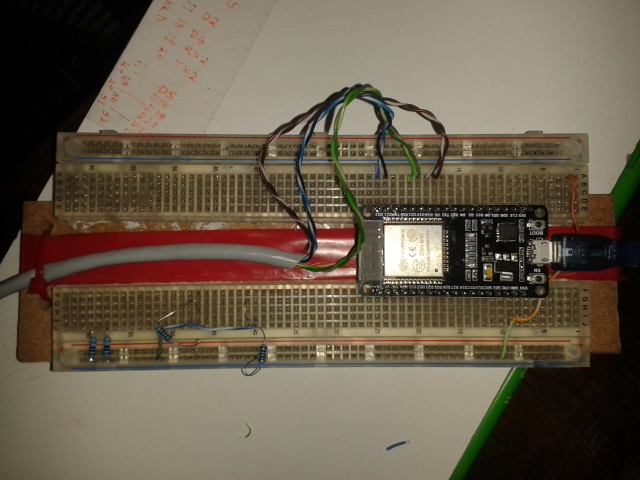
@bklunder @stickbreaker Yeah, the devKit pin-spacing (width) doesn't play nicely with the standard breadboard layout. So I sliced a breadboard down the center length-ways, spread it and glued it to a piece of wood. It gives me plenty of access to every signal pin on the devKit, and allows me to route wires under the "tunnel" below the ESP32. And of course, as you see in my current project, I can drill some holes in the wood underneath and use cable ties, etc. for wiring. The red in the middle is red insulation tape, only for visual effects!
cspwcspw
on 27 Sep 2019
@cspwcspw Yep, your visual is a much better explanation than my words. That was a good Idea.
Chuck.
stickbreaker
on 27 Sep 2019
Ok i still don't see the issue with my method but i'll leave that be.
I'm still confused on how to call a pin within code. Based on the second and third comment of this thread the pin #'s are the same on the left and right of the board. When I want to call a pin number in code what am I supposed to use?? For example
#define DATA_PIN 18
#define CLOCK_PIN 19
On my board the silkscreen is D18 and D19, but in the schematic from above its pin 8 and 9 (GPIO18 and 19 respectively)? but those pins also correspond to the other side of the board which are A8 and A5?
So if I want to use GPIO18 and 19, do I call 18 and 19 in the code or 8 and 9???
bklunder
on 27 Sep 2019
@bklunder Each pin is labeled. Each pin is different.
The only ones that don't have the correct pin numbers on their label are:
- RX2 pin 16
- TX2 pin 17
- RX0 pin 3, used for Serial(), connected through USB bridge to PC
- TX0 pin 1, used for Serial(), connected through USB bridge to PC
- VN pin 39, input only
- VP pin 36, input only
- EN -- Hardware Reset, Active Low (don't connect to it unless you know how to use it)
Chuck.
stickbreaker
on 27 Sep 2019
On my board the silkscreen is D18 and D19, but in the schematic from above its pin 8 and 9 (GPIO18 and 19 respectively)? but those pins also correspond to the other side of the board which are A8 and A5?
So if I want to use GPIO18 and 19, do I call 18 and 19 in the code or 8 and 9???
// to use GPIO18 as an output
pinMode(18,OUTPUT);
digitalWrite(18,HIGH);

// to use 19 as a digital input
pinMode(19,INPUT);
uint8_t a = digitalRead(19);

//to use 36 as analog input
pinMode(36,INPUT);
uint16_t analog = analogRead(36);   // same as analogRead(A0);
What A5, A8?
from variants/doitESP32devkitV1/pins_arduino.h
static const uint8_t A0 = 36;
static const uint8_t A3 = 39;
static const uint8_t A4 = 32;
static const uint8_t A5 = 33;
static const uint8_t A6 = 34;
static const uint8_t A7 = 35;
static const uint8_t A10 = 4;    //DAC2
static const uint8_t A11 = 0;    //DAC2
static const uint8_t A12 = 2;    //DAC2
static const uint8_t A13 = 15;  //DAC2
static const uint8_t A14 = 13;  //DAC2
static const uint8_t A15 = 12;  //DAC2
static const uint8_t A16 = 14;  //DAC2
static const uint8_t A17 = 27;  //DAC2
static const uint8_t A18 = 25;  //DAC2
static const uint8_t A19 = 26;  //DAC2
Also, you cannot use any analog input using DAC2 If you use WIFI/Bluetooth. The DAC2 is used by the radio
stickbreaker
on 27 Sep 2019
Ah, I never thought to check the files like that. Thanks.
Also, you cannot use any analog input using DAC2 If you use WIFI/Bluetooth. The DAC2 is used by the radio.
I don't expect to be using any input at the moment, just Tx to LED strings.
bklunder
on 27 Sep 2019
@bklunder I just did a dive into that photo you posted, are you in Kazakhstan? or Canadia?
stickbreaker
on 27 Sep 2019
@bklunder @stickbreaker Breadboards often have little tabs and recesses to allow them to clip together, and the power rail can often clip off the board too. Here I joined two small boards width-wise, and can mount this devkit very nicely with many connectors for each break-out pin on the devkit.

cspwcspw
on 29 Sep 2019
Since this thread seems to be alive yet... anyone found a eagle file for the dev board?
I found a couple but the footprint seems to be turned the wrong way?

 Naesstrom
on 2 Oct 2019
Naesstrom
on 2 Oct 2019


 shridattdudhat
on 21 Jan 2020
shridattdudhat
on 21 Jan 2020
Here you go :) It also took me a while to find the schematics. Just not the following, the GPIO pins follow the numbers 1-27 (lower right pin out schematics), but the analog pins labeled as A6-A9 are 34, 35, 32, 33, 25, 28. The board labels on board are pretty accurate except you need to know that those analog pins are not labeled unless you look at the schematic.
Some other quirks I noticed:
Also when you power the board with a 5v USB you get 5v power out of the VIN pin, I used this to power a 5v servo with no problems, even during extended stall draw was ok. Also don't accidentally cross ground on the VIN side with ground on the 3.3v side, you will blow your board when powered via USB.
I would like to power my ESP32 DEV Module with a power source other than the USB port. How would you recommend connecting 3.3 Volts to power the board alone,
Here you go :) It also took me a while to find the schematics. Just not the following, the GPIO pins follow the numbers 1-27 (lower right pin out schematics), but the analog pins labeled as A6-A9 are 34, 35, 32, 33, 25, 28. The board labels on board are pretty accurate except you need to know that those analog pins are not labeled unless you look at the schematic.
Some other quirks I noticed:
Also when you power the board with a 5v USB you get 5v power out of the VIN pin, I used this to power a 5v servo with no problems, even during extended stall draw was ok. Also don't accidentally cross ground on the VIN side with ground on the 3.3v side, you will blow your board when powered via USB.
How would I connect power to my ESP32 DEV Module board only, independent of USB connection? Would I use pin 3V3 and GND@1 accordingly?
 paulw517
on 5 May 2020
paulw517
on 5 May 2020
My apologies for the duplicate comment, I needed to scroll up to your pin out diagram to ensure I referenced the ground associated with 3V3 + Volts.
paulw517
on 5 May 2020
Here you go :) It also took me a while to find the schematics. Just not the following, the GPIO pins follow the numbers 1-27 (lower right pin out schematics), but the analog pins labeled as A6-A9 are 34, 35, 32, 33, 25, 28. The board labels on board are pretty accurate except you need to know that those analog pins are not labeled unless you look at the schematic.
Some other quirks I noticed:
Also when you power the board with a 5v USB you get 5v power out of the VIN pin, I used this to power a 5v servo with no problems, even during extended stall draw was ok. Also don't accidentally cross ground on the VIN side with ground on the 3.3v side, you will blow your board when powered via USB.
What do you mean “cross ground VIN with 3V3”?
paulw517
on 5 May 2020
My interpretation is keep the VIN (5.0V) ground with VIN peripherals and V3V (3.3V) ground with V3V peripherals, but tie both grounds to gether?
paulw517
on 5 May 2020
Some people have said that the two GND connections should NOT be connected or assumed to be at the same potential. Connecting the two grounds to each other, as though they were the same potential will apparently damage some boards beyond repair.
I have no experience of this, I wonder whether it's only some boards, maybe a bad batch, maybe a certain minor revision, but then again, I'm not in a rush to identify whether I have a board that can be damaged.
I'm using the two GND connections for different things, anyway, 5V side GND for some LEDS, the 3.3V side for I2C and an IR movement sensor, in my last project. 3.3V entirely in my current one, which is interesting, as WS8212 LEDs are not supposed to work on 3.3V, but they do, and very nicely, in spite of the current draw. For the lovers of breadboard layouts, I use a power rail strip up the middle as shown here, the yellow wire does not go to the +5V, it's the DIN to the 2812 strips with a 1k resistor from pio 13:

nicechocolate
on 5 May 2020
The schematic shows that the two GND pins are connected and from a quick look at the one I have it looks like a 2 layer board with both pins connected to the ground plane on the bottom layer. Assuming the schematic is correct and your board is like mine you won't have any problems if you connect them. That said, it's not bad practice to have separate ground routes for different purposes (especially if you have noisy peripherals) - obviously unlikely to make a difference for a breadboard circuit but when you come to laying out your PCB it's a good habit to have got in to.
 robertpoll
on 5 May 2020
robertpoll
on 5 May 2020
The schematic shows that the two GND pins are connected and from a quick look at the one I have it looks like a 2 layer board with both pins connected to the ground plane on the bottom layer. Assuming the schematic is correct and your board is like mine you won't have any problems if you connect them. That said, it's not bad practice to have separate ground routes for different purposes (especially if you have noisy peripherals) - obviously unlikely to make a difference for a breadboard circuit but when you come to laying out your PCB it's a good habit to have got in to.
the two GND are not connected in my case, and I decided to use GND near 3V3 for the 3V3 source, the other GND for 5V source. Some of my friend said they already connected them together with no problem at all.
 hatran3e
on 14 Oct 2020
hatran3e
on 14 Oct 2020
Related issues
 mpatafio
·
4Comments
mpatafio
·
4Comments
 DrewHoyt
·
4Comments
lonerzzz
·
3Comments
DrewHoyt
·
4Comments
lonerzzz
·
3Comments
 0x1abin
·
3Comments
0x1abin
·
3Comments
 maxgerhardt
·
3Comments
maxgerhardt
·
3Comments
Most helpful comment
Here you go :) It also took me a while to find the schematics. Just not the following, the GPIO pins follow the numbers 1-27 (lower right pin out schematics), but the analog pins labeled as A6-A9 are 34, 35, 32, 33, 25, 28. The board labels on board are pretty accurate except you need to know that those analog pins are not labeled unless you look at the schematic.
Some other quirks I noticed:
Also when you power the board with a 5v USB you get 5v power out of the VIN pin, I used this to power a 5v servo with no problems, even during extended stall draw was ok. Also don't accidentally cross ground on the VIN side with ground on the 3.3v side, you will blow your board when powered via USB.
SchematicsforESP32.pdf