Appium-desktop: Appium” can’t be opened because Apple cannot check it for malicious software.
Unable to open Appium 1.16 in Mac. It is saying that the "Appium” can’t be opened because Apple cannot check it for malicious software."
This software needs to be updated. Contact the developer for more information.
The problem
I am unable to open the 1.16 Appium desktop in my Mac. It is complaining that the "This software needs to be updated. Contact the developer for more information.".
Environment
- I am running Appium Desktop version _
_.1.16 - I am on (pick one): Mac
- [ ] Mac
- [ ] Windows
- [ ] Linux
 KS261187
All 13 comments
Ctrl and click, then the open option
 sme81
on 13 Jan 2020
sme81
on 13 Jan 2020

HI
I am trying to install Appium in Mac OS Catalina and I am getting this error
 ps1logi
on 17 Jan 2020
ps1logi
on 17 Jan 2020
HI I am trying to install Appium in Mac OS Catalina and I am getting this error
see above for the fix
sme81
on 17 Jan 2020
Hi
Please follow the below steps
- Right-click
- Select Open
- Now move the appium to the Application folder
ps1logi
on 21 Jan 2020
You can download an older version ...its working fine
 LoveleshQA
on 22 Jan 2020
LoveleshQA
on 22 Jan 2020
this might have only worked for me for my java installation (when i tried to do brew cask install java), but after it tries once you can go to System Preferences > Security and privacy > General and then click Allow (near the bottom of the window there should be something that says something like "Appium tried to run but was blocked" and a box that says allow). it should then let you run it the next time you try.
 gillett-hernandez
on 25 Jan 2020
gillett-hernandez
on 25 Jan 2020
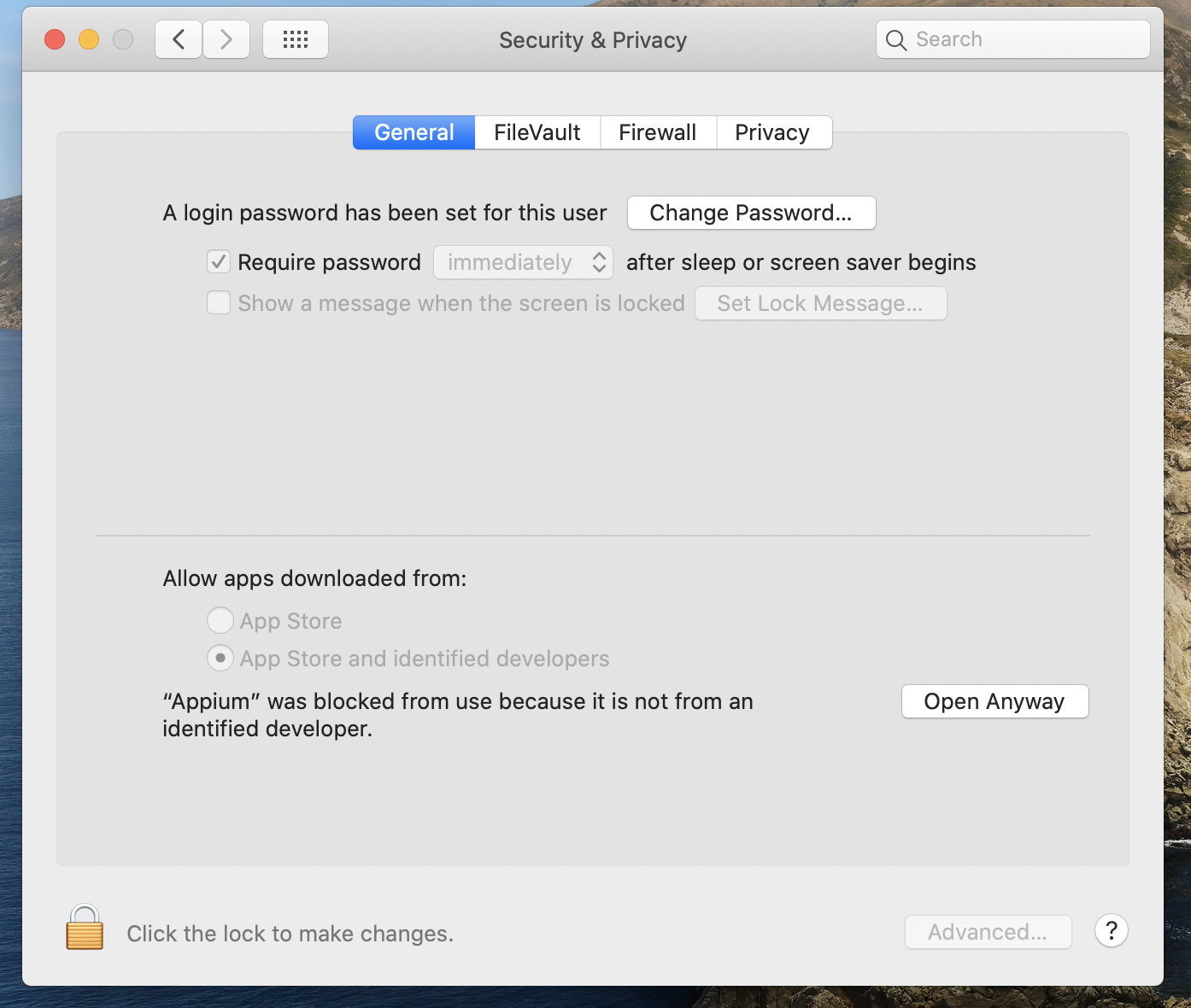
Yeah this is what you need to do in System Settings -> Security & Privacy -> General.
Still think this is a signing issue and needs to be dealt with on you Appium side.
 crenshaw78
on 17 Jun 2020
crenshaw78
on 17 Jun 2020
Yes, it needs paid sign, but it is not handy for a voluntary based project like this.
Perhaps https://github.com/appium/appium-desktop/issues/1264 may help though. ( https://github.com/appium/appium-desktop/issues/1207 )
 KazuCocoa
on 17 Jun 2020
KazuCocoa
on 17 Jun 2020
xattr -cr Appium.app also help
KazuCocoa
on 19 Jul 2020
Download (.dmg) version not .zip and it's will work fine.
 jamalalatrash93
on 3 Aug 2020
jamalalatrash93
on 3 Aug 2020
This one worked for me
https://www.youtube.com/watch?v=Vyaszsfq1uk
 HelderItiro
on 26 Aug 2020
HelderItiro
on 26 Aug 2020
this might have only worked for me for my java installation (when i tried to do
brew cask install java), but after it tries once you can go to System Preferences > Security and privacy > General and then click Allow (near the bottom of the window there should be something that says something like "Appium tried to run but was blocked" and a box that says allow). it should then let you run it the next time you try.
Thanks,that worked for me
 geeethub
on 1 Sep 2020
geeethub
on 1 Sep 2020
Definitely, this one worked for you guys
https://www.youtube.com/watch?v=Vyaszsfq1uk
 bikkyseemanta
on 14 Nov 2020
bikkyseemanta
on 14 Nov 2020
Related issues
 jphennessey
·
9Comments
jphennessey
·
9Comments
 Vijayabaskar03
·
3Comments
Vijayabaskar03
·
3Comments
 abh7nav
·
11Comments
abh7nav
·
11Comments
 aaratitambe
·
6Comments
aaratitambe
·
6Comments
 chaitanyadeshmukh
·
11Comments
chaitanyadeshmukh
·
11Comments
Most helpful comment
this might have only worked for me for my java installation (when i tried to do
brew cask install java), but after it tries once you can go to System Preferences > Security and privacy > General and then click Allow (near the bottom of the window there should be something that says something like "Appium tried to run but was blocked" and a box that says allow). it should then let you run it the next time you try.