Appium-desktop: Error in Appium - Could not verify WinAppDriver install; re-run install
The problem
I am trying to start a session in Appium with following capabilities
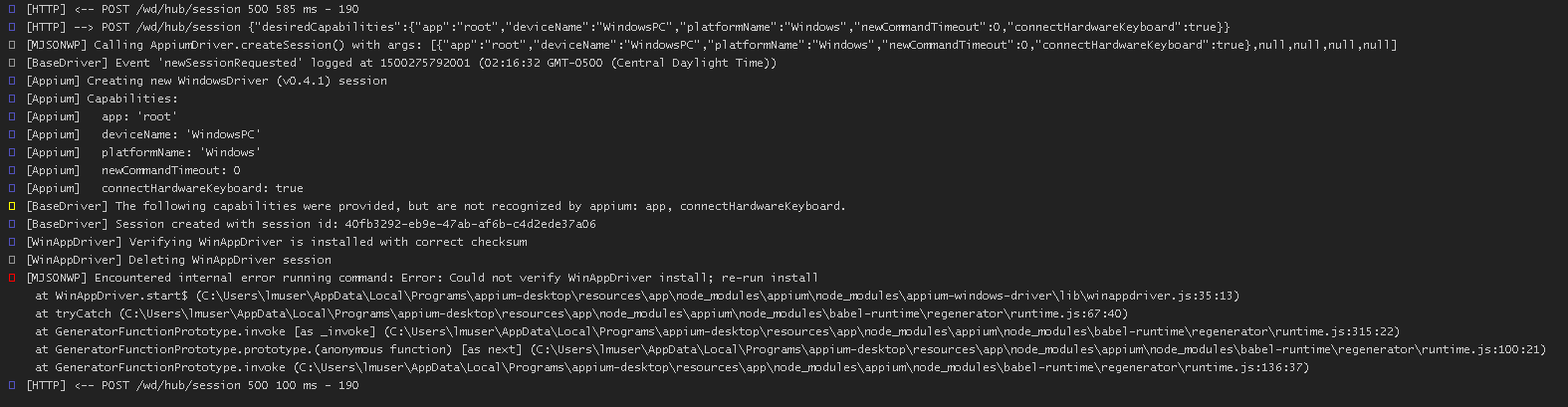
I am using WinAppDriver version 0.9.1705.5001
Am I using incorrect version of WinAppDriver?
Please assist.
Environment
Windows 2016 Server
- I am running Appium Desktop version _<1.6.4>_.
I am on (pick one):
- [ ] Windows
 dhapolapankaj
All 27 comments
Have you tested WinAppDriver.exe on it's own? (ie: running WinAppDriver.exe from the command line and then testing some of the endpoints)
 dpgraham
on 18 Jul 2017
dpgraham
on 18 Jul 2017
This failure means that the WinAppDriver.exe binary didn't match the checksum we expected. I'd uninstall and reinstall appium
 jlipps
on 18 Jul 2017
jlipps
on 18 Jul 2017
@dpgraham Yeah. I am able to work with WinAppDriver.exe in different test case.
@jlipps sorry I didn't noticed, does Appium need a specific version of WinAppDriver?
dhapolapankaj
on 19 Jul 2017
@dhapolapankaj Can you try installing Appium globally and testing it using that
npm uninstall -g appium
npm install -g appium
appium .
And use that instead of the server built into Appium Desktop.
dpgraham
on 19 Jul 2017
Closing due to inactivity.
dpgraham
on 8 Aug 2017
Hi @dpgraham
Apology for the late reply.
I tried below scenario.
- I tried re-installing the appium windows installer. I got below error
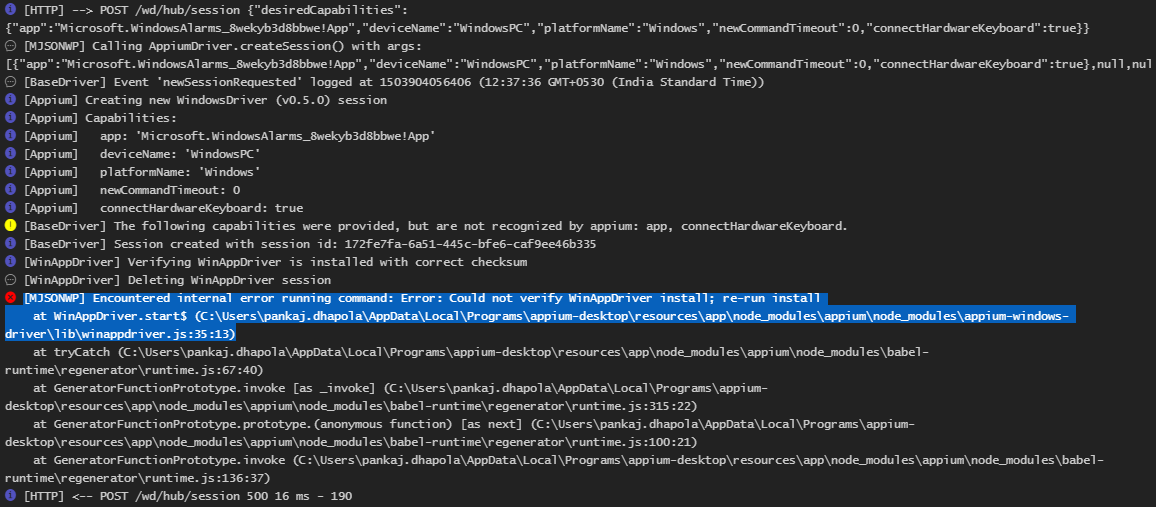
Then I updated the Latest WinAppDriver, I guess they have release version 1
Still can't set it upI tried using npm
I got below error message
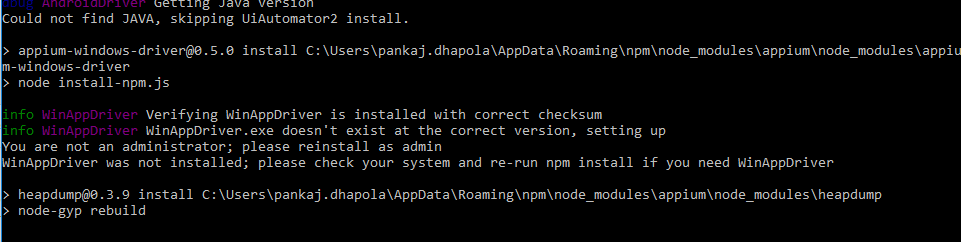
Could you please tell me
- While installing Appium desktop, Is it going to Install the WinAppDriver on its own?
- If its not, then can we have a message saying "Please install WinAppDriver first"?
- Also can we also mention the Appium version is compatible with what version of WinAppDriver?
For a time being, I am able to work on another machine.
I am not sure if the issue lies in this machine configuration.
Thanks
PD
dhapolapankaj
on 28 Aug 2017
Can you try uninstalling your locally installed WinAppDriver? I think there's a conflict involving your local version and the bundled Appium version.
dpgraham
on 28 Aug 2017
Hey @dpgraham
I tried un-installing the WinAppDriver from my system. On clicking start session button I got error saying could not find the WinAppDriver.
Sorry but it was again a failure in my system. I am not able to figure out the issue in my System.
I re-installed WAD. When I click on "Start Session" Appium says
[Appium] Welcome to Appium v1.6.5
[Appium] Non-default server args:
[Appium]   port: 4724
[Appium] Appium REST http interface listener started on 0.0.0.0:4724
[HTTP] --> GET /wd/hub/sessions {}
[MJSONWP] Calling AppiumDriver.getSessions() with args: []
[MJSONWP] Responding to client with driver.getSessions() result: []
[HTTP] <-- GET /wd/hub/sessions 200 2 ms - 40
[HTTP] --> POST /wd/hub/session {"desiredCapabilities":{"app":"C:\\Windows\\System32\\notepad.exe","deviceName":"WindowsPC","platformName":"Windows","newCommandTimeout":0,"connectHardwareKeyboard":true}}
[MJSONWP] Calling AppiumDriver.createSession() with args: [{"app":"C:\\Windows\\System32\\notepad.exe","deviceName":"WindowsPC","platformName":"Windows","newCommandTimeout":0,"connectHardwareKeyboard":true},null,null]
[BaseDriver] Event 'newSessionRequested' logged at 1504510704285 (13:08:24 GMT+0530 (India Standard Time))
[Appium] Creating new WindowsDriver (v0.5.0) session
[Appium] Capabilities:
[Appium]   app: 'C:\\Windows\\System32\\notepad.exe'
[Appium]   deviceName: 'WindowsPC'
[Appium]   platformName: 'Windows'
[Appium]   newCommandTimeout: 0
[Appium]   connectHardwareKeyboard: true
[BaseDriver] The following capabilities were provided, but are not recognized by appium: app, connectHardwareKeyboard.
[BaseDriver] Session created with session id: 82c44322-bab5-442c-aeb5-ab2a9024dd2c
[WinAppDriver] Verifying WinAppDriver is installed with correct checksum
[WinAppDriver] Deleting WinAppDriver session
[MJSONWP] Encountered internal error running command: Error: Could not verify WinAppDriver install; re-run install
    at WinAppDriver.start$ (C:\Users\pankaj.dhapola\AppData\Local\Programs\appium-desktop\resources\app\node_modules\appium\node_modules\appium-windows-driver\lib\winappdriver.js:35:13)
    at tryCatch (C:\Users\pankaj.dhapola\AppData\Local\Programs\appium-desktop\resources\app\node_modules\appium\node_modules\babel-runtime\regenerator\runtime.js:67:40)
    at GeneratorFunctionPrototype.invoke [as _invoke] (C:\Users\pankaj.dhapola\AppData\Local\Programs\appium-desktop\resources\app\node_modules\appium\node_modules\babel-runtime\regenerator\runtime.js:315:22)
    at GeneratorFunctionPrototype.prototype.(anonymous function) [as next] (C:\Users\pankaj.dhapola\AppData\Local\Programs\appium-desktop\resources\app\node_modules\appium\node_modules\babel-runtime\regenerator\runtime.js:100:21)
    at GeneratorFunctionPrototype.invoke (C:\Users\pankaj.dhapola\AppData\Local\Programs\appium-desktop\resources\app\node_modules\appium\node_modules\babel-runtime\regenerator\runtime.js:136:37)
[HTTP] <-- POST /wd/hub/session 500 19 ms - 190
I tried the same scenario using NuGet packages - appium-dotnet-driver
DesiredCapabilities appCapabilities = new DesiredCapabilities();
            appCapabilities.SetCapability("deviceName", "WindowsPC");
            appCapabilities.SetCapability("platformName", "Windows");
            appCapabilities.SetCapability("app", @"C:\Windows\System32\notepad.exe");
            WindowsDriver<WindowsElement> NotepadSession = new WindowsDriver<WindowsElement>(new Uri("http://127.0.0.1:4723"), appCapabilities);
            NotepadSession.FindElementByClassName("Edit").SendKeys("This is some text");
It worked fine for me.
dhapolapankaj
on 4 Sep 2017
What is the appium log output for your successful run using the dotnet driver?
jlipps
on 4 Sep 2017
Closing this. Will re-open if problem still persisting.
dpgraham
on 23 Oct 2017
I have the same problem. Uninstalling/reinstalling Appium makes no difference, not does installing it globally with npm.
The error reported is [MJSONWP] Encountered internal error running command: Error: Could not verify WinAppDriver install; re-run install
Oringinally, I installed WinAppDriver standalone before installing Appium - it seems there may be some remnant registry setting that the Appium installer is reading that isn't reset/cleared by an uninstall.
 peterthomastlc
on 26 Oct 2017
peterthomastlc
on 26 Oct 2017
isn't this error due to windows 2016 server, got the same message on 2016 while on win10 it runs? reinstalled the driver and appium... no success till now
 Clemensreijnen
on 30 Oct 2017
Clemensreijnen
on 30 Oct 2017
I am also facing similar issue
The server is running
[Appium] Welcome to Appium v1.7.1
[Appium] Appium REST http interface listener started on 0.0.0.0:4723
[HTTP] --> GET /wd/hub/sessions {}
[MJSONWP] Calling AppiumDriver.getSessions() with args: []
[MJSONWP] Responding to client with driver.getSessions() result: []
[HTTP] <-- GET /wd/hub/sessions 200 5 ms - 40
[HTTP] --> POST /wd/hub/session {"desiredCapabilities":{"app":"C:\Windows\System32\notepad.exe","deviceName":"WindowsPC","platformName":"Windows","newCommandTimeout":0,"connectHardwareKeyboard":true}}
[MJSONWP] Calling AppiumDriver.createSession() with args: [{"app":"C:\Windows\System32\notepad.exe","deviceName":"WindowsPC","platformName":"Windows","newCommandTimeout":0,"connectHardwareKeyboard":true},null,null]
[BaseDriver] Event 'newSessionRequested' logged at 1510044529079 (14:18:49 GMT+0530 (India Standard Time))
[Appium] Creating new WindowsDriver (v0.5.0) session
[Appium] Capabilities:
[Appium] app: 'C:\Windows\System32\notepad.exe'
[Appium] deviceName: 'WindowsPC'
[Appium] platformName: 'Windows'
[Appium] newCommandTimeout: 0
[Appium] connectHardwareKeyboard: true
[BaseDriver] The following capabilities were provided, but are not recognized by appium: app, connectHardwareKeyboard.
[BaseDriver] Session created with session id: 634708dc-199b-470e-9c66-4fd1f835bc06
[WinAppDriver] Verifying WinAppDriver is installed with correct checksum
[WinAppDriver] Deleting WinAppDriver session
[MJSONWP] Encountered internal error running command: Error: Could not verify WinAppDriver install; re-run install
at WinAppDriver.start$ (C:\Users\jsingh\AppData\Local\Programs\appium-desktop\resources\app\node_modules\appium\node_modules\appium-windows-driver\lib\winappdriver.js:35:13)
at tryCatch (C:\Users\jsingh\AppData\Local\Programs\appium-desktop\resources\app\node_modules\appium\node_modules\babel-runtime\regenerator\runtime.js:67:40)
at GeneratorFunctionPrototype.invoke [as _invoke] (C:\Users\jsingh\AppData\Local\Programs\appium-desktop\resources\app\node_modules\appium\node_modules\babel-runtime\regenerator\runtime.js:315:22)
at GeneratorFunctionPrototype.prototype.(anonymous function) [as next] (C:\Users\jsingh\AppData\Local\Programs\appium-desktop\resources\app\node_modules\appium\node_modules\babel-runtime\regenerator\runtime.js:100:21)
at GeneratorFunctionPrototype.invoke (C:\Users\jsingh\AppData\Local\Programs\appium-desktop\resources\app\node_modules\appium\node_modules\babel-runtime\regenerator\runtime.js:136:37)
[HTTP] <-- POST /wd/hub/session 500 71 ms - 190
Really appreciate if any one can help me out
 jsingh-qualitrol
on 7 Nov 2017
jsingh-qualitrol
on 7 Nov 2017
@dhapolapankaj :Appreciate if you can share how did you get your problem resolved.
Kindly share the detail steps 👍
Thanks in advance
jsingh-qualitrol
on 7 Nov 2017
Hi,
Same issue with appium 1.7.1, reinstallation of WinAppDriver doesn't help. I tried to uninstall it and install appium but there is the same error message.
I tried to install different WinAppDriver versions, but none of them solved the issue.
Regards
Łukasz
 LukaszBigos
on 14 Nov 2017
LukaszBigos
on 14 Nov 2017
Same issue here. I'm a first-time Appium user, installed it (appium-desktop-Setup-1.2.7.exe) for the first time on my machine 2 days ago (appium with the included WinAppDriver). Got the error from this issue where appium couldn't verify the WinApp installation. I then downloaded and installed the latest WinAppDriver with no change. Still unable to run appium with the WinAppDriver with fresh installs of the latest versions.
 bbrandtnerdery
on 30 Nov 2017
bbrandtnerdery
on 30 Nov 2017
Ok, I believe I found the answer to this problem....
If you look in the following directory (on Windows):
You will find a file name "installer.js"
At the top of this file are the following constants:
const WAD_VER = "0.9-beta";
const WAD_DL = https://github.com/Microsoft/WinAppDriver/releases/download/v${WAD_VER}/WindowsApplicationDriver.msi;
const WAD_DL_MD5 = "17b9b4728782f5a58c72f6d3a4b2494f";
In other words, the latest release of Appium Server was built with version 0.9-beta of the WinAppDriver (I have tested and verified this).
So, you have 2 choices:
Uninstall the latest WinAppDriver and install 0.9-beta (two releases back; btw, if you need to access the Desktop, i.e. - app="root" capability, this won't work with this version. At least that is my experience).
Use the latest version of WinAppDriver, but start it separate from Appium Server, in a CMD window (you will need to remove /wd/hub from your URL when instantiating your driver).
Basically what we need is a new build of Appium Server with the new WinAppDriver (v1.0).
I hope this is helpful.
David
 dfalves
on 3 Dec 2017
dfalves
on 3 Dec 2017
I am seeing the same issue. Installed the latest Appium from node. Very annoying.
[MJSONWP] Encountered internal error running command: Error: Could not verify WinAppDriver install; re-run install
at WinAppDriver.start$ (../../lib/winappdriver.js:35:13)
at tryCatch (C:\Users\ewac\AppData\Roaming\npm\node_modules\appium\node_modules\babel-runtime\regenerator\runtime.js:67:40)
at GeneratorFunctionPrototype.invoke [as _invoke] (C:\Users\ewac\AppData\Roaming\npm\node_modules\appium\node_modules\babel-runtime\regenerator\runtime.js:315:22)
at GeneratorFunctionPrototype.prototype.(anonymous function) [as next] (C:\Users\ewac\AppData\Roaming\npm\node_modules\appium\node_modules\babel-runtime\regenerator\runtime.js:100:21)
at GeneratorFunctionPrototype.invoke (C:\Users\ewac\AppData\Roaming\npm\node_modules\appium\node_modules\babel-runtime\regenerator\runtime.js:136:37)
at
 ellnika
on 15 Dec 2017
ellnika
on 15 Dec 2017
did anyone try David's solution?
Do I need to install WinAppDriver separately from Appium? (I thought everything is bundled in Appium).
ellnika
on 15 Dec 2017
Yes I tried David's solution and it worked great. I personally don't need Appium since I'm only testing a Windows UWP desktop app, so running the WinAppDriver executable standalone worked perfectly.
bbrandtnerdery
on 15 Dec 2017
The WinAppDriver is part of Appium Desktop...however, the latest version of Appium Desktop (v1.2.7) has WinAppDriver 0.9-beta (two releases back) integrated (or expects you to install this version). If you install this release, you can run Appium Desktop only, and you will not get the error in this thread. Unfortunately, you will also give up a lot of functionality (check the Changelogs and see if it is for you).
dfalves
on 15 Dec 2017
Hello every I have resolved this problem.
just
解决掉了这种报错:
MSBUILD : error MSB3428: 未能加载 Visual C++ 组件“VCBuild.exe”。要解决此问题,1) 安装 .NET Framework 2.0 SDK;2) 安装 Microsoft Vis ual Studio 2005;或 3)
如果将该组件安装到了其他位置,请将其位置添加到系统路径中。 [D:\nodejs\node-global\node_modules\appium\node_modules\heapdump\build\bi nding.sln]
解决掉了这种警告:
[email protected] install D:\nodejs\node-global\node_modules\appium\node_modules\appium-windows-driver
node install-npm.js
info WinAppDriver You must use WinAppDriver version 1.0
info WinAppDriver Verifying WinAppDriver version 1.0 is installed via comparing the checksum.
info WinAppDriver WinAppDriver.exe doesn't exist at the correct version 1.0, setting up
WARNING: You are not running as an administrator so WinAppDriver cannot be installed for you; please reinstall as admin
WinAppDriver was not installed; please check your system and re-run npm install if you need WinAppDriver
[email protected] install D:\nodejs\node-global\node_modules\appium\node_modules\heapdump
node-gyp rebuild
D:\nodejs\node-global\node_modules\appium\node_modules\heapdump>if not defined npm_config_node_gyp (node "D:\nodejs\node_modules\npm\node_modules\npm-lifecycle\node-gyp-bin\....\node_modules\node-gyp\bin\node-gyp.js" rebuild ) else (node "D:\nodejs\node_modules\npm\node_modules\node-gyp\bin\node-gyp.js" rebuild )
在此解决方案中一次生成一个项目。若要启用并行生成,请添加“/m”开关。
具体解决步骤:
最终的方法,期间参考一些折腾了一些其他的,反复试了几次,应该是这样的步骤:
1 卸载 npm uninstall appium -g
哦 实际 我也开启了 win10 的开发人员模式,此步是不是必要 我暂时不清楚,参考乱七八糟的帖子 折腾了许多,所以并不知道 是否此步必要
2 去 https://developer.microsoft.com/zh-cn/windows/downloads/windows-10-sdk 下载 .iso
一共760多MB 16299.15.170928-1534.rs3_release_WindowsSDK.iso win10 可以直接双击该iso 便会加载为一个光盘DVD驱动器,进去,直接双击WinSDKSetup.exe 安装即可.默
认路径,默认features全选择
3 https://github.com/Microsoft/WinAppDriver/releases 下载v1.0 的WindowsApplicationDriver.msi .
安装到默认C:\Program Files (x86)\Windows Application Driver
路径,然后命令行到该路径,尝试启动下
保证启动正常. 保证正常启动不报错后,就可以关掉了,安装其他过程中不需要保证开启该 server
4 管理员权限 powershell 执行 npm install --global --production windows-build-tools
过程很长,需要在线下载一些组件.我全程科学上网.
Windows PowerShell
版权所有 (C) Microsoft Corporation。保留所有权利。
PS C:\WINDOWS\system32> npm install --global --production windows-build-tools
[email protected] postinstall D:\nodejs\node-global\node_modules\windows-build-tools
node ./lib/index.js
Downloading BuildTools_Full.exe
Downloading python-2.7.14.amd64.msi
[> ] 0.0% (0 B/s)
Downloaded python-2.7.14.amd64.msi. Saved to C:\Users\cmd.windows-build-tools\python-2.7.14.amd64.msi.
Starting installation...
Launched installers, now waiting for them to finish.
This will likely take some time - please be patient!
Status from the installers:
---------- Visual Studio Build Tools ----------
Successfully installed Visual Studio Build Tools.
------------------- Python --------------------
Successfully installed Python 2.7
- [email protected]
added 132 packages in 1365.525s
5 管理员权限 powershell 执行npm i appium -g
然后就正常了 没WARNING了.
PS C:\WINDOWS\system32> npm i appium -g
D:\nodejs\node-global\appium -> D:\nodejs\node-global\node_modules\appium\build\lib\main.js
[email protected] install D:\nodejs\node-global\node_modules\appium\node_modules\appium-chromedriver
node install-npm.js
info Chromedriver Install Installing Chromedriver version '2.33' for platform 'win' and architecture '32'
info Chromedriver Install Opening temp file to write chromedriver_win32 to...
info Chromedriver Install Downloading https://chromedriver.storage.googleapis.com/2.33/chromedriver_win32.zip...
info Chromedriver Install Writing binary content to C:\Users\cmd\AppData\Local\Temp\2018317-14572-briz5r.jt6ow\chromedriver_win32.zip...
info Chromedriver Install Extracting C:\Users\cmd\AppData\Local\Temp\2018317-14572-briz5r.jt6ow\chromedriver_win32.zip to C:\Users\cmd\AppData\Local\Temp\2018317-14572-briz5r.jt6ow\chromedriver_win32
info Chromedriver Install Creating D:\nodejs\node-global\node_modules\appium\node_modules\appium-chromedriver\chromedriver\win...
info Chromedriver Install Copying unzipped binary, reading from C:\Users\cmd\AppData\Local\Temp\2018317-14572-briz5r.jt6ow\chromedriver_win32\chromedriver.exe...
info Chromedriver Install Writing to D:\nodejs\node-global\node_modules\appium\node_modules\appium-chromedriver\chromedriver\win\chromedriver.exe...
info Chromedriver Install D:\nodejs\node-global\node_modules\appium\node_modules\appium-chromedriver\chromedriver\win\chromedriver.exe successfully put in place
[email protected] install D:\nodejs\node-global\node_modules\appium\node_modules\appium-selendroid-driver> node ./bin/install.js
dbug AndroidDriver Getting Java version
info AndroidDriver Java version is: 1.8.0_121
info Selendroid Ensuring D:\nodejs\node-global\node_modules\appium\node_modules\appium-selendroid-driver\selendroid\download exists
info Selendroid Downloading Selendroid standalone server version 0.17.0 from http://repo1.maven.org/maven2/io/selendroid/selendroid-standalone/0.17.0/selendroid-standalone-0.17.0-with-dependencies.jar --> D:\nodejs\node-global\node_modules\appium\node_modules\appium-selendroid-driver\selendroid\download\selendroid-server-7cf7163ac47f1c46eff95b62f78b58c1dabdec534acc6632da3784739f6e9d82.jar
info Selendroid Writing binary content to D:\nodejs\node-global\node_modules\appium\node_modules\appium-selendroid-driver\selendroid\download\selendroid-server.jar.tmp
info Selendroid Selendroid standalone server downloaded
info Selendroid Determining AndroidManifest location
info Selendroid Determining server apk location
info Selendroid Extracting manifest and apk to D:\nodejs\node-global\node_modules\appium\node_modules\appium-selendroid-driver\selendroid\download
info Selendroid Copying manifest and apk to D:\nodejs\node-global\node_modules\appium\node_modules\appium-selendroid-driver\selendroid
info Selendroid Cleaning up temp files
info Selendroid Fixing AndroidManifest icon bug
[email protected] install D:\nodejs\node-global\node_modules\appium\node_modules\appium-uiautomator2-driver
node ./bin/install.js
dbug AndroidDriver Getting Java version
info AndroidDriver Java version is: 1.8.0_121
info UiAutomator2 downloading UiAutomator2 Server APK v0.3.0 : https://github.com/appium/appium-uiautomator2-server/releases/download/v0.3.0/appium-uiautomator2-server-v0.3.0.apk
info UiAutomator2 downloading UiAutomator2 Server test APK v0.3.0 : https://github.com/appium/appium-uiautomator2-server/releases/download/v0.3.0/appium-uiautomator2-server-debug-androidTest.apk
info UiAutomator2 UiAutomator2 Server APKs downloaded
[email protected] install D:\nodejs\node-global\node_modules\appium\node_modules\appium-windows-driver
node install-npm.js
info WinAppDriver You must use WinAppDriver version 1.0
info WinAppDriver Verifying WinAppDriver version 1.0 is installed via comparing the checksum.
info WinAppDriver WinAppDriver.exe version 1.0 already exists with correct checksum, not re-downloading
[email protected] install D:\nodejs\node-global\node_modules\appium\node_modules\heapdump
node-gyp rebuild
D:\nodejs\node-global\node_modules\appium\node_modules\heapdump>if not defined npm_config_node_gyp (node "D:\nodejs\node_modules\npm\node_modules\npm-lifecycle\node-gyp-bin\....\node_modules\node-gyp\bin\node-gyp.js" rebuild ) else (node "D:\nodejs\node_modules\npm\node_modules\node-gyp\bin\node-gyp.js" rebuild )
在此解决方案中一次生成一个项目。若要启用并行生成,请添加“/m”开关。
heapdump.cc
Creating library D:\nodejs\node-global\node_modules\appium\node_modules\heapdump\build\Release\addon.lib and object D:\nodejs\node-global\node_modules\appium\node_modules\heapdump\build\Release\addon.exp
Generating code
Finished generating code
addon.vcxproj -> D:\nodejs\node-global\node_modules\appium\node_modules\heapdump\build\Release\addon.node
addon.vcxproj -> D:\nodejs\node-global\node_modules\appium\node_modules\heapdump\build\Release\addon.pdb (Full PDB)
[email protected] install D:\nodejs\node-global\node_modules\appium\node_modules\pre-commit
node install.js
[email protected] install D:\nodejs\node-global\node_modules\appium\node_modules\wd
node scripts/build-browser-scripts
[email protected] postinstall D:\nodejs\node-global\node_modules\appium\node_modules\spawn-sync
node postinstall
npm WARN optional SKIPPING OPTIONAL DEPENDENCY: [email protected] (node_modules\appium\node_modules\fsevents):
npm WARN notsup SKIPPING OPTIONAL DEPENDENCY: Unsupported platform for [email protected]: wanted {"os":"darwin","arch":"any"} (current: {"os":"win32","arch":"x64"})
- [email protected]
added 1375 packages in 682.967s
 Archer456
on 18 Apr 2018
Archer456
on 18 Apr 2018
I am also facing same issue by using JAVA
Error Stack - An unknown server-side error occurred while processing the command. Original error: Could not verify WinAppDriver install; re-run install
i tried all the possibilities like uninstall WinAppDriver and Reinstall Appium but in JAVA we are facing this issue when we use C# everything is good.
 sseenivasan89
on 11 Apr 2019
sseenivasan89
on 11 Apr 2019
Hi,
I need help to install Apium in Visual Studio Enterprise 2017.
When i am trying to serach Apium in Browsers under Neuget Manage Packages , i see the below error
Package not found.
Could anyone help me why it is not supporting to Apium?
 Jabeen-2
on 12 Jun 2019
Jabeen-2
on 12 Jun 2019
I Solved the above issue by uninstalling the windappdriver and installing it without changing its default installation location.
In most cases people tend to change its default installation location due to which the appium installer.js is not able to find the installed files at the location that it is supposed to be installed at.
Or the other way is to change the default location mentioned in the installer.js file.
 Jeeveshk
on 10 Jan 2020
Jeeveshk
on 10 Jan 2020
Hi , I am also facing same issues with appium v1.17.1,and please let me know how to find winappdriver version?
The server is running
[Appium] Welcome to Appium v1.17.1
[Appium] Non-default server args:
[Appium] port: 6666
[Appium] allowInsecure: {
[Appium] }
[Appium] denyInsecure: {
[Appium] }
[Appium] Appium REST http interface listener started on 0.0.0.0:6666
[HTTP] --> POST /wd/hub/session
[HTTP] {"desiredCapabilities":{"app":"C:\\Program Files (x86)\\Google\\Chrome\\Application\\chrome.exe","platformName":"windows","deviceName":"Windows PC","platformVersion":"10"},"capabilities":{"firstMatch":[{"appium:app":"C:\\Program Files (x86)\\Google\\Chrome\\Application\\chrome.exe","appium:deviceName":"Windows PC","platformName":"windows","appium:platformVersion":"10"}]}}
[W3C] Calling AppiumDriver.createSession() with args: [{"app":"C:\\Program Files (x86)\\Google\\Chrome\\Application\\chrome.exe","platformName":"windows","deviceName":"Windows PC","platformVersion":"10"},null,{"firstMatch":[{"appium:app":"C:\\Program Files (x86)\\Google\\Chrome\\Application\\chrome.exe","appium:deviceName":"Windows PC","platformName":"windows","appium:platformVersion":"10"}]}]
[BaseDriver] Event 'newSessionRequested' logged at 1604203578304 (09:36:18 GMT+0530 (India Standard Time))
[Appium] Appium v1.17.1 creating new WindowsDriver (v1.8.0) session
[BaseDriver] Creating session with MJSONWP desired capabilities: {
[BaseDriver] "app": "C:\\Program Files (x86)\\Google\\Chrome\\Application\\chrome.exe",
[BaseDriver] "platformName": "windows",
[BaseDriver] "deviceName": "Windows PC",
[BaseDriver] "platformVersion": "10"
[BaseDriver] }
[BaseDriver] Session created with session id: eab00a66-097d-47b0-bc28-e314da1c1c59
[WinAppDriver] You must use WinAppDriver version 1.2-RC
[WinAppDriver] Verifying WinAppDriver version 1.2-RC is installed via comparing the checksum.
[WinAppDriver] Deleting WinAppDriver session
[BaseDriver] Event 'newSessionStarted' logged at 1604203578317 (09:36:18 GMT+0530 (India Standard Time))
[W3C] Encountered internal error running command: Error: Could not verify WinAppDriver install; re-run install
[W3C] at WinAppDriver.start (C:\Program Files\Appium\resources\app\node_modules\appium\node_modules\appium-windows-driver\lib\winappdriver.js:37:13)
[W3C] at WindowsDriver.startWinAppDriverSession (C:\Program Files\Appium\resources\app\node_modules\appium\node_modules\appium-windows-driver\lib\driver.js:57:5)
[W3C] at WindowsDriver.createSession (C:\Program Files\Appium\resources\app\node_modules\appium\node_modules\appium-windows-driver\lib\driver.js:30:7)
[W3C] at AppiumDriver.createSession (C:\Program Files\Appium\resources\app\node_modules\appium\lib\appium.js:358:35)
[W3C] Destroying socket connection
[HTTP] <-- POST /wd/hub/session 500 20 ms - 671
[HTTP]
 KALAISELVI123
on 1 Nov 2020
KALAISELVI123
on 1 Nov 2020
@Jeeveshk
1.Please let me know how to delete the existing winappdriver.js file.
2.Any specific winappdriver version is there for support appium v1.17.1
3.How to find winappdriver version.
KALAISELVI123
on 1 Nov 2020
Related issues
 hunzai
·
7Comments
hunzai
·
7Comments
 abh7nav
·
11Comments
abh7nav
·
11Comments
 mrk-han
·
9Comments
mrk-han
·
9Comments
 vikramvi
·
3Comments
vikramvi
·
3Comments
 VTINFOJames
·
7Comments
VTINFOJames
·
7Comments
Most helpful comment
Ok, I believe I found the answer to this problem....
If you look in the following directory (on Windows):
\AppData\Local\Programs\appium-desktop\resources\app\node_modules\appium\node_modules\appium-windows-driver\lib
You will find a file name "installer.js"
At the top of this file are the following constants:
const WAD_VER = "0.9-beta";
const WAD_DL =
https://github.com/Microsoft/WinAppDriver/releases/download/v${WAD_VER}/WindowsApplicationDriver.msi;const WAD_DL_MD5 = "17b9b4728782f5a58c72f6d3a4b2494f";
In other words, the latest release of Appium Server was built with version 0.9-beta of the WinAppDriver (I have tested and verified this).
So, you have 2 choices:
Uninstall the latest WinAppDriver and install 0.9-beta (two releases back; btw, if you need to access the Desktop, i.e. - app="root" capability, this won't work with this version. At least that is my experience).
Use the latest version of WinAppDriver, but start it separate from Appium Server, in a CMD window (you will need to remove /wd/hub from your URL when instantiating your driver).
Basically what we need is a new build of Appium Server with the new WinAppDriver (v1.0).
I hope this is helpful.
David