Appium-desktop: Unable to use Appium.app UI to locate elements on iOS
The problem
Briefly describe the issue you are experiencing (or the feature you want to see added to Appium). Tell us what you were trying to do and what happened instead. Remember, this is _not_ a place to ask questions. For that, go to http://discuss.appium.io!
Environment
- Appium version (or git revision) that exhibits the issue: Appium v1.18.0
- Last Appium version that did not exhibit the issue (if applicable): Appium v1.16.0
- Desktop OS/version used to run Appium: macOS Mojave
- Node.js version (unless using Appium.app|exe): v12.18.0
- Npm or Yarn package manager: '6.14.4'
- Mobile platform/version under test: iOS 11.3
- Real device or emulator/simulator: simulator
- Appium CLI or Appium.app|exe: Appium.app
Details
I upgraded from Appium.app 1.16 to 1.18.1 and now can not use UI to locate elements on the app. I am running a react-native app.
Link to Appium logs
https://gist.github.com/hunzai/f835ecd8d98b58f4463e0153f97dc094
Code To Reproduce Issue [ Good To Have ]
- Open Appium.app
- Load application with following configs
{
"deviceName": "iPhone X",
"platformVersion": "11.3",
"language": "en",
"locale": "DE",
"unicodeKeyboard": false,
"resetKeyboard": true,
"newCommandTimeout": 500,
"autoAcceptAlerts": true,
"app": "XYZ.app",
"platformName": "ios",
"includeNonModalElements": true,
"automationName": "Instruments"
} - Hover over elements in the app UI
Actual:
Top element is highlighted and the source is shown in the resource tree. No child elements are selected and highlighted on the RHS window
 hunzai
All 7 comments
thanks, @mykola-mokhnach for moving to right place.
hunzai
on 20 Aug 2020
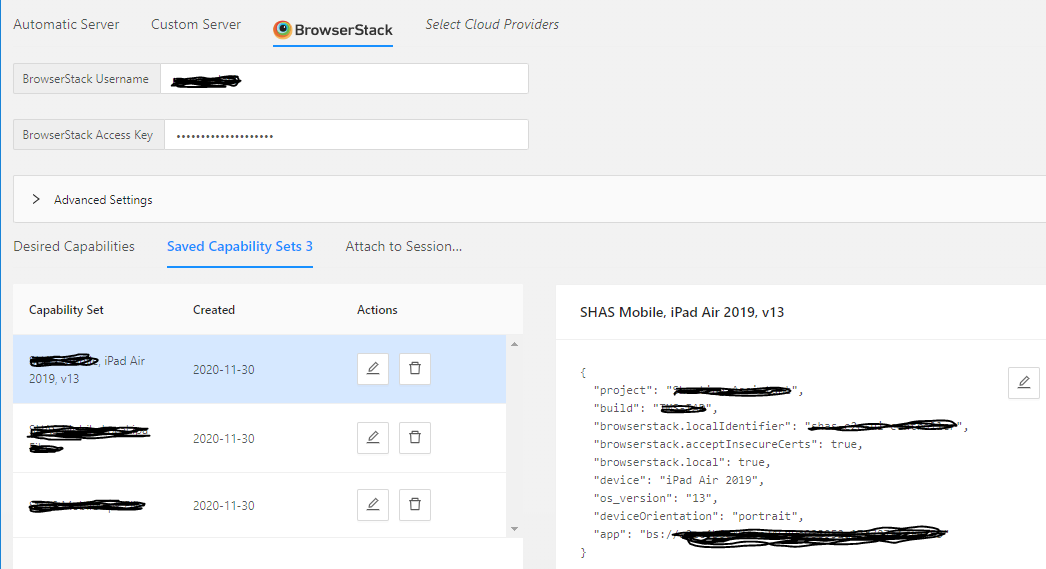
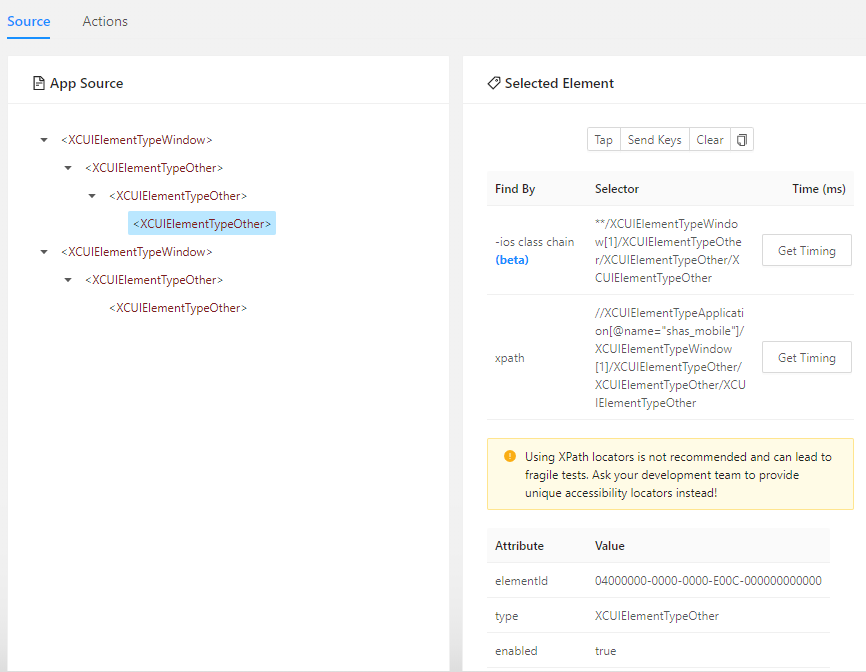
We have the same problem with the Appium v1.18.3. If we load an ipa file from the file system, is everything ok - we can inspect elements. But if we load the app from the BrowserStack, no child elements are selected and highlighted. I can only see the top elements. It seems to be the wrong structure / wrong page.
The same, if we access the app on BrowserStack programmatically by java-client. If I call getPageSource() by Appium driver, the same wrong page structure with only top level elements is shown. Is it a big in the Appium? My OS is Windows 10. A similar issue: https://github.com/appium/appium-desktop/issues/1424
Here some screenshots:
 ova2
on 19 Dec 2020
ova2
on 19 Dec 2020
if we access the app on BrowserStack programmatically by java-client. If I call getPageSource() by Appium driver, the same wrong page structure with only top level elements is shown.
If it occurred only on BrowserStack, it would be great to ask them.
I don't know how they handle Appium.
 KazuCocoa
on 19 Dec 2020
KazuCocoa
on 19 Dec 2020
BrowserStack doesn't handle Appium. AFAIK, it doesn't know Appiium. Appium driver communicates with the app running in BrowserStack. As I said, if an ipa / ipa file is loaded locally into the Appium Desktop, I can inspect elements. The same app, uploaded to BrowserStack, can not be driven by Appium because the app structure is not recognized correct.
BTW, this is a Flutter app, compilied for iOS and Android platforms.
ova2
on 19 Dec 2020
@ova2
When using Appium Desktop to connect to Browserstack Appium Desktop is using the Appium Server from Browserstack, not from Appium Desktop. So what @KazuCocoa is referring to is correct.
You can also only find the Appium logs within Browserstack, not AD.
Maybe you can provide the Appium version in the capabilities when you connect to Browserstack so it will use the latest version of Appium and all drivers as it would on your local machine
 wswebcreation
on 19 Dec 2020
wswebcreation
on 19 Dec 2020
@KazuCocoa @wswebcreation I have tried to set the appium version explicitly per capability
"browserstack.appium_version"
"1.19.1"
The problem remains. It doesn't matter if we communicate with the app on BrowserStack via Java-Client or Appium-Desktop.
ova2
on 5 Jan 2021
The source depends on XCTest (by Apple) framework. Appium shows elements by it.
If AD and Java client have gotten the same source structure, then Apple XCTest framework returned only them. Nothing we can do as Appium. Only Apple can improve it.
(Potentially, you can get elements that were not in the source, but in the case also XCTest framework behaved so.)
KazuCocoa
on 7 Jan 2021
Related issues
 jutamasJeab
·
3Comments
jutamasJeab
·
3Comments
 Prasant-Sutaria
·
11Comments
KazuCocoa
·
4Comments
Prasant-Sutaria
·
11Comments
KazuCocoa
·
4Comments
 josephbaylon
·
8Comments
josephbaylon
·
8Comments
 apn6125
·
3Comments
apn6125
·
3Comments
Most helpful comment
@ova2
When using Appium Desktop to connect to Browserstack Appium Desktop is using the Appium Server from Browserstack, not from Appium Desktop. So what @KazuCocoa is referring to is correct.
You can also only find the Appium logs within Browserstack, not AD.
Maybe you can provide the Appium version in the capabilities when you connect to Browserstack so it will use the latest version of Appium and all drivers as it would on your local machine