Appium-desktop: Auto update didn't work

Tapped on "Download Update Now" but nothing happened.
Mac 10.11.6 ( have current - 1 build installed )
 vikramvi
All 36 comments
This issue was fixed in 1.0.0-beta.4
Try clicking the 'Download Update Now' button and wait a few minutes. Eventually it should say 'Download Complete'. The download actually starts, it just doesn't show an indicator.
The only known issue left is that when you click to restart Appium it closes it without relaunching it and you have to wait up to a few minutes for it to install the new update before re-opening.
 dpgraham
on 15 Mar 2017
dpgraham
on 15 Mar 2017

@dpgraham I waited for 5 mins and got this error.
It'll nice to show some fake loader that something is getting downloaded otherwise user will think something not correct.
can you please re-open this issue ?
vikramvi
on 15 Mar 2017
@dpgraham Even 2nd time I got the same error. I've double checked that my company network is not behind some firewall / proxy.
vikramvi
on 15 Mar 2017
@jlipps please re-open, I don't have permission to re-open closed issue.
vikramvi
on 15 Mar 2017
@vikramvi if you open up the web console (right click -> inspect) do you see anything in the logs for that window?
 jlipps
on 15 Mar 2017
jlipps
on 15 Mar 2017

@jlipps there is not network activity observed, also as I can't resize window it's hard to see what's going on there. I tried few times
vikramvi
on 15 Mar 2017
You'll need to hit CMD+R in that window to refresh it for network activity to be recorded
jlipps
on 15 Mar 2017

This is what I could see, is there a way to expand and get more verbose info ?
vikramvi
on 15 Mar 2017
No, not without rebuilding the app without window size restrictions. @dpgraham can you think of another way to look for logs?
jlipps
on 15 Mar 2017
If you reach the 'Could not download. An error has occurred' page it's because a server error occurred when attempting to download the latest update from GitHub releases.
The logs for this are stored at:
on Linux: ~/.config/appium-desktop/log.log
on OS X: ~/Library/Logs/appium-desktop/log.log
on Windows: %USERPROFILE%\AppData\Roaming\appium-desktop\log.log
In this version though (v1.0.0-beta.3) the autoUpdater info isn't being logged out so we may not get any helpful information (v1.0.0-beta.4 has these logs). Once we get v1.0.0-beta.5 out we'll be able to test this further (by downloading v1.0.0-beta.4 and having it update).
dpgraham
on 15 Mar 2017
@vikramvi v1.0.0-beta.5 shows a download progress indicator. This was a bug.
dpgraham
on 15 Mar 2017
@dpgraham Thanks for detailed clarification. I will verify and close this issue after v1.0.0-beta.5 is released.
vikramvi
on 15 Mar 2017
Thanks, it will be released before end-of-week
And thanks for the help on this project. I appreciate it.
dpgraham
on 15 Mar 2017

Whenever i am starting Appium, it is getting autoupdated. After complete download "Click to restart appium" option is being shown, nothing updated after clicking it [i've waited for 10 minutes, still app not updated]
 GruLab
on 16 Mar 2017
GruLab
on 16 Mar 2017
Hi @GruLab, this is a known issue on Windows that I submitted a patch for (https://github.com/appium/appium-desktop/commit/35562acd66c22a7b151faedf92d7d64b4a59490a), and it will be in the next beta (v1.0.0-beta.5). In the meantime, can you try uninstalling Appium and then installing the latest version (v1.0.0-beta.4) and let me know if the error happens again.
dpgraham
on 16 Mar 2017
Hi @dpgraham , Sure; i'll check it on "v1.0.0-beta.5". I've uninstalled the older one & installed the latest beta.4, no issue exists. ~Best Regards
GruLab
on 17 Mar 2017
Great, thanks @GruLab!
dpgraham
on 17 Mar 2017
Hi @dpgraham , issue still exists.


But after uninstalling "1.0.0-beta.4" & installing newer one "1.0.0-beta.5" it is working perfectly.
GruLab
on 26 Mar 2017
Thanks for letting me know. This is proving to be quite difficult. I think what I'll do is replace the 'Could not download update. Try again later.' with a message and a link to the latest release.
dpgraham
on 27 Mar 2017
@dpgraham Even I'm facing same issue with latest update; also I didn't find ~/Library/Logs/appium-desktop/log.log
There is no folder by name appium-desktop under Logs, please review
vikramvi
on 28 Mar 2017
@dpgraham You may do that in next release.
GruLab
on 28 Mar 2017
@vikramvi Have you searched your filesystem for a directory called 'appium-desktop'? They might be getting stashed somewhere else
@GruLab I've committed that fix, it'll be in our next version.
I'm going to close this issue because we're just going to go with the fallback of providing a download link whenever the update fails. Feel free to keep the discussion going on this ticket.
dpgraham
on 28 Mar 2017
@dpgraham I tried command find / appium-desktop from mac terminal and it didn't fetch any results.
Later I tried command find . -type d
But didn't find any file log.log. @GruLab can you please check if you have this file on your mac ?
/Applications/Appium.app/Contents/Resources/app/node_modules/fsevents/build/Release/.deps/Users/danielgraham
/Applications/Appium.app/Contents/Resources/app/node_modules/fsevents/build/Release/.deps/Users/danielgraham/appium-desktop
/Applications/Appium.app/Contents/Resources/app/node_modules/fsevents/build/Release/.deps/Users/danielgraham/appium-desktop/node_modules
/Applications/Appium.app/Contents/Resources/app/node_modules/fsevents/build/Release/.deps/Users/danielgraham/appium-desktop/node_modules/fsevents
/Applications/Appium.app/Contents/Resources/app/node_modules/fsevents/build/Release/.deps/Users/danielgraham/appium-desktop/node_modules/fsevents/lib
/Applications/Appium.app/Contents/Resources/app/node_modules/fsevents/build/Release/.deps/Users/danielgraham/appium-desktop/node_modules/fsevents/lib/binding
/Applications/Appium.app/Contents/Resources/app/node_modules/fsevents/build/Release/.deps/Users/danielgraham/appium-desktop/node_modules/fsevents/lib/binding/Release
/Applications/Appium.app/Contents/Resources/app/node_modules/fsevents/build/Release/.deps/Users/danielgraham/appium-desktop/node_modules/fsevents/lib/binding/Release/electron-v1.4-darwin-x64
/Applications/Appium.app/Contents/Resources/app/node_modules/fsevents/build/Release/.deps/Users/danielgraham/appium-desktop/node_modules/fsevents/lib/binding/Release/electron-v1.4-darwin-x64/fse.node.d
vikramvi
on 29 Mar 2017
@dpgraham @jlipps can we please re-open the ticket, as marking issue as closed gets ignore. I have posted few comments couple of days back but no update
Even with latest release, auto update is not working and as per release notes, there is no link which takes to download page.
vikramvi
on 31 Mar 2017
@vikramvi you won't see this new feature unless you have 1.6.4-beta.6 and there is a beta.7 update...
jlipps
on 31 Mar 2017
@vikramvi Sorry for delayed response, i also didn't find any log on beta.5
@jlipps @dpgraham Waiting for beta.7, as i've replaced beta.5 with beta.6
GruLab
on 1 Apr 2017
@GruLab thanks for clarification.
@dpgraham can you please confirm if logging is working for any other users ?
@jlipps Let me uninstall existing version and download new one. Do you have plans to track auto update failures or just mention link to download latest version ?
vikramvi
on 3 Apr 2017
We use https://www.npmjs.com/package/electron-log which is supposed to log out app data. The default location is ~/Library/Logs/<app name>/log.log so not sure why you can't find it. Maybe it logged it somewhere else?
We'll keep track of auto-update failures. We've already put a fair bit of effort into trying to fix it without much success, I think it might be an issue with the library we're using. The fallback that we're going to use of just showing the link to the latest downloaded version, we've decided, will be good enough in the meantime.
dpgraham
on 3 Apr 2017
still doesnt work. I try to update it on windows, I download it update, after a while it ask me to close appium which I did. Nothing happen for few minutes, so I started appium desktop again and once more I get pop up about updating to new version (1.1.0-beta3)
 obstar
on 28 Jun 2017
obstar
on 28 Jun 2017
Thanks for letting me know @obstar. I'll look into it again, this issue has been nagging us for a while.
dpgraham
on 28 Jun 2017
@dpgraham please review below
it will be nice to have some fake installation progress animation
can we capture auto update info in some local log file for easy debugging in case any issue occurs
vikramvi
on 22 Aug 2017
I am not able to update Appium 1.2.5 to 1.2.7.
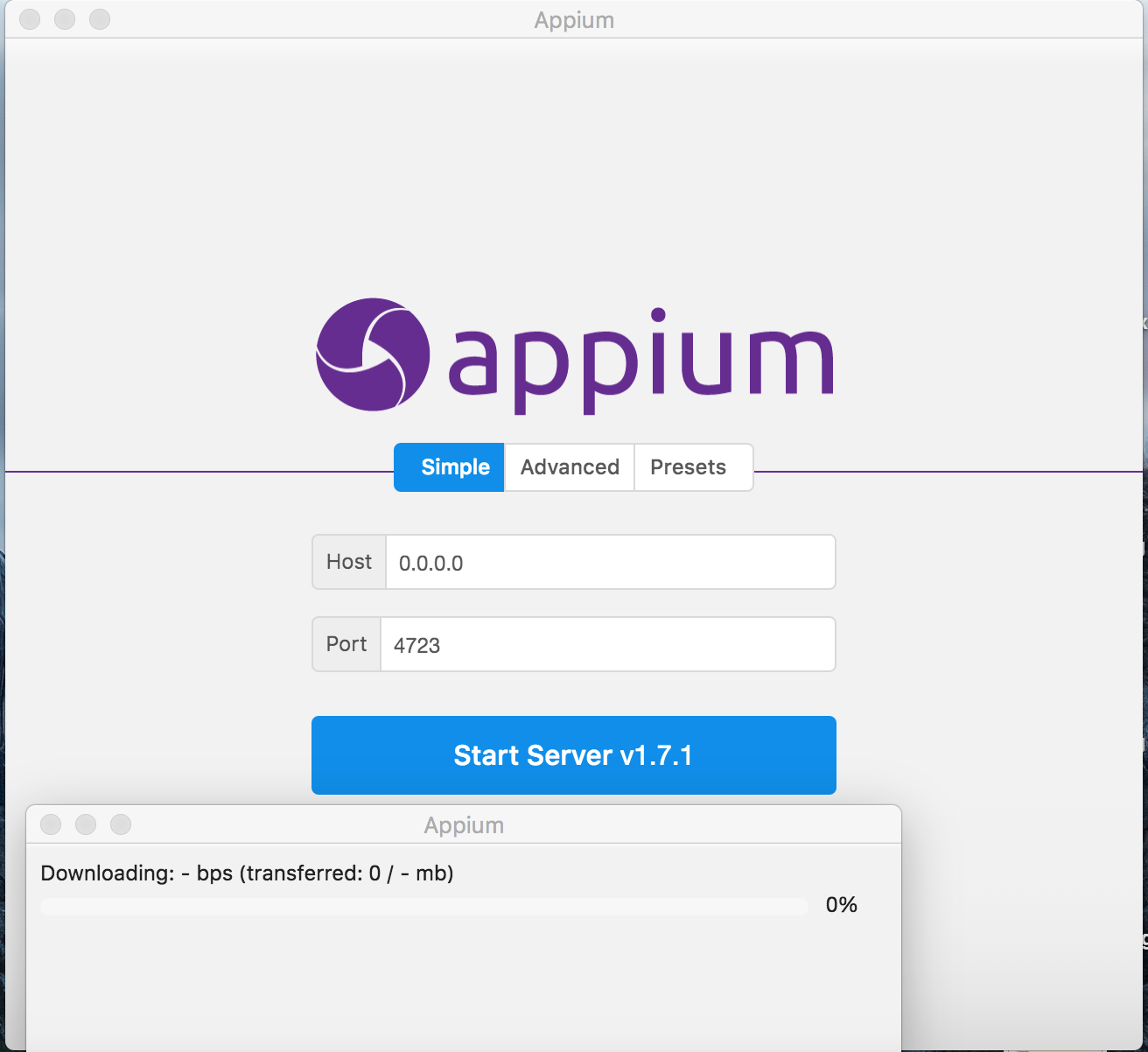
 d-rai
on 12 Dec 2017
d-rai
on 12 Dec 2017
To all those who are facing the issue "Not able to auto-update appium" after clicking on "Close appium" button.
There is a workaround for it. After the appium update gets downloaded and you see the pop-up, do not click on "Close appium" button rather then close appium directly using "x" icon at top of appium window and it will start auto-updating appium.
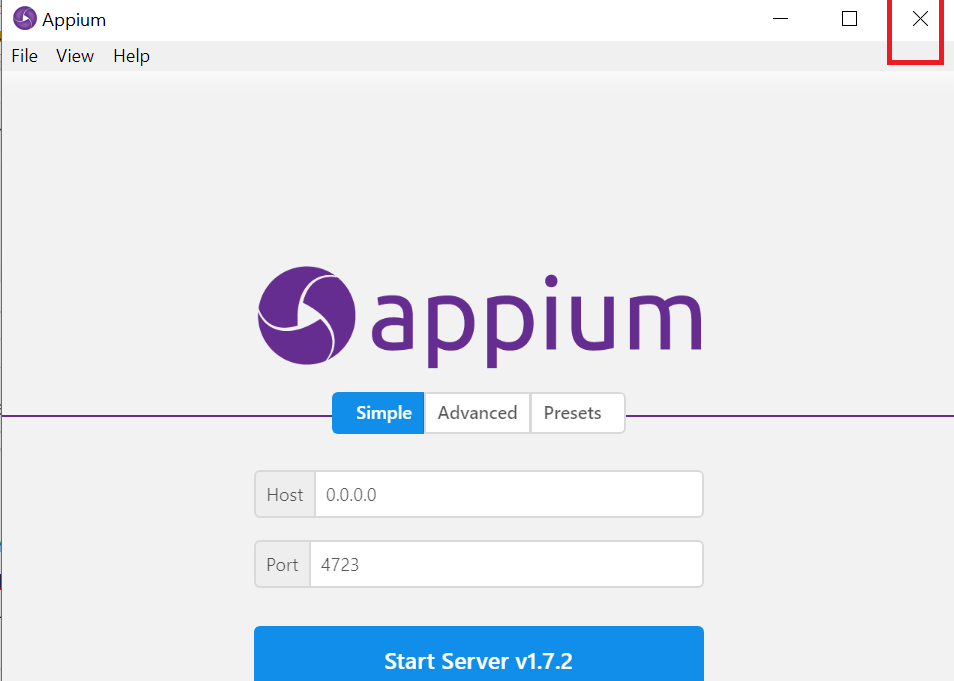
I have been using this workaround for quite sometime and seeing it is successful everytime. Sharing it with everyone.
Hoping it helps:)
 Harsh-Mindtree
on 23 Jan 2018
Harsh-Mindtree
on 23 Jan 2018
Thanks for sharing @Harsh-Mindtree ... that's interesting that it only works when you close it using the native exit.
dpgraham
on 25 Jan 2018
Will publish to v1.4.1
dpgraham
on 6 Mar 2018
Resolved with v1.4.1
dpgraham
on 8 Mar 2018
Related issues
vikramvi
·
4Comments
 apn6125
·
3Comments
apn6125
·
3Comments
 Vijayabaskar03
·
3Comments
Vijayabaskar03
·
3Comments
 abh7nav
·
11Comments
vikramvi
·
10Comments
abh7nav
·
11Comments
vikramvi
·
10Comments
Most helpful comment
still doesnt work. I try to update it on windows, I download it update, after a while it ask me to close appium which I did. Nothing happen for few minutes, so I started appium desktop again and once more I get pop up about updating to new version (1.1.0-beta3)