I am describing here a situation that has been reported to us by many users.
When creating the wallet, the user is prompted to save a backup. This opens the following window under Windows.

Many users have reported that this backup file was deleted during the installation of an update. Apparently, this folder, which is suggested by default, is a very bad place to store a backup.
So far, not many people have really lost money because most users with this problem were in possession of the 24 words.
In the last few days, new users have entered the system who no longer have 24 words. If these users save the backup to the suggested location and then install an update, the whole fortune is lost.
I recommend to use a better folder than default folder for saving. For example my files.
 RobinTorque
All 22 comments
@RobinTorque: Thanks for opening an issue, it is currently awaiting triage.
The triage/accepted label can be added by foundation members by writing /triage accepted in a comment.
In the meantime, you can:
- Checkout DeFiChain’s Github issue page to see if your issue has already been reported
- Submit any logs if you have them, this will greatly expedite the process for us.
- You can also join our Telegram or Reddit community channels.
Details
I am a bot created to help the DeFiCh developers manage community feedback and contributions. You can check out my manifest file to understand my behavior and what I can do. If you want to use this for your project, you can check out the DeFiCh/oss-governance-bot repository.
 defichain-bot
on 11 Mar 2021
defichain-bot
on 11 Mar 2021
Damn, feel like this happened to me.
Joined not too long ago so wasn't able to create a 24 word key. Now I've just updated to the latest v2.3.0. and I'm unable to find my DAT file.
Is there any way to recover this? Or have I just lost everything? Guess I made a mistake of not creating more backups.
 cryptoexplained3
on 12 Mar 2021
cryptoexplained3
on 12 Mar 2021
@cryptoexplained3 are you experiencing it v2.3.0? Some users are reporting it with v.2.3.1
 thedoublejay
on 12 Mar 2021
thedoublejay
on 12 Mar 2021
@RobinTorque this folder is the location of installation files. I'm not sure why it's presented as default path for some users. I'm adding a fix to forcefully display the wallet path.
thedoublejay
on 12 Mar 2021
@cryptoexplained3 are you experiencing it v2.3.0? Some users are reporting it with v.2.3.1
Apologies, meant to say this occurred with the v2.3.1 update. (v2.3.0 -> v2.3.1)
cryptoexplained3
on 12 Mar 2021
Initially I was having trouble getting past the "Unable to start blockchain" page. But then I was able to get into the app after opening up the defi .conf file and removing the wallet properties.
However, I don't think I was using the correct .dat file (which I think I was able to recover). After trying to adjust to what I think is the correct .dat file, now I'm back to the "Unable to start blockchain" page and cannot get around it with the .conf file.
Just added my app log file, any help or ideas here would be greatly appreciated.
cryptoexplained3
on 12 Mar 2021
@cryptoexplained3 thank you for this. We're currently working on a fix for this.
thedoublejay
on 12 Mar 2021
I think this is one of the most important issues atm. Maybe it would also make sense to disable the updates from 2.3.0 to 2.3.1 till this issue is fixed?
 tommuhm
on 12 Mar 2021
tommuhm
on 12 Mar 2021
@tommuhm Yes we have disabled the v2.3.1 while checking on this issue.
thedoublejay
on 12 Mar 2021
Help! My wallet never actually synched to the website and was lost? during an upgrade. I currently am running 2.3.0 and have both my catchphrase and seed phrases; however, when trying to restore my wallet through the app. it asks for me to enter my catchphrase first before the 24 seed phrases, yet, there is no entry field to enter catchphrase? What to do? I don't want to lose and or stop investing.
 johnny72764
on 14 Mar 2021
RobinTorque
on 15 Mar 2021
johnny72764
on 14 Mar 2021
RobinTorque
on 15 Mar 2021
Hi @johnny72764 , thanks for your feedback, the team has halted v2.3.1 at the moment due to some issues — which you might be facing on v2.3.0. If you keep your passphrase & wallet.dat safe, there shouldn't be an issue. I'll update you again when the team fixes it and is ready for release. In the mean time please refer to the official channels for updates.
DeFiChain Telegram (EN)
DeFiChain Announcements (EN)
You can make a copy of your wallet.dat for safe keeping, routes as stated:
Windows — C:
\Users\
Mac — Go to Folder:
/Users/
 izzycsy
on 16 Mar 2021
izzycsy
on 16 Mar 2021
I am experiencing the same problem. I am a new user and did not record my passphrase and I updated the app. When i re-opened my wallet was gone and when asked to recover them through the app it the files no longer existed. Is there anyway it can be reocvered? Any assistance greatly appreciated.
 BigE1269
on 18 Mar 2021
BigE1269
on 18 Mar 2021
Hi @BigE1269 , the team is fixing this. Yes so long as you keep your passphrase & wallet.dat safe. Please refer to the above comment. Thank you for your understanding.
izzycsy
on 19 Mar 2021
Thanks for your response. The issue is I do not have my passphrase. Only been doing this for about a week and didn't write it down yet. And my wallet.dat is telling me my wallet is at $0. Does this mean I lost my investment? What files do I need to send to you or a tech that would be capable of recovering it for me if it is still recoverable?
Sent from my Verizon, Samsung Galaxy smartphone
Get Outlook for Androidhttps://aka.ms/AAb9ysg
From: Bella @.>
Sent: Friday, March 19, 2021 12:50:17 AM
To: DeFiCh/app *@.>
Cc: BigE1269 @.>; Mention @.*>
Subject: Re: [DeFiCh/app] DeFi App deletes Wallet.dat BackUp (#641)
Hi @BigE1269https://github.com/BigE1269 , the team is fixing this. Yes so long as you keep your passphrase & wallet.dat safe. Please refer to the above comment. Thank you for your understanding.
—
You are receiving this because you were mentioned.
Reply to this email directly, view it on GitHubhttps://github.com/DeFiCh/app/issues/641#issuecomment-802599137, or unsubscribehttps://github.com/notifications/unsubscribe-auth/ATJMDWBASH42VWCI7UV6NULTELX2TANCNFSM4ZA7X4OA.
BigE1269
on 19 Mar 2021
Hi @BigE1269 , the passphrase (to be set by yourself) would be the first screen you encounter when you updated to / install v2.3.0, it's as important as your mnemonic seed. If you skipped setting a passphrase then you can rely on your wallet.dat and the wallet should not be locked. If you're about a week-old user, then you won't have mnemonic seed, but passphrase instead.
In v2.3.0, mnemonic seed does not exist for new users until the team can find a better way to utilise it. Hence the passphrase & wallet.dat are the ones you need to keep safe. Though if you're an existing user from before v2.3.0, you can still use your mnemonic seed to restore your wallet, but from v2.3.0 I would advice that you create a passphrase and write it down somewhere for safe keeping.
We won't be able to recover your wallet for you as it's your own responsibility and on your own local PC, but we can guide you. If you did not delete any files you're unfamiliar with, your investments should be safe and stored in the wallet.dat file + passphrase.
You can make a copy of your wallet.dat for safe keeping, routes as stated:
Mac — Go to Folder:
/Users//Library/Application Support/DeFi/wallets/wallet.dat
Windows — C:
\Users<username>\AppData\Roaming\DeFi Blockchain\wallets\wallet.dat
Try to Restore from wallet backup (wallet.dat).
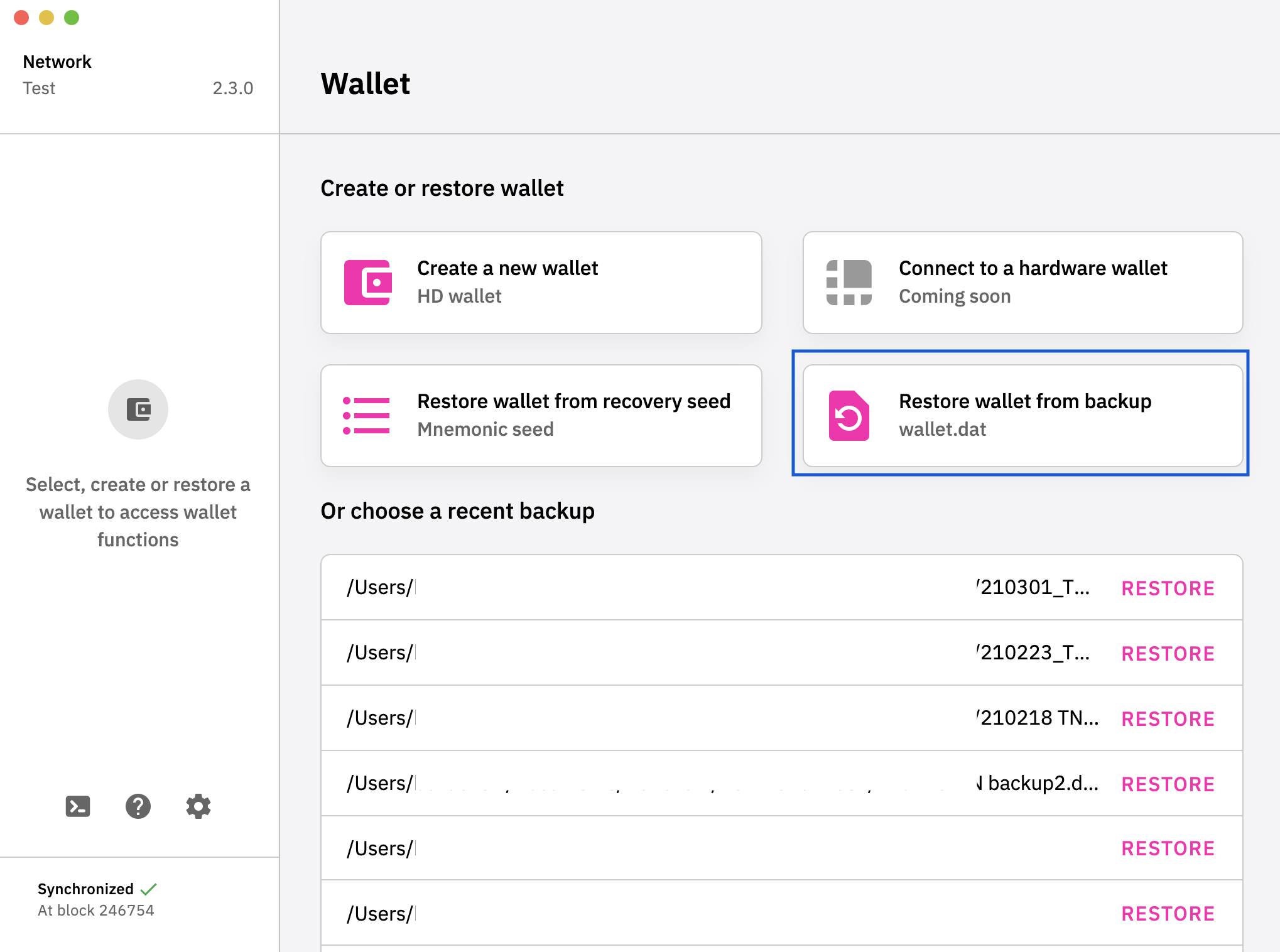
izzycsy
on 19 Mar 2021
Hi @johnny72764 @cryptoexplained3 @tommuhm @BigE1269 , update v2.3.2 is out, this is a mandatory update.
Please read through the release notes before updating.
Do give a thumbs up to this comment if your issue has been resolved, otherwise, please send new information (include screenshots) and app logs. Thank you
izzycsy
on 22 Mar 2021
Hi Bella,
Thanks again for the reply. I misspoke when I said I did not know the passphrase. I do know that. What I do not know is the mnemonic seed. When I tried to reload/restore my previously saved wallets after updating the application; they said file not found/no longer exists because I saved it in the default folder the app directed me to save to. Could you please direct me in how to recover from wallet.dat when it tells me all previous restores fail? Thank you.
Sent from my Verizon, Samsung Galaxy smartphone
Get Outlook for Androidhttps://aka.ms/AAb9ysg
From: Bella @.>
Sent: Monday, March 22, 2021 11:45:28 AM
To: DeFiCh/app *@.>
Cc: BigE1269 @.>; Mention @.*>
Subject: Re: [DeFiCh/app] DeFi App deletes Wallet.dat BackUp (#641)
Hi @johnny72764https://github.com/johnny72764 @cryptoexplained3https://github.com/cryptoexplained3 @tommuhmhttps://github.com/tommuhm @BigE1269https://github.com/BigE1269 , update v2.3.2https://github.com/DeFiCh/app/releases/tag/v2.3.2 is out, this is a mandatory update. Please read through the release notes before updating.
Do give a thumbs up to this comment if your issue has been resolved, otherwise, please send new information (include screenshots) and app logs. Thank you
—
You are receiving this because you were mentioned.
Reply to this email directly, view it on GitHubhttps://github.com/DeFiCh/app/issues/641#issuecomment-804306073, or unsubscribehttps://github.com/notifications/unsubscribe-auth/ATJMDWBRJ45FGKWDZUUPSP3TE6F4RANCNFSM4ZA7X4OA.
BigE1269
on 24 Mar 2021
Hi @BigE1269 , in v2.3.2 all new users would not have a mnemonic seed, the team has temporary stopped this feature until further notice. You should Restore Wallet from Backup (wallet.dat).
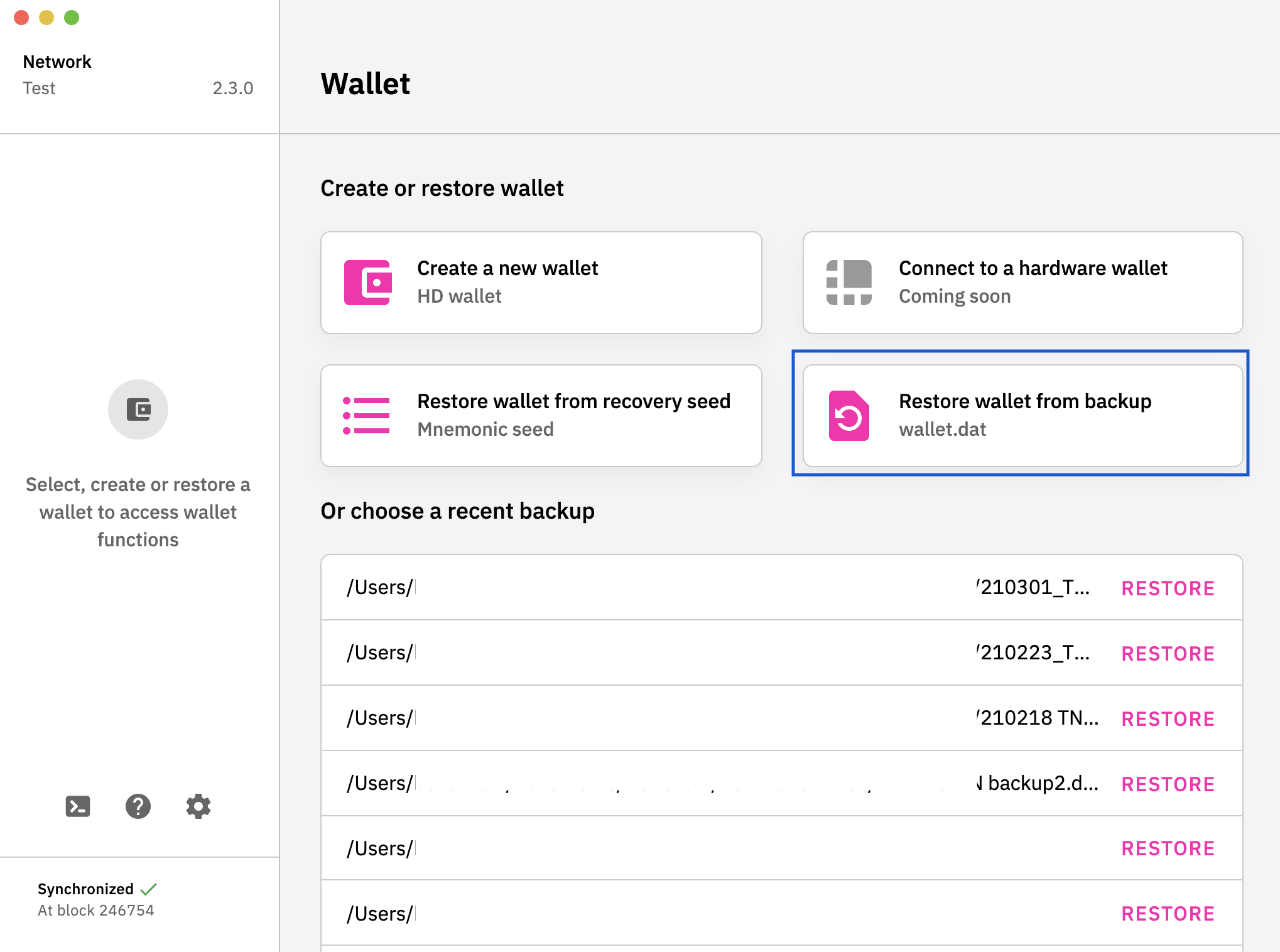
You can make a copy of your wallet.dat and store it on a thumbdrive / external hard-disk. To find your wallet.dat route:
Windows — C:
Blockchain folder
C:\Users\<username>\AppData\Roaming\DeFi Blockchain\wallets\wallet.dat
Mac — Go to Folder:
Blockchain folder
/Users/<username>/Library/Application Support/Defi/wallets/wallet.dat
izzycsy
on 26 Mar 2021
Bella,
Thank you again for your reply. I have followed your directions exactly and my wallet with my investment still does not appear. When I did the Defi App update on 3.11.21 it completely re-wrote my wallet.dat file. I enter my passphrase as instructed and it opens up the wallet but with a zero balance. I have my actual address that I used to track my income on defichain-income.com and my log files. Is there a way to recover that way? Possibly backtrace my defichain-income address and then tie it to my actual passphrase to unlock and prove that it is in fact my account? Please let me know. Would hate to lose my investment due to a flaw in the app design. Appreciate any support. Thank you.
Sincerely,
Eric
From: Bella @.>
Sent: Friday, March 26, 2021 6:33 AM
To: DeFiCh/app *@.>
Cc: BigE1269 @.>; Mention @.*>
Subject: Re: [DeFiCh/app] DeFi App deletes Wallet.dat BackUp (#641)
Hi @BigE1269https://github.com/BigE1269 , in v2.3.2 all new users would not have a mnemonic seed, the team has temporary stopped this feature until further notice. You should Restore Wallet from Backup (wallet.dat).
[Restore wallet from backup]https://user-images.githubusercontent.com/65014479/112629226-fb624400-8e6e-11eb-8ad7-02e066da39be.png
You can make a copy of your wallet.dat and store it on a thumbdrive / external hard-disk. To find your wallet.dat route:
Windows — C:
Blockchain folder
C:\Users\
Mac — Go to Folder:
Blockchain folder
/Users/
—
You are receiving this because you were mentioned.
Reply to this email directly, view it on GitHubhttps://github.com/DeFiCh/app/issues/641#issuecomment-808179739, or unsubscribehttps://github.com/notifications/unsubscribe-auth/ATJMDWH3PL7HDNNY434G2B3TFR5GFANCNFSM4ZA7X4OA.
BigE1269
on 31 Mar 2021
Hi @BigE1269 , upon any update the app uses your existing wallet.dat. Could you think back and see if you may have touched / removed the wallet.dat files previously? The app also creates auto backups for users, you can try Restore Wallet from backup using those backups as well, these files are hidden intentionally to prevent users from accidentally removing it. In the screenshot below is an example, you can try using wallet-bak-1234567890.dat — routes to the files are as stated in the previous comment or any wallet.dat backups you've stored in other folders specified by you.
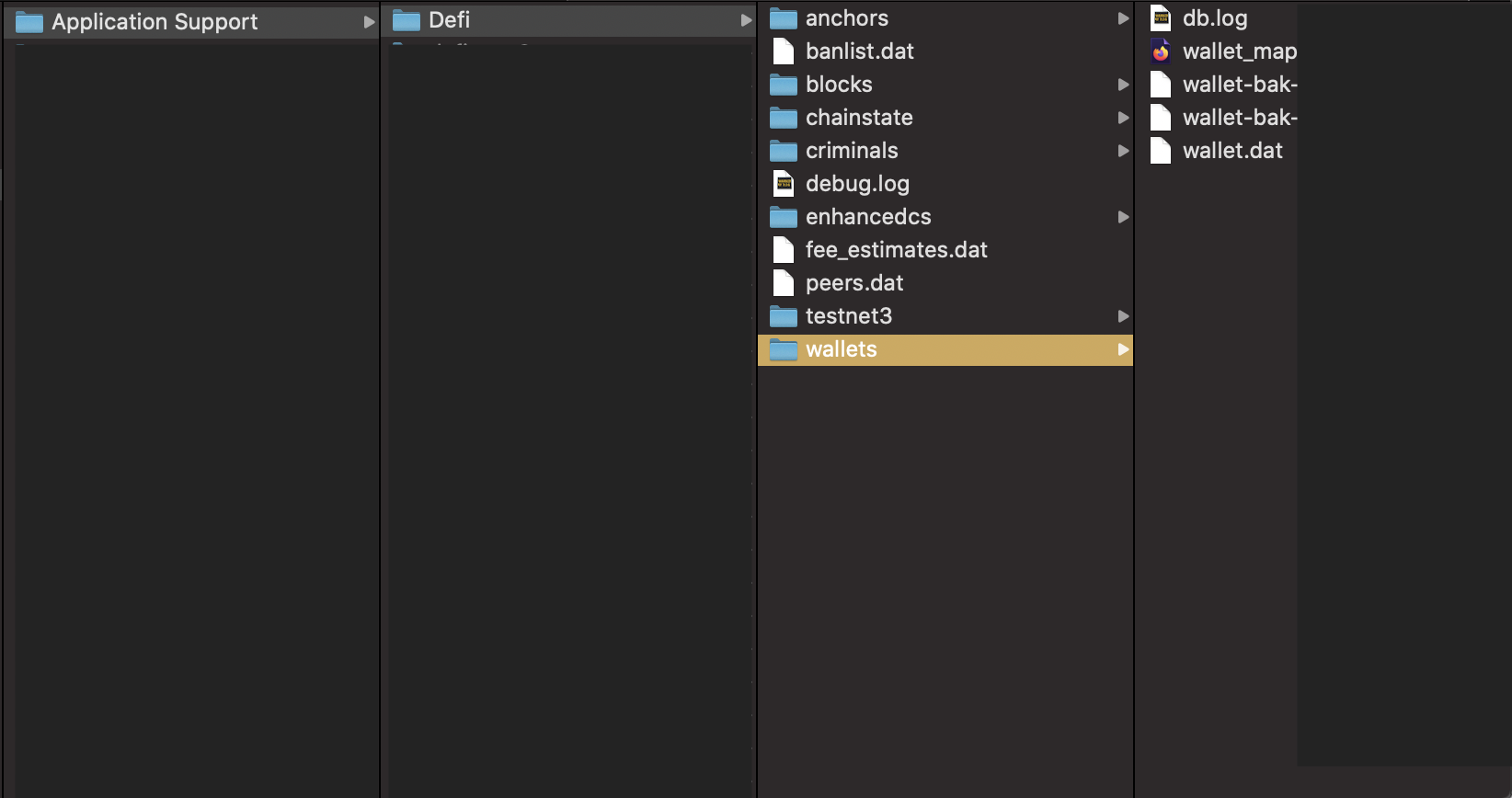
With your addresses, you or any other use can only see your balances / transaction information via DeFi Explorer or Mainnet, to Restore your wallet it's still through wallet.dat & passphrase.
izzycsy
on 31 Mar 2021
Hi @johnny72764 @cryptoexplained3 @tommuhm @BigE1269 , v2.3.3 is out. Please read through the release notes before updating. If you have not sync to 100%, there was a node issue on 05/04/2021 that may have cause the network error, everything is back online now, you may try the following:
Option 1 — Reset & Reindex (sync from 0%)
- Settings >
Reset & Reindex

Option 2 — Snapshot (sync from 90%+)
- Settings >
Reset & Reindex - Wait for app to start syncing
- Ensure you’ve at least 27GB of extra space
-
Click on
ilocated at bottom-left corner of app screen - Download Snapshot

If your issue persist, we can further discuss on the problem here Unable to start blockchain. We would like to keep same issues in one thread. Thank you for your patience.
izzycsy
on 7 Apr 2021
Related issues
 wyssen
·
4Comments
wyssen
·
4Comments
 diegorodriguezv
·
9Comments
diegorodriguezv
·
9Comments
 jleidinger
·
6Comments
jleidinger
·
6Comments
 adrian-schnell
·
3Comments
RobinTorque
·
8Comments
adrian-schnell
·
3Comments
RobinTorque
·
8Comments
Most helpful comment
@tommuhm Yes we have disabled the v2.3.1 while checking on this issue.