Apexcharts.js: Add linebreaks on noData text
I had a problem where I had a big text to be displayed when noData was set. On mobile, I needed it to break in several lines so the entire text would be displayed correctly. Couldn't find a way to it using the lib, had to do some js append <*tspan>s to take care of that after it was rendered.
I'm not exactly familiar to SVGs but I've first imagined that an ideal solution would be to specify a max-width to the the
According to that same answer, we could use <textArea>.. but that would also limit the support for SVG 1.1.
So, maybe passing a max character length prop for every line until it breaks? We could use it to render multiple <tspan> which would do the job. Don't know if that is exactly ideal either.
Thank you
 igormartimiano
All 4 comments
Multi-line texts in SVG are a bit tricky and the solution provided in your stack-overflow link is not very feasible.
<foreignObject> is something to consider but it is not supported in IE.
 junedchhipa
on 4 Oct 2019
junedchhipa
on 4 Oct 2019
From the next version, you will be able to add multiline texts in the nodata options.
noData:{
  text: ['No data available', ' Please try later']
}

junedchhipa
on 4 Jan 2020
Good one! Thank you 😄
igormartimiano
on 20 Mar 2020
Hi there! It would be nice if you could update the ApexNoData interface to follow this functionality
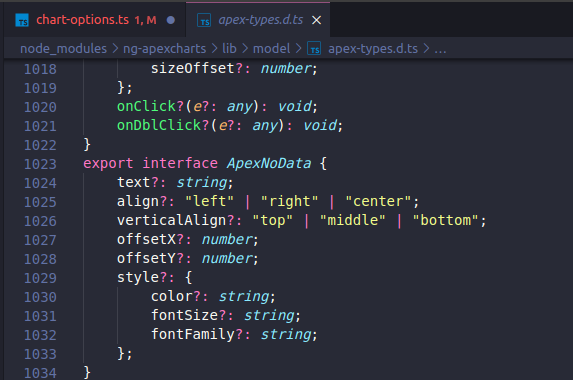
Thanks for your awseome work 😃
 MauricioPaez
on 19 May 2021
MauricioPaez
on 19 May 2021
Related issues
 GalacticSun
·
29Comments
GalacticSun
·
29Comments
 astone2014
·
15Comments
astone2014
·
15Comments
 benhaynes
·
19Comments
benhaynes
·
19Comments
 CheyenneForbes
·
17Comments
CheyenneForbes
·
17Comments
 stalnikar
·
13Comments
stalnikar
·
13Comments
Most helpful comment
From the next version, you will be able to add multiline texts in the nodata options.