Anysoftkeyboard: No backspace in first symbols keyboard
Steps to reproduce
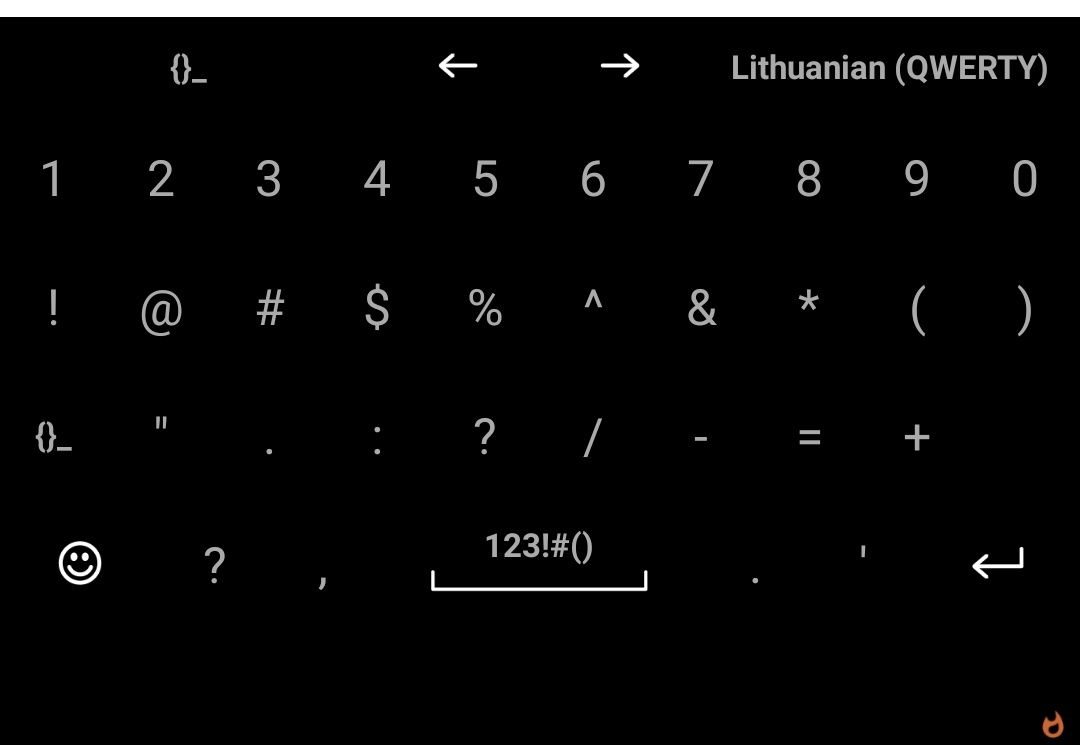
- Click on "123!#()" button while in keyboard
Expected behaviour
I see all the symbols and a backspace button
Actual behaviour
I don't see the backspace button, just an empty space in its place.
Android OS version:
9.0
Device manufacturer and model:
Oneplus 6
List of installed add-ons (like languages, or themes):
Lithuanian and Russian keyboards. Nothing else.
 ashirviskas
All 3 comments
Version 1.10.1064, version-code 6234
ashirviskas
on 4 Dec 2019
Thank you for reporting
 menny
on 5 Dec 2019
menny
on 5 Dec 2019
❤1
I was hoping that no one would notice until I fixed it... that one was a typo I made. I accidentally disabled that key. Sorry.
I've made a fix (040c74d8daa3eee8d96880cb1ba37299b399ca22), and we'll merge it very soon, along with simple fixes for other bugs.
 ArenaL5
on 5 Dec 2019
ArenaL5
on 5 Dec 2019
😄3
Was this page helpful?
0 / 5 - 0 ratings
Related issues
 PopeRigby
·
4Comments
PopeRigby
·
4Comments
 ntninja
·
7Comments
ntninja
·
7Comments
 BurlyMynah
·
4Comments
BurlyMynah
·
4Comments
 Krzmbrzl
·
5Comments
Krzmbrzl
·
5Comments
 xmiseggs
·
5Comments
xmiseggs
·
5Comments
Most helpful comment
I was hoping that no one would notice until I fixed it... that one was a typo I made. I accidentally disabled that key. Sorry.
I've made a fix (040c74d8daa3eee8d96880cb1ba37299b399ca22), and we'll merge it very soon, along with simple fixes for other bugs.