Anysoftkeyboard: Swipe Gesture Typing
Post about implementation: http://krishnabharadwaj.info/how-swype-works/
C++ implementation by @krisys
https://gist.github.com/krisys/71acdef7a33ed40bd586
 menny
menny
All 89 comments
Any luck with this? It's a really interesting problem.
 colms
on 22 Apr 2014
colms
on 22 Apr 2014
No progress yet. Hadn't have the time.
menny
on 22 Apr 2014
is there any progress? would be great
 Micha-Btz
on 5 Sep 2015
Micha-Btz
on 5 Sep 2015
Not really.
menny
on 5 Sep 2015
http://nbviewer.ipython.org/url/norvig.com/ipython/Gesture%20Typing.ipynb is interesting. Might have some useful info.
 losingkeys
on 23 Oct 2015
losingkeys
on 23 Oct 2015
Not really, it is still on the _backlog_
menny
on 7 Nov 2015
This would be fantastic to have...
 craftyguy
on 12 Sep 2016
craftyguy
on 12 Sep 2016
Adding my support for this feature request. I'd be interested in implementing it but don't currently have the time. Here are some other really useful resources I found:
A research paper on different implementation approaches: https://esc.fnwi.uva.nl/thesis/centraal/files/f2109327052.pdf
A swipe-based typing proof of concept keyboard for the Jolla Sailfish OS: https://git.tuxfamily.org/okboard
Porting the Sailfish OS code would be a straightforward task. The engine is a separate repo and I believe written in C so maybe only JNI bindings need to be written for the engine. The integration with AnySoft would have to be from scratch I presume.
 boconnell
on 2 Nov 2016
boconnell
on 2 Nov 2016
I'll gladly help out here as much as I can, but I can not lead this right
now.
On Wed, Nov 2, 2016, 4:42 PM boconnell [email protected] wrote:
Adding my support for this feature request. I'd be interested in
implementing it but don't currently have the time. Here are some other
really useful resources I found:
A research paper on different implementation approaches:
https://esc.fnwi.uva.nl/thesis/centraal/files/f2109327052.pdf
A swipe-based typing proof of concept keyboard for the Jolla Sailfish OS:
https://git.tuxfamily.org/okboardPorting the Sailfish OS code would be a straightforward task. The engine
is a separate repo and I believe written in C so maybe only JNI bindings
need to be written for the engine. The integration with AnySoft would have
to be from scratch I presume.—
You are receiving this because you authored the thread.
Reply to this email directly, view it on GitHub
https://github.com/AnySoftKeyboard/AnySoftKeyboard/issues/264#issuecomment-257992695,
or mute the thread
https://github.com/notifications/unsubscribe-auth/AAdX-OWgDdaF6I9m4zmpZOe1bvET4WoUks5q6PXPgaJpZM4BUO81
.
menny
on 2 Nov 2016
Any updates on this?
 beerisgood
on 2 Dec 2016
beerisgood
on 2 Dec 2016
Plus one! I'd very much like this feature, because this keyboard is the only FOSS keyboard for Android that is still being updated.
@menny Is it a matter of not having the time, or rather a matter of not having the funds for this? Would you accept pull requests if someone else would do it instead, or does that depend on (the quality of) the work in the pull request?
Thanks for at least considering and not dismissing this feature; I bet it is wanted by a whole number of people.
 doodhout
on 12 Dec 2016
doodhout
on 12 Dec 2016
I'd?gladly accept quality PRs to implement this request, and help as much as I can.
menny
on 12 Dec 2016
I'd like to try to implement this over the next couple weeks, but I'll need a bit of guidance. I've been messing around with the source code to familiarize myself with it. So far, I commented out the code in onTouchEvent of AnyKeyboardView that handles swipe gestures, and I can draw non-functional gesture trails. I'll keep searching through the code, but it would save me some time if you could answer a few questions as I get my feet wet:
Where should I add this functionality? I modified AnyKeyboardView so far out of convenience, since it has access to all of the motion events sent to the entire keyboard, but I don't think this is the most maintainable place to put it. I also don't know how to check what layout is currently in use, since this functionality should not be activated for the numeric input panel or special characters.
Where can I get information about the layout? Ideally, I would like to know what normal keys are close to a given x/y position, but I really only need the x/y positions of each character. I would like to do this in a way that will work for other languages and layouts without any extra work.
How should I get this to work with the existing gestures? I was thinking that one-finger gestures would only be activated if your finger starts outside of any key, but its your UI.
What functionality does your existing dictionary code provide? I assume that prediction is going to be the hardest part of this, and I don't want to worry about it too much until I get the gesture trails and layout stuff working, but I want to get a rough idea of how much code can be re-used. I'll be sure to look at the excellent resources linked above.
Thanks for your help!

 justinmichaud
on 20 Dec 2016
justinmichaud
on 20 Dec 2016
Hi again,
I've added a preferences toggle to enable the gesture typing. Correct me if I'm wrong, but it looks like the easiest place to add the gesture code would be as a separate class similar to GestureDetector, with onTouchEvent and onDraw in AnyKeyboardView being modified to accommodate. I've been able to get the nearest keys, the position of the keys, and the associated character (via the label property) using getKeyboard() in AnyKeyboardView.
I am still unsure about how to combine this with the existing gestures, or how to determine if gesture typing should be enabled for the current keyboard. My current solution (hack) for this is to check if the key_down event occurred within a certain radius of a latin character (again, using the label property of the key), but this is a kludge.
Thanks again for the help!
justinmichaud
on 21 Dec 2016
Wow, great start!
As a user, I would prefer using the swipe gestures over the default gestures implemented now, so some options I can think of off the top of my head are:
When swipe gestures are enabled, disable other gestures (probably easiest to implement, but rather draconian)
When swipe gestures are enabled, disable all other one-finger gestures (slightly less draconian)
When swipe gestures are enabled, convert all all other one-finger gestures to two-finger gestures (may conflict with existing two-finger gestures unless those are moved to three-finger, and so on. I could easily see how this would get messy/buggy quickly)
craftyguy
on 21 Dec 2016
Thank you for taking a stub at this!
I mostly agree with @craftyguy, most gestures should be disabled when gesture-typing is enabled.
I guess that the following can be enabled while gesture-typing is enabled:
- swipe from the spacebar (left, right or up)
- swipe up out of the keyboard
Saying that, I believe this is not required for the initial release. I would say that for the initial release, if the user has gesture typing enabled, then any other gesture detection should be disabled.
Again, thanks!
menny
on 21 Dec 2016
I'm very happy you guys finaly made it!
Cant wait the release.
beerisgood
on 22 Dec 2016
Does the latest version have it?
beerisgood
on 20 Jan 2017
@beerisgood no. This will be released with v1.9, which is a couple of months away.
You can try out the latest build of this feature in the PR thread: https://circleci.com/gh/AnySoftKeyboard/AnySoftKeyboard/tree/gesture-typing
Click the latest SUCCESS build and download the APK from the _Artifacts_ tab.
Currently, the latest APK is here: https://149-4063516-gh.circle-artifacts.com/0/tmp/circle-artifacts.czSPGau/apks/app-debug.apk
menny
on 20 Jan 2017
Thanks!
beerisgood
on 20 Jan 2017
This is currently too slow to be used. While you will probably improve it, I think you should rely more on JNI side for a smooth experience (that's how other keyboards are doing it, correct me if I'm wrong).
If you want to have a look at how Google is doing it, the Java side is fully implemented on AOSP tree (in particular java/src/com/android/inputmethod/keyboard/internal/{BatchInputArbiter,Gesture}.java), and there are some stubs of the JNI side for the more complex operations (such as Damerau–Levenshtein distance) in native/jni/src/suggest/policyimpl/.
Unfortunately, I'm not good enough in these programming languages and mathematics to help you, but I thought sharing this with you might help you.
 papjul
on 21 Jan 2017
papjul
on 21 Jan 2017
The gestures lib is indeed 'native' (or rather: not regular java code) and is the same for both AOSP and Google's proprietary keyboard that's on the Play Store, i.e. they are interchangeable.
doodhout
on 1 Feb 2017
@menny I don't mean to bug you unnecessarily, bud I have been following this development and I am happy to do some testing, but I am having trouble finding the latest build. As of now the latest success is #273, but on the web page I am struggling to find the artifact / artifact tab other than the logs under the heading "artifacts".
 ghost
on 15 Mar 2017
ghost
on 15 Mar 2017
How is the status?
beerisgood
on 4 Jun 2017
this is a must have feature. i want to make a specific keyboard for fisherman with buttons on it for specific fish types but swype/gesture typing is a must. I tested the beta version with the gesture typing, and it's a step in the right direction but sadly the speed of it and the accuracy is very lacking and not on par with any of the 10 other swype style keyboards on the app store. i wish i could contribute to this but i am dumbfounded as to how to improve the swype on any keys
 Photogad
on 21 Jun 2017
Photogad
on 21 Jun 2017
Has this actually been implemented, if so how do we turn it on? Thanks.
 bobolea
on 19 Dec 2017
bobolea
on 19 Dec 2017
This is still a work in progress. You can test it with the latest beta version
menny
on 19 Dec 2017
@menny but Beta releases are for Google Users only
beerisgood
on 19 Dec 2017
You can download the latest _master_ build from circle-ci: https://circleci.com/gh/AnySoftKeyboard/workflows/AnySoftKeyboard/tree/master
Look for the artifacts in the latest build. For example https://1713-4063516-gh.circle-artifacts.com/0/apks/canary/app-canary.apk
menny
on 19 Dec 2017
Thanks fo rthe info, as I'm not too keen on running beta versions any idea when you hope to release the normal version?
bobolea
on 24 Dec 2017
No ETA at the moment.
menny
on 24 Dec 2017
Impressive! I installed it and did a bit of testing.
I guess I'll file another bug on the Working Gesture Typing issues I see.
THANKS a lot! Hooray!
 ildar
on 28 Dec 2017
ildar
on 28 Dec 2017
@menny Which one do I install and how can I activate the swipe typing? I installed one most recent one you linked to here and I see nothing in the settings.
 ShapeShifter499
on 30 Dec 2017
ShapeShifter499
on 30 Dec 2017
@ShapeShifter499
I was able to sniff around and get the debug APK link where this experimental feature is listed in the settings screen:
https://1791-4063516-gh.circle-artifacts.com/0/apks/debug/app-debug.apk
 itavq
on 1 Jan 2018
itavq
on 1 Jan 2018
Related with some useful links:
https://github.com/microg/android_packages_apps_GmsCore/issues/460
ildar
on 14 Jan 2018
I managed to figure out how to get the latest debug builds (app-debug.apk) from the codebase linked by @menny
I am curious why the Play Store beta builds (aka app-canary.apk) don't have it enabled though. It is a bit buggy but this IS a beta...
ghost
on 11 Mar 2018
I will enable this for Canary builds in the coming weeks.
menny
on 11 Mar 2018
The swipe typing is pretty accurate in the most inaccurate way and it's quite frustrating. I'm certainly no expert in neural networks or whatever technology this particular implementation is using, but I'm wondering if there's any way we end users who can't contribute code can help make it better.
I tried to swipe the above paragraph: _the swipe tipping out's petty accurate in three nougat inaccurate easy and it'd quire frustrating. in certainly no exciter in neural network's whatever technology third's particular implementation odds using but in wondering id there's any waft we ebbed use's who carny contribute xi's can hateful make it netter._
 Riamse
on 23 Mar 2018
Riamse
on 23 Mar 2018
@Riamse Ha. That is a great way to describe it.
It currently compares the path of your word to a simulated path. The problem I am having is that it doesn't take into account any of the previous words that you typed. I am not sure how to incorporate this data, while still allowing slower and more accurate gestures to override it. I think this would explain why it seems to be "frustratingly" accurate, since it picks words that are plausible, but not at all expected.
Thanks for the feedback, and I will be sure to update here when I have a better solution.
justinmichaud
on 23 Mar 2018
I'm thinking that this could be implemented in a similar way to those next word suggestion algorithms. We could try to predict the next word and compare the list of suggestions to the list of suggestions based on the input. Each could be given a certain (hopefully configurable in settings) weighting and the highest combined weight would be the word selected.
All we would have to do is grab data from the next word predictions and cross it with the given input. That would hopefully resolve some of these problems.
 rob-3
on 28 Mar 2018
rob-3
on 28 Mar 2018
Would simple POS tagging help us narrow down the list and help us provide
more relevant suggestions? As it currently stands I sometimes get
suggestions for words that would make no sense in the given context. Also I
can understand not using tags for lowercase words in the user's dictionary
(though we could build those over time based on their usage of the word,
but this probably isn't a good idea for v1).
On Tue, Mar 27, 2018 at 10:05 PM, firstamendment notifications@github.com
wrote:
I'm thinking that this could be implemented in a similar way to those next
word suggestion algorithms. We could try to predict the next word and
compare the list of suggestions to the list of suggestions based on the
input. Each could be given a certain (hopefully configurable in settings)
weighting and the highest combined weight would be the word selected.—
You are receiving this because you commented.
Reply to this email directly, view it on GitHub
https://github.com/AnySoftKeyboard/AnySoftKeyboard/issues/264#issuecomment-376745647,
or mute the thread
https://github.com/notifications/unsubscribe-auth/AAorfR66_8OBlm24wrk_ZnVZ8BpClzh2ks5tiv3igaJpZM4BUO81
.
losingkeys
on 29 Mar 2018
Is this already included in the Beta from Google Play Store?
 mariodigital
on 18 Apr 2018
mariodigital
on 18 Apr 2018
@losingkeys @justinmichaud what I'd expect in a simple implementation, before it comes to POS tagging to even subtler NLP stuff, would be something more like just n-grams (generally trigrams), which once fed a language corpus, lets you gauge the plausibility of a potential "next word" given the two (or n-1) words that came before it.
An advantage of this over POS tagging strategies is that it works transparently for any language you have a corpus for, and if you don't have a corpus, the corpus can just be what the user types (bar privacy concerns, but I'm thinking locally, of course), which all boils down to the exact same thing that's typically used to provide personalized predictive typing, i.e. where "the next word comes up in the suggestions before you even type anything".
In these implementations, if you just keep hitting the proposed "next word", you quite literally end up with what resembles a sentence from a Markov chain chatbot... but this "inevitability" doesn't have to be a problem of the n-gram model in general, because in and of itself, all it gives you is a function mapping any given "potential next word" to the estimated chance that it would be the word actually chosen by the user, and that probability could be combined with the probability that the gesture recognizer attributes to its top candidates (and the respective weights for the two probabilities simply adjusted depending on the speed at which the user swipes the gesture, maybe?).
Sorry if I give suggestions that are obvious to NLP people, but I am myself not one, and maybe my simplified description can get someone interested to tinker with code.
 LuccoJ
on 5 May 2018
LuccoJ
on 5 May 2018
If it would be possible for the keyboard to learn how to associate novel swipe paths with words as you swipe, that would also be great. (I figure that Google Keyboard does this)
Riamse
on 5 May 2018
@menny, I have installed the latest canary (https://circleci.com/gh/AnySoftKeyboard/AnySoftKeyboard/2695#artifacts/containers/0) and I can't find the feature in settings.
 bocekm
on 11 May 2018
bocekm
on 11 May 2018
@bocekm at the moment, gesture typing only exists in a debug build. You can either build locally, or getting it from https://2692-4063516-gh.circle-artifacts.com/0/apks/debug/app-debug.apk
menny
on 11 May 2018
@menny, it uses the english dictionary only, right? I downloaded Czech keyboard+dictionary, switched to it, and the swipe gesture seems to still use only the czech dict.
bocekm
on 11 May 2018
Currently yes, I have a PR up to fix that
justinmichaud
on 11 May 2018
For those wishing to try out this awesome feature, install the "debug" build from the @justinmichaud's PR #1308 - https://2667-4063516-gh.circle-artifacts.com/0/apks/debug/app-debug.apk. It's able to use multiple dicts at the same time and I'm impressed by the quality of how it chooses words.
bocekm
on 11 May 2018
Took this apk to test. Nice ))
Yet I can't make it work with Russian. Does it supposed to?
Besides I see several little bugs to report (later?)
ildar
on 15 May 2018
I would like to help with development of this feature, maybe as a tester or something.
I installed AnySoftKeyboard from the Android Playstore and then enabled Beta testing so I can check out the progress on the Swipe gesture typing support feature. I have enabled the feature. But every time I switch to the AnySoftKeyboard, a message appears on screen "Tracing initiating failed! Check logcat for details." How do I find the log files so I can share them? I would like to help with development of this feature.
 cdobrich
on 24 Jun 2018
cdobrich
on 24 Jun 2018
Thanks for helping. You need to install the Android SDK and tools
(specifically, the ADB tool). Then run "adb logcat" to get the logs out of
the device.
On Sat, Jun 23, 2018, 10:28 PM cdobrich notifications@github.com wrote:
I would like to help with development of this feature, maybe as a tester
or something.I installed AnySoftKeyboard from the Android Playstore and then enabled
Beta testing so I can check out the progress on the Swipe gesture typing
support feature. I have enabled the feature. But every time I switch to the
AnySoftKeyboard, a message appears on screen "Tracing initiating failed!
Check logcat for details." How do I find the log files so I can share them?
I would like to help with development of this feature.—
You are receiving this because you were mentioned.
Reply to this email directly, view it on GitHub
https://github.com/AnySoftKeyboard/AnySoftKeyboard/issues/264#issuecomment-399724061,
or mute the thread
https://github.com/notifications/unsubscribe-auth/AAdX-LmnwI8LRQDNuOEbKSAq8hSf_Banks5t_vlggaJpZM4BUO81
.
menny
on 24 Jun 2018
If I could add my 2¢ here, I have an open source app on my phone called "Logcat reader" that makes it really easy to capture a log and upload the file.
Logcat Reader (A simple app to view logs) - https://f-droid.org/app/com.dp.logcatapp
 tgp1994
on 24 Jun 2018
tgp1994
on 24 Jun 2018
I installed AnySoftKeyboard from the Android Playstore and then enabled Beta testing
Is it possible to enable betatesting from the fdroid version too? :)
Thanks for working on this!!
 voidplayer
on 24 Jun 2018
voidplayer
on 24 Jun 2018
@tgp1994 thank you, that would be fetching the logs easier.
F-droid does not support beta versions the same way that Play Store does.
menny
on 24 Jun 2018
@menny not the same way, for sure, but F-Droid does support versions marked as beta that won't be proposed as updates (or installed by default) to users unless they've gone into the settings and chosen to pick beta versions by default.
LuccoJ
on 24 Jun 2018
I've ported the original c++ version to java, am i too late?
https://github.com/sreehax/Swipe-Java
 sreehax
on 4 Jul 2018
sreehax
on 4 Jul 2018
We have an implementation of gesture-typing in the codebase at the moment. Would you like to a take a look at it?
@justinmichaud can you take a look?
menny
on 5 Jul 2018
Sure, where could I find it?
sreehax
on 5 Jul 2018
@sreehax https://github.com/AnySoftKeyboard/AnySoftKeyboard/blob/c82fd3f3cbfaafeaea5c98b1b2d0f8d955227a13/app/src/main/java/com/anysoftkeyboard/gesturetyping/GestureTypingDetector.java has all of the code. Feel free to try replacing the code in that file with your implementation, it should be fairly well-contained.
justinmichaud
on 5 Jul 2018
@menny UPDATE: It looks like I was never running the debug APK provided by @Menny and @justinmichaud. You can ignore my logcat file.
Original Post: So I finally figured out how to get the logcat file off my phone. I have attached it in hopes the details will help explain why tracing immediately fails whenever I turn on the feature (after restarting AnySoftKeyboard). This is in reference to my post about three weeks ago where I kept getting the error message: "Tracing initiating failed! Check logcat for details."
AnySoftKeyboard LogCat 2018-07-16.txt
I really like the keyboard Menny and it is great to have a feature rich open-source keyboard that I can trust using and not worry about corporate recording of my information.
UPDATE: To those who followed my directions before, those were not correct. It did not enable gesture typing, but instead enabled log tracing (I think) which is different. See later for how to enable Gesture Typing properly.
cdobrich
on 17 Jul 2018
Sadly, I also have the "Tracing initiating failed! Check logcat for details." error.
I hope my LogCat file can help you in debugging the error:
AnySoftKeyboard.LogCat.2018-08-10.txt
Just realized, I used the beta build from the play store, that didn't include the gesture typing... thought tracing was "finger tracing" -> gesture typing. I'm sorry for the useless post then.
 tenthmile
on 10 Aug 2018
tenthmile
on 10 Aug 2018
@cdobrich please, tell me how enable swype type in beta. I setup beta 1.9-r5 and I can not find any options to enable Swipe Gesture Typing. May be a do anything not properly?
 progserega
on 9 Sep 2018
progserega
on 9 Sep 2018
@progserega To enable gesture typing, do the following:
Open the keyboard settings (if you have the keyboard open on screen, do this by long-press on the blue button in most right corner.) Select "Keyboard Setting".
When on the keyboard settings window, next in the upper right corner, press on the three vertical dots. Select "Tweaks". Now select "Developer Tools". From there you can click the button labeled "Enable Tracing" to enable or disable the feature.
Hope that helps.
UPDATE: Edited to make directions more clear.
cdobrich
on 9 Sep 2018
@cdobrich
Thank you!
I found "Developer Tools", but do not found how enable "Gesture Swipe Tracing":
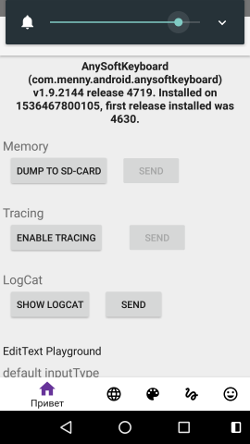
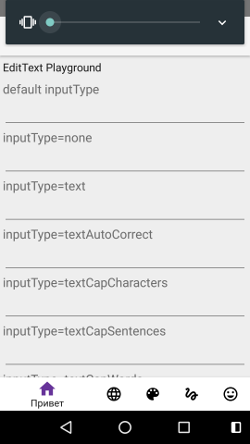
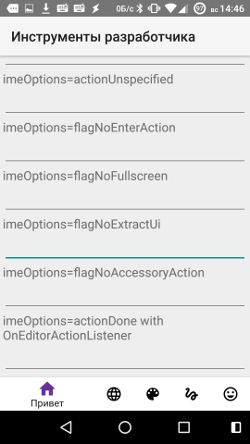
What I need write in this text-edit's?
progserega
on 9 Sep 2018
@progserega Click the button labeled "Enable Tracing". I told you the incorrect name last time. The button "Enable Tracing" is the button you want. After you click it, there will be instructions for restarting the keyboard app. You can do that by either switching keyboards (like to the stock-keyboard) or restarting your phone. Sorry for the confusion.
cdobrich
on 10 Sep 2018
I'm also on v1.9.2144 r4719 and swipe still doesn't activate after all the steps above. The phone gets very slow and opening the keyboard settings hangs after doing it for two or three times. After restart, no change.
Are you positively sure that it is the Tracing that needs to be enabled?
 MisterY
on 10 Sep 2018
MisterY
on 10 Sep 2018
Hmm... After enable Tracing Keyboard will start very slow, Swipe Gesture Typing is not enabled. :-(
progserega
on 10 Sep 2018
"Enable tracing" doesn't seem to be the correct setting for me. If you install the debug build linked in this comment, the "Gesture Typing: EXPERIMENTAL" toggle is under the "Gestures" tab (second from the right) in the settings app. After turning that on, gesture typing is working for me.
 jonafato
on 10 Sep 2018
jonafato
on 10 Sep 2018
@jonafato I see. It looks like I was never running the debug APK provided by Menny and justinmichaud. I had to uninstall the regular BETA application and install the APK version.
Now that I have installed and enabled gesture typing... I think I'm stuck. Whenever I try to swipe to gesture type, it does not seem to work. Did you have to disable any other gestures? What did you do?

cdobrich
on 11 Sep 2018
I don't have any other gestures enabled. It seems like if a gesture doesn't match any words closely enough, it won't insert or suggest anything, but the feature does work once that setting is enabled.
When you swipe, do you see a trailing line showing the pattern, or is there no visual feedback at all? If the latter, I'm guessing that the feature isn't enabled.
jonafato
on 11 Sep 2018
I see line. Gesture is work, but it must be more learning for match words.
progserega
on 18 Sep 2018
Is gesture typing still available in the debug/beta build only, or did it make it to F-Droid? If it did not yet, I could offer my repo to host the beta build. Let me know if that is welcome, and we find a way to set it up (maybe even with a different package name, so the two can be told apart easily).
 IzzySoft
on 4 Oct 2018
IzzySoft
on 4 Oct 2018
The first release is now on the ALPHA channel!!!
You can also get it from: https://3354-4063516-gh.circle-artifacts.com/0/apks/debug/app-debug.apk
menny
on 10 Oct 2018
Thank you, @justinmichaud
menny
on 10 Oct 2018
@menny any interest in providing the "test version" via my repo (see above) to make it easier to find? That should then preferably be a "non-debug" version and signed – plus available either via your Github repo or via a "fixed URL" (that doesn't change, i.e. path and filename are persistent) where the server provides the LAST_MODIFIED fiels in the header – so my auto-updater can take care to fetch updates in good time.
IzzySoft
on 11 Oct 2018
The first release is now on the ALPHA channel!!!
You can also get it from: https://3354-4063516-gh.circle-artifacts.com/0/apks/debug/app-debug.apk
How do I sign up for the Alpha Channel?
mariodigital
on 11 Oct 2018
Would be nice to have it on fdroid or other repo.
 homlett
on 3 Dec 2018
homlett
on 3 Dec 2018
This seems to be closed here but I don't see this feature in the latest version. What's up with that?
 AntonyPallups
on 7 Dec 2018
AntonyPallups
on 7 Dec 2018
This feature is available in the latest beta and alpha releases. Those are served by Google Play Store. Check out the download page at http://anysoftkeyboard.github.io/download/
menny
on 14 Dec 2018
@menny and where do the free folks (those no longer bound by Google's master ring) get it? No Google stuff on my device. I already offered serving it via my repo (see above), this offer still stands :wink:
IzzySoft
on 14 Dec 2018
@menny: Please don't ignore F-Droid
beerisgood
on 14 Dec 2018
@IzzySoft @beerisgood I know, it sucks, but at the moment I do not have any way to automatically upload new (beta/alpha) versions to F-Droid.
You can download a CI version. Find the last good _master_ build in our CI, then click master / build_check_tests_deploy, and on the new page, click the deploy_canary box. This will navigate you to the last deploy-to-play-store job.
You can find the canary APK in the Artifacts tab.
menny
on 14 Dec 2018
Sorry, but right now this is the only way to get that APK.
You can also build it yourself, locally.
menny
on 14 Dec 2018
Im willing to wait until it becomes stable enough to make a normal release in f-droid
This is one of the features i miss the most in my googleless phone. Thanks for your hard work menny!
voidplayer
on 14 Dec 2018
@menny is there any way you could a) get it into this repo (e.g. attaching it to a tag) or b) serving the APK with a fixed name (i.e. the URL remains the same if it's updated) on a server that also provides the LAST_MODIFIED header field? If so, that's where I could grab it and put it into my repo, automatically keeping it updated.
IzzySoft
on 14 Dec 2018
Just tried this and had some weird results with swiping.
Tried swiping "hello" 3 separate times and the chosen words were:
- gleeful
- Helloooooo
- Brillo
Can I eliminate the complications of user dictionaries by just disabling the single option in settings? Will disabling the user dictionary and using swiping for 3-4 days give me an easily reproducible set of words whose suggestions need enhancements?
Is any ordering done by common word usage in choosing swiped words currently and can anyone point me to that code? I can go look for it later in the relevant PR after I find it I suppose.
 codygman
on 30 Dec 2018
codygman
on 30 Dec 2018
There is no ordering by common word usage or by any other kind of grammar. It seems to me that if the gesture recognizer could output some sort of metric on how confident it is, then we could use that to combine a word's gesture score + frequency score to get more accurate gestures.
Most of the code is at https://github.com/AnySoftKeyboard/AnySoftKeyboard/blob/master/app/src/main/java/com/anysoftkeyboard/gesturetyping/GestureTypingDetector.java.
justinmichaud
on 1 Jan 2019
https://static.googleusercontent.com/media/research.google.com/en//pubs/archive/43461.pdf might be something to try next.
Riamse
on 24 Feb 2019
Related issues
 kojid0
·
5Comments
kojid0
·
5Comments
 xmiseggs
·
6Comments
xmiseggs
·
6Comments
 ingodeutschmann
·
5Comments
ingodeutschmann
·
5Comments
 fronki
·
5Comments
fronki
·
5Comments
 ashirviskas
·
3Comments
ashirviskas
·
3Comments
Most helpful comment
I'd like to try to implement this over the next couple weeks, but I'll need a bit of guidance. I've been messing around with the source code to familiarize myself with it. So far, I commented out the code in onTouchEvent of AnyKeyboardView that handles swipe gestures, and I can draw non-functional gesture trails. I'll keep searching through the code, but it would save me some time if you could answer a few questions as I get my feet wet:
Where should I add this functionality? I modified AnyKeyboardView so far out of convenience, since it has access to all of the motion events sent to the entire keyboard, but I don't think this is the most maintainable place to put it. I also don't know how to check what layout is currently in use, since this functionality should not be activated for the numeric input panel or special characters.
Where can I get information about the layout? Ideally, I would like to know what normal keys are close to a given x/y position, but I really only need the x/y positions of each character. I would like to do this in a way that will work for other languages and layouts without any extra work.
How should I get this to work with the existing gestures? I was thinking that one-finger gestures would only be activated if your finger starts outside of any key, but its your UI.
What functionality does your existing dictionary code provide? I assume that prediction is going to be the hardest part of this, and I don't want to worry about it too much until I get the gesture trails and layout stuff working, but I want to get a rough idea of how much code can be re-used. I'll be sure to look at the excellent resources linked above.
Thanks for your help!
