Antennapod: [Statistics] Add podcast specific statistics to podcast info screen
Checklist
- [x] I have used the search function to see if someone else has already submitted the same feature request.
- [x] I will only create one feature request per issue.
- [x] I will describe the problem with as much detail as possible.
App version / source: 2.0.1 / Google Play
Feature description
Right now statistics is only accessible from settings.
It would be good to show info in specific podcast info screen, I would suggest to add a button between info and settings for statistics :
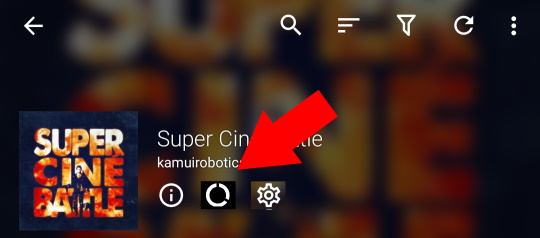
Which like for info or settings will show statistics :
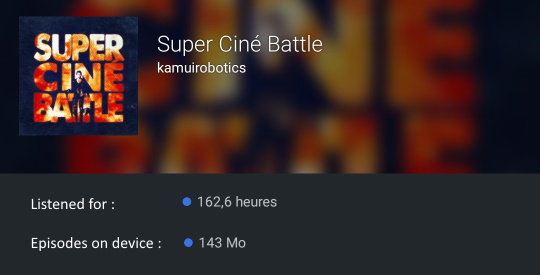
In mock-up I only added duration play and size of episodes on device but it should reuse info from statistics screen in settings. For instance how many episodes you have listened to and how many there is (regardless of listened state).
(splitted from issue #4552)
 Matth7878
All 9 comments
I think this should not use a new icon but be displayed on the already existing podcast info page. That avoids increasing the number of elements on main screens.
For most of my podcasts, the info page is pretty much empty. Maybe we could also remove the "language" part on that screen (language is pretty obvious when looking at the description).
 ByteHamster
on 22 Oct 2020
ByteHamster
on 22 Oct 2020
Agreed with @ByteHamster. To repeat my comment from the original issue:
There are no 'statistics for current podcasts' at the moment (e.g. listening hours per week, for a specific podcast). We (only) have an overview of the statistics of all podcasts.
This means that there is little information to display per podcast, so a separate screen isn't necessary.
I wouldn't do this on the main podcast screen (it would clutter the interface), but I think it would fit nicely on the 'podcast info' screen (where there's also the author, language, URL and Description). E.g. the number of hours listened and episodes started could be displayed. Maybe even a percentage of the total episodes in the database (e.g. you listened to/downloaded 5 % of the episodes). And then with a link to 'more statistics' (which leads to the stats screen).
Maybe we could also remove the "language" part on that screen (language is pretty obvious when looking at the description).
Didn't share it yet, but I was thinking the same this week!
 keunes
on 22 Oct 2020
keunes
on 22 Oct 2020
Can I work on this ? Also can you help me out with hacktober fest contribution by adding a hacktoberfest label to this issue. It would be really helpful :)
 avirajrsingh
on 23 Oct 2020
avirajrsingh
on 23 Oct 2020
So the changes would be, in the podcast 'info' screen:
- Remove the 'Language' title & the actual language
- Add a 'Statistics' title all the way at the bottom (below the actual description)
- Add a line with 'Listened for:' and the duration (as already used on the stats screen)
- Add a line with 'Episodes on the device:' and the size taken by episodes on the device and the number of episodes (as introduced in #4581, with same formatting)
- For the two lines with the stats, please don't do the coloured dot as in the mock-up above, and make sure that font sizes are the same as the other elements on the info screen (so like the description text)
- Add a line with 'View all statistics' and a tiny 'open in new' icon (tapping on which opens the statistics screen)
@ByteHamster Agreed with the above list?
@avirajrsingh Please hold off until BH gives the green light.
keunes
on 23 Oct 2020
Also can you help me out with hacktober fest contribution by adding a hacktoberfest label to this issue. It would be really helpful :)
@avirajrsingh Your contribution would count anyway because the whole repository is tagged with 'hacktoberfest', so any PR here counts, regardless the issue label (which is just applied for discoverability)
keunes
on 23 Oct 2020
Add a 'Statistics' title all the way at the bottom (below the actual description)
I would add the statistics above the description. Sometimes the description gets extremely long and would then push the stats out of the screen.
Apart from that, I agree with your list :)
ByteHamster
on 23 Oct 2020
Okay @keunes @ByteHamster I'll start working on it. I need some help from you guys, now I already have an ongoing PR. So should I make a new PR for this issue after completing the changes or should I continue with that old PR itself. Also I need to know one thing, currently i'm working on the forked copy of the repo, so do I need to update it to the latest develop branch everytime before pushing new changes ? I'm new to GitHub and contributions so kinda confused with the flow.
avirajrsingh
on 23 Oct 2020
So should I make a new PR for this issue after completing the changes or should I continue with that old PR itself.
I can't give a full explanation here but have a look at git branches. You can find some explanations here (don't be afraid of all those details, it's easier than it sounds :smile:). Basically, one usually creates a branch for each change. You can then switch between branches when working on different features. At AntennaPod, the branch where pull requests start with is called develop (master is used for the production version)
Also I need to know one thing, currently i'm working on the forked copy of the repo, so do I need to update it to the latest develop branch everytime before pushing new changes
Not every time but it is usually helpful before starting a new pull request to prevent merge conflicts. I think this could help with updating your fork
ByteHamster
on 23 Oct 2020
@ByteHamster Thank You so much, working on it.
avirajrsingh
on 24 Oct 2020
Related issues
 clixyz
·
4Comments
keunes
·
3Comments
clixyz
·
4Comments
keunes
·
3Comments
 zequip
·
3Comments
Matth7878
·
3Comments
zequip
·
3Comments
Matth7878
·
3Comments
 Cj-Malone
·
5Comments
Cj-Malone
·
5Comments
Most helpful comment
I can't give a full explanation here but have a look at git branches. You can find some explanations here (don't be afraid of all those details, it's easier than it sounds :smile:). Basically, one usually creates a branch for each change. You can then switch between branches when working on different features. At AntennaPod, the branch where pull requests start with is called
develop(masteris used for the production version)Not every time but it is usually helpful before starting a new pull request to prevent merge conflicts. I think this could help with updating your fork