Antennapod: Podcast screen: show media duration rather than size by default
App version: 1.7.1
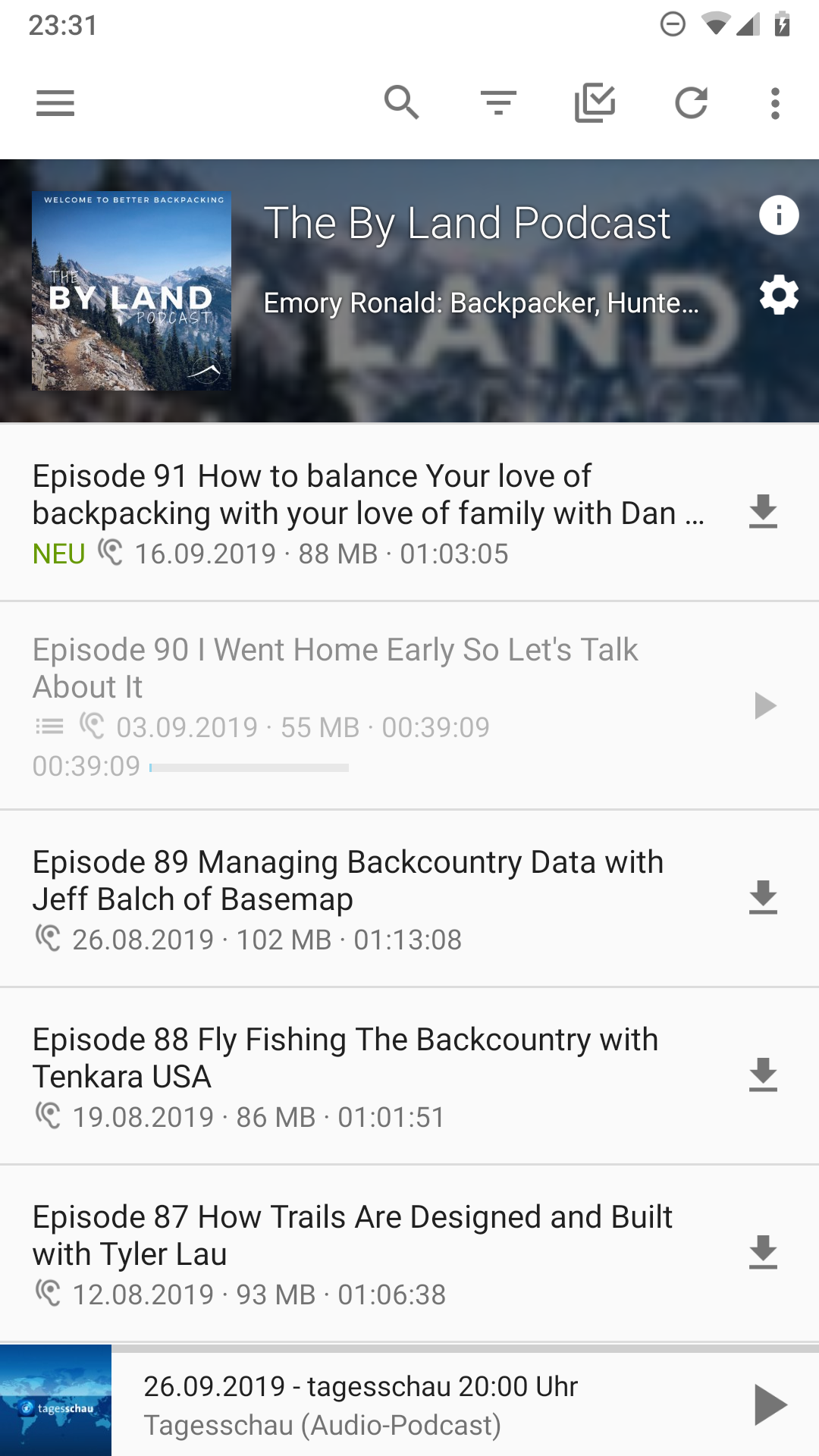
Current behaviour: On Podcast screen (for a podcast) that lists the podcast episodes, for each episodes, it shows the media size rather than duration [1]
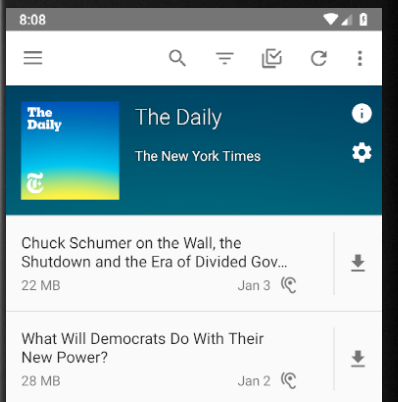
In contrast, other screens (Episodes, Queue, etc.) all show media duration when possible.
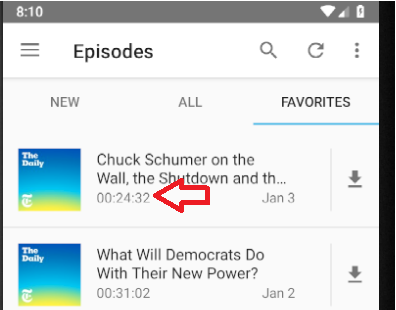
Desired behaviour: On Podcast screen, show episode duration rather than size, similar to other screens.
[1] The exception is if the episode is the currently playing one.
 orionlee
All 15 comments
I'm rather strongly against this. If someone changes such a fundamental UI element for a couple of thousand users that are used to the current way, they better have a convincing argument. I don't see a strong argument to change the current behaviour.
@ByteHamster you?
 mfietz
on 27 Jan 2019
mfietz
on 27 Jan 2019
I feel both information are valuable.
Wouldn't it be possible to display size and duration when episode is not downloaded. For example : "175 MB / 00:50:00"
And when episode is downloaded it will be like we have now : duration and time bar showing what have been listened.
In fact I'm for to always use this pattern => displaying both size and duration everywhere we display one or the other and where a time bar is not shown.
 Matth7878
on 27 Jan 2019
Matth7878
on 27 Jan 2019
I am also against removing the size completely. Just as Matth7878, I thought about displaying both size and duration. Just adding the two things together will clutter the UI. AntennaPod does not look as modern as other podcast players because it tries to provide too much information. Changing that is probably not possible because people already have their use-cases. We can only prevent to gradually make it worse by adding more and more text. As long as this is more a consistency thing rather than actual complaints by (many) users, I would prefer to keep everything as it currently is.
 ByteHamster
on 27 Jan 2019
ByteHamster
on 27 Jan 2019
Also, the consistency I would expect is the following: whenever an episode is downloaded the duration is displayed, whenever it's not downloaded the filesize is displayed. Makes sense to me.
Then the issue would be that the Favourites activity is the exception that doesn't follow this logic (hence creating inconsistency).
If following this logic the aim is to increase consistency within the app, the favourites activity should be 'fixed' (which I think can be done safely without a negative impact on a large user-group).
 keunes
on 27 Jan 2019
keunes
on 27 Jan 2019
Regarding showing both duration / media size, @pachecosf also made a suggestion of showing media size on podcast episode / item screen (and preferring duration over media size on podcast screen)
My idea would be to implement the size on the individual podcasts item page, so that the download button's text would be: "Download (50mb)"
Regarding whether AntennaPod should prefer showing duration over media size on Podcast screen:
2a. I can only speak from my own experience, I usually use Queue / Episode screens, and use Podcast screens occasionally. I'd choose to download episodes based on duration (whether it is a short, < 30 minutes episode or an hour-long one). I can do so easily on Episode screen as the episodes show duration. On podcast screen, I will have to inconveniently estimate the duration based on the media size.
2b. The current inconsistency between Queue/Episode screens and Podcast screens would seem to be surprising users. Maybe they are used to AntennaPod's idiosyncrasy. Maybe they don't much care about it. Maybe there was some good reasons behind the difference. But if there is the case, it'd be great if someone can share the reasons.
orionlee
on 27 Jan 2019
Here's a mockup for my solution if anyone else wants to see it

 pachecosf
on 2 Feb 2019
pachecosf
on 2 Feb 2019
i'm all for the dual size and time display as shown in the elegant example above by @pachecosf
remember that not everybody has unlimited data, and some podcasters either mis-click on ocassion, or completely do not understand the concept of efficient mp3 compression for their use case, so this helps figure out at a glance if i should wait until i'm not on a severely metered connection.
(studies show mp3 at 64k m for strictly speech vs 128k js musical podfic are adequate to majority, but i keep coming across folks doubling that, and several recently started shows using 320k s for their half hour show... facepalm)
 jmichael2497
on 12 Feb 2019
jmichael2497
on 12 Feb 2019
I would like to go more into the direction that Google uses for Material Design. They use no right-aligned text. That's a thing I currently don't like about AntennaPod: The layout feels a bit scrambled to me.
- Date is not aligned
- Icon sizes do not match
- Big empty space in the middle of the item
- If icons are not displayed, they leave empty space.
I created a mock-up that I think I like more. The layout always displays the size and duration. I am totally open to suggestions because lists are a major part of the app. If we change them, users should be happy.
Before / After (single line items):
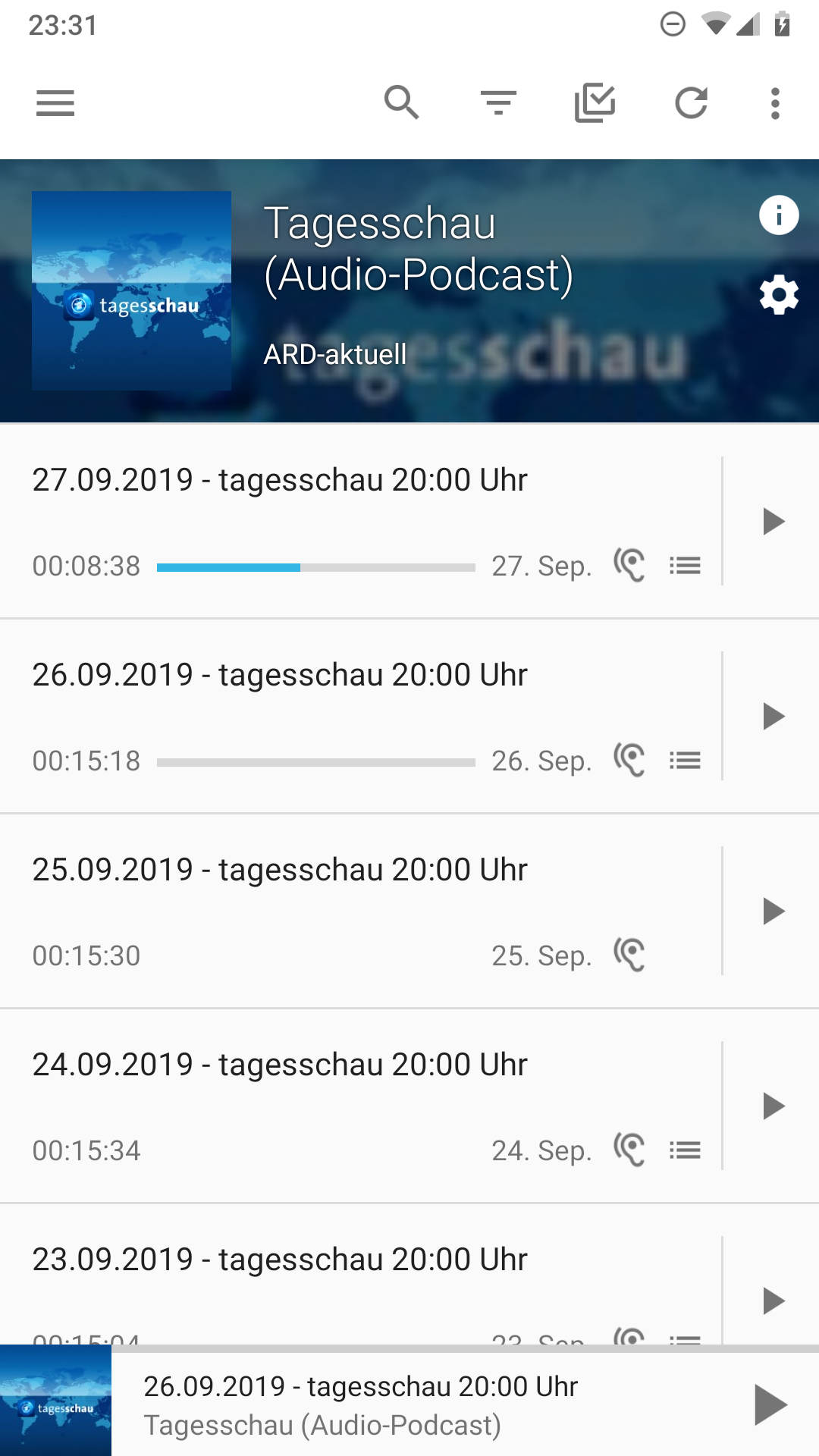
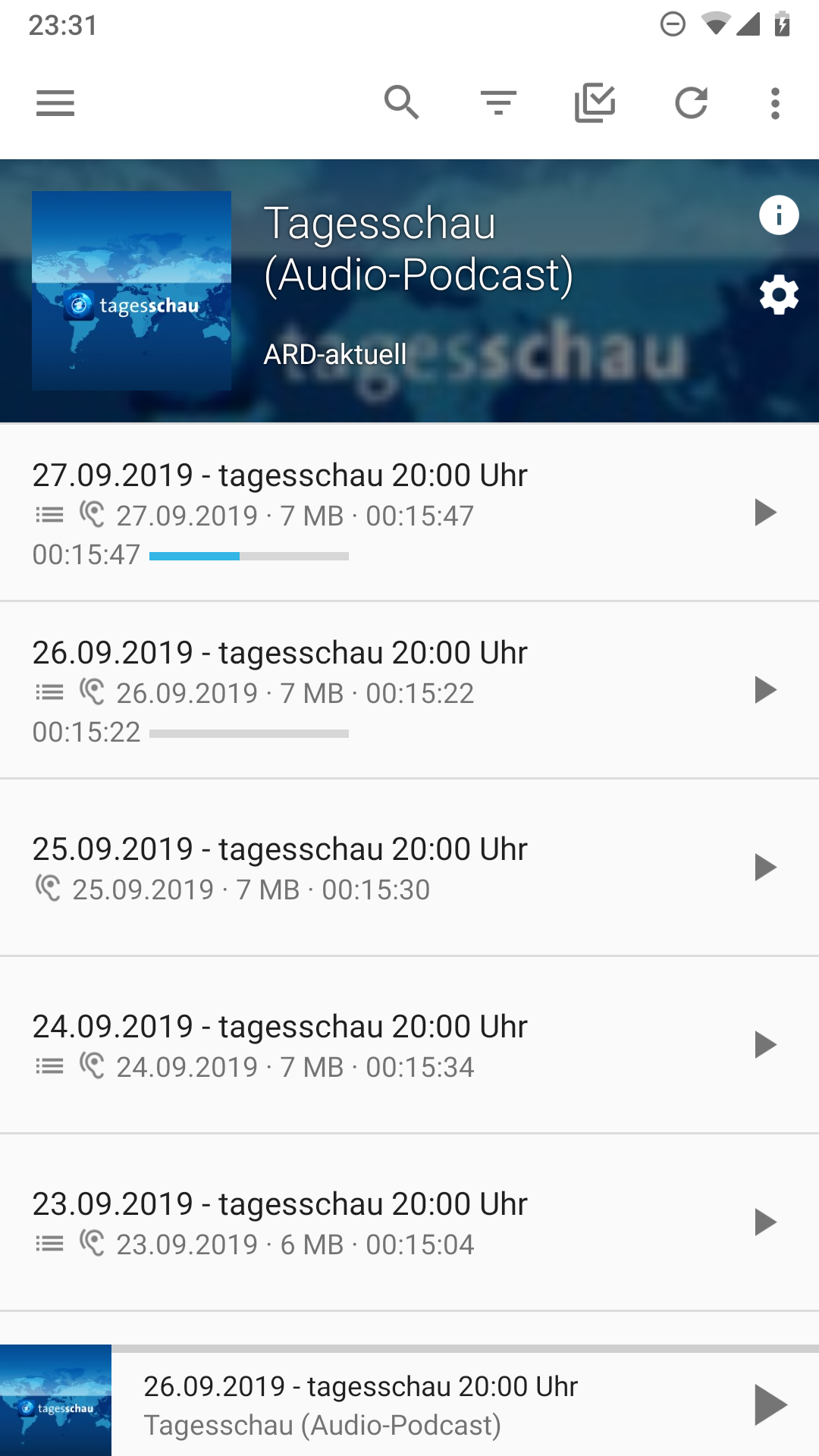
Before / After (multi line items):

ByteHamster
on 2 Oct 2019
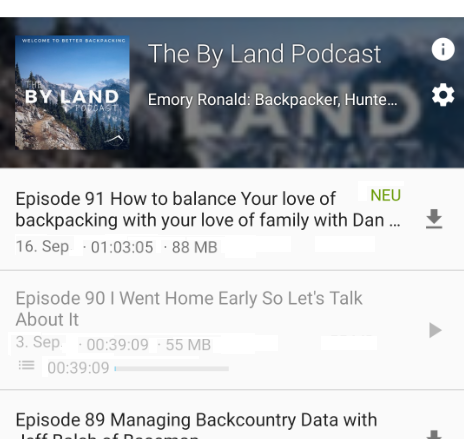
I suggest some refinement, primarily to reduce repetition (and make the screen less clutter)
- abbreviate date for recent ones
- Move New indicator back towards the end, so that the items line up nicely, no matter they are new or not.
- show duration before size. I feel nowadays, most users would be more concerned about duration that size.
- removed video / audio indicator. Most of the time it is just repeating itself, cluttering the screen without giving users much information. (If it's indeed deemed useful, then I wonder why it is not shown on queue / episode screens.)
orionlee
on 3 Oct 2019
Backing up at a higher level,
- if we do some redesign, would it then be just podcast screen, or all other relevant screens as well (queue, episodes, podcast preview during add podcast flow)?
- there were some concerns that changes would cause backlash from existing users who are used to the existing UI. Is there any way to address the concern? E.g., circulate the design on the mailing list? Or possibly create an specific alpha release with the redesigned podcast screen to test the water?
orionlee
on 3 Oct 2019
Would it be possible to display progress bar with time played on the left and total time or time left (depending on mini player settings) on the right ?
It will make the progress bar the same as the one in player view.
I agree with orionlee about displaying time before size so info would be aligned for all episodes.
New indicator could be displayed on top of download arrow. It seems it would fit inside the button.
I was looking at queue view because I think it would be nice to be able to be consistent in displaying episodes and queue feels better. What I think after looking it :
- we should use it for podcast view
- in current podcast screen is there a use to display size once episode has been downloaded or started to play? Queue view is smart about that displaying size or time olayed
- date should be centered on top of episode length
Matth7878
on 3 Oct 2019
abbreviate date for recent ones
I removed that because the abbreviated date had a dot after the month, which did not look good next to the separator dot.
Move New indicator back towards the end, so that the items line up nicely, no matter they are new or not.
What you have drawn is really hard to implement (flowing the title around "New"). If we move it to the right, the second line of the title will stop before the "New". That was a reason for moving it to the left.
show duration before size. I feel nowadays, most users would be more concerned about duration that size.
:+1:
removed video / audio indicator. Most of the time it is just repeating itself, cluttering the screen without giving users much information.
I thought that, too. Currently wondering if there are users who would complain then.
if we do some redesign, would it then be just podcast screen, or all other relevant screens as well
I would do it on all screens. We basically display the same information on each screen but we have a ton of different layout files and adapters. When changing this, I want to remove those duplicates. (the mock-up only shows one list because I only changed one layout file).
Is there any way to address the concern? E.g., circulate the design on the mailing list? Or possibly create an specific alpha release with the redesigned podcast screen to test the water?
We should do something like this, yes. Anki-Android recently added a poll for beta users to decide for a new icon. They had a lot of responses. Maybe we could do something like this, too. (maybe not a yes/no vote but a free-text field with comments).
Would it be possible to display progress bar with time played on the left and total time or time left (depending on mini player settings) on the right ?
It will make the progress bar the same as the one in player view.
I experimented with that, too. I decided against it because we then need to move the duration from the subtitle to the progress bar. I want to change as little as possible between playing state and unplayed state. If you have a good idea on how to do it, I would be happy to experiment with that, too.
New indicator could be displayed on top of download arrow. It seems it would fit inside the button.
Good idea. That would fix the issue I mentioned above where the title size changes. I will experiment with that.
we should use it for podcast view
I want to change all lists because I think the current lists look outdated. The new big podcast players (Spotify, Google podcasts) have a lot more clean interface. Obviously, they display less information but I would like AntennaPod to loon a bit more like them (without removing information).
date should be centered on top of episode length
We have the same problem here as with the new indicator. The title is shrinked when increasing the date width.
ByteHamster
on 3 Oct 2019
abbreviate date for recent ones
I removed that because the abbreviated date had a dot after the month, which did not look good next to the separator dot.
Take out the dot after the month - I deliberately took out the dot in the abbreviated date in the mockup above. I looked at a few other apps that show abbreviated dates, they all took out the dot.
Speaking of icons: what's the use of the chapter-like icon  next to the progress bar?
orionlee
on 4 Oct 2019
Speaking of icons: what's the use of the chapter-like icon
It's displayed if the episode is currently in the queue. Obviously, we will hide that icon if we use the same layout for the queue.
ByteHamster
on 4 Oct 2019
i like the idea of the "new" (why not universal icon?) going above the download/play icon on the right side... which obviously leads to suggestion of using the space below for the "queued" icon.
also, as for the other icons, while it is rare, i do follow a few feeds that occasional include a text only post (delay, taking a break, or other notice), or rarely pop in a video instead of audio.
i like the detail at a glance, but i can understand most folks might want the option to forego features for following the latest trend of "pretty minimalist feature removal elegance"...
so, maybe after whatever layout tweaking, make the appearance of some elements be optional, then people can have their "only the episode title and nothing else" view, with all functionality like queue and play hidden behind a hold tap...
or just tell to go use those other apps that never give users a choice to begin with.
jmichael2497
on 29 Nov 2019
Related issues
keunes
·
4Comments
 reverse-unina
·
5Comments
reverse-unina
·
5Comments
 Cj-Malone
·
5Comments
Cj-Malone
·
5Comments
 maxxo
·
4Comments
maxxo
·
4Comments
 yosefmizrahi
·
3Comments
yosefmizrahi
·
3Comments
Most helpful comment
Here's a mockup for my solution if anyone else wants to see it
