Anki-android: Images from Android clipboard do not paste correctly.
You can copy an image from Android, say by holding it down and tapping copy.
However you cannot paste it from the clipboard like you would on a desktop machine.
Instead you get something like: content://com.android.chrome.FileProvider/images/screenshot/16048407172167286279025733221228.png
 McSpooder
All 11 comments
Hi @McSpooder
Which version of AnkiDroid are you using?
Which phone are you using?
This might be fixed in the latest alpha: https://github.com/ankidroid/Anki-Android/releases/download/v2.14alpha27/AnkiDroid-2.14alpha27.parallel.A.apk
Ref: #7566 and #7568
 david-allison-1
on 8 Nov 2020
david-allison-1
on 8 Nov 2020
2.13.5, I will try the alpha thanks!
McSpooder
on 8 Nov 2020
Just tried the alpha, unfortunately no luck
McSpooder
on 8 Nov 2020
Update:
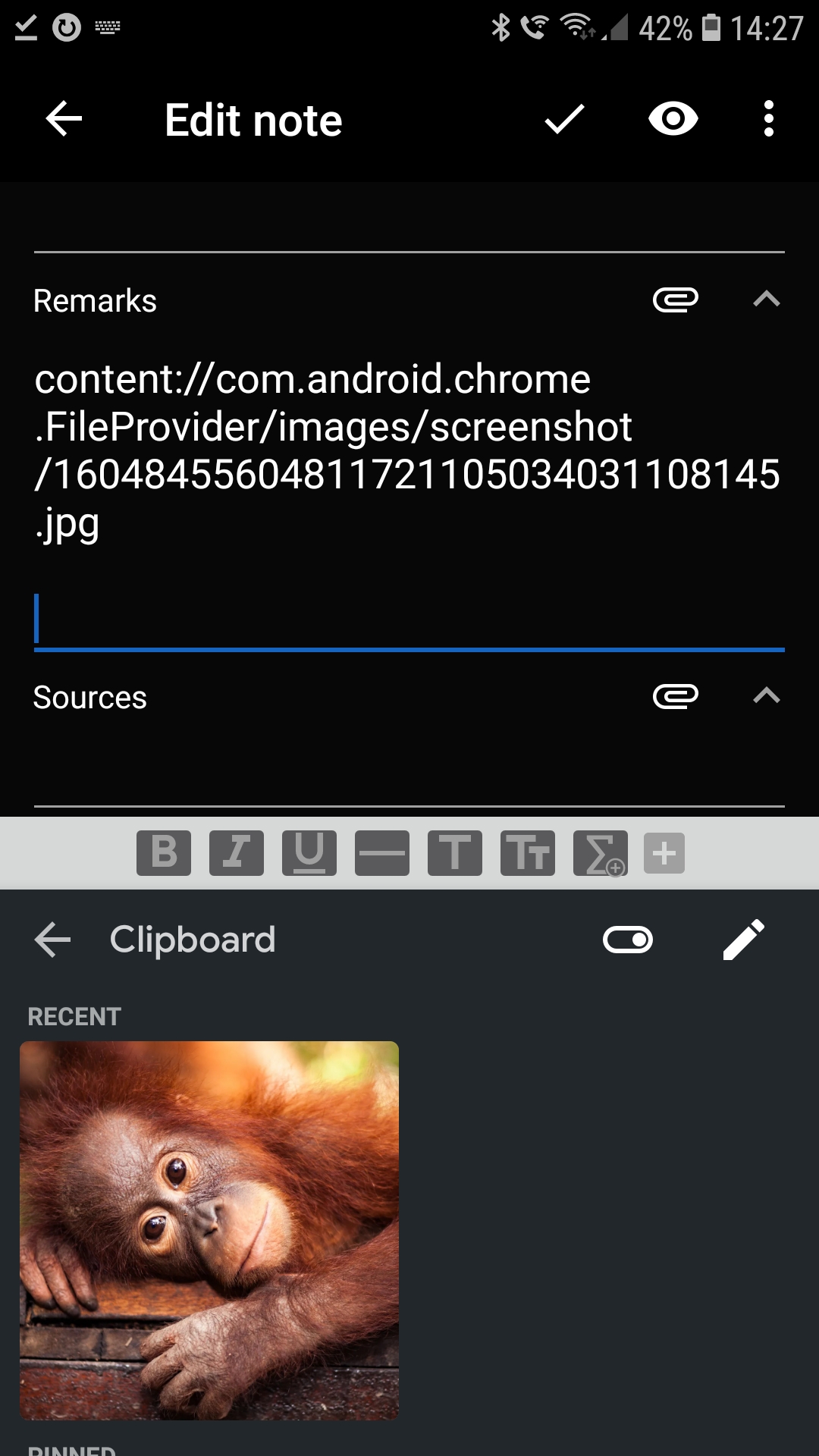
Pasting by holding down the field and pressing clipboard (which opens up the native Android clipboard) just pastes the relative path on the device.
However, pasting using the Google keyboard displays an anki error saying that pasting is not supported here.

McSpooder
on 8 Nov 2020
Tried hard coding the html like so:
<img src="content://com.android.chrome.FileProvider/images/screenshot/16048455604811721105034031108145.jpg"/>
But that didn't work either. Anki just says failed to load image.
McSpooder
on 8 Nov 2020
Thanks for the repro - will improve this in the next alpha
tag: AnkiDroid does not support image pasting here
david-allison-1
on 8 Nov 2020
I'm going to close this as a duplicate of #7566 to consolidate discussion.
david-allison-1
on 8 Nov 2020
@McSpooder Could you try alpha28: https://github.com/ankidroid/Anki-Android/releases/download/v2.14alpha28/AnkiDroid-2.14alpha28.parallel.A.apk
david-allison-1
on 9 Nov 2020
@david-allison-1
Can confirm pasting images now works with the alpha when using the Google keyboard!
McSpooder
on 9 Nov 2020
@david-allison-1 -> 🏆
 mikehardy
on 9 Nov 2020
mikehardy
on 9 Nov 2020

david-allison-1
on 9 Nov 2020
Related issues
 infinyte7
·
4Comments
infinyte7
·
4Comments
 hanpingchinese
·
5Comments
mikehardy
·
4Comments
hanpingchinese
·
5Comments
mikehardy
·
4Comments
 Acelya-9028
·
4Comments
Acelya-9028
·
4Comments
 homocomputeris
·
5Comments
homocomputeris
·
5Comments
Most helpful comment
@david-allison-1
Can confirm pasting images now works with the alpha when using the Google keyboard!