Anki-android: Audio gestures/touch mask replay button (can mark card as correct instead of replaying audio)
Reproduction Steps
- Set touching the middle of the screen to do nothing (left is wrong, right is correct)
- Review a card which has audio
- Let the audio play in full (doesn't happen if you hit the button while the audio is still playing) then hit the replay button
Expected Result
The audio replays.
Actual Result
It progresses to the next card (as if I had marked the card as good)
Debug info
Refer to the support page if you are unsure where to get the "debug info".
AnkiDroid Version = 2.8.4
Android Version = 9
ACRA UUID = 01229334-5848-488f-afe4-5826790c1bed
Research
Enter an [ x ] character to confirm the points below:
[ x ] I have read the support page and am reporting a bug or enhancement request specific to AnkiDroid
[ x ] I have checked the manual and the FAQ and could not find a solution to my issue
[ x ] I have searched for similar existing issues here and on the user forum
 ohare93
All 21 comments
Ankidroid touch gestures and buttons interfere with each other. So if your cards have buttons, you should use swipe gestures instead.
 Anthropos888
on 2 Jun 2019
Anthropos888
on 2 Jun 2019
@Anthropos888 I prefer touch. This surely cannot be an unfixable Android-wide phenomenon.
Regardless, I have middle touch disabled to do anything. The buttons are always in the middle of the screen. Surely that leads this to be a bug in the Anki Droid app.
ohare93
on 3 Jun 2019
Maybe you could install the latest alpha? I just tried to reproduce this behavior in Ankidroid 2.9alpha68 but the replay button works as expected. Clicking above or below the button will perform the action set in gestures, but clicking the button just replays the audio (I'm also using some additional css styling and z-index: 1; for the button).
Anthropos888
on 3 Jun 2019
This issue is still happening, except also on Text Entry boxes. If I tap the side of a text box, and I have set tapping the side to mark correct, then instead of entering the text box it marks the card correct.
@Anthropos888 Is 2.9 due to release soon? Otherwise, how do I go about installing the Alpha as you have suggested?
ohare93
on 25 Aug 2019
Hey, you're right. Your issue seems to be related to the issue I opened yesterday:
https://github.com/ankidroid/Anki-Android/issues/5415
But it's only happening in complete fullscreen mode "hide system bars and answer buttons".
That's why I couldn't reproduce your issue cause I set fullscreen mode to only "hide the system bars", and in that mode buttons are working properly.
AnkiDroid 2.9 is beta now and you can just use it by opening the app in Playstore and clicking "join the beta".
Anthropos888
on 25 Aug 2019
Okay, 2.9 is now out and this is still an issue. However I have found out a little bit more info from playing around with it.
I have a card which happens to have the audio play button almost directly in the centre vertically (which is important).
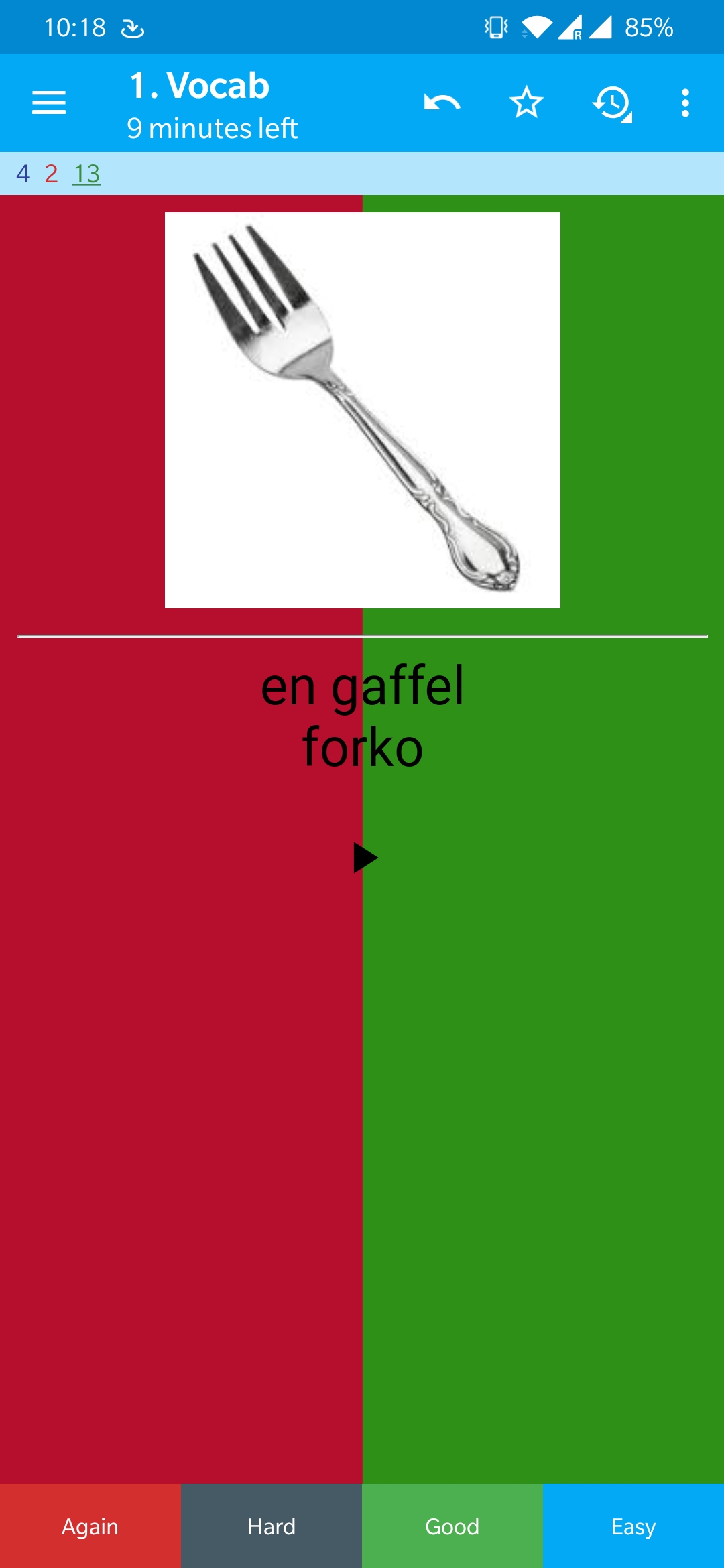
In Settings -> Gestures under Actions I changed: Touch Top: Mark Note, and Touch Bottom: Edit Note (I was surprised there was no Touch middle, as you'll see later).
Now, in the screenshot above if I hit the play button near the bottom of it, it opens the Edit Note screen without playing the audio again (ala, what the Touch Bottom Action is set to). However if I hit the card in the middle/near the top of the play button then it marks the card as correct. I can still make the Touch Top Action occur, but the play button does not overlap with that.
Playing around further in cards with no play buttons or anything in the middle, there is a centre point in each card which always marks the card as correct. Try setting both the top and the bottom actions to Mark Note and then keep tapping near the vertical and horizontal centre of a card until you find the sweet spot. This works on both the front and back of cards (the front just revealing the back, and the back marking as correct).
ohare93
on 28 Oct 2019
Does it still happen when you embed the replay-button within a div? You can try this styling which I use (I placed the button on the right, for a center button you would use left: 50%; margin-left: -20px;)
.replay_right a {
    position: fixed;
    right: 20px;
    bottom: 65px;
    width: 40px;
    height: 40px;
    line-height: 50px;
    font-size: 10px;
    color: rgba(0, 0, 0, 0.4);
    background: linear-gradient(135deg, rgba(255, 255, 255, 0.4) 0%, rgba(255, 255, 255, 0.1) 100%);
    border-radius: 50%;
    box-shadow: 1px 1px 3px 0px rgba(0, 0, 0, 0.3);
    text-shadow: 1px 1px 4px rgba(0, 0, 0, 0.2);
    opacity: 1;
    text-decoration: none;
    z-index: 1;
}
then place your audio file into the front/back like this:
<div class="replay_right">{{Your-Audio-Field}}</div>
Anthropos888
on 28 Oct 2019
Apologies for the delay. I cannot reproduce the issue at all, with or without your change, strangely. I will reply again when/if I can.
ohare93
on 19 Dec 2019
Okay, I am having this issue again, but slightly different. It seems that _any button_ on the front template will trigger an answer. Also the button must come after "
Hello 👋, this issue has been opened for more than 2 months with no activity on it. If the issue is still here, please keep in mind that we need community support and help to fix it! Just comment something like _still searching for solutions_ and if you found one, please open a pull request! You have 7 days until this gets closed automatically
![github-actions[bot] picture](https://avatars2.githubusercontent.com/in/15368?v=4&s=40) github-actions[bot]
on 3 Jun 2020
github-actions[bot]
on 3 Jun 2020
I still have this issue now and again. I can recreate it and export a card that breaks in this way, if that would help.
ohare93
on 3 Jun 2020
Hi @ohare93,
I believe I've fixed this in 2.11. There's a new setting under 'Gestures' which should deal with it.
Could you sign up for our beta program and confirm whether this is still occurring when 2.11beta is released in a few days? https://docs.ankidroid.org/manual.html#betaTesting
 david-allison-1
on 3 Jun 2020
david-allison-1
on 3 Jun 2020
@david-allison-1 I'll give that a go this weekend :+1:
ohare93
on 6 Jun 2020
@ohare93 2.11 is out now! No need for a beta.
david-allison-1
on 6 Jun 2020
Ah, my sloth has paid off! :grin: :+1:
ohare93
on 6 Jun 2020
I believe I've fixed this in 2.11. There's a new setting under 'Gestures' which should deal with it.
@david-allison-1 I assume you mean the new "Ignore touch gestures on links" option? If so, then no it does not fix my issue.
Here are two WebMs showing how my card interacts on Anki and on AnkiDroid.
Anki: https://1drv.ms/u/s!An8TBTYs7ARHiKp52v8v617MeIbbkA?e=zpgNlJ
AnkiDroid: https://1drv.ms/u/s!An8TBTYs7ARHiKp6kqZNtJfY4TpVzA?e=EWcS53
As you can see, clicking on a button in AnkiDroid will activate the "touch the side of the screen" gesture, which I have setup for wrong on the left and correct on the right. Furthermore, when I click in the exact middle of the screen neither of them occur, yet the button disappears! :cry:
I have attached a Deck Package containing the card.
ohare93
on 6 Jun 2020
Damn, thanks for the repro
david-allison-1
on 6 Jun 2020
Hello 👋, this issue has been opened for more than 2 months with no activity on it. If the issue is still here, please keep in mind that we need community support and help to fix it! Just comment something like _still searching for solutions_ and if you found one, please open a pull request! You have 7 days until this gets closed automatically
github-actions[bot]
on 5 Aug 2020
Hello 👋, this issue has been opened for more than 2 months with no activity on it. If the issue is still here, please keep in mind that we need community support and help to fix it! Just comment something like _still searching for solutions_ and if you found one, please open a pull request! You have 7 days until this gets closed automatically
github-actions[bot]
on 4 Oct 2020
Hello 👋, this issue has been opened for more than 2 months with no activity on it. If the issue is still here, please keep in mind that we need community support and help to fix it! Just comment something like _still searching for solutions_ and if you found one, please open a pull request! You have 7 days until this gets closed automatically
github-actions[bot]
on 4 Dec 2020
Related issues
 SimonePols
·
3Comments
david-allison-1
·
4Comments
SimonePols
·
3Comments
david-allison-1
·
4Comments
 Mornon
·
5Comments
david-allison-1
·
5Comments
Mornon
·
5Comments
david-allison-1
·
5Comments
 infinyte7
·
4Comments
infinyte7
·
4Comments