Anki-android: Feature: more visible flags
I just noticed in the last version it's possible to add flag directly from the card we are studying, but I to me they are kinda unnoticeable: with the card in mid-screen, I did some test and it's not unlikely (on the contrary) that I miss that the card is flagged. Would it be possible (and make sense) to have an option for a more visible flag, like an opt-in option that puts a flag next to the shown word (or content in general)?
 Mornon
All 5 comments
Hi @Mornon,
Could you send a screenshot please?
Afterwards, you can move the flag icon to the action bar by going to: Settings - Reviewing - App Bar Buttons
You can also use {{UserFlag}} in your card template, and use JavaScript to customise the appearance based on that value.
Please let me know if this helps, or if you still need a change in the AnkiDroid code
All the best,
David
 david-allison-1
on 14 May 2020
david-allison-1
on 14 May 2020
I already have the button in the action bar, and when I tried to use {{UserFlag}} I got an error:
Found '{{UserFlag}}', but there is no field called 'UserFlag'
This is what I see at the moment:
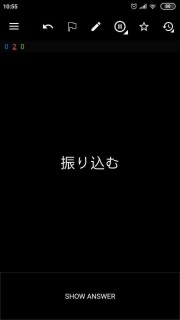
But with the flag in the upper screen it's likely I won't notice if the card is flagged, unless I purposely check every time, since I'm concentrating on the middle screen, where the card is. So it'd be great to be able to have something like this:
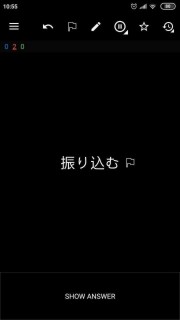
with the flag appearing also near the card (just as a icon, also without being able to interact with it), or some other visual clue.
Using the template to add formatting, like we can do with tags, would be an option, giving it'd overlap with formatting from tag, but if it's possible I don't know how to do it (since {{UserFlag}} gives error).
Edit: replaced the images with smaller versions.
Mornon
on 14 May 2020
@Mornon Sorry... try {{CardFlag}}
david-allison-1
on 14 May 2020
That works, thanks!
Mornon
on 14 May 2020
Cheers!
david-allison-1
on 14 May 2020
Related issues
 OoDeLally
·
4Comments
OoDeLally
·
4Comments
 toninomanzi
·
6Comments
toninomanzi
·
6Comments
 hanpingchinese
·
5Comments
hanpingchinese
·
5Comments
 mashinbaz1
·
6Comments
david-allison-1
·
5Comments
mashinbaz1
·
6Comments
david-allison-1
·
5Comments
Most helpful comment
That works, thanks!