Animation_nodes: Proposal: Offset instances along spline
Hi @OmarEmaraDev ,
now that we have the Spline Distribution available, can you please add a way to more easily offset these instances along the spline?
Please find here a reference video from Cinema4D:
https://p7s1-my.sharepoint.com/:f:/g/personal/par0001d_belgium_fhm_de/EvO9F7XskZxJnnzDAmDP9MkBfpof5oYcM-1sXE14vh874A?e=XIaHyc
I think these 3 things should be the core functionality that should be included.
- an offset value from -100 to 100 should move all instances on and off the whole spline once
- an offset variation value should vary the positions of the instances along the spline
- a loop option should be included which basically allows for a seamless infinite animation of instances along the path (so once an instance reaches the end of the spline it should appear at the beginning again)
In Cinem4D they also have a rate option, including a rate variation which basically auto-animates the instances along the spline at a certain speed and optionally varies the individual speed of the instances. This would be also nice to have but maybe not necessary in the first place.
In the folder please find as well my node group approach for spline instancing again. I actually wanted to already reduce the setup while utilizing the new distribution method but couldn't figure out so quickly how to do this. But maybe this gives you ideas as well...?
Maybe you could implement this as separate node or maybe better as an extra option in the Evaluate Spline Node, as discussed here?
https://github.com/JacquesLucke/animation_nodes/issues/1598#issuecomment-742424583
Let me know what you think. Thank you!
 dapa5900
All 46 comments
The problem with such proposal is that it seems out of scope of the node in question or is too specific to implement as a new node.
In particular, by out of scope of a node I mean the following. The Evaluate Spline node should evaluate a spline, it shouldn't have elements of randomness (Like offset variation) or elements of motion (Like rates). It might seem like the more option the node have, the more friendly it will be. But this doesn't seem to be the case here.
In Animation Nodes, most of the nodes we have are self explanatory, reading the name of the nodes and the inputs should give you a pretty good idea what this node does. Adding more elements and dimensions to the node would make this process harder.
Alright. We have a node called Evaluate Spline that outputs a position, a tangent, a radius, and a tilt. So it must return the information about some point on the spline. Its input seem to be limited to the [0, 1] range, so that must be our range of values. Hmmm, I wounder what that seed value have to do with this node. Oh and there is a time input as well, why does this node need temporal information? Maybe I should check the documentation.
As for a new node, while adding new stuff is always nice and saves time. Among other reasons, sometimes the function of the node is not sufficiently flexible that the user will eventually have to recreate the node from scratch to achieve the effect in question. In this case, the user might want to change the scale of the object during the animation, but the node would only return the final state and all other information would be lost. There are other countless possibilities that might require this recreation of the node. And that's why we should be careful not to implement too specific nodes. And after all, that's why we have extensions and subprograms.
We could however, try to make things easier for the user. I can see some possible ways to do this. One way is to add a matrix output to the evaluate node to save one the trouble of constructing that oneself. Another way is to add an advanced node option to control what happens to parameters that are out of bound, of which "Looping" can be an option. And so on.
 OmarEmaraDev
on 12 Dec 2020
OmarEmaraDev
on 12 Dec 2020
I generally agree with Omar.
I think It's not realistic to be like C4D in terms of design, in which one "Cloner" can cover so many functions all together. To keep freedom is important even if it means multiple nodes to achieve certain specific functions.
Many functions mentioned here should possibly be achieved by adding just a few nodes. However, indeed, I have no idea how it will impact performance, as Omar mentioned last time.
I just want to add that, I hope "evaluate spline node" also has "step" way of evaluation as the distribute matrices spline node.
As for "loop" (modulo between 0 and 1), it is already mentioned by Omar, I think it's very good.
 Gerstmann-Bradley
on 12 Dec 2020
Gerstmann-Bradley
on 12 Dec 2020
Hi @OmarEmaraDev and @Gerstmann-Bradley
Thank you both for your replies and explanations. Maybe in this case it could be a better approach if you can maybe show a node setup how you would achieve the desired functionality with the currently available nodes instead of me proposing my takes on achieving these 3 goals:
- an offset value from -100 to 100 should move all instances on and off the whole spline once
- an offset variation value should vary the positions of the instances along the spline
- a loop option should be included which basically allows for a seamless infinite animation of instances along the path (so once an instance reaches the end of the spline it should appear at the beginning again)
My problem is that at least for me there's no obvious way how I can offset instances along a spline by using for example an offset matrix node, so I'm very much open for your recommendations here.
Thanks.
dapa5900
on 13 Dec 2020
Our approach won't be too much different from what you already did in the node tree you shared. 1) Is a simple remap node. 2) Is a simple add random number. 3) Is a simple fraction or modulo node.
Do you think that it is unreasonable to expect the user to create this setup?
OmarEmaraDev
on 13 Dec 2020
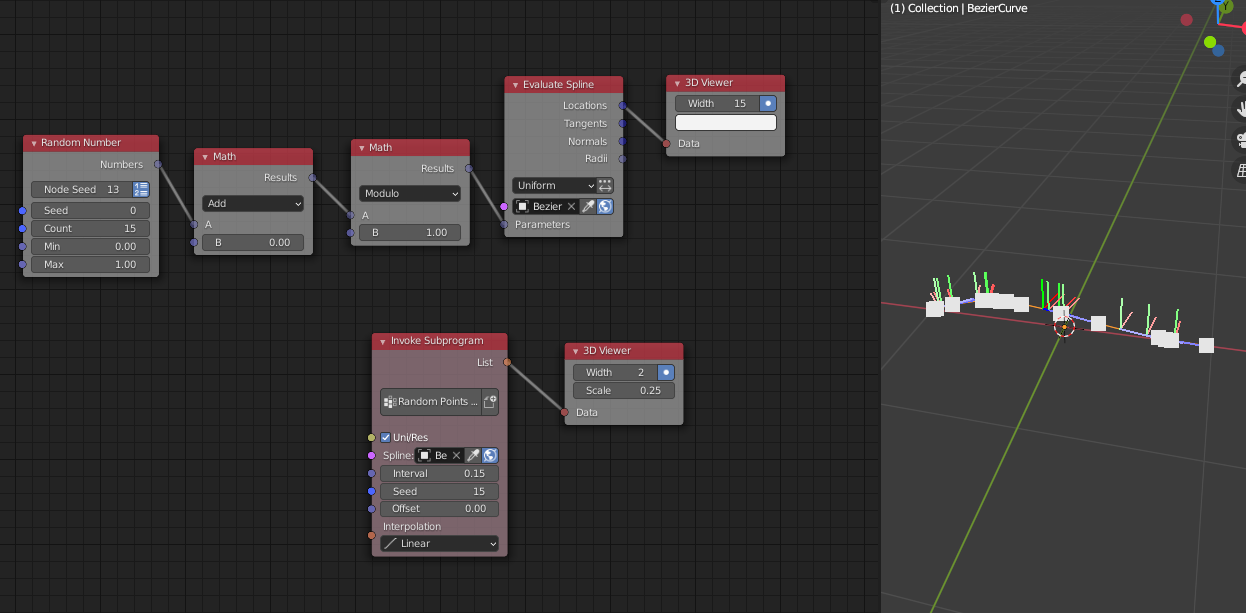
The attached is my approach. In practice, I made everything into group node so that it forms a preset.
The setup can be even easier once Omar added loop function and others for us. But generally, random distribution or offset is something that should be very easy to achieve.
Gerstmann-Bradley
on 13 Dec 2020
Thank you.
@OmarEmaraDev
Can you please share your solution for 1) at least that shows how to remap the output of the distribute matrices node in spline mode to get the desired offset behaviour? I think I can then try the rest myself.
@Gerstmann-Bradley
Can you please elaborate how to use your setup together with the distribute matrices node in spline mode to offset the instances created this way? Basically how do you combine your vectors with the vectors or matrices of the distribute matrices node?
dapa5900
on 13 Dec 2020
@Gerstmann-Bradley
Can you please elaborate how to use your setup together with the distribute matrices node in spline mode to offset the instances created this way? Basically how do you combine your vectors with the vectors or matrices of the distribute matrices node?
I don't use "distribute matrices" node for spline. That's why I wasn't much of a fan last proposal. I agree that keeping related function in one node will make it more intuitive and easier for users, but AN currently doesn't work in such a way. Especially evaluate spline node has to take most of your proposed functions. Adding the same functions again in distribute matrices node will confuse users as well when many of them will end up going back to "evaluate spline" node for distribution.
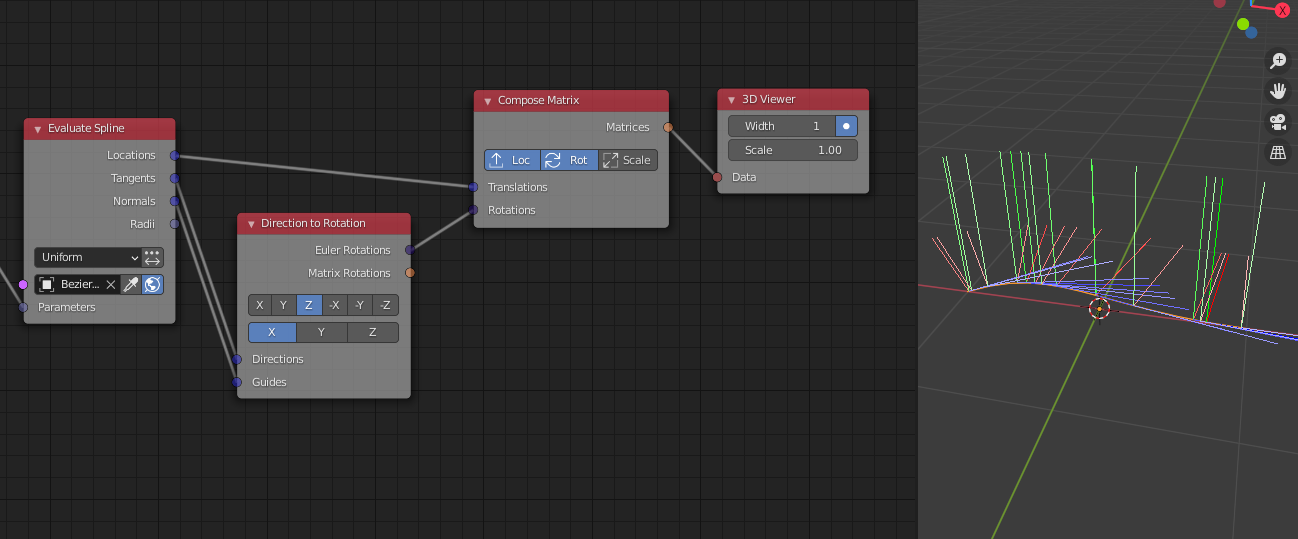
Back to the topic, I have already distributed vectors on a spline, why do you need "distribute matrices" in the setup to repeat the function that has already been done? If you need matrices instead of vectors, you can add two more nodes as shown.
Just be aware that Omar has mentioned he is going to add "loop" and "matrix" output for us in the future, which will make this setup much shorter and easier.
Gerstmann-Bradley
on 13 Dec 2020
@dapa5900 I wasn't talking about the Distribute Matrices node. But the evaluate node as you used in your node tree.
OmarEmaraDev
on 13 Dec 2020
Ok, I was afraid of this and I totally agree with you that this is indeed pretty confusing then for the user. However I would still argue that using one common node for all methods of distributing and then use other nodes _after_ that to achieve certain things is the behavior that most of the users would expect. Not only because of how thing usually work in other software but more importantly how things work in AN in moste cases. Think of it from a user's perspective like this maybe:
I want to instance a couple of cubes in a grid distribution and then move them. OK, I know I can take the distribute matrices node in grid mode and plug an offset matrices node _after_ that.
I want to instance a couple of cubes in a circle or spiral distribution or distribute them on a mesh and then move them. OK, I know I can take the distribute matrices node in the respective modes and plug an offset matrices node _after_ that.
So, let's assume we get rid of the spline distribution method again in the distribute matrices node, because you suggested you would prefer the evaluate spline method instead.
Now I want to instance a couple of cubes on a spline and then move them. Wait, why can I now not use the distribute matrices node anymore, that I actually know from all the other distribution methods but have to use another method instead that so far I never used for anything else?
When I take the node that creates the matrices that I need to plug into the Object Matrix Output as my workflow anchor, why do I all of the sudden have the feeling that I'm not working stream-upwards anymore like with all the other distribution methods but rather have to work stream-backwards and have to build the matrix for this distribution method myself?
My point is, that even if it might not be overly complicated to use the evaluate spline method instead, for me as a user it's just not the method that I would expect considering how the other methods for distributing are working. It's simply not consistent behavior or at least not a consistent user experience.
And yeah it is even more confusing that since now you do have the spline distribution method available you still need to go a completely different route to move the instances along the spline. That's why I'm really hoping that there's a way to offer the users another way for offsetting instances along the spline which can take the matrix as an input the the distribute matrices node is creating. Either as option on the evaluate spline node or as a new node, as long as it can be used _after_ the distribute matrices node.
Thank you.
dapa5900
on 14 Dec 2020
So, let's assume we get rid of the spline distribution method again in the distribute matrices node, because you suggested you would prefer the evaluate spline method instead.
I am not proposing to delete that spline mode. And I didn't mind to add that mode to distribute matrices. Especially it is already there, I have no reason to ask for a revert.
My points should be clear:
- What happens to distribute matrices spline mode should mostly happen to "evaluate spline" node as well. For example, We do need a "step" evaluation of spline in addition to "amount".
- To achieve that specific kind of offset you are looking for, "distribute matrices" is not the way you should go. You need to use evaluate spline node. Function is already there and it makes sense by its name and so on so forth. It will be even easier to achieve what you are proposing after Omar added features he promised.
Gerstmann-Bradley
on 14 Dec 2020
There are two fundamental concepts we need to make clear here. 1) Animation Nodes is data driven. 2) Information is lost when going upward stream, and conversely gained when going downward stream.
Animation Nodes is data driven. A node outputs data that encode certain information, we can only process this data solely based on the information encoded in that data and possibly other external data. In the case of the distribute node, the output data is a list of matrices in global scene space. The information that this data encode is 4 things, Location, Orientation, Scale, and order. The order being the order of the matrices in the list. Okay, so lets look at the examples you presented.
A distribute node in Grid mode outputs a number of matrices organized on a grid in a row major order. Nothing special goes on inside the node. If we want to offset those matrices somehow, we can do that at full utility, because we have all the information we need, we know exactly how matrices are organized. The same goes for the Circle distribution mode.
Now lets look at Spline distribution. But instead of thinking about it as a simple procedure, I want you to conceptualize it as a projection of a series of vectors from the "spline space" into the scene global space. This spline space is constructed from the input spline. The node outputs the result of the projection, and you want to offset that result somehow, which we can do to some degree, but not at full utility. The reason is, we don't have sufficient information, we have no knowledge of the spline space as it is something that exists only inside the node. The offset you want to achieve is an offset "along the spline", but how? We don't have this piece of information. And that's exactly why you proposed #1605, you lost information and you would like to get it back by projecting from the scene global space back into the spline space. Thankfully that wasn't needed in your example case because we had the order of the matrices as a useful information. But in order to offset along the spline, you will have to project from the global scene space to the spline space, offset the matrices in the spline space, then project them back to the global scene space from the spline space. We effectively gone a full circle. Which brings us to our next point.
Information is lost when going upward stream, and conversely gained when going downward stream. As we saw before, as we go upstream, we gradually lose information that may sometimes be useful to achieve what we want. So the solution is, just go downstream when you need more information. This doesn't work in a certain case, which is the case we are talking about here. This case is when the information downstream was internal to a node like we discussed above. So the only solution here is to recreate the whole node to expose that information.
Our design choices in Animation Nodes aim to minimizing the cases where this happens, admittedly by not implementing that node in the first place. I know, that sounds rather stupid. But as we said before, that's why there are subprograms and extensions.
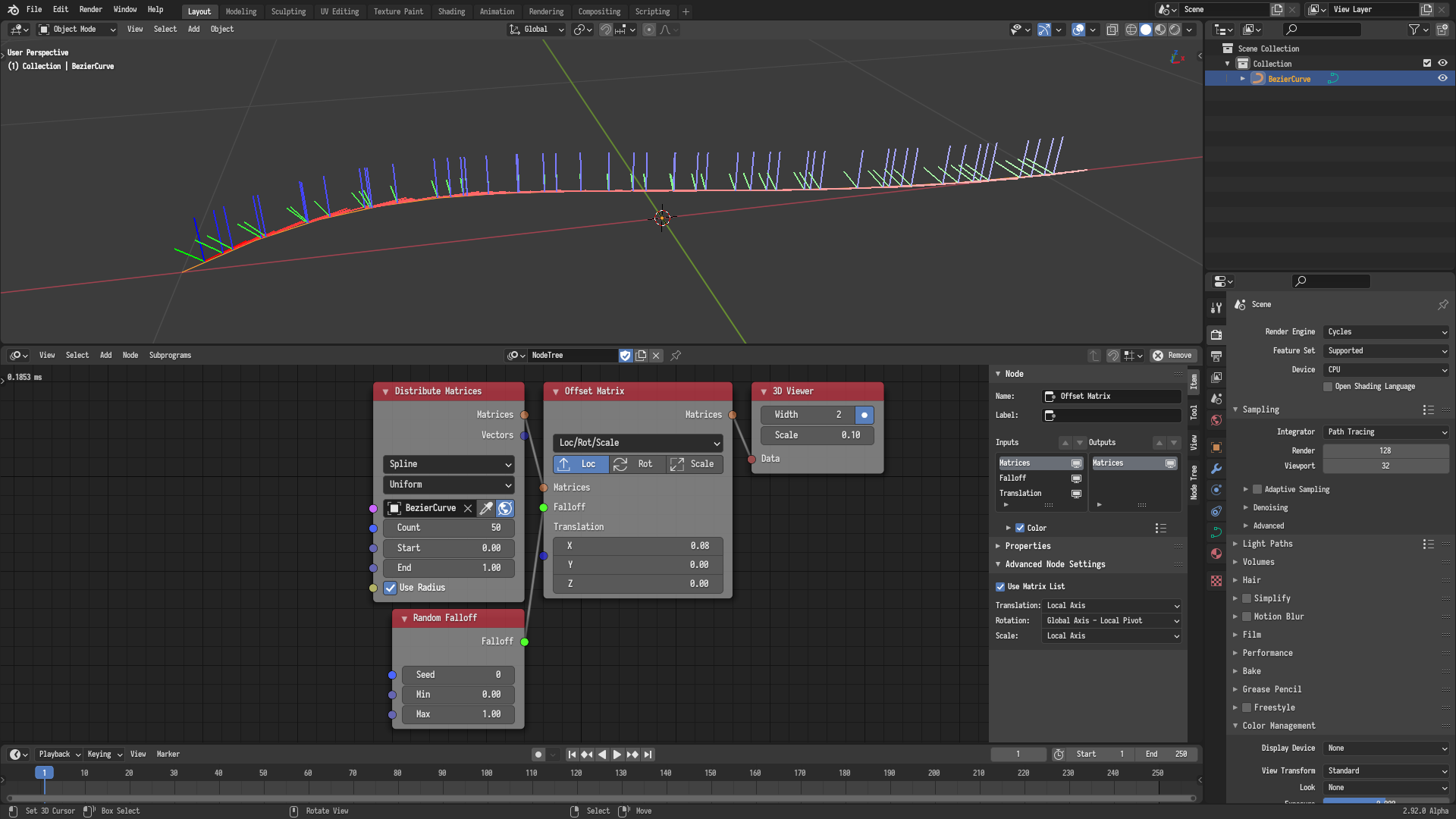
Finally, I would like to present a simple example that demonstrates a simple concept. A small offset along a spline can be approximated in the global scene space by offsetting the matrices along their local x axis (See Advanced Node Setting of the Offset Matrix node). This works because the local x axis is aligned with the tangent of the spline. That's an example where we process the data using the information it encodes.
OmarEmaraDev
on 14 Dec 2020
Thanks for your explanation.
Please find here an example how this can work using the Distribute Matrices node method:
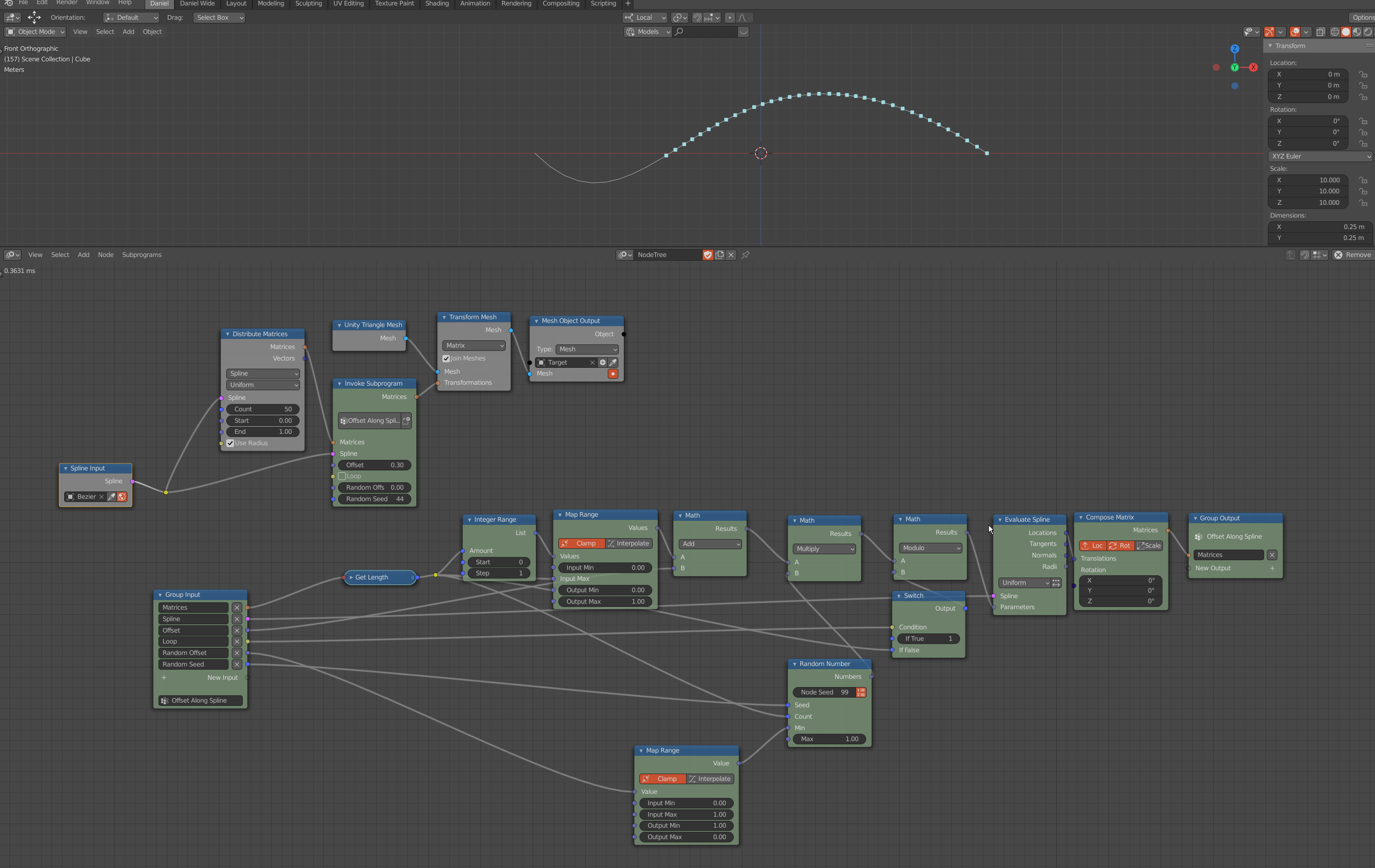
The Looping and Random Functionality could be implemented in a better way, since there are now instances for example stucking at the end of the spline, when going to a negative offset (is there a way to bypass nodes completely via a boolean input and/or a logical operation?) but overall it works.
Do you think this could a reasonable approach?
dapa5900
on 14 Dec 2020
Please find here an example how this can work using the Distribute Matrices node method:
If you like this method, you can name this subprogram and save it in your startup file,
so that you can live with this subprogram for yourself.
I won't comment on your method further, because it's very wrong while the correct one is already shown.
Gerstmann-Bradley
on 14 Dec 2020
Please find here an example how this can work using the Distribute Matrices node method:
If you like this method, you can name this subprogram and save it in your startup file,
so that you can live with this subprogram for yourself.
I won't comment on your method further, because it's very wrong while the correct one is already shown.
@Gerstmann-Bradley
Why do you comment anyways? So far you never had an pro-active way of thinking about user friendly improvements to Animation Nodes but instead you just justifying all the time that the way everything it's currently working is the best way it can possibly be done anyways. I can ensure you it's not and I bet if 10 artists should come up with a method to do this, 9 out 10 would rather go for my approach from an interface / user experience perspective (and I'm not talking about the underlying node setup) rather than the current method.
Just saying it's "very wrong" doesn't help at all, especially when it's working and thus proving your statement wrong by evidence.
I'm pretty much aware that I can save this stuff for myself as preset and if you remember I already have all of this implement for myself as node-group anyways. I'm just trying to contribute with an outsight view to help improving AN in terms of user friendliness and make it more accessible to people who don't have a PHD in software development or mathematics.
If you're not open to improvement proposals maybe you should get out of the conversation and leave the discussion to more open minded devs like @OmarEmaraDev
dapa5900
on 14 Dec 2020
ok, I have given suggestions and opinions though you didn't listen. I will keep silent for you from now on.
Gerstmann-Bradley
on 14 Dec 2020
ok, I have given suggestions and opinions though you didn't listen. I will keep silent for you from now on.
I was very much open for your suggestions, as a matter of fact I took your proposed approach as basis for my new node-setup. The only thing I'm trying to solve is to combine this with the new distribution method which imo is more user friendly and consistent with the other distribution methods. And as said, it's working so how can it be wrong? Nevermind.
I'm not sure if you're aware that more and more people are trying to switch to Blender from other DCCs however the big pain-point to this date is motion graphics. When you take a look at comments under tutorials for AN there's a lot of especially C4D people that would really like to try it out but a lot of people just can't wrap their head around it or complain about things that should be easy to achieve but are note as mentioned earlier. When you need a full screen of nodes to achieve something that can be done with 3 sliders in another software then something is wrong with the method no matter how much freedom this method might give you otherwise.
And whenever I see people now on Twitter arguing about this I try to convince them that you can wrap your head around it but I also promote AN, the GitHub and that everyone can contribute to make it better and that the devs (you) are super open about proposals. I really hope I didn't draw a wrong conclusion in this regards....
dapa5900
on 14 Dec 2020
@dapa5900 I wouldn't consider this a good approach to the problem, because it effectively redo what the distribute node does.
Is your primary motivation behind the offset input to animate the matrices on the spline? So if a node were to be added, it would be for the purpose of animating things on the spline?
OmarEmaraDev
on 14 Dec 2020
@OmarEmaraDev
Exactly. Animating and randomizing offsets along the spline. I see, that my approach is kind of stupid, since all it get's is the amount of the matrices actually and also doesn't work with the trimming provided by the Distribute Matrices in Spline mode. It's solely for showcasing what I would consider a more user friendly and consistent workflow. So if there's a way to maybe get the functionality into a node that can work with the Matrices provided by the Distribute Matrices in Spline mode as an input this would be great (maybe by interpolating between the current positions somehow...?). If this is simply not possible within the AN context, fine as well. I just wanted to see if it might be possible.
Thanks.
dapa5900
on 15 Dec 2020
@dapa5900 I think that the workflow you are proposing is not technically feasible in the context of Animation Nodes, for the reasons I explained above.
To conclude my thoughts for now, here is what I think we should do. We will implement the improvements I mentioned in the Evaluate Spline node to make the workflow easier and more streamline. Then we will create some examples based on the new workflow and present them. Finally, we will assess those examples and determine if more work is needed, be in it in the form of a new node or more improvements to existing nodes. Sounds good?
OmarEmaraDev
on 15 Dec 2020
@OmarEmaraDev
Sounds awesome. Thanks a lot for your effort.
dapa5900
on 15 Dec 2020
As a first step, a Wrap Parameters option was added to the Advanced Node Settings of the Evaluate Spline node in 0db35d4.
OmarEmaraDev
on 16 Dec 2020
A Matrix output, hidden by default, was added to the Evaluate Spline node in 4ea58ca.
OmarEmaraDev
on 17 Dec 2020
@dapa5900 Okay. Examples time.
Simple animation:
Animation with random offset controlled by a falloff:
What do you think?
OmarEmaraDev
on 19 Dec 2020
Thanks @OmarEmaraDev
Looks already quite good. From what I can tell you now implemented the looping and the align to spline functionality in the node, correct?
Here are a couple of questions that come to my mind.
- How do you turn off the looping in case you don't what that?
- If you don't want to have instances aligned to the spline you would just use the vector output instead, right?
- Would you implement the other distribution methods from the distribute matrices node as well here? (step, count etc)
- How could you trim the start and end (instances) in this setup similar to the distribute matrices node options?
- Out of interest: what other purposes has the parameter input in the evaluate spline node other than what you currently do in these setups? Meaning, what are other use cases that you can achieve by plugin in values here?
- One remark: don't know if this is due to your current 3d view rotation or the spline direction but imo the instances should move in the positive direction by default / when calculating with positive time info values.
- Is the performance pretty bad with this setup? You only get 8fps with so few instances even though you already use the mesh output instancing?
Thank you!
dapa5900
on 20 Dec 2020
@dapa5900 Yes, both are currently implemented.
- You can turn off the looping in the Advanced Node Settings of the node.
- Yes, you use the Vector output, Offset Vectors node, and Vectors mode of the Transform Mesh node.
- Sure.
- An easy solution is to use the Trim Spline node. But you can also change the ranges of the Float Range node.
- This the main way to evaluate a spline in Animation Nodes. So pretty much everything involving a spline. :)
- Looks like an illusion, the rate is exactly right that it seems they are moving in the opposite direction. You can see in the second example that they move in the positive direction correctly.
- No. It is less than a millisecond of execution time. The horrible FPS is because I am using a 12 years old GPU that runs on coal and can barely run Blender. So not related to Animation Nodes or Blender.
OmarEmaraDev
on 20 Dec 2020
Yeah cool, looks great. Looking forward to see the rest.
I have the feeling with these changes it will be way more accessible to create your own node groups to eg bundle all the features that I had in mind. Will there be the possibility to propagate the distribution methods as a group input as well?
Thanks again!
dapa5900
on 20 Dec 2020
@dapa5900 My apologies, haven't seen your question after the edit. Blender doesn't allow enum values to exposed as UI elements, so this isn't possible at the moment. You may use booleans or compare strings if that works for your case.
I tried to integrate the step evaluation method in the Evaluate Spline node, but haven't found a good way to do that yet. I think having the option in the distribute node is sufficient for now, we can pick this up again later if needed.
This was the last point to be handled for this proposal, right?
OmarEmaraDev
on 8 Jan 2021
@OmarEmaraDev
Yes I think so. Please let me know when I can test it. Thanks.
dapa5900
on 8 Jan 2021
I tried to integrate the step evaluation method in the Evaluate Spline node, but haven't found a good way to do that yet. I think having the option in the distribute node is sufficient for now, we can pick this up again later if needed.
This was the last point to be handled for this proposal, right?
Hi, I have several questions and/or requests:
- In terms of step evaluation, my logic is to get spline length and divide by an interval/step. Will this be unreasonable or difficult to accomplish in this way?
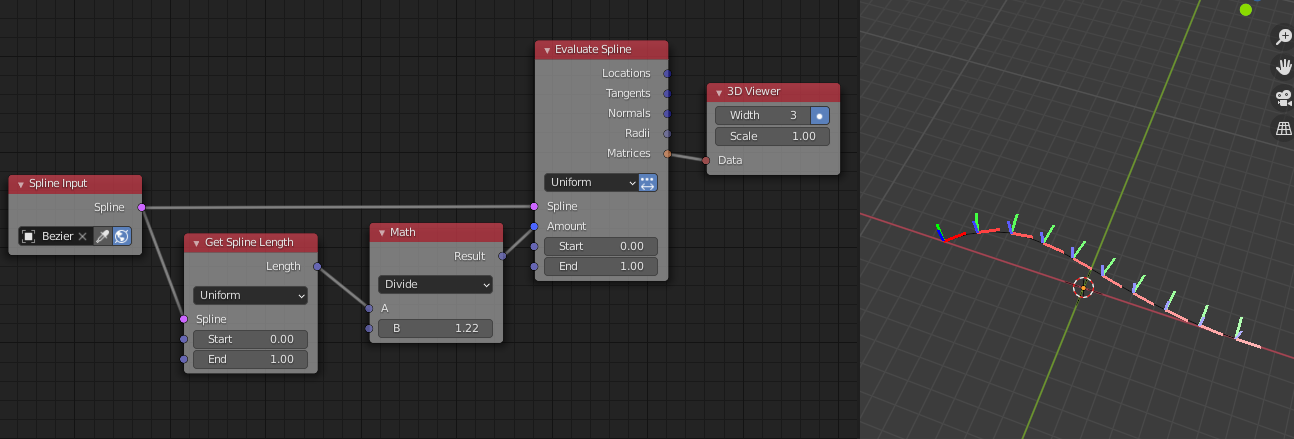
- From now on we have wrap in advanced settings, but "parameter" is still clamped between 0 and 1. To overcome this clamp we have to add an additional "float input" so that we can enter a value beyond 1 to loop it. I think this is a little awkward. In fact at the first glance, I thought wrap isn't working. My request is that, when we activate "wrap", is that possible to get rid of clamp?
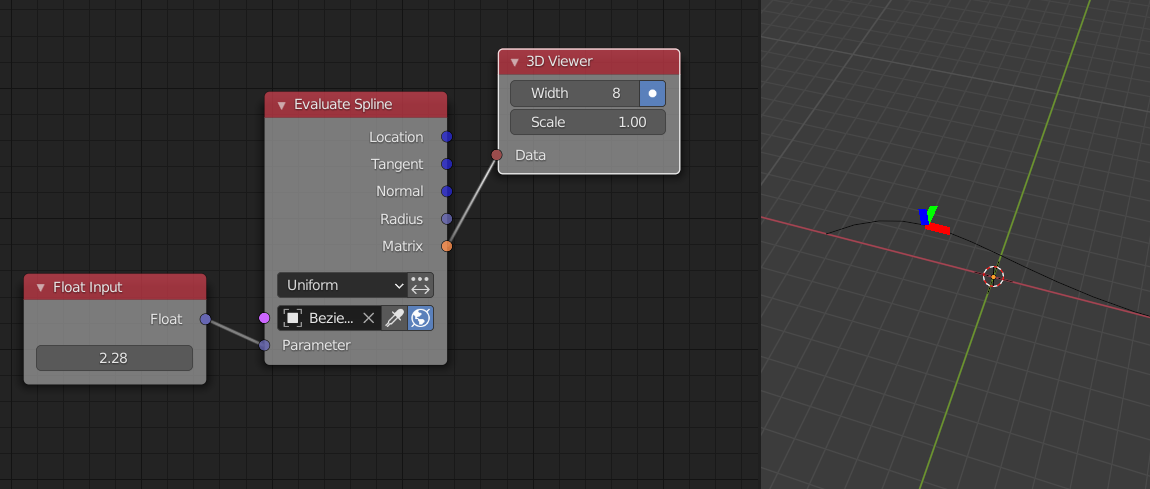
Matrix output is a very frequently used output in my opinion. For example if we want to ask object to follow matrix obtained on spline, we mostly need matrix (I know there is a follow spline action, but it's not possible to edit action as much as matrix. There is also other using cases in which we prefer to use evaluate spline node than distribute on spline, this has been discussed either in this post or other posts. in these cases matrix output should be unhidden and used). Thus, my request is would that be possible to unhide it in default and put that on top of the output list?
Gerstmann-Bradley
on 8 Jan 2021
@Gerstmann-Bradley
I was talking about design difficulties. I don't know where to put this option or how to incorporate it in the node design. Essentially, the main option in the node is the Uniform vs Resolution, the Step option doesn't fit with those options, and it shouldn't even be available when evaluate range is not enabled, so we can't put it with this enum. We can't put the Step option alone because it only works with Uniform and not Resolution, so we have to hide the main option when this is enabled, but the option itself shouldn't be visible when Evaluate Range is disabled, which is drawn beside the main option. You see where this is going. I am open to suggestions.
Good point. Fixed in 1dcd4d9.
Sure. Done in 8efcd12.
OmarEmaraDev
on 8 Jan 2021
@Gerstmann-Bradley
- I was talking about design difficulties. I don't know where to put this option or how to incorporate it in the node design. Essentially, the main option in the node is the Uniform vs Resolution, the Step option doesn't fit with those options, and it shouldn't even be available when evaluate range is not enabled, so we can't put it with this enum. We can't put the Step option alone because it only works with Uniform and not Resolution, so we have to hide the main option when this is enabled, but the option itself shouldn't be visible when Evaluate Range is disabled, which is drawn beside the main option. You see where this is going. I am open to suggestions.
- Good point. Fixed in 1dcd4d9.
- Sure. Done in 8efcd12.
- I see, I didn't realize that. No problem.
2, 3. thanks for accepting the other two points.
Gerstmann-Bradley
on 8 Jan 2021
@OmarEmaraDev @Gerstmann-Bradley
Good points. Thank you both
dapa5900
on 8 Jan 2021
Final suggestion implemented in 5fb31de. Thanks for the suggestions everyone!
OmarEmaraDev
on 10 Jan 2021
@OmarEmaraDev
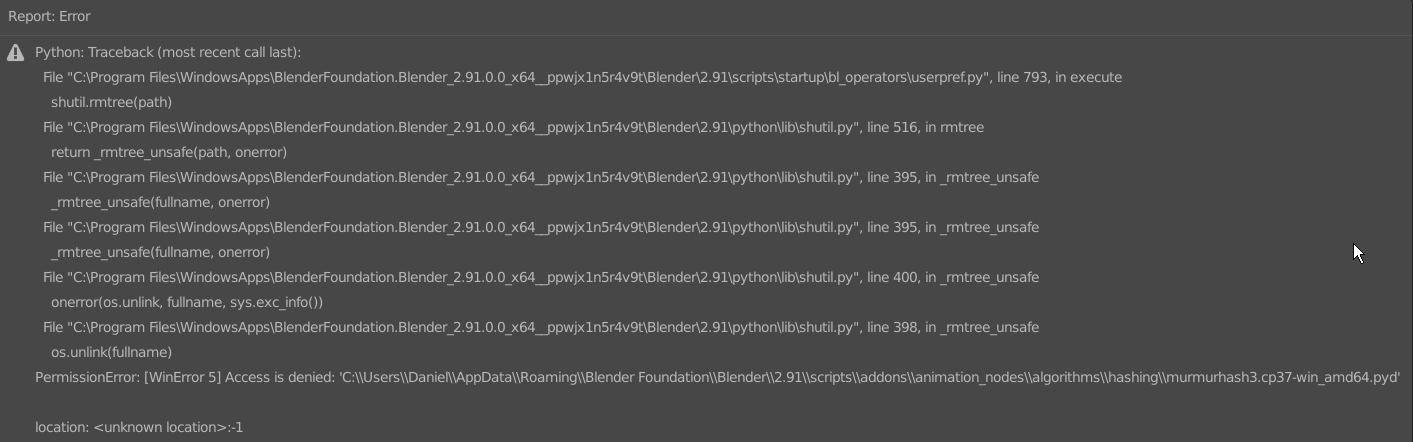
thank you. I just wanted to test it but when I try to remove (disabled the addon, restarted Blender and the tried to remove it) the recent AN version before, I get this error...
dapa5900
on 11 Jan 2021
@dapa5900 You were probably an administrator when you installed it. Just remove the animation_nodes folder manually in this case.
OmarEmaraDev
on 11 Jan 2021
@OmarEmaraDev
thanks. I found the problem. I had the extensions from blue fox installed as well and the were still enabled, that's why it wouldn't let me remove AN.
dapa5900
on 11 Jan 2021
Right, good to know. We can add that to the documentation.
OmarEmaraDev
on 11 Jan 2021
@OmarEmaraDev
ok, I quickly tried to test it however here are a few things that I noticed right away.
- The matrices output is disabled by default, but should be enabled by default as suggested by @Gerstmann-Bradley
- In Parameter Mode this icon/function is now missing, is this intended?

- Parameter Count and Step Mode work good but how would I now setup the offsetting animation using these modes? (as I don't have the paramater input in these modes anymore...)
Thank you!
dapa5900
on 11 Jan 2021
- In Parameter Mode this icon/function is now missing, is this intended?
- Parameter Count and Step Mode work good but how would I now setup the offsetting animation using these modes? (as I don't have the paramater input in these modes anymore...)
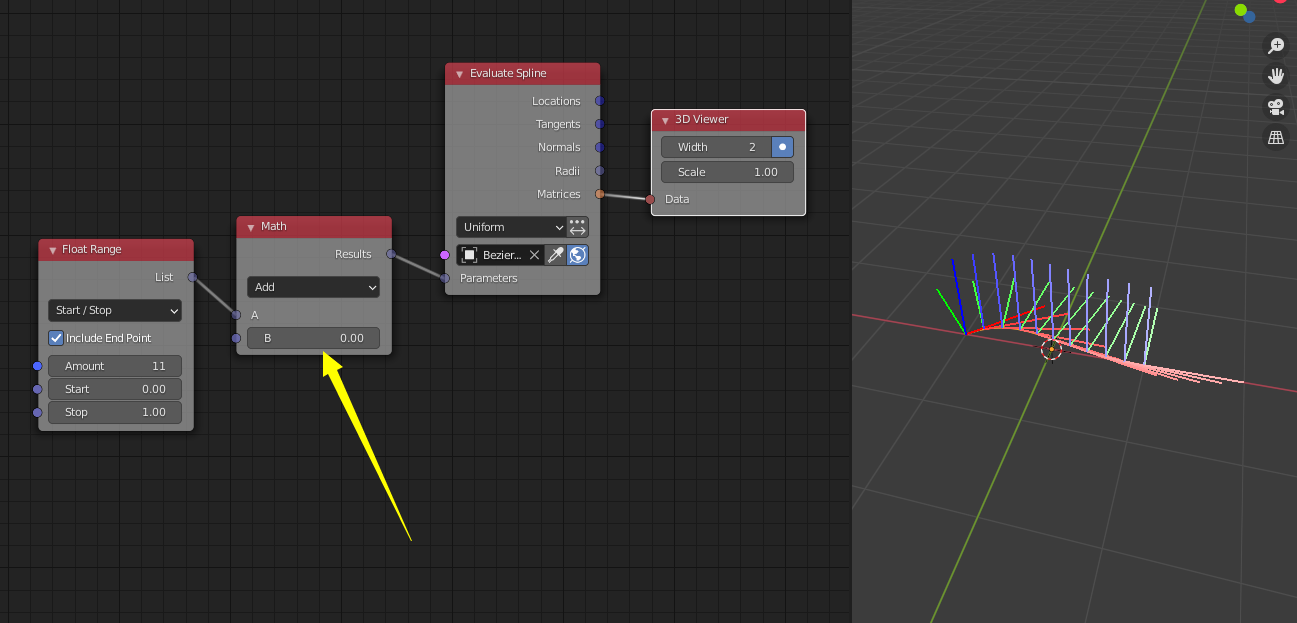
For your 2 and 3, the method.
I agree with 1.
Gerstmann-Bradley
on 11 Jan 2021
@dapa5900
- My bad. I forgot to show it in the parameter case. Corrected in 738537c.
- This button was replaced. Choosing "Range Count" is now equivalent to enabling this button.
- I thought we agreed already that those modes will not have an offset facility. The offset can be done using the methods outlined in my examples above and in the example provided by @Gerstmann-Bradley.
OmarEmaraDev
on 11 Jan 2021
@OmarEmaraDev
- Alright.
- Got it.
- Sorry I must have minderstood this then. I thought utilizing the evaluate spline node would make offsetting possible always no matter the distribution method. So would there still be a possibility to somehow offset along the path using the step or count mode by using other nodes in conjunction (because depending on the use case you might really need one of these two distribution methods)? And if not, is the functionality you get with these two modes any different from the functionality you get with the spline distribution in the distribute matrices node (also in combination with other nodes)?
Thank you.
dapa5900
on 11 Jan 2021
@dapa5900 Yes, because the range options are just shortcuts to the parameter option with some extra computations. The Range Count method is equivalent to a Float Range node used as the input parameter. The Range Step method is equivalent to a Float Range node with a multiple of the Spline Length as the count. So adding one or two nodes will give you the desired effect.
OmarEmaraDev
on 11 Jan 2021
@OmarEmaraDev
alright. I tried to setup this up with a float input and one math add node for the start and end values:
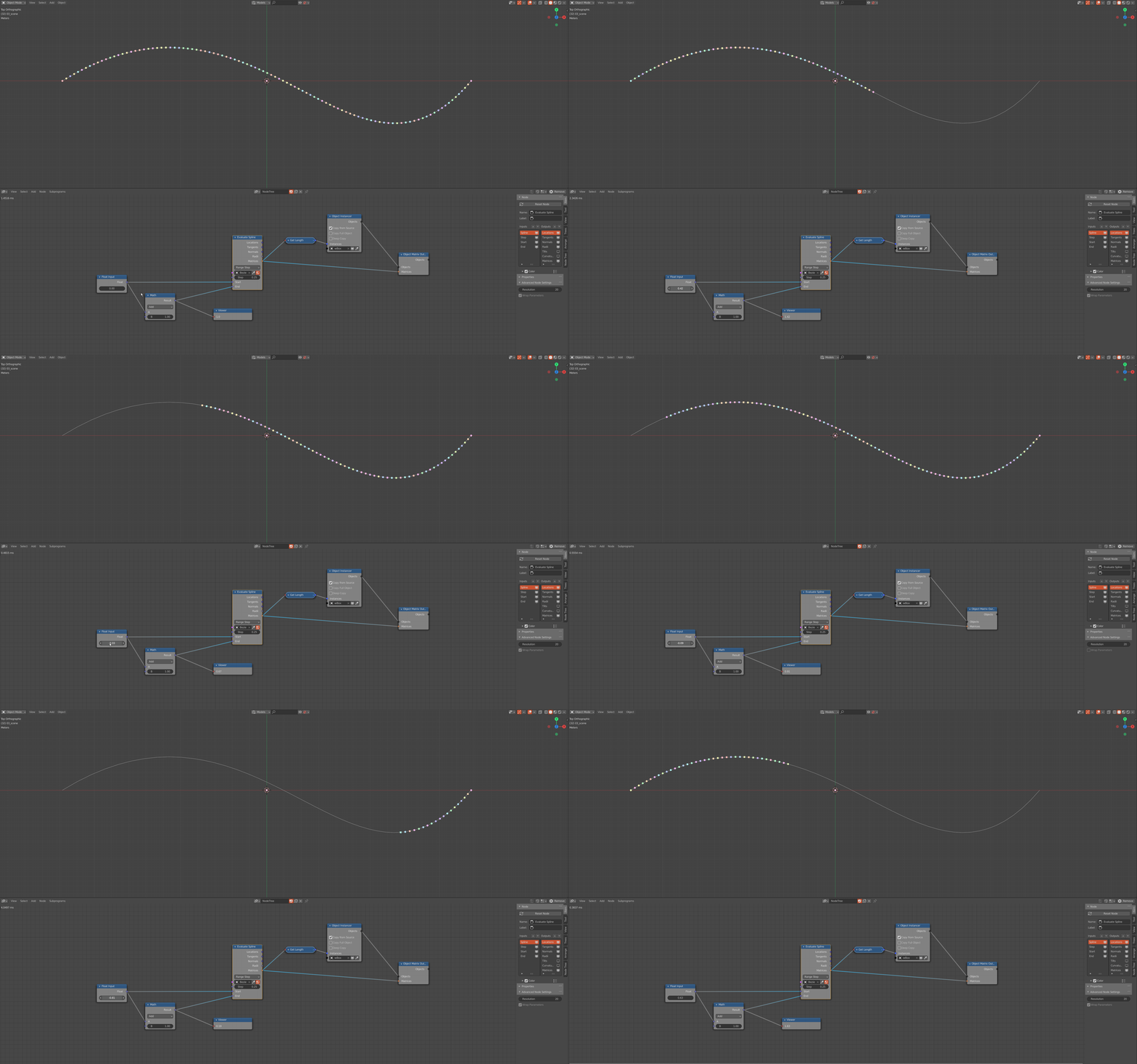
the offsetting works now, but it doesn't loop. I tried checking "Wrap Parameters" on (which I think would be the right way to achieve this considering the tool tip hint, right?) and off, but this doesn't change anything in my case. Am I missing something here? Or do I need to achieve the looping effect with some modulo math instead?
thank you!
dapa5900
on 11 Jan 2021
@dapa5900 The "Wrap Parameter" only works with the parameter mode, hence the name. As I said, those modes will not have an offset facility.
OmarEmaraDev
on 11 Jan 2021
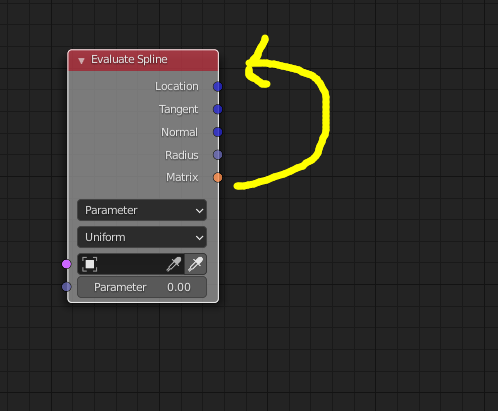
Hi @OmarEmaraDev, if you don't mind, I wish to have matrix output to be the first output.
Matrix also define location, it's nice to have these two relative functions stay near each other. It also consistent with the output arrangement as distribute matrices node.
Gerstmann-Bradley
on 11 Jan 2021
@Gerstmann-Bradley I will think about it.
OmarEmaraDev
on 11 Jan 2021
Related issues
 Montaire
·
3Comments
Montaire
·
3Comments
 juangea
·
10Comments
juangea
·
10Comments
 tofuhead
·
7Comments
tofuhead
·
7Comments
 harisreedhar
·
10Comments
harisreedhar
·
10Comments
 enzyme69
·
9Comments
enzyme69
·
9Comments
Most helpful comment
@dapa5900 Yes, both are currently implemented.