Animation_nodes: Have issue installing AN 2.1 on Mac Blender 2.8
Is this because I have previous AN add-on?
reloading addon: animation_nodes 1544910486.8574095 1544910962.3037305 '/Users/jimmygunawan/Library/Application Support/Blender/2.80/scripts/addons/animation_nodes/__init__.py'
Modules Installed () from '/Users/jimmygunawan/Downloads/animation_nodes_v2.1_blender2.80_macOS_py37.zip' into '/Users/jimmygunawan/Library/Application Support/Blender/2.80/scripts/addons'
GPUShader: compile error:
ERROR: 0:72: Use of undeclared identifier 'gl_FragColor'

Traceback (most recent call last):
  File "/Users/jimmygunawan/Downloads/blender-2.80.0-git20181215.351f537fa83-x86_64/blender.app/Contents/Resources/2.80/scripts/modules/addon_utils.py", line 351, in enable
    mod = __import__(module_name)
  File "/Users/jimmygunawan/Library/Application Support/Blender/2.80/scripts/addons/animation_nodes/__init__.py", line 166, in <module>
    auto_load.init()
  File "/Users/jimmygunawan/Library/Application Support/Blender/2.80/scripts/addons/animation_nodes/auto_load.py", line 23, in init
    modules = get_all_submodules(Path(__file__).parent)
  File "/Users/jimmygunawan/Library/Application Support/Blender/2.80/scripts/addons/animation_nodes/auto_load.py", line 51, in get_all_submodules
    return list(iter_submodules(directory, directory.name))
  File "/Users/jimmygunawan/Library/Application Support/Blender/2.80/scripts/addons/animation_nodes/auto_load.py", line 55, in iter_submodules
    yield importlib.import_module("." + name, package_name)
  File "/Users/jimmygunawan/Downloads/blender-2.80.0-git20181215.351f537fa83-x86_64/blender.app/Contents/Resources/2.80/python/lib/python3.7/importlib/__init__.py", line 127, in import_module
    return _bootstrap._gcd_import(name[level:], package, level)
  File "/Users/jimmygunawan/Library/Application Support/Blender/2.80/scripts/addons/animation_nodes/nodes/viewer/viewer_3d.py", line 19, in <module>
    matricesShader = getShader(os.path.join(os.path.dirname(__file__), "matrix_shader.glsl"))
  File "/Users/jimmygunawan/Library/Application Support/Blender/2.80/scripts/addons/animation_nodes/graphics/import_shader.py", line 10, in getShader
    return gpu.types.GPUShader("\n".join(lines[:i]), "\n".join(["\n"] * index + lines[i:]))
Exception: Shader Compile Error, see console for more details
 enzyme69
All 9 comments
Or is it because of this? MacBookPro 2017

enzyme69
on 15 Dec 2018
Thanks.
Maybe this fixes it: https://stackoverflow.com/a/26695347/4755171
It should be possible for you to try that fix by changing two lines of code or so. However I don't know which ones right now (I'm on my phone).
Will give more detailed instructions tomorrow.
 JacquesLucke
on 15 Dec 2018
JacquesLucke
on 15 Dec 2018
Navigate to animation_nodes/nodes/viewer/matrix_shade.glsl. After the line // Fragment Shader, change the code to:
flat in vec4 v_Color;
out vec4 fragColor;

void main()
{
    fragColor = v_Color;
}
Does this solve the problem?
 OmarEmaraDev
on 16 Dec 2018
OmarEmaraDev
on 16 Dec 2018
@OmarSquircleArt Yes, it seems to work!!! And holy crap AN in Blender 2.8 is FAST!
enzyme69
on 16 Dec 2018
Fixed in 9cfdb0b.
OmarEmaraDev
on 16 Dec 2018
hello
problem with animation node on mac 2017 mojave

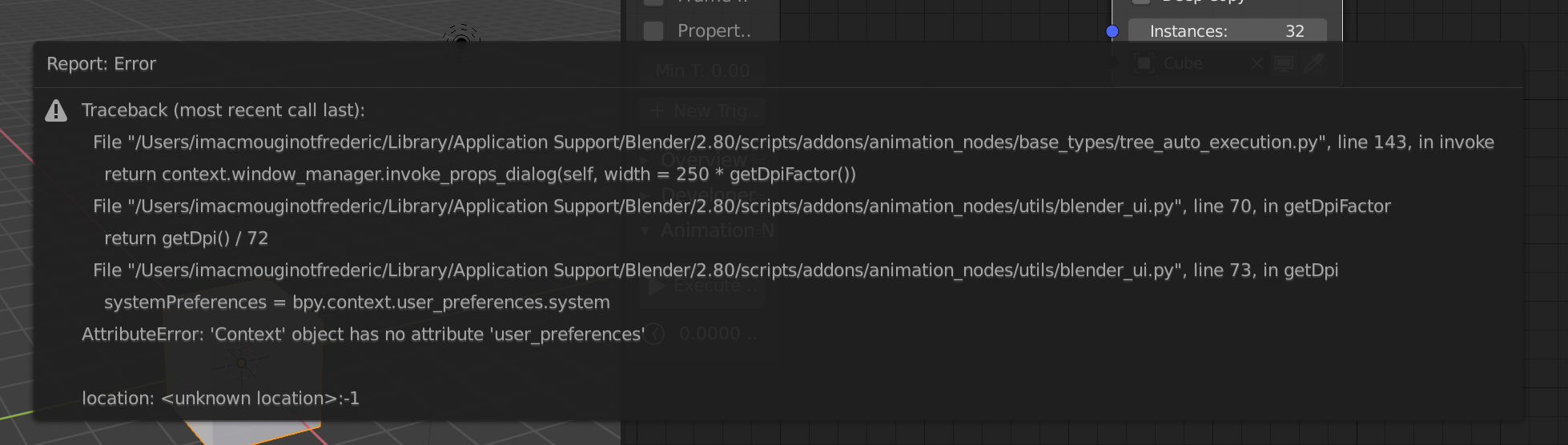
 frf2436
on 25 Dec 2018
frf2436
on 25 Dec 2018
@frf2436 Thanks for the report. This was already fixed.
OmarEmaraDev
on 25 Dec 2018
@nch3d Thanks for the report, this was already fixed. Please open a new issue for further reports.
OmarEmaraDev
on 6 Jan 2019
@nch3d Thanks for the report, this was already fixed. Please open a new issue for further reports.
@OmarSquircleArt Thanks.... find this and work!!
https://github.com/JacquesLucke/animation_nodes/commit/f69dda0e1b6ad2da1ed9fd37dda839bf8815370c#diff-0af26f9b9db107e7409421702476aa04
 nch3d
on 6 Jan 2019
nch3d
on 6 Jan 2019
Related issues
 collinizhou
·
10Comments
collinizhou
·
10Comments
 LupoMarcio
·
4Comments
LupoMarcio
·
4Comments
 tofuhead
·
7Comments
tofuhead
·
7Comments
 ricardoroehe
·
4Comments
ricardoroehe
·
4Comments
 harisreedhar
·
5Comments
harisreedhar
·
5Comments
Most helpful comment
Navigate to
animation_nodes/nodes/viewer/matrix_shade.glsl. After the line// Fragment Shader, change the code to:Does this solve the problem?