Animation_nodes: A question about variable nodes
My animation depends on the value of a certain vector V, which changes very slowly. The calculation of V is time-consuming. I don't want to calculate V at every frame. I want to update (calculate) V every 15th frame, save the value to a variable and retrieve it in all intermediate frames.
It does not seem possible to declare a variable node to store and retrieve variables. The variables (integer, float, vector etc) should be persistent and accessible by all nodes (at least in the same tree) across different frames. If not possible, I like to suggest implementing variable nodes. I believe it will be very powerful for many other situations.
 mathlusiverse
All 106 comments
Wouldn't a per frame cache be ok in this case?
 OmarEmaraDev
on 7 Feb 2019
OmarEmaraDev
on 7 Feb 2019
I have already done this in several of my own nodes. I am on holiday just now (in Vietnam without my Mac), but will let you know how I did it when I get home mid February . Basically you can set a “property” to be a variable and update it on the fly and read it whenever you want, these are displayed with a “draw” option in the node definition. You can also do this with custom properties, but “variable” nodes are better IMHO.
Cheers, Clock
 Clockmender
on 7 Feb 2019
Clockmender
on 7 Feb 2019
Thanks for the reply.
Can @OmarSquircleArt explain per frame cache? Is the cache per frame or per whole animation (meaning persist between different frames)?
Looking forward to see how @Clockmender achieve the it.
Without seeing either of the solutions yet, I tend to think a dedicated "variable" node will provide a clean and transparent (and hence better) approach to situations such as my use case. :)
mathlusiverse
on 7 Feb 2019
Have a look at the documentation for subprogram caching. Basically, you create a group that computes the vector V. And enable Per Frame Caching Mechanism to cache the result of the group at different frames. Alternatively, you can use a Per Input Caching Mechanism to get the exact behaviour you are looking for, this works as follows:

This will compute the vector once every 15 frames. Of course, the input frame has to be multiplied by 15 in this case during computation.
OmarEmaraDev
on 7 Feb 2019
@OmarSquircleArt Thanks for the picture and the link. I read the documentation, it seems 'Once Per Input' is the appropriate cache mode here.
Your idea of feeding floor(frame/15) as the input will indeed skip the calculation for most of the frames and force the computation every 15 frames. The problems is it will accumulate old and outdated cache and waste memory.
There is absolutely no need to cache old values of the vector V (referring to my example). The value V is meant to be overwritten at every new input. I see the button 'Clear cache' in the picture. Is it possible to 'pro grammatically press' the button inside [Do something expensive here] before each calculation?
If not, then this may not be what I want. BTW, thanks for pointing out the cache feature. I didn't know it before, I am sure I will need it for other purpose later.
mathlusiverse
on 7 Feb 2019
There is no way to achieve this in Animation Nodes currently, aside from using a python script or using some strange hacks. I might submit a patch that gives some functionality like this, but currently there is no way to do this that I know of. Sorry.
OmarEmaraDev
on 7 Feb 2019
Thanks for the info.
It seems that my use case is common and important enough to warrant a special node. One immediate approach is to wrap the Group Input node with auto clear cache at each new input. But this is not a desirable solution because it is essentially disabling a sophisticated feature (caching of multiple input version) to achieve overwriting (caching only the latest version disregarding the input combination).
It also seems it would (it will take time to debug, optimize and polish) be easy to strip the extra features of Group Input node and turn it into a simple "variable node": (1) We don't need cache for multiple input combination. (2) We don't need multiple input parameters.
I am not familiar with the implementation of Animation Nodes. Sorry if the following comment is way off.
The implementation of "variable node" should be easier and more efficient than Group Input node. Because it should just have the following 3 essential ingredients:
(1) Name of the node (serve as the name of the variable)
(2) A simple trigger for writing value (instead of comparing new input with cached input combinations) .
(3) An always-available output socket for reading the value.
Of course, a totally different approach to the whole concept of "variable node" may be worth consideration. But in the main time, the above 'dirty fix' should work. :)
mathlusiverse
on 7 Feb 2019
But how do you want to implement this trigger? We will still need some method to disable the execution of the node tree responsible for creating the variable data. Or else the node will be of no use.
OmarEmaraDev
on 7 Feb 2019
A pure "variable node" should not link execution code for calculating its own value. It should be just a container that accepts calculated value and make it available to others.
The Group Input/Output nodes are actually more than a cache, together it is like an execution module with a buffer for writing/reading its internal state.
We can achieve "variable node" by having one boolean input only. For example, we can feed
(frame % 15==0)
as the input. It is a trigger. The group input will execute the nodes between Group Input/Output only if the trigger is true.
Now how do we get the parameters needed for the calculation of variable? Because the Group Input/Output is responsible for launching and providing all necessary data for the calculation. Hence "extra" inputs such as frame (in my example) will be part of the Group Input setup!
This is ugly approach! In this case, the data "frame" is actually globally available, so we don't really need to include it in the Group Input setup. But what if the variable requires a lot of different data? It will be ugly to provide everything in the Group Input setup. In such case, may be we should have a stand-alone function to calculate the value of a variable, and have the Group Input/Output pair to act on a single boolean trigger and then call the function to update its own internal cache.
I believe, we need pure container nodes for holding variable values. They should not be associated with the calculation in any manner. This is a conceptually better approach, because a variable may be calculated by different methods in different places at different time under different circumferences. To have the Group Input/Output to embed all these different ways to update the variable is just not clean approach.
mathlusiverse
on 7 Feb 2019
I see what you mean. Subprogram weren't designed for this purpose anyway. While a specialized subprogram needs more study, what we can do currently is add a boolean input to the Invoke node to trigger its execution. I already have such system in my custom build. I will discuss it with Jacques and see if we can merge this upstream.
OmarEmaraDev
on 7 Feb 2019
Great! :)
I think that will do the job.
I do hope you guys will consider implementing a true variable node, that are stand-alone, and can be used anywhere in a tree for writing and reading.
I will try look into the implementation and happy to help down the road.
mathlusiverse
on 7 Feb 2019
A good idea would be to open a new issue with clear description of your proposal. That way Jacques can read it more clearly and give input.
OmarEmaraDev
on 7 Feb 2019
OK, basically a variable node should be a simple wrapper of a Python variable. Its usage and behavior should be intuitive and non-surprising to new comers of the Animation Nodes. It should be robust and conceptually-simple enough that it does not have unexpected side effect when it is used anywhere by reasonable new users.
Thanks for the suggestion. I'll have to think about how to write the proposal. It will probably take me a while to do that.
mathlusiverse
on 7 Feb 2019
@Clockmender, It sounds like you add a custom property to an object and use it as a variable. I am not very familiar with Animation Nodes, I am curious how you actually do that. This may turn out the 'cheapest' way to do variable, please post your approach also when you come back from your trip!
Enjoy your trip! :)
mathlusiverse
on 7 Feb 2019
OK a quick starter, no images as it’s from my phone:
Create an object and add a Custom Property of some description and call it “Value_1”.
Add an Object node and select the new object.
Add an Expression Node and plug the object node into the input socket.
Type this into the Expression Node:
x[‘Value_1’]
Plug a Viewer into the output socket, set some value for the custom property in the normal way and execute your node tree. You will see the custom property value output to the viewer node.
That’s the easiest way to read custom properties into a node tree. If you type this into the Expression Node, assuming a float property:
x[‘Value_1’] = 12.56
And execute the node tree it will set the custom property to the value input.
You are quite correct the use modulo maths to trigger responses every so many frames, you could experiment with an expression node here also. Expressions like:
0 if frm % 15 == 0 else frm
Are perfectly valid if you feed the frame input into the Expression node and call the input “frm”.
Cheers, Clock
Edit
I am quite happy to make a node for you when I get home, but this should get you thinking in the right direction. More later....
This, used as an expression:
x[‘Value_1’] = x[‘Value_1’] if frm % 15 != 0 else x[‘Value_1’] + 1
Should increase the value of the custom property by 1 every 15 frames, if my memory serves me well, I cannot test this....
Clockmender
on 8 Feb 2019
@Clockmender I tried to follow your suggestions, and tried some variations but did not get the expected result. The viewers all show "None".
It is surprising that the custom property must be float type, or am I looking at the wrong tabs?
Thanks for the hints! I will try writing a node to solve this problem.

mathlusiverse
on 8 Feb 2019
@mathlusiverse Animation Nodes is not functioning in this screenshot. You are probably using an old AN version where things didn't work due to API change. Try a newer version.
OmarEmaraDev
on 8 Feb 2019
@OmarSquircleArt I downloaded the following
https://github.com/JacquesLucke/animation_nodes/archive/v2.1_blender2.8_testbuild1.zip
from Animation Nodes 2.1 for Blender 2.8 Test Builds.
It is the latest one that I can find. BTW is the test build has a github?
I am using the nightly built Blender 2.8 and Python 3.7. @JacquesLucke was VERY helpful in troubleshooting my setup. The Animation Nodes was freshly built and copy to Blender addon folder a few hours ago.
I assume I am working with the latest version of Animation Nodes. It said version 2.1.3 May be I am missing something.
mathlusiverse
on 8 Feb 2019
@mathlusiverse This is not the latest. Just clone the blender2.8 branch and build it directly. The files on the release page are out-dated.
OmarEmaraDev
on 8 Feb 2019
@OmarSquircleArt Thanks! I am looking for the Github for Blender2.8 built! :)
I am new at GitHub, I just selected the blender2.8 branch, cloned the blender2.8 branch using Github desktop. I rebuild the whole thing. Now Blender complainted the AN is version 2.0.4.
This may be a silly question :( I selected branch 2.8 before I clone it with Github desktop, but when I build everything, it seems to use the old branch. How do I actually get branch28 to my local drive?
In the mean time, I am trying different ways to get branch28 onto my drive, I am not sure what I am doing LOL. I get the following "This may never happen" bug. It may be just my system is confused with different version.

mathlusiverse
on 8 Feb 2019
All branches are stored in this repository, this is how git works. When you clone a repository, it is automatically checkout at the master branch. So you have to checkout to the blender2.8 branch. To do that, you should navigate to the repository and execute git checkout blender2.8, I am not sure how to do that on Github Desktop, but a quick google search tells me:
Simply click on the dropdown menu on the upper left hand corner of the client, and pick the branch you want to switch to.
After checking out, you should be able to to build it with no problems.
OmarEmaraDev
on 8 Feb 2019
It is working now!!! Thanks @OmarSquircleArt Now I am building from the blender2.8 in the Github. That's really an adventure.
The idea of using an expression to get the value of a custom property from an Object input node is not working. Not sure what the two cryptic error message mean (Wrong Output Type & Expected Object). LOL I think it is probably just the wrong usage of the nodes, not anything wrong with the nodes themselves.
But the other method work.
However, the custom property is float only. I am going to explore how to write/read a simple node storing a Vector value.

mathlusiverse
on 8 Feb 2019
The expression node have a generic output socket by default, you changed that to an Object socket. So Animation Nodes tried to convert the float to an object and fails, hence the error. To change the output to the desired type, click on the gear button.
I think you might find my answer here useful.
OmarEmaraDev
on 8 Feb 2019
Yes. It work.
I clicked the gear before, but did not realize it is for selecting type of the value. It makes perfect sense now.
mathlusiverse
on 8 Feb 2019
@mathlusiverse I made a pull request for a conditional invoking feature #1027. You can compile the conditional_invoking branch to use it. Can you test it?
OmarEmaraDev
on 8 Feb 2019
@omar... thanks for helping with this!
@math... you might like to think about storing three floats on your node and using the execute function to combine them into a vector for the output socket. I am not sure there is a vector property you can use in your node. I would use FloatProperties for your variables, float inputs to set them and a BoolProperty to set the variables to the inputs, so only change vector variables if BoolProperty is True.
I will start work with you on this when I get home.
Cheers, Clock.
Clockmender
on 9 Feb 2019
I got one of my friends to do this for you and mail me this picture:

It was done in blender 2.79 with AN 2.0, but gives you a better idea of what I was rambling on about in a previous post. It resets the custom property at frame 1 back to 0 and increments it by 1 every 15 frames as you run the animation. Building this into an "easy to use" node will not be difficult.
Cheers, Clock.
Clockmender
on 9 Feb 2019
@OmarSquircleArt I tested the conditional invoke with a very simple animation. It works. Thanks!
Please see the attached blender file. The animation consists of 2 planets (yellow cube and blue sphere) moving around its own circular orbit. The cube moves every 20 frames, the sphere also moves every 20 frames, but delayed by 10 frames. Hence they kind of 'jump' (not smooth move because of the 20 frames pause) alternatively.
The position of a planet is (Rcos A, Rsin A, 0) where R is orbit radius, A is the angle determined by the speed.

BTW, Why are the color of the frames shaded?All those vibrant colors are useless. I like bright yellow frames :)
mathlusiverse
on 9 Feb 2019
@Clockmender Thanks for the replies. They look interesting.
I am going out of town with my kids for this weekend. I will look at your ideas as soon as I have time. Thanks again.
mathlusiverse
on 9 Feb 2019
@mathlusiverse You can change their color in the N Panel.
OmarEmaraDev
on 9 Feb 2019
@Clockmender I am new to Animation Nodes. The nodes look unfamiliar in the diagram attached in https://github.com/JacquesLucke/animation_nodes/issues/1026#issuecomment-462008524 I'll try figuring it out.
I am comfortable with programming in general, I am interested in the remarks you suggested in https://github.com/JacquesLucke/animation_nodes/issues/1026#issuecomment-462007592 I'll interested in working with you on this node.
I just started following the developer's guide. I wrote the following code for a variable node for a Vector. The idea is very simple: initialize an instance Vector variable to (0,0,0). And then update it if the Write socket is enabled.
But I will the following error:
AttributeError: 'VarVector' object has no attribute 'value_cache'
I originally use __value_cache as the name of the instance variable (want it to be private), then the error was:
AttributeError: 'VarVector' object has no attribute '_VarVector__value_cache'
I try declare value_cache inside __init__, it still doesn't work.
If I declare the variable outside create(), make it a class variable; then there is no compilation error. But the behavior of the node will be wrong.
import bpy
from mathutils import Vector
from .. base_types import AnimationNode

class VarVector(bpy.types.Node, AnimationNode):
  bl_idname = "an_VarVector"
  bl_label = "A container for storing and retrieving a Vector variable"

  def create(self):
    self.value_cache = Vector((0,0,0))     # instance variable for storing/retrieving a Vector value
    self.newInput("Boolean", "Write", "do_write")
    self.newInput("Vector", "Value In", "value_in")
    self.newOutput("Vector", "Value Out", "value_out")

  def execute(self, do_write, value_in):
    if do_write:
      self.value_cache = value_in
    return self.value_cache
I am sure I miss something simple in the code.
The idea in the following picture is very simple: write to the green vector variable node every 15 frames. Read the vector variable always. The vector variable is used to set the position of a cube. Correct behavior is the cube should jump 15 meters (instead of smooth move 1 meter per frame) every 15 frames.

mathlusiverse
on 11 Feb 2019
Nah! You don't do it like that!
See this image:

You declare the variables in the main definition and then process them through the "Mode" settings. Below is the code for this node so far, I will look at adding Rotation Eulers/ Quaternions later on.
Here is the code for this new node (Tried and tested in blender 2.79 and AN 2.0 BTW, not on Blender 2.8 and AN 2.1 yet):
import bpy
from ... base_types import AnimationNode
from bpy.props import *
from mathutils import Vector
from ... events import propertyChanged

class variableStore(bpy.types.Node, AnimationNode):
    bl_idname = "an_variableStore"
    bl_label = "Variable Store"
    bl_width_default = 150

    strV = StringProperty()
    intV = IntProperty(default = 0)
    floV = FloatProperty(default = 0)
    vexV = FloatProperty(default = 0)
    veyV = FloatProperty(default = 0)
    vezV = FloatProperty(default = 0)
    enum = [("STRING","String","String Variable","",0),
        ("FLOAT","Float","Float Variable","",1),
        ("INTEGER","Integer","Integer Variable","",2),
        ("VECTOR","Vector","Vector Variable","",3)]

    mode = EnumProperty(name = "Type", items = enum, update = AnimationNode.refresh)

    def draw(self,layout):
        layout.prop(self, "mode")

    def create(self):
        if self.mode == "STRING":
            self.newInput("Text", "Input", "varInput")
            self.newOutput("Text", "Output", "varOutput")
        elif self.mode == "INTEGER":
            self.newInput("Integer", "Input", "varInput")
            self.newOutput("Integer", "Output", "varOutput")
        elif self.mode == "FLOAT":
            self.newInput("Float", "Input", "varInput")
            self.newOutput("Float", "Output", "varOutput")
        elif self.mode == "VECTOR":
            self.newInput("Vector", "Input", "varInput")
            self.newOutput("Vector", "Output", "varOutput")
        self.newInput("Boolean", "Process", "boolInput")

    def execute(self,varInput,boolInput):
        if self.mode == "STRING":
            if boolInput:
                self.strV = varInput
                varOutput = varInput
            else:
                varOutput = self.strV
        elif self.mode == "INTEGER":
            if boolInput:
                self.intV = varInput
                varOutput = varInput
            else:
                varOutput = self.intV
        elif self.mode == "FLOAT":
            if boolInput:
                self.floV = varInput
                varOutput = varInput
            else:
                varOutput = self.floV
        elif self.mode == "VECTOR":
            if boolInput:
                self.vexV = varInput.x
                self.veyV = varInput.y
                self.vezV = varInput.z
                varOutput = varInput
            else:
                varOutput = Vector((self.vexV,self.veyV,self.vezV))
        return varOutput
I use Atom for my code writing... This setup only changes at 15 frame intervals, it changes the Text, Integer, Float and Vector mode outputs. I will upload blend file and .py node file later.
Cheers, Clock.
Another image of the cube jumping 3m every 15 frames:

Clockmender
on 11 Feb 2019
And here is no reason why it would not work with Quaternions:

But I m not sure where you would use this...
The Node Code now:
import bpy
from ... base_types import AnimationNode
from bpy.props import *
from mathutils import Vector, Euler, Quaternion
from ... events import propertyChanged

class variableStore(bpy.types.Node, AnimationNode):
    bl_idname = "an_variableStore"
    bl_label = "Variable Store"
    bl_width_default = 150

    strV = StringProperty()
    intV = IntProperty(default = 0)
    floV = FloatProperty(default = 0)
    vexV = FloatProperty(default = 0)
    veyV = FloatProperty(default = 0)
    vezV = FloatProperty(default = 0)
    vewV = FloatProperty(default = 0)
    enum = [("STRING","String","String Variable","",0),
        ("FLOAT","Float","Float Variable","",1),
        ("INTEGER","Integer","Integer Variable","",2),
        ("VECTOR","Vector","Vector Variable","",3),
        ("EULER","Euler","Euler Rotation Variable","",4),
        ("QUATERNION","Quaternion","Quaternion Rotation Variable","",5)]

    mode = EnumProperty(name = "Type", items = enum, update = AnimationNode.refresh)

    def draw(self,layout):
        layout.prop(self, "mode")

    def create(self):
        if self.mode == "STRING":
            self.newInput("Text", "Input", "varInput")
            self.newOutput("Text", "Output", "varOutput")
        elif self.mode == "INTEGER":
            self.newInput("Integer", "Input", "varInput")
            self.newOutput("Integer", "Output", "varOutput")
        elif self.mode == "FLOAT":
            self.newInput("Float", "Input", "varInput")
            self.newOutput("Float", "Output", "varOutput")
        elif self.mode == "VECTOR":
            self.newInput("Vector", "Input", "varInput")
            self.newOutput("Vector", "Output", "varOutput")
        elif self.mode == "EULER":
            self.newInput("Euler", "Input", "varInput")
            self.newOutput("Euler", "Output", "varOutput")
        elif self.mode == "QUATERNION":
            self.newInput("Quaternion", "Input", "varInput")
            self.newOutput("Quaternion", "Output", "varOutput")
        self.newInput("Boolean", "Process", "boolInput")

    def execute(self,varInput,boolInput):
        if self.mode == "STRING":
            if boolInput:
                self.strV = varInput
                varOutput = varInput
            else:
                varOutput = self.strV
        elif self.mode == "INTEGER":
            if boolInput:
                self.intV = varInput
                varOutput = varInput
            else:
                varOutput = self.intV
        elif self.mode == "FLOAT":
            if boolInput:
                self.floV = varInput
                varOutput = varInput
            else:
                varOutput = self.floV
        elif self.mode == "VECTOR":
            if boolInput:
                self.vexV = varInput.x
                self.veyV = varInput.y
                self.vezV = varInput.z
                varOutput = varInput
            else:
                varOutput = Vector((self.vexV,self.veyV,self.vezV))
        elif self.mode == "EULER":
            if boolInput:
                self.vexV = varInput.x
                self.veyV = varInput.y
                self.vezV = varInput.z
                varOutput = varInput
            else:
                varOutput = Euler((self.vexV,self.veyV,self.vezV))
        elif self.mode == "QUATERNION":
            if boolInput:
                self.vewV = varInput.w
                self.vexV = varInput.x
                self.veyV = varInput.y
                self.vezV = varInput.z
                varOutput = varInput
            else:
                varOutput = Quaternion((self.vewV,self.vexV,self.veyV,self.vezV))
        return varOutput
Cheers, Clock.
EDIT:
Could use it with my own "Bone Transform" Node I suppose:

Clockmender
on 11 Feb 2019
A good idea would be to open a new issue with clear description of your proposal. That way Jacques can read it more clearly and give input.
@OmarSquircleArt See my 2 posts above my friend, I think this is what he wanted and requires no real wizardry, perhaps you, or Jacques could comment on my strange behaviour with your nodes!!!
Cheers, Clock.
Clockmender
on 11 Feb 2019
@Clockmender Thanks. It works in Blender 2.8 beautifully!
The cube jumps 15 meters every 15 frames as expected!
The green node is your new Variable Store node.

It did gives the following un-harmful warning message on the console. May be new requirement for 2.8

The warning is:
Warning: class an_variableStore contains a properties which should be an annotation!
mathlusiverse
on 11 Feb 2019
I have no idea why it does that! I am not using 2.8 and AN 2.1 yet for anything other than playing and my 2.8 is well out of date... Perhaps @OmarSquircleArt could comment on how this might be better done in 2.8, I have not written any nodes for 2.8/AN 2.1 and won't until it is more stable, i.e. officially released! But then I'm a bit old fashioned...
Cheers, Clock.
Clockmender
on 11 Feb 2019
I am testing the second version with Euler. It has the following error. I think it is just an oversight only.
varOutput = Euler((self.vexV,self.veyV,self.vezV))
NameError: name 'Euler' is not defined
mathlusiverse
on 11 Feb 2019
I think you may not have altered this line:
from mathutils import Vector, Euler, Quaternion
Not sure as it works on my system. Is Euler recognised in Mathutils in Blender 2.8?
Clockmender
on 11 Feb 2019
Try just replacing your file with this one, maybe a typo....
I now have a error I did not have before, leave it with me a little while.
Clockmender
on 11 Feb 2019
It works beautifully in Blender 2.8 again. There was some hasty copy-and-paste on my part, hence some confusion. This is based on your last code (variable.py.zip).

Just start with a new Blender session, scale the default cube 10x and attach the default cube as shown.
Then the cube jumps 15 meters per 15 frames. And rotate 20 degrees about z-axis every 20 frames. :)
To see the animation better: Scale the cube 10x, and change animation length to 100.
mathlusiverse
on 11 Feb 2019
Glad it works! The error on mine was that I thought I had copied the file to my desktop to make the zip with, but I had just dragged it so it was missing from my nodes directory - what a plonker!
All is well again, maybe I should get some sleep after my 14 hour flight from Vietnam....
Clockmender
on 11 Feb 2019
Thanks for your help! It is quite rewarding for me. Have a good night.
mathlusiverse
on 11 Feb 2019
Thank you!
Can you think of anything else we might add as another variable type, let me know tomorrow, if you think of anything, I am off for some much needed sleep!
Also do you think it worthwhile making a node to trigger these events rather than using the Expression node, that may be beyond some people to understand and it is really easy to parcel that bit up nicely.
Clockmender
on 11 Feb 2019
Blender 2.8 required properties to be defined as type annotations, so instead of writing str = StringProperty() you write str: StringProperty(). This should get rid of the warning.
For the implementation itself, you can use a DataTypeSelectorSocket instead of an enum to define the type. Moreover, you can use a global dictionary with the node identifiers as keys. So a quick implementation should be something like this:
import bpy
from ... base_types import AnimationNode, DataTypeSelectorSocket

variables = {}

class VariableNode(bpy.types.Node, AnimationNode):
    bl_idname = "an_VariableNode"
    bl_label = "Variable"

    assignedType: DataTypeSelectorSocket.newProperty(default = "Float")

    def create(self):
        self.newInput("an_BooleanSocket", "Condition", "condition")
        self.newInput(DataTypeSelectorSocket("Input", "input", "assignedType"))
        self.newOutput(DataTypeSelectorSocket("Output", "output", "assignedType"))

    def execute(self, condition, input):
        if condition:
            variables[self.identifier] = input

        if self.identifier in variables and type(variables[self.identifier]) == type(input):
            return variables[self.identifier]
        else:
            return self.inputs[1].getDefaultValue()
Thanks Omar! I clearly have some learning to do before I port my nodes to 2.8/AN 2.1...
@mathlusiverse Here is a "Trigger" node:
import bpy
from ... base_types import AnimationNode
from bpy.props import *
from ... events import propertyChanged

class triggerNode(bpy.types.Node, AnimationNode):
    bl_idname = "an_triggerNode"
    bl_label = "Trigger Events"
    bl_width_default = 150

    mess = StringProperty()

    def draw(self,layout):
        if self.mess != '':
            layout.label(self.mess, icon = 'ERROR')

    def create(self):
        self.newInput("Integer", "Step (Frames)", "range")
        self.newInput("Integer", "Offset", "offset")
        self.newOutput("Boolean", "Condition", "condition")

    def execute(self, range, offset):
        if offset >= range:
            offset = 0
            self.mess = 'Offset Invalid, Using 0'
        else:
            self.mess = ''
        if range > 0:
            return bpy.context.scene.frame_current % range == offset
        else:
            self.mess = 'No Step Set'
            return True
And how to use it:

Just quick and dirty for now, but the Steps is the frame interval to activate, say every 20 frames and the offset is to adjust when it triggers in the "step" range, so 20 and 5 would trigger every 20 frames starting at frame 5, being input sockets you can of course animate them with other nodes...
Now I am really off to sleep!
Clockmender
on 11 Feb 2019
The following example uses 4 @Clockmender's Variable Store (orange) nodes and 1 Trigger Event (green) node. The trigger event fires once every 20 frames. A teapot will be randomly dancing, moving and changing its color.
A random number is generated and used to calculate the values of 4 variables to control the teapot's position, rotation, scale and its color.

3 Remarks on the code of the Trigger Event:
Blender 2.8 gives 1 warning. Solved easily by including 'text' in the following:
layout.label(text = self.mess, icon = 'ERROR')
I change the input 'Frame (Step)' to 'Cycle Length', and require it to be positive.
Cycle length must be at least one. I do not impose any condition on 'Offset'. I always think the "offset' as phase. The following code allow 'Offset' to change continuously from -99999 to 99999 and still behave seamlessly:
```
offset %= cycleLen
if offset < 0:
offset += cycleLen
```
Now that the variable node works, can we enhance it so that multiple instance of same-named-variable- nodes of the SAME variable can be used in different parts of the tree. The reason I ask this is because I want to be able to write/read the same variable (say, matColor) in multiple parts of the tree. Kind of like there is a 'hidden static list' storing the property matColor, so it can be referenced by different instance of the same-named-variable-node.
This feature will be useful, for example, to code x=3x+4x*(2-x) where x is an integer variable: read x, calculate new x, and then write new value back to x again.
Side note: The above example is actually a very special case, and can be achieved by new Update Expression node: get its own value in the input, and calculate it, and automatically update its own value, and produce the new output as bonus.
mathlusiverse
on 12 Feb 2019
I see the Variable node has changed a little as well, can you post the full code for both nodes as you have them now, so I can update my versions to match yours, I will adjust for blender 2.79/AN 2.0. I also see you have a Boolean option for the Variable node.
Now that the variable node works, can we enhance it so that multiple instance of same-named-variable- nodes of the SAME variable can be used in different parts of the tree. The reason I ask this is because I want to be able to write/read the same variable (say, matColor) in multiple parts of the tree. Kind of like there is a 'hidden static list' storing the property matColor, so it can be referenced by different instance of the same-named-variable-node.
Won't this cause a conflict between multiple nodes trying to set the same thing?
Thanks, Clock.
EDIT:
You can control the input socket values like this as an alternative:
def create(self):
        self.newInput("Integer", "Cycle Length", "cycLen", minValue = 1)
        self.newInput("Integer", "Offset", "offset", minValue = 0)
Note it is _minValue_ and _maxValue_, or course rather than _min_ and _max_ as it is for Properties...
Clockmender
on 12 Feb 2019
I have re-created your setup in Blender 2.79 / AN 2.0:

I will give some thought to your idea changing the variably with different nodes, I think there're ways to do this already (with Booleans you can just multiply various ones together in an Expression node).
Cheers, Clock.
EDIT:
I thought about the offset - cycLen thing again and this works nicely and auto-corrects:
import bpy
from ... base_types import AnimationNode
from bpy.props import *
from ... events import propertyChanged

class triggerNode(bpy.types.Node, AnimationNode):
    bl_idname = "an_triggerNode"
    bl_label = "Periodic Trigger"
    bl_width_default = 150

    def create(self):
        self.newInput("Integer", "Cycle Length", "cycLen", minValue = 1)
        self.newInput("Integer", "Offset", "offset", minvalue = 0)
        self.newOutput("Boolean", "Condition", "condition")

    def execute(self, cycLen, offset):
        if offset >= cycLen:
            offset = offset % cycLen
        return bpy.context.scene.frame_current % cycLen == offset
This changes at frame 6 as it should:

Clockmender
on 12 Feb 2019
Here is the code for Variable Store (Blender 2.8 beta, AN 2.1.3)
import bpy
from bpy.props import *
from mathutils import Vector, Euler, Quaternion
from .. base_types import AnimationNode
from .. events import propertyChanged

class VariableStore_Idea(bpy.types.Node, AnimationNode):
  bl_idname = "an_VariableStore_Idea"
  bl_label = "Store for a variable"

  varStr : StringProperty()
  varInt : IntProperty()
  varBoo : BoolProperty(default = False)
  varFx  : FloatProperty() # shared by Vector.x and Euler.x
  varFy  : FloatProperty() # shared by Vector.y and Euler.y
  varFz  : FloatProperty() # shared by Vector.z and Euler.z
  varFw  : FloatProperty() # shared by Float    and Euler.w

  varTypeEnum = [("STRING",     "String",     "String Variable",              "",0),
                 ("FLOAT",      "Float",      "Float Variable",               "",1),
                 ("INTEGER",    "Integer",    "Integer Variable",             "",2),
                 ("BOOLEAN",    "Boolean",    "Boolean Variable",             "",3),
                 ("VECTOR",     "Vector",     "Vector Variable",              "",4),
                 ("EULER",      "Euler",      "Euler Rotation Variable",      "",5),
                 ("QUATERNION", "Quaternion", "Quaternion Rotation Variable", "",6)]

  varType : EnumProperty(name = "Variable Type", items = varTypeEnum,
                         default = "FLOAT",  update = AnimationNode.refresh)

  def draw(self,layout):
    layout.prop(self, "varType")

  def create(self):
    self.newInput("Boolean", "Store", "boolInput")
    if self.varType == "STRING":
      self.newInput("Text", "Input", "varInput")
      self.newOutput("Text", "Output", "varOutput")
    elif self.varType == "INTEGER":
      self.newInput("Integer", "Input", "varInput")
      self.newOutput("Integer", "Output", "varOutput")
    elif self.varType == "FLOAT":
      self.newInput("Float", "Input", "varInput")
      self.newOutput("Float", "Output", "varOutput")
    elif self.varType == "BOOLEAN":
      self.newInput("Boolean", "Input", "varInput")
      self.newOutput("Boolean", "Output", "varOutput")
    elif self.varType == "VECTOR":
      self.newInput("Vector", "Input", "varInput")
      self.newOutput("Vector", "Output", "varOutput")
    elif self.varType == "EULER":
      self.newInput("Euler", "Input", "varInput")
      self.newOutput("Euler", "Output", "varOutput")
    elif self.varType == "QUATERNION":
      self.newInput("Quaternion", "Input", "varInput")
      self.newOutput("Quaternion", "Output", "varOutput")

  def execute(self, boolInput, varInput):
    if self.varType == "STRING":
      if boolInput:
        self.varStr = varInput
        varOutput = varInput
      else:
        varOutput = self.varStr
    elif self.varType == "INTEGER":
      if boolInput:
        self.varInt = varInput
        varOutput = varInput
      else:
        varOutput = self.varInt
    elif self.varType == "FLOAT":
      if boolInput:
        self.varFw = varInput
        varOutput = varInput
      else:
        varOutput = self.varFw
    elif self.varType == "BOOLEAN":
      if boolInput:
        self.varBoo = varInput
        varOutput = varInput
      else:
        varOutput = self.varBoo
    elif self.varType == "VECTOR":
      if boolInput:
        self.varFx = varInput.x
        self.varFy = varInput.y
        self.varFz = varInput.z
        varOutput = varInput
      else:
        varOutput = Vector((self.varFx, self.varFy, self.varFz))
    elif self.varType == "EULER":
      if boolInput:
        self.varFx = varInput.x
        self.varFy = varInput.y
        self.varFz = varInput.z
        varOutput = varInput
      else:
        varOutput = Euler((self.varFx, self.varFy, self.varFz))
    elif self.varType == "QUATERNION":
      if boolInput:
        self.varFw = varInput.w
        self.varFx = varInput.x
        self.varFy = varInput.y
        self.varFz = varInput.z
        varOutput = varInput
      else:
        varOutput = Quaternion((self.varFw, self.varFx, self.varFy, self.varFz))
    return varOutput
Here is the code for Periodic Trigger Event (Blender 2.8 beta, AN 2.1.3)
import bpy
from bpy.props import *
from .. base_types import AnimationNode
from .. events import propertyChanged

class PeriodicTriggerEvent(bpy.types.Node, AnimationNode):
  bl_idname = "an_PeriodicTriggerEvent"
  bl_label = "Fire a trigger signal periodically"

  errMsg : StringProperty()

  def create(self):
    self.newInput("Integer", "Period", "period")
    self.newInput("Integer", "Phase", "phase")
    self.newOutput("Boolean", "Trigger", "trigger")

  def execute(self, period, phase):
    # period must be positive
    if period <= 0:
      self.errMsg = "Period must be positive"
      return False
    # everything is OK now
    self.errMsg = ""
    # no restriction on phase
    # eg: make sure phase=...,-22,-12,-2,8,18,28,... are the same for period=10
    phase %= period
    if phase < 0:
      phase += period
    return bpy.context.scene.frame_current % period == phase

  def draw(self,layout):
    if self.errMsg != "":
      layout.label(text = self.errMsg, icon = "ERROR")
Let me explain what I meant by being able to use multiple same-named Variable Nodes in different places in the tree. For example, I have a variable named "speed". Following pictures are not real: the "Name" field is fake!

Now I can use the speed to control an object's position. When I use it to read the value, I can hide sockets related to writing (this can currently be done). It would be less confusing to display "Output" as "Value" in this case.

I can collapse the variable node. The collapsed Variable Node display "Speed" (this can currently be done).

If I want to use the above logic to control different objects. Current implementation of variable node require me to read the speed value from a single variable node. That means if I have 10 such objects in different corners of the tree, then I will have ten lines running all over in the tree.
My idea is that the "speed" variable node can be used in different places just like "Time info (frame)".
mathlusiverse
on 12 Feb 2019
Aha! I understand, the problem here is that the variable in the node is not accessible from outside the node, so that won't work. But this might, let me try it and get back to you:
Introduce a Custom Property somewhere in the blend file and set it to the variable, then read this with a node - might work, let me think about it.
Clockmender
on 12 Feb 2019
This works:

Maybe I can knock up a quick pair of nodes to do this easily.
Clockmender
on 12 Feb 2019
This works:

It makes the CP's if they don't exist and I seem to be able to store anything in them, sometimes need a converter to get it back to what it was before though.
Code for the nodes:
Writer:
import bpy
from ... base_types import AnimationNode
from bpy.props import *
from ... events import propertyChanged

class writeCPNode(bpy.types.Node, AnimationNode):
    bl_idname = "an_writeCPNode"
    bl_label = "Store CP to Object"

    def create(self):
        self.newInput("Object", "Object", "obj")
        self.newInput("Text", "CP Name", "cpName")
        self.newInput("Generic", "Input", "inpV")

    def execute(self, obj, cpName, inpV):
        obj[cpName] = inpV
Reader:
import bpy
from ... base_types import AnimationNode
from bpy.props import *
from ... events import propertyChanged

class readCPNode(bpy.types.Node, AnimationNode):
    bl_idname = "an_readCPNode"
    bl_label = "Read CP from Object"

    def create(self):
        self.newInput("Object", "Object", "obj")
        self.newInput("Text", "CP Name", "cpName")
        self.newOutput("Generic", "Output", "outV")

    def execute(self, obj, cpName):
        return obj[cpName]
Just needs a simple object to store the CP's, I used an Empty and I think you can have a shed load of CP's on it. Let me know what you think, you can put any number of the Readers anywhere on your node tree.
Thanks for the Nodes you are using for 2.8 BTW.
EDIT:
Another example of usage, would be more use in a really complex node tree :-)

Clockmender
on 12 Feb 2019
The CustomPropertyWriter and CustomPropertyReader nodes work! :)
I add an empty object, a cube and a teapot in the scene. Define two variables: PositionX (float) and Orientation (Euler). Store them as custom property of the empty object. Update the value of PositionX and Orientation periodically. Read the values of the two variables by cube and teapot at each frame. Behavior is as expected.

I have to do a simple modification to the Writer and Reader nodes, otherwise dropping a new Writer and Reader node will cause error as the 'backing object' is undefined at that time.
```
def execute(self, obj, cpName, inpV): # writer
if obj != None:
obj[cpName] = inpV
def execute(self, obj, cpName): # reader
if obj != None:
return obj[cpName]
return None
```
Thanks @Clockmender!
Wonder if we can 'hide' the Variable Store and Convert nodes inside the Writer and Reader node. I will play with this a little bit more. Just want to let you know that the Writer and reader nodes work as it is!
EDIT:
I tested the Read/Write nodes with storing two custom properties of different types (float and Euler). So we should be able to use one single empty object to store any number of variables. It will be nice if the node implicitly create a new empty object the very first time a user use a variable node. That way the user does not have to know anything about the custom property and the magic empty object. I don't know how to do it yet.
mathlusiverse
on 13 Feb 2019
@mathlusiverse Thanks for that, I tried to build the converter in but ran against a lack of knowledge on my behalf. Getting the First Variable node to add the Empty is doable, I will look at that in a moment, however, I need some help from Omar first..
@OmarSquircleArt Hello Sir! I have a little problem, I a trying to build a data type converter into the read node for this system, but have hit an impasse, here is my setup:

And here is my code to date, including notes at the bottom on the bit that doesn't work:
import bpy
from bpy.props import *
from ... base_types import AnimationNode, AutoSelectDataType
from ... sockets.info import toIdName

class CPConvertNode(bpy.types.Node, AnimationNode):
    bl_idname = "an_CPConvertNode"
    bl_label = "Get CP & Convert"
    bl_width = 100

    dataType = StringProperty(default = "Generic", update = AnimationNode.refresh)
    lastCorrectionType = IntProperty()

    fixedOutputDataType = BoolProperty(name = "Fixed Data Type", default = False,
        description = "When activated the output type does not automatically change",
        update = AnimationNode.refresh)

    def create(self):
        self.newInput("Object", "Object", "Object", "obj")
        self.newInput("Text", "CP Name", "cpName")
        self.newOutput(self.dataType, "New", "new")

        if not self.fixedOutputDataType:
            self.newSocketEffect(AutoSelectDataType(
                "dataType", [self.outputs[0]], ignore = {"Generic"}))

    def draw(self, layout):
        row = layout.row(align = True)
        self.invokeSelector(row, "DATA_TYPE", "assignOutputType", text = "to " + self.dataType)
        icon = "LOCKED" if self.fixedOutputDataType else "UNLOCKED"
        row.prop(self, "fixedOutputDataType", icon = icon, text = "")

        if self.lastCorrectionType == 2:
            layout.label("Conversion Failed", icon = "ERROR")

    def assignOutputType(self, dataType):
        self.fixedOutputDataType = True
        if self.dataType != dataType:
            self.dataType = dataType

    def getExecutionCode(self):
        # Test Value for cpVal - this works
        cpVal = '20.76'
        # What I want is the value for obj[cpName] to convert that to another type
        # so something like this:
        #cpVal = obj[cpName]
        # but this doesn't work...
        yield "new, self.lastCorrectionType = self.outputs[0].correctValue("+cpVal+")"
Can you point me in the right direction please? I just need to get the value of the Custom Property named in cpName converted to the chosen data type.
Cheers, Clock.
Clockmender
on 13 Feb 2019
@mathlusiverse
Here is the node that does the Custom Property store onto an empty, creates the empty if it doesn't exist and writes the value to it. I need to check for over-writing an existing CP, off flying now for an hour.

And the code for 2.79 / AN 2.0:
import bpy
from ... base_types import AnimationNode
from bpy.props import *
from mathutils import Vector, Euler, Quaternion
from ... events import propertyChanged

class variableCPStore(bpy.types.Node, AnimationNode):
    bl_idname = "an_variableCPStore"
    bl_label = "Variable CP Store"
    bl_width_default = 200

    strV = StringProperty()
    booV = BoolProperty(default = True)
    mess = StringProperty()
    intV = IntProperty(default = 0)
    floV = FloatProperty(default = 0)
    vexV = FloatProperty(default = 0)
    veyV = FloatProperty(default = 0)
    vezV = FloatProperty(default = 0)
    vewV = FloatProperty(default = 0)
    enum = [("STRING","String","String Variable","",0),
        ("FLOAT","Float","Float Variable","",1),
        ("INTEGER","Integer","Integer Variable","",2),
        ("VECTOR","Vector","Vector Variable","",3),
        ("EULER","Euler","Euler Rotation Variable","",4),
        ("QUATERNION","Quaternion","Quaternion Rotation Variable","",5),
        ("BOOLEAN","Boolean","Boolean Rotation Variable","",6)]

    mode = EnumProperty(name = "Type", items = enum, update = AnimationNode.refresh)

    def draw(self,layout):
        layout.prop(self, "mode")
        if self.mess != '':
            layout.label(self.mess,icon = "ERROR")

    def create(self):
        if self.mode == "STRING":
            self.newInput("Text", "Input", "varInput")
            self.newOutput("Text", "Output", "varOutput")
        elif self.mode == "INTEGER":
            self.newInput("Integer", "Input", "varInput")
            self.newOutput("Integer", "Output", "varOutput")
        elif self.mode == "FLOAT":
            self.newInput("Float", "Input", "varInput")
            self.newOutput("Float", "Output", "varOutput")
        elif self.mode == "VECTOR":
            self.newInput("Vector", "Input", "varInput")
            self.newOutput("Vector", "Output", "varOutput")
        elif self.mode == "EULER":
            self.newInput("Euler", "Input", "varInput")
            self.newOutput("Euler", "Output", "varOutput")
        elif self.mode == "QUATERNION":
            self.newInput("Quaternion", "Input", "varInput")
            self.newOutput("Quaternion", "Output", "varOutput")
        elif self.mode == "BOOLEAN":
            self.newInput("Boolean", "Input", "varInput")
            self.newOutput("Boolean", "Output", "varOutput")
        self.newInput("Boolean", "Process", "boolInput")
        self.newInput("Text", "CP Name", "cpName")

    def execute(self,varInput,boolInput,cpName):
        if cpName == '':
            self.mess = 'Enter CP Name'
            return None
        else:
            self.mess = ''
        if self.mode == "STRING":
            if boolInput:
                self.strV = varInput
                varOutput = varInput
            else:
                varOutput = self.strV
        elif self.mode == "INTEGER":
            if boolInput:
                self.intV = varInput
                varOutput = varInput
            else:
                varOutput = self.intV
        elif self.mode == "FLOAT":
            if boolInput:
                self.floV = varInput
                varOutput = varInput
            else:
                varOutput = self.floV
        elif self.mode == "BOOLEAN":
            if boolInput:
                self.booV = varInput
                varOutput = varInput
            else:
                varOutput = self.booV
        elif self.mode == "VECTOR":
            if boolInput:
                self.vexV = varInput.x
                self.veyV = varInput.y
                self.vezV = varInput.z
                varOutput = varInput
            else:
                varOutput = Vector((self.vexV,self.veyV,self.vezV))
        elif self.mode == "EULER":
            if boolInput:
                self.vexV = varInput.x
                self.veyV = varInput.y
                self.vezV = varInput.z
                varOutput = varInput
            else:
                varOutput = Euler((self.vexV,self.veyV,self.vezV))
        elif self.mode == "QUATERNION":
            if boolInput:
                self.vewV = varInput.w
                self.vexV = varInput.x
                self.veyV = varInput.y
                self.vezV = varInput.z
                varOutput = varInput
            else:
                varOutput = Quaternion((self.vewV,self.vexV,self.veyV,self.vezV))
        cpObj = bpy.data.objects.get('CP_Empty')
        if cpObj == None:
            bpy.ops.object.add(type='EMPTY',location=(0,0,0),radius = 0.3)
            bpy.context.active_object.name = 'CP_Empty'
            bpy.context.active_object.empty_draw_type = "SINGLE_ARROW"
            bpy.context.active_object.show_name = True
            bpy.context.active_object.layers[19] = True
            for i in range(18):
                bpy.context.active_object.layers[i] = False
            bpy.context.active_object.select = False
            cpObj = bpy.data.objects.get('CP_Empty')
        cpObj[cpName] = varOutput

        return varOutput
Let me know what you think to this please, it puts the empty at 0,0,0 on layer 19. If you delete the Empty, it automatically gets re-created next execution of the node tree, with all CPs assigned by nodes BTW.
Cheers, Clock.
Clockmender
on 13 Feb 2019
@Clockmender Hi, I am not entirely sure what you want to do, but:
getExecutionCodemethod should take two parameters,selfandrequired. You only providedself.cpVal = obj[cpName]don't work for two reasons:
objandcpNameare not defined, those are variables that AN will define/fill in the execution code, but they do not exist in this namespace.- Aside from the fact that it doesn't exist due to the aforementioned point.
cpValis an object and not necessarily a string. You are trying to concatenate a string with an object.
So the correct implementation should be something like this:
def getExecutionCode(self, required):
    return "new, self.lastCorrectionType = self.outputs[0].correctValue(obj[cpName])"
@OmarSquircleArt Thanks for the comment above, I will try to re-work this tomorrow, far too tired and jet lagged now! I appreciate your help. I am trying to convert what is in a Custom Property to another type, like a Vector, or Euler, etc. I have found another way to do this, but it is not as good as this would be if I got it working. Basically I tried to borrow the code from the convert node, but did not fully understand it all - it had no "required" bit in it so that's where that error came from, I learn more every day!
@mathlusiverse
Update:

Here's the code for the new "Reader" node - it takes the values form the CP_Empty object and outputs them for animations:
import bpy
from bpy.props import *
from mathutils import Vector, Euler, Quaternion
from ... base_types import AnimationNode
from ... events import propertyChanged

class CPConvertNode(bpy.types.Node, AnimationNode):
    bl_idname = "an_CPConvertNode"
    bl_label = "Get CP & Convert"
    bl_width = 100

    enum = [("STRING","String","String Variable","",0),
        ("FLOAT","Float","Float Variable","",1),
        ("INTEGER","Integer","Integer Variable","",2),
        ("VECTOR","Vector","Vector Variable","",3),
        ("EULER","Euler","Euler Rotation Variable","",4),
        ("QUATERNION","Quaternion","Quaternion Rotation Variable","",5),
        ("BOOLEAN","Boolean","Boolean Rotation Variable","",6)]

    mode = EnumProperty(name = "Type", items = enum, update = AnimationNode.refresh)
    mess = StringProperty()

    def create(self):
        self.newInput("Text","CP Name", "cpName")
        if self.mode == "STRING":
            self.newOutput("Text", "Output", "varOutput")
        elif self.mode == "INTEGER":
            self.newOutput("Integer", "Output", "varOutput")
        elif self.mode == "FLOAT":
            self.newOutput("Float", "Output", "varOutput")
        elif self.mode == "VECTOR":
            self.newOutput("Vector", "Output", "varOutput")
        elif self.mode == "EULER":
            self.newOutput("Euler", "Output", "varOutput")
        elif self.mode == "QUATERNION":
            self.newOutput("Quaternion", "Output", "varOutput")
        elif self.mode == "BOOLEAN":
            self.newOutput("Boolean", "Output", "varOutput")

    def draw(self, layout):
        layout.prop(self, "mode")
        if self.mess != '':
            layout.label(self.mess,icon = "ERROR")

    def execute(self,cpName):
        cpObj = bpy.data.objects.get('CP_Empty')
        if cpObj != None:
            cps = cpObj.keys()
            if cpName in cps:
                if self.mode == 'STRING':
                    return str(cpObj[cpName])
                elif self.mode == 'INTEGER':
                    if type(cpObj[cpName]).__name__ == 'int':
                        self.mess = ''
                        return int(cpObj[cpName])
                    else:
                        self.mess = 'CP is '+type(cpObj[cpName]).__name__
                        return None
                elif self.mode == 'FLOAT':
                    if type(cpObj[cpName]).__name__ == 'float':
                        self.mess = ''
                        return float(cpObj[cpName])
                    else:
                        self.mess = 'CP is '+type(cpObj[cpName]).__name__
                        return None
                elif self.mode == 'VECTOR':
                    if type(cpObj[cpName]).__name__ == 'IDPropertyArray':
                        self.mess = ''
                        return Vector(cpObj[cpName])
                    else:
                        self.mess = 'CP is '+type(cpObj[cpName]).__name__
                        return None
                elif self.mode == 'EULER':
                    if type(cpObj[cpName]).__name__ == 'IDPropertyArray':
                        self.mess = ''
                        return Euler(cpObj[cpName])
                    else:
                        self.mess = 'CP is '+type(cpObj[cpName]).__name__
                        return None
                elif self.mode == 'QUATERNION':
                    if type(cpObj[cpName]).__name__ == 'IDPropertyArray':
                        self.mess = ''
                        return Quaternion(cpObj[cpName])
                    else:
                        self.mess = 'CP is '+type(cpObj[cpName]).__name__
                        return None
                elif self.mode == 'BOOLEAN':
                    if type(cpObj[cpName]).__name__ == 'int':
                        self.mess = ''
                        return bool(cpObj[cpName])
                    else:
                        self.mess = 'CP is '+type(cpObj[cpName]).__name__
                        return None
            else:
                return None
And this one just lists the Custom Property names from CP_Empty, (useful if you don't want to keep finding the CP_Empty object):
import bpy
from bpy.props import *
from ... base_types import AnimationNode
from ... events import propertyChanged

class getCPfromObj(bpy.types.Node, AnimationNode):
    bl_idname = "getCPfromObj"
    bl_label = "Get Custom Properties"
    bl_width = 220

    mess = StringProperty()

    def create(self):
        self.newOutput("Text List", "Custom Properties", "cusProp")

    def draw(self,layout):
        layout.label('CP_Empty Object',icon = 'INFO')
        if self.mess != '':
            layout.label(self.mess,icon = "ERROR")

    def execute(self):
        cpObj = bpy.data.objects.get('CP_Empty')
        if cpObj != None:
            self.mess = ''
            return cpObj.keys()
        else:
            self.mess = 'CP_Empty Not Found'
            return None
I am going to try to get my original thought working after help from Omar, but not until tomorrow now...
Cheers, Clock.
Clockmender
on 13 Feb 2019
@Clockmender Oh, I keep forgetting that you are on an old version. You don't need the required parameter if you are not on v2.1+ versions. The other points still stands though.
OmarEmaraDev
on 13 Feb 2019
@OmarSquircleArt
This is the code now:
import bpy
from bpy.props import *
from ... base_types import AnimationNode, AutoSelectDataType
from ... sockets.info import toIdName

class objCPConvertNode(bpy.types.Node, AnimationNode):
    bl_idname = "an_objCPConvertNode"
    bl_label = "Get Object CP & Convert"
    bl_width = 100

    dataType = StringProperty(default = "Generic", update = AnimationNode.refresh)
    lastCorrectionType = IntProperty()

    fixedOutputDataType = BoolProperty(name = "Fixed Data Type", default = False,
        description = "When activated the output type does not automatically change",
        update = AnimationNode.refresh)

    def create(self):
        self.newInput("Object", "Object", "Object", "obj")
        self.newInput("Text", "CP Name", "cpName")
        self.newOutput(self.dataType, "New", "new")

        if not self.fixedOutputDataType:
            self.newSocketEffect(AutoSelectDataType(
                "dataType", [self.outputs[0]], ignore = {"Generic"}))

    def draw(self, layout):
        row = layout.row(align = True)
        self.invokeSelector(row, "DATA_TYPE", "assignOutputType", text = "to " + self.dataType)
        icon = "LOCKED" if self.fixedOutputDataType else "UNLOCKED"
        row.prop(self, "fixedOutputDataType", icon = icon, text = "")

        if self.lastCorrectionType == 2:
            layout.label("Conversion Failed", icon = "ERROR")

    def assignOutputType(self, dataType):
        self.fixedOutputDataType = True
        if self.dataType != dataType:
            self.dataType = dataType

    def getExecutionCode(self):
        return "new, self.lastCorrectionType = self.outputs[0].correctValue(obj[cpName])"
This doesn't work, error message:
import sys, bpy
import itertools
from time import perf_counter as getCurrentTime
from mathutils import Vector, Matrix, Quaternion, Euler
AN = animation_nodes = sys.modules.get('animation_nodes')
from animation_nodes.data_structures import *
from animation_nodes import algorithms
_node_execution_times = animation_nodes.execution.measurements.getMeasurementsDict()
nodes = bpy.data.node_groups['NodeTree'].nodes
_reovxhh4uny26zv = nodes['Get Object CP & Convert']
_yxvbd5lhpauuk0p = nodes['Viewer']
_Object_reo0 = _reovxhh4uny26zv.inputs[0].getValue()
_cpName_reo1 = _reovxhh4uny26zv.inputs[1].getValue()Node: 'NodeTree' - 'Get Object CP & Convert'
_new_reo2, _reovxhh4uny26zv.lastCorrectionType = _reovxhh4uny26zv.outputs[0].correctValue(obj[_cpName_reo1])
Node: 'NodeTree' - 'Viewer'
_yxvbd5lhpauuk0p.execute(_new_reo2)
_obj_ is the input object variable, _cpName_ is the Custom Property name.
Blender Window:

I am not sure where I go from here - Blender 2.79 AN 2.0 - both official releases.
EDIT:
This as the last line and get rid of the object input:
def getExecutionCode(self):
        return "new, self.lastCorrectionType = self.outputs[0].correctValue(bpy.data.objects.get('CP_Empty')[cpName])"
DOES work, if I call the object specifically - I am confused, clearly it doesn't like the obj input....

Clockmender
on 14 Feb 2019
@Clockmender The problem is in this line:
self.newInput("Object", "Object", "Object", "obj")
It should be:
self.newInput("Object", "Object", "obj")
@OmarSquircleArt
Now I feel really silly, it is amazing how many times one can look at code and not see basic errors!
Thank you so much. All is good now. Although I don't seem to be able to test for obj having a value, like this:
if obj != None:
   # Do somehting...
@Clockmender What exactly is the problem? Can you show me the full code?
A better way to check for None objects is to use if obj is not None:
OmarEmaraDev
on 14 Feb 2019
So I wanted to check that _obj_ input and _cpName_ is not None. My execution code is therefore:
def getExecutionCode(self):
    if obj is not None and cpName is not None:
        return "new, self.lastCorrectionType = self.outputs[0].correctValue(obj[cpName])"
    else:
        return ''
But this always causes an error, I think you said that _obj_ and _cpName_ are not available in this namespace, so I don't think I can perform this check? it is not that important, it just means that you get the red outline until you have entered the values.
Clockmender
on 14 Feb 2019
When using getExecutionCode method instead of the more conventional execute function. You return a string (or an iterator of strings) that will be embedded directly into the execution code of the node tree. Animation Nodes will replace the inputs (obj, cpName) and the self to the appropriate objects.
So to solve this problem, simply include your code in the string directly like this:
def getExecutionCode(self):
    yield "if obj is not None and cpName is not None:"
    yield "    new, self.lastCorrectionType = self.outputs[0].correctValue(obj[cpName])"
    yield "else:"
    yield "    new = whatever"
Here is the thing, you don't really need to use the getExecutionCode function here, just use execute to avoid all of these problems.
OmarEmaraDev
on 14 Feb 2019
OK Leave that with me for a while, I need to go out for about an hour or so.
Can I use return "new, self.lastCorrectionType = self.outputs[0].correctValue(obj[cpName])" in an execute function then? I thought not... but then I get a lot of things wrong at times :-)
Clockmender
on 14 Feb 2019
Well no, but you can write it as a normal function like so:
def execute(self, obj, cpName):
    new, self.lastCorrectionType = self.outputs[0].correctValue(obj[cpName])
    return new
After spending many many hours debugging and learning the concepts of property and collection in Blender 2.8, I finally have the Variable Node done for the moment. Still have more work to do. I am going to post what I have so far.
It is now a single variable node that can write/read variables and used anywhere in the same tree. It does not require converter. The idea is to create an empty object automatically and store all variables as custom property of the object. The green node is the Variable Node.


The code is here:
import bpy
from bpy.props import *
from mathutils import Vector, Euler, Quaternion
from .. events import propertyChanged
from .. base_types import AnimationNode


class  MlvAn_03e(bpy.types.Node, AnimationNode):
  bl_idname = 'an_Mlv_03e'
  bl_label = 'MLV_01e: Write/read variable to a common hidden object'

  msg : StringProperty()

  varTypeEnum = [
       # (identifier, displayName, description, icon, ordinal)
       # ordinal: unique constant
#      ('STRING',     'String',     'String type variable',                    '',0),
       ('FLOAT',      'Float',      'Float type variable',                     '',1),
       ('INTEGER',    'Integer',    'Integer type variable',                   '',2),
       ('BOOLEAN',    'Boolean',    'Boolean type variable',                   '',3),
       ('VECTOR',     'Vector',     'Vector type variable',                    '',4),
       ('EULER',      'Euler',      'Euler (for rotation) type variable',      '',5),
       ('QUATERNION', 'Quaternion', 'Quaternion (for rotation) type variable', '',6) ]

  varType : EnumProperty(name = 'Type', items = varTypeEnum,
                        default = 'FLOAT',  update = AnimationNode.refresh)


  def draw(self,layout):
    layout.prop(self, 'varType')
    if self.msg != '':
      layout.label(text = self.msg, icon = 'ERROR')


  def create(self):
    self.val = None
    # newInOutput( Type, Name, Identifier )
    self.newInput('Text', 'Name', 'cpName')
    if self.varType == 'STRING':
      self.newInput( 'Text', 'New Value', 'valNew')
      self.newOutput('Text', 'Value', 'valueCurr')
    elif self.varType == 'INTEGER':
      self.newInput( 'Integer', 'New Value', 'valNew')
      self.newOutput('Integer', 'Value', 'valueOut')
    elif self.varType == 'FLOAT':
      self.newInput( 'Float', 'New Value', 'valNew')
      self.newOutput('Float', 'Value', 'valueOut')
    elif self.varType == 'BOOLEAN':
      self.newInput( 'Boolean', 'New Value', 'valNew')
      self.newOutput('Boolean', 'Value', 'valueOut')
    elif self.varType == 'VECTOR':
      self.newInput( 'Vector', 'New Value', 'valNew')
      self.newOutput('Vector', 'Value', 'valueOut')
    elif self.varType == 'EULER':
      self.newInput( 'Euler', 'New Value', 'valNew')
      self.newOutput('Euler', 'Value', 'valueOut')
    elif self.varType == 'QUATERNION':
      self.newInput( 'Quaternion', 'New Value', 'valNew')
      self.newOutput('Quaternion', 'Value', 'valueOut')
    self.newInput('Boolean', 'Set Value', 'setValue')


  def defaultVal(self):
    if self.varType == 'STRING':
      return ''
    elif self.varType == 'INTEGER':
      return 0
    elif self.varType == 'FLOAT':
      return 0
    elif self.varType == 'BOOLEAN':
      return False
    elif self.varType == 'VECTOR':
      return Vector(0,0,0)
    elif self.varType == 'EULER':
      return Euler()
    elif self.varType == 'QUATERNION':
      return Quaternion()


  def execute(self, cpName, valNew, setValue):
    if cpName == '':
      self.msg = 'Variable name missing'
      return self.defaultVal()
    self.msg = ''
    cpObj = self.getCpObj()
    val = self.getCpObjVal(cpObj, cpName)
    if setValue:
      cpObj[cpName] = valNew
      self.setCpObjVal(cpObj, cpName, valNew)
      return valNew
    else:
      return val


  def getCpObj(self):
    COLL_NAME = 'Animation Nodes Object Container' #  shared by all nodes
    CPOBJ_NAME = 'AnimNodeVarStore' #  shared by all nodes
    cpObj = bpy.data.objects.get(CPOBJ_NAME)
    if cpObj == None:
      cpObj = bpy.data.objects.new(name = CPOBJ_NAME, object_data = None)
      try:  # find the existing collection
        coll = bpy.data.collections[COLL_NAME]
      except:
        pass
      if coll == None:  # not found
        # create new collection
        coll = bpy.data.collections.new(COLL_NAME)
        # link the newCol to the scene
        bpy.context.scene.collection.children.link(coll)
      bpy.data.collections[COLL_NAME].objects.link(cpObj)
    return cpObj


  def getCpObjVal(self, cpObj, cpName):
    try:
      val = cpObj[cpName]
      return val
    except:
      if self.varType == 'STRING':
        pass # not implemented yet
      elif self.varType == 'FLOAT':
        cpObj[cpName] = 0
      elif self.varType == 'INTEGER':
        cpObj[cpName] = 0
      elif self.varType == 'BOOLEAN':
        cpObj[cpName] = 0
      elif self.varType == 'VECTOR':
        cpObj[cpName] = [0,0,0]
      elif self.varType == 'EULER':
        cpObj[cpName] = [0,0,0]
      elif self.varType == 'QUATERNION':
        cpObj[cpName] = [0,0,0,1]
    val = cpObj[cpName]
    return val


  def setCpObjVal(self, cpObj, cpName, valNew):
    if self.varType == 'STRING':
      pass # not implemented yet
    elif self.varType == 'FLOAT':
      cpObj[cpName] = valNew
    elif self.varType == 'INTEGER':
      cpObj[cpName] = round(valNew)
    elif self.varType == 'BOOLEAN':
      cpObj[cpName] = 1 if valNew else 0
    elif self.varType == 'VECTOR':
      cpObj[cpName] = [valNew.x, valNew.y, valNew.z]
    elif self.varType == 'EULER':
      cpObj[cpName] = [valNew.x, valNew.y, valNew.z]
    elif self.varType == 'QUATERNION':
      cpObj[cpName] = [valNew.x, valNew.y, valNew.z, valNew.w]
To do:
- String variable
- Automatically remove property when variable name is not used anymore
- When user type 'Speed' as variable name, depending on the timing, following custom property will be created: 'S', 'Sp', 'Spe', 'Spee', "Speed'.
- Color of the Variable Node revert back to default on its own.
- ...
mathlusiverse
on 14 Feb 2019
@mathlusiverse - Looking good but I don't think I can use this in 2.79... I see you are using Collections! I will wait for your final version, although aren't you still using a separate "read" node as well? I am getting confused just now.
@OmarSquircleArt - Sorry for being thick, I blame jet lag still, or old age.
This now works beautifully:
import bpy
from bpy.props import *
from ... base_types import AnimationNode, AutoSelectDataType
from ... sockets.info import toIdName

class objCPConvertNode(bpy.types.Node, AnimationNode):
    bl_idname = "an_objCPConvertNode"
    bl_label = "Read & Convert CPs"
    bl_width = 100

    dataType = StringProperty(default = "Generic", update = AnimationNode.refresh)
    lastCorrectionType = IntProperty()

    fixedOutputDataType = BoolProperty(name = "Fixed Data Type", default = False,
        description = "When activated the output type does not automatically change",
        update = AnimationNode.refresh)

    def create(self):
        self.newInput("Object", "Object", "inpObj")
        self.newInput("Text", "CP Name", "cpName")
        self.newOutput(self.dataType, "Output", "new")

        if not self.fixedOutputDataType:
            self.newSocketEffect(AutoSelectDataType(
                "dataType", [self.outputs[0]], ignore = {"Generic"}))

    def draw(self, layout):
        row = layout.row(align = True)
        self.invokeSelector(row, "DATA_TYPE", "assignOutputType", text = "to " + self.dataType)
        icon = "LOCKED" if self.fixedOutputDataType else "UNLOCKED"
        row.prop(self, "fixedOutputDataType", icon = icon, text = "")

        if self.lastCorrectionType == 2:
            layout.label("Conversion Failed", icon = "ERROR")

    def assignOutputType(self, dataType):
        self.fixedOutputDataType = True
        if self.dataType != dataType:
            self.dataType = dataType

    def execute(self, inpObj, cpName):
        cpObj = bpy.data.objects.get('CP_Empty')
        if cpObj is not None and inpObj is None:
            cps = cpObj.keys()
            if cpName in cps:
                new, self.lastCorrectionType = self.outputs[0].correctValue(cpObj[cpName])
                return new
            else:
                return None
        elif inpObj is not None and cpName is not None:
            cps = inpObj.keys()
            if cpName in cps:
                new, self.lastCorrectionType = self.outputs[0].correctValue(inpObj[cpName])
                return new
            else:
                return None
        else:
            return None
It looks for a default object, if not found, or if the input object is entered, it uses the chosen object and checks that the Custom Property names exist in both cases. I think I have cracked it, thanks for all your help!

EDIT:
Some more images of the nodes in use:


Clockmender
on 14 Feb 2019
@Clockmender Your nodes are looking really good.
The Blender property and collection are completely new to me, I was testing different ideas. So I put everything (creating objects, writing and reading custom properties) into one single Python file so I can edit it easily. I now have a decent version. The code is conceptually clean and easy to maintain. There are still some problems with it. Eventually I will split it into variable writer, and variable reader.
The main problem now is the way the user declare a variable. It is very clunky! I like the way Group Input Nodes define their name, and the way we pick a group when we want to invoke it later! It is much more safer and professional: user pick from a list. But I am not sure if I can implement this feature.
@OmarSquircleArt Right now I am editing each Python script using a plain notepad. When I done with editing. I run the setup script to copy all changes to Blender addon folder. Start the Blender with the switch -con to see the system console. Blender always start full screen, I have to resize it to about 75% of the screen size so I can see the system console. I then strat or load a previous animation node blender files. If there is an error, I have to close the Blender and edit the Python script and start all over again.
My question is:
- I resize the blender to a smaller size, save everything and close it. I restart blender next time. It is back to full size again! Is it possible to force blender not to start full size?
- If there is an error in the system console, I try to turn off the animation node in preference and refresh the addon folder then turn on the addon agin. But it doesn't work, is it possible?
- Any suggestion on streaming the workflow?
mathlusiverse
on 14 Feb 2019
@mathlusiverse - I've got this node:

You can simply feed it through a Get List Element node, but I am working on being able to select from a list, I will keep you posted. I had hidden the Object Input on the image above as I was using default CP_Empty.
import bpy
from bpy.props import *
from ... base_types import AnimationNode
from ... events import propertyChanged

class getCPfromObj(bpy.types.Node, AnimationNode):
    bl_idname = "getCPfromObj"
    bl_label = "List CP Names"
    bl_width = 200

    mess = StringProperty()

    def create(self):
        self.newInput("Object", "Object", "inpObj")
        self.newOutput("Text List", "Custom Properties", "cusProp")

    def draw(self,layout):
        layout.label(self.mess,icon = 'INFO')

    def execute(self,inpObj):
        cpObj = bpy.data.objects.get('CP_Empty')
        if cpObj is not None and inpObj is None:
            self.mess = 'CP_Empty Object'
            return cpObj.keys()
        elif inpObj is not None:
            self.mess = 'Chosen Object'
            return inpObj.keys()
        else:
            self.mess = 'No Objects'
            return None
EDIT:
Right now I am editing each Python script using a plain notepad
I got a ticking off for that from Jacques, so I now use Atom - Jacques said that plain text editors did not always use the same quote marks, etc. and that was giving me errors!
Clockmender
on 14 Feb 2019
@mathlusiverse 1. Perhaps you should take a look at the -p directive in the documentation for CLI options.
- As far as I know, dynamic reloading doesn't work with AN because of Cython. So the only way to reload the addon is by closing and reopening Blender.
Maybe you should use VS Code with the Blender Development extension that Jacques created. I use Atom, but VS Code seems like a better option for you.
OmarEmaraDev
on 14 Feb 2019
@mathlusiverse - This is the best I can do, one does not have access to bpy.data in the Class function, so you cannot build an enumerator list to choose from, unless someone knows how to do this...

Code for the CP selector node, feeding the "Read & Convert" node:
import bpy
from bpy.props import *
from ... base_types import AnimationNode
from ... events import propertyChanged

class getCPfromObj(bpy.types.Node, AnimationNode):
    bl_idname = "getCPfromObj"
    bl_label = "List CP Names"
    bl_width = 200

    indX = IntProperty(name = 'Index', min = 0, default = 0)

    def create(self):
        self.newInput("Object", "Object", "inpObj")
        self.newOutput("Text List", "Custom Properties", "cusProp")
        self.newOutput("Text", "Index Custom Property", "indxCP")

    def draw(self,layout):
        layout.prop(self, "indX")

    def execute(self,inpObj):
        cpObj = bpy.data.objects.get('CP_Empty')
        if cpObj is not None and inpObj is None:
            if self.indX >= len(cpObj.keys()):
                self.indX = len(cpObj.keys()) - 1
            self.label = 'Active CP: '+cpObj.keys()[self.indX]
            return cpObj.keys(), cpObj.keys()[self.indX]
        elif inpObj is not None:
            if self.indX >= len(inpObj.keys()):
                self.indX = len(inpObj.keys()) - 1
            self.label = 'Active CP: '+inpObj.keys()[self.indX]
            return inpObj.keys(), inpObj.keys()[self.indX]
        else:
            self.label = 'No Objects to Read'
            return None
It labels itself with the chosen Custom Property name.
Clockmender
on 15 Feb 2019
@OmarSquircleArt Thanks for the suggestion. I will look into the Blender Development extension later.
@Clockmender Thanks for your help! The drop down list for variable name is definitely a 'high end' feature. I am cleaning up my code and will post mine later. Right now it is working, but there is still some problems; but the problems are not game-stopper. I am considering 3 Variable nodes now. The Variable Writer, Variable Reader, and Variable Manager. The manager node is an unnecessary evil. Currently useless variables are created as user type the variable names. I can see the cluttering of meaningless custom properties attached to the store (corresponds to cpObj in your code) and can delete them myself. But other user of the node should not be expected to manipulate the store themselves. Hence the Variable Manager is to allow end-user to add/delete variable names and change types in a safe manner.
I don't think the end-users should have any knowledge of the store (cpObj), hence I had avoided using any references of 'custom property' in the interface of the variable nodes. I call 'custom property name' the 'variable name' (please see my most recent screenshot). I hope to post something new soon.
EDIT:
@Clockmender Can you zip your last node files and the Blender file in one single file and upload here. I have Blender 2.79 & 2.8 on my machine, I like to test your nodes because I think it is easier for me to follow your code and test different ideas if I can tinker the Blender file. Thanks.
mathlusiverse
on 16 Feb 2019
@mathlusiverse:
The manager node is an unnecessary evil. Currently useless variables are created as user type the variable names.
This is because you are running AN in "Always Mode":

To stop this run in "Frame Changed" Mode, or some other than "Always", then just scrub the Timeline 1 frame, or click the Execute button in the AN Toolshelf.

The easiest way to clean up the cpObj is just delete it and Execute the node tree again, it only then creates the CP's to whatever "Writer" nodes you have in the node tree. Doing this can be put into a node, or I can delete the cpObj every execution, not sure about how effective this might be from a performance point of view, I will measure execute times if I do this. One other option is a boolean called "Cleanup" on the "Writer" node that deletes the cpObj if set to True, then sets it to False afterwards, all is then automatic and no need for a "Manager" node.
After deleting the cpObj - all is cleaned up and it is automatically re-created:

Files to follow, I will change the names from "Custom Property" to "Variable"
EDIT:
Files as promised, I am still looking at auto-deleting the cpObj, but have other things to do for Mrs. C first!
This one deletes the cpObj, but of course it gets re-created next time you run the node tree and only the required variables get added back.
Doing it on the fly did not work, because at some tiny instance in time, there were not enough variables as described in the tree, so it failed, this method works. Add a load of Custom Properties to CpObj and then click the "Reset Variables" Button, all will be back to normal again.
I also altered the normal "List Variable" node so it doesn't show all of them, just the indexed one:
I think it is better like this, here is a screen shot, you just need to alter some nodes in my project:

Before Reset:

After Reset:

EDIT:
This means of course that if you run AN "Always" then click the reset button, all spurious variables get deleted!
And this is slightly better code for the function:
def resetNode(self):
        cpObj = bpy.data.objects.get('CP_Empty')
        if cpObj is not None:
            bpy.data.objects.remove(cpObj, True)
I have just discovered FloatVectorProperty types in Blender, so the new Variables Node looks like this:
import bpy
from ... base_types import AnimationNode
from bpy.props import *
from mathutils import Vector, Euler, Quaternion
from ... events import propertyChanged

class variableCPStore(bpy.types.Node, AnimationNode):
    bl_idname = "an_variableCPStore"
    bl_label = "Variable Store"
    bl_width_default = 200

    strV = StringProperty()
    booV = BoolProperty(default = True)
    mess = StringProperty()
    intV = IntProperty(default = 0)
    floV = FloatProperty(default = 0)
    vecV = FloatVectorProperty(subtype = 'XYZ')
    eulV = FloatVectorProperty(subtype = 'EULER')
    quaV = FloatVectorProperty(subtype = 'QUATERNION')
    enum = [("STRING","String","String Variable","",0),
        ("FLOAT","Float","Float Variable","",1),
        ("INTEGER","Integer","Integer Variable","",2),
        ("VECTOR","Vector","Vector Variable","",3),
        ("EULER","Euler","Euler Rotation Variable","",4),
        ("QUATERNION","Quaternion","Quaternion Rotation Variable","",5),
        ("BOOLEAN","Boolean","Boolean Rotation Variable","",6)]

    mode = EnumProperty(name = "Type", items = enum, update = AnimationNode.refresh)

    def draw(self,layout):
        layout.prop(self, "mode")
        layout.prop(self, "booC")
        if self.mess != '':
            layout.label(self.mess,icon = "ERROR")

    def create(self):
        if self.mode == "STRING":
            self.newInput("Text", "Input", "varInput")
            self.newOutput("Text", "Output", "varOutput")
        elif self.mode == "INTEGER":
            self.newInput("Integer", "Input", "varInput")
            self.newOutput("Integer", "Output", "varOutput")
        elif self.mode == "FLOAT":
            self.newInput("Float", "Input", "varInput")
            self.newOutput("Float", "Output", "varOutput")
        elif self.mode == "VECTOR":
            self.newInput("Vector", "Input", "varInput")
            self.newOutput("Vector", "Output", "varOutput")
        elif self.mode == "EULER":
            self.newInput("Euler", "Input", "varInput")
            self.newOutput("Euler", "Output", "varOutput")
        elif self.mode == "QUATERNION":
            self.newInput("Quaternion", "Input", "varInput")
            self.newOutput("Quaternion", "Output", "varOutput")
        elif self.mode == "BOOLEAN":
            self.newInput("Boolean", "Input", "varInput")
            self.newOutput("Boolean", "Output", "varOutput")
        self.newInput("Boolean", "Process", "boolInput")
        self.newInput("Text", "Variable Name", "cpName")

    def execute(self,varInput,boolInput,cpName):
        if cpName == '':
            self.mess = 'Enter Variable Name'
            return None
        else:
            self.mess = ''
        if self.mode == "STRING":
            if boolInput:
                self.strV = varInput
                varOutput = varInput
            else:
                varOutput = self.strV
        elif self.mode == "INTEGER":
            if boolInput:
                self.intV = varInput
                varOutput = varInput
            else:
                varOutput = self.intV
        elif self.mode == "FLOAT":
            if boolInput:
                self.floV = varInput
                varOutput = varInput
            else:
                varOutput = self.floV
        elif self.mode == "BOOLEAN":
            if boolInput:
                self.booV = varInput
                varOutput = varInput
            else:
                varOutput = self.booV
        elif self.mode == "VECTOR":
            if boolInput:
                self.vecV = varInput
                varOutput = varInput
            else:
                varOutput = self.vecV
        elif self.mode == "EULER":
            if boolInput:
                self.eulV = varInput
                varOutput = varInput
            else:
                varOutput = self.eulV
        elif self.mode == "QUATERNION":
            if boolInput:
                self.quaV = varInput
                varOutput = varInput
            else:
                varOutput = self.quaV

        cpObj = bpy.data.objects.get('CP_Empty')
        if cpObj is None:
            bpy.ops.object.add(type='EMPTY',location=(0,0,0),radius = 0.3)
            bpy.context.active_object.name = 'CP_Empty'
            bpy.context.active_object.empty_draw_type = "SINGLE_ARROW"
            bpy.context.active_object.show_name = True
            bpy.context.active_object.layers[19] = True
            for i in range(18):
                bpy.context.active_object.layers[i] = False
            bpy.context.active_object.hide = True
            bpy.context.active_object.select = False
            cpObj = bpy.data.objects.get('CP_Empty')

        cpObj[cpName] = varOutput

        return varOutput
I was trying to implement better and safer way to add/delete variables. I have to give up for the moment. Right now I have two nodes: Variable Writer and Variable Reader.
They can be used to access the same variables at different place in the tree. The variable values are stored as custom properties of an empty object. The object is created automatically, and will be re-created whenever it is missing and a variable-write is triggered.
So far I am happy with the behavior of the writer and reader nodes, it works. However it should be more robust and friendly to create/delete variables. I am going to post my code here for the moment.


File #1 Shared by Writer and Reader
import bpy
from bpy.props import *
from mathutils import Vector, Euler, Quaternion
from .. events import propertyChanged
from .. base_types import AnimationNode


mlv_varTypeEnum = [
     # (identifier, displayName, description, icon, ordinal)
     # ordinal: unique constant
     ('STRING',     'String',     'String type variable',                    '',0),
     ('FLOAT',      'Float',      'Float type variable',                     '',1),
     ('INTEGER',    'Integer',    'Integer type variable',                   '',2),
     ('BOOLEAN',    'Boolean',    'Boolean type variable',                   '',3),
     ('VECTOR',     'Vector',     'Vector type variable',                    '',4),
     ('EULER',      'Euler',      'Euler (for rotation) type variable',      '',5),
     ('QUATERNION', 'Quaternion', 'Quaternion (for rotation) type variable', '',6) ]


def mlv_defaultValue(varType):
  if varType == 'STRING':
    return ''
  elif varType == 'INTEGER':
    return 0
  elif varType == 'FLOAT':
    return 0
  elif varType == 'BOOLEAN':
    return False
  elif varType == 'VECTOR':
    return Vector()
  elif varType == 'EULER':
    return Euler()
  elif varType == 'QUATERNION':
    return Quaternion()


def mlv_getStore():
  COLL_NAME = 'Animation Nodes Object Container' #  shared by all nodes
  STORE_NAME = 'AnimNodeVarStore' #  shared by all nodes
  store = bpy.data.objects.get(STORE_NAME)
  if store == None:
    store = bpy.data.objects.new(name = STORE_NAME, object_data = None)
    try:  # find the existing collection
      coll = bpy.data.collections[COLL_NAME]
    except:
      pass
    if coll == None:  # not found
      # create new collection
      coll = bpy.data.collections.new(COLL_NAME)
      # link the newCol to the scene
      bpy.context.scene.collection.children.link(coll)
    bpy.data.collections[COLL_NAME].objects.link(store)
  return store


def mlv_getVarValue(store, varName, varType):
  try:
    val = store[varName]
  except:
    val = mlv_defaultValue(varType)
  if varType == 'STRING':
    return ''.join(chr(ascii) for ascii in val)
  else:
    return val

def mlv_setVarValue(store, varName, varType, newValue):
  if varType == 'STRING':
    chars = []
    for c in newValue:
      chars.append(ord(c))
    store[varName] = chars
  elif varType == 'FLOAT':
    store[varName] = newValue
  elif varType == 'INTEGER':
    store[varName] = round(newValue)
  elif varType == 'BOOLEAN':
    store[varName] = 1 if newValue else 0
  elif varType == 'VECTOR':
    store[varName] = [newValue.x, newValue.y, newValue.z]
  elif varType == 'EULER':
    store[varName] = [newValue.x, newValue.y, newValue.z]
  elif varType == 'QUATERNION':
    store[varName] = [newValue.x, newValue.y, newValue.z, newValue.w]
File #2 : Writer
import bpy
from bpy.props import *
from mathutils import Vector, Euler, Quaternion
from .. events import propertyChanged
from . mlv14_mgr import *


class Mlv14VarWriter(bpy.types.Node, AnimationNode):
  bl_idname = 'Mlv14VarWriter'
  bl_label = 'Mlv14 Variable Writer'
  # write variable value to custom property of an object
  #    shared by all variable writers and variable readers

  msg : StringProperty()

  varType : EnumProperty(name = 'Type', items = mlv_varTypeEnum,
                        default = 'FLOAT',  update = AnimationNode.refresh)

  def draw(self,layout):
    layout.prop(self, 'varType')
    if self.msg != '':
      layout.label(text = self.msg, icon = 'ERROR')

  def create(self):
    self.val = None
    # newInOutput( Type, Name, Identifier )
    self.newInput('Text', 'Name', 'varName')
    if self.varType == 'STRING':
      self.newInput( 'Text', 'New Value', 'newValue')
    elif self.varType == 'INTEGER':
      self.newInput( 'Integer', 'New Value', 'newValue')
    elif self.varType == 'FLOAT':
      self.newInput( 'Float', 'New Value', 'newValue')
    elif self.varType == 'BOOLEAN':
      self.newInput( 'Boolean', 'New Value', 'newValue')
    elif self.varType == 'VECTOR':
      self.newInput( 'Vector', 'New Value', 'newValue')
    elif self.varType == 'EULER':
      self.newInput( 'Euler', 'New Value', 'newValue')
    elif self.varType == 'QUATERNION':
      self.newInput( 'Quaternion', 'New Value', 'newValue')
    self.newInput('Boolean', 'Set Value', 'setValue')

  def execute(self, varName, newValue, setValue):
    if varName == '':
      self.msg = 'Variable name missing'
      return
    self.msg = ''
    if setValue:
      store = mlv_getStore()
      mlv_setVarValue(store, varName, self.varType, newValue)
File #3: Reader
import bpy
from bpy.props import *
from mathutils import Vector, Euler, Quaternion
from .. events import propertyChanged
from .. base_types import AnimationNode
from . mlv14_mgr import *

class Mlv14VarReader(bpy.types.Node, AnimationNode):
  bl_idname = 'Mlv14VarReader'
  bl_label = 'Mlv14 Variable Reader'
  # read variable value from custom property of an object
  #    shared by all variable writers and variable readers

  msg : StringProperty()

  varType : EnumProperty(name = 'Type', items = mlv_varTypeEnum,
                        default = 'FLOAT',  update = AnimationNode.refresh)

  def draw(self,layout):
    layout.prop(self, 'varType')
    if self.msg != '':
      layout.label(text = self.msg, icon = 'ERROR')


  def create(self):
    self.val = None
    # newInOutput( Type, Name, Identifier )
    self.newInput('Text', 'Name', 'varName')
    if self.varType == 'STRING':
      self.newOutput('Text', 'Value', 'currValue')
    elif self.varType == 'INTEGER':
      self.newOutput('Integer', 'Value', 'currValue')
    elif self.varType == 'FLOAT':
      self.newOutput('Float', 'Value', 'currValue')
    elif self.varType == 'BOOLEAN':
      self.newOutput('Boolean', 'Value', 'currValue')
    elif self.varType == 'VECTOR':
      self.newOutput('Vector', 'Value', 'currValue')
    elif self.varType == 'EULER':
      self.newOutput('Euler', 'Value', 'currValue')
    elif self.varType == 'QUATERNION':
      self.newOutput('Quaternion', 'Value', 'currValue')

  def execute(self, varName):
    if varName == '':
      self.msg = 'Variable name missing'
      return mlv_defaultValue(self.varType)
    self.msg = ''
    store = mlv_getStore()
    return mlv_getVarValue(store, varName, self.varType)
@OmarSquircleArt I tested the variable writer and reader nodes, they both work as expected. I am happy the way it is. The only thing I like to improve is the process of create/delete/edit variable names/types.
The nodes are working properly already. It may be useful for others. Can you please comment on it. If you have suggestions and hints on how to improve the handling of variable creation/deletion, I will be happy to try it.
@Clockmender If you are considering working with Blender 2.8 (which I strongly encourage you to try), please do try my variable writer and reader nodes and comment on them! Thank you for your inspiration! :)
mathlusiverse
on 25 Feb 2019
@mathlusiverse Alright. I will look into it tomorrow.
OmarEmaraDev
on 25 Feb 2019
Hi @mathlusiverse my friend, I have 2.8 loaded, but not the latest and I don't have AN for it yet. I will be going that route soon, I need some spare time. Don't EVER retire from work, you are so chuffing busy all the time because your family think you have nothing to do.... _grumble, grumble_. Anyways I am pleased you have what you wanted and pleased to have helped along the way!
I am going to try your "No Data" object rather than an Empty in 2.79 in the next day, or so. I am just building a simple prototype Digital Audio Workstation (like Reason, or LMMS) in Blender at the moment to try to get this going as a project, if my efforts vaguely work....
Cheers, Clock.
Clockmender
on 25 Feb 2019
@OmarSquircleArt @Clockmender Thanks for taking the time. I have uploaded a zip. It contains one Blender file and four python files (Periodic Trigger, Variable Writer, variable Reader and a variable manager) used for my most recent post (ver 14) .
Hopefully the whole thing does not depend on the particular folder structure of my local addon setup. If it works, it should open in Blender 2.8 and ready to test immediately. Just press SPACE to start the animation. Here is a screen shot of the Blender file upon opening.

Custom colors of the Variable writer/reader nodes do not stick. Don't know why.
For some reasons, sometimes the following message will show at the console when I quit the Blender, Need help hunting down the memory leak.
Error: Not freed memory blocks: 6, total unfreed memory 0.012619 MB
Attached file: mlv-14.zip
@Clockmender Indeed, I too have to slow down after I worked like crazy learning, developing and debugging the variable nodes.
mathlusiverse
on 25 Feb 2019
I have altered my Store Node so the object is completely hidden:
import bpy
from ... base_types import AnimationNode
from bpy.props import *
from mathutils import Vector, Euler, Quaternion
from ... events import propertyChanged

class variableCPStore(bpy.types.Node, AnimationNode):
    bl_idname = "an_variableCPStore"
    bl_label = "Variable Store"
    bl_width_default = 200

    strV = StringProperty()
    booV = BoolProperty(default = True)
    mess = StringProperty()
    intV = IntProperty(default = 0)
    floV = FloatProperty(default = 0)
    vecV = FloatVectorProperty(subtype = 'XYZ')
    eulV = FloatVectorProperty(subtype = 'EULER')
    quaV = FloatVectorProperty(subtype = 'QUATERNION')
    enum = [("STRING","String","String Variable","",0),
        ("FLOAT","Float","Float Variable","",1),
        ("INTEGER","Integer","Integer Variable","",2),
        ("VECTOR","Vector","Vector Variable","",3),
        ("EULER","Euler","Euler Rotation Variable","",4),
        ("QUATERNION","Quaternion","Quaternion Rotation Variable","",5),
        ("BOOLEAN","Boolean","Boolean Rotation Variable","",6)]

    mode = EnumProperty(name = "Type", items = enum, update = AnimationNode.refresh)

    def draw(self,layout):
        layout.prop(self, "mode")
        layout.prop(self, "booC")
        if self.mess != '':
            layout.label(self.mess,icon = "ERROR")

    def create(self):
        if self.mode == "STRING":
            self.newInput("Text", "Input", "varInput")
            self.newOutput("Text", "Output", "varOutput")
        elif self.mode == "INTEGER":
            self.newInput("Integer", "Input", "varInput")
            self.newOutput("Integer", "Output", "varOutput")
        elif self.mode == "FLOAT":
            self.newInput("Float", "Input", "varInput")
            self.newOutput("Float", "Output", "varOutput")
        elif self.mode == "VECTOR":
            self.newInput("Vector", "Input", "varInput")
            self.newOutput("Vector", "Output", "varOutput")
        elif self.mode == "EULER":
            self.newInput("Euler", "Input", "varInput")
            self.newOutput("Euler", "Output", "varOutput")
        elif self.mode == "QUATERNION":
            self.newInput("Quaternion", "Input", "varInput")
            self.newOutput("Quaternion", "Output", "varOutput")
        elif self.mode == "BOOLEAN":
            self.newInput("Boolean", "Input", "varInput")
            self.newOutput("Boolean", "Output", "varOutput")
        self.newInput("Boolean", "Process", "boolInput")
        self.newInput("Text", "Variable Name", "cpName")

    def execute(self,varInput,boolInput,cpName):
        if cpName == '':
            self.mess = 'Enter Variable Name'
            return None
        else:
            self.mess = ''
        if self.mode == "STRING":
            if boolInput:
                self.strV = varInput
                varOutput = varInput
            else:
                varOutput = self.strV
        elif self.mode == "INTEGER":
            if boolInput:
                self.intV = varInput
                varOutput = varInput
            else:
                varOutput = self.intV
        elif self.mode == "FLOAT":
            if boolInput:
                self.floV = varInput
                varOutput = varInput
            else:
                varOutput = self.floV
        elif self.mode == "BOOLEAN":
            if boolInput:
                self.booV = varInput
                varOutput = varInput
            else:
                varOutput = self.booV
        elif self.mode == "VECTOR":
            if boolInput:
                self.vecV = varInput
                varOutput = varInput
            else:
                varOutput = self.vecV
        elif self.mode == "EULER":
            if boolInput:
                self.eulV = varInput
                varOutput = varInput
            else:
                varOutput = self.eulV
        elif self.mode == "QUATERNION":
            if boolInput:
                self.quaV = varInput
                varOutput = varInput
            else:
                varOutput = self.quaV

        cpObj = bpy.data.objects.get('VAR_Store')
        if cpObj is None:
            bpy.data.objects.new('VAR_Store', None)
            cpObj = bpy.data.objects.get('VAR_Store')

        cpObj[cpName] = varOutput

        return varOutput
Cheers, Clock.
EDIT:
Look, no variable objects!

Clockmender
on 26 Feb 2019
@mathlusiverse Here are some points after having an initial look at the nodes:
- I assume you are only interested in storing the variable in memory and not disk. In which case, you don't need an object to store your variables. Just store them anywhere in Animation Nodes. One possibility would be to define an empty dictionary outside of the class and add entries based on the execution code. Check any node that performs caching as an example.
- Do we really need an explicit type enum? Can't we just use automatic socket type conversion? What do you think?
- Don't use labels to output errors. Instead, use Error UI Extensions. Moreover, using
EXCEPTIONerrorHandlingTypewill set defaults automatically, so you can remove the defaults code. To know more about this, just search for nodes that sets theerrorHandlingTypeattribute. - Generally, nodes should have at least one input and one output. So having a node that have no output is a bad idea.
- In your example, you have your setters and getters in different execution units. So there is no telling which will execute before which. Will we set then get or will we get and then set? This ambiguity is not tolerated in Animation Nodes. Jacques requires nodes to be "side effects free" and this node doesn't fit the criteria. This is the main reason why we don't have such nodes in Animation Nodes. One has to really think this through to make sure there are no side effects.
OmarEmaraDev
on 26 Feb 2019
- I assume you are only interested in storing the variable in memory and not disk. In which case, you don't need an object to store your variables. Just store them anywhere in Animation Nodes. One possibility would be to define an empty dictionary outside of the class and add entries based on the execution code. Check any node that performs caching as an example.
@OmarSquircleArt is this possible with a multitude of variable types? We have text, float, vector, boolean, euler and quaternion variables in here. I am not sure I understand what you mean by "Just store them anywhere in Animation Nodes".
4. Generally, nodes should have at least one input and one output. So having a node that have no output is a bad idea.
@OmarSquircleArt , @mathlusiverse my "Store Variable" node does output the value, so is this OK?
5. In your example, you have your setters and getters in different execution units. So there is no telling which will execute before which. Will we set then get or will we get and then set?
@OmarSquircleArt could you please explain this for us, I am not sure what you are saying here, is there a way to execute some nodes before others? I think the preferred option would be "set then get" as an order.
Is the type of error handling you quoted in your point 3 available in Blender 2.79/AN 2.0?
Thanks, Clock.
Clockmender
on 26 Feb 2019
@OmarSquircleArt I think I answered one of my questions:


However, looking at the execution times, our nodes are almost 10 times quicker...
Have I made a mistake somewhere? The more I run the animation, the worse the times get, so is there a way to clear everything out at frame 1 for example?
Cheers, Clock.
Clockmender
on 26 Feb 2019
@Clockmender
- Yes, it works with any type, it can store any python object, which is about everything. By storing them in Animation Nodes I meant the AN module. So they will be stored, for instance, in
AN.nodes.generic.variable_node.variableswhere variables is the global dictionary I mentioned. See this node as a reference. - Yah, outputting the value is a good idea. I was talking about MLV node.
- Animation Nodes executes execution units in no defined order and we can't force her to follow a certain order. So we can't implement the "set then get" policy you mentioned. Sometimes AN will do it
set then getand other timesget then set. I hope you can already see why this is a problem. - I don't think so, it is available in 2.1 only.
- I am not sure why it is getting slower. However, expression nodes do some extra things, so you can't really compare a native node to an expression. A good thing to do is enable Measure Execution Time and measure the minimum time of each node instead.
OmarEmaraDev
on 26 Feb 2019
Here's the blend file, just run the animation several times over and the execution times just ramp up.
I will try with a home-made node...
Clockmender
on 26 Feb 2019
I just tried it, it only takes 0.08ms on my machine. So not sure why this is happening in your case.
OmarEmaraDev
on 26 Feb 2019
Leave the animation running for 3 minutes.....
Clockmender
on 26 Feb 2019
That's weird, I just restarted Blender and it no longer ramps up, oh well....
Thanks!
Clockmender
on 26 Feb 2019
@OmarSquircleArt - So this works:
setattr(animation_nodes, "float_test", x*y) if y > 1 else setattr(animation_nodes, "float_test", 0)
(y is the Frame Value... x is a float)
and this is useful for us:

I shall look at using this instead of the object over the next few days. Thanks again for the insight and please don't despair too much at my lack of knowledge!
Clockmender
on 26 Feb 2019
I don't know if I am really missing something @OmarSquircleArt but this works in an expression node:

But this code does not work, I can find no idea of how to do this in a node anywhere:
def execute(self,varInput,boolInput):
        if '.' in self.name:
            varName = 'VAR_'+self.name.split('.')[1]
        else:
            varName = 'VAR_000'
        setattr(animation_nodes, varName, varInput)
        return varInput
What am I missing please?
Clockmender
on 26 Feb 2019
@Clockmender Are you getting errors? Your indentations seems wrong. Is animation_nodes defined somewhere?
OmarEmaraDev
on 26 Feb 2019
@OmarSquircleArt Just the red border, no useful errors. It’s just a code snippet, indentation is correct in my node file. If I comment out the setattr line the node works. I don’t understand why the code works in an Expression Node but not in a custom node.
Clockmender
on 26 Feb 2019
@Clockmender Is animation_nodes defined somewhere? The expression node have animation_nodes defined, so you can use it. So make sure you have animation_nodes defined. Or simply use the node itself to store the variables as I described before.
OmarEmaraDev
on 26 Feb 2019
@OmarSquircleArt
Thanks for the comment, here are some of my immediate thoughts.
I assume you are only interested in storing the variable in memory and not disk. ...
Yes, the variable is meant to be used transient: good only during the animation, no need to save across session.Do we really need an explicit type enum? Can't we just use automatic socket type conversion? ...
Definitely don't need need another explicit type enum. Would love to use existing enum. Need to learn more abut it first. Automatic socket type conversion is a good idea. Need to learn more about it too.Don't use labels to output errors. Instead, use Error UI Extensions. ...
OKGenerally, nodes should have at least one input and one output. ...
I am trying to emphasis the two different roles of variable writers and readers. As in some other drag-and-drop visual scripting languages, they have sink nodes (no output sockets) and source nodes (no input sockets). My original Variable nodes is writer/reader combined, It has both the input (write) and output (read). If necessary, we can just re-combine the writer and reader back to the same node. Also see my thoughts on 5.In your example, you have your setters and getters in different execution units. So there is no telling which will execute before which. ...
This seems to be the real challenge. If AN has no built-in capability to allow custom ordering of node execution, then we will have a race between writing and reading variables! It would be nice if AN supports something like pre-update, update, post-update in each frame update (the main 'game' loop). Thus nodes designated pre-update will be run first. Without such mechanism, the write/read race may cause the 'get' off by at most one frame. The only way to make sure 'set' before 'get' is to have ONE single variable node with both write and read resides in the same node.
In my original scenario, I have a computational-intensive vector variable that changes slowly. So I want to re-calculate it every 15 frames. In sch scenario, my variable writer nodes and variable reader nodes do the job. The reason is because the variable changes slowly, and a one frame off due to write/read race do not have noticeable difference in animation. This of course may not be the case in other use case.
mathlusiverse
on 26 Feb 2019
@OmarSquircleArt OK I got there in the end:

I use the .name of the node to set the key name for the dictionary entry as this is unique to the project and requires no user input.
Here is the node code:
import bpy
from ... base_types import AnimationNode
from bpy.props import *
from mathutils import Vector, Euler, Quaternion
from ... events import propertyChanged

varStore = {}

class variableATTRtore(bpy.types.Node, AnimationNode):
    bl_idname = "an_variableATTRStore"
    bl_label = "Variable ATTR"
    bl_width_default = 200

    mess = StringProperty()
    enum = [("STRING","String","String Variable","",0),
        ("FLOAT","Float","Float Variable","",1),
        ("INTEGER","Integer","Integer Variable","",2),
        ("VECTOR","Vector","Vector Variable","",3),
        ("EULER","Euler","Euler Rotation Variable","",4),
        ("QUATERNION","Quaternion","Quaternion Rotation Variable","",5),
        ("BOOLEAN","Boolean","Boolean Rotation Variable","",6)]

    mode = EnumProperty(name = "Type", items = enum, update = AnimationNode.refresh)

    def draw(self,layout):
        layout.prop(self, "mode")
        layout.prop(self, "booC")
        if self.mess != '':
            layout.label(self.mess,icon = "ERROR")

    def create(self):
        if self.mode == "STRING":
            self.newInput("Text", "Input", "varInput")
            self.newOutput("Text", "Output", "varOutput")
        elif self.mode == "INTEGER":
            self.newInput("Integer", "Input", "varInput")
            self.newOutput("Integer", "Output", "varOutput")
        elif self.mode == "FLOAT":
            self.newInput("Float", "Input", "varInput")
            self.newOutput("Float", "Output", "varOutput")
        elif self.mode == "VECTOR":
            self.newInput("Vector", "Input", "varInput")
            self.newOutput("Vector", "Output", "varOutput")
        elif self.mode == "EULER":
            self.newInput("Euler", "Input", "varInput")
            self.newOutput("Euler", "Output", "varOutput")
        elif self.mode == "QUATERNION":
            self.newInput("Quaternion", "Input", "varInput")
            self.newOutput("Quaternion", "Output", "varOutput")
        elif self.mode == "BOOLEAN":
            self.newInput("Boolean", "Input", "varInput")
            self.newOutput("Boolean", "Output", "varOutput")
        self.newInput("Boolean", "Update Variable", "boolInput")

    def execute(self,varInput,boolInput):
        if '.' in self.name:
            key = 'VAR_'+self.name.split('.')[1]
        else:
            key = 'VAR_000'
        if boolInput:
            varStore[key] = varInput
        self.label = 'Var Key: '+key
        return varStore.get(key)
I think that Automatic Socket Type conversion is a 2.1 thing? So I use the enum for now...
Thanks for your help, I really appreciate it, even if I don't understand everything at once!
Clockmender
on 26 Feb 2019
@mathlusiverse @Clockmender
Automatic type selection:
Import DataTypeSelectorSocket from base_types:
from ... base_types import AnimationNode, DataTypeSelectorSocket
Create a property to hold the type:
assignedType: DataTypeSelectorSocket.newProperty(default = "Float")
Create an automatic selection input:
self.newInput(DataTypeSelectorSocket("Input Name", "inputIdentifier", "assignedType"))
For Clock
You should define enum items outside the node class.
For MLV
Ok, see if a single node would be more appropriate. Note, however, that this is not the only way to define execution order, the standard way is to make sure the the latter execution unit depends on the former execution unit. The dependency needn't be effective in any way, for instance, consider the following two node tree:

In this node tree, we have two execution units, each have only one node, they execute in no defined order. So they will execute in arbitrary order. Now, lets look at this node tree:

We setup the node tree such that is is composed of a single execution unit, we made it such that the second node depends on the first, so Animation Nodes must execute the first node first. Notice that the latter don't really depend on the former, the latter simply ignores whatever the former gave which is None anyway. This is generally how you define order in Animation Nodes. That's why I said that nodes should generally have at least one input and one output.
OmarEmaraDev
on 27 Feb 2019
@OmarSquircleArt Thank you, I understand now, but the DatatypeSelectorSocket is 2.1, I think, this does not work in 2.79/AN 2.0 - I will change the node when I upgrade to 2.8/AN 2.1.
We were trying to get rid of lots of connectors across the node tree, but I did not realise this screws the execute order, so I will just use the one node from now on and connect it as required.
I have to say that the manual for node development is a little light in information of this depth, maybe we can improve the docs at some point.
Anyway thanks again for all your input, it has been most rewarding for me and I am sure also for @mathlusiverse
Cheers, Clock.
EDIT:
Revised node setup:

Revised node code, for 2.79/AN 2.0:
import bpy
from ... base_types import AnimationNode
from bpy.props import *
from mathutils import Vector, Euler, Quaternion
from ... events import propertyChanged

varStore = {}
enum = [("STRING","String","String Variable","",0),
    ("FLOAT","Float","Float Variable","",1),
    ("INTEGER","Integer","Integer Variable","",2),
    ("VECTOR","Vector","Vector Variable","",3),
    ("EULER","Euler","Euler Rotation Variable","",4),
    ("QUATERNION","Quaternion","Quaternion Rotation Variable","",5),
    ("BOOLEAN","Boolean","Boolean Rotation Variable","",6)]

class variableATTRtore(bpy.types.Node, AnimationNode):
    bl_idname = "an_variableATTRStore"
    bl_label = "Store Variable"
    bl_width_default = 200

    mess = StringProperty()
    mode = EnumProperty(name = "Type", items = enum, update = AnimationNode.refresh)

    def draw(self,layout):
        layout.prop(self, "mode")
        layout.prop(self, "booC")
        if self.mess != '':
            layout.label(self.mess,icon = "ERROR")

    def drawAdvanced(self, layout):
        self.invokeFunction(layout, "clearCache", text = "Clear Variables")

    def clearCache(self):
        varStore.clear()

    def create(self):
        if self.mode == "STRING":
            self.newInput("Text", "Input", "varInput")
            self.newOutput("Text", "Output", "varOutput")
        elif self.mode == "INTEGER":
            self.newInput("Integer", "Input", "varInput")
            self.newOutput("Integer", "Output", "varOutput")
        elif self.mode == "FLOAT":
            self.newInput("Float", "Input", "varInput")
            self.newOutput("Float", "Output", "varOutput")
        elif self.mode == "VECTOR":
            self.newInput("Vector", "Input", "varInput")
            self.newOutput("Vector", "Output", "varOutput")
        elif self.mode == "EULER":
            self.newInput("Euler", "Input", "varInput")
            self.newOutput("Euler", "Output", "varOutput")
        elif self.mode == "QUATERNION":
            self.newInput("Quaternion", "Input", "varInput")
            self.newOutput("Quaternion", "Output", "varOutput")
        elif self.mode == "BOOLEAN":
            self.newInput("Boolean", "Input", "varInput")
            self.newOutput("Boolean", "Output", "varOutput")
        self.newInput("Boolean", "Update Variable", "boolInput")

    def execute(self,varInput,boolInput):
        if '.' in self.name:
            key = 'VAR_'+self.name.split('.')[1]
        else:
            key = 'VAR_000'
        self.label = 'Var Key: '+key
        if boolInput:
            varStore[key] = varInput

        return varStore.get(key)
@Clockmender You can use 2.1 with 2.79. Just compile the v2.1 branch in this case. As for the development guide, yes, I agree. However, I am not sure if it is worth writing/improving; there isn't a lot of people developing Animation Nodes, so I think our efforts are better directed somewhere else.
OmarEmaraDev
on 27 Feb 2019
@OmarSquircleArt
I am not sure if it is worth writing/improving; there isn't a lot of people developing Animation Nodes, so I think our efforts are better directed somewhere else.
I agree, let me know if I can help at all with AN development, etc.
Clockmender
on 27 Feb 2019
@OmarSquircleArt Is there something like bl_color in animation nodes? Like bl_label for example, so I can set the nodes' colour in the AN class.
Cheers, Clock.
Clockmender
on 27 Feb 2019
@Clockmender I think color is the attribute you are looking for.
OmarEmaraDev
on 27 Feb 2019
@OmarSquircleArt This doesn't work:
class SeqCreateTrack(bpy.types.Node, AnimationNode):
    bl_idname = "an_SeqCreateTrack"
    bl_label = "SEQ Create Track"
    bl_width_default = 250
    use_custom_color = True
    useNetworkColor = False
    color = (1,0.8,1)
But this does:
    def execute(self):
        self.use_custom_color = True
        self.useNetworkColor = False
        self.color = (1,0.8,1)
I was hoping there was a way to set it like the first option, the second option is fine though. Thanks!
@mathlusiverse as an option to clean up the connections in node trees and preserve execution order, you might like to experiment with "reroute" nodes:

You might also consider using Loop Subprograms and feeding those with a multitude of objects to which you want the variable applied, this will be more efficient I think.
EDIT:
Like this for example:
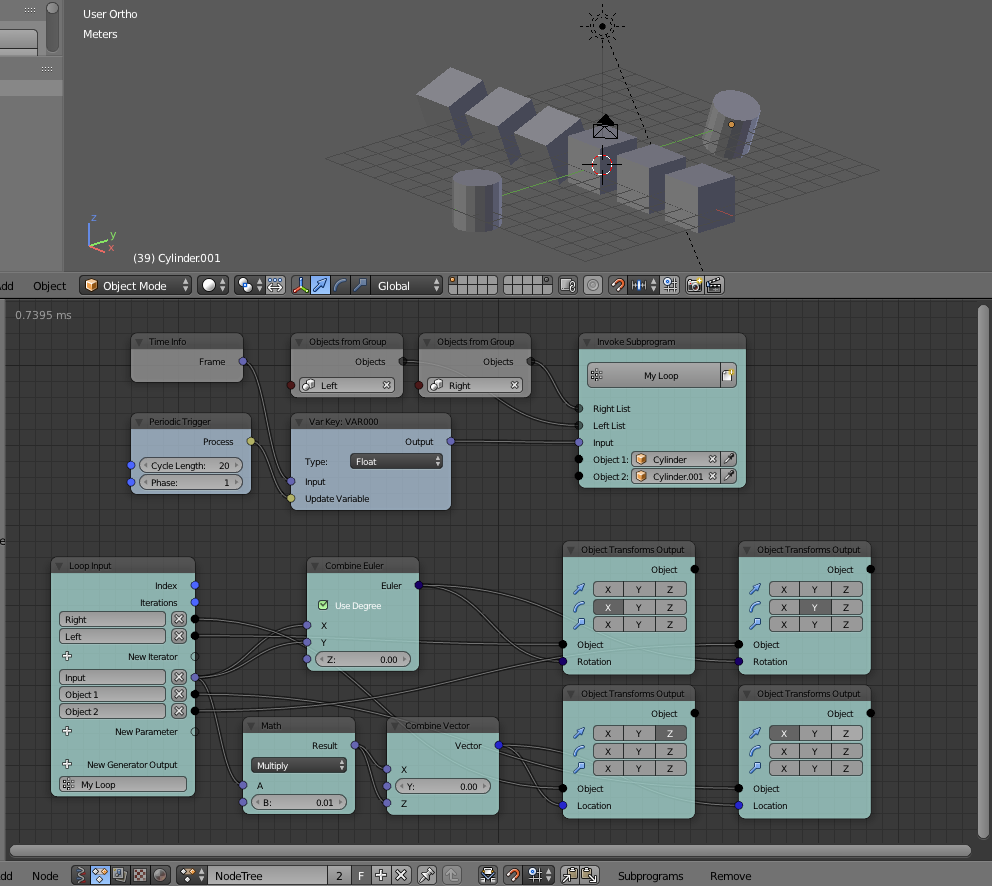
Cheers, Clock.
Clockmender
on 28 Feb 2019
Maybe this thread has gone cold now, so perhaps @mathlusiverse might like to close it?
Here is my final version of the Variables node for 2.8:
import bpy
from ... base_types import AnimationNode, DataTypeSelectorSocket

variables = {}

class VariableNode(bpy.types.Node, AnimationNode):
    bl_idname = "an_variableATTRStore"
    bl_label = "Variable Store"

    assignedType: DataTypeSelectorSocket.newProperty(default = "Float")

    def create(self):
        self.newInput("an_BooleanSocket", "Condition", "condition")
        self.newInput(DataTypeSelectorSocket("Input", "input", "assignedType"))
        self.newOutput(DataTypeSelectorSocket("Output", "output", "assignedType"))

    def execute(self, condition, input):
        self.use_custom_color = True
        self.useNetworkColor = False
        self.color = (0.85,0.75,0.5)
        if condition:
            variables[self.identifier] = input

        if self.identifier in variables and type(variables[self.identifier]) == type(input):
            return variables[self.identifier]
        else:
            return self.inputs[1].getDefaultValue()
Fully dynamic sockets and seems to work well in 2.8 on my Mac. You can leave out the first three lines of the execute function, if you don't want it to change colour...
Clockmender
on 25 Mar 2019
@Clockmender @OmarSquircleArt
Thanks so much for your supports and helps while I am learning the scripting of AnimationNode. It is a rewarding experience. I created my nodes and used them in my project, they worked well, (please see my posted scripts). I have been away for a while, I will need AnimationNode for my other projects later. @Clockmender's variable node is going to be useful.
Thanks @JacquesLucke for the wonderful addon!
I am going to close this thread now.
mathlusiverse
on 31 May 2019
I could add idea: all variables could be seen at once in the left sidebar, and pickable from there and also from ADD menu like subprograms.
 grinvaldsjanis
on 2 Jul 2019
grinvaldsjanis
on 2 Jul 2019
Related issues
 harisreedhar
·
10Comments
harisreedhar
·
10Comments
 Montaire
·
3Comments
Montaire
·
3Comments
 z0u
·
12Comments
z0u
·
12Comments
 tofuhead
·
7Comments
tofuhead
·
7Comments
 kdsin23
·
11Comments
kdsin23
·
11Comments
Most helpful comment
@Clockmender @OmarSquircleArt
Thanks so much for your supports and helps while I am learning the scripting of AnimationNode. It is a rewarding experience. I created my nodes and used them in my project, they worked well, (please see my posted scripts). I have been away for a while, I will need AnimationNode for my other projects later. @Clockmender's variable node is going to be useful.
Thanks @JacquesLucke for the wonderful addon!
I am going to close this thread now.