Angular-gridster2: Weird margin results after updating to v4.4.2 from v3.15.3.
Hello!
I've updated the angular-gridster2 library to 4.4.2 (thanks to finally updating to Angular 5.x) and it seems there has been a change of some sort in how the margin and outerMargin properties affect the grid item.
Before the update, here's how the layout looked like:
The grid's width is 1595px and I am using 4 columns (see below for full options).
And after it, using the same config, I get this result:
Those are my gridster options:
gridsterOptions: GridsterConfig = {
    id: Utils.generateId('test'),
    compactType: 'compactUp&Left',
    gridType: 'fixed',
    maxCols: 4,
    maxRows: 10000,
    // fixedColWidth: calculated based on [container's width / max columns]
    fixedRowHeight: 20,
    maxItemRows: 100,
    margin: 10,
    outerMargin: false,
    keepFixedHeightInMobile: true,
    keepFixedWidthInMobile: false,
    pushItems: this.customizeState,
    swap: this.customizeState,
    draggable: {
        // config
    },
    resizable: {
    // config
    }
};
If I change the margin to 0, it looks like this:
Which is fine on the vertical margin, but not on the horizontal one. It looks like the margin value has a great impact on the vertical axis and a very small one on the horizontal one. Do you have any idea what am I doing wrong?
 NoMercy235
All 20 comments
Hi @NoMercy235 ,
I have no idea why its this effect.
Very strange, seems you have other order of items also.
Check if you don't have any css bleeding in since the Encapsulation was set to none.
 tiberiuzuld
on 22 Jan 2018
tiberiuzuld
on 22 Jan 2018
Hello @tiberiuzuld !
The order was simply because I used someone else's server (which had the older version) to make the demos (and I had other configuration of it). Here's the result with the default config.
I quick fix might be allowing the options to specify margin only for some axis?
However, I investigated a bit more, and here's what I find strange. This is on the 4.4.2 version:
Using 0 margin:
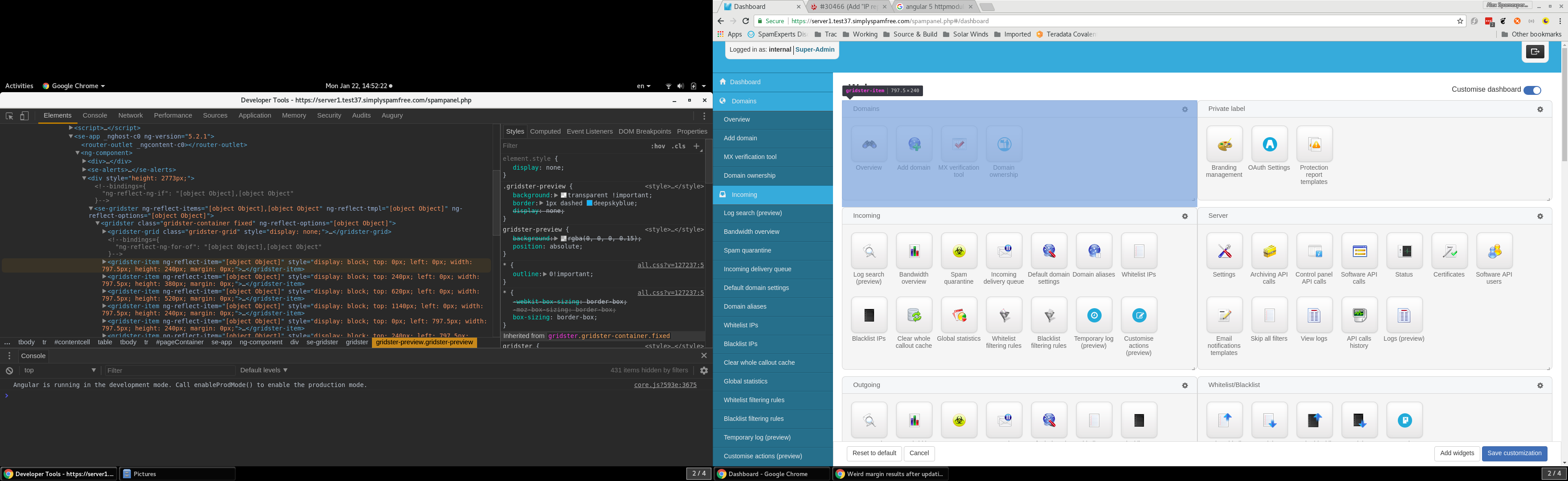
Using 10 margin:
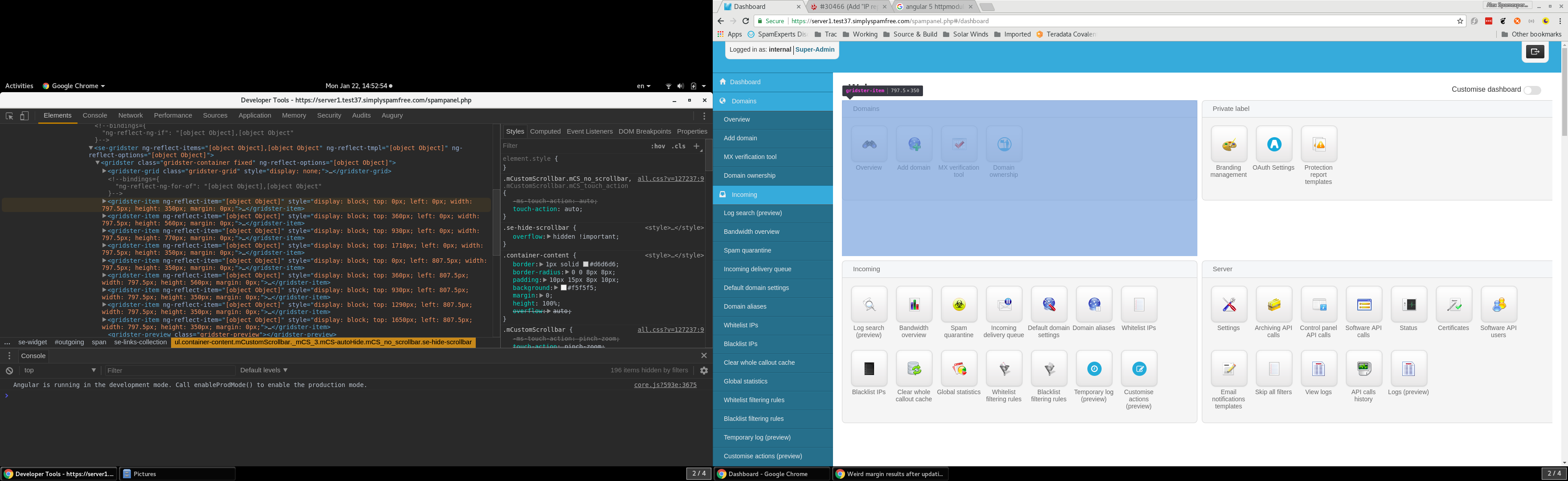
It looks like the widget itself got bigger simply because of the margin value.
NoMercy235
on 22 Jan 2018
There is already a ticket for separate outer margins https://github.com/tiberiuzuld/angular-gridster2/issues/222 but is complicated to implement.
But I think you have a different problem.
Maybe option compactType: 'compactUp&Left', is not checked at the start.
Check if items have the correct sizes depending on options.
Check if you don't have any outside css affecting the items.
tiberiuzuld
on 22 Jan 2018
Update! Found the issue. It happens in here:
else if (this.$options.gridType === 'fixed') {
    this.curColWidth = this.$options.fixedColWidth + this.$options.margin;
    this.curRowHeight = this.$options.fixedRowHeight + this.$options.margin;
    addClass = 'fixed';
    removeClass1 = 'fit';
    removeClass2 = 'scrollVertical';
    removeClass3 = 'scrollHorizontal';
}
This code is located in the calculateLayout method of the GridsterComponent (link). In the 3.15.3 version, it looked like this. Right now, the margin gets added to the fixedRowHeight value. However, a single row does not equal a widget in my case. They can have up to 100 (and a row is a small 20px line). But, by adding the 10px from margin, it becomes 30px, and for a widget of 20 rows, the difference is visible. :(
Is there any way of bypassing this, or at least specify that the margin should not apply to the fixedRowHeight?
Update2 Yes, I think I'd need something similar to #222 , but it should apply to the GridsterItem instead of Gridster as a whole. Perhaps something like:
// options {
...
margin: {
    x: 10,
    y: 0,
},
// or
margin: {
    top: 0,
    right: 5,
    bottom: 0,
    left: 5,
}
...
}
Oh well that was changed a while ago with https://github.com/tiberiuzuld/angular-gridster2/issues/162
Yes you are right it shouldn't add margin for each row.
Will try to find a fix as soon as possible.
Thanks
tiberiuzuld
on 22 Jan 2018
Should the missing margin that's mentioned in #222 be added in the setSize method of the GridsterItemComponent? It looks to me that it only needs to be added once per gridster item. So it would make better sense to do so there than in the GridsterComponent.
NoMercy235
on 22 Jan 2018
I was wrong is working as expected.
In gridster.component L235 is added for each row
In gridsterItem.component L98 is removed once for the gap.
This is done like this so items which span multiple rows have the correct height.
So items end and start on the correct row with the margin included.
When you have a rowHeight of 100px and a margin of 10px.
You expect an item which spans 2 rows to have 210px which is 2 * rowHeight + margin.
So a item which spans multiple rows will include the margin for each row except last one.
tiberiuzuld
on 22 Jan 2018
With the separate outer margin depends on how the options will look like.
Yes the outerMargin calculations occur in setSize now already.
The check for outerMargin in GridsterComponent is needed to calculate the overall size of the grid.
tiberiuzuld
on 22 Jan 2018
So in this issue https://github.com/tiberiuzuld/angular-gridster2/issues/162
There was a bug before in normal gridType fixed that the margin was not included and the item will not have a final correct size.
With that fix the items now have a correct size.
When you set the row to have 200px it will have 200px not 200px - margin.
tiberiuzuld
on 22 Jan 2018
I see. But in GridsterItemComponent, on line 99, the row looks like this:
this.height = this.$item.rows * this.gridster.curRowHeight - this.gridster.$options.margin;
Doesn't this mean that the margin is substracted only once? But at this point, this.gridster.curRowHeight has the value of 30, instead of 20. So the math looks like this:
12 * 30 - 10 = 350 (as shown in the above picture (2nd one))
While I was expecting:
12 * 20 - 10 = 230 (widget height) and the 10px would be the margin.
Although, it looks like, in the first picture, the widget height is 240.
NoMercy235
on 22 Jan 2018

Yes which is correct.
You want an item which has 2 rows to be equal as size as 2 items with one row.
If you have each row of 100px and margin of 10px.
Item with 2 rows will have height of 210px.
Items with 1 row will have height of 100px.
Items which span multiple rows need to include in height the gaps between the rows they span over.
So in GridsterComponent is added the margin for each row.
And in GridsterItemComponent is removed one margin, which is the gap between items.
tiberiuzuld
on 22 Jan 2018
In other words, before this change, for an item with 5 rows, where a row has 10px and a margin of 2 set on the gridster's options, the following were true:
row1    10
row2    20
row3    30
row4    40
row5    50
margin  52
And after this change, it looks like this:
row1           10
margin         12
row2           22
margin         24
row3           34
margin         36
row4           46
margin         48
row5           58
margin         60
Am I getthing this correctly?
NoMercy235
on 22 Jan 2018
Almost
After the change it will have 58px
Before was 48px
tiberiuzuld
on 22 Jan 2018
Ah yes, because you substract the last margin instead of adding it. But this is a problem for me because I made a lot of computing based around the sizes as they were before #162 . :(
NoMercy235
on 22 Jan 2018
Would you accept a PR with a new option which switches back to the previous way of computing the height? :D Something like ignoreMarginInItem which would be false by default. Then there'll be a wrap around all the
this.curColWidth = this.$options.fixedColWidth + this.$options.margin;
this.curRowHeight = this.$options.fixedRowHeight + this.$options.margin;
parts like this:
this.curColWidth = this.$options.fixedColWidth + ( this.$options.ignoreMarginInRow ?
 0 : this.$options.margin );
this.curRowHeight = this.$options.fixedRowHeight + ( this.$options.ignoreMarginInRow ?
 0: this.$options.margin );
Just tested this calculations in CSS GRID Layout
here
The browser does the calculations exactly like is done now in the library.
Probably will make the switch to CSS GRID sometime in the future.
Will accept the PR if you add the option for all 3 types of fixed: fixed, verticalFixed and horizontalFixed and you document the option in gridsterConfig.constant and readme.md
tiberiuzuld
on 22 Jan 2018
Regarding the PR: I might have made a mistake. I noticed now that it wants to merge 3 of my commits (the one I made some time ago and the sync with the upstream). If that's not the way it should be done, please tell me and I'll make another fork and PR with only the updates that are necessary.
NoMercy235
on 23 Jan 2018
Is ok, squashed and merged.
Will make a new version today and publish it to npm.
tiberiuzuld
on 23 Jan 2018
Published v4.5.0
tiberiuzuld
on 23 Jan 2018
Everything worked perfectly after the update. Thank you for your time and help!
NoMercy235
on 23 Jan 2018
Related issues
 jayoma
·
3Comments
jayoma
·
3Comments
 leandro-ali-elel
·
4Comments
leandro-ali-elel
·
4Comments
 ermcgrat
·
3Comments
ermcgrat
·
3Comments
 samarsiraj
·
3Comments
samarsiraj
·
3Comments
 CollinGraf314
·
3Comments
CollinGraf314
·
3Comments