Angular-gridster2: [bug] pushItems and swap not working
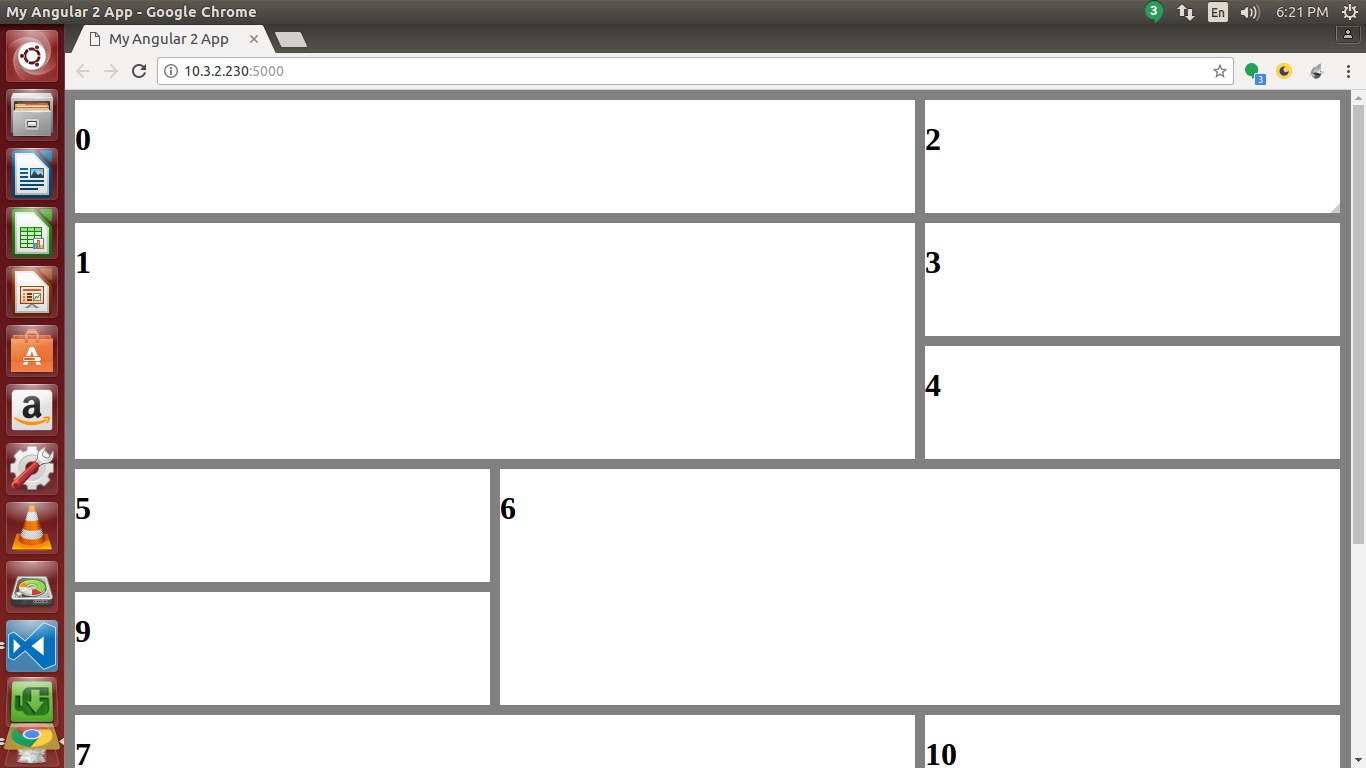
My use case involves a fixed number of columns. The relevant code:
app.component.ts
this.options = {
      gridType: 'fit',
      compactType: 'compactUp',
      itemChangeCallback: AppComponent.itemChange,
      itemResizeCallback: AppComponent.itemResize,
      margin: 10,
      minCols: 3,
      maxCols: 3,
      outerMargin: true,
      maxItemCols: 3,
      minItemCols: 1,
      maxItemRows: 50,
      minItemRows: 1,
      defaultItemCols: 1,
      defaultItemRows: 1,
      draggable: {
        enabled: true,
        stop: AppComponent.eventStop
      },
      resizable: {
        enabled: true,
        stop: AppComponent.eventStop
      },
      swap: true,
      pushItems: true
    };

    this.dashboard = [
      { cols: 2, rows: 1, y: 0, x: 0 },
      { cols: 2, rows: 2, y: 0, x: 2 },
      { cols: 1, rows: 1, y: 0, x: 4 },
      { cols: 1, rows: 1, y: 0, x: 5 },
      { cols: undefined, rows: undefined, y: 1, x: 0 },
      { cols: 1, rows: 1, y: undefined, x: undefined },
      { cols: 2, rows: 2, y: 1, x: 5 },
      { cols: 2, rows: 2, y: 2, x: 0 },
      { cols: 2, rows: 1, y: 2, x: 2 },
      { cols: 1, rows: 1, y: 2, x: 4 },
      { cols: 1, rows: 1, y: 0, x: 6 }
    ];
  }
app.component.html
<gridster [options]="options">
  <gridster-item [item]="item" *ngFor="let item of dashboard; let i = index">
    <h1>{{i}}</h1>
  </gridster-item>
</gridster>
Here, pushItem and swap doesn't work for item 1, when it is moved over item 3 and 4.
Using version: 3.0.0
 samarsiraj
All 3 comments
Hi @samarsiraj ,
The side effect of fixing #60 is that now it does not push in all situations.
In your situation item 3 needs to be moved 2 times down to be out of the way.
I will look into the possibility of improving push without causing infinite loops over the weekend.
Thanks,
 tiberiuzuld
on 23 Jun 2017
tiberiuzuld
on 23 Jun 2017
Can confirm this. We have been using the system for a short time and see one of the big issues (least for us) is the ability to have larger cards move small cards. Using the screenshot above we would not be able to push 1 if we were to drag 6 over it. But moving 2, 3 or 4 over a larger card would make it push. We find you have to move cards out of the way and then move the 6 where you want it to go. We use gridType: "fixed"
 dec0y
on 23 Jun 2017
dec0y
on 23 Jun 2017
Hi @samarsiraj and @dec0y ,
Fixed the issue in v3.0.2.
Let me know if you find any more issues.
Thanks,
tiberiuzuld
on 25 Jun 2017
Related issues
 marco-martins
·
4Comments
marco-martins
·
4Comments
 dnbo
·
4Comments
dnbo
·
4Comments
 ddegasperi
·
4Comments
ddegasperi
·
4Comments
 Abdullah-96
·
5Comments
Abdullah-96
·
5Comments
 matpag
·
3Comments
matpag
·
3Comments