Angular-gridster2: Q: Is it possible to size "enable drop to add" item placeholders?
On the "Empty Cell" demo "Enable drop to add", is it possible to have the "Drag me!" placeholder occupy a size other than 1x1 on the grid? For example, have it be a 2x2?
Awesome project by the way!
 ermcgrat
All 3 comments
This might not be something you can currently do in the demo, but in your own application when you implement the emptyCellDropCallback, you get to pass it a GridsterItem. GridsterItems are simple objects of the format:
interface GridsterItem {
x: number;
y: number;
rows: number;
cols: number;
}
So you should be able to make it drag a 2x2 cell onto the grid by simply setting the rows and cols properties to 2
 CollinGraf314
on 21 Nov 2018
CollinGraf314
on 21 Nov 2018
Hey Colin,
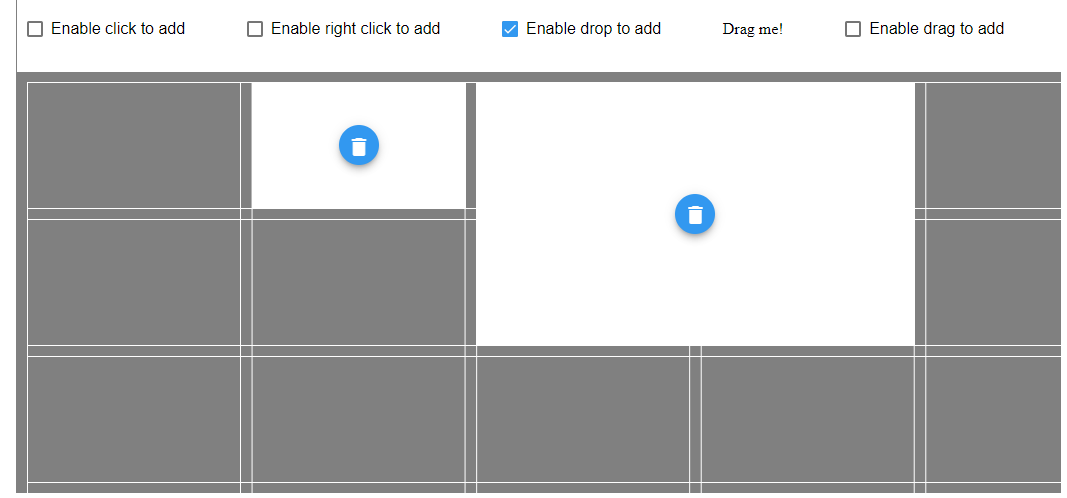
Thanks for the help! Unfortunately when I use this callback, it changes the size of the item after it is dropped onto the grid, not while it is being dragged onto it. So the placeholder is still a 1x1, and then becomes a 2x2 after being dropped (emptyCellDropCallback):
dropDone(event: MouseEvent, item: GridsterItem) {
console.info('drop done', event, item);
item.cols = 2;
item.rows = 2;
this.dashboard.push(item);
}
Showing the drag process:
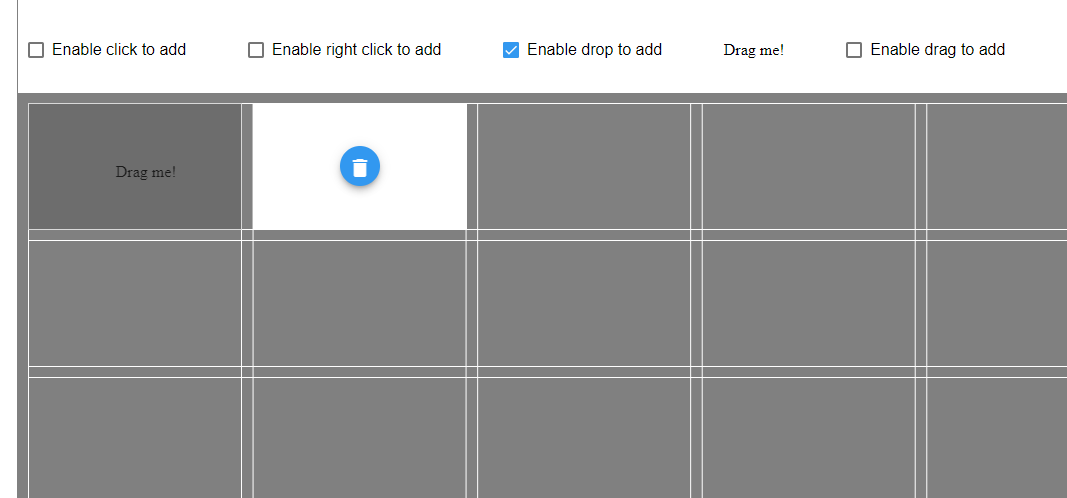
On drop, becomes a 2x2, and cannot fit. The grid kindly relocates it for me
Can't be placed in the bounds of the dashboard, trying to auto position!/n{"cols":2,"rows":2,"x":0,"y":0}
It's almost like I need to set the size of the "Drag me!" div on its drag handler:
dragStartHandler(ev) {
// possible to set size here at all?
console.log('dragStartHandler');
ev.dataTransfer.setData('text/plain', 'Drag Me Button');
ev.dataTransfer.dropEffect = 'copy';
}
But I don't know what I would do in this section, or if the grid even supports what I'm trying to do. I also tried looking at some other callbacks, but none seem to be able to do what I'm trying.
In the GridsterConfig options object:
itemInitCallback // this is called after the item is already dropped onto the grid, same issue as above
draggable.start // this is for items already in the grid, doesn't apply to the external "Drag me!"
emptyCellDragCallback // different thing, this is for creating areas on the grid by dragging a section
Any suggestions on where I can start looking? Thanks!
ermcgrat
on 28 Nov 2018
It looks like I found a workaround of sorts. The defaultItemCols and defaultItemRows options are respected by the drag placeholder. I just set the size in that dragStart handler and reload the options:
  dragStartHandler(ev, size: { cols: number, rows: number }) {
    console.log('dragStartHandler');
    this.options.defaultItemCols = size.cols;
    this.options.defaultItemRows = size.rows;
    this.changedOptions();
    ev.dataTransfer.setData('text/plain', 'Drag Me Button');
    ev.dataTransfer.dropEffect = 'copy';
  }
  <div *ngIf="options.enableEmptyCellDrop" draggable="true" (dragstart)="dragStartHandler($event, {cols:1,rows:1})">Drag
    me! 1x1</div>
  <div *ngIf="options.enableEmptyCellDrop" draggable="true" (dragstart)="dragStartHandler($event, {cols:2,rows:2})">Drag
    me! 2x2</div>
The only other thing I'm wondering now is if it is possible for the drag placeholder to push other items around? Or is this limited to items already existing in the grid?
ermcgrat
on 28 Nov 2018
Related issues
 tiberiuzuld
·
3Comments
tiberiuzuld
·
3Comments
 dhaniksahni
·
4Comments
dhaniksahni
·
4Comments
 samarsiraj
·
3Comments
samarsiraj
·
3Comments
 petarGitNik
·
3Comments
petarGitNik
·
3Comments
 ddegasperi
·
4Comments
ddegasperi
·
4Comments
Most helpful comment
It looks like I found a workaround of sorts. The defaultItemCols and defaultItemRows options are respected by the drag placeholder. I just set the size in that dragStart handler and reload the options:
The only other thing I'm wondering now is if it is possible for the drag placeholder to push other items around? Or is this limited to items already existing in the grid?