Angular-calendar: Customizing template
Currently, its very uncleaer how to customize the template of the calendar views.
I tried to simply do this:
<div #myHeader>
      Test
    </div>
    <mwl-calendar-week-view
      [viewDate]="today"
      [locale]="locale"
      [events]="calEvents"
      [headerTemplate]="myHeader">
   </mwl-calendar-week-view>
But I get the followingerror:
templateRef.createEmbeddedView is not a function
also, I couldn't figure out how to change the monthly-view events template (the one with the gray-black background that slides when clicking a day)
Is there any way to add one basic example to replace a template of specific calendar area?
 theunreal
All 15 comments
I have a working example for the week-view calendar.
Header template
<ng-template #headerTemplate let-days="days" let-locale="locale"
                     let-dayClicked="dayClicked" let-eventDropped="eventDropped">
            <div class="cal-day-headers cursor-default">
                <div
                        class="cal-header"
                        *ngFor="let day of days"
                        [class.cal-past]="day.isPast"
                        [class.cal-future]="day.isFuture"
                        [class.cal-drag-over]="day.dragOver"
                        (mwlClick)="dayClicked.emit({date: day.date})"
                        mwlDroppable
                        (dragEnter)="day.dragOver = true"
                        (dragLeave)="day.dragOver = false"
                        (drop)="day.dragOver = false; eventDropped.emit({event: $event.dropData.event, newStart: day.date, fromHeader: true})">
                    <div class="top" [class.today]="day.isToday">
                        <div class="day-label text-uppercase">
                            {{ day.date | calendarDate:'weekViewColumnHeader':locale }}
                        </div>
                        <div class="day-number">{{ day.date | calendarDate:'weekViewColumnSubHeader':locale }}</div>
                    </div>
                </div>
            </div>
        </ng-template>
Event template
<ng-template #eventTemplate let-weekEvent="weekEvent" let-locale="locale">
            {{weekEvent.event.title}}
        </ng-template>
The calendar view
<mwl-calendar-week-view [viewDate]="calendarViewDate" [events]="requestsPlanned"
                                [weekStartsOn]="1" [locale]="'fr'"
                                [refresh]="refreshCalendar"
                                [headerTemplate]="headerTemplate"
                                [eventTemplate]="eventTemplate"
                                [allowDragOutside]="true"
                                (eventTimesChanged)="requestDropped($event)"></mwl-calendar-week-view>
 ElieSauveterre
on 6 Jun 2017
ElieSauveterre
on 6 Jun 2017
As @ElieSauveterre said you're nearly there and just need to wrap the template in a ng-template tag. The process for setting a custom template is to find the child component in the source, in this case the week view header: https://github.com/mattlewis92/angular-calendar/blob/master/src/components/week/calendarWeekViewHeader.component.ts
From there copy its template into your components source and adapt as required for your app: https://github.com/mattlewis92/angular-calendar/blob/master/src/components/week/calendarWeekViewHeader.component.ts#L7-L26
You can see what variables are passed to the template here:
https://github.com/mattlewis92/angular-calendar/blob/master/src/components/week/calendarWeekViewHeader.component.ts#L29
and access them by doing
<ng-template #eventTemplate let-days="days" let-locale="locale"></ng-template>
There is an e2e example of how to do this here: https://mattlewis92.github.io/angular-calendar/#/custom-templates
Finally to override the month view slide box template you want this input: https://github.com/mattlewis92/angular-calendar/blob/master/src/components/month/calendarMonthView.component.ts#L147
Hope that helps!
 mattlewis92
on 9 Jun 2017
mattlewis92
on 9 Jun 2017
The links in the post above have changed due to refactoring.
New ones are (in order of appearance ) :
https://github.com/mattlewis92/angular-calendar/blob/master/src/modules/week/calendar-week-view-header.component.ts
https://github.com/mattlewis92/angular-calendar/blob/master/src/modules/week/calendar-week-view-header.component.ts#L13-L38
https://github.com/mattlewis92/angular-calendar/blob/master/src/modules/week/calendar-week-view-header.component.ts#L29
https://github.com/mattlewis92/angular-calendar/blob/master/src/modules/month/calendar-month-view.component.ts#L156
 ichepurnoy
on 21 Nov 2017
ichepurnoy
on 21 Nov 2017
Can someone pls tell me, how can I pass variables to an overriden cellTemplate ?
I guess that I need to pass them to mwl-calendar-month-cell, but how?
https://github.com/mattlewis92/angular-calendar/blob/master/src/modules/month/calendar-month-view.component.ts#L57-L76
I've overriden the cell template for month view, and now am trying to add/remove a custom class on it. (I'm implementing custom weekends, so I thought I just need to add / remove this cal-weekend class on a day).
ichepurnoy
on 21 Nov 2017
How can I Change Dots into text title in template of month.
 RajshreeTathe
on 8 Mar 2018
RajshreeTathe
on 8 Mar 2018
@RajshreeTathe you can extend the CustomDateFormatter class as your own and then write something like this:
public monthViewColumnHeader({ date, locale }: DateFormatterParams): string {
    const dayLabel = new DatePipe(locale).transform(date, 'EEEE', locale);
    return dayLabel.substr(0, 3);
  }
Hope that helps you.
 sergiolenza
on 7 Apr 2018
sergiolenza
on 7 Apr 2018
I am trying to customize the calendar view so that only current and next day is shown in hourly manner, I currently have in mind to edit the 'day' template so that it shows the calendar for 2 day(today and tomorrow). Is this possible, any help will be appreciated.
 AhmadWaheedQadri
on 10 Apr 2018
AhmadWaheedQadri
on 10 Apr 2018
Hi everyone,
Could somebody tell me where is the source code for the Header Component in the Day View ?
The "Week View" as one
(https://github.com/mattlewis92/angular-calendar/blob/.../src/components/week/calendarWeekViewHeader.component.ts)
but I can't find the header for the "Day View".
Thanks a lot,
 Geux
on 17 Sep 2018
Geux
on 17 Sep 2018
Hello,
I tried to create a custom re sizable event but it doesn't work unlike when using the default template. Do you have the code of the default html template. Maybe I will try to pattern my custom template there.
Thank you!
 IamSef
on 13 Nov 2018
IamSef
on 13 Nov 2018
headerTemplate]
can you please provide a link in stackblitz ? i want to ultimately be able to change the week view's header so it can only show the days without the month ?
 maaqoul
on 19 Feb 2019
maaqoul
on 19 Feb 2019
I am trying to customize a template for mwl-calendar-week-view. But I am not sure where is the documentation for seeing what variables are required to be passed into the template. Can you please point me towards the right resource? I have checked out your page:
https://mattlewis92.github.io/angular-calendar/#/custom-templates
But I am not sure, how will I know that 'day' and 'locale' are variables I can pass into the template? When I type 'day' in Search documentation, I am unable to find anything on it.
 donnalmh
on 10 Apr 2019
donnalmh
on 10 Apr 2019
Is it possible to create a custom calendar-week-view, where the header displays the days (Sun - Sat) from top to bottom, in the far left column? Also, can we remove the time grid from the calendar-week-view and just show custom-formatted info for each event?
_(Note: disregard the red square in the image below. The image was copied from a requirements document)_

 whitejamesh
on 31 Jul 2020
whitejamesh
on 31 Jul 2020
How can I display tooltip(with different value based on hovered date) on hover of Custom Header Template?
I have implemented custom header template but I'm not able to display tooltip.

 Virendra8Satva
on 26 Aug 2020
Virendra8Satva
on 26 Aug 2020
I have a working example for the week-view calendar.
Header template
<ng-template #headerTemplate let-days="days" let-locale="locale"
                     let-dayClicked="dayClicked" let-eventDropped="eventDropped">
            <div class="cal-day-headers cursor-default">
                <div
                        class="cal-header"
                        *ngFor="let day of days"
                        [class.cal-past]="day.isPast"
                        [class.cal-future]="day.isFuture"
                        [class.cal-drag-over]="day.dragOver"
                        (mwlClick)="dayClicked.emit({date: day.date})"
                        mwlDroppable
                        (dragEnter)="day.dragOver = true"
                        (dragLeave)="day.dragOver = false"
                        (drop)="day.dragOver = false; eventDropped.emit({event: $event.dropData.event, newStart: day.date, fromHeader: true})">
                    <div class="top" [class.today]="day.isToday">
                        <div class="day-label text-uppercase">
                            {{ day.date | calendarDate:'weekViewColumnHeader':locale }}
                        </div>
                        <div class="day-number">{{ day.date | calendarDate:'weekViewColumnSubHeader':locale }}</div>
                    </div>
                </div>
            </div>
        </ng-template>
Event template
<ng-template #eventTemplate let-weekEvent="weekEvent" let-locale="locale">
            {{weekEvent.event.title}}
        </ng-template>
The calendar view
<mwl-calendar-week-view [viewDate]="calendarViewDate" [events]="requestsPlanned"
                                [weekStartsOn]="1" [locale]="'fr'"
                                [refresh]="refreshCalendar"
                                [headerTemplate]="headerTemplate"
                                [eventTemplate]="eventTemplate"
                                [allowDragOutside]="true"
                                (eventTimesChanged)="requestDropped($event)"></mwl-calendar-week-view>
Is there a way to import the ng-templates from separate files? I currently have them all in the same component file and it's quite messy.
 usersina
on 16 Aug 2021
usersina
on 16 Aug 2021
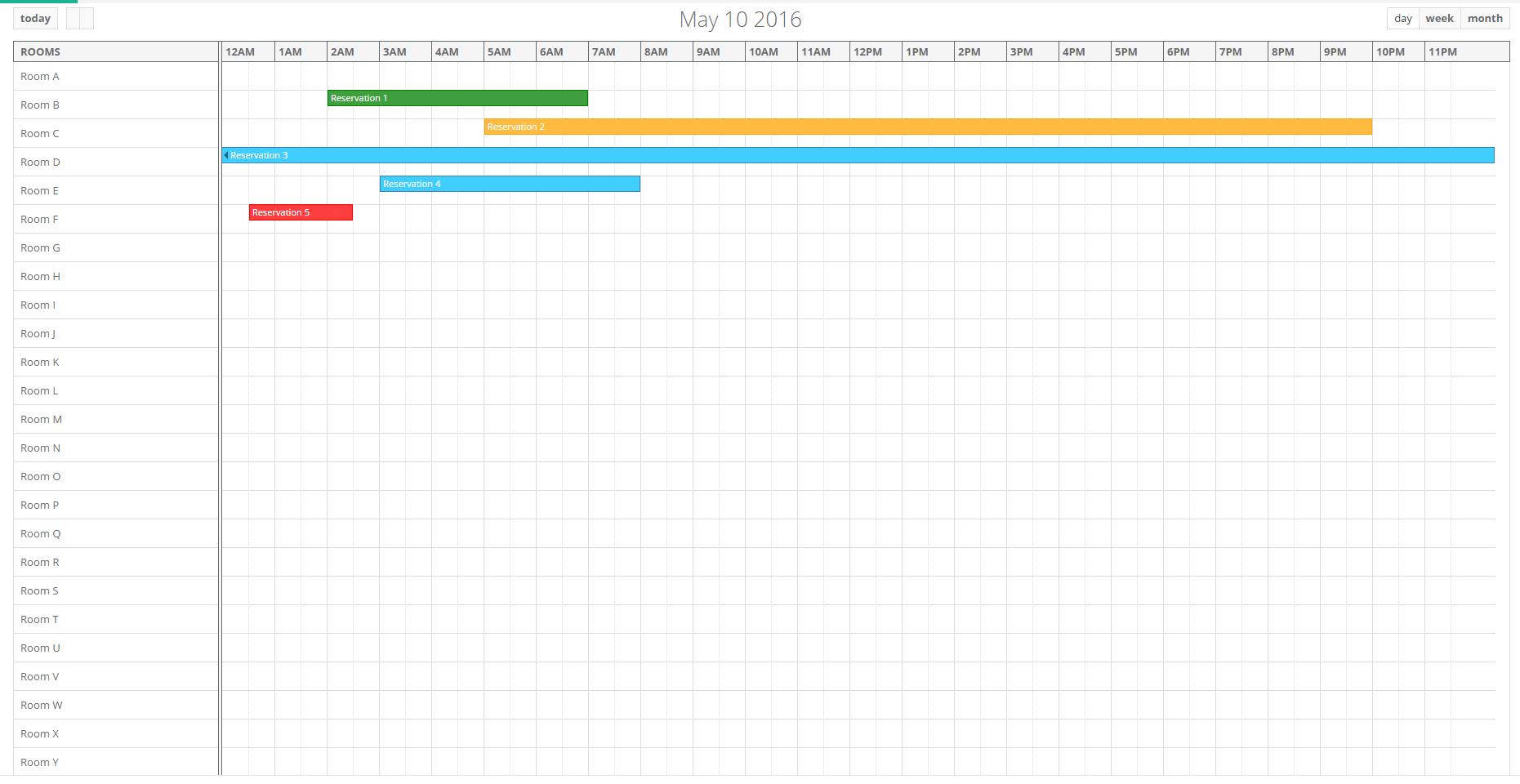
Hello can i change time segment to the header in every day and add section row like this
 abdulraheemzaqout
on 13 Sep 2021
abdulraheemzaqout
on 13 Sep 2021
Related issues
 Sushma-tiwari
·
3Comments
Sushma-tiwari
·
3Comments
 PrasannaKolla
·
4Comments
mattlewis92
·
3Comments
PrasannaKolla
·
4Comments
mattlewis92
·
3Comments
 no-more
·
3Comments
no-more
·
3Comments
 zolee
·
3Comments
zolee
·
3Comments