Angular-calendar: Wrap Event Title vertically for week view
Is there any way that I can wrap my titles vertically in week view and horizontally in day view.
I have my title lengthy and its getting truncated for week view and day view. Attached the screenshots

I am using angular 5
 PrasannaKolla
All 4 comments
Unfortunately there's no trivial way to do this, there are tooltips that the user can mouse over to see the full title though. You might be able to get something working by using a custom template and some additional styling for the week view event component.
 mattlewis92
on 13 May 2018
mattlewis92
on 13 May 2018
This comes two years late, but if anyone else has this issue I achieved event title word wraps (where vertical space is available) using the CalendarEvent _cssClass_ property based on Matt's demo here.
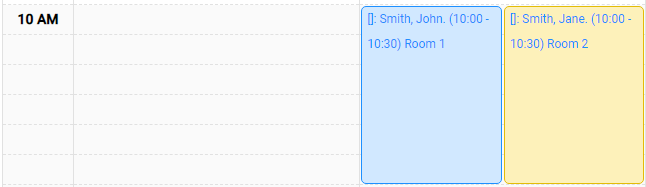
calendar.component.ts
Define a custom class by adding your own css class name to the event's _cssClass_ property.
events: CalendarEvent[] = [
    {
      title: 'Has custom class',
      color: colors.yellow,
      start: new Date(),
      cssClass: 'my-custom-class',
    },
  ];
styles.css
Add the css class to your global _styles.css_ file with the following style change.
.my-custom-class span{
    white-space: normal !important;
}
 tgoode
on 30 Jun 2020
tgoode
on 30 Jun 2020
This comes two years late, but if anyone else has this issue I achieved event title word wraps (where vertical space is available) using the CalendarEvent _cssClass_ property based on Matt's demo here.
calendar.component.ts
Define a custom class by adding your own css class name to the event's _cssClass_ property.
events: CalendarEvent[] = [
    {
      title: 'Has custom class',
      color: colors.yellow,
      start: new Date(),
      cssClass: 'my-custom-class',
    },
  ];
styles.css
Add the css class to your global _styles.css_ file with the following style change.
.my-custom-class span{
    white-space: normal !important;
}
I think it would be a good idea to have an example of this solution in the documentation..
 igoragueme
on 17 Aug 2020
igoragueme
on 17 Aug 2020
please help me how design this type of calender
 Tahir-zaman
on 3 Aug 2021
Tahir-zaman
on 3 Aug 2021
Related issues
 no-more
·
3Comments
no-more
·
3Comments
 fmoessle
·
5Comments
fmoessle
·
5Comments
 AstRonin
·
4Comments
AstRonin
·
4Comments
 chaouiy
·
3Comments
mattlewis92
·
3Comments
chaouiy
·
3Comments
mattlewis92
·
3Comments
Most helpful comment
This comes two years late, but if anyone else has this issue I achieved event title word wraps (where vertical space is available) using the CalendarEvent _cssClass_ property based on Matt's demo here.
calendar.component.ts
Define a custom class by adding your own css class name to the event's _cssClass_ property.
styles.css
Add the css class to your global _styles.css_ file with the following style change.