Angular-calendar: Tooltip stay visible after route change on mobile
Describe the bug
Context:
- Full page calendar view, on event click navigate to subroute, calendar is not visible but still there.
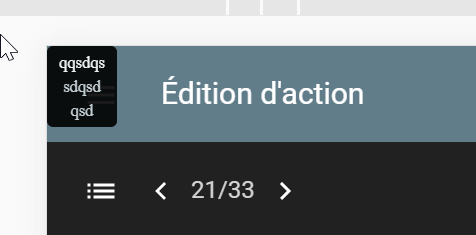
- Tooltip is visible on the top-left corner of the screen
I've tried to set focus with js on another element, but the tooltip remains active.
Would be great to have a service to force closing tooltip or to automatically close it on navigation start
Minimal reproduction of the problem with instructions
Screenshots
Versions
@angular/core: 10angular-calendar: 0.28.16- Browser name and version: Chrome lates 84.0.4147.135
 no-more
All 3 comments
Thanks so much for opening an issue! If you'd like me to give priority to answering your issue or would just like to support this project, then please consider sponsoring me
![matts-bot[bot] picture](https://avatars.githubusercontent.com/in/12675?v=4&s=40) matts-bot[bot]
on 22 Aug 2020
matts-bot[bot]
on 22 Aug 2020
Hey there, sorry to hear you're having troubles, there's a couple options I can think of that should resolve your issue:
1/ Set [tooltipAppendToBody]="false" on the month / week / day components which will stop the tooltips getting appending to the body element and hide them when the parent is hidden
2/ Use an *ngIf on the month / week / day components to remove the components from the dom when hidden which should destroy the tooltips
Hope that helps! 😄
 mattlewis92
on 12 Sep 2020
mattlewis92
on 12 Sep 2020
Hi,
Thanks for your response.
Option 2 is not an option in my case as the element is only hidden by CSS according to screen size
I will try option 1, as was not aware of this parameter which looks very interesting.
Thanks again
no-more
on 13 Sep 2020
Related issues
 Sushma-tiwari
·
3Comments
Sushma-tiwari
·
3Comments
 teodoramalec
·
4Comments
teodoramalec
·
4Comments
 nguyendo
·
3Comments
nguyendo
·
3Comments
 daneshmandi
·
4Comments
daneshmandi
·
4Comments
 PrasannaKolla
·
4Comments
PrasannaKolla
·
4Comments