Andotp: Can't use andOTP with Google account
General information
- App version: 0.6.0-beta3
- App source: F-Droid
- Android Version: LineageOS 14.1
- Custom ROM: MicroG LineageOS fork
Expected result
What is expected? When adding 2FA to Google account, Google shows a QR code (otpauth:// url) and then asks for a OTP to confirm.
What does happen instead? The OTP generated by andOTP is not accepted by Google : "Incorrect code"
Steps to reproduce
Enable 2FA with Authenticator on myaccount.google.com
Scan QRcode with andOTP
Type code when prompted by Google
 yhoyhoj
All 11 comments
I have been using andOTP with Google for a long time now and never had problems. Did you try it multiple times? Maybe there was an error when scanning the QR code.
Otherwise check the clock on your phone, if it is not synchronized correctly TOTP tokens won't work.
 flocke
on 1 Sep 2018
flocke
on 1 Sep 2018
I'm totally confused. I tried to setup 2fa with Google, but they do not use TOTP. They use their own system by sending a message via the Android API somehow.
How do you even get a TOTP QR code in Google?
 tessus
on 10 Sep 2018
tessus
on 10 Sep 2018
There should be an option to not use that method and use Google Authenticator instead, I think it's called "alternative second step" or something like that.
flocke
on 10 Sep 2018
@flocke unfortunately there isn't:
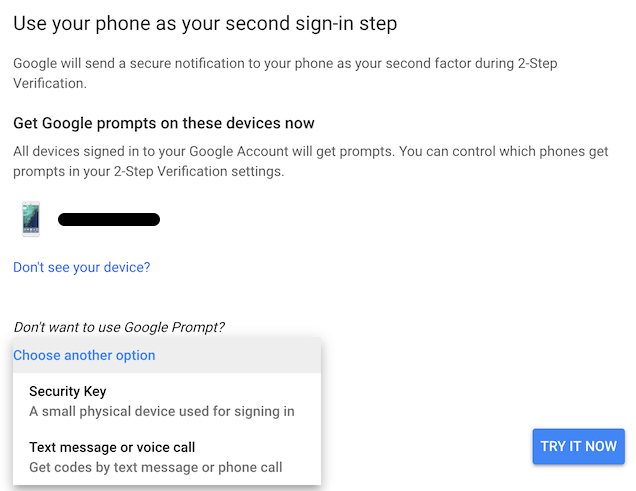
As you can see the only 2 other options are Security Key (e.g. Yubico) or Text or Phone Call.
Maybe they have removed TOTP unless you are already using it.
In any case, there's no way to ask Google, because the only info I get when searching or this topic is this exact screen. Sending a mail to Google is also impossible, so I'm stuck and not able to use TOTP with Google.
tessus
on 11 Sep 2018
I'm gonna make a second Google account and check it out later on, maybe you are right and they removed it.
flocke
on 11 Sep 2018
OK, I just looked in my Google account again and I have Text or Call enabled as first option and TOTP as second. Maybe you need to enable one of the three options it gives you first before you can enable TOTP as alternative.
flocke
on 11 Sep 2018
@flocke thank you very much for looking into it. After I had activated 2fa (with Google prompts) I was able to choose a backup 2fa method. At that point I could choose TOTP. After setting up TOTP, I deleted the primary (Google prompts) method and now I can use TOTP. Hooray.
tessus
on 12 Sep 2018
@tessus Good to hear. No idea why they made it like this if you can remove the primary method later on again...
flocke
on 12 Sep 2018
@tessus , is this a gsuite account ? I was greeted with this too recently when I tried to enable 2fa on a new gsuite account. I wonder if they are trying to deprecate TOTP, starting with gsuite accounts.
 pgera
on 18 Sep 2018
pgera
on 18 Sep 2018
@pgera no, it's not a gsuite account. I thought about something else: maybe it's a geo location thing. We both are located in North America, the others in this discussion are in Europe.
tessus
on 18 Sep 2018
Seems like this issue is now resolved, please comment on here if not
 RichyHBM
on 11 Oct 2018
RichyHBM
on 11 Oct 2018
Related issues
 alonbl
·
7Comments
alonbl
·
7Comments
 aph3rson
·
6Comments
aph3rson
·
6Comments
 SeppPenner
·
3Comments
SeppPenner
·
3Comments
 fakkoweb
·
4Comments
fakkoweb
·
4Comments
 MartinX3
·
4Comments
MartinX3
·
4Comments
Most helpful comment
@flocke thank you very much for looking into it. After I had activated 2fa (with Google prompts) I was able to choose a backup 2fa method. At that point I could choose TOTP. After setting up TOTP, I deleted the primary (Google prompts) method and now I can use TOTP. Hooray.