Amplify-console: E2E testing: not showing pretty display of cypress tests
Describe the bug
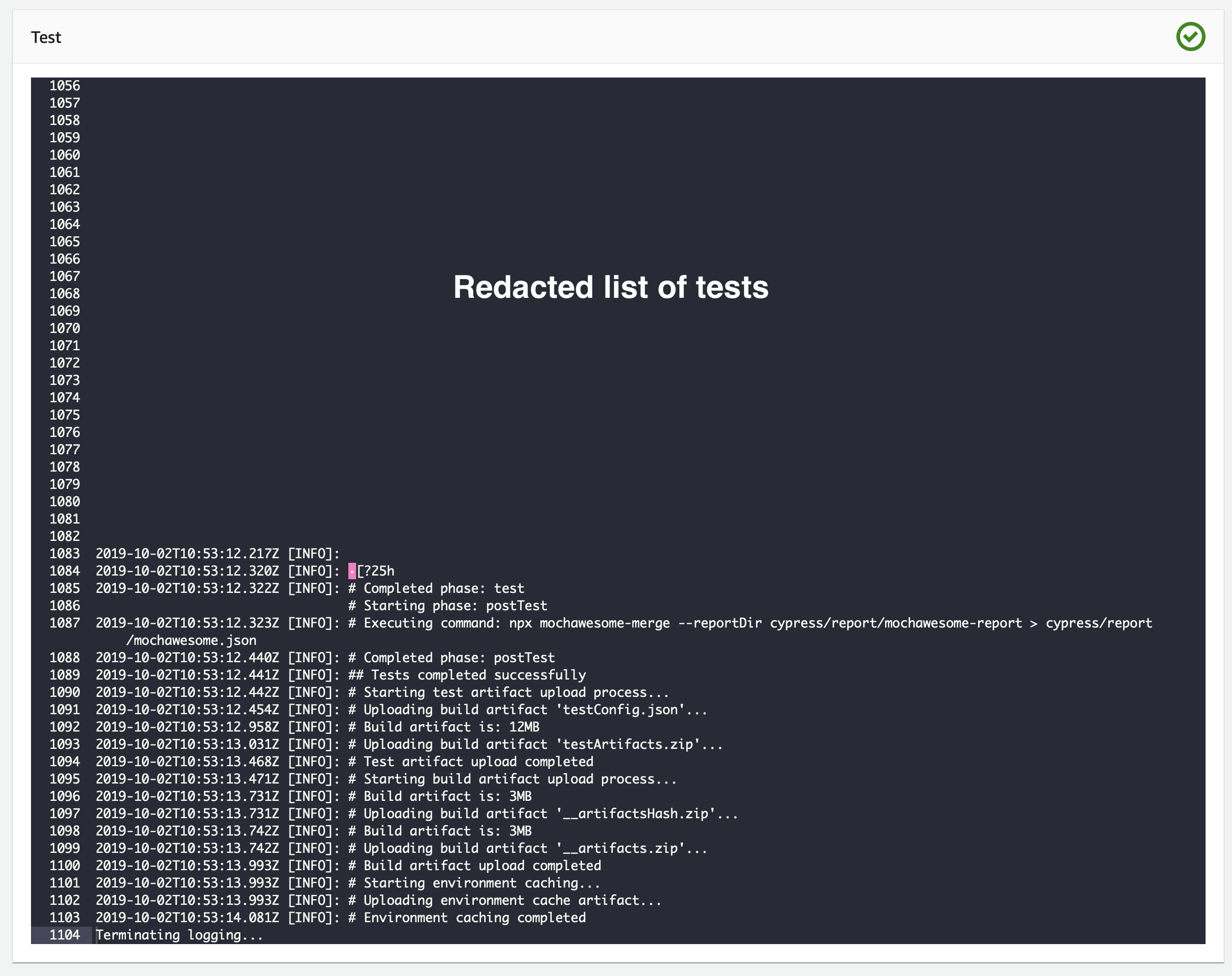
For an existing app, adding cypress tests displays as regular console output, instead of a pretty display.
To Reproduce
Steps to reproduce the behavior:
Setup cypress tests on an app, as documented here, https://docs.aws.amazon.com/amplify/latest/userguide/running-tests.html
Expected behavior
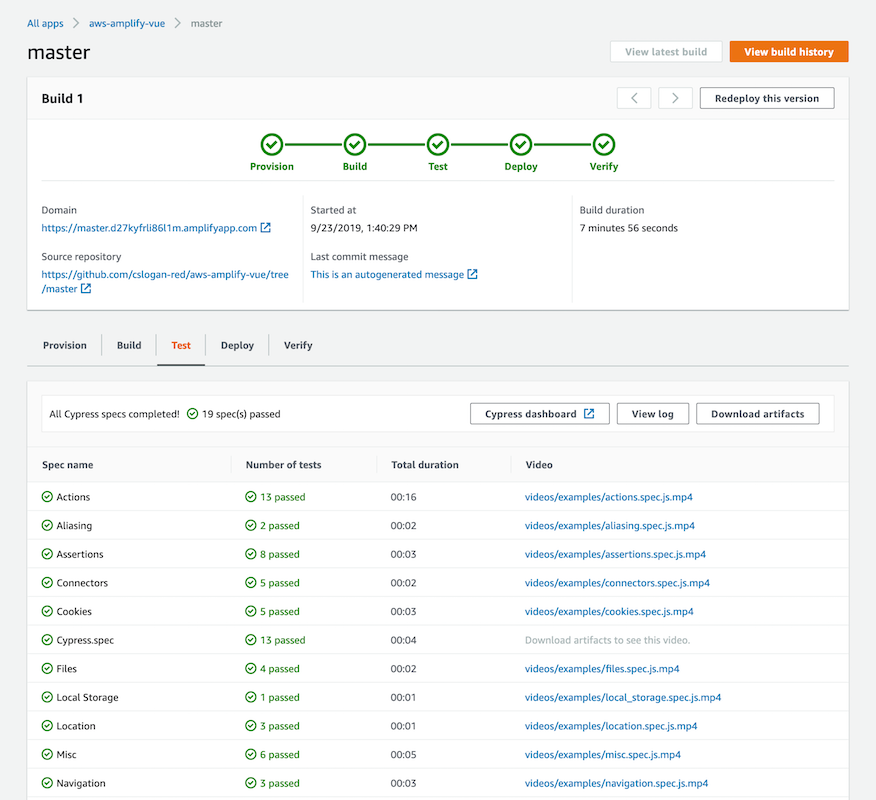
The test panel should display a pretty output, not just a command line.
What I expect
What I got
Additional context
I suspect it's because existing project don't have a chance to detect that cypress tests are in the codebase, and therefore amplify console can't see that it needs to display the results in their pretty form.
My test script in amplify.yml, after the backend and frontend configs:
test:
  artifacts:
    baseDirectory: cypress
    configFilePath: '**/mochawesome.json'
    files:
      - '**/*.png'
      - '**/*.mp4'
  phases:
    preTest:
      commands:
        - 'npm run serve & npx wait-on http://localhost:9000'
    test:
      commands:
        - 'CYPRESS_baseUrl=http://localhost:9000/ npx cypress run --reporter mochawesome --reporter-options reportDir=cypress/report/mochawesome-report,overwrite=false,html=false,json=true,timestamp=mmddyyyy_HHMMss'
    postTest:
      commands:
        - npx mochawesome-merge --reportDir cypress/report/mochawesome-report > cypress/report/mochawesome.json
 thedgbrt
All 22 comments
Hello, @thedgbrt can you post your app Id and region?
 cslogan-red
on 2 Oct 2019
cslogan-red
on 2 Oct 2019
Hi @cslogan-red, it’s d19neubxmmsnaf in us-east-1
thedgbrt
on 3 Oct 2019
Thanks! For reference, which browser are you using, and can you inspect your developer console and see if you're getting any JS console exceptions after refreshing and then clicking on the "Test" tab, and if so, can you post a screenshot? There's nothing wrong with your generated test report that I can see, however the Console will fall back to displaying the test log view if the report can't be parsed properly.
cslogan-red
on 3 Oct 2019

@cslogan-red interesting! here's what I got. Note that these errors appear right away on the reload, but nothing more shows up when I switch to the test tab.
Tried on chrome, safari and firefox. All three show the same errors.
thedgbrt
on 3 Oct 2019
Thanks for posting @thedgbrt , nothing unusual there, those bangs aren't actually from the Amplify Console. I'm also able to display the dashboard using your build's generated test report in one of our test environments without issue, so I'm not quite sure why it's not displaying for you, as all three of those browsers work and are supported. Will have to do some additional investigating and get back to you!
cslogan-red
on 3 Oct 2019
@cslogan-red weird indeed! thanks for investigating 🙏
thedgbrt
on 3 Oct 2019
We have the same issue. Tests added to an existing build don't show the nice report. The tests pass, the console output is very messy (lots of control characters from the cypress output that I can't turn off), but it says the artifacts are uploaded same as the screenshot by @thedgbrt. We're also missing the test phase in the series of green circles with tick boxes at the top of the build info (sequence is "provision", "build", "deploy", "verify" - no "test"), although the test phase tab appears in the bottom section of the page.
 nomiddlename
on 7 Oct 2019
nomiddlename
on 7 Oct 2019
@nomiddlename & @thedgbrt can you each post (or email to [email protected], if you'd prefer) your complete build spec's? Have a hunch as to what's occurring in this case and would like to confirm, thanks!
cslogan-red
on 7 Oct 2019
@cslogan-red do you just want the amplify.yml, or something else?
nomiddlename
on 7 Oct 2019
@nomiddlename correct, the complete file or contents from App settings > Build settings, thanks!
cslogan-red
on 7 Oct 2019
Here's the amplify.yml:
version: 0.1
backend:
  phases:
    build:
      commands:
        - "# Execute Amplify CLI with the helper script"
        - amplifyPush --simple
    postBuild:
      commands:
        - yarn install
        - yarn run test:scripts
        - yarn run data-loader
        - yarn run test:integration
frontend:
  phases:
    preBuild:
      commands:
        - yarn install
        - yarn run test
    build:
      commands:
        - yarn run build
  artifacts:
    baseDirectory: build
    files:
      - "**/*"
  cache:
    paths:
      - node_modules/**/*
test:
  artifacts:
    baseDirectory: cypress
    configFilePath: '**/mochawesome.json'
    files:
      - '**/*.png'
      - '**/*.mp4'
  phases:
    preTest:
      commands:
        - yarn install
    test:
      commands:
        - npm run ci:e2e
    postTest:
      commands:
        - npx mochawesome-merge --reportDir cypress/report/mochawesome-report > cypress/report/mochawesome.json
The command that npm run ci:e2e runs in package.json:
"ci:cypress": "cypress run --reporter mochawesome --reporter-options \"reportDir=cypress/report/mochawesome-report,overwrite=false,html=false,json=true,timestamp=mmddyyyy_HHMMss\"",
    "ci:e2e": "start-server-and-test start 3000 ci:cypress",
I've added the various mochawesome deps to the dev deps in package.json, because if I use npm install instead of yarn install my react build fails with compilation errors. I tried using yarn to run the ci:e2e test command and the mochawesome-merge, but the postTest phase would never execute if I did that. Everything seems to work ok with the above setup, I just don't get the nice report.
nomiddlename
on 8 Oct 2019
Thanks @nomiddlename , can you also send over your app Id?
cslogan-red
on 8 Oct 2019
App id is d3rfa777e3c1ou, ap-southeast-2.
nomiddlename
on 8 Oct 2019
@cslogan-red if that helps:
version: 0.1
backend:
  phases:
    preBuild:
      commands:
        - export NPM_TOKEN=$NPM_TOKEN
        - export GATSBY_RECAPTCHA_KEY=$GATSBY_RECAPTCHA_KEY
        - echo -e "//registry.npmjs.org/:_authToken=${NPM_TOKEN}" > ~/.npmrc
        - echo -e "GATSBY_RECAPTCHA_KEY=${GATSBY_RECAPTCHA_KEY}" > ~/.env.production
    build:
      commands:
        - '# Execute Amplify CLI with the helper script'
        - sh scripts/amplifyPushAlt.sh
frontend:
  phases:
    preBuild:
      commands:
        - yarn install
    build:
      commands:
        - yarn run build
  artifacts:
    baseDirectory: public
    files:
      - '**/*'
  cache:
    paths:
      - node_modules/**/*
test:
  artifacts:
    baseDirectory: cypress
    configFilePath: '**/mochawesome.json'
    files:
      - '**/*.png'
      - '**/*.mp4'
  phases:
    preTest:
      commands:
        - 'npm run serve & npx wait-on http://localhost:9000'
    test:
      commands:
        - if [ "${AWS_BRANCH}" = "production" ]; then npx cypress run --config ignoreTestFiles=**/*_noprod.js; else npx cypress run; fi
    postTest:
      commands:
        - npx mochawesome-merge --reportDir cypress/report/mochawesome-report > cypress/report/mochawesome.json
So in this case (which happens to be the same for both of you, @thedgbrt & @nomiddlename) the Console appears to be working as designed. The Console attempts to derive whether or not you've added tests, and when to even render some of the test step content, based on the presence of the "test:" config in your amplify.yml (build spec).
Looking at the build history for each of your app Id's, it was the same situation of adding a new branch to the Console with a Cypress test suite and updating your build spec's to include the test config's (shown above) so the tests would run. Subsequently, I can see that each of your app's most recent build is from _another branch_ where the build spec has been modified to remove the test config entirely. As the build spec is app-wide, this updates the UI to disable test-specific components, including the prettified Cypress dashboard. _However_, if a test log for a previous build is present, we will continue to show the log in the "Test" tab regardless (what you're seeing).
If you update your app's build spec in the Console (App settings > Build settings) and add the "test:" config back (and if you save the amplify.yml in your repo, update there as well, as that version wins in a build), the prettified dashboard will render (for the branch(es) containing completed Cypress test suites) and the progress steps will be updated to reflect the "Test" step.
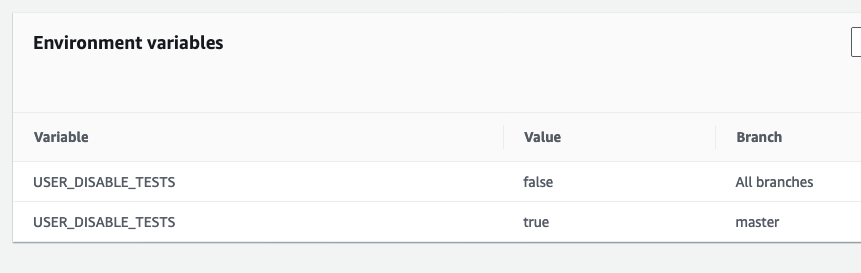
The docs missed this and will be updated accordingly, but you can globally disable tests OR disable tests on a _per branch basis_ with the "USER_DISABLE_TESTS" environment variable. Adding this environment variable with a value of "true" (no quotes) without any overrides will globally disable tests. Adding this variable with a value of "false" and overrides of "true" for each specific branch _will disable tests for those branches_, even if the "test:" config is present in the build spec (amplify.yml), so that it doesn't break builds for other branches not containing tests, or if you would like to disable tests for some other reason. Screenshot attached for an example of disabling tests for the "master" branch, while leaving them enabled for all other branches using this variable.
Thanks!
cslogan-red
on 8 Oct 2019
I can confirm we're getting the nice test tab output now. Thanks for your help @cslogan-red
nomiddlename
on 9 Oct 2019
@cslogan-red thanks for the explanation, it's good to know how things work in the background. However I've had this problem for all my builds, way prior to disabling my tests (which I did recently for other reasons). I've monitored a dozen or so builds last week, as they happened, and while the tests were part of the amplify config. I've never seen the proper display once.
I re-enabled tests on my master branch via amplify.yml, just to check, and I still don't see the proper display as it builds. I'm also looking at older builds tests, and not seeing the display there either, which I should see if I understood your comment properly.
I apologise in advance if I'm misunderstanding something very basic here.
thedgbrt
on 9 Oct 2019
@thedgbrt I had to upload my amplify.yml in the build settings to get things to work, not just update the amplify.yml in git.
nomiddlename
on 9 Oct 2019
Correct, @thedgbrt, need to make sure your amplify.yml in App settings > Build settings includes the "test:" config in order for the Cypress dashboard to even display, even for past builds. Additionally, the final Cypress dashboard is only displayed after all tests have run and the results are uploaded. While a build is running, you'll simply get the headless log output of the "cypress run" command. Once all tests have completed, we generate the dashboard based on the test run results. Thanks!
cslogan-red
on 9 Oct 2019
Oh right, indeed I just had to upload my amplify.yml to the dashboard. A bit clumsy to have two sources of truth, but at least everything looks good now. Thanks!
thedgbrt
on 9 Oct 2019
Ran into this issue too - turned out to be because my amplify.yml in the console didn't have a test section, same as @thedgbrt.
I'd like to underscore how problematic it is to have two sources of truth, especially since the docs say that the .yml in source control always takes precedence. While I understand this is a fairly new feature, it would be nice for this quirk to be documented, or for the issue to be fixed and just have one single source of truth.
Happy to open an issue/PR.
 lauraalkhoury-youitv
on 18 Dec 2019
lauraalkhoury-youitv
on 18 Dec 2019
Related issues
thedgbrt
·
5Comments
 ayotise
·
4Comments
ayotise
·
4Comments
 nballenger
·
5Comments
nballenger
·
5Comments
 patleeman
·
5Comments
patleeman
·
5Comments
 zackthoutt
·
3Comments
zackthoutt
·
3Comments
Most helpful comment
@thedgbrt I had to upload my amplify.yml in the build settings to get things to work, not just update the amplify.yml in git.