Amplify-console: [Feature request] Support default password protection for all new branches
Is your feature request related to a problem? Please describe.
When using amplify preview to deploy code on each pr, it creates a url that is not password protected by default. The only way is to go to access control and add it manually each time.
Describe the solution you'd like
In access control settings, I would like to be able to set a default password for all new / existing branches, except for those I explicitly exclude (namely, the production branch)
 thedgbrt
All 5 comments
@thedgbrt currently there isn't an easy way to do so. A workaround would be to have 2 Amplify Console apps connected to the same repo - first app is your production app. 2nd app has all your other branches and you can set a global password for all the connected branches.
 swaminator
on 4 Dec 2019
swaminator
on 4 Dec 2019
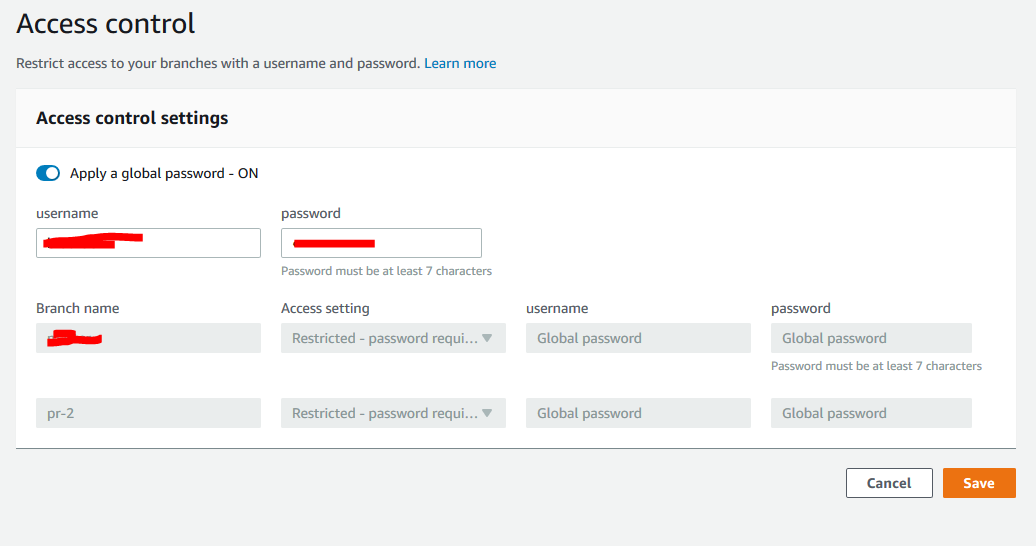
@thedgbrt Have you tried global password protection in access control?
 ganipcanot
on 7 Feb 2020
ganipcanot
on 7 Feb 2020
@ganipcanot the problem is I don’t want my production branch to be password protected. It’s missing a feature where I can exclude it from the global setting.
thedgbrt
on 9 Feb 2020
Exactly the same use case is required.
 allanitis
on 17 Oct 2020
allanitis
on 17 Oct 2020
Weirdly the AWS Amplify documentation seems to say that this is possible: https://docs.aws.amazon.com/amplify/latest/userguide/access-control.html
To exclude branches from a global password, turn on Apply a global password, and then choose Publicly viewable for Access setting for any branch that you want to exclude.
But all the branch specific inputs are disabled when setting a global password so this is not achievable.
 leighkendell
on 17 Nov 2020
leighkendell
on 17 Nov 2020
Related issues
 ericclemmons
·
5Comments
ericclemmons
·
5Comments
 kontrol-debug
·
4Comments
kontrol-debug
·
4Comments
 ckamps
·
3Comments
ckamps
·
3Comments
 lucaluke88
·
4Comments
lucaluke88
·
4Comments
 nomiddlename
·
4Comments
nomiddlename
·
4Comments
Most helpful comment
Weirdly the AWS Amplify documentation seems to say that this is possible: https://docs.aws.amazon.com/amplify/latest/userguide/access-control.html
But all the branch specific inputs are disabled when setting a global password so this is not achievable.