Amp-wp: Custom poster in video shortcode is not fitting properly
Bug Description
- Custom poster in
[video]shortcode is not fitting properly on the AMP page. A poster will not get fit properly if the aspect ratio of the poster image miss matches with the video. - On none AMP page, mediaelement uses overlay div with a background in image with 100% height and width. However, on AMP page poster attribute will be used as it is without any additional CSS which is causing the issue when aspect ratios are different between poster and video.
Expected Behaviour
Poster must fit with the aspect ratio of the video.
Steps to reproduce
- Create a post of a video shortcode with a custom poster on the Gutenberg editor. eg shortcode
[video src="https://varia.amp.rt.gw/wp-content/uploads/sites/2/2020/05/SampleVideo_1280x720_1mb.mp4" poster="https://varia.amp.rt.gw/wp-content/uploads/sites/2/2020/05/animal-1554745_1920.jpg"] - Check the AMP version of the post, video poster is not fitting properly.
Screenshots
None-AMP page screenshot

AMP page screenshot

Additional context
- WordPress version: 5.4.1
- Plugin version: 1.5.3
- AMP plugin template mode: Transitional
_Do not alter or remove anything below. The following sections will be managed by moderators only._
Acceptance criteria
Implementation brief
QA testing instructions
Demo
Changelog entry
 sagarnasit
All 11 comments
Hi @sagarnasit,
This is not an issue with the plugin. Please open an issue on the ampproject/amphtml repository to have this investigated.
 pierlon
on 13 May 2020
pierlon
on 13 May 2020
Are we sure it's not an issue with the plugin?
 westonruter
on 13 May 2020
westonruter
on 13 May 2020
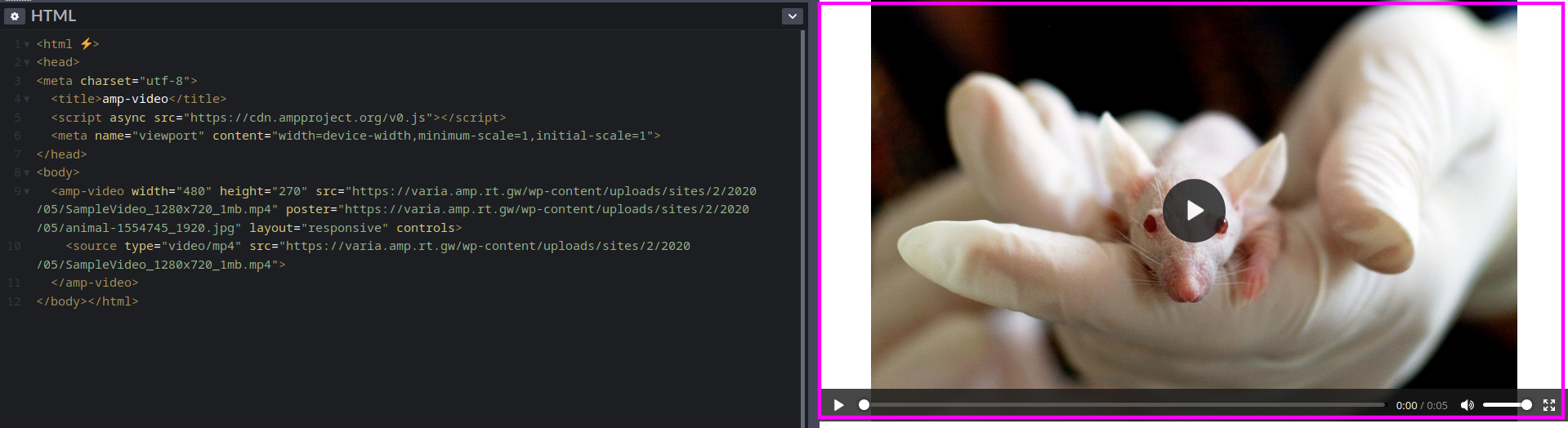
I'm able to replicate this outside of WordPress, see this CodePen for example:
pierlon
on 13 May 2020
Thank you. @pierlon I created an issue https://github.com/ampproject/amphtml/issues/28383 on amphtml repo.
sagarnasit
on 13 May 2020
I've provided an analysis on the issue: https://github.com/ampproject/amphtml/issues/28383#issuecomment-628126140
The reason for the discrepancy is MediaElement.js in the non-AMP version implements cover poster via a background image overlay, but in AMP it's using the poster on the video element. So the object-fit:cover would need to be applied to the video but only until the video starts playing, but that is a challenge to do in AMP.
westonruter
on 13 May 2020
@westonruter Is there any reason to only keep object-fit:cover until the video starts playing? Just curious. I checked this css property with video playing, I don't see anything affected by it. As soon as we play video, the cover image disappears and never shows back again. It will be all video frames later.
 pradeep910
on 15 May 2020
pradeep910
on 15 May 2020
That's a good question. If we can confirm that the aspect ratio of the video is correctly reflected in the width and height, then there's no reason to not do object-fit:cover. However, if this can't be guaranteed then the result can be cropped video playback, which could be bad if not intended. Right?
westonruter
on 15 May 2020
You are right Weston. After testing with some more images and variations we found that the video aspect ratio changes if we set horizontal image for the vertical video and vice versa.
pradeep910
on 15 May 2020
But, in the case when we're able to determine the dimensions of the video, for example when the video file is in the media library:
Then adding object-fit:cover would seem to make sense, since it won't impact the video playback.
westonruter
on 15 May 2020
Yes, that makes sense.
pradeep910
on 15 May 2020
Then again, it would be preferable for a user to select a poster image with the same aspect ratio, as otherwise there are pixels being downloaded which are never displayed. But as a small enhancement, giving videos with poster images that have known dimensions a object-fit:cover seems like a good mini enhancement.
westonruter
on 16 May 2020
Related issues
 postphotos
·
25Comments
postphotos
·
25Comments
 swissspidy
·
33Comments
swissspidy
·
33Comments
 johnwatkins0
·
26Comments
westonruter
·
31Comments
johnwatkins0
·
26Comments
westonruter
·
31Comments
 Ipstenu
·
32Comments
Ipstenu
·
32Comments