Amp-wp: Previously existing CTA buttons display broken
Bug Description
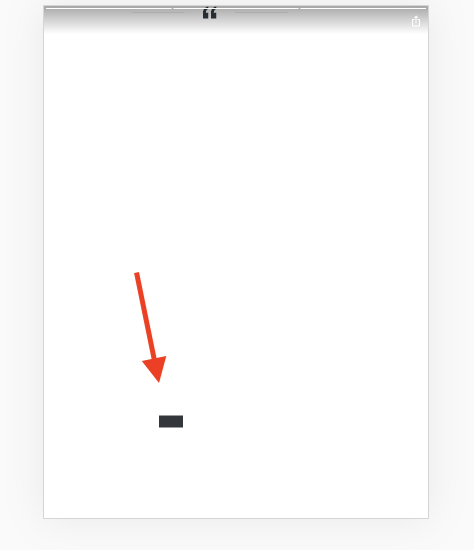
The CTA buttons created with the previous Plugin version (or currently released version) do not display the text in the editor.
This could likely be due to the change in #3453 which changed the CSS in the FE.
Perhaps assigning minimum width and minimum height to the CTA button could help with that.
Expected Behaviour
Previously added CTA buttons should display the text.
Steps to reproduce
- Check out a previous released plugin version.
- Add a CTA block with some text.
- Check out current
developversion. - See the CTA button in the FE.
See an example story in the story-test environment (needs logging in).
Screenshots
Additional context
- WordPress version:
- Plugin version:
- Gutenberg plugin version (if applicable):
- AMP plugin template mode:
- PHP version:
- OS:
- Browser: [e.g. chrome, safari]
- Device: [e.g. iPhone6]
_Do not alter or remove anything below. The following sections will be managed by moderators only._
Acceptance criteria
- Pre-existing CTA blocks should still work as expected and have visible text after updating to the latest version
Implementation brief
- If saving a story with CTA's without internal width and height (i.e. re-saving an old story with CTA's made before the above change), allow them to export as they did before.
- Basically, do this (which is thus already done).
QA testing instructions
Demo
Changelog entry
- Fixed a regression in CTA dimension calculation
 miina
miina
All 15 comments
Note that changing the Text in the CTA button and saving "fixes" the issue, this is due to width and height being assigned to the CTA block when the Text changes.
One possible fix would be assigning minimum widht and height in the FE, we could also improve the situation by assigning width and height to the CTA block whenever it's not assigned and it renders in the editor, not only when the Text changes.
miina
on 22 Oct 2019
we could also improve the situation by assigning width and height to the CTA block whenever it's not assigned and it renders in the editor, not only when the Text changes.
That only helps when editing the story though, right? It seems like a good thing to do, but only in combination with a minimum width/height as you suggested.
 swissspidy
on 22 Oct 2019
swissspidy
on 22 Oct 2019
That only helps when editing the story though, right?
That's right, it only helps when editing and should go together with an additional fix for the FE.
miina
on 22 Oct 2019
The issue occurred only when re-saving an older story. That is, a story with CTA's created before the change and that haven't been re-edited since the chance.
I've come up with a suggestion, that simply re-saves older CTA's without width and height as they were saved before. That'll ensure, that they look exactly as they did before.
It does however introduce tech debt and this can't really be removed at any point in the future. The problem will of course be a lot smaller if we do decide to remove this type of backwards compatibility some months down the line.
Thoughts, @swissspidy, @miina, @spacedmonkey?
 barklund
on 22 Oct 2019
barklund
on 22 Oct 2019
There is however still the minor problem of stories re-published with the existing beta before this new fix comes in and not re-published by then. But is that really a problem?
barklund
on 22 Oct 2019
To test this, check out 2a04104f5eb510949f844a36b0aee25ee8882727 (which is the parent commit to @miina's work in #3453) and create a story with a CTA here. Then checkout fix/3595-fix-old-ctas and go to the same story, add a new page with a new CTA, but make sure not to edit the old button. Press "preview" and see both CTA's working (but styled slightly differently, which is as expected).
barklund
on 22 Oct 2019
Gutenberg has the notion of block deprecation, which we already use quite heavily in the editor.
In assets/src/stories-editor/blocks/amp-story-cta/deprecated.js we have two deprecated versions of the CTA's save function.
Instead of doing some version checks in assets/src/stories-editor/blocks/amp-story-cta/save.js we could put the old save function logic into a new CallToActionSaveV140 function.
swissspidy
on 24 Oct 2019
Gutenberg has the notion of block deprecation, which we already use quite heavily in the editor.
In
assets/src/stories-editor/blocks/amp-story-cta/deprecated.jswe have two deprecated versions of the CTA's save function.Instead of doing some version checks in
assets/src/stories-editor/blocks/amp-story-cta/save.jswe could put the old save function logic into a newCallToActionSaveV140function.
Hm, I will have to look into this. It sounds a bit esoteric. But it might work. Where does the V140 version number come from and "how" is it automatically invoked?
barklund
on 24 Oct 2019
The variable name doesn't matter too much, but V140 will make it more clearer for developers that this block version was deprecated in version 1.4 of the editor (since we made the change in this cycle).
If this approach doesn't turn out to be feasible enough in time, we can go with your proposed approach and then do the deprecation in the next release. It doesn't matter too much as the result is the same for users.
swissspidy
on 24 Oct 2019
Note: the previous version numbers (e.g. V121 etc.) in the deprecation logic are copy-pasted save functions from that version. Meaning that CallToActionSaveV121 is exact copy of the previous save function for that block from the AMP plugin version 1.2.1. It's not obvious from the number if it's 12.1 or 1.2.1 or 1.21 but there should be clarifying comments.
miina
on 28 Oct 2019
Meaning that if we copy the current save function for deprecation then it could make sense to name it after the current version since the version number matches the plugin's version number where the save function was (is) in use. This way we can track back to see which save function was used in which versions (if it should become necessary). Perhaps more detailed comments would be handy.
miina
on 28 Oct 2019
@barklund Currently the width and height are only saved in a CTA button when the Text is changed, see
https://github.com/ampproject/amp-wp/blob/41cda10ee6a27e5a37686a8682c2fa138118f198/assets/src/stories-editor/blocks/amp-story-cta/edit.js#L102-L113
This means that the new width and height are saved only if the Text content changes.
If the CTA button displays incorrectly only when saving a pre-existing story, couldn't we then fix the issue by always checking if the width and height already exist, and if not, generate the values the same way as when changing the text value?
miina
on 28 Oct 2019
Okay, my local env broke right now so can't really test it out to create a PR but was thinking that perhaps we could add something like this into the edit (and use updateWidthAndHeight within onChange for text, too) so that if a Story has been opened in the editor, the CTA button would always have width and height assigned.
        const updateWidthAndHeight = () => {
        // Update width and height based on the room that the CTA button takes.
        const element = document.querySelector( `#amp-story-cta-button-${ clientId } .wp-block-amp-amp-story-cta` );
        // Deduct the padding since this will be added extra otherwise.
        const width = getPercentageFromPixels( 'x', element.clientWidth - CTA_BUTTON_PADDING_HORIZONTAL );
        const height = getPercentageFromPixels( 'y', element.clientHeight - CTA_BUTTON_PADDING_VERTICAL, STORY_PAGE_INNER_HEIGHT_FOR_CTA );
        setAttributes( {
            btnWidth: width,
            btnHeight: height,
        } );
    };

        // Always run this.
    useEffect( () => {
        // If the text is set but width and height not, set width and height, too.
        if ( text && text.length && ! btnWidth && ! btnHeight ) {
            updateWidthAndHeight();
        }
    } );
Thoughts?
miina
on 28 Oct 2019
Verified in QA
 csossi
on 30 Oct 2019
csossi
on 30 Oct 2019
Demo doesn't make a lot of sense here, as it would just be a screenshot of a working CTA button.
 spacedmonkey
on 8 Nov 2019
spacedmonkey
on 8 Nov 2019
Related issues
 westonruter
·
5Comments
westonruter
·
5Comments
 fumikito
·
5Comments
fumikito
·
5Comments
 luizeof
·
4Comments
miina
·
5Comments
swissspidy
·
5Comments
luizeof
·
4Comments
miina
·
5Comments
swissspidy
·
5Comments