Amiberry: 4.1.1 - Large hardfiles not recognized anymore (but does from USB)
Describe the bug
I was on 3.3 previously until yesterday.
I have a 3.1.4.1 installation in a 2GB HDF file which I took from my Windows/MacOS FS-UAE installation.
It worked fine for half a year now.
Now with 4.1.1 it only boots to the kickstart screen of 3.1.4.1 with the animated floppy.
If I change the HDF file from my internal (/home/pi/amiberry/hardfiles/Amiga 3.1.4.1.hdf) to the identical file on an external USB stick (/media/usbstick/Amiga 3.1.4.1.hdf) it works, but very slow. The HDF files are identical, I just copied it from USB to internal memory (microSD) as before with 3.3.
To Reproduce
See above - change internal HDF to (the same file) on USB.
Expected behavior
Boot as before.
Desktop (please complete the following information):
- OS: Raspbian Lite Raspberry 3B+
- Version 10 (buster)
Additional context
Every installed driver, firmware etc. is up to date.
I took the precompiled SDL32 version of AmiBerry 4.1.1.
Love Amiberry? Please consider supporting our collective:
👉 https://opencollective.com/amiberry/donate
 andiweli
All 15 comments
Could you please try to recreate the config, as a first test?
 midwan
on 4 Apr 2021
midwan
on 4 Apr 2021
Already done several times.
Also copied the .hdf file several times from USB to iternal.
andiweli
on 4 Apr 2021
Could you post your config file here please?
How large is that HDF file? Is it possible to send me a share link so I can test with the same here?
Preferably at this address: midwan at gmail dot com
midwan
on 4 Apr 2021
Could you post your config file here please?
How large is that HDF file? Is it possible to send me a share link so I can test with the same here?
Preferably at this address: midwan at gmail dot com
The .HDF is 2 GB in size - I also tried with a 256MB Workbench 3.1 only.
The 256GB image gets loaded in 4.1.1 - the 2GB file not.
It even doesn't recognize the size of the 2GB image in the 4.1.1 GUI (n/a) while in 3.3 it does.
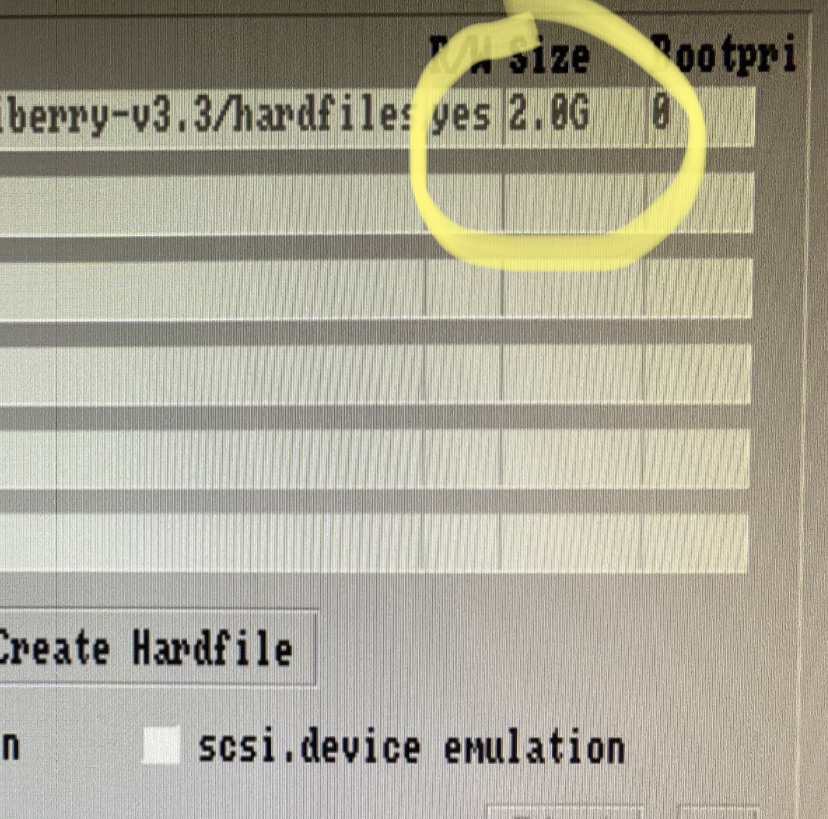
I can send you a MEGA link with my configs (3.3 and 4.1.1) incl. the hardfiles to test if you want.
andiweli
on 4 Apr 2021
Please send me a link, so I can debug this further. Thank you!
midwan
on 4 Apr 2021
Same for me. Had a working .hdf workbench setup. Wont boot anymore.
I also tried it from scratch. Created a basic expanded a1200 setup and mounted my .hdf. No luck so far getting it to boot.
 AnalogHero
on 5 Apr 2021
AnalogHero
on 5 Apr 2021
Same for me. Had a working .hdf workbench setup. Wont boot anymore.
I also tried it from scratch. Created a basic expanded a1200 setup and mounted my .hdf. No luck so far getting it to boot.
What's the site of your HDF?
andiweli
on 5 Apr 2021
Thank you, I can recreate the problem.
I think I have a fix for it also, doing some more testing first to verify before I commit it.
midwan
on 5 Apr 2021
Great thank you! :)
andiweli
on 5 Apr 2021
Fixed with a change in the Makefile.
Just recompile from source and it will work as expected now - I tested it with your HDF.
Note: you'll need to change the Screenmode in your Workbench installation, due to the change in the 32-bit pixel format. It will boot into PAL mode because it cannot find the previous mode, so don't panic. :)
midwan
on 5 Apr 2021
Just asking...
It keeps crashing with this error:
./include/guisan/sdl/sdltruetypefont.hpp:50:10: fatal error: SDL_ttf.h: Datei oder Verzeichnis nicht gefunden
#include "SDL_ttf.h"
^~~
compilation terminated.
make[1]: * [
make[1]: Verzeichnis „/home/pi/amiberry/external/libguisan“ wird verlassen
make:
make: ** Es wird auf noch nicht beendete Prozesse gewartet....
andiweli
on 6 Apr 2021
Sorry, it seems to compile normally here on several targets that I tested.
Do you have sdl-ttf-dev installed?
If so, try making a make clean first, to remove any previously compiled objects, before compiling again?
midwan
on 6 Apr 2021
Hmm, reinstalled al the sdl-dev packages again - before I removed them.
Tried a make clean.
Same error... no idea.
Seems I have to wait until a new release then.
Thanks anyway :)
andiweli
on 6 Apr 2021
You need sdl2-ttf-dev
On Tue, Apr 6, 2021 at 11:19 AM Andiweli @.*> wrote:
Hmm, reinstalled al the sdl-dev packages again - before I removed them.
Tried a make clean.
Same error... no idea.Seems I have to wait until a new release then.
Thanks anyway :)—
You are receiving this because you are subscribed to this thread.
Reply to this email directly, view it on GitHub
https://github.com/midwan/amiberry/issues/790#issuecomment-813968650,
or unsubscribe
https://github.com/notifications/unsubscribe-auth/AAHY72ARRDFVV3UJSRDJZT3THLG3NANCNFSM42LJZO5Q
.
 solskogen
on 6 Apr 2021
solskogen
on 6 Apr 2021
You need sdl2-ttf-dev
…
On Tue, Apr 6, 2021 at 11:19 AM Andiweli @.*> wrote: Hmm, reinstalled al the sdl-dev packages again - before I removed them. Tried a make clean. Same error... no idea. Seems I have to wait until a new release then. Thanks anyway :) — You are receiving this because you are subscribed to this thread. Reply to this email directly, view it on GitHub <#790 (comment)>, or unsubscribe https://github.com/notifications/unsubscribe-auth/AAHY72ARRDFVV3UJSRDJZT3THLG3NANCNFSM42LJZO5Q .
Yes I know. It is installed, together with all other sdl2-*dev packages.
andiweli
on 6 Apr 2021
Related issues
 ransom1122
·
5Comments
ransom1122
·
5Comments
 Fourdee
·
4Comments
Fourdee
·
4Comments
 tenleftfingers
·
8Comments
tenleftfingers
·
8Comments
 jonpatterson
·
8Comments
Fourdee
·
4Comments
jonpatterson
·
8Comments
Fourdee
·
4Comments